
In this article
- 01 Define what the website budget must buy
- 02 Separate costs into four buckets
- 03 A website cost breakdown with transparent arithmetic
- 04 Test the assumptions that can change the decision
- 05 Ask questions that make vendor quotes comparable
- 06 Frequently asked questions
- 07 Use the estimate as a decision tool
- 08 Sources
A website cost breakdown should separate the initial build, recurring services, ongoing work and eventual handoff or exit costs. The most useful budget is one you can recalculate when scope changes. Start with pages and workflows, attach explicit assumptions to each line, and compare a consistent operating period across proposals.
This guide provides a worksheet and a hypothetical US-dollar example for a small business website. The amounts below are invented planning inputs, not market averages, a vendor quote or PolyDraft pricing. Replace them with your own estimates and current written offers before making a purchasing decision.
- Define the same scope before comparing prices.
- Count updates and internal time as well as hosting.
- Show what is excluded instead of hiding it inside a total.
- Ask who owns the domain, source, content and operating accounts.
Define what the website budget must buy
“A ten-page website” is not a complete scope. Ten pages sharing one design and supplied copy are a different job from ten unique layouts requiring interviews, original photography and approval from several teams. Describe what has to be created, reviewed, connected and maintained.
For a first pass, list page types rather than just page count: homepage, service page, case study, article, contact page and any legal or support pages. Then list functions such as forms, search, booking, payment or authenticated access. Specify how many languages need full content and how updates will reach them.
Audience and primary conversion:
Page types and approximate counts:
Content supplied / content to create:
Forms, booking, payments or integrations:
Languages and regional variations:
Design and accessibility review:
Migration and redirects:
Hosting and operating account owner:
Update cadence and responsible person:
Source, media and documentation handoff:
Explicit exclusions:
Use this scope sheet for every proposal. If one supplier includes copy and another assumes you will provide it, the headline totals are not comparable. Resolve that mismatch before ranking vendors by price.
Separate costs into four buckets
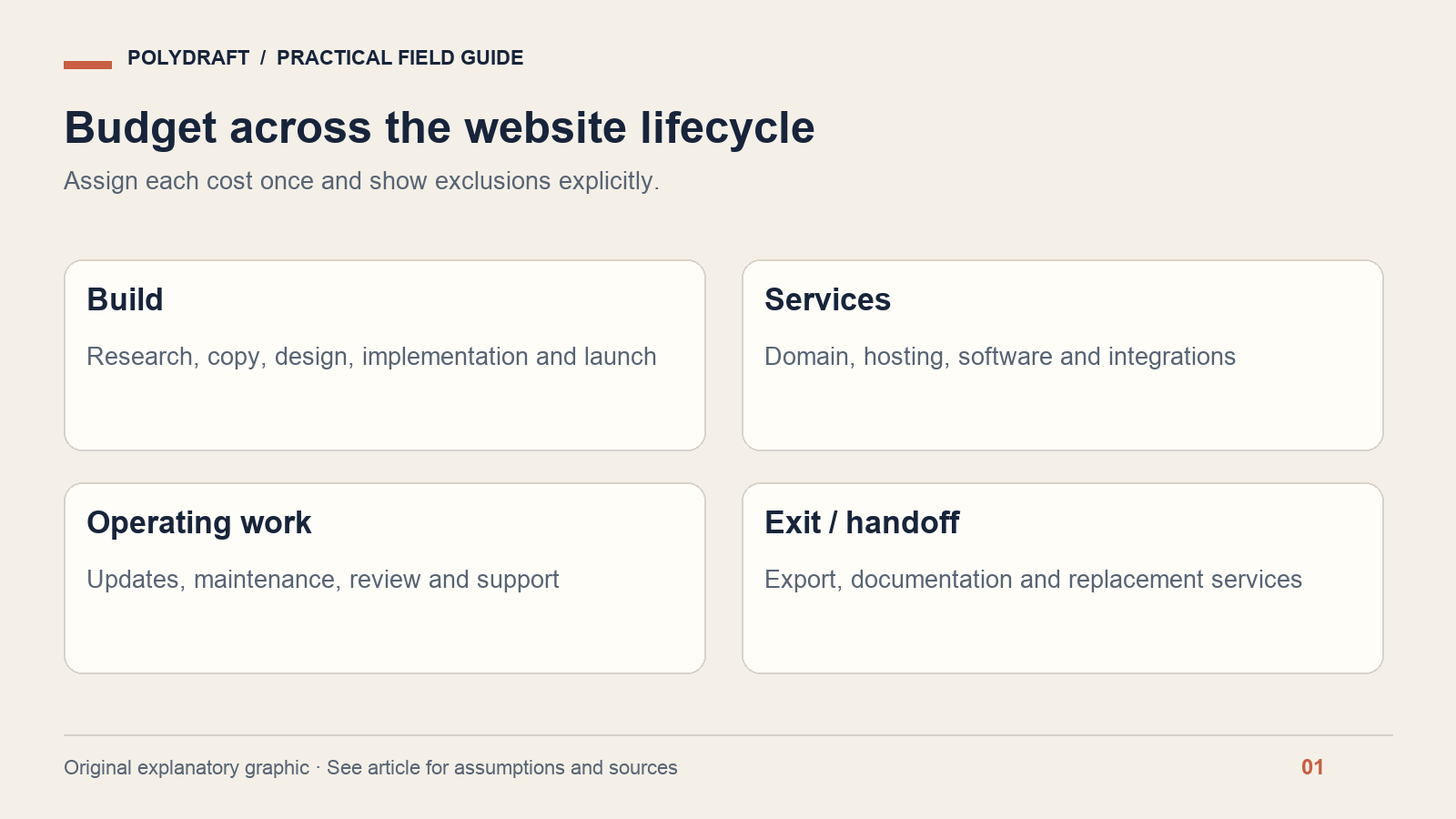
Initial build: research, information architecture, copy, design, implementation, testing, migration and launch. Recurring services: domain, hosting, software subscriptions and any paid integrations. Operating work: content changes, maintenance, testing, analytics review and support. Exit or handoff: export, documentation and moving to another operator or environment.
Keep accessibility and search setup in the scope instead of treating them as optional surprises at launch. The W3C accessibility planning guidance is a useful starting point for assigning responsibilities. Google's SEO starter guide describes search fundamentals, but neither document provides a universal price for performing the work.
Assign each cost once. A platform subscription might already include hosting; a maintenance retainer might already include a fixed amount of editing. Counting both the bundle and its included components overstates the budget. Conversely, excluding work merely because an employee performs it understates the resources required.
A website cost breakdown with transparent arithmetic
Assume an eight-page, single-language informational site with one contact form, supplied brand assets and no ecommerce, login system or legacy migration. For this illustration, the initial build is $2,400. Hosting and software cost $35 per month, the domain costs $20 per year, and updates take two hours per month valued at $60 per hour.
These are deliberately simple modeling assumptions. They are not claims about what an eight-page site should cost or what a vendor charges. The hourly rate represents either paid work or the opportunity cost of internal time; distinguish those when preparing a cash budget.
| Budget line | Assumption | 12 months | 36 months |
|---|---|---|---|
| Initial build | $2,400 once | $2,400 | $2,400 |
| Hosting and software | $35 per month | $420 | $1,260 |
| Domain | $20 per year | $20 | $60 |
| Updates and maintenance labor | 2 hours per month × $60 | $1,440 | $4,320 |
| Modeled total | Before excluded items | $4,280 | $8,040 |
12-month total = 2,400 + (35 × 12) + 20 + (2 × 60 × 12)
                = 4,280 USD

36-month total = 2,400 + (35 × 36) + (20 × 3) + (2 × 60 × 36)
                = 8,040 USD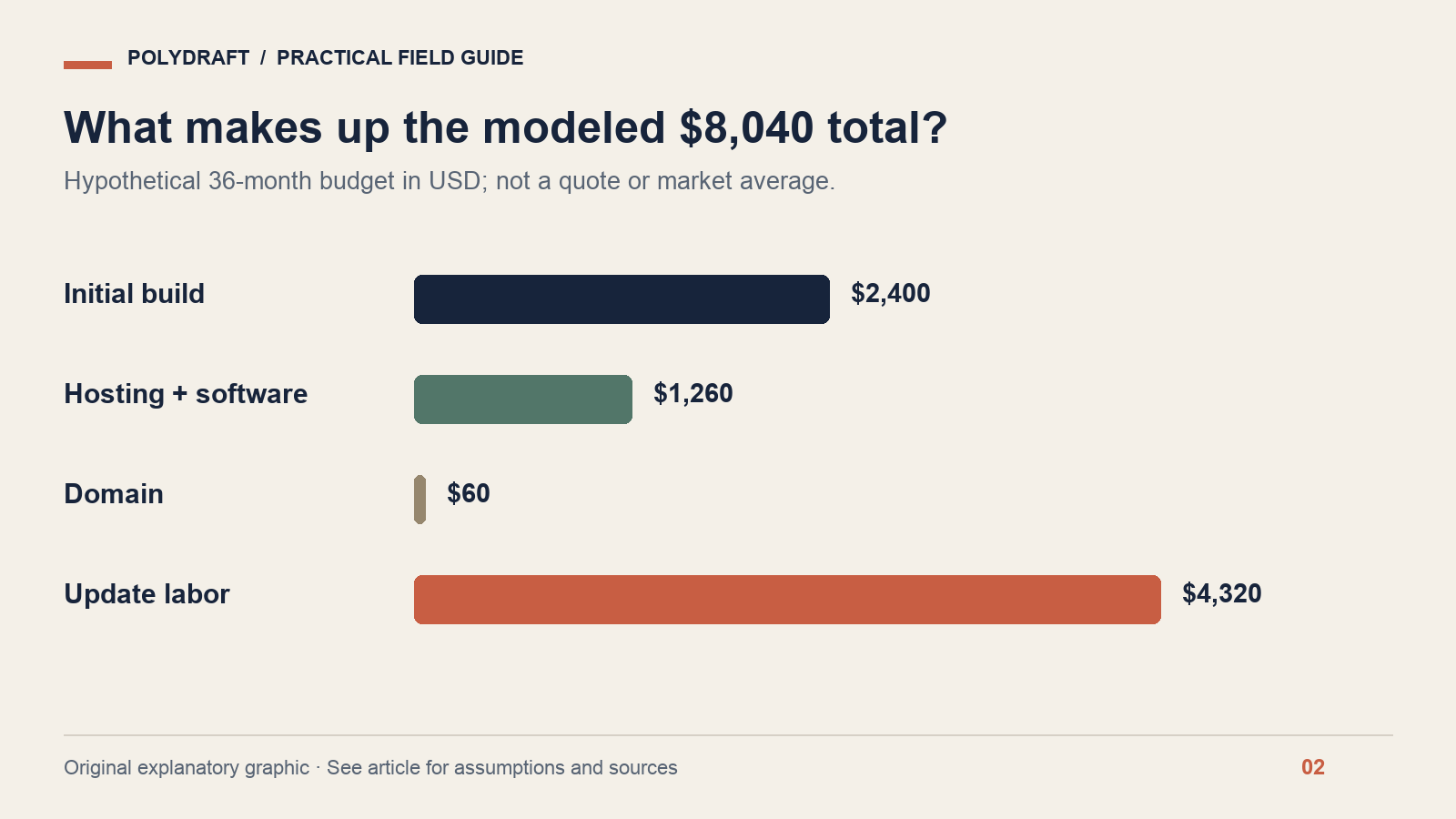
The example excludes taxes, transaction fees, new languages, additional features, advertising, major redesigns and exit work. It assumes unchanged prices and workload across the period. If those assumptions are unrealistic for your business, change them; do not hide uncertainty behind a precise-looking total.
If maintenance is performed internally, the modeled total includes the value of that time even when no invoice is issued. In this example, the 36-month build, hosting and domain subtotal is $3,720; the additional $4,320 is the modeled labor component. Keeping both views helps distinguish cash needs from resource allocation.
Test the assumptions that can change the decision
Instead of arguing over a small domain fee, test the variables with the biggest effect. Keep the same build, hosting and domain assumptions and vary update time. With zero modeled update hours, the 36-month total is $3,720. At two hours per month it is $8,040. At five hours per month it is $14,520.
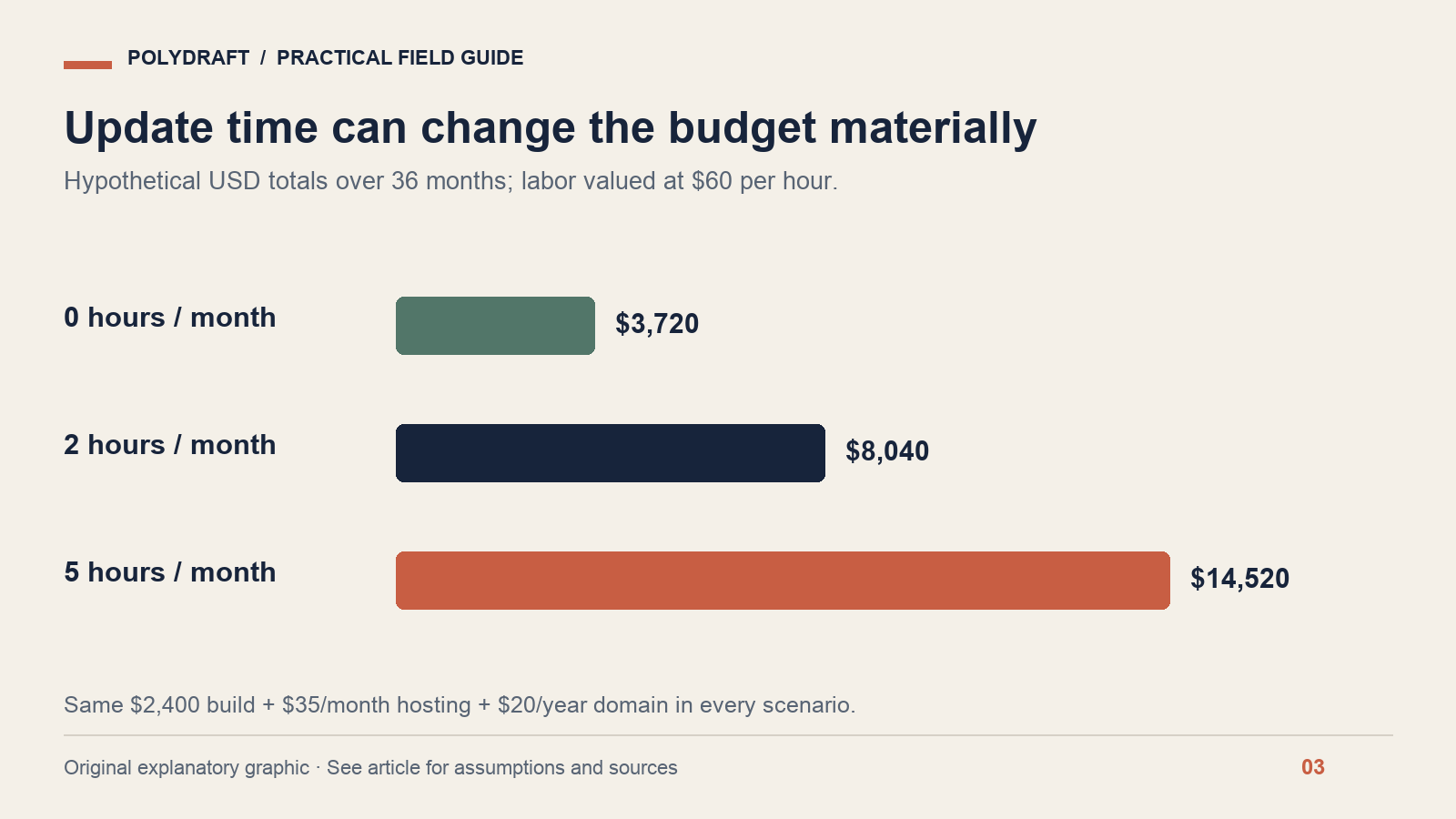
The zero-hour case is a comparison baseline, not a recommendation to neglect a website. The exercise shows why publishing workflow, review effort and maintainability belong in a buying discussion. In this model, each additional monthly hour valued at $60 adds $2,160 across 36 months.
Run a second scenario for expected growth: an added language, a new service section or a booking integration. Estimate those as explicit changes with their own setup and maintenance needs. A website that is cheap at launch can become expensive if every routine update requires specialist intervention.
For uncertainty, create low, expected and high scenarios from written assumptions. A contingency is a budget reserve, not a cost already incurred. Keep it separate so reviewers can see the base estimate and the amount held for unresolved work.
Ask questions that make vendor quotes comparable
- What is included? Confirm copy, images, page types, integrations, review rounds and launch support.
- What repeats? Ask about renewal terms, usage limits and optional services.
- Who performs updates? Identify included editing time, response expectations and the rate for additional work.
- Who owns the operating accounts? Record control of domain registration, hosting, analytics and form destinations.
- What happens at handoff? Specify source files, assets, content exports, credentials transfer and documentation.
- What triggers a change request? Agree on how additions are estimated and approved.
Domain ownership and transfer deserve their own check. Review the registrar account and registrant information rather than assuming the person who paid the first invoice controls the domain. ICANN's transfer FAQ explains transfer considerations; the exact account and registrar conditions still need to be checked for your domain.
Do not assume an exported design is a complete portable site. Ask whether the deliverable includes content, uploaded media, configuration and a usable build process, and what services must be replaced. Evaluate the actual handoff package instead of accepting “you own it” as a complete specification.
Frequently asked questions
How much should a small business website cost?
There is no defensible single amount without scope, service level and maintenance assumptions. Use a budget sheet to compare equivalent work. The example in this article demonstrates arithmetic only; obtain current quotes or plan terms for the route you are considering.
Is a subscription always more expensive than a custom build?
No. Compare the same period and responsibilities, including hosting, updates and replacement services. A lower initial fee can coexist with higher running costs, while a larger build fee can still require substantial ongoing work. The outcome depends on the actual scope and terms.
Should SEO be a separate budget line?
Make the work explicit even if it is included in the build. Distinguish technical setup, content production and later review. Ask what deliverables and checks are included, and reject a budget framed around guaranteed rankings or unsupported traffic forecasts.
Use the estimate as a decision tool
Put your own assumptions into the PolyDraft website cost calculator and preserve a copy of the inputs beside any result. If you are still choosing a build route, use our guide to evaluating an AI website builder. A useful estimate explains what changes the total and what you receive for the money.
About this article: Prepared with AI assistance for PolyDraft. Technical statements are linked to primary documentation checked on October 8, 2026. Worked examples and diagrams are illustrative, not customer results or live-site audit evidence. The hero is an AI-generated editorial illustration. For corrections, contact PolyDraft with the page URL and supporting source.