SEO Chrome Extensions by Job: What Each Does and What It Can Read (2027)
SEO Chrome extensions grouped by the job they do, including robots.txt, structured data and rendered HTML checks, with the permissions each one requests.
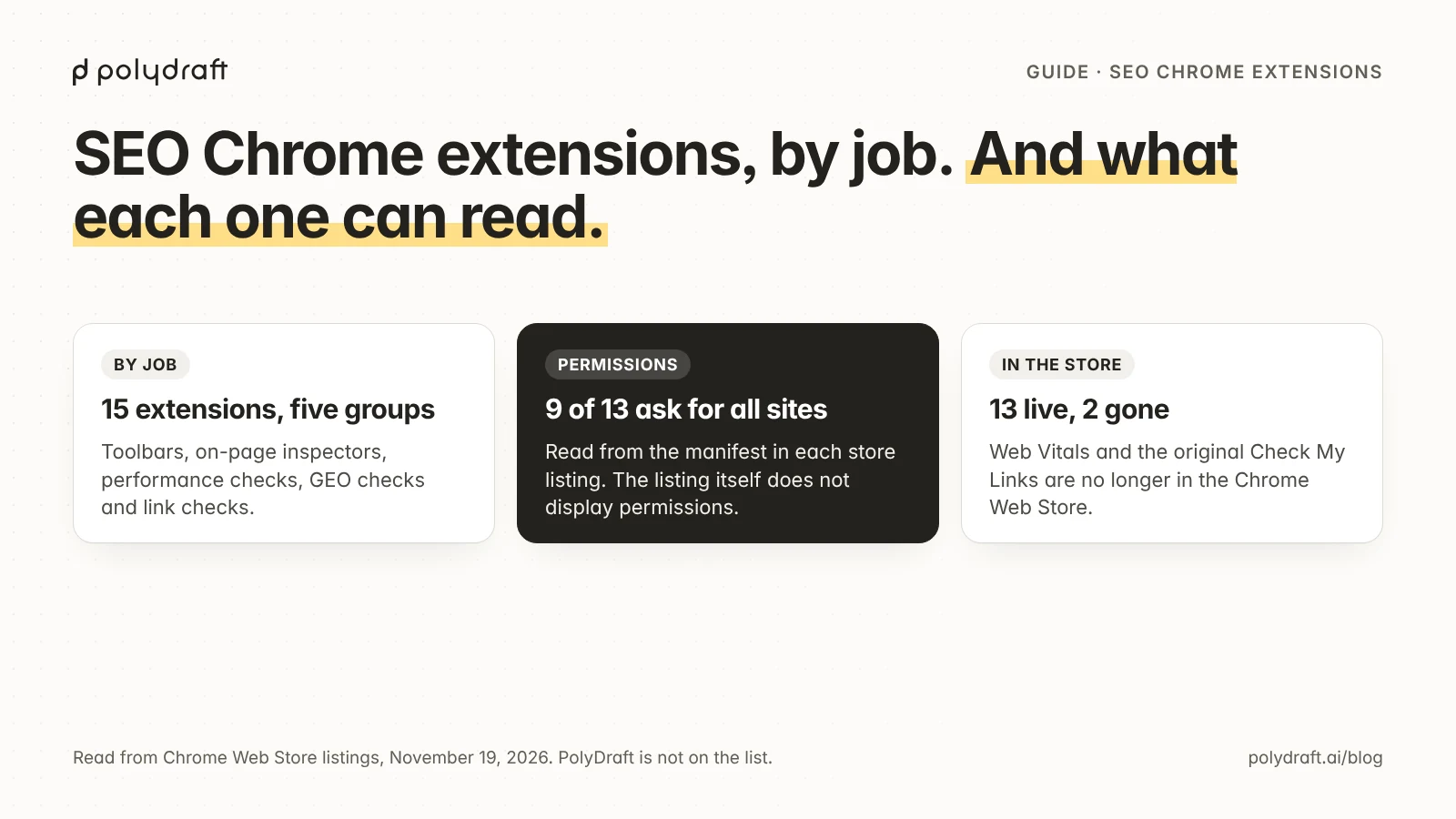
Pick SEO Chrome extensions by the job you need done, not by a top-10 list. One multi-purpose toolbar covers most page checks: the Ahrefs SEO Toolbar's own page lists on-page reports, robots.txt rules, redirect tracing, and a raw-versus-rendered HTML comparison. Add single-job extensions only for gaps such as AI crawler rules or structured data, and read what each can access before installing.
This list covers 15 extensions, grouped by job and not ranked. We opened each Chrome Web Store listing on November 19, 2026: 13 are live, and two, Google's Web Vitals and PageModified's Check My Links, are no longer in the store.
We make PolyDraft, an AI website builder, and it is not on this list. Of the 15, we use one: the Ahrefs SEO Toolbar, the only SEO extension we have installed. We have not removed any, and we also pay for Ahrefs data. Everything here, including the facts about that toolbar, is described from store listings and vendor pages, not from testing.
Key points
- Nine of the 13 live extensions ask for access to every site you open. Google's Chrome Web Store Help says such access can "read, request or modify data from every page you visit".
- Chrome lets you narrow any extension to "When you select the extension", so it reads a page only after you click.
- Another publisher's extension now uses the Check My Links name.
SEO Chrome extensions at a glance
Every cell was read from the extension's Chrome Web Store listing on November 19, 2026.
| Extension | Job | Publisher shown | Users | Rating (ratings) | Updated |
|---|---|---|---|---|---|
| Ahrefs SEO Toolbar | All-in-one toolbar | AHREFS PTE. LTD. | 400,000 | 4.7 (569) | Nov 18, 2026 |
| SEOquake | All-in-one toolbar, SERP overlay | Semrush Inc. | 1,000,000 | 3.6 (2.6K) | Nov 11, 2026 |
| MozBar | All-in-one toolbar | moz.com | 900,000 | 1.4 (2.5K) | Nov 18, 2026 |
| Detailed SEO Extension | On-page inspector | AHREFS PTE. LTD. | 600,000 | 4.8 (234) | Jun 2, 2026 |
| SEO META in 1 CLICK | On-page inspector | seo-extension.com | 1,000,000 | 4.9 (1.3K) | Aug 31, 2024 |
| SEO Pro Extension | On-page inspector | marketingsyrup.com | 100,000 | 4.8 (82) | Nov 20, 2024 |
| SEO Minion | On-page inspector, SERP tools | seominion.com | 200,000 | 1.6 (797) | Nov 16, 2026 |
| Lighthouse | Performance and SEO audit | Google Ireland, Ltd. | 1,000,000 | 4.2 (335) | Jun 25, 2026 |
| Robots Exclusion Checker | robots.txt, meta robots, AI bots | checkrobots.com | 50,000 | 4.9 (29) | Mar 4, 2026 |
| View Rendered Source | Raw vs rendered HTML | Peg Leg Ltd | 30,000 | 4.4 (41) | Nov 4, 2026 |
| Quick Javascript Switcher | Turn JavaScript off | maximelebreton.com | 200,000 | 4.0 (817) | Apr 21, 2025 |
| User-Agent Switcher and Manager | Change the User-Agent | rynu.smith ("Offered by") | 300,000 | 4.0 (277) | Nov 17, 2026 |
| OpenLink Structured Data Sniffer | Structured data | OpenLink Software ("Offered by") | 7,000 | 4.6 (18) | Aug 18, 2025 |
| Web Vitals (Google) | Core Web Vitals | Not in the store | – | – | – |
| Check My Links (PageModified) | Broken links | Not in the store | – | – | – |
Where the permissions come from. A store listing shows the publisher, users, rating, update date and a "Privacy" section, but not the extension's permissions. Chrome shows those in the install prompt, which we did not open. Each listing's page carries the published build's manifest.json in its page data, and the next table is read from that file. There, "All sites" means the manifest names every site in its host permissions or content scripts.
| Extension | Site access and permissions (store manifest) | Free or paid |
|---|---|---|
| Ahrefs SEO Toolbar | All sites; webRequest, webNavigation, identity, storage, declarativeNetRequestWithHostAccess |
Free; Ahrefs metrics need a subscription |
| SEOquake | All sites; tabs, webRequest, contextMenus, storage |
Free; a free Semrush account adds metrics |
| MozBar | Content scripts on all sites; tabs, cookies, webNavigation, activeTab, storage |
Guest and free-account tiers; Moz Pro for the rest |
| Detailed SEO Extension | activeTab, scripting, contextMenus, storage, declarativeNetRequestWithHostAccess; all-site access is optional |
"Free forever", per detailed.com |
| SEO META in 1 CLICK | activeTab, scripting |
Free, per seo-extension.com |
| SEO Pro Extension | All sites; webRequest, webNavigation |
"Free extension", per its listing |
| SEO Minion | All sites; webRequest, declarativeNetRequest, webNavigation, tabs, scripting, activeTab, storage |
"Free for everyone", per its site |
| Lighthouse | activeTab, storage |
Open source, Apache-2.0 |
| Robots Exclusion Checker | Content script on all sites; storage |
No price on the listing |
| View Rendered Source | All sites; contextMenus, storage |
Free tier; Pro plan, "Offers in-app purchases" |
| Quick Javascript Switcher | tabs, contentSettings, contextMenus, storage |
Open source; donations |
| User-Agent Switcher and Manager | All sites; webRequest, scripting, declarativeNetRequestWithHostAccess, contextMenus, storage |
No price shown; donations on its site |
| OpenLink Structured Data Sniffer | All sites; webRequest, scripting, declarativeNetRequest, contextMenus, storage |
Open source, GPL v2 |
Under "Privacy", eleven listings say the developer "will not collect or use your data". SEO Minion and View Rendered Source disclose data handling instead (entries 7 and 11).
One toolbar for most page checks
A multi-purpose toolbar replaces several single-job extensions, which means fewer extensions with access to your pages.
1. Ahrefs SEO Toolbar
The Ahrefs SEO Toolbar has the broadest feature list here, and its page-level reports are free. Ahrefs' SEO Toolbar page lists content structure, outgoing and broken links, and redirect chains with HTTP headers. Its indexation view covers "canonical tags, noindex/nofollow directives, hreflang links, and sitemap/robots.txt rules in one place".
Under "still 100% free", after "Sign in for free", one feature compares "raw vs. rendered HTML to spot differences in titles and meta descriptions on JS-powered sites". What costs money is Ahrefs' own data. The page advertises "access to Ahrefs' metrics for just $29/month", and the Ahrefs SEO Toolbar store listing says an "Ahrefs subscription is required for access to Ahrefs metrics."
Not the right pick if you want an extension that reads a page only when clicked: its manifest requests all sites.
2. SEOquake
SEOquake is the free alternative for people who work inside search results pages. The SEOquake store listing, published by Semrush Inc., calls it "a free on-page SEO checker extension for Chrome". It states: "Core reports and built-in Semrush metrics work without an account." It also describes an overlay on Google results.
3. MozBar
MozBar is worth adding only if you already use Moz data. The MozBar store listing describes three tiers: "Guest: Free access to On-Page Elements, General Attributes, and Internal Link details", a free Community account that adds DA and PA metrics, and Moz Pro for the rest.
On November 19, 2026 the listing showed a rating of 1.4 from 2.5K ratings. We did not read the reviews, so we can't say what the rating reflects.
On-page inspectors you open with a click
4. Detailed SEO Extension
Detailed SEO Extension is a click-to-run inspector that works without all-site access. Detailed's extension page says it is "Built by SEOs, for SEOs. Free forever", with "No upsells. No tracking", and lists heading structure, schema markup, hreflang and a check for X-Robots HTTP headers. The Detailed SEO Extension store listing names AHREFS PTE. LTD. as publisher, the same publisher as the Ahrefs SEO Toolbar. To check a whole set of hreflang tags, not one page, use our hreflang audit checklist.
5. SEO META in 1 CLICK
SEO META in 1 CLICK asks for the least of the four: activeTab and scripting. The SEO META in 1 CLICK store listing says it displays the title and description, canonical URL, meta robots, headers in order, Open Graph data, and "Robots.txt and sitemap.xml". The seo-extension.com site says it is free.
6. SEO Pro Extension
SEO Pro Extension adds field Core Web Vitals to the usual tag checks. The SEO Pro Extension store listing describes a "free extension" that shows title, meta description, canonical, meta robots and "Core Web Vitals (Field data)", plus redirect chains and schema markup.
7. SEO Minion
SEO Minion covers the most jobs of the four and discloses the most data handling. Its site, seominion.com, redirects to a Keywords Everywhere page. That page calls it "Free for everyone, no account or API key needed" and lists twelve tools, including broken-link checks, redirects, "HTML vs DOM" and structured data validation. The SEO Minion store listing discloses that it handles personally identifiable information, authentication information, location and website content.
On November 19, 2026 the listing showed a rating of 1.6 from 797 ratings. Again, we did not read the reviews.
Extensions for performance checks
8. Lighthouse
Lighthouse runs an audit of one page in four categories: accessibility, best practices, performance and SEO. You may not need the extension: the Lighthouse README says Lighthouse is integrated directly into Chrome DevTools, under the Lighthouse panel. The Lighthouse store listing requests only activeTab and storage.
9. Web Vitals (no longer in the store)
Google's Web Vitals extension cannot be installed from the store: its listing URL returned an empty store page on November 19, 2026. Google's Chrome for Developers post is titled The Web Vitals extension, now in DevTools. It carries this update: "The merger of the Web Vitals extension and DevTools is complete and support for the extension has ended". The same post dates the end of support to January 7, 2025, and recommends the Performance panel in DevTools.
A store search for "web vitals" returns same-named extensions from other publishers, not Google's.
Extensions for GEO checks: robots.txt, rendered HTML and structured data
The useful GEO checks are ordinary technical checks. Google's AI features documentation says: "There are no additional requirements to appear in AI Overviews or AI Mode". The same page lists what still matters, including "Ensuring that crawling is allowed in robots.txt" and "Making sure your structured data matches the visible text on the page".
10. Robots Exclusion Checker
Robots Exclusion Checker is the one extension here whose listing describes a robots.txt check for AI crawlers. The Robots Exclusion Checker store listing says it reports on robots.txt, the meta robots tag, X-Robots-Tag, canonicals and "A.I. Bots", and that it "monitors 14 bots across 6 companies - OpenAI, Anthropic, Google, Perplexity, Meta, and Apple".
OpenAI's crawler documentation says "sites that are opted out of OAI-SearchBot will not be shown in ChatGPT search answers, though can still appear as navigational links". Our robots.txt examples for AI crawlers show the rules, and our robots.txt generator writes the file.
11. View Rendered Source
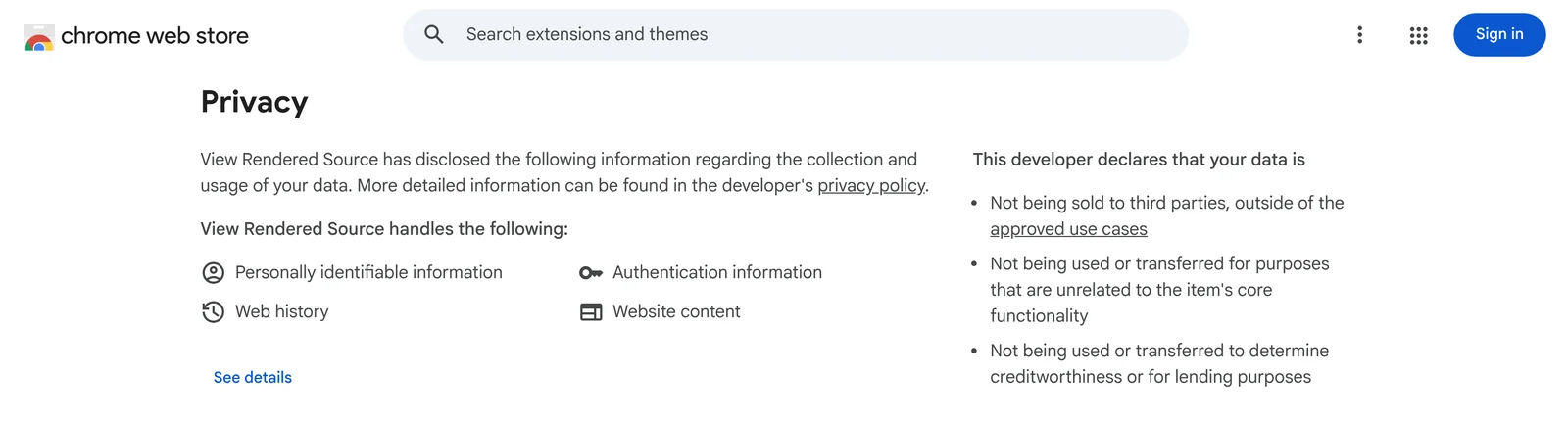
View Rendered Source compares the HTML the server sends with the page after JavaScript runs. The View Rendered Source store listing describes Raw Source, Rendered DOM and Difference panels, and says the free features are "Free forever. No account needed", with a Pro plan for saved snapshots. The listing states that GPTBot, ClaudeBot and PerplexityBot do not run JavaScript; that is the publisher's claim, which we did not check. It discloses handling personally identifiable information, authentication information, web history and website content.
12. Quick Javascript Switcher
Turning JavaScript off shows what a crawler that doesn't run scripts receives. Google's JavaScript SEO documentation notes that "not all bots can run JavaScript". The Quick Javascript Switcher store listing describes an open-source extension that toggles JavaScript "on a per-site basis". The store build requests no site access.
13. User-Agent Switcher and Manager
A user-agent switcher shows whether a server answers differently when the request names a crawler. The User-Agent Switcher and Manager page on webextension.org says it rewrites the User-Agent string sent with each request. Using it with a crawler's string is our suggestion, not a use the vendor describes.
This check has a hard limit. OpenAI's documentation recommends "allowing requests from our published IP ranges", so a firewall can verify a crawler by IP address. A request from your laptop tests only rules that match on the string. Use it only on sites you own or are authorized to test.
To set up the check, paste a string exactly as the operator publishes it. These are copied from the OpenAI and Perplexity crawler pages on November 20, 2026. Both say the version number may change, so recheck before you rely on one.
| Crawler | User-agent string to paste |
|---|---|
| GPTBot (OpenAI, training) | Mozilla/5.0 AppleWebKit/537.36 (KHTML, like Gecko); compatible; GPTBot/1.4; +https://openai.com/gptbot |
| ChatGPT-User (OpenAI, user-triggered) | Mozilla/5.0 AppleWebKit/537.36 (KHTML, like Gecko); compatible; ChatGPT-User/1.0; +https://openai.com/bot |
| PerplexityBot (Perplexity, search) | Mozilla/5.0 (compatible; PerplexityBot/1.0; +https://perplexity.ai/perplexitybot) |
| Perplexity-User (Perplexity, user-triggered) | Mozilla/5.0 (compatible; Perplexity-User/1.0; +https://perplexity.ai/perplexity-user) |
OpenAI's OAI-SearchBot string is longer, because it mimics a desktop Chrome browser, and the string for Google-Agent, which Google uses for agents that act on a userand Google's new Google-Agent string uses#39;s request, uses a Chrome/W.X.Y.Z placeholder in its documentation. Copy those from the source pages rather than from a third-party list. If the page you get back differs from what a browser shows, our manual AI crawler access check walks through what to compare next.
14. OpenLink Structured Data Sniffer
OpenLink Structured Data Sniffer shows the structured data embedded in a page. Its README on GitHub says it "detects, presents, and offers interaction interfaces for structured data" in formats including JSON-LD, Microdata and RDFa. The OpenLink Structured Data Sniffer store listing shows version 3.4.27, while the repository manifest is 4.0.37.
Displaying markup does not tell you whether Google accepts it. Google's structured data documentation points to the Rich Results Test for validation.
Extensions for link checks
15. Check My Links (the original is no longer in the store)
PageModified's Check My Links cannot be installed from the store: the listing URL in its README on GitHub returned an empty store page on November 19, 2026. The repository manifest uses Manifest V2. Chrome's Manifest V2 timeline has this entry for August 31, 2026: "All remaining Manifest V2 extensions have been removed from the Chrome Web Store". The store gave no reason for this listing, so the connection is our inference.
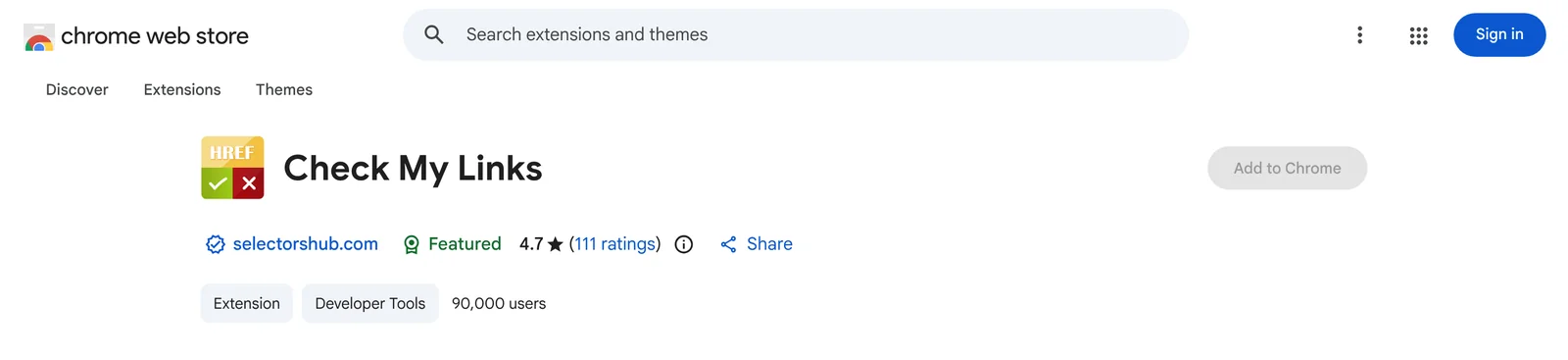
Caution: same name, different publisher. On November 19, 2026, a store search for "check my links" returned an extension named Check My Links from another publisher, selectorshub.com (developer: SelectorsHub Tech Private Limited). Its store listing has a different store ID and shows 90,000 users and a rating of 4.7 from 111 ratings. Its manifest requests
scripting,storage,windowsandwebRequest, with access to all sites. The PageModified repository manifest requested onlyactiveTab. That is everything the listing and the manifest show. We make no claim about the publisher's intent or about how the name came to be reused, and nine of the 13 live extensions in this list request all-site access too. Treat it as a separate product and read its listing as you would for any extension you have not used.
If you only need broken links on one page, the Ahrefs SEO Toolbar and SEO Minion both list a broken-link check.
What an SEO extension can read, and how to limit it
Treat every SEO extension as software that can read the pages you open, and narrow its access in Chrome's settings. Google's permissions help page says the install warning "doesn't mean the app is dangerous, just that it can be". It sorts permissions into three alert levels, and access to "your data on all the websites you visit" is medium.
Chrome gives you three site-access settings for an installed extension, described in Google's extensions help: "When you select the extension", "On [current site]" and "On all sites". The first fits almost every extension here.
Before installing, read the publisher name, the update date and the "Privacy" section on the store listing. Prefer the extension that asks for less: activeTab (SEO META in 1 CLICK, Lighthouse, Detailed) is narrower than access to all sites. Remove what you stopped using.
When to use Search Console or a crawler instead
Use Google Search Console when the question is what Google saw, not what your browser sees. Google's URL Inspection help lists "View a rendered version of the page: See a screenshot of how the Google-InspectionTool sees the page".
An extension checks one page at a time and works on sites you don't own. For every page of your own site you need a crawler. We have used Screaming Frog, a desktop crawler and not an extension; in our view it becomes worthwhile from roughly 1,000 URLs and is not needed earlier. For content checks page by page, see our SEO content audit guide. For tools beyond the browser, see SEO tools for small business. Agencies buying for several clients can use our agency tools list, with cost per client.
How we picked
The starting set was the extensions named in Google's AI Overview and result snippets for "seo chrome extensions" on November 19, 2026. We added extensions for performance, link checks and three GEO jobs: robots.txt, rendered HTML and structured data.
One more limit: the sites of Moz, SEO Pro Extension, Robots Exclusion Checker and View Rendered Source could not be opened from our network. Entries 3, 6, 10 and 11 therefore rest on store listings, which publishers write.
Frequently asked questions
What is an SEO extension?
An SEO extension is a browser add-on that shows search-related data about the page or search result you are viewing, such as titles, headings, robots directives, links and structured data.
Are SEO Chrome extensions free?
Most are free for page-level checks, and vendor data usually costs money. Ahrefs calls its toolbar free and reserves its own metrics for subscribers. MozBar's listing reserves some features for Moz Pro, and View Rendered Source's shows "Offers in-app purchases".
How do I install and manage extensions in Chrome?
Open the Chrome Web Store, select the extension and choose "Add to Chrome", then approve the permissions prompt if you trust it. To change site access later, open More, then Extensions, then Manage extensions.
Do I need an extension to check AI crawler access?
No. Open your site's /robots.txt in the browser and look for the crawler names you care about, such as OAI-SearchBot and GPTBot for OpenAI. An extension saves a step by showing the rules next to the page.
Continue with the next task
- Decide which AI crawlers your robots.txt lets in: robots.txt examples for AI crawlers
- See the paid tools around the browser: the growth engineer's martech stack, 21 tools by job
Updated November 20, 2026: the User-Agent Switcher entry now lists crawler user-agent strings copied from OpenAI's and Perplexity's documentation that day, and OpenAI links point to its current documentation address.
About this article. Drafted by an AI agent following PolyDraft's blog workflow and checked by an automated QA script. Every quotation was matched against a saved copy of its source page, opened on November 19, 2026. Nothing here rests on hands-on testing. The statements about what we use come from PolyDraft's founder. The screenshots are captures of the pages named, cropped and resized only.
Sources
All pages were opened on November 19, 2026.
- Chrome Web Store listings: Ahrefs SEO Toolbar, SEOquake, MozBar, Detailed SEO Extension, SEO META in 1 CLICK, SEO Pro Extension, SEO Minion, Lighthouse, Robots Exclusion Checker, View Rendered Source, Quick Javascript Switcher, User-Agent Switcher and Manager, OpenLink Structured Data Sniffer, Check My Links by selectorshub.com
- Chrome Web Store: the two listing URLs that returned no listing, and store searches for "web vitals" and "check my links"
- Chrome for Developers, Manifest V2 support timeline and The Web Vitals extension, now in DevTools
- Ahrefs, SEO Toolbar
- Detailed, Detailed SEO Extension; SEO META in 1 CLICK; Keywords Everywhere, SEO Minion; WebExtension.ORG, User-Agent Switcher and Manager
- GoogleChrome, Lighthouse README
- OpenLink Software, OSDS README and repository manifest
- PageModified, Check My Links README and repository manifest
- Google Chrome Web Store Help, Permissions requested by apps and extensions and Install and manage extensions
- Google Search Central, AI features and your website, JavaScript SEO basics and Intro to structured data
- Google Search Console Help, URL Inspection tool
- OpenAI, Overview of OpenAI Crawlers
- Perplexity, Perplexity Crawlers (read November 20, 2026)
- Google, Google user-triggered fetchers (read November 20, 2026)