Best AI App Builders and Vibe Coding Tools 2027, by What You Are Building
Eight AI app builders and vibe coding tools by what you're building: what free credits buy, what happens at zero, and who owns the code.
The right AI app builder depends on who will change the app after the first version. If no one on your team codes, start with Lovable or Base44, or Bubble if you need complex logic and accept that the app stays on Bubble. If a developer will take the project over, Bolt, Replit, and v0 build full-stack apps in the browser with the code in view. If you already write code, Cursor and Claude Code work in your own repository, so you aren't tied to a platform's stack or hosting.
Before you compare prices, check two things: how far the free tier and credits really go, and whether the app can leave the vendor. We didn't test these products hands-on. Every price, credit rule, and export fact below comes from the vendor's own pricing pages and documentation, read on November 18, 2026. We captured the screenshots with an automated Chromium browser.
Key points
- "AI app builder" and "vibe coding tool" overlap. The useful split is who edits the result: a chat window, a browser workspace, or your own code editor.
- Every tool here caps AI work with credits, tokens, dollars, or usage limits. Only Lovable and Base44 publish what typical tasks cost, so with the others you can't tell in advance how much work a month's allowance covers.
- What happens at zero credits differs a lot. On some tools your live app keeps running; on others its backend features stop.
- Some builders sync both ways with GitHub, and Bubble has no native code export. Check whether the app can run without the vendor before you build.
Disclosure: the publisher of this article makes an AI website builder. It isn't an app builder and isn't ranked here. It appears only in the section on websites near the end.
Best AI app builders at a glance
This table answers three questions for each tool: who edits the result, how usage is metered, and what happens to a live app when credits run out. Prices and stacks are in each tool's section below.
| Who edits the result | Tool | Usage meter | Live app when credits hit zero | Can run without the vendor? | Checked |
|---|---|---|---|---|---|
| Chat and visual editor (non-developers) | Lovable | One credit balance for building, hosting, backend and in-app AI | Site stays live; backend pauses once the Cloud grant and general credits are both gone | Yes, after replacing calls to Lovable's services | Nov 18, 2026 |
| Base44 | Message credits (building) and integration credits (what the app does) | Users get errors and backend functions stop when integration credits run out | Front-end code exports; no documented way to self-host the backend | Nov 18, 2026 | |
| Bubble | AI credits and workload units | Keeps running with overages on; goes offline at the limit with overages off | No | Nov 18, 2026 | |
| Browser workspace with code in view | Bolt | Tokens; usage per message grows with project size | Free sites stop at monthly data limits; paid hosting is billed as you go | Yes; ZIP download | Nov 18, 2026 |
| Replit | Dollar credits, effort-based; the same credits pay for hosting | Keeps running on pay-as-you-go unless you set a hard budget cap | Yes; push to GitHub | Nov 18, 2026 | |
| v0 by Vercel | Dollar credits spent at per-token rates | Generation pauses; hosting is on your Vercel plan | Yes; export and deploy elsewhere | Nov 18, 2026 | |
| Your own repository (developers) | Cursor | Weekly usage pool; other vendors' models at API price | No platform hosting | Yes; the code is in your repo | Nov 18, 2026 |
| Claude Code | Five-hour and weekly limits shared with Claude chat | No platform hosting | Yes; the code is in your repo | Nov 18, 2026 |
For a head-to-head on two of these, see Replit vs Lovable and Lovable vs Base44.
App builder or vibe coding tool: the difference
An AI app builder is a hosted product that turns a description into a running app and keeps the app on its own infrastructure. Lovable, Base44, and Bubble work this way. "Vibe coding" describes a way of working, prompting instead of typing code. The tools for it range from those same builders to coding agents like Cursor and Claude Code, which edit files in a repository you control.
The practical question is who edits the result after the first version:
- A chat window and a visual editor. You never need to open the code. Lovable, Base44, and Bubble are built for this.
- A browser workspace with the code visible. You can prompt, but the files, terminal, and preview are right there for a developer. Bolt, Replit, and v0 work this way.
- Your own editor or terminal. The AI works on your codebase, and hosting is up to you. Cursor and Claude Code work this way.
Pick the category first, then the vendor. Cursor and Claude Code assume you can set up a repository and deploy it yourself. Bubble keeps the app on its platform, so a developer can't take the code elsewhere.
For non-technical founders
These three are built for people who will describe changes rather than write code. All three include hosting, a database, and sign-in for your app's users.
Lovable: two-way Git sync on every plan, including Free
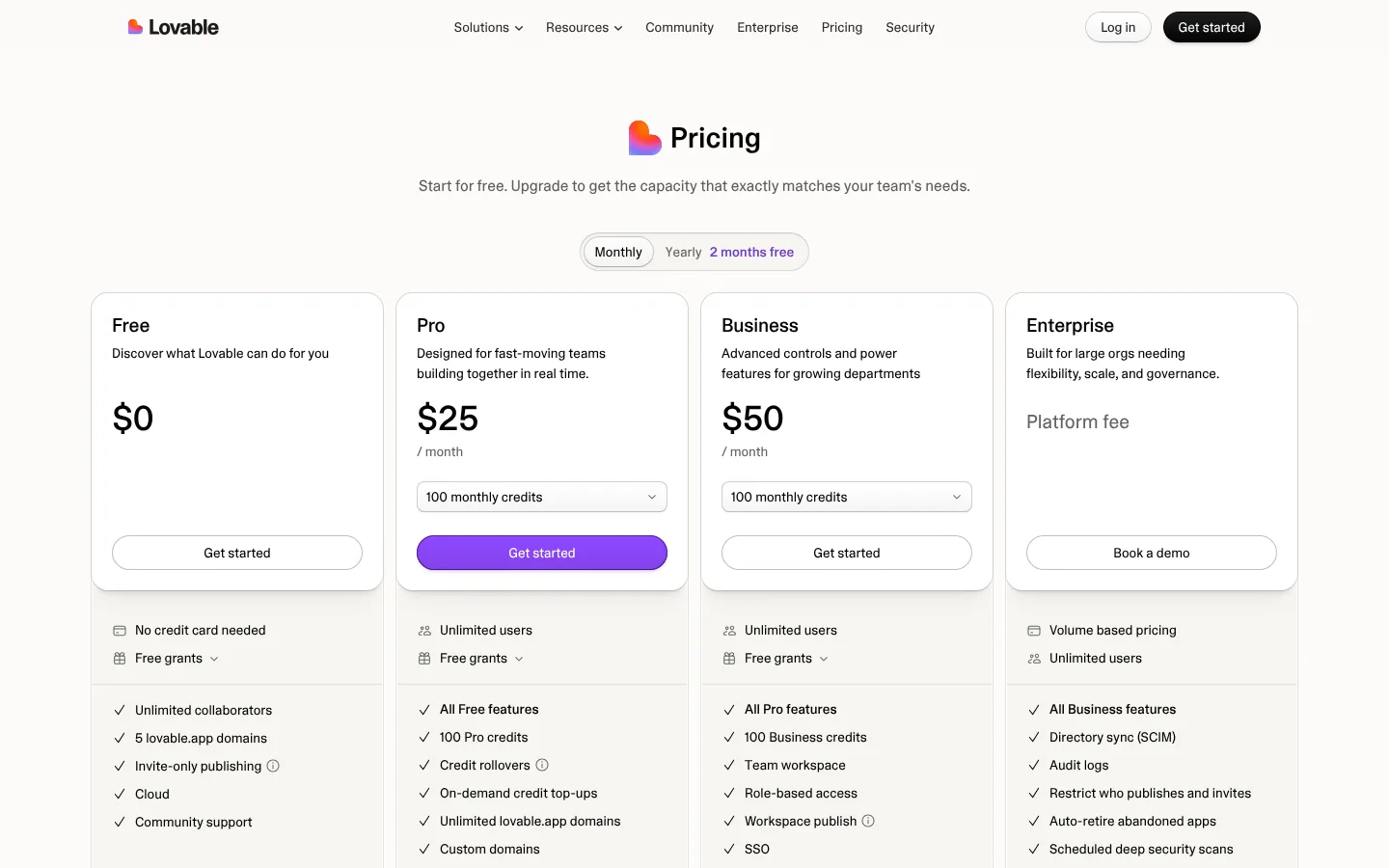
Lovable builds web apps from chat and runs them on its own backend, Lovable Cloud. Its docs say Cloud is built on Supabase's open-source foundation. Apps created since May 13, 2026 use TanStack Start; older apps use React and Vite. Lovable doesn't generate native apps. Its FAQ points to a progressive web app or a Capacitor wrapper for the app stores.
A single Lovable balance pays for all of it. Prompts, hosting, the Cloud backend, and any AI your app calls draw from the same credits. Pro costs $25 a month, or $21 a month billed annually ($250 a year), for 100 monthly credits plus 5 daily build credits; Business costs $50 a month. Pro top-ups cost $15 per 50 credits. On monthly billing, each batch of plan credits lasts two months from issue; unused credits carry into the next cycle only while the subscription stays active. Our Lovable pricing guide covers the plans in more detail.
Lovable's FAQ says your apps and code are yours. Git sync with GitHub, GitLab, or Bitbucket works both ways on every plan, one branch at a time. Downloading a ZIP and editing code in the app require a paid plan.
What the pricing page tells you: the credit selector under each paid plan changes the price, so open it before you compare plans. Worth copying: Lovable's docs state that a published site stays live when credits run out. Could be clearer: the pricing page FAQ prices a landing page with images at 1.70 credits, but the docs' example says 2.00.
Choose Lovable if a non-developer will build a web app with users and data, and you want the code in your own Git repository from day one. Look elsewhere if the app has to ship as a native mobile build.
Base44: separate meters for building and for what the app does
Base44 builds full apps with a built-in backend. Its site lists Wix.com Ltd. in the copyright line. Base44's developer docs list React with TanStack Start, Vite, Tailwind, and shadcn/ui on the front end, and a managed NoSQL database with serverless Deno functions behind it. Mobile apps run your published web app inside a native wrapper, and downloading app-store files requires the Builder plan or higher.
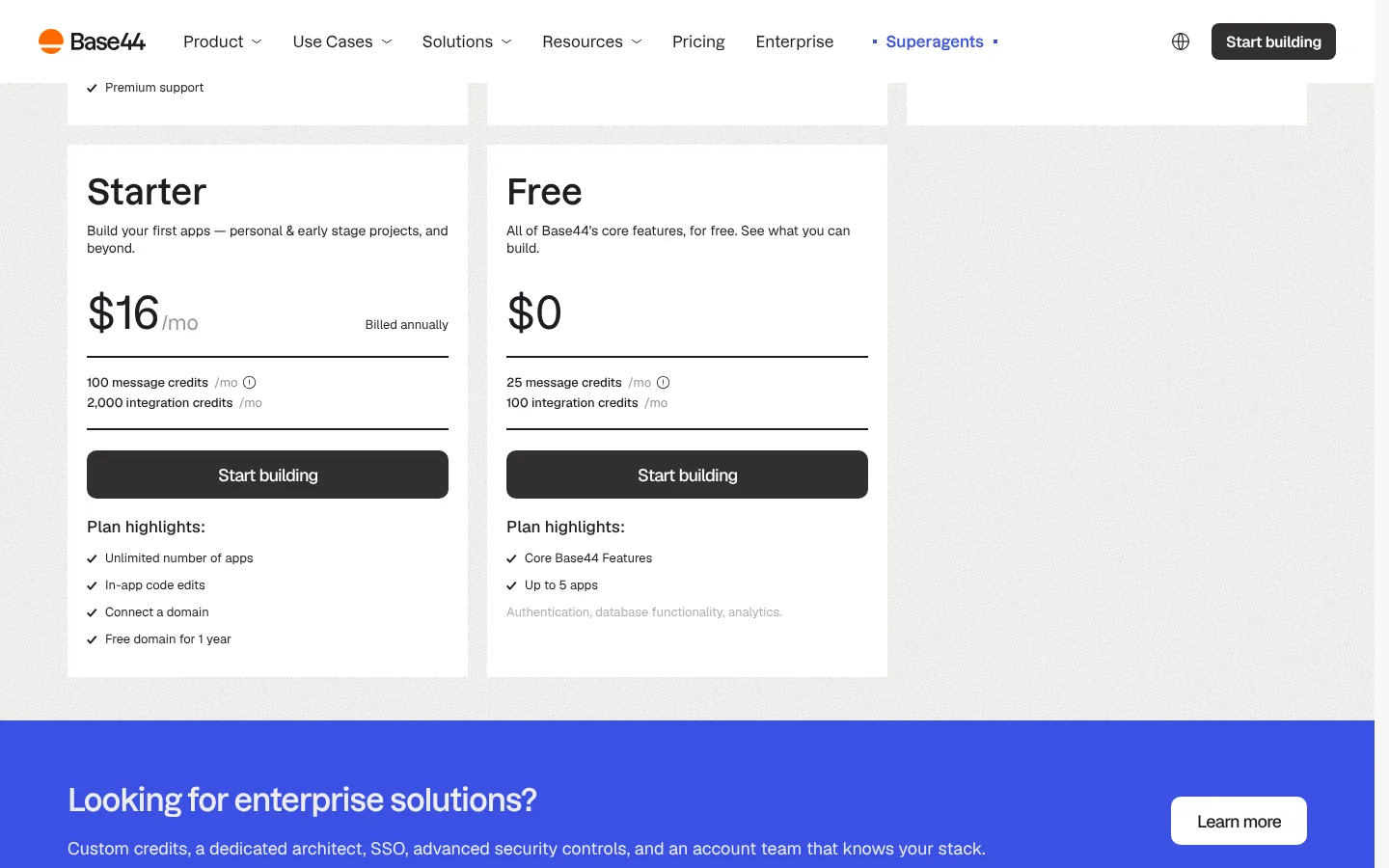
Base44 splits usage into two meters. Message credits pay for building with the AI. Integration credits pay for what your app does once it's running: sending an email costs about 1 credit, and 100 backend function runs cost about 1 credit. Starter costs $20 a month, or $16 billed annually, for 100 message credits and 2,000 integration credits. Builder is $50 a month ($40 annually), Pro $100 ($80), and Elite $200 ($160). Unused credits expire at each monthly reset. Base44's docs offer upgrading as the way to get more credits; we found no top-up packs documented.
On ownership, Base44's pricing FAQ says you own your code and data and that "nothing is locked to the platform." Two-way GitHub sync requires the Builder plan, so Starter has no code exit. Exported code still calls Base44's backend. The docs' eject command creates a new backend on Base44 with your schemas but not your data, and we found no documented way to self-host that backend.
What the pricing page tells you: each plan has two credit numbers that measure different things, and your app's users use up the integration credits. Worth copying: Base44 publishes per-task credit estimates. Could be clearer: "Free domain for 1 year" appears on Starter without the docs' qualifier that it applies only to yearly plans.
Base44 suits a team tool, such as an approvals queue or a client portal, that you're content to keep running on Base44's backend. Look elsewhere if the app has to run entirely on your own infrastructure.
Bubble: one no-code project for web, iOS, and Android
Bubble's visual platform now covers web apps and native mobile apps in a single project. Its pricing page says the native apps run on React Native, and web and mobile share one backend and database. Bubble's AI agent and page generation use AI credits; Bubble says generating an app doesn't currently use them.
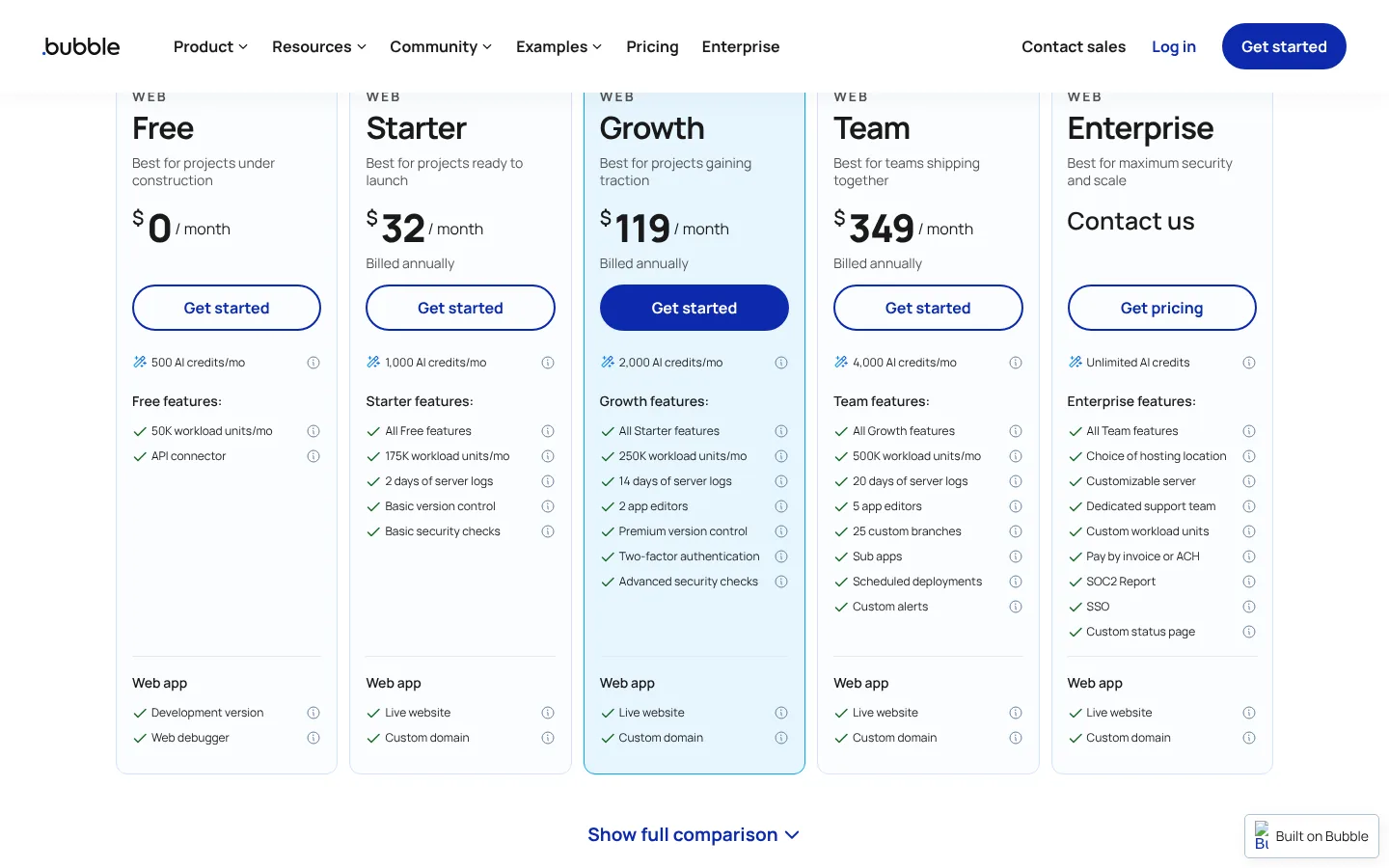
Bubble has two meters: AI credits for AI features and workload units for the server work your running app does. The Free plan includes 500 AI credits and 50,000 workload units, but only a development version, with no live site. Web Starter costs $39 a month, or $32 billed annually, with 1,000 AI credits and 175,000 workload units. Growth is $119 a month and Team $349, both billed annually. You can buy more AI credits on any paid plan, and purchased credits expire after six months. Workload overages cost $0.30 per 1,000 units. Bubble's manual says that if overages are disabled and the app hits its workload limit, it is "taken offline" until you enable overages, buy a workload tier, or the next billing period starts.
On ownership, Bubble's manual is direct: you own your data, Bubble owns the code that powers your app, and "Bubble apps can only be run on the Bubble platform." A newer manual page describes an AI agent rebuilding an app in code through the Bubble MCP (beta), and says the approach "doesn't guarantee perfect fidelity." Bubble also says its source code would be released under an open-source license if it ever shut down.
What the pricing page tells you: the Web, Mobile, and Web & Mobile tabs change the price, so pick the tab you'll actually need. Worth copying: Bubble emails you at 75% and 100% of your workload allowance. Could be clearer: the plan card doesn't make it obvious that Free can't publish a live app.
Bubble suits a founder who wants an iOS app, an Android app, and a web app to share one database without code, and who is comfortable with Bubble as the permanent host. Look elsewhere if you may need to move the code to your own servers later.
Browser-based full-stack
These tools also start from a prompt, but they show you the code, terminal, and preview in the browser. They suit a founder who'll hand the project to a developer, or a developer who wants speed without local setup.
Bolt: JavaScript apps that run in the browser
Bolt runs projects in WebContainers in the browser. Its docs say it supports only JavaScript-based backends, so PHP or Python won't work. It builds iOS and Android apps through Expo, though Bolt notes that web projects don't easily switch to mobile. Every plan includes Bolt Database and hosting.
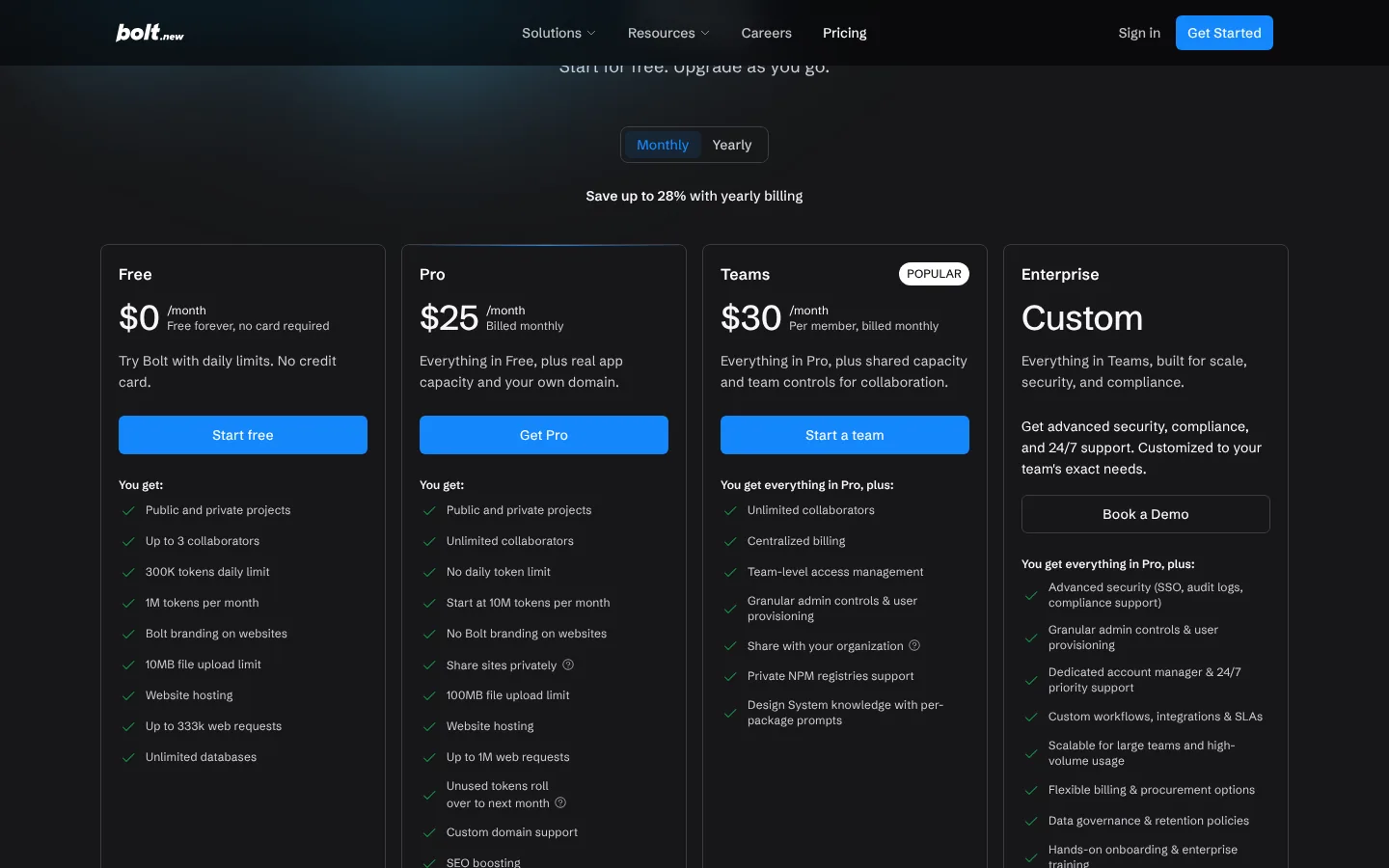
Bolt meters tokens. Free gives 1M tokens a month with a 300K daily limit. Pro costs $25 a month, or $18 a month billed annually ($216 a year), starting at 10M tokens with no daily limit. Teams costs $30 per member a month. Paid tokens roll over for two months. If you cancel, you lose access to them when the billing cycle ends, but resubscribing before they expire restores them. The key fact for budgeting is in Bolt's help center: most token use comes from reading and syncing your project files, "so larger projects use more tokens per message." Your allowance buys fewer changes as the app grows.
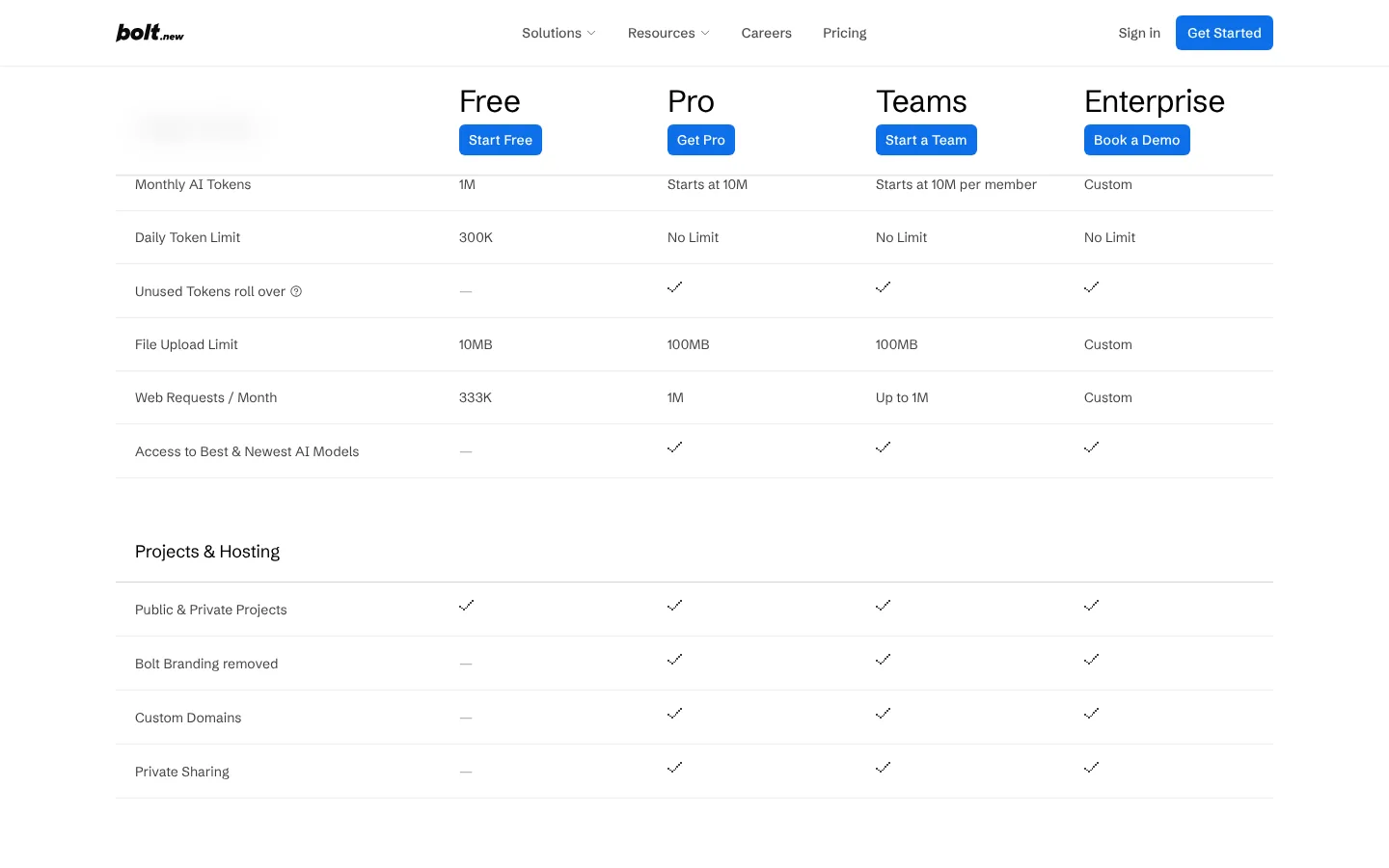
Bolt's help center says the code you create is yours to use commercially. You can download a ZIP. GitHub sync commits each change and pulls in outside edits every 30 seconds, and a Bolt project stays on its main branch.
What the pricing page tells you: the 300K daily cap is what limits Free; one of Bolt's two page layouts shows it on the Free card, the other only in the comparison table. Worth copying: Bolt publishes its hosting limits per plan. Could be clearer: Bolt served us two different pricing layouts on the same day, though the prices matched.
Bolt suits a JavaScript project where a clickable prototype matters this week and a GitHub repository will hold the code afterward. Look elsewhere if your backend needs Python or another language that isn't JavaScript.
Replit: effort-based billing that also pays for hosting
Replit's Agent builds the app, and the same Replit project then hosts it, stores its database, and can produce mobile apps through Expo. The files, shell, and preview sit side by side, so a developer can pick up exactly where the Agent stopped.
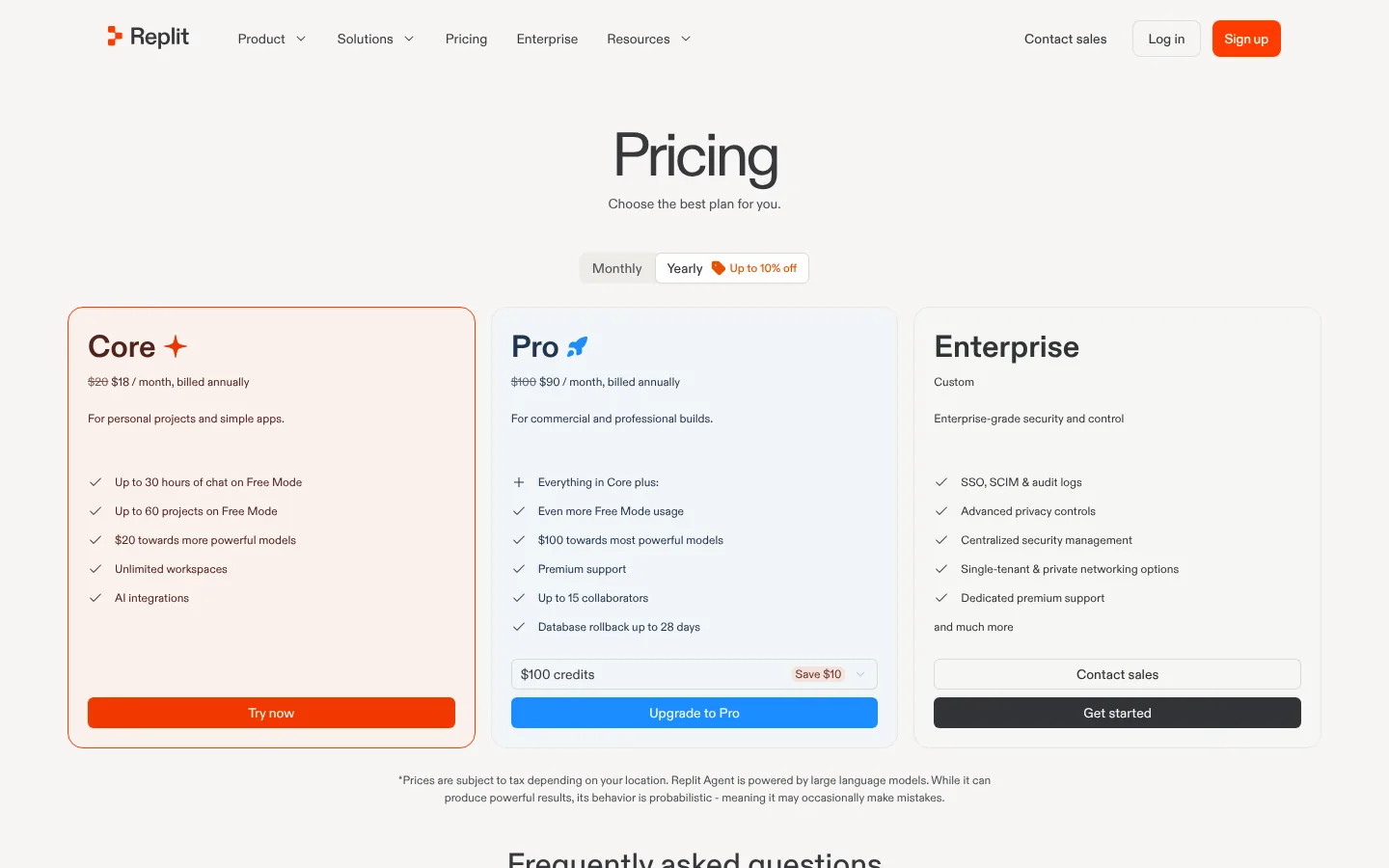
Replit uses dollar credits and effort-based pricing. Each request creates one checkpoint, and the pricing FAQ says "the Agent will spend more credits as it works longer." Core costs $20 a month, or $18 annually, with $20 of credits; Pro starts at $100 ($90 annually). Core and Pro also include a Free Mode allowance that refreshes every five hours, and Replit asks for confirmation before a paid action starts. The same credits pay for hosting. Replit's docs price an Autoscale deployment at a $2 base fee plus usage, and estimate about $2.39 a month for a small business site with 75,000 requests.
The pricing page no longer lists a free plan, but Replit's docs still describe Starter: daily AI credits up to a monthly cap (amounts not published), Lite builds only, and one published app that goes down after 30 days.
Replit's terms say you keep your rights to the content you submit, and you can push code to GitHub.
What the pricing page tells you: the Pro selector runs from $90 to $2,000 a month, which shows how far effort-based usage can scale. Worth copying: Replit lets you set a budget that acts as a hard monthly cap. Could be clearer: Replit doesn't publish a typical checkpoint cost, so you only learn the price after the work is done.
Pick Replit when the agent gets you started but the app will keep growing as ordinary code. Look elsewhere if whoever maintains the app wants a no-code editor.
v0 by Vercel: Next.js code with bi-directional GitHub sync
v0 generates Next.js and React code with Tailwind and shadcn/ui, covering everything from a single page to a full-stack app, and offers one-click database integrations such as Neon and Supabase. Its docs describe mobile-responsive apps; we found no native mobile output.
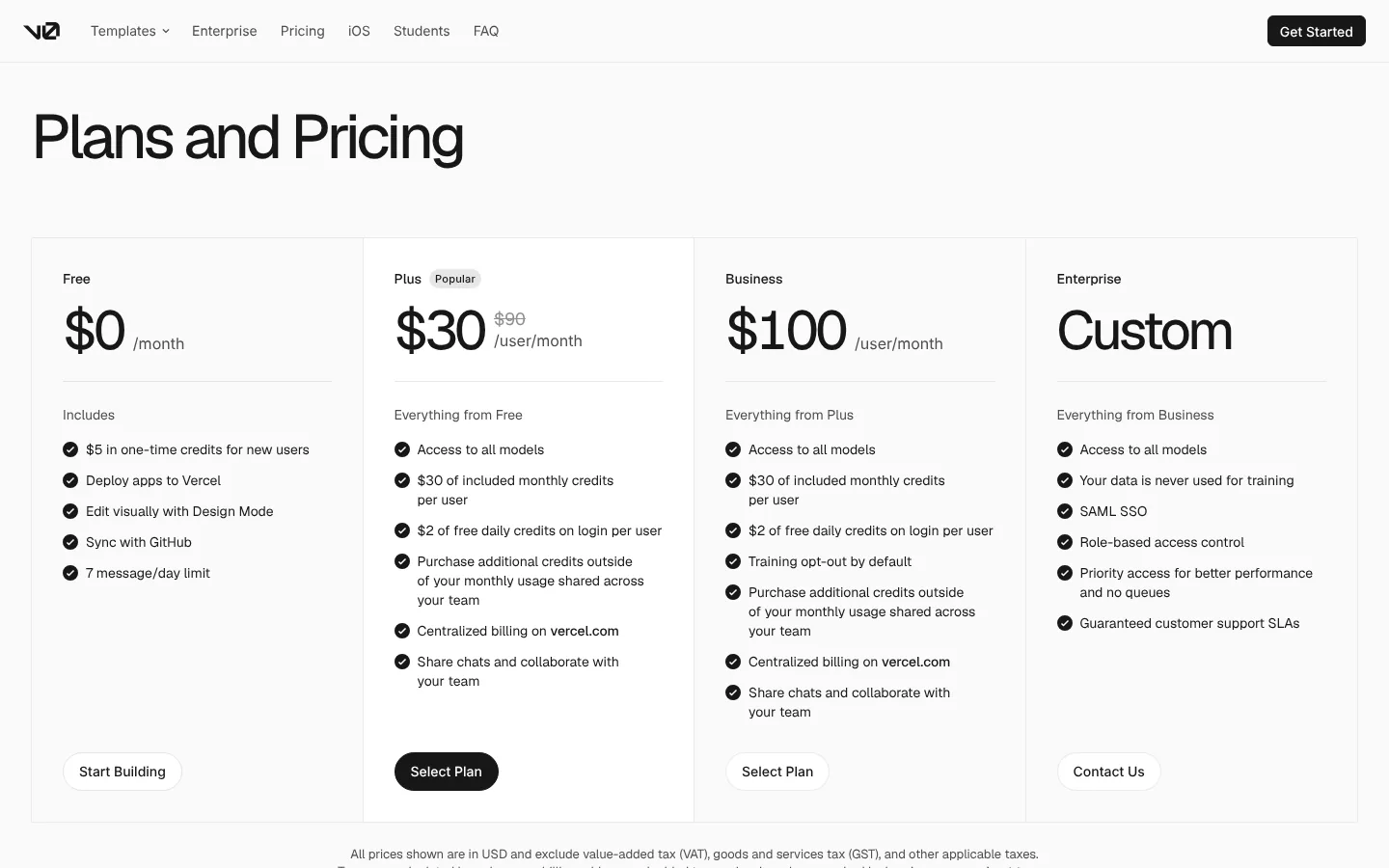
v0 charges per token. Free gives new users $5 of one-time credits and a 7-message daily limit. Plus shows as $30 per user a month next to a struck-through $90. Neither the page nor v0's pricing docs explain the $90, so check before you rely on the $30 price lasting. Plus includes $30 of monthly credits per user plus $2 of daily credits on login. Business costs $100 per user a month. We saw no annual price. Hosting is separate: v0 isn't included in a Vercel subscription, and deploying uses your Vercel plan (Hobby is free; Pro seats are $20 a month).
v0's FAQ says Vercel doesn't own the code generated from your prompts. GitHub sync is bi-directional, and "you can still export code and deploy elsewhere."
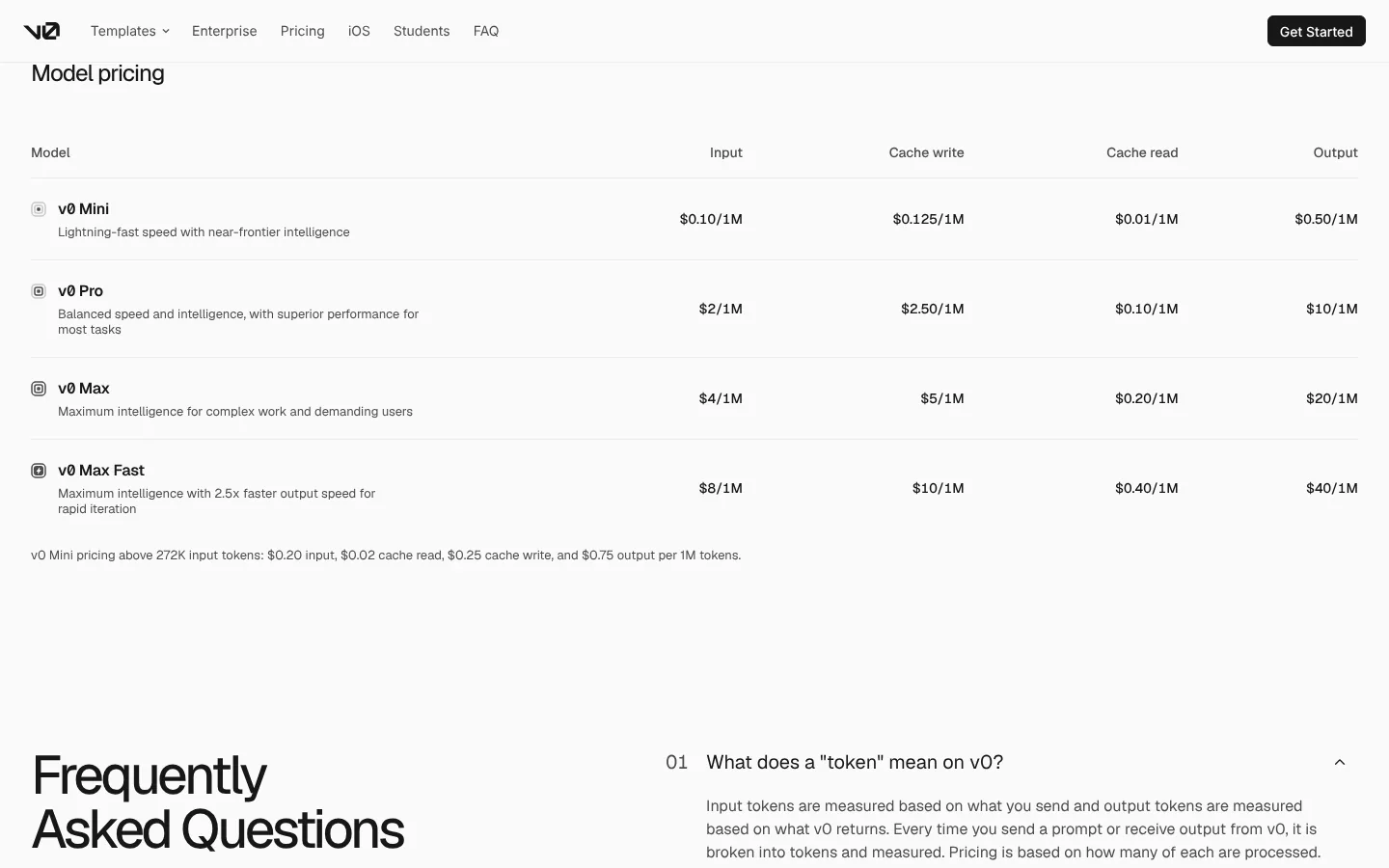
What the pricing page tells you: the model table is the real price list. v0's docs say chat history and source files count as input tokens, so long projects cost more per message. Worth copying: the Business and Enterprise cards state their training terms: "Training opt-out by default" and "Your data is never used for training." Could be clearer: v0's own pages don't agree on Free and Plus. The FAQ says content from "any customer that has opted out of model training in their Vercel settings" isn't used for training, while the pricing docs' plan table lists "Data Opt-out: No" for Free, Premium, and Plus. Check your own Vercel settings before relying on either.
v0 suits a team already deploying Next.js on Vercel that wants each generated change to land as commits in its repository. Skip v0 if no one will review or maintain the React code it writes.
For developers
If you already write code, a coding agent works in your own repository with any stack, so you aren't tied to an app builder's platform. Neither tool below hosts your app; you deploy it the way you deploy any code.
Cursor: an AI code editor, now sold as part of a bundle
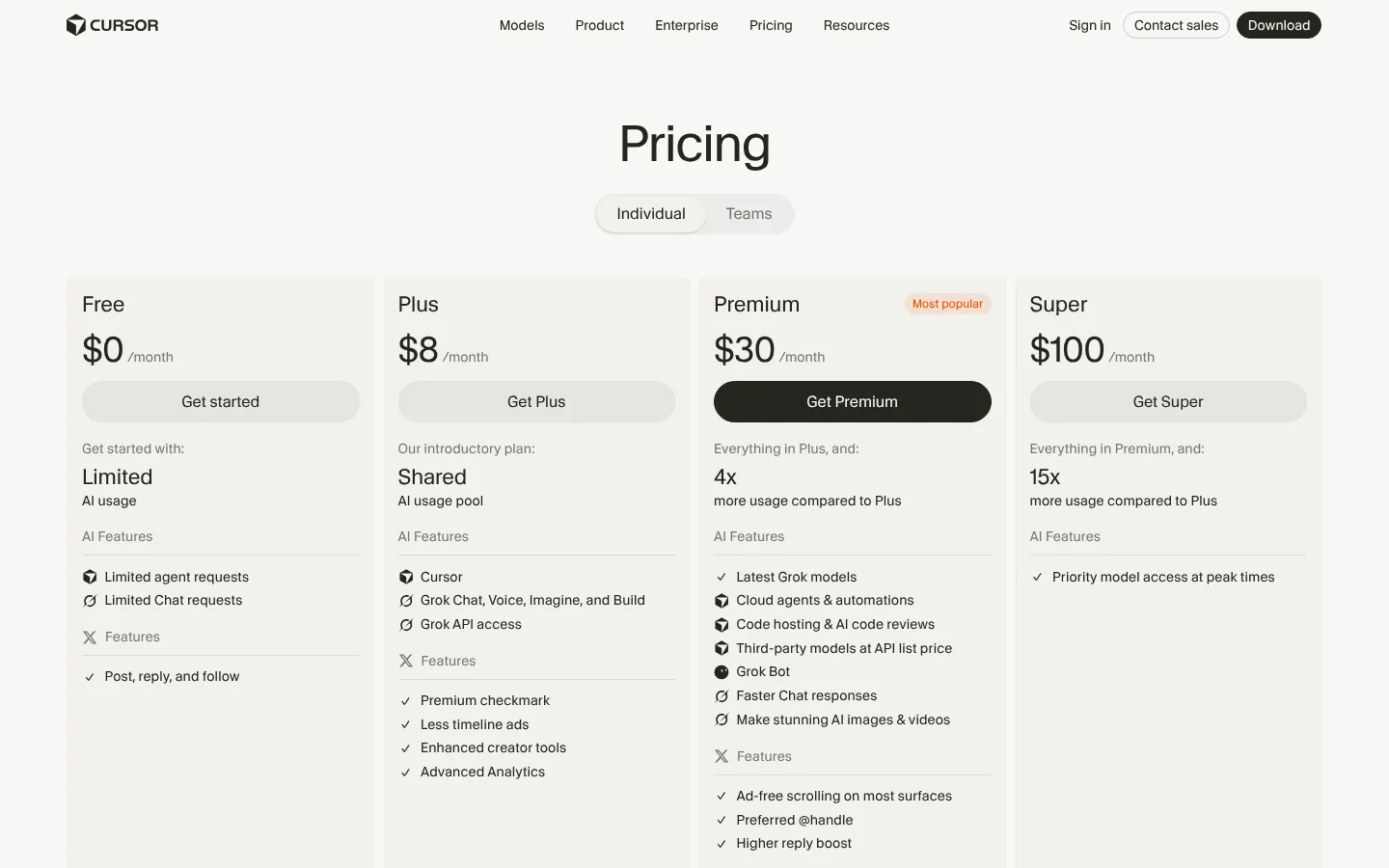
Cursor is an AI code editor with a CLI and cloud agents. Cursor's blog announced on August 14, 2026 that it had been acquired by SpaceX, and its docs now say Cursor "is sold as part of The X Subscription, one subscription for Grok, Cursor, and X." That's why the pricing page lists X features next to coding ones.
For a solo developer, Plus costs $8 a month ($80 a year) and includes the agent with Cursor's own models (Grok and Composer) only. Premium costs $30 a month and adds cloud agents plus Claude, GPT, and Gemini at API list price, paid from prepaid credit on top of the subscription. Super costs $100 a month. Included usage refreshes weekly. Cloud agents clone your repository, work on a branch, and push changes back.
Choose Cursor if you want an AI-first editor and are comfortable with the bundle. Look elsewhere if you want third-party models included in a flat price, because on the current plans they're billed by usage.
Claude Code: Anthropic’s agent, billed through a Claude subscription
Claude Code is Anthropic's coding agent. Its docs say it reads your codebase, edits files, runs commands, and works with git, and it's available in the terminal, IDEs, a desktop app, and the browser. It isn't on Claude's free plan. Claude Pro costs $20 a month, or $17 billed annually, and Claude Code shares its usage with Claude chat under five-hour and weekly limits. Cloud sessions clone an existing GitHub repository and push a branch for review. Claude's pricing page wouldn't load in our browser, so these figures come from the page's text, fetched directly.
Choose Claude Code if you work from the terminal or want an agent that runs commands and tests. Skip it if you'd rather click through a visual interface, or your project isn't under git.
Our Lovable alternatives guide covers when a developer should leave an app builder for one of these.
Free tiers and what credits really buy
A free tier lets you judge a tool, not ship a product. Only Lovable and Base44 publish what typical tasks cost in credits, so only for those two can you turn an allowance into a number of changes. For the others, the answer depends on your project, and the table says what it depends on.
The "roughly buys" columns are our arithmetic on each vendor's own examples, not measurements. Read each row on its own: the vendors define tasks differently, so a Lovable "landing page" and a Base44 "complex module" aren't comparable. Real costs vary with the model and the size of your app.
| Tool | Free tier (Nov 18, 2026) | What the vendor says a task costs | Free tier roughly buys | Entry paid plan roughly buys |
|---|---|---|---|---|
| Lovable | 5 build credits a day, capped at 30 a month; separate monthly Cloud (20) and AI (4) grants | Docs examples: button style change 0.50, remove footer 0.90, add authentication 1.20, landing page with images 2.00 (1.70 on the pricing page) | 60 small style changes, or 15–17 landing pages with images, a month | Pro: 100 monthly credits plus 5 a day. The monthly credits alone cover 50–58 landing pages, before any hosting, backend, or in-app AI use from the same balance |
| Base44 | 25 message credits a month (up to 5 a day); 100 integration credits | "Rough ranges, not a quote": simple change ~0.5, small feature ~1, complex module ~2, app-wide change ~3–4 | About 12 complex modules or 50 simple changes; about 100 app emails | Starter: 100 message credits, so about 50 complex modules; 2,000 integration credits |
| Bubble | 500 AI credits; 50,000 workload units; no live app | "There's no fixed number of credits per message"; generating an app doesn't use credits | Can't be converted; enough to evaluate building | Starter: 1,000 AI credits and 175,000 workload units |
| Bolt | 1M tokens a month, 300K a day | Larger projects use more tokens per message | Can't be converted; shrinks as the project grows | Pro: from 10M tokens a month |
| Replit | Starter: daily AI credits up to a monthly cap (amounts not published); Lite builds only | Effort-based: longer work costs more; checkpoint costs shown only after the fact | Can't be converted | Core: $20 of credits, also used for hosting, plus Free Mode |
| v0 | $5 one-time credits; 7 messages a day | Per-token rates; chat history and files count as input | Can't be converted reliably; see the example below | Plus: $30 a month plus $2 a day on login |
| Cursor | "Limited" agent requests | Weekly usage pool; third-party models at API price on Premium | Enough to try the editor | Plus: agent with Cursor's own models |
| Claude Code | Not included on Claude's free plan | Shared five-hour and weekly limits | Nothing | Pro: shared limits with Claude chat |
Here's an illustrative v0 calculation, using message sizes we picked, not v0's. One message that sends 50,000 tokens of context and returns 5,000 tokens on the v0 Pro model costs 50,000 × $2/1M + 5,000 × $10/1M = $0.15. At that size, $30 of monthly credits covers about 200 messages. The figure leaves out cache pricing and the $2 daily login credits, and v0's docs say context grows with chat history and files, so a mature project costs more per message.
What happens when the credits run out
This table shows what a quiet month or a busy one costs you.
| Tool | When you run out | Does the live app keep working? |
|---|---|---|
| Lovable | Buy top-ups (paid plans) or wait for the next grant | Lovable says the published site stays live, but built-in backend services pause when the Cloud grant and general credits are both gone |
| Base44 | AI building pauses until the next reset; upgrade to get more | Not fully: when integration credits run out, your app's users get an error and backend functions stop |
| Bubble | AI features wait for purchased credits or the monthly refresh; you can keep building in the visual editor | Yes while overages are on (billed at $0.30 per 1,000 workload units); if overages are off, the app goes offline at the limit |
| Bolt | Free: wait for the daily or monthly reset, and keep editing in Code view; paid: token reloads on some plans | Free sites stop serving when they hit monthly data limits; paid plans bill extra hosting as you go |
| Replit | Buy a credit pack or pay as you go | Yes, unless you set a hard budget cap, which suspends usage-based services |
| v0 | Generation pauses; Free users must upgrade to buy more | Hosting is on Vercel, billed separately |
Code export and ownership
Every vendor here says the code or content you create is yours, except Bubble, which keeps ownership of the code that runs your app. The bigger difference is whether the app can run anywhere else.
| Tool | Ownership statement | GitHub sync | Can the app run without the vendor? |
|---|---|---|---|
| Lovable | "Your apps, code, and the content you create with Lovable are yours" | Two-way on all plans; one branch at a time | Yes, after replacing calls that run through Lovable's services |
| Base44 | "You own everything you build on Base44" | Two-way, Builder plan and up | Front-end code exports; we found no documented way to self-host the backend |
| Bubble | You own your data; Bubble owns the code that powers the app | None documented for apps | No: "Bubble apps can only be run on the Bubble platform" |
| Bolt | Your code, usable commercially | Commits each change; pulls outside edits every 30 seconds; stays on main | Yes; ZIP download available |
| Replit | You keep your rights to content you submit | Import and push | Yes; the code can be pushed to your own GitHub repository |
| v0 | "Vercel doesn't own the code generated" | Bi-directional; the repo becomes the source of truth | Yes: "export code and deploy elsewhere" |
| Cursor, Claude Code | The code is in your own repository | Native git | Yes; there's no platform to leave |
If what you need is a website, not an app
If the project is a marketing site, a blog, or a business website that someone on your team will update for years, look at website builders instead. An app builder charges you to build user accounts and a database, while a business site mostly needs pages, articles, search basics, and an editor.
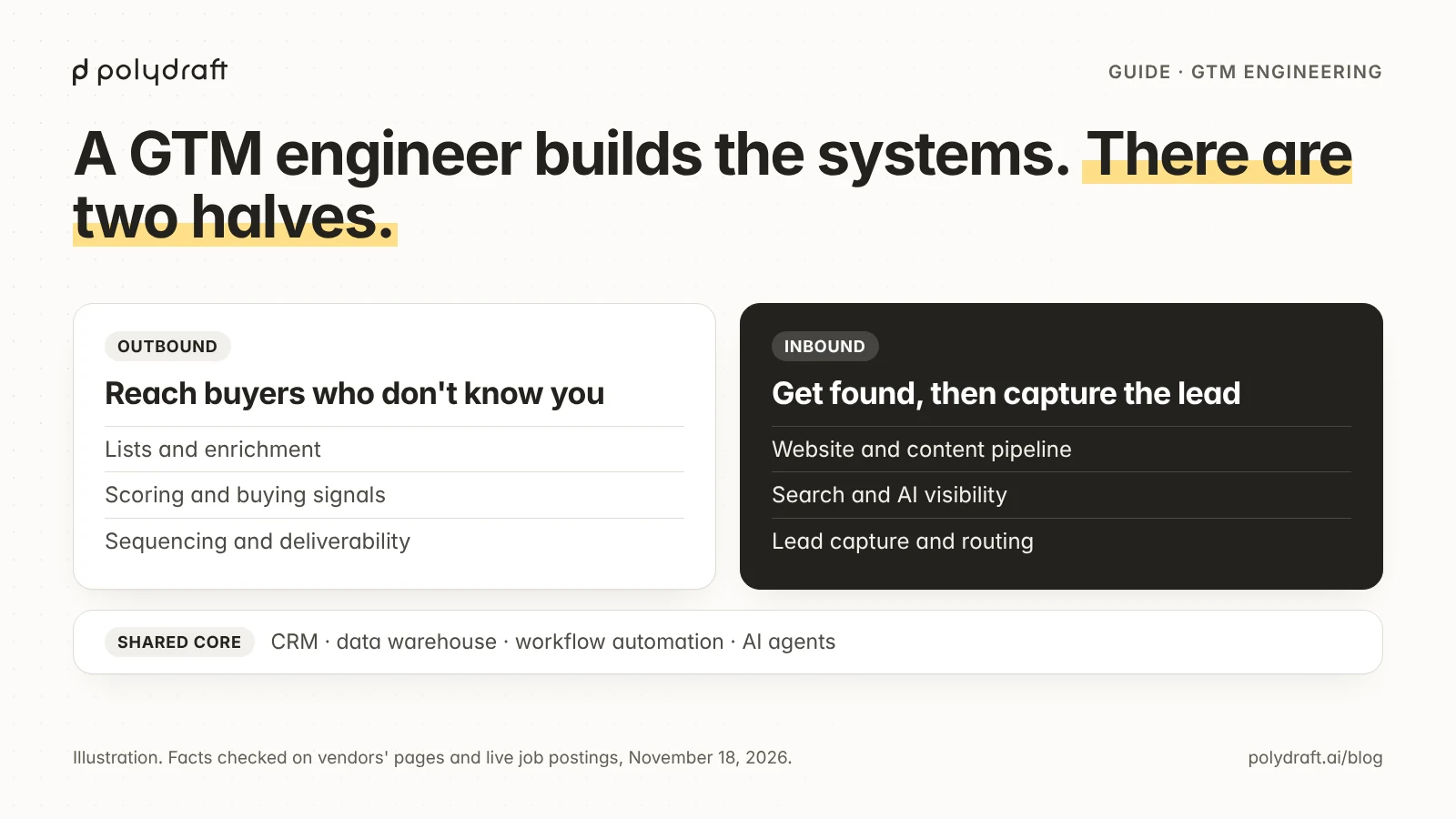
We make PolyDraft, an AI website builder, so read this section with that in mind. PolyDraft isn't an app builder. Its own pricing page says Lovable, Replit, and Base44 are the better choice for an app with logins and a database. Here's what its pages say it offers, as of November 18, 2026:
- It builds a server-rendered Astro site that deploys to a Cloudflare account you own, under your own domain. Cancelling the subscription doesn't take the site down.
- Each site has a built-in admin with a blog editor and categories, an inquiries inbox, an image library, an internal-link manager, and a translation manager.
- Sites start in one language and can be localized: up to 10, 30, or 100 languages depending on the plan.
- Starter costs $39 a month, or $390 a year. The Agency plan adds a full source-code download; Pro and higher plans can hand a project to another account.
- Access is invite-based, and building and previewing are free.
- To move from WordPress, Wix, Squarespace, Webflow, or Framer, PolyDraft rebuilds the site from its public URL as a new site you own. It doesn't import a WordPress database, user accounts, or backend settings.
The limits matter as much:
- PolyDraft builds marketing and lead-generation sites, not a store, and has no ecommerce or payment integration.
- Redirects aren't generated for you. You list the old URLs, choose where each one should point, and configure the mapping on the host that serves the new site.
- You supply the Cloudflare credentials and point your domain at the new site once the preview is verified.
- PolyDraft also sells a done-for-you service, AI FDE, in which an engineer builds or migrates the site; scope and price are agreed per engagement.
It's the wrong pick for an app with user accounts, an online store, or a team that wants redirects created automatically during a move.
How we assessed them
We picked tools that appear repeatedly in Google's results and AI Overview for "best AI app builder" and "best vibe coding tools" (sampled November 17–18, 2026), and that publish pricing and documentation we could cite. We grouped them by who edits the result. Then we compared each on what it produces, its stack, entry price, how usage is metered, what happens at zero credits, and code export.
On November 18, 2026, an automated Chromium browser opened each pricing page at 1440 pixels wide, signed out, and captured the screenshots shown. Cookie banners were removed before capture, and nothing else was changed. Where a price sat behind a billing toggle or a collapsed FAQ, we switched the toggle or expanded the answer in the same browser and saved the text. We read credit, export, and ownership rules from the text versions of each vendor's documentation the same day. Where a vendor's own pages disagree, we say so. We didn't build an app in any tool, so nothing here measures output quality, speed, or reliability. The "roughly buys" figures are arithmetic on vendor examples, not tests.
We left out GitHub Copilot and Windsurf because we couldn't open their plans pages from our environment. Prices and credit rules in this category change often, so treat every figure as a dated snapshot.
Frequently asked questions
What is the best AI app builder for beginners?
For someone who doesn't code, Lovable or Base44. Both build a full web app with a database and sign-in from chat. Lovable includes two-way Git sync on every plan. Base44 publishes per-task credit estimates and meters what your running app uses separately. Bubble covers complex logic and native mobile apps from one project, but keeps your app on Bubble.
What is the best free AI app builder?
None of the free tiers is meant for shipping a product. Lovable's free plan gives 5 build credits a day, up to 30 a month: roughly 15 to 17 landing pages by its own examples. Base44 gives 25 message credits a month. Bolt gives 1M tokens a month with a 300K daily cap. Bubble's free plan can't publish a live app.
Can ChatGPT build an app?
Partly. On any plan, ChatGPT can write an app's code, which you then host yourself. On Plus and higher plans, ChatGPT Sites can build, publish, and host websites and lightweight apps from a conversation, within beta usage limits. Our guide Can ChatGPT build a website? covers the plans and limits. That guide relies on search excerpts of OpenAI's help center, because OpenAI's pages blocked our automated browser. For an app with its own database, sign-in, and a codebase you can take elsewhere, the app builders above go further.
Is vibe coding really that easy?
The first version is often easy; later changes get harder and more expensive. Bolt's docs say larger projects use more tokens per message, and v0's say chat history and files count as input, so costs rise as the app grows. You still need to test the app, review its security, and decide what happens when credits run out.
Do I own the code an AI app builder writes?
Usually, but check two things: the vendor's ownership statement and whether the app can run without the vendor. Lovable, Bolt, and v0 state that the code is yours and offer GitHub sync. Base44 exports code but keeps the backend on Base44. Bubble apps can only run on Bubble.
Which vibe coding tool is best for developers?
Cursor or Claude Code, because both work inside your own repository with any stack. Among the browser tools, Replit gives you the whole workspace, and v0 produces Next.js code with bi-directional GitHub sync.
Continue with the next task
- Shortlist by what you're replacing: Lovable alternatives
- See two of the app builders head to head: Replit vs Lovable
- Choose between the two non-developer builders: Lovable vs Base44
- Budget Lovable credits: Lovable pricing
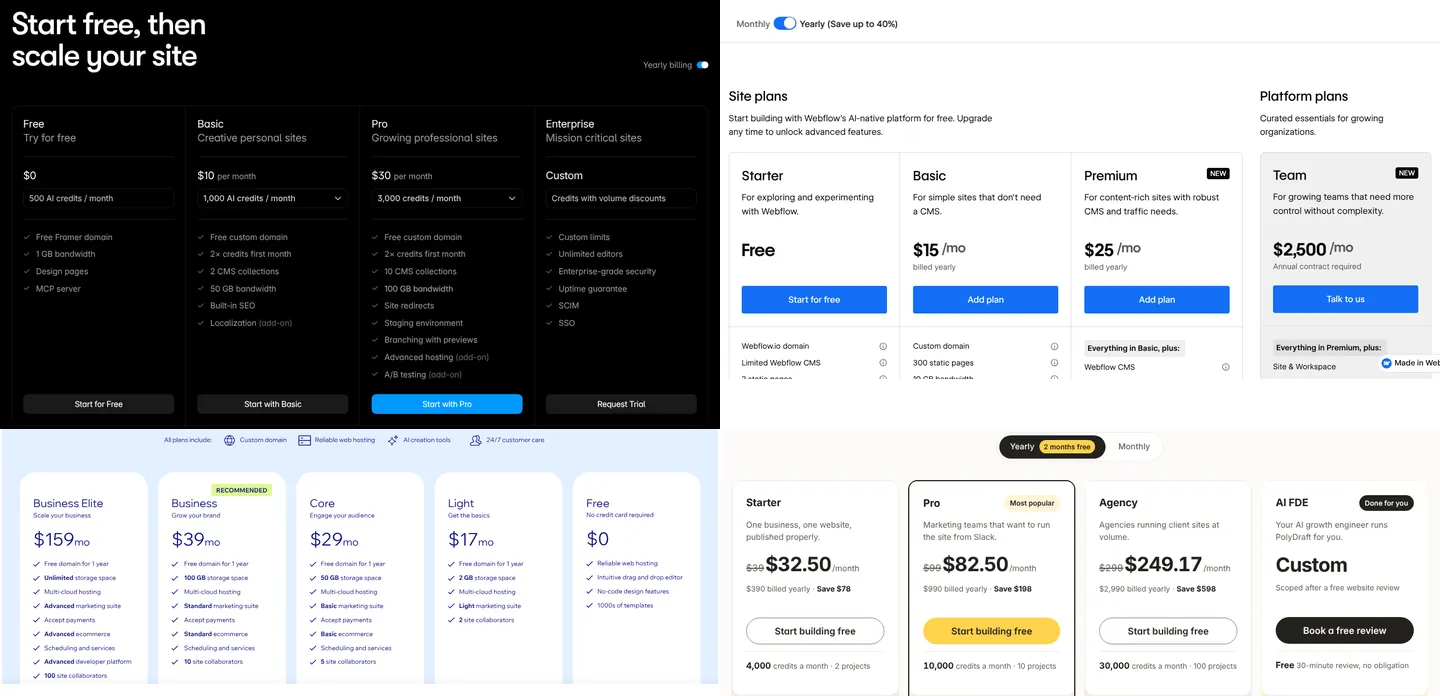
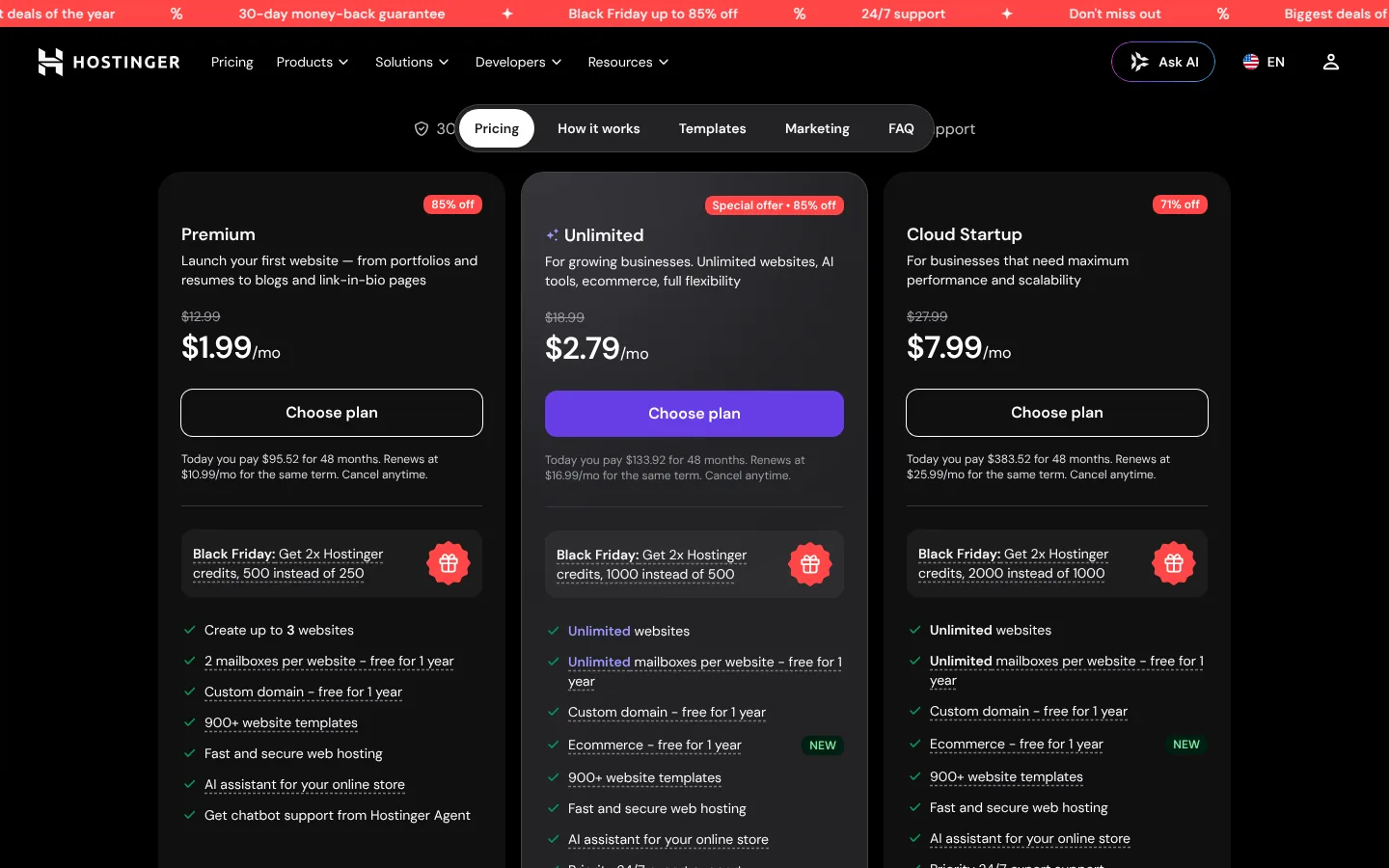
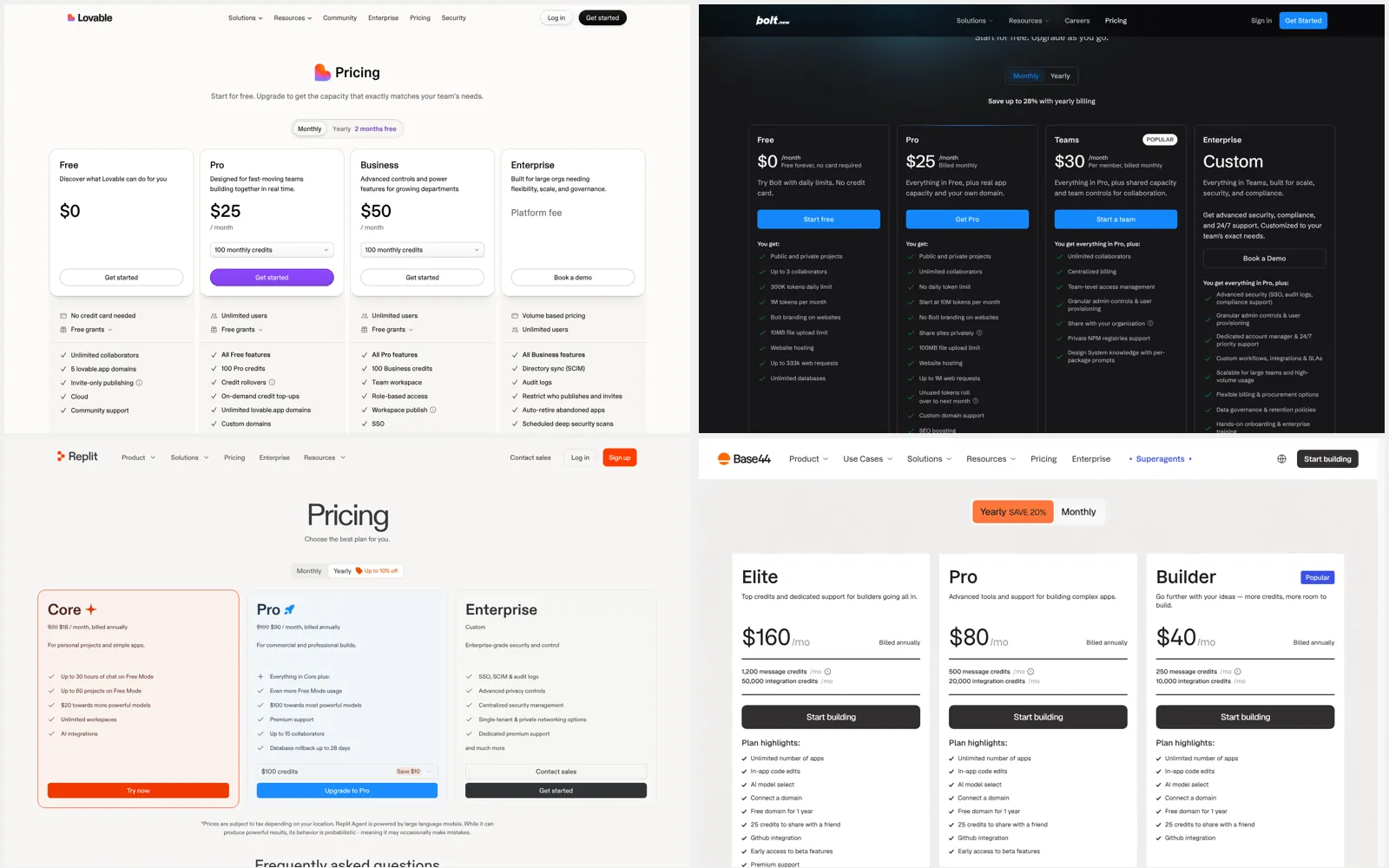
About this article. An AI agent drafted this article following PolyDraft's blog workflow: Claude, made by Anthropic, which also makes Claude Code, one of the tools listed. A separate AI review session then checked it. PolyDraft is our product. It appears only in the website section, which covers what it doesn't do as well as what it does. Vendor facts come from each vendor's own pricing pages and documentation, read on November 18, 2026, as described under "How we assessed them." We didn't run hands-on tests. The screenshots are real captures of public pricing pages, with cookie banners removed; the hero image arranges four of them in a grid.
Sources
- Lovable: Pricing, Subscription plans, Credits and usage, Credit top-ups, Out of credits, Deployment, hosting and ownership, Cloud, Git sync, FAQ
- Base44: Pricing, Billing and plans, Credits, App code overview, GitHub, Start from an existing app, Uploading to app stores
- Bubble: Pricing, Pricing plans, AI credits, Application and data ownership
- Bolt: Pricing, Tokens, Hosting plans, Supported technologies, Expo, Git, Commercial use
- Replit: Pricing, AI billing, Starter plan, Deployment pricing, Terms of service
- v0: Pricing, Pricing docs, FAQs, GitHub; Vercel: Hobby plan, Pro plan
- Cursor: Pricing, Models and pricing, Cloud agents, Cursor is now a part of SpaceX
- Claude Code: Claude pricing, Claude Code overview, Claude Code on the web
- PolyDraft: Pricing, Features, Integrations, WordPress to Astro, AI FDE