Carrd Alternatives 2027: One-Page Builders Compared
Carrd alternatives for link-in-bio pages and business one-pagers, with free-plan limits and first-year custom domain costs where vendors publish them.
The right Carrd alternative depends on what your page is for. For a personal page or link-in-bio, look at straw.page, mmm.page, or Linktree. If it has to be free, try Google Sites, Canva, Notion, or Neocities. For a business one-pager that may grow into a full site, look at Framer, Webflow, Wix, or PolyDraft (our product). If you only need one page with a form and your own domain, Carrd's Pro Standard plan, at $19 a year plus the domain itself, is still hard to beat on price.
We make PolyDraft. It appears only in the business group, and we judged it on the same criteria as everything else, including who shouldn't use it. We didn't test these products hands-on. We opened the vendor pages for every tool here on November 18 or 19, 2026, except two. straw.page and Canva served our tools a security check instead of the page, so their figures come from each vendor's own text as it appeared in search results. The table and those two sections say so.
Key points
- Most Carrd alternatives fall into one of two groups: personal and link-in-bio pages, or business sites. Picking the group first narrows the list fast.
- A free plan almost always puts your site on the vendor's subdomain, and some vendors, such as Canva and Wix, add their branding too. Your own domain is usually the first thing you pay for.
- Linktree doesn't support custom domains, according to its help center. If owning the address matters, use a page builder, not a link-in-bio tool.
- If your one-pager will need a blog, more pages, or a CMS within a year, pick a builder that can grow now, so you don't have to rebuild later.
Carrd alternatives at a glance
The first-year cost is for the cheapest plan we found that connects a custom domain, billed yearly where that's an option. Unless the cell says a domain is included, add the cost of registering the domain yourself. "Opened" means we loaded the vendor's page in a browser on November 18, 2026 (Carrd: November 19). "Search excerpt" means our tools couldn't open the vendor's site, so we read the vendor's own text through search results on the same day and couldn't check it on the page itself. Confirm those rows before you buy. A yearly figure built from a monthly price is our multiplication, not a price the vendor prints.
| Option | Best for | What the free plan gives you | Custom domain, first year | How checked (Nov 18, 2026) |
|---|---|---|---|---|
| Carrd (for reference) | Single-page sites on a tiny budget | 3 site slots; sites publish to .carrd.co addresses | $19 (Pro Standard, 10 sites), domain not included | Opened: carrd.com/pro and Carrd docs (Nov 19) |
| straw.page | Playful personal pages | A page on a straw.page subdomain | $49 (Premium), domain not included | Search excerpt: straw.page homepage (not opened) |
| Linktree | A link-in-bio list for social profiles | A linktr.ee/yourname page | Not offered; paid plans (from $7 a month billed yearly) add a redirect instead | Opened: Linktree help center and pricing |
| Google Sites | A simple site if you already have a Google account | Sites published on sites.google.com | No fee listed by Google; you buy the domain from a registrar | Opened: Google Sites Help |
| Notion Sites | Pages you already keep in Notion | Publish Sites with one notion.site domain | About $216: Plus at $10 per seat per month plus an $8-per-month domain add-on, both billed yearly; domain not included | Opened: Notion pricing and help |
| Super (on Notion) | A more polished site from Notion pages | One free site on super.site, with a "Made with Super" badge and no custom domain | $144 (Personal, $12 a month per site billed yearly); connects a domain you own, domain not included | Opened: super.so/pricing |
| Neocities | Hand-coded HTML personal sites | Free static hosting on a neocities.org subdomain, 1 GB storage | $60 (12 × $5 a month for Supporter; no yearly price published), domain not included | Opened: Neocities supporter page |
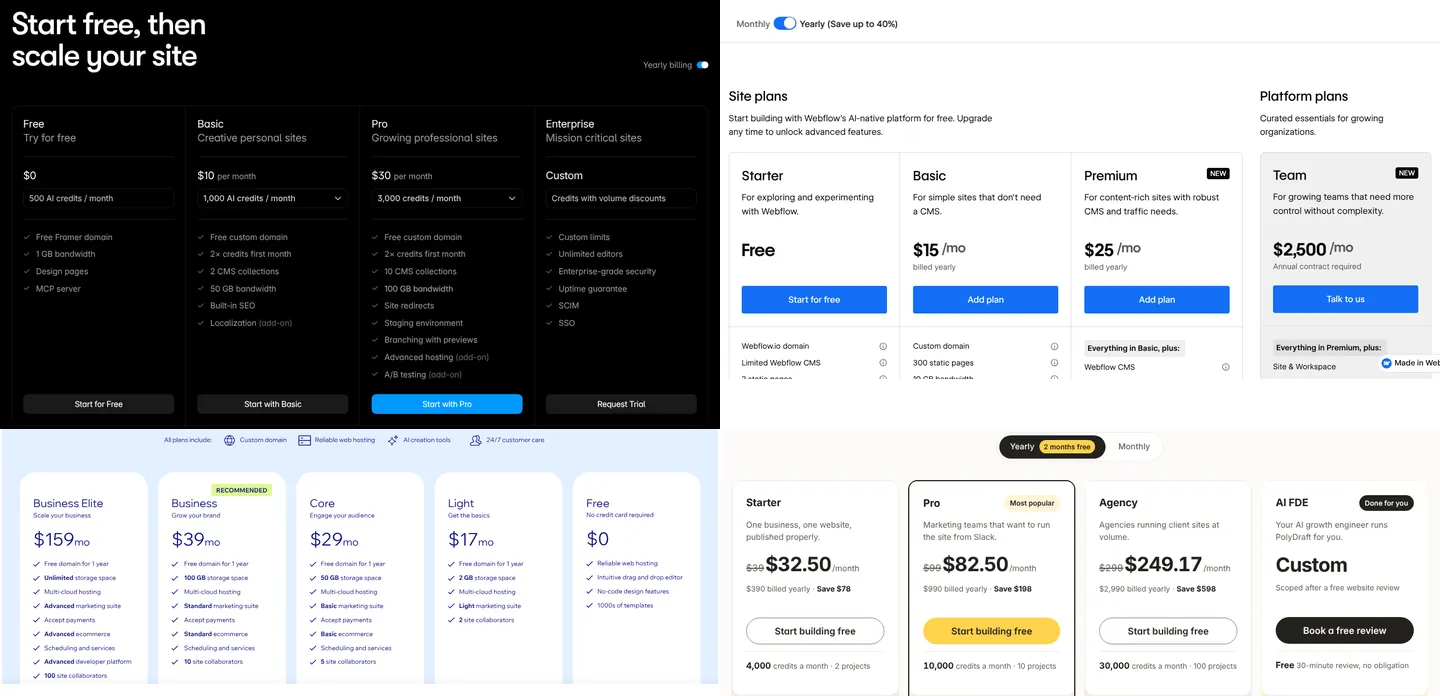
| Framer | Design-led business pages | Free Framer domain, 1 GB bandwidth, aimed at non-commercial use | $120 (Basic, $10 a month billed yearly), first-year domain included | Opened: framer.com/pricing |
| Webflow | Business sites a designer will extend | 2 static pages on webflow.io, 50 form submissions | $180 (Basic, $15 a month billed yearly), domain not included | Opened: webflow.com/pricing |
| Wix | All-in-one small business sites | Free site on a Wix address, with Wix branding | $204 (Light, $17 a month billed yearly), 1-year voucher for a new Wix domain | Opened: wix.com/plans |
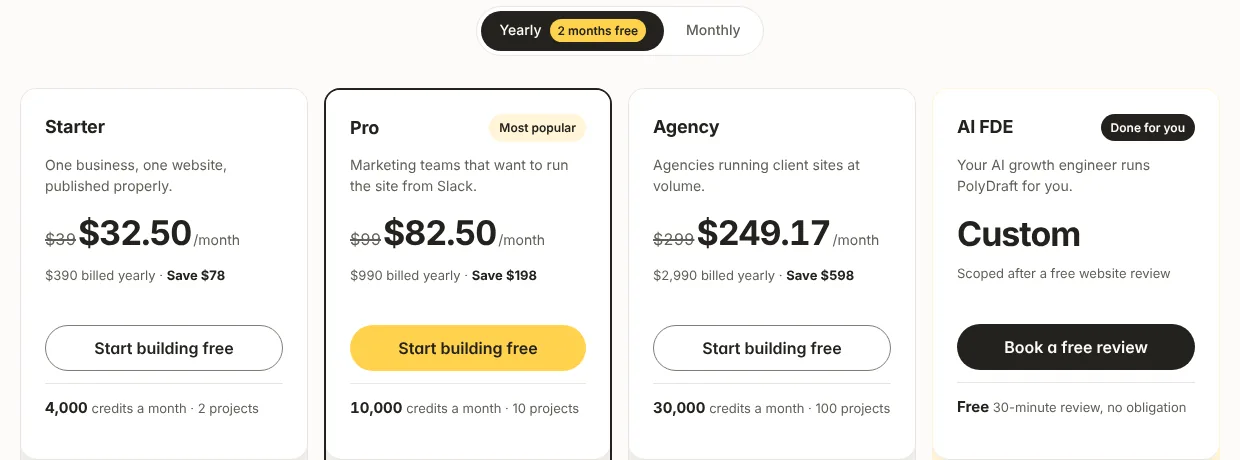
| PolyDraft (ours) | Multi-page business sites on your own Cloudflare account | Build and preview free; publishing needs a paid plan | $390 (Starter, billed yearly), domain not included | Opened: polydraft.ai/pricing |
Two more tools come up often, but we couldn't confirm a full first-year price for them, so they aren't in the table above:
| Option | Best for | What we could confirm (Nov 18, 2026) | What's missing |
|---|---|---|---|
| mmm.page | Collage-style personal pages | Opened: free plan at $0; a domain needs a Plus account or above | The Plus price, which isn't on any public mmm.page page |
| Canva Websites | Designers who already use Canva | Search excerpt (not opened): up to 5 sites on my.canva.site, 10 sections per page, a "Designed with Canva" footer; a custom domain needs a paid plan | The US price of that plan (excerpts showed conflicting figures) |
What Carrd is good at, and where it stops
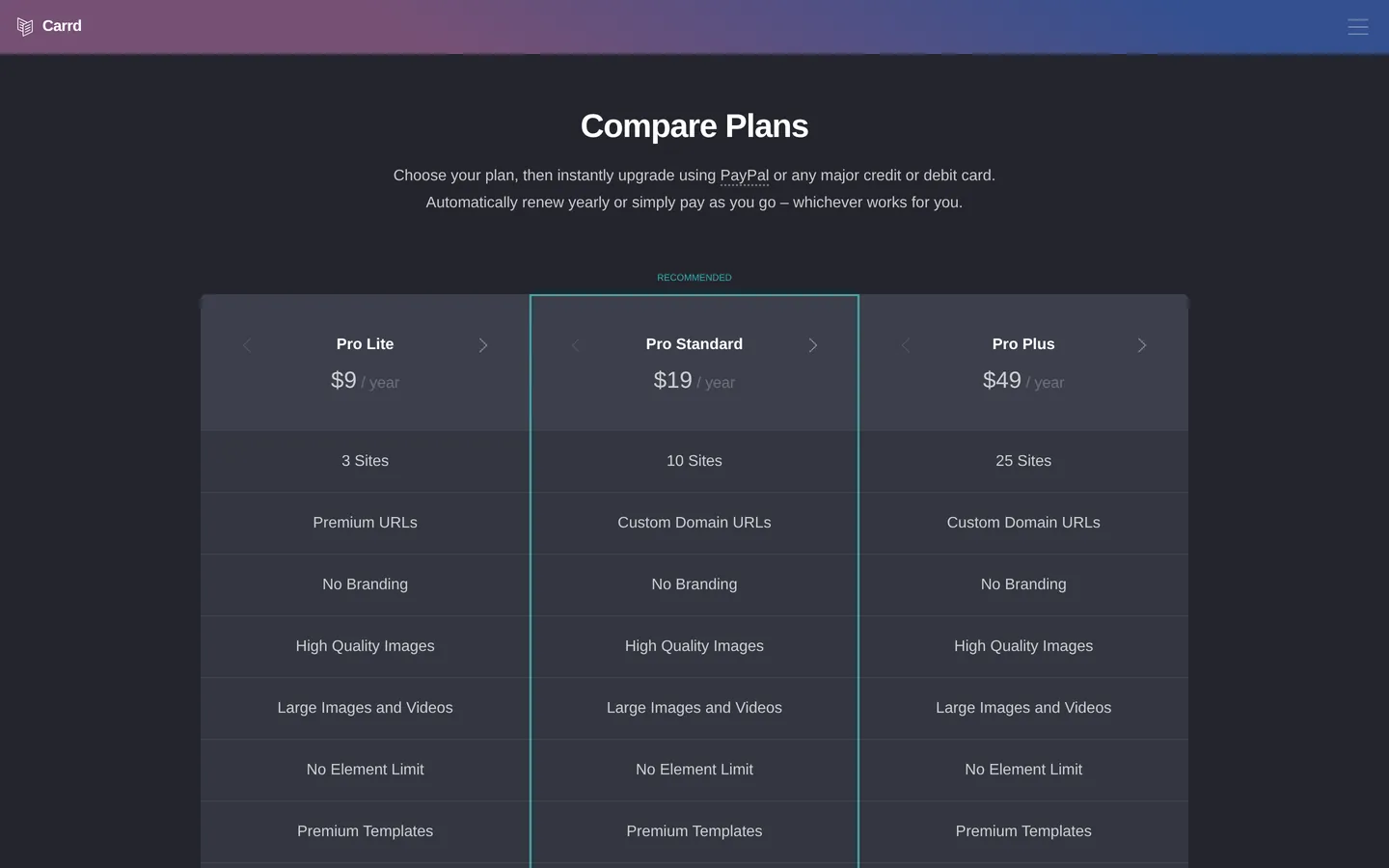
Carrd is good at one thing: simple, responsive, one-page sites for very little money. The figures below come from Carrd's Pro page and documentation on carrd.com, opened on November 19, 2026 (carrd.co links redirect there):
- The free plan (Basic) gives you 3 site slots. Carrd's docs say "Published sites, drafts, templates, and archived sites all occupy slots," so drafts count against the limit. Carrd sites publish to .carrd.co addresses unless you upgrade.
- Pro Lite costs $9 a year for 3 sites. It removes Carrd branding and adds unbranded .crd.co addresses, but not custom domains. Carrd's docs describe it as the plan for people who don't need custom domains, forms, or widgets.
- Pro Standard costs $19 a year with 10 sites, and adds custom domains and forms. Carrd's custom-domain guide says it "Requires Pro Standard or higher," and that the domain must be registered elsewhere first. Carrd sells higher site counts at higher prices, such as Pro Standard 25 at $39 a year.
- Pro Plus costs $49 a year for 25 sites and adds custom forms, advanced settings, and the option to download the unminified source of your sites.
- Every Pro plan is billed yearly. Every price on the Pro page reads "/ year," and Carrd says you can "automatically renew yearly or simply pay as you go," meaning renew by hand.
Carrd stops being the right tool when one page isn't enough. If you need a blog, a dozen service pages, or content in several languages, you'll be working around Carrd rather than with it. That's why the rest of this guide is split by what the page is for, not by price alone. Our guide to one-page website SEO covers when a single page can still rank and when it's time to split it into several.
For personal pages and link-in-bio
For a personal page, a portfolio card, or the link in your social bio, choose by how much you care about owning the address. straw.page and mmm.page let you connect your own domain on a paid plan. Linktree doesn't.
straw.page: best for a playful page built on your phone
straw.page calls itself an "extremely simple website builder" and a free mobile website builder. Pages publish free to a straw.page subdomain. Its homepage says Premium costs $49 a year and adds custom domains and analytics. It also lists a blog, which can be public or private, and a set of starting themes. We read these details through search results, because straw.page served our tools a security check instead of the page, so none of them was checked on the page itself.
Choose straw.page if you want a quick, expressive personal page and you're fine with a subdomain until you're ready to pay. Look elsewhere if you need forms or business features, or a custom-domain plan as cheap as Carrd's $19.
mmm.page: best for a collage-style personal corner of the web
mmm.page builds personal pages out of blocks, and its homepage title calls it "Your Corner of the Internet." Under a "Free Forever" heading, the homepage says: "Only upgrade if you need domains, private pages, or unlimited blocks. Otherwise $0/mo." Its help center (last updated November 20, 2023) says connecting a domain needs a Plus account or above. mmm.page isn't a domain registrar, so you buy the domain elsewhere; the help center recommends Hover and also names Porkbun, Namecheap, and Cloudflare. We opened these pages on November 18, 2026, but no public mmm.page page shows the Plus price. The last official figure we found was a $15-a-month Pro plan announced in 2021, so we haven't used it.
Choose mmm.page if the page is meant to feel personal and handmade. Look elsewhere if you need to know the exact price up front, or you want a structured business layout.
Linktree: best for a link list, not a website
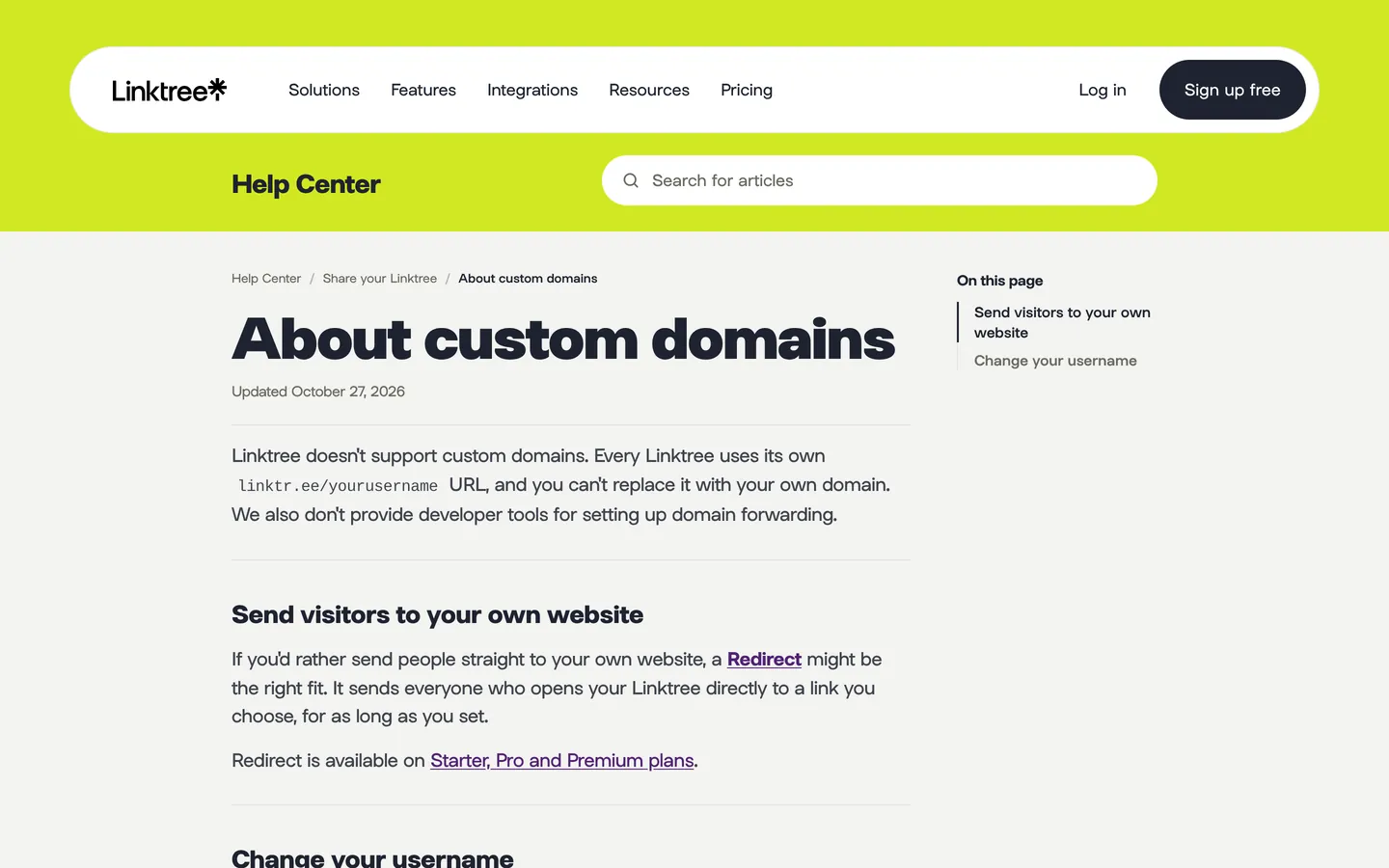
Linktree is a link-in-bio tool: one page with a stack of links under your profile. Linktree's help center (opened on November 18, 2026, and updated October 27, 2026) says: "Linktree doesn't support custom domains. Every Linktree uses its own linktr.ee/yourusername URL, and you can't replace it with your own domain." The closest option is a redirect that sends everyone who opens your Linktree straight to a link you choose, available on Starter, Pro, and Premium. Linktree's pricing page lists Starter at $7 a month billed annually or $9 monthly, Pro at $14 or $17, and Premium at $30 or $35. Removing Linktree branding starts on Pro.
Choose Linktree if the page is only a list of links for social profiles. Look elsewhere if you want your own domain or anything beyond links. On the domain question, Carrd and straw.page are better fits.
Free options
Every option here puts your site on the vendor's address unless you pay or connect a domain. Canva, Notion, and Neocities have free plans, and Google's help pages list no fee for Google Sites. Canva also adds its own footer on free sites.
Google Sites: best if you already use Google and want your own domain
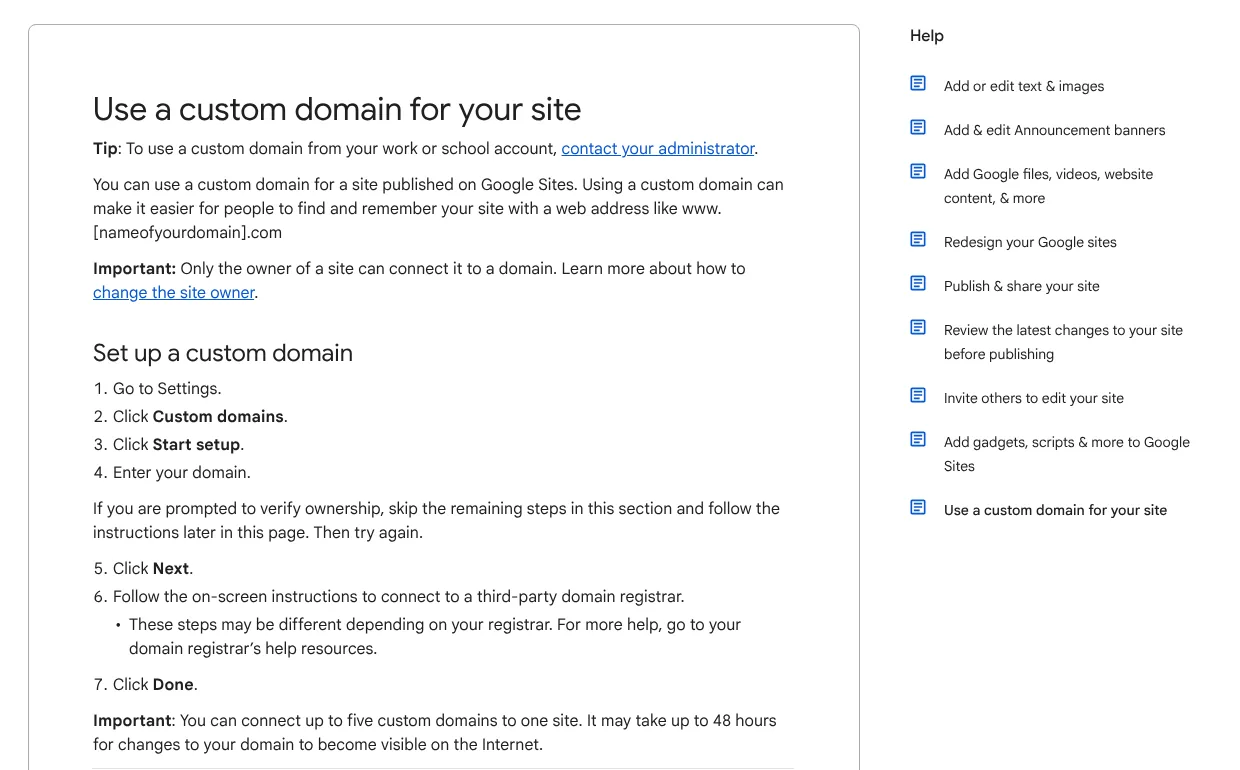
Google's help center (opened on November 18, 2026) says the owner of a Google Site can connect a custom domain from Settings > Custom domains, using a domain bought from a third-party registrar. One site can have up to five custom domains, and changes can take up to 48 hours to show up. Google also sells domains for Sites through a Google Workspace plan. Work and school accounts go through their administrator instead. The help article doesn't list a fee for connecting a domain, but it doesn't say the service is free either, so we've written "no fee listed" rather than $0.
Choose Google Sites if you want a plain site with your own domain and no listed monthly fee. Look elsewhere if design control is the priority. Google Sites is built for plain, simple sites.
Canva Websites: best if you already design in Canva
Canva Free can publish websites to a free my.canva.site address, according to Canva's Help Center as it appeared in search results. Canva served our tools a security check instead of the page, so none of these Canva details was checked on the page itself. Free users can publish up to five websites. They can design up to 20 sections per page but publish only 10. A "Designed with Canva" footer appears on free sites and can't be removed. Link-in-bio and mobile templates publish to a canva.link address instead. Using your own domain needs a paid Canva plan. The pricing excerpts we saw disagreed on that plan's US price, so we haven't listed one.
Choose Canva if your brand assets already live in Canva and you want the site to match them. Look elsewhere if you need more than 10 sections per page on the free plan, or you don't want the Canva footer.
Notion Sites: best for publishing pages you already keep in Notion
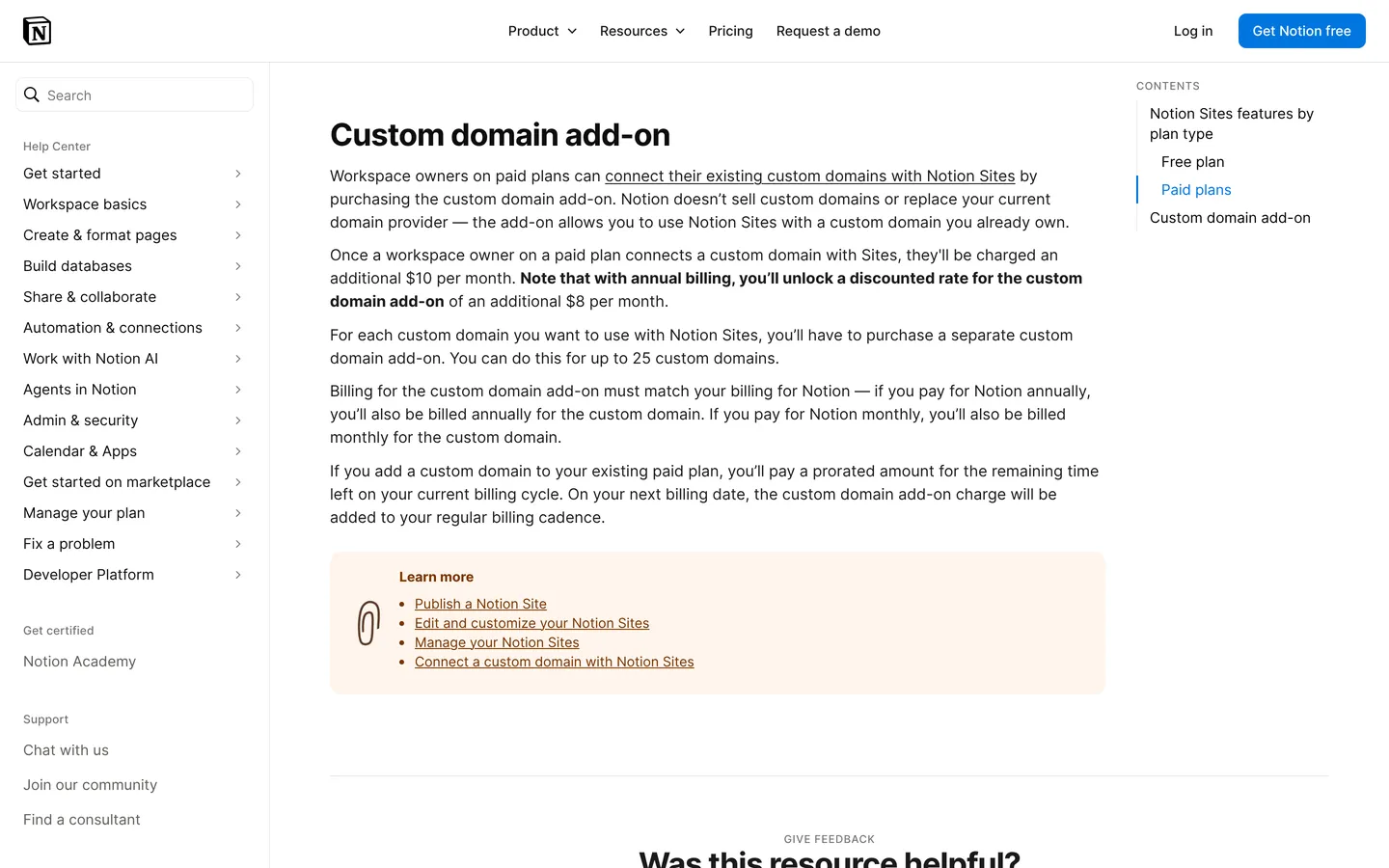
Notion's Free plan can publish Sites and claim one notion.site domain, according to Notion's help center. A custom domain needs a paid plan plus an add-on, which Notion lists at $10 a month, or $8 a month billed yearly, per domain. Notion's pricing page lists Plus at $10 per member per month billed yearly, or $12 billed monthly. The add-on's billing has to match the plan's, so for one person on yearly billing that's about $216 for the first year: $120 for Plus plus $96 for the domain add-on. Notion doesn't sell domains, so you need one already. We opened both Notion pages on November 18, 2026.
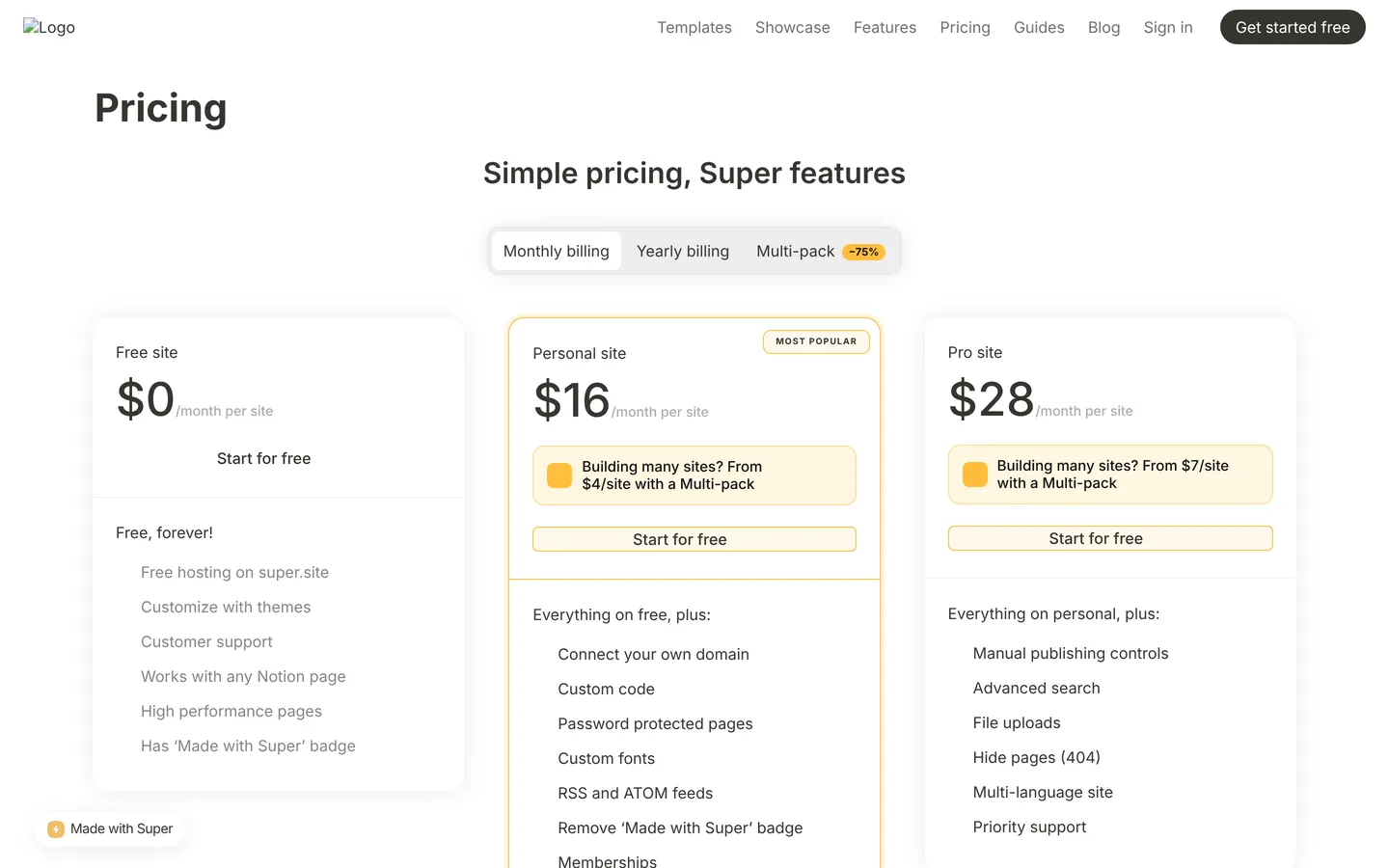
If you want more design control than Notion's built-in Sites, Super turns Notion pages into a website. Super's pricing page (opened on November 18, 2026) lists one free site on a super.site address with a "Made with Super" badge and no custom domain. The Personal plan costs $16 a month per site, or $12 a month billed yearly ($144 a year, per Super's FAQ), and lets you connect your own domain and remove the badge.
Choose Notion Sites or Super if the content already lives in Notion and you want to keep editing it there. Look elsewhere if your content doesn't live in Notion, because a Notion workspace is part of the setup.
Neocities: best free option for people who write HTML
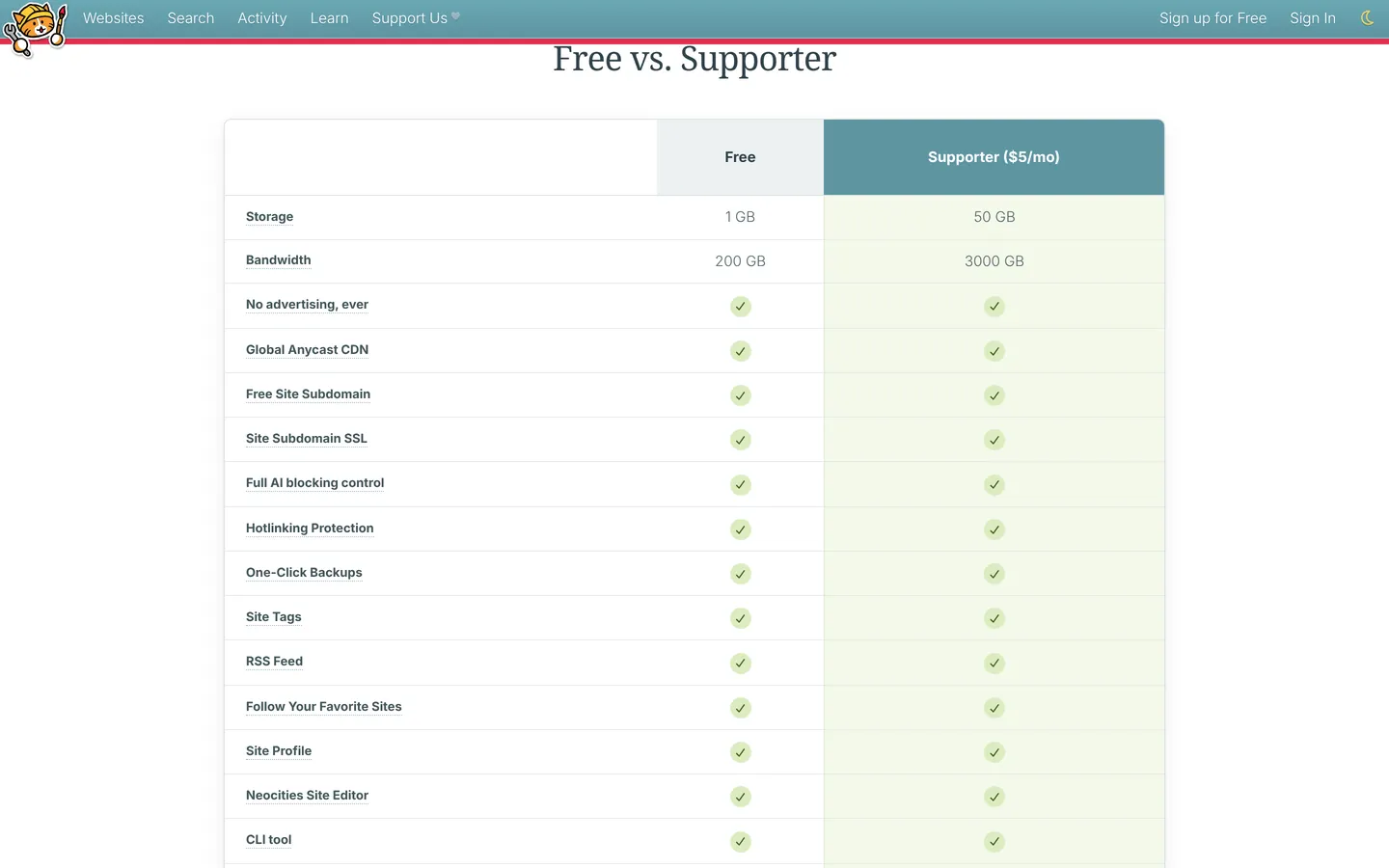
Neocities hosts static sites you build yourself in HTML and CSS, free on a neocities.org subdomain. Its "Free vs. Supporter" table (opened on November 18, 2026) gives free sites 1 GB of storage and 200 GB of bandwidth. The Supporter plan costs $5 a month and raises that to 50 GB and 3,000 GB, and the table lists "Custom Domains" and "Custom Domain SSL Certs" for Supporter only. Neocities doesn't publish a yearly price, so the $60 in the table is 12 months at $5.
Choose Neocities if you like writing code and want a free home for it. Look elsewhere if you want a visual editor. Neocities expects you to write the page yourself.
For a business one-pager that may grow
For a business, the question is less "which one-pager is cheapest" and more "will I have to rebuild in a year." If you can picture a pricing page, a blog, or case studies coming, start on a builder that handles them. Our landing page vs website guide covers how to decide what to build first.
Framer: best for a design-led page that may grow into a site
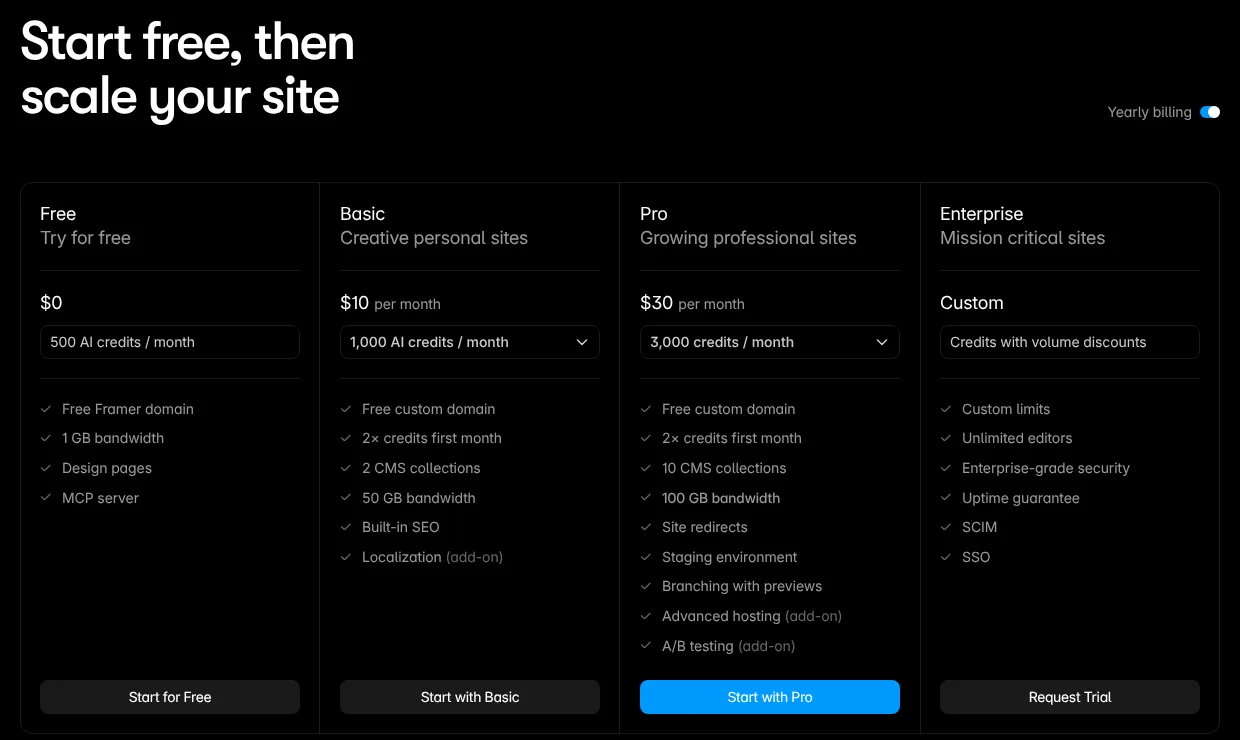
Framer's free plan publishes to a Framer domain with 1 GB of bandwidth, and Framer says the free plan is "ideal for non-commercial use." Connecting a custom domain needs a paid plan. Basic costs $10 a month billed yearly, or $15 billed monthly, and Framer's comparison table says a complimentary domain is included with yearly billing. Basic includes 30 pages, 2 CMS collections, and 50 GB of bandwidth. Pro, at $30 a month billed yearly, adds site redirects, staging, and 150 pages. Extra languages are an add-on at $20 per locale per month on yearly billing, or $25 billed monthly.
Choose Framer if visual polish matters and you'll add pages over time. Look elsewhere if you want the free plan for a business, because Framer positions it for non-commercial use.
Webflow: best when a designer will extend the site later
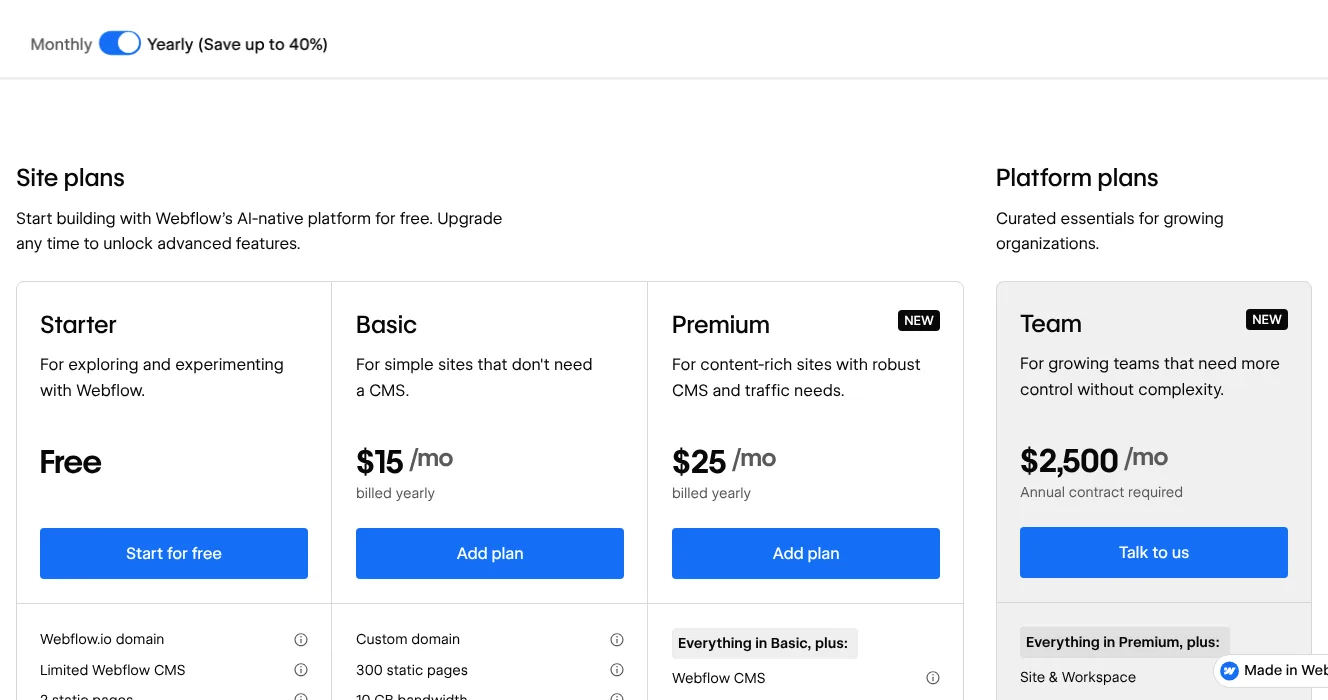
Webflow's free Starter plan gives you a webflow.io address, 2 static pages, 1 GB of bandwidth, and 50 form submissions. Basic costs $15 a month billed yearly, or $25 billed monthly. It adds a custom domain, 300 static pages, 10 GB of bandwidth, unlimited form submissions, and password protection. Webflow describes Basic as for "simple sites that don't need a CMS," and the full Webflow CMS starts on Premium, at $25 a month billed yearly.
Choose Webflow if a designer will build and grow the site, and you'll want a CMS later. Look elsewhere if nobody on the team wants to learn a professional design tool for a single page.
Wix: best for an all-in-one site with payments and bookings
Wix's plans page says creating a website is free, and that a Premium plan lets you connect your own domain and remove Wix branding. Light costs $17 a month for a yearly subscription. Accepting payments, basic ecommerce, and scheduling start on Core, at $29 a month, and Business costs $39 a month. Most Premium plans include a 1-year voucher for a new domain bought from Wix. The voucher can't renew a domain you already own. Wix notes that prices and currency vary by location and that its USD prices are shown for reference.
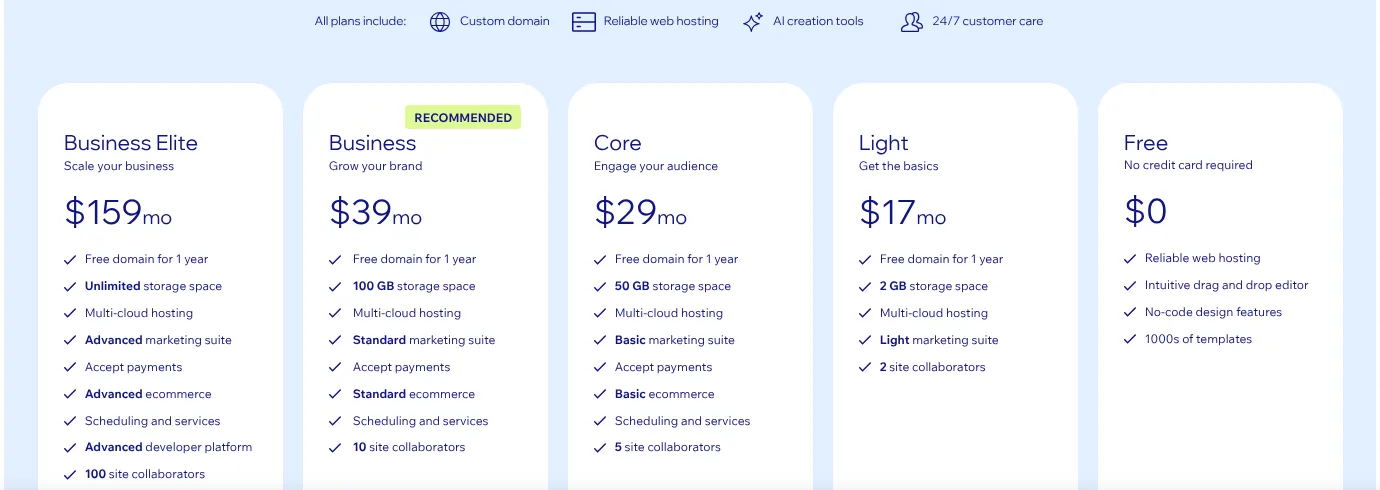
Choose Wix if your one-pager will need payments, bookings, or a store soon. Look elsewhere if you only need a static page. Wix Light costs more than ten times Carrd's Pro Standard, though Wix's yearly price includes a first-year domain voucher and Carrd's doesn't include a domain.
PolyDraft (our product): best for a business site you expect to become multi-page and multilingual
PolyDraft is an AI website builder, and it isn't a one-page tool. You describe your business or give it your current site's URL, and it builds a multi-page site you deploy to a Cloudflare account you own. Every site has an admin panel with a blog editor and a lead inbox. Canceling a subscription doesn't take a deployed site down. As of November 18, 2026, according to PolyDraft's pricing and features pages:
- Pricing: building and previewing is free, and you pay to publish. Starter costs $39 a month, or $390 a year billed yearly ($32.50 a month), for 2 projects. Pro costs $99 a month ($990 a year) and Agency $299 a month ($2,990 a year). Access is invite-based. PolyDraft also sells a done-for-you service, AI FDE, scoped after a review. It isn't compared here.
- Languages: up to 10 languages on Starter, 30 on Pro, and 100 on Agency.
- Ownership: full source-code export is on Agency, and project transfer is on Pro and above.
Know the limits before you choose it. The first four are stated on PolyDraft's own pages, and the last is our arithmetic:
- PolyDraft builds marketing and lead-generation sites, not a storefront. Carts, orders, and payments stay on a store you run elsewhere.
- Moving from another builder means a rebuild from your site's public URL, not an import of that platform's backend or database.
- Redirects aren't generated for you. You plan them from your list of old URLs and set them up on the host that serves the new site.
- Membership systems, booking engines, and forums aren't part of the product.
- Its cheapest publishing plan costs about 20 times Carrd's Pro Standard, and neither price includes the domain. For a single page, that's poor value.
Choose PolyDraft if your one-pager is the first page of a business site that will need more pages, a blog, or other languages, and you want it running in your own Cloudflare account. Look elsewhere if one page is all you'll ever need, you sell products online, or you want to drag elements around a canvas yourself.
When one page is enough
If one page with a form and your own domain is all you need, Carrd is probably still the right tool. On Carrd's pricing page, Pro Standard costs $19 a year with custom domain support and forms, and you register the domain separately. The cheapest business option in this guide, Framer Basic, costs $120 a year, and that price includes a first-year domain. Staying makes sense when:
- The page has one job, such as a waitlist, an event, a product teaser, or a contact card.
- You won't need a blog or extra pages in the next year.
- You'd rather pay $19 a year plus a domain than learn a bigger tool.
Switch when the page starts collecting jobs: a pricing section turning into a pricing page, an FAQ turning into a help center, or a second language. That's the point where Framer, Webflow, Wix, or PolyDraft starts to repay its higher price.
Which one fits
| If you need… | Shortlist |
|---|---|
| A link list for your social bio | Linktree; Carrd or straw.page if you want your own domain |
| A playful personal page | straw.page, mmm.page |
| Your own domain with no listed site fee | Google Sites |
| A free page on the vendor's address | Canva, Notion Sites, Neocities, Carrd |
| A page built from your Notion content | Notion Sites, Super |
| One business page with a form | Carrd Pro Standard |
| A business page that will grow into a site | Framer, Webflow |
| Payments, bookings, or a store | Wix |
| A multi-page business site, possibly multilingual, on your own Cloudflare account | PolyDraft |
How we compared
We picked tools that come up for people leaving Carrd. We started from Google's AI Overview and the top 20 results for "carrd alternatives" (US, desktop, checked through DataForSEO on November 18, 2026). We added the tools named in an earlier AI Overview sample of the same query (mmm.page, straw.page, Google Sites, Notion with Super, and Canva) and answered its People Also Ask questions. We compared them on three things: what the free plan allows, what the cheapest plan with a custom domain costs for a year, and who each tool suits.
On November 18, 2026, we opened the pricing, plan, or help pages of Framer, Webflow, Wix, PolyDraft, Google Sites, Linktree, mmm.page, Notion, Super, and Neocities in a desktop browser at 1440 px wide, signed out, from a US connection. We opened Carrd's pages on carrd.com on November 19, 2026. The screenshots in this guide come from those visits. straw.page and Canva served a security check instead of the page. For those two, we read the vendor's own text through search results on the same day and couldn't check it on the pages themselves, so we've said so in the table and in each section. Where the excerpts disagreed, as with Canva's paid price, or where no public page shows a price, as with mmm.page's Plus plan, we left the figure out rather than guess.
We left out Siter.io and Typedream because we couldn't confirm their current plans from their own pages. This guide doesn't measure performance, design quality, or search rankings. Prices change often, so treat every figure as a dated checkpoint.
Frequently asked questions
What is a Carrd site?
A Carrd site is a one-page website built with Carrd, a builder for simple, responsive single-page sites. Sites publish to .carrd.co addresses, and the free plan gives you 3 site slots per account. Carrd's Pro plans start at $9 a year, and custom domains need Pro Standard, at $19 a year, according to Carrd's own pages.
Which is better, Carrd or straw.page?
Carrd is better for a business page, because Pro Standard adds forms and custom domain support for $19 a year. straw.page is better for a playful personal page made on a phone. Its Premium plan costs $49 a year and adds custom domains and analytics. Neither price includes the domain itself.
What is the best free Carrd alternative?
For a free page on the vendor's address, Neocities, Notion Sites, and Canva all have free plans, and Canva adds a "Designed with Canva" footer on free sites. If you want your own domain without paying the site builder, look at Google Sites: Google's help center explains how to connect a domain you've bought from a registrar and lists no fee for doing so, though it doesn't call the service free.
Is Carrd really that cheap?
Yes. On Carrd's own pricing page, Pro Lite costs $9 a year and Pro Standard $19 a year, billed yearly, plus the domain. Google Sites lists no fee for connecting a domain. Among paid custom-domain plans, the cheapest we found elsewhere were straw.page Premium at $49 a year and Neocities Supporter at $60 for a year ($5 a month). Business builders started at $120 a year with Framer Basic, which includes a first-year domain.
Can I use my own domain with Linktree?
No. Linktree's help center says it doesn't support custom domains, so every page keeps its linktr.ee address. Paid plans offer a redirect that sends visitors straight to a link you choose. If you need your own domain, use a page builder such as Carrd or straw.page.
When should I move from Carrd to a multi-page builder?
When your page starts needing a blog, separate pricing or service pages, or a second language. Then a builder like Framer or Webflow, or PolyDraft for a multi-page business site, saves you from stretching one page too far. If the page still has one job, stay on Carrd.
Continue with the next task
- Check whether one page can carry your SEO: One-page website SEO
- Decide what to build first: Landing page vs website
About this article. Drafted by an AI agent following PolyDraft's blog workflow. PolyDraft is one of the options compared, and we've applied the same criteria to it. Facts for most vendors come from pages we opened on November 18 or 19, 2026. Facts for straw.page and Canva come from their own pages as shown in search results on the same date, and we couldn't check them on the pages themselves. We didn't run hands-on tests. The screenshots are real, captured signed out on a 1440 px desktop viewport.
Sources
- Carrd: Pro plans, Plans documentation, Understanding site slots
- straw.page: Homepage
- mmm.page: Homepage, Domains help, 2021 year in review
- Linktree: About custom domains, Pricing
- Google: Use a custom domain for your site
- Canva: Publish websites to a free domain, Pricing
- Notion: Notion Sites availability and pricing, Connect a custom domain, Pricing
- Super: Pricing
- Neocities: Supporter, Donate, Homepage
- Framer: Pricing
- Webflow: Pricing
- Wix: Plans
- PolyDraft: Pricing, Features, WordPress to Astro