Best AI Tools for Small Business: 14 Picks by Job, 4 Tested on One Bakery Brief
The best AI for small business, by job: assistants, writing, website, support, bookkeeping, notes and design. 4 of 14 tested. Prices checked 19 Nov 2026.
The best AI for a small business is usually one general assistant plus a few free tools that each do one job well. Here is the short version, by job:
- Everyday writing and thinking: ChatGPT, Claude or Gemini. Pick the one that matches the email and documents you already use. Microsoft Copilot fits if you live in Outlook and Word.
- Proofreading and email marketing: Grammarly Free, then Mailchimp's free plan for a small list.
- Your website: Wix if you want a hosted builder with a free plan. PolyDraft (our product) if you want a researched site that runs in your own cloud account.
- Customer chat, books, meetings, design and booking: Tidio, QuickBooks or Wave, Otter, Canva and Calendly. Each has a free plan.
This list is for owners and small teams choosing their first few AI tools. It is not for you if you need regulated record keeping or a full help desk. Start with the vendor's compliance docs instead.
We tested 4 of the 14 tools hands-on with one bakery brief: ChatGPT, Gemini, Grammarly and Wix. The other 10 are marked "Not tested" and rest on vendor pricing pages and docs. We make PolyDraft, and we did not score it.
In brief
- One paid assistant at about $20 a month can cover most everyday writing. The free tiers of ChatGPT, Claude and Gemini are enough to find out which one you like.
- We could test two assistants. ChatGPT noticed that the weekdays in our brief matched 2025, not 2026. Gemini didn't, and it added a detail we never gave it.
- Personal plans on most assistants can use your chats for model training unless you turn that off. Business plans generally don't by default. Check before you paste customer or supplier details.
- Most job-specific tools here have a real free plan. Pay for one only when you hit a limit every week.
At a glance
Prices are list prices in US dollars on each vendor's pricing page, re-checked on 19 November 2026. "Annual" means the monthly figure when you pay for a year up front. Prices can differ by country, so check the figure at your own checkout.
"Best for" is our editorial judgment. For tools marked "Not tested", it is based on the vendor's own pages, not on our use.
| Tool | Job | Best for | Starting paid price | Free plan | Key limit | How we evaluated it |
|---|---|---|---|---|---|---|
| ChatGPT | General assistant | Writing, planning, checking your own facts | Go $8/mo, Plus $20/mo | Yes | Personal plans train on chats by default | Hands-on: existing personal account |
| Claude | General assistant | Long documents and careful drafting | Pro $17/mo annual, $20 monthly | Yes | Training is a user setting on Free, Pro and Max | Not tested: our test account was unavailable |
| Gemini | General assistant | Businesses already on Google Workspace | Google AI Plus $4.99/mo, AI Pro $19.99/mo | Yes | Human reviewers may read consumer chats | Hands-on: existing Workspace account |
| Microsoft Copilot | General assistant | Businesses on Outlook, Word and Excel | Microsoft 365 Personal $9.99/mo | Yes | Best features sit in Microsoft 365 plans | Not tested: couldn't complete sign-in |
| Grammarly | Writing | Proofreading posts and emails | Pro $12/mo | Yes | 100 AI prompts a month on Free | Hands-on: public checker, no account |
| Mailchimp | Email marketing | A first customer newsletter | Paid plans from $13/mo | Yes | Free: 250 contacts, 500 sends a month | Not tested: docs and pricing only |
| Wix | Website | Hosted site with a free plan and apps | Light $17/mo annual | Yes | Free plan shows Wix branding | Hands-on: free account, setup only |
| PolyDraft (our product) | Website | A researched site you own | Starter $39/mo or $390/yr | Free to build and preview | Publishing needs a plan; invite-based access; no online store | Not scored: our product, see disclosure |
| Tidio | Customer chat | Website chat with an AI agent | Starter $24.17/mo | Yes | Free: 50 billable conversations a month | Not tested: docs and pricing only |
| QuickBooks | Bookkeeping | Books you'll hand to an accountant | Simple Start $38/mo | Yes (QuickBooks Free) | Free: 2 invoices a month | Not tested: docs and pricing only |
| Wave | Bookkeeping | Free invoicing and accounting | Pro $19/mo or $190/yr | Yes | Card fees on every online payment | Not tested: docs and pricing only |
| Otter | Meeting notes | Supplier and staff calls | Pro $8.33/user/mo annual | Yes | Free: 300 minutes a month, 30 per conversation | Not tested: docs and pricing only |
| Canva | Design | Promo graphics and menus | Pro US$144/yr | Yes | Free has limited AI allowance | Not tested: couldn't complete sign-in |
| Calendly | Scheduling | Cake consultations and catering calls | Standard $10/seat/mo, billed yearly | Yes | Free: one event type | Not tested: couldn't complete sign-in |
General assistants: ChatGPT, Claude, Gemini and Copilot
A general AI assistant is the tool a small business owner will open most. We wrote one prompt for Northline Bakery, a fictional two-location bakery in Portland, Oregon, and ran it on the two assistants we could get into, ChatGPT and Gemini:
I run Northline Bakery, a two-location bakery in Portland, Oregon (Alberta Street and Sellwood). Please write two things. 1) A short post for Instagram and our Google Business Profile announcing holiday hours: Dec 24 open 7am to 2pm, Dec 25 closed, Dec 31 7am to 4pm, Jan 1 closed, normal hours from Jan 2. Bûche de Noël pre-orders close Dec 20. Under 100 words, warm, at most 3 hashtags. 2) A short email to our flour supplier, Cascade Mills, asking to move the Thursday Dec 25 delivery to Tuesday Dec 23 and to double the order of bread flour that week. Do not invent any facts I did not give you.
The brief has a deliberate trap. In 2026, December 25 is a Friday, not a Thursday. A good assistant should either catch it or at least not repeat it as fact.
Each assistant got one run. Answers vary from run to run, so treat what follows as one dated observation, not a ranking.
ChatGPT
What it is. OpenAI's general assistant, on the web, desktop and phone.
Who it suits. An owner who writes a lot of short things: posts, replies, supplier emails, job ads.
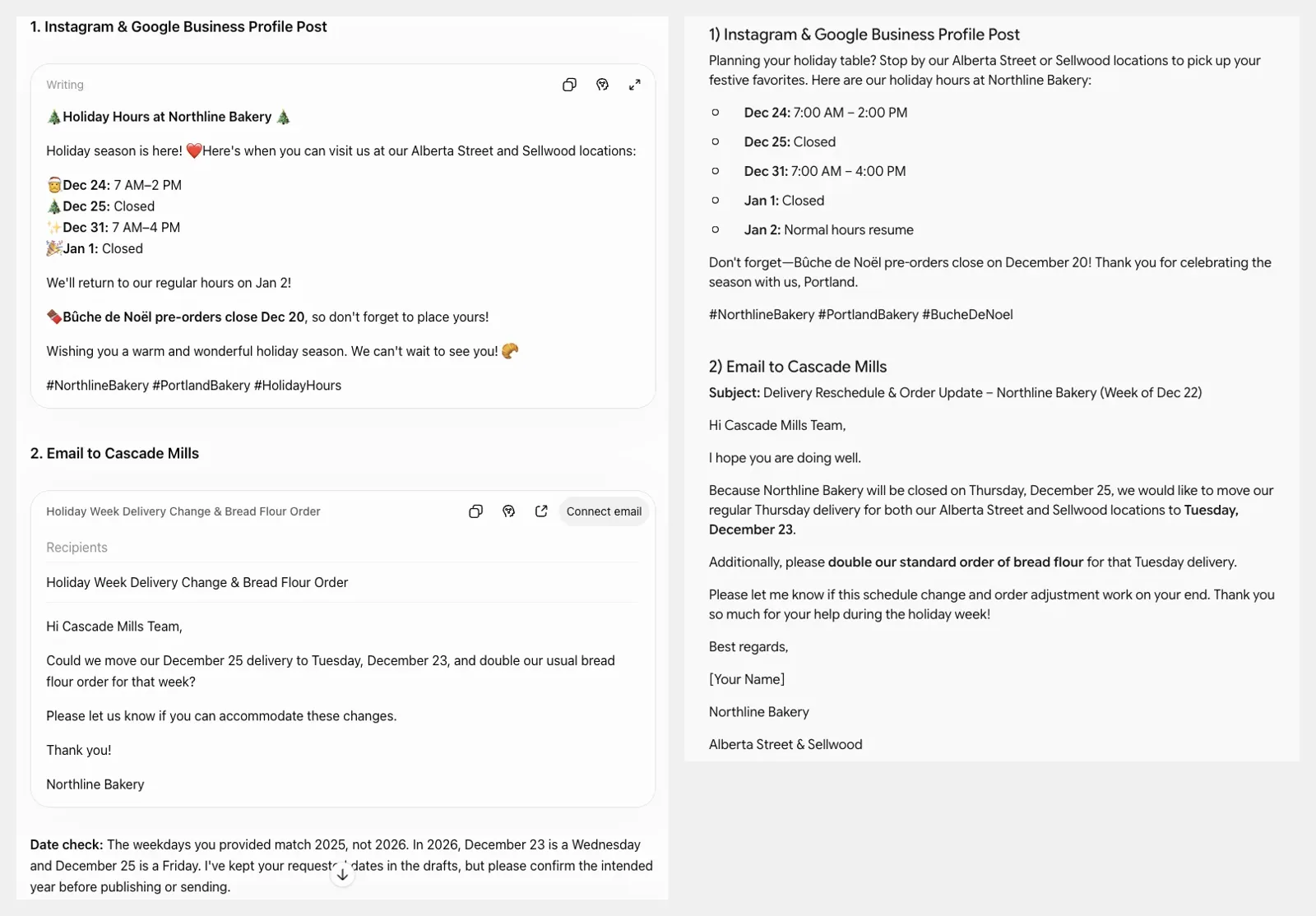
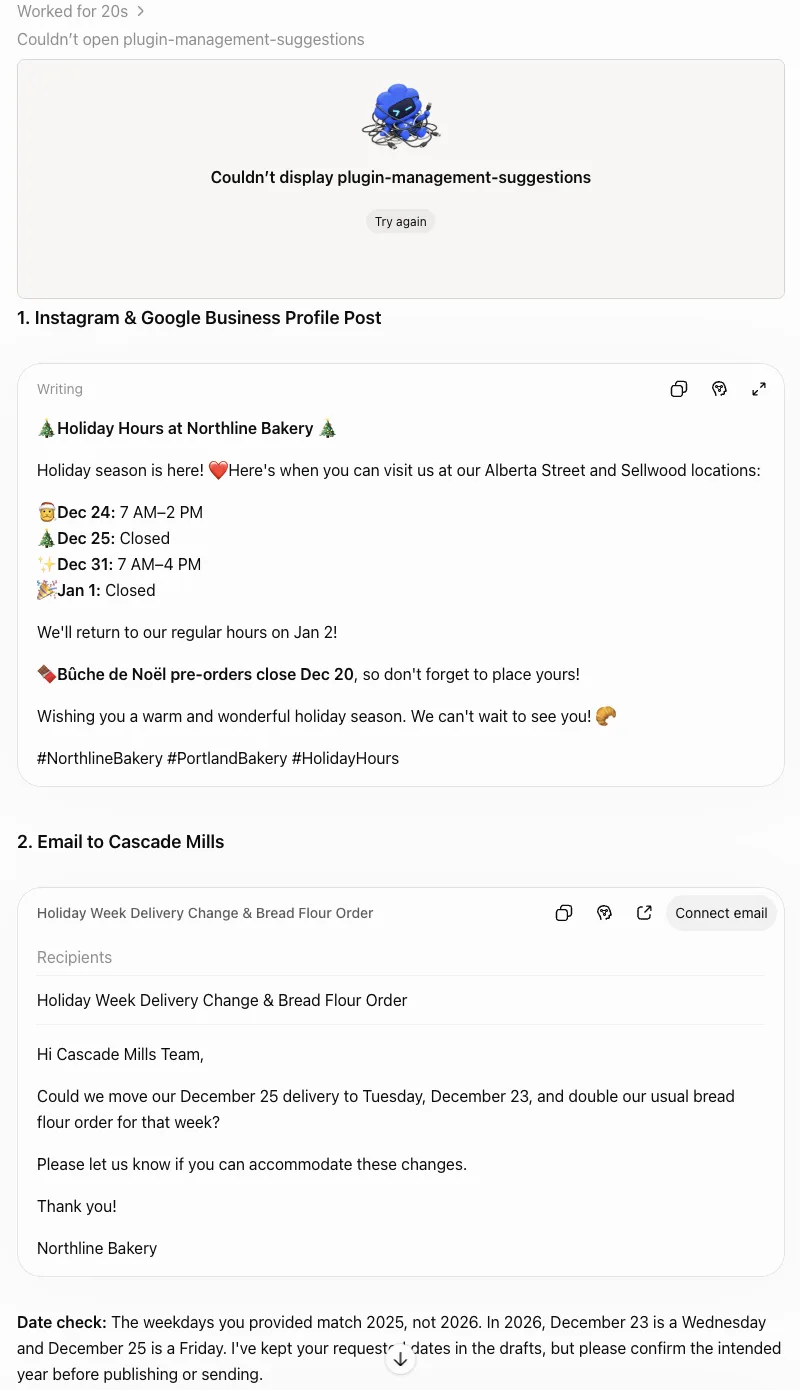
What we saw. We ran the prompt in a Temporary Chat on an existing personal account. ChatGPT showed "Worked for 20s". In our session it then showed a broken card that said "Couldn't display plugin-management-suggestions" above the answer. The answer itself was fine. The post kept every date and time we gave it, named both locations and used exactly three hashtags. It added an emoji to almost every line, which you may or may not want on a Google Business Profile. The email was four short lines with no invented facts. Below the drafts it added a "Date check": the weekdays we gave matched 2025, not 2026. It also dropped the word "Thursday" from the email, so the draft didn't repeat the error. Of the two assistants we tested, it was the only one that caught the trap.
Pricing. Free $0, Go $8 a month, Plus $20 a month, Pro from $100 a month. Business plans start at two users. Source: ChatGPT pricing, checked 19 Nov 2026.
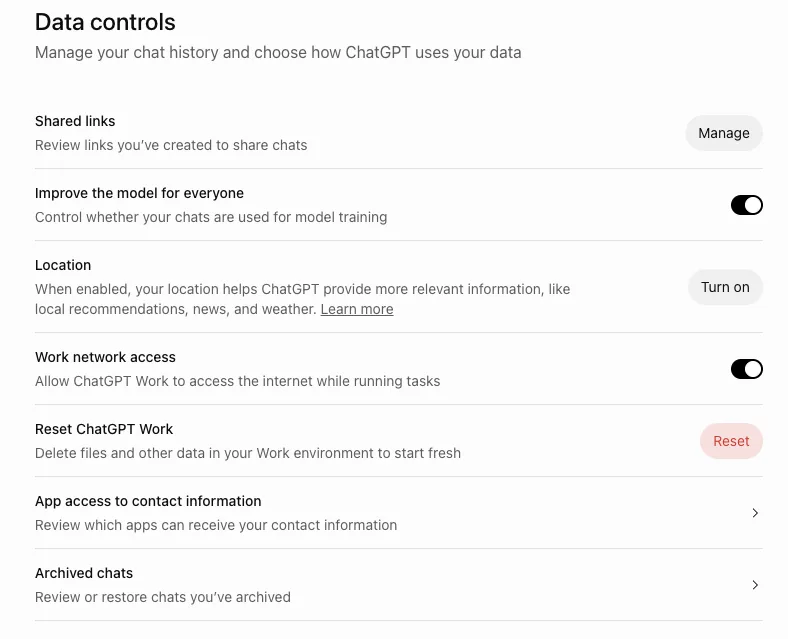
Limits. On Free, Plus and Pro personal workspaces, "Improve the model for everyone" is on by default, so your chats can be used for training until you turn it off (OpenAI data controls). OpenAI says it doesn't train on ChatGPT Business data by default (OpenAI business data).
Verdict. The better of the two results in our test, mainly because it checked our facts instead of just formatting them. Turn the training setting off before you paste anything about real customers.
Claude
What it is. Anthropic's general assistant, on the web, desktop and phone.
Who it suits. Owners who work from long inputs: a lease, a supplier contract, a 20-page grant form.
What we saw. Nothing. The Claude account signed in on our test browser belongs to an organization that Claude shows as "Organization disabled", so we couldn't send a prompt. That is a problem with our account, not with Claude. We didn't create a second account. Treat this entry as docs and pricing only.
Pricing. Free $0. Pro $17 a month billed annually ($200 a year) or $20 monthly. Max from $100 a month. Team standard seats are $20 a month billed annually or $25 monthly. Source: Claude pricing, checked 19 Nov 2026. Our test browser, which is outside the US, displayed $18 for Pro and $110 for Max, so check the price shown at your own checkout.
Limits. On Free, Pro and Max, Anthropic trains new models on your chats only when the model-training setting is on. If it's on, retention extends to five years. If it's off, the 30-day retention period continues. Team and Enterprise plans fall under commercial terms and are not covered by that setting (Anthropic consumer terms update).
Verdict. Worth trying on its free plan with the same prompt we used. We can't tell you how it handled our brief.
Gemini
What it is. Google's assistant. It's also built into Gmail, Docs and Sheets on Google Workspace plans.
Who it suits. A business that already runs email and documents on Google Workspace.
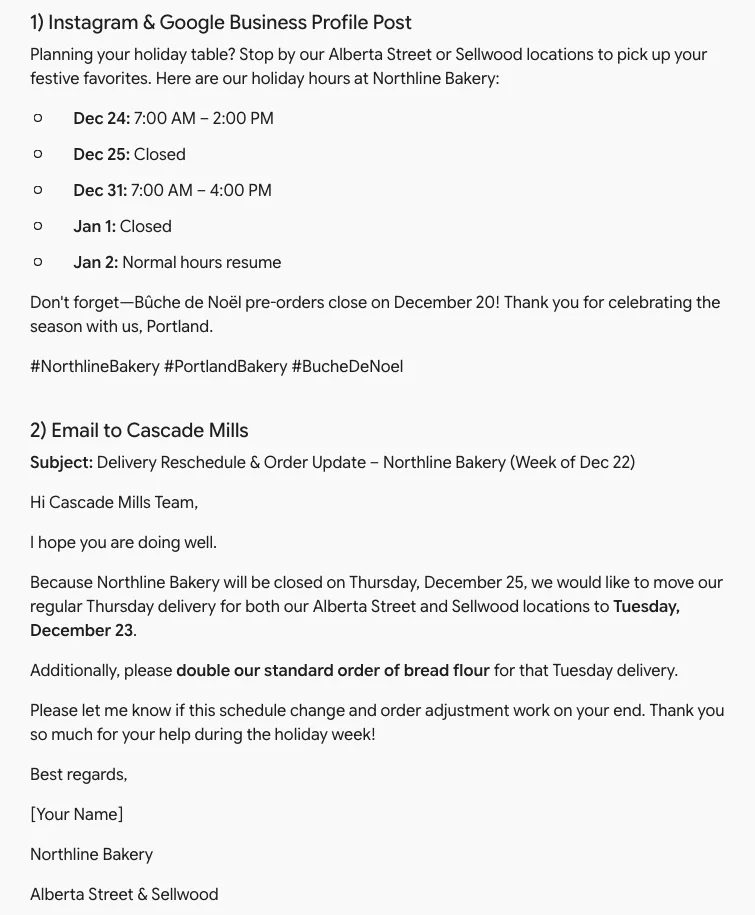
What we saw. We used an existing Workspace account in a Temporary Chat. The post was clean: no emoji, every date right, both locations named, three hashtags and well under 100 words. The email was more of a problem. It said Northline would be closed on "Thursday, December 25", repeating our weekday error. It also described the delivery as our "regular Thursday delivery for both our Alberta Street and Sellwood locations". We never said the delivery was regular or that it covered both shops, which breaks our "don't invent facts" instruction. It also left a "[Your Name]" placeholder to fill in.
Pricing. Free $0 with a Google Account. Google AI Plus $4.99 a month, Google AI Pro $19.99 a month, Google AI Ultra from $99.99 a month. Gemini with Google Workspace starts at $14 per seat per month. Source: Google AI plans, checked 19 Nov 2026.
Limits. For personal accounts, Google says human reviewers may read some chats and asks you not to enter confidential information. Chats are kept for around two months even with Gemini history off, and reviewed chats can be kept for up to three years (Gemini Apps Privacy Hub). On Workspace, Google says your content isn't used to train models outside your domain without permission (Workspace generative AI privacy hub). Our test screen showed a matching notice: chats on that work account "aren't used to improve our models".
Verdict. Good drafts in one run, and the easy choice if you're on Workspace. Read anything it writes about dates and orders before you send it.
Microsoft Copilot
What it is. Microsoft's assistant, in a free app and inside Word, Excel and Outlook on Microsoft 365 plans.
Who it suits. A business that already pays for Microsoft 365 and keeps its books and emails there.
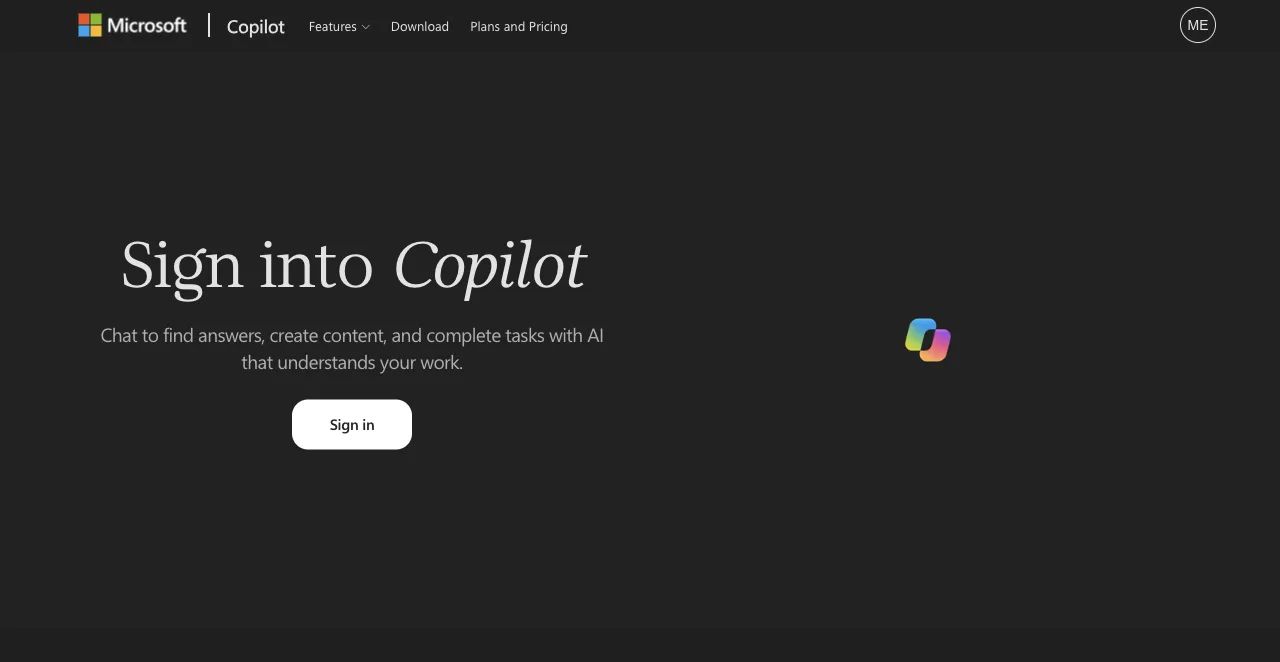
What we saw. Copilot's web app asked us to sign in before chatting. Choosing the account opened a pop-up window that our single-tab test session couldn't follow, so we couldn't finish. That is a limit of our setup, not a fault in Copilot. Not tested.
Pricing. The Copilot app has a free tier. Microsoft 365 Personal is $9.99 a month (shown at $6.99 in an offer on the day we checked), Family is $12.99 a month and Premium is $19.99 a month (Microsoft Copilot for individuals). For businesses, Microsoft 365 Business Standard with Copilot is $23.50 per user a month, paid yearly, and the Copilot Business add-on is listed at $21, offered at $18 (Microsoft 365 business plans). All checked 19 Nov 2026.
Limits. Microsoft's privacy FAQ says consumer users can opt out of model training, and that Microsoft 365 Copilot conversations under a work account are not used to train its models (Microsoft Copilot privacy FAQ). The same page notes that its model-training section applies to the older Copilot app, so check the settings in the version you use.
Verdict. Makes sense if Microsoft 365 is already your office. We can't rate its writing from this test.
Writing and marketing: Grammarly and Mailchimp
Grammarly
What it is. A writing checker that works in the browser and most apps, with AI rewriting on top.
Who it suits. Anyone who posts and emails customers and wants a second pair of eyes.
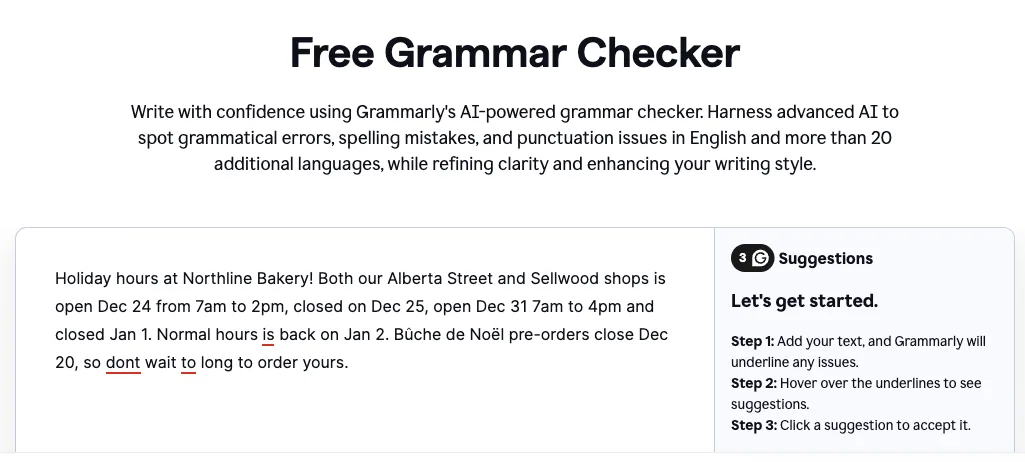
What we saw. We pasted a rough version of the holiday post into Grammarly's public free checker, with no account. We planted four mistakes: "shops is", "hours is", "dont" and "to long". It reported three suggestions within a few seconds and underlined "is" in "hours is", "dont" and "to". It missed "shops is". The free checker only shows suggestions when you hover. Full rewrites need an account.
Pricing. Free $0 with 100 AI prompts a month. Pro $12 a month with 2,000 prompts. Source: Grammarly plans, checked 19 Nov 2026. The price can depend on whether you pay monthly or yearly, so check the figure at checkout.
Limits. The public checker is a demo. The everyday value comes from the browser extension, which needs an account, and we didn't test that.
Verdict. Worth having on the free plan. Don't treat it as a full proofread: it missed one of four simple errors in our check.
Mailchimp
What it is. Email marketing with templates, automations and generative AI help for campaigns.
Who it suits. A bakery with a pre-order list or a loyalty newsletter.
What we saw. Not tested. We didn't create an account. Sending a real campaign was out of scope, and we didn't want to email anyone.
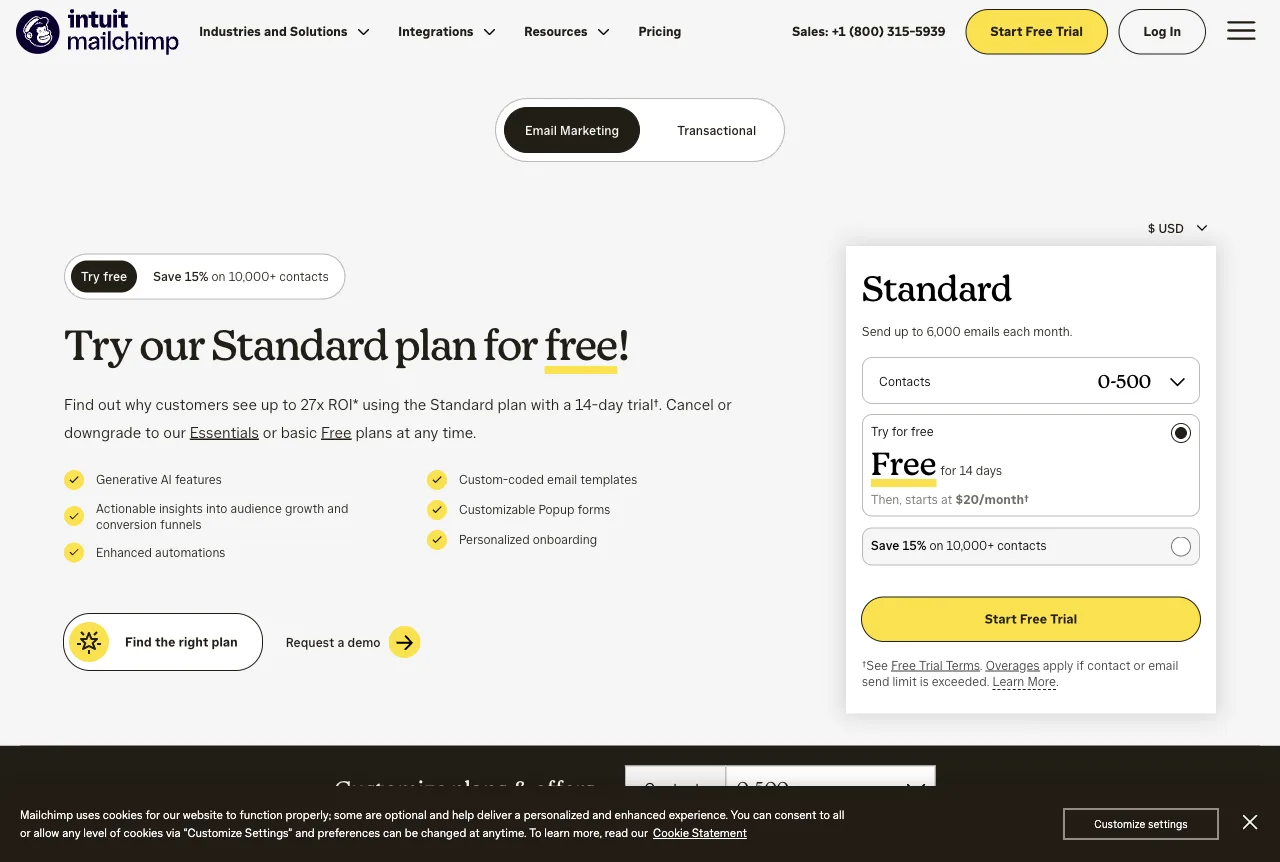
Pricing. The Free plan includes 1 seat, 1 audience of up to 250 contacts and 500 sends a month, with at most 250 a day. Paid plans are listed from $13 a month, with the next tier from $20 a month. Source: Mailchimp pricing, checked 19 Nov 2026.
Limits. Mailchimp's generative AI features, branded Intuit Assist, are in beta on certain Standard, Premium and Legacy plans, in English, in select countries (same pricing page).
Verdict. On paper, the free plan is enough to start a small list. The AI features are in beta on paid plans only, so they aren't the reason to pick it yet.
Website: Wix and PolyDraft
If you're still deciding whether a chatbot alone can make your site, read what ChatGPT can and can't do when building a website first. For the questions to ask any builder, see our guide on how to evaluate an AI website builder.
Wix
What it is. A hosted website builder with an AI setup chat, an app market and a free plan.
Who it suits. Owners who want everything hosted in one place, including bookings, menus and online orders.
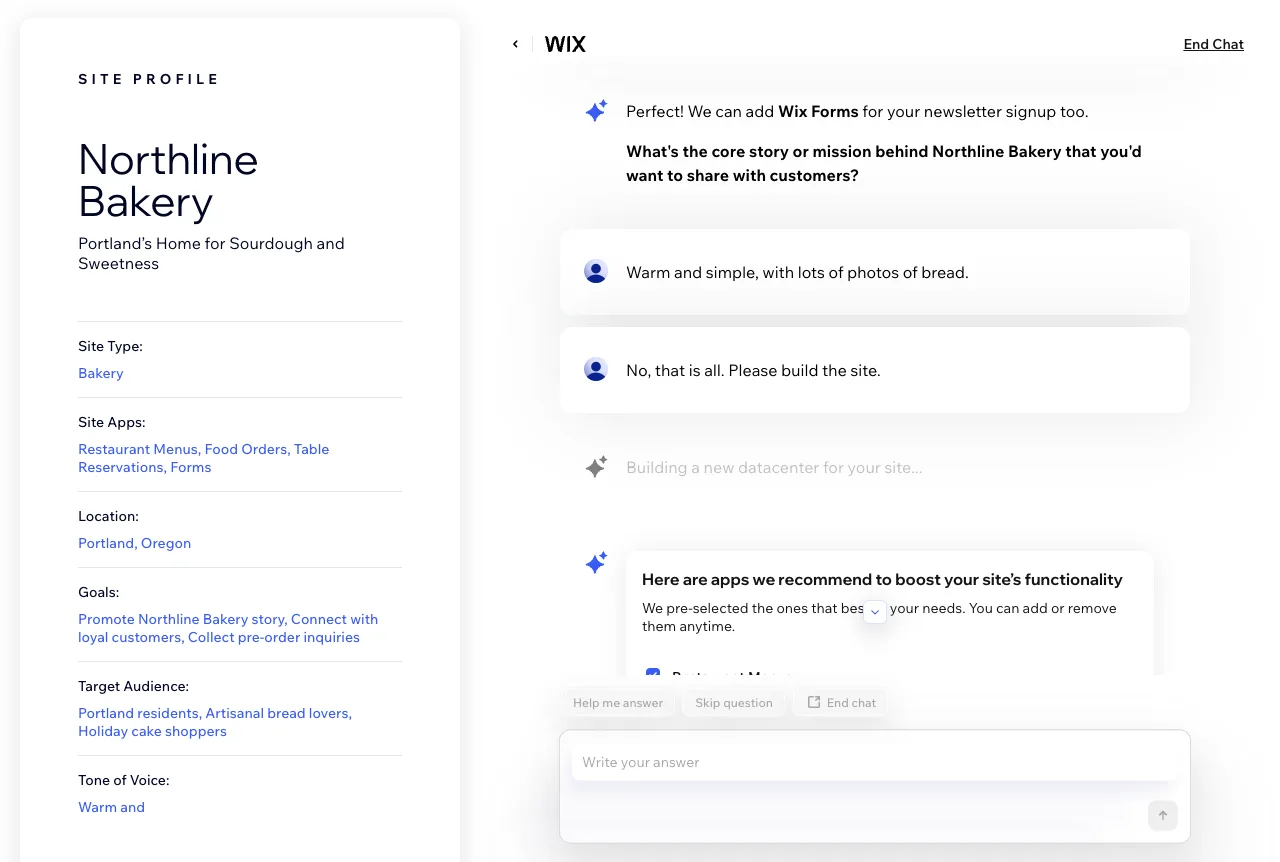
What we saw. We used a free account and started a new site with Wix's AI assistant. We gave it the same Northline brief and said we wanted "just inquiry forms" and "no online sales for now". It asked four follow-up questions, filled in a site profile on the right and updated its suggested tagline as we answered. Then it pre-selected four apps: Restaurant Menus, Food Orders, Table Reservations and Forms. Food Orders conflicts with "no online sales", and Table Reservations goes beyond "just inquiry forms". You can untick apps at that step. We accepted the defaults to see where they led.
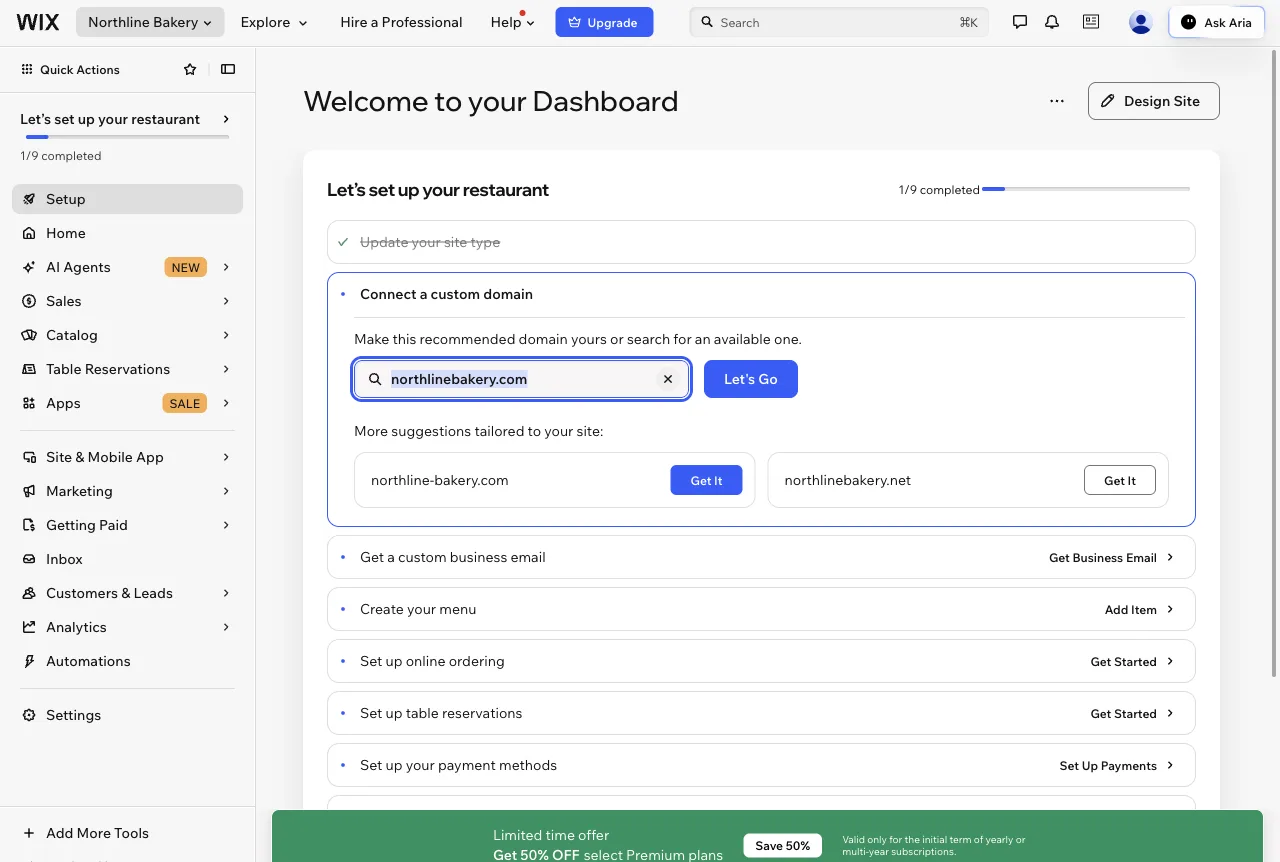
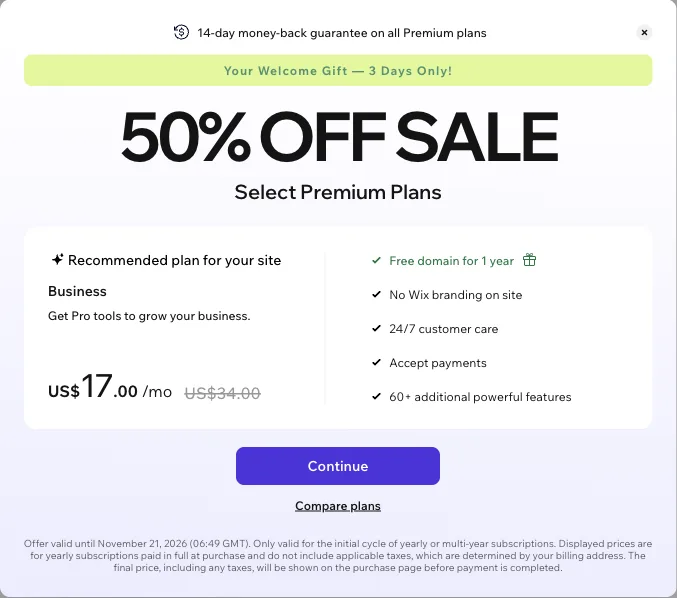
The dashboard that followed was titled "Let's set up your restaurant", with steps for online ordering and table reservations. A full-screen offer then appeared: the Business plan at US$17 a month instead of US$34, on yearly billing, for three days. The public plans page lists Business at $39 a month, so the "regular" price can differ between screens. We stopped at the dashboard and didn't open the editor or publish, so we can't comment on the finished site.
Pricing. Free $0. Light $17, Core $29, Business $39 and Business Elite $159 a month, on yearly subscriptions. Wix says prices and currency vary by location. Source: Wix plans, checked 19 Nov 2026.
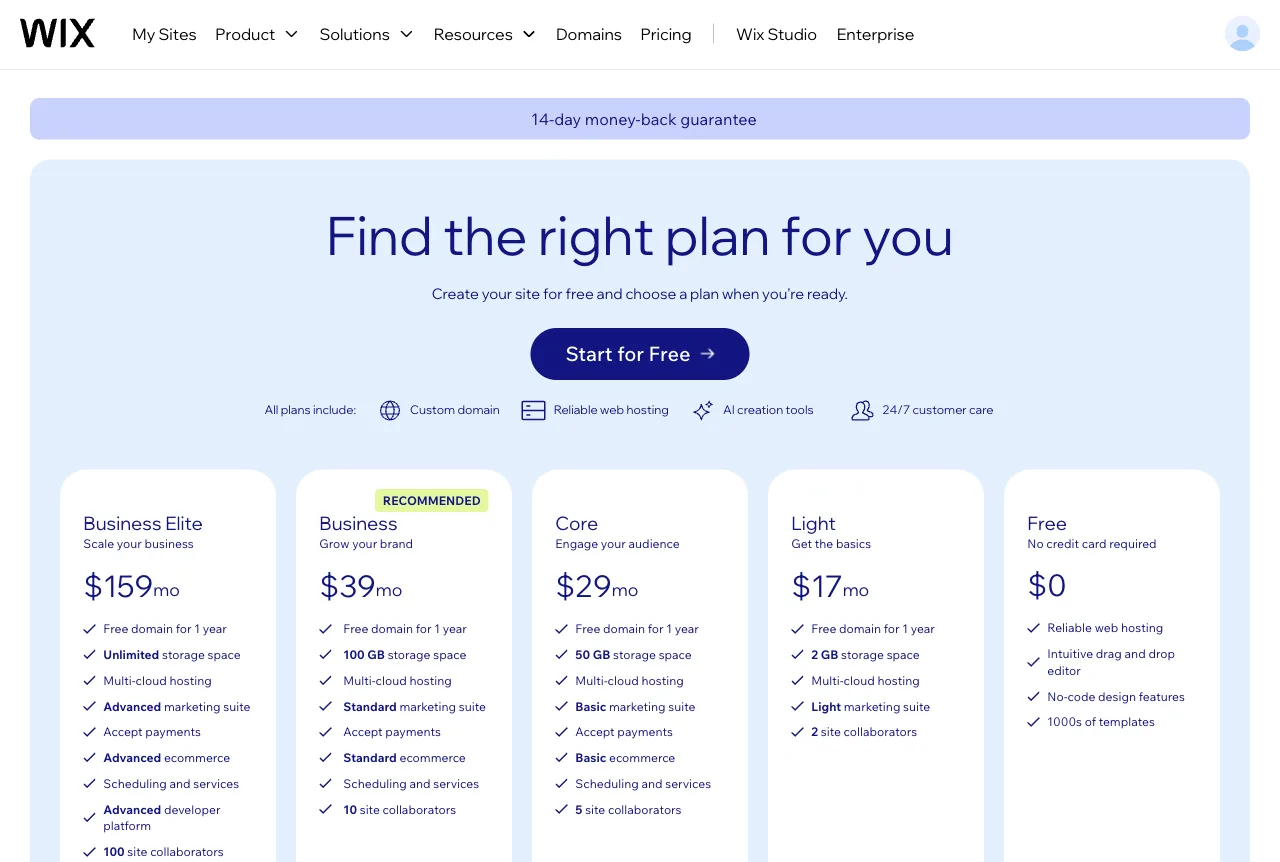
Limits. The free plan keeps Wix branding and a Wix address. The site stays hosted on Wix. In our run, the assistant's app picks didn't match what we had asked for, so review them before you continue.
Verdict. Fast to get started, with a lot of business apps ready. Check what the assistant switched on before you go live. Already on Wix and thinking of leaving? See our Wix alternatives guide.
PolyDraft (our product)
What it is. PolyDraft is our AI website builder. You describe your business or paste your current site's address. It researches your market, writes the pages and builds a site you can preview. You then publish it to a cloud account in your own name (PolyDraft for small business).
Who it suits. A small business that wants researched copy and a site it owns, and doesn't need an online store.
What we saw. We didn't put PolyDraft through the test or score it. Judging our own product on a list we wrote wouldn't be a fair comparison. Here is what our public pages say. Building and previewing are free. The site ships with an admin panel that includes a blog, an inquiry inbox and an image library. Structured data, a sitemap, an llms.txt file and an AI-crawler-friendly robots.txt ship by default.
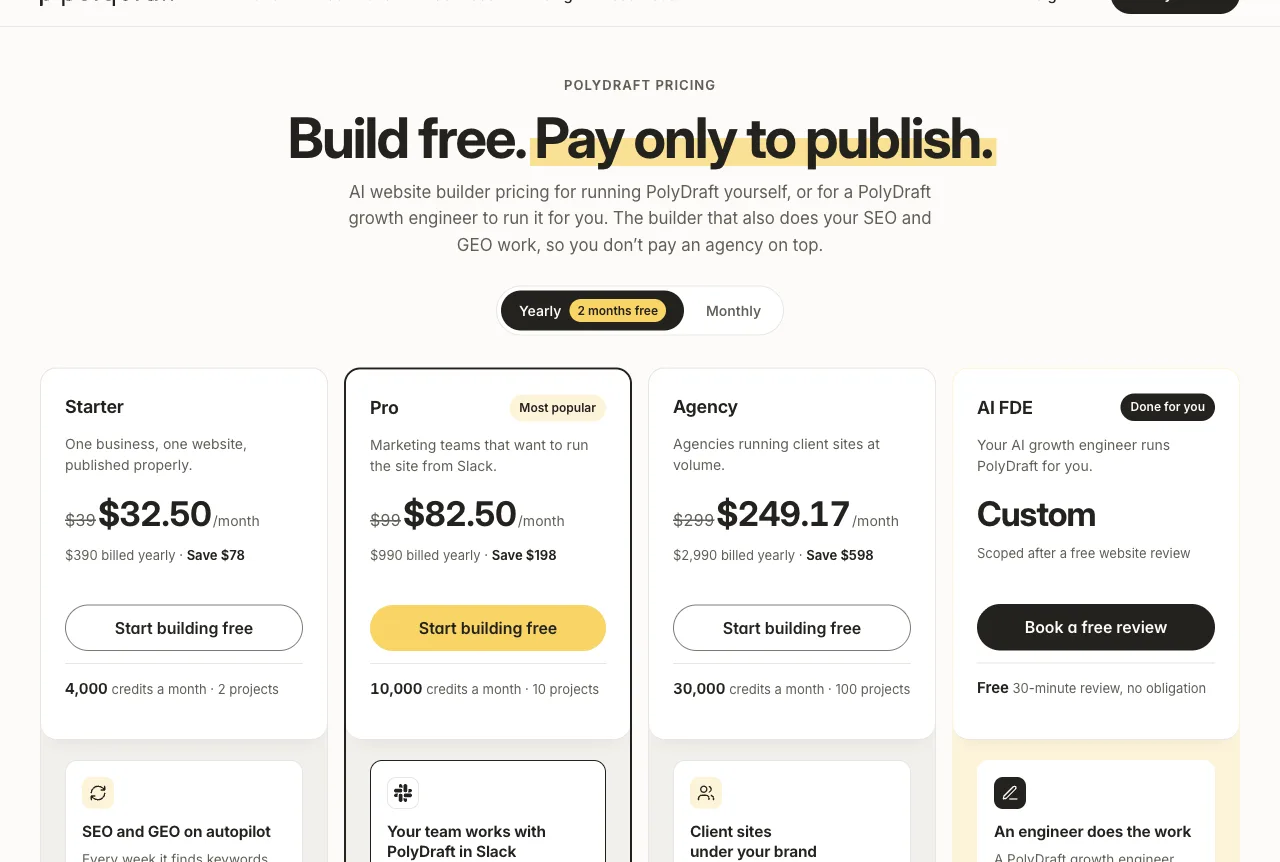
Pricing. Free to build and preview. Starter is $39 a month or $390 a year, and Pro is $99 a month or $990 a year. New accounts get 500 welcome credits (PolyDraft for small business). Access is currently invite-based (PolyDraft pricing). Checked 19 Nov 2026.
Limits. There's no online store and no built-in booking. Publishing needs a paid plan, and access is invite-based for now. You'll also need your own cloud and domain accounts, and those can carry their own costs.
Verdict. A fit if you want the copy researched for you and the site in your own account. If you sell online or need bookings built in, Wix is the better match. We compare the two in PolyDraft vs Wix.
Customer support and chat: Tidio
Tidio
What it is. A website chat and help desk with Lyro, an AI agent that answers repetitive questions.
Who it suits. A bakery that gets the same five questions every day: hours, gluten-free options, cake lead times.
What we saw. Not tested. We didn't create an account.
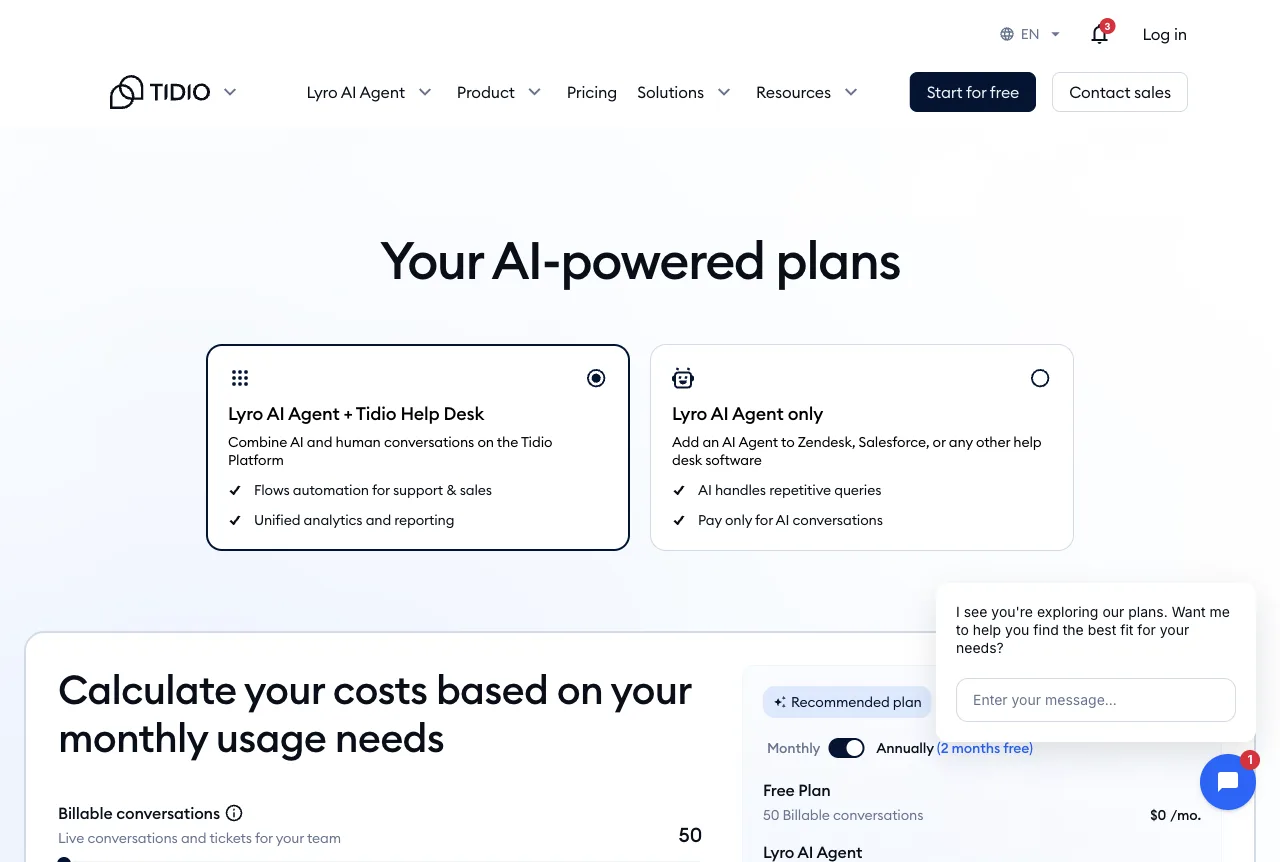
Pricing. Free $0 with 50 billable conversations a month. As listed on the pricing page: Starter $24.17 a month, Growth from $49.17 a month and Plus from $300 a month, with usage on top. Lyro is sold with the help desk or on its own, and Tidio offers a free Lyro trial. Source: Tidio pricing, checked 19 Nov 2026. These figures can depend on whether you pay monthly or yearly, so check the total at checkout.
Limits. AI conversations are counted and billed separately as you grow, so price the plan against your real chat volume.
Verdict. A sensible first chat tool on paper. Give the AI agent only answers you've written and checked.
Bookkeeping: QuickBooks and Wave
QuickBooks
What it is. Intuit's accounting software. Its AI layer, Intuit Intelligence, categorizes expenses and answers questions about your books.
Who it suits. A business with an accountant who already uses QuickBooks.
What we saw. Not tested. Every plan, including the free one, needs an Intuit account, and we didn't create one.
Pricing. QuickBooks Free is $0 with no card required and up to 2 invoices a month (QuickBooks Free). Simple Start lists at $38 a month, Essentials at $85, Plus at $140 and Advanced at $340, with an introductory discount shown on the day we checked (QuickBooks pricing). Checked 19 Nov 2026.
Limits. Intuit's own page warns that Intuit Intelligence can make mistakes. Our advice: have your accountant review AI categorizations at least once a quarter.
Verdict. The default if your accountant asks for it. Start on Free only if you send very few invoices.
Wave
What it is. Free invoicing and accounting for very small businesses. We list it as the $0 baseline, not for AI features.
Who it suits. A one- or two-person business that invoices a few catering clients.
What we saw. Not tested. We didn't create an account.
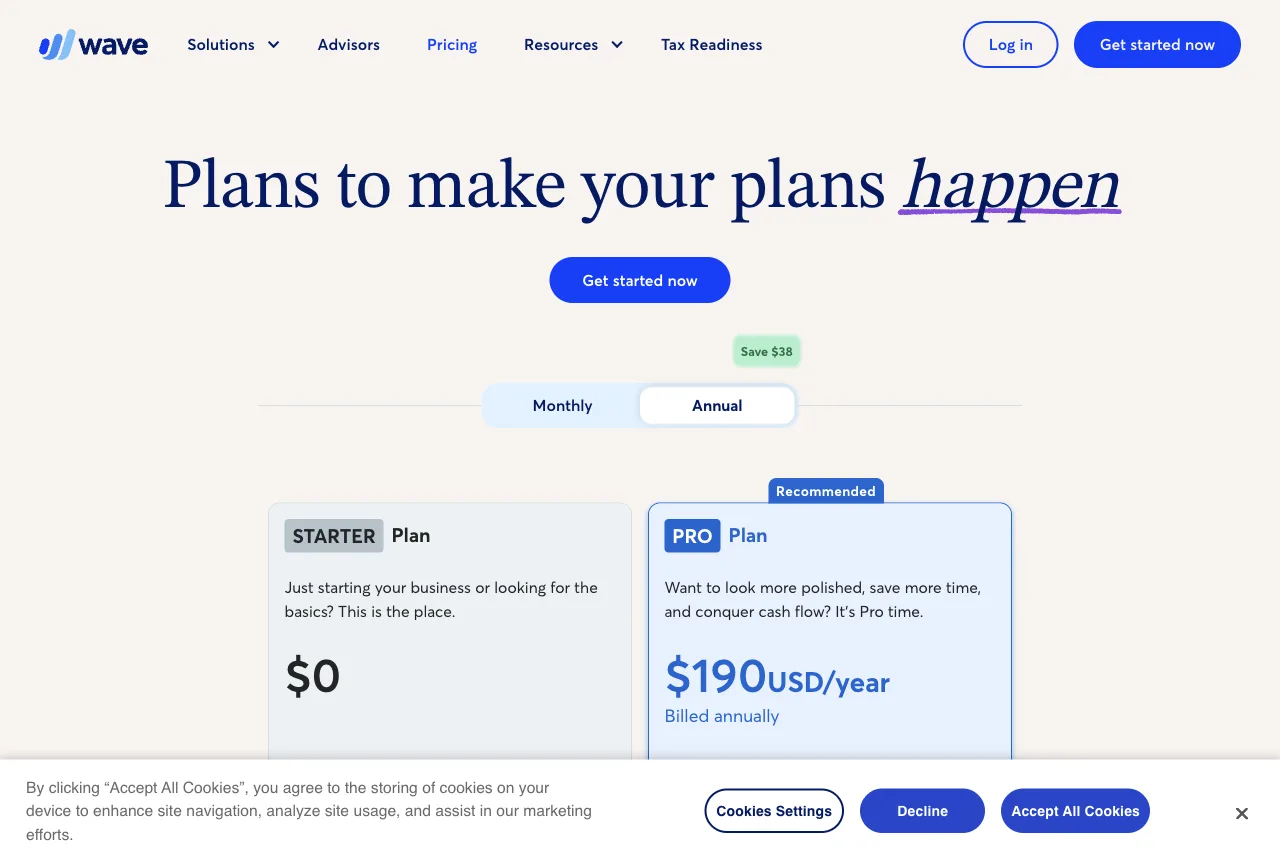
Pricing. Starter $0. Pro $19 a month or $190 a year. Online card payments cost 2.9% + $0.60 per transaction on Starter. Source: Wave pricing, checked 19 Nov 2026.
Limits. Card fees apply to every online payment, so compare them with your current card reader.
Verdict. The cheapest way on this list to get invoices out. Move to QuickBooks when an accountant asks for it.
Meetings and notes: Otter
Otter
What it is. An AI notetaker that records and transcribes meetings and writes summaries.
Who it suits. An owner who agrees prices and delivery changes on calls and forgets the details.
What we saw. Not tested. A fair test needs a real recorded call, and we didn't record anyone.
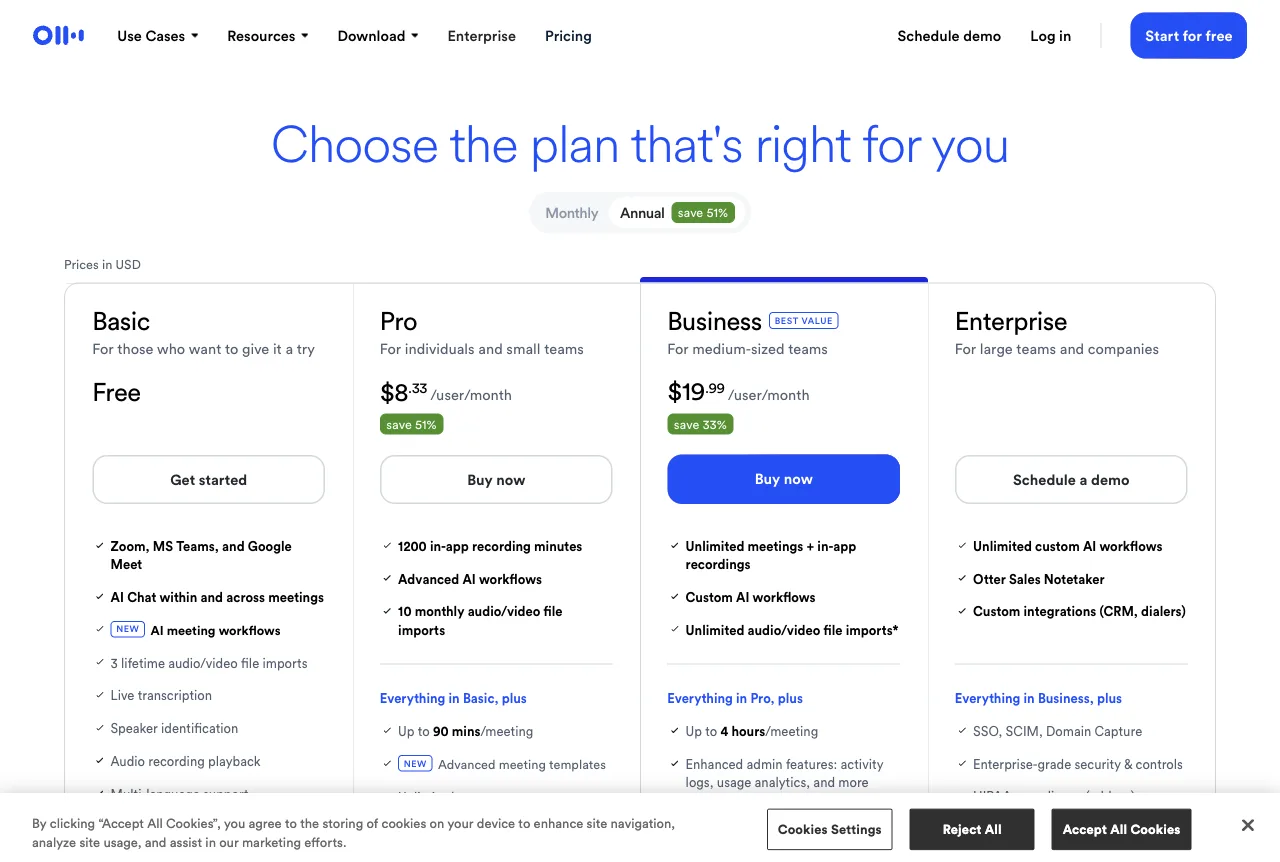
Pricing. Basic is free, with 300 transcription minutes a month, 30 minutes per conversation and 3 lifetime file imports. Pro is $8.33 per user a month billed annually ($16.99 monthly). Business is $19.99 per user a month billed annually ($30 monthly). Source: Otter pricing, checked 19 Nov 2026.
Limits. Tell people you're recording. The 30-minute cap on Basic cuts off longer supplier calls.
Verdict. Worth a look if you hold regular calls. Otherwise skip it.
Design: Canva
Canva
What it is. A design tool for social posts, menus and flyers, with AI features such as Magic Write and Magic Layers.
Who it suits. Anyone who makes their own promo graphics.
What we saw. Not tested. Canva's login asked us to accept its terms, then opened Google sign-in in a pop-up that our single-tab test session couldn't follow. Our test task, a holiday-hours promo graphic, couldn't be run.
Pricing. Free US$0. Pro US$144 a year for one person. Business US$250 a year per person. Many of its AI tools draw from a shared monthly AI allowance that varies by plan. Source: Canva pricing, checked 19 Nov 2026. Our browser showed prices in another currency, so we read the US figures from the US page.
Limits. The free plan has limited access to the AI tools that use the allowance.
Verdict. A common starting point for small-business graphics. Start on Free and upgrade only if you run out of AI allowance.
Scheduling: Calendly
Calendly
What it is. Booking links that check your calendar. It now offers Notetaker and Callie, an AI assistant that schedules over email, as add-ons.
Who it suits. A bakery that books wedding-cake tastings or catering calls.
What we saw. Not tested. "Continue with Google" opened a pop-up that our single-tab test session couldn't follow.
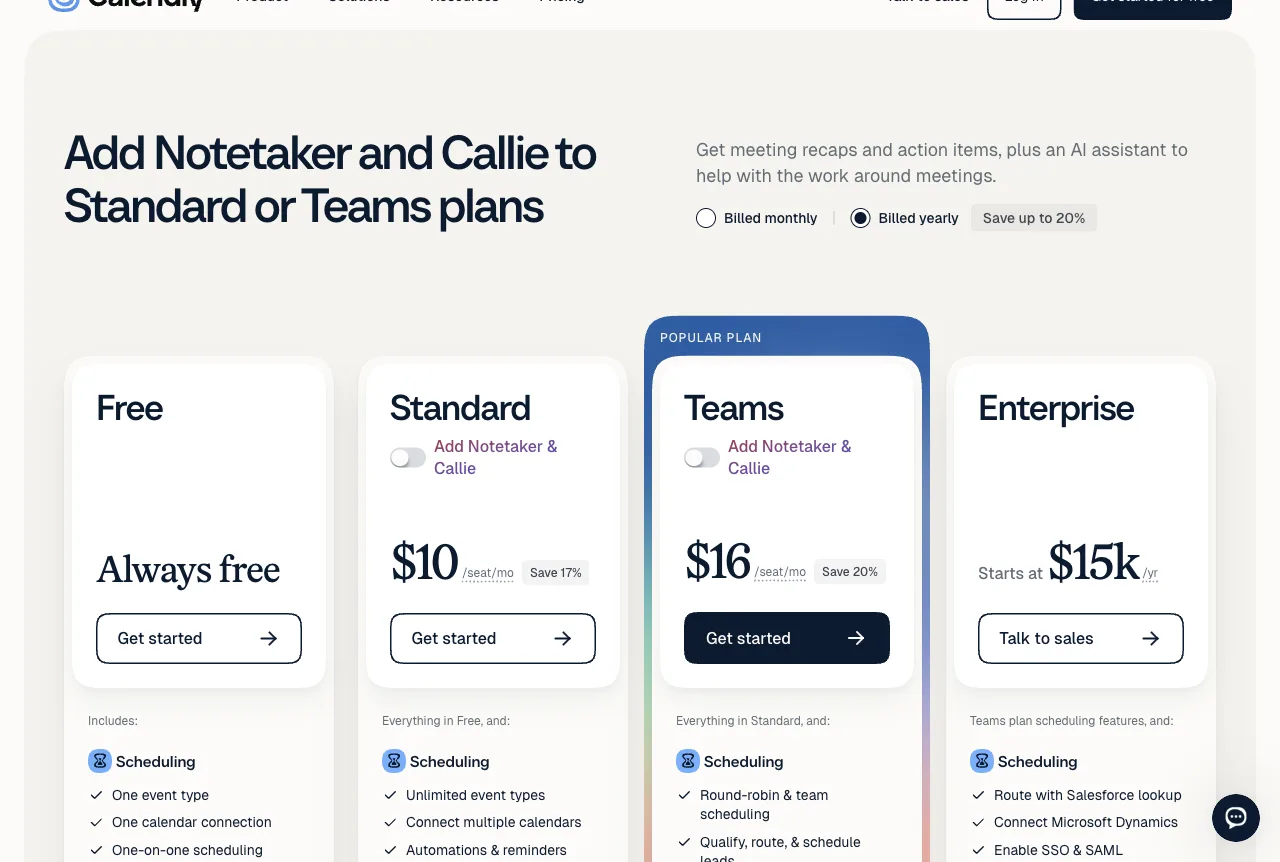
Pricing. Free with one event type. Standard $10 and Teams $16 per seat a month, billed yearly. With the Notetaker and Callie add-ons, the plans are listed at $18 (Standard Plus) and $24 (Teams Plus) per seat a month. Source: Calendly pricing, checked 19 Nov 2026.
Limits. The free plan's single event type means one booking link, for example "Cake consultation".
Verdict. The free plan covers one kind of booking. Pay only when you need a second.
Start-here stack by budget
These are our recommendations, not vendor bundles. Figures use the prices above. Canva, Wix and Otter use the monthly equivalent of yearly billing. ChatGPT, Wave and PolyDraft use the monthly price, and Tidio uses the listed figure.
| Budget | Stack | Monthly cost |
|---|---|---|
| $0 | ChatGPT Free or Gemini free, Grammarly Free, Canva Free, Calendly Free, Wave Starter, Mailchimp Free, Wix Free | $0 plus card fees |
| About $50 a month | ChatGPT Plus ($20), Canva Pro ($12 a month on the yearly plan), Wave Pro ($19), plus the free tools above | About $51 |
| About $110 to $125 a month | The $50 stack plus a website plan (Wix Core at $29 or PolyDraft Starter at $39), Tidio Starter ($24.17) and Otter Pro ($8.33) | About $113 to $123 |
The $0 row shows how far free AI tools for small business can go: every job on this page except a published site without vendor branding.
How to use it: write down the three tasks that eat your week, map each to a row in the table at the top, and only pay for the tool that solves one of them. If two tools do the same job, keep the one you opened most last month. If getting found in search is one of those tasks, our list of the best SEO tools for small business starts with the free ones.
To compare the website line with hiring a designer, our website cost calculator lets you plug in your own quotes.
Privacy settings to check before you paste business data
Supplier prices, customer names and staff issues are the kinds of things an owner is tempted to paste into an assistant. Check these settings first.
| Assistant | Personal plan default | Where to change it | Business plan |
|---|---|---|---|
| ChatGPT | Chats can train models | Settings, Data controls, "Improve the model for everyone" | Business data not used for training by default |
| Claude | Training only if the setting is on; 5-year retention if on | The model-training setting in your Claude account | Team and Enterprise under commercial terms |
| Gemini | Human review possible; chats kept about 2 months even with history off | Gemini History in My Activity | Workspace content not used to train models outside your domain without permission |
| Copilot | Opt-out available | Copilot privacy controls | Microsoft 365 Copilot under a work account not used for training |
Sources for each row are linked in the assistant sections above.
How we tested
- Dates. Assistant tests ran on 18 November 2026. The Grammarly, Wix and sign-in checks, plus every price, ran on 19 November 2026.
- Test task. One fictional business, Northline Bakery, with two shops in Portland. ChatGPT and Gemini got the holiday-hours post and supplier email prompt shown above, one run each. Grammarly got a flawed draft of the same post. Wix got the same brief as a website request. The planned Canva task was a holiday-hours promo graphic.
- How the tests were run. Tests were run with an AI browsing agent in a session limited to a single browser tab. It couldn't complete sign-ins that open a separate pop-up window.
- Accounts. ChatGPT and Gemini used existing accounts in Temporary Chat. Grammarly used the public checker with no account. Wix used a free account signed in with Google. We didn't pay for anything, enter a card or start a trial. We didn't record which model version each session used.
- Criteria. Did it follow the instructions? Did it invent facts? Did it catch the date error? How many steps to the first useful result? What was paywalled?
- What we tested: 4 of 14. ChatGPT, Gemini, Grammarly's public checker and Wix's AI setup flow.
- What we didn't test: 10 of 14. Claude was blocked by a disabled organization on our account. Copilot, Canva and Calendly were blocked by sign-in pop-ups. We didn't create accounts for Mailchimp, Tidio, QuickBooks, Wave or Otter. We didn't publish a Wix site, send any email or record anyone. For these tools, everything we say comes from the vendor pages in the Sources list.
- Our position. We make PolyDraft. We listed it in the website section only, not first overall, and didn't score it. Every claim about it comes from our public pages. No vendor paid for placement, and we have no affiliate links.
This article was drafted with AI assistance and checked by our team under our editorial policy.
Frequently asked questions
What is the best AI for a small business?
For most small businesses, it's the general assistant that fits the tools you already use: ChatGPT if you have no preference, Gemini on Google Workspace, Copilot on Microsoft 365. Try two free tiers on the same real task, like the one above, and keep the one that gets your facts right.
Are free AI tools enough for a small business?
Often, yes. Every job-specific tool here has a free plan, except PolyDraft, which is free to build and preview but needs a plan to publish. Our suggestion is to pay first for one assistant at about $20 a month, then upgrade a single tool when a limit hits every week, such as Calendly's one event type or Otter's 30-minute cap.
Is it safe to put customer information into ChatGPT or Gemini?
Not by default on personal plans. Turn off model training where you can, and avoid pasting customer names, card details or staff matters. OpenAI says it doesn't train on ChatGPT Business data by default. Google says Workspace content isn't used to train models outside your domain without permission. Microsoft says Microsoft 365 Copilot chats under a work account aren't used for training. Anthropic's consumer training setting doesn't apply to its Team and Enterprise plans. Read the vendor page for the plan you actually buy.
Can AI build my small business website?
Yes, with limits. Wix's AI chat set up a site and dashboard from our brief, though it pre-selected apps we didn't ask for. PolyDraft, our product, builds a researched site you publish to your own cloud account. We didn't score it here. Our guide on how to evaluate an AI website builder lists the questions to ask before you commit.
Will Google penalize a small business site for using AI-written content?
Google's guidance says using AI to write content is not against its rules, as long as the content is helpful and not mass-produced to manipulate rankings (Google Search Central on AI-generated content). That part is Google's rule. Our advice on top of it: draft posts and pages with AI if you like, and check every fact before you publish, as the date error in our test shows.
Which AI tool should I buy first?
A general assistant. It covers posts, emails, menus, job ads and replies, so one subscription helps with more of your week than any single specialist tool.
Sources
- ChatGPT pricing: https://chatgpt.com/pricing/
- OpenAI, Data controls in ChatGPT: https://help.openai.com/en/articles/7730893-data-controls-faq
- OpenAI, Business data privacy: https://openai.com/business-data/
- Claude pricing: https://claude.com/pricing
- Anthropic, Updates to consumer terms: https://www.anthropic.com/news/updates-to-our-consumer-terms
- Google AI plans: https://gemini.google/subscriptions/
- Gemini Apps Privacy Hub: https://support.google.com/gemini/answer/13594961?hl=en
- Google Workspace generative AI privacy hub: https://knowledge.workspace.google.com/admin/generative-ai/generative-ai-in-google-workspace-privacy-hub?hl=en
- Microsoft Copilot for individuals: https://www.microsoft.com/en-us/microsoft-copilot/for-individuals
- Microsoft 365 business plans: https://www.microsoft.com/en-us/microsoft-365/business/microsoft-365-plans-and-pricing
- Microsoft Copilot privacy FAQ: https://support.microsoft.com/en-us/topic/privacy-faq-for-microsoft-copilot-27b3a435-8dc9-4b55-9a4b-58eeb9647a7f
- Grammarly plans: https://www.grammarly.com/plans
- Mailchimp pricing: https://mailchimp.com/pricing/marketing/
- Wix plans: https://www.wix.com/plans
- PolyDraft for small business: https://polydraft.ai/for-small-business
- PolyDraft pricing: https://polydraft.ai/pricing
- Tidio pricing: https://www.tidio.com/pricing/
- QuickBooks Free: https://quickbooks.intuit.com/oa/online/free/
- QuickBooks pricing: https://quickbooks.intuit.com/pricing/
- Wave pricing: https://www.waveapps.com/pricing
- Otter pricing: https://otter.ai/pricing
- Canva pricing: https://www.canva.com/pricing/
- Calendly pricing: https://calendly.com/pricing
- Google Search Central, Google Search's guidance about AI-generated content: https://developers.google.com/search/blog/2023/02/google-search-and-ai-content
All checked 19 November 2026.