Wix Alternatives: 10 Options Compared by Why People Leave Wix
Ten Wix alternatives compared on export, price and SEO control. Two built our full test brief, three were tried in part. Prices checked November 19, 2026.
The best Wix alternative depends on why you are leaving. This guide compares 10 Wix alternatives by that reason. For content you can export later, look at WordPress.com, or Webflow on a Workspace plan. For more design control, look at Framer or Webflow. To sell products, pick Shopify. To pay less, Carrd, Hostinger and Google Sites cost less than Wix. For a quick AI-built small business site, Durable produced a first draft fastest in our test. For a multilingual business site that runs on your own Cloudflare account, consider PolyDraft, which is our product. Whichever you choose, plan the exit first. Wix says a Wix site can't be hosted anywhere else, and its help center says blog posts currently can't be exported to other platforms. Leaving Wix means rebuilding, not transferring.
In brief
- This guide is for owners of small business, portfolio and marketing sites who are deciding whether to leave Wix and where to go. It does not cover moving a large Wix store or a site built on Wix bookings and apps, where staying is often cheaper.
- We opened free accounts on five builders. Two of them, Framer and Durable, built our full bakery home page brief with AI. On WordPress.com, Carrd and Google Sites we only got as far as setup or the editor. Four more builders are covered from their own pricing and help pages, and PolyDraft is our own product. Each entry says which is which.
- Leaving Wix does not fix SEO by itself. Wix already handles the basics. The real reasons to move are portability, speed, cost and how much control you need.
What counts as a Wix alternative? Any website builder or platform you could rebuild a Wix site on. Some are sites like Wix that keep the hosted all-in-one model, such as Squarespace and Hostinger. Others give that up for exportable content (WordPress.com), design control (Framer, Webflow), selling (Shopify) or a lower price (Carrd, Google Sites).
Wix alternatives at a glance
Prices are the lowest paid plan each vendor's page showed us on November 19, 2026, in US dollars unless noted. Shopify served us prices in Korean won that day, so prices can vary by region. Confirm them from your own location, and check whether a price is billed monthly or yearly. Promotional prices change often, so check again before you budget.
| Option | Best for | Lowest paid plan (checked 19 Nov 2026) | Free plan | Key limit | How we evaluated it |
|---|---|---|---|---|---|
| Wix (for reference) | All-in-one sites with stores, bookings and apps | Light $17/month | Yes | Site can't be exported or hosted elsewhere | Not tested: docs and pricing only |
| WordPress.com | Owning your content and being able to move it | Personal $4/month billed yearly ($9 monthly) | Yes, with ads | Free sites show WordPress.com ads | Partial hands-on: free account, setup only, no page built |
| Squarespace | A polished all-in-one swap | Basic $19/month billed annually ($25 monthly) | No; 14-day trial | No free plan | Not tested: pricing page only |
| Webflow | Designers who want precise control and code export | Basic $15/month billed yearly | Yes, 2 static pages | Code export needs a Workspace plan and leaves out the CMS | Not tested: docs and pricing only |
| Framer | Design-led marketing sites built with an AI agent | Basic $10/month | Yes, non-commercial | Custom domain needs a paid plan | Hands-on: full test brief built on a free account |
| Shopify | Selling products | Basic $29/month billed yearly (US page, 18 Nov) | No; 3-day trial | Built for stores, not brochure sites | Not tested: pricing page only |
| Hostinger Website Builder | The lowest advertised price | $1.99/month on a 48-month prepaid term (Black Friday promotion) | No; 14-day trial | Renews at $10.99/month | Not tested: pricing page only |
| Durable | A fast AI-built small business site | Launch $22/month billed yearly ($25 monthly) | Yes, preview only | Little HTML control | Hands-on: full test brief built on a free account |
| Carrd | One-page sites on a tiny budget | Pro from $19/year | Yes | One page per site | Partial hands-on: free account, editor only |
| Google Sites | Free, simple pages for a team or event | Free | Yes | Few design and SEO settings seen in the editor | Partial hands-on: blank site only |
| PolyDraft (our product) | Multilingual business sites on your own Cloudflare account, with content drafted for review after launch | Starter $39/month ($390 billed yearly) | No; build and preview free, pay to publish | No store; invite-based access; source export on the $299 Agency plan only | Our product. Not tested in this article |
Why people leave Wix
Wix is a capable builder. In our test of 46 live sites on 10 website builders, all five Wix home pages had a title, a description, a canonical tag, one H1, a robots.txt file and a sitemap. If your Wix site is small and those checks pass, our Wix SEO guide explains what you can still change without moving. People who do leave usually have one of four reasons.
1. You can't take the site with you
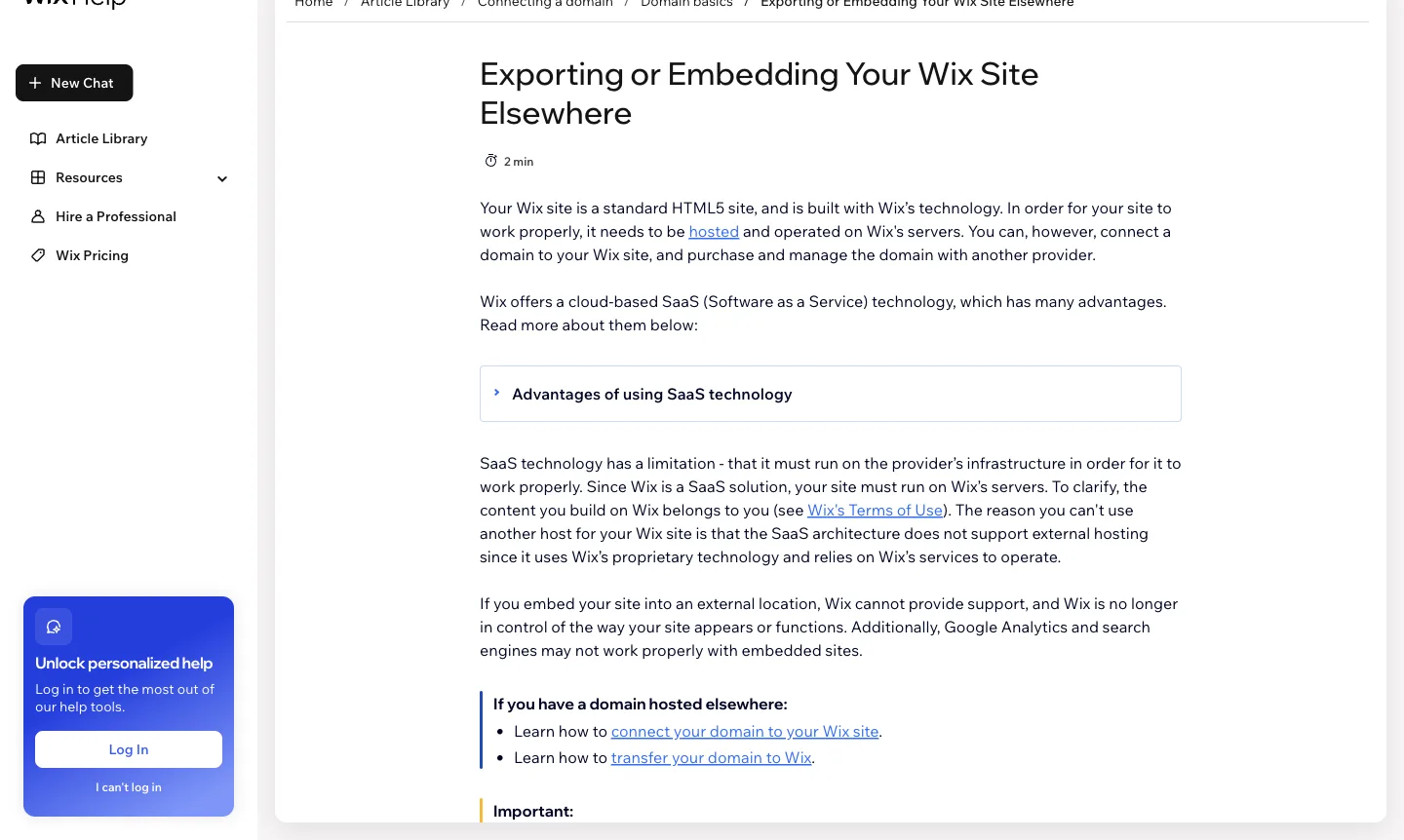
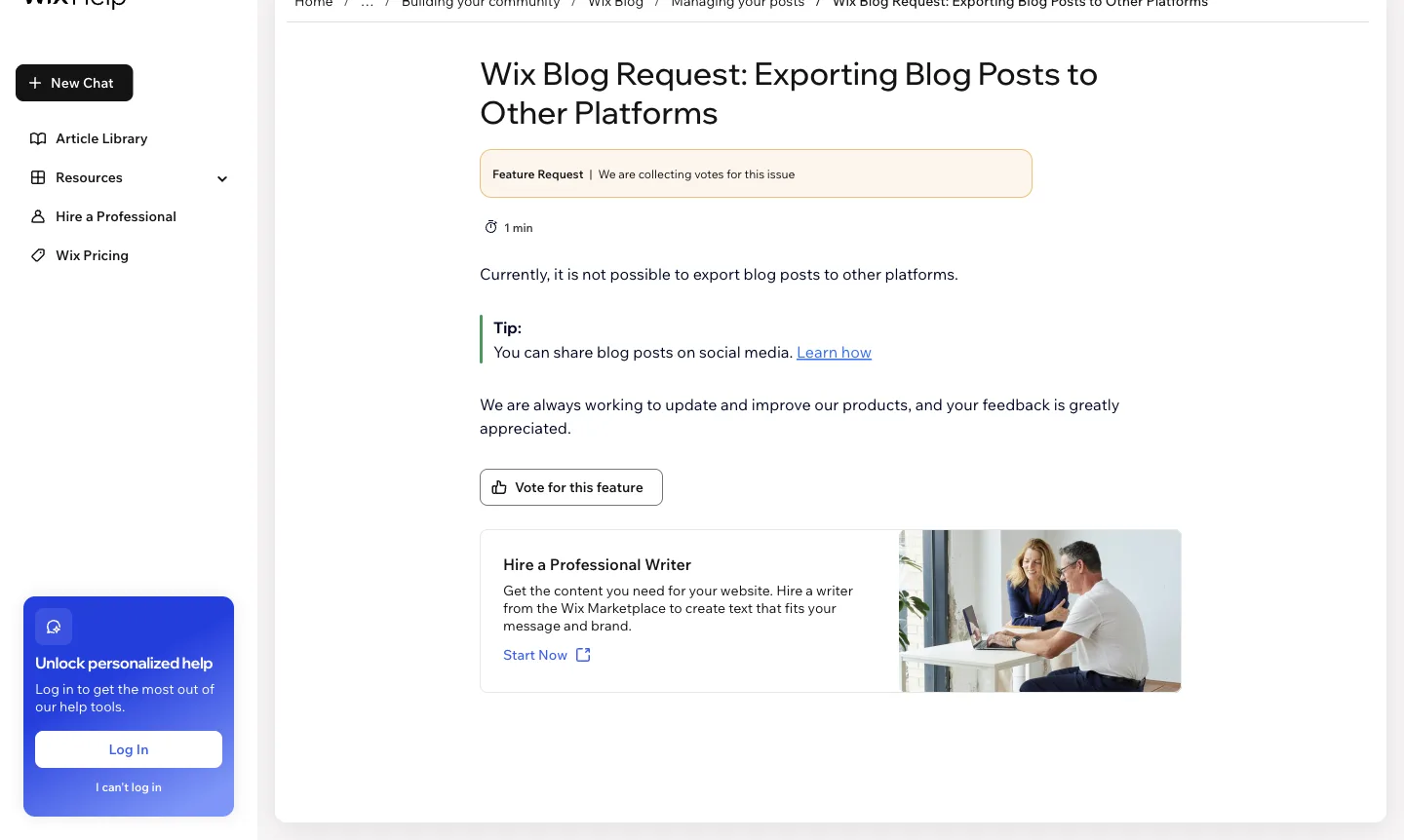
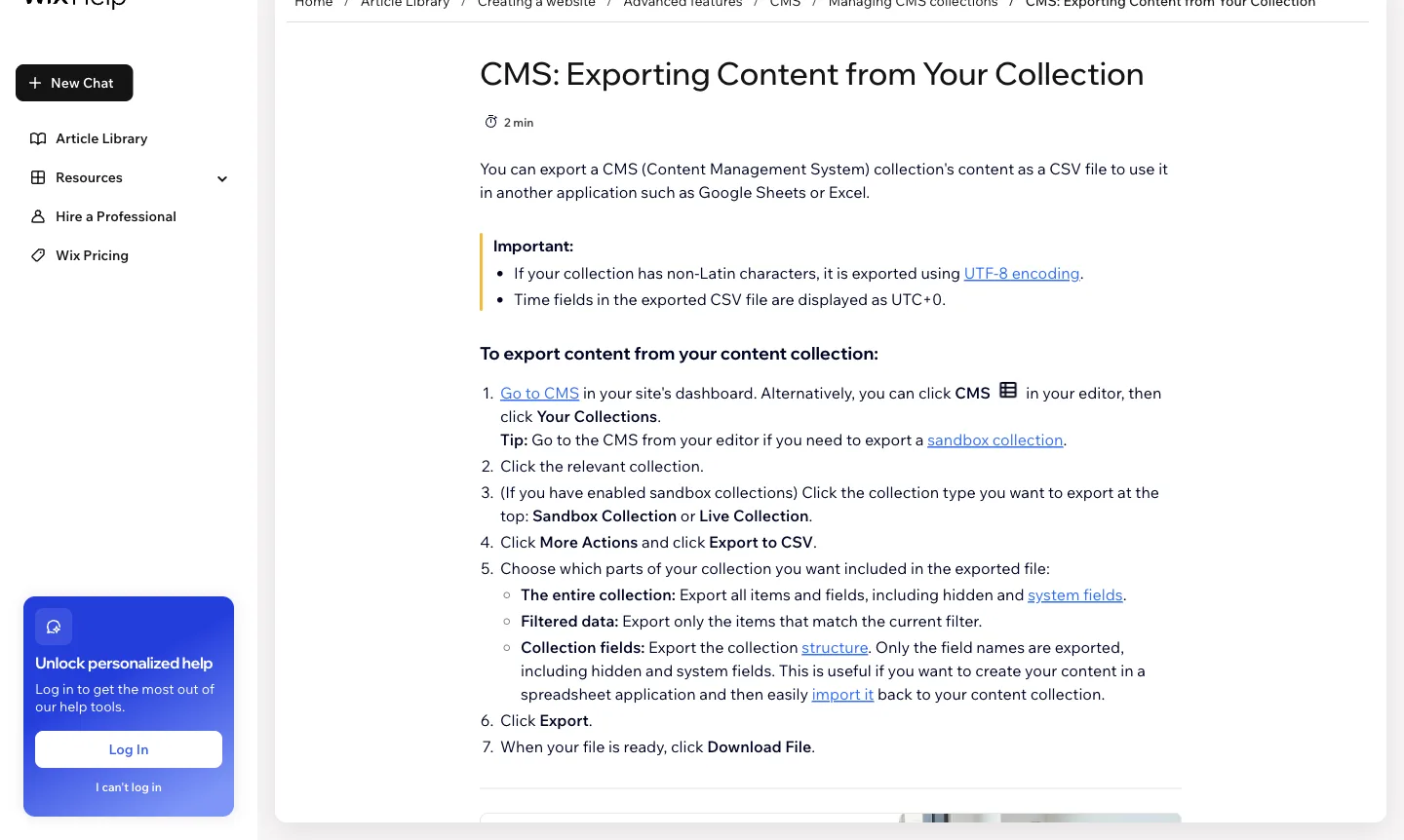
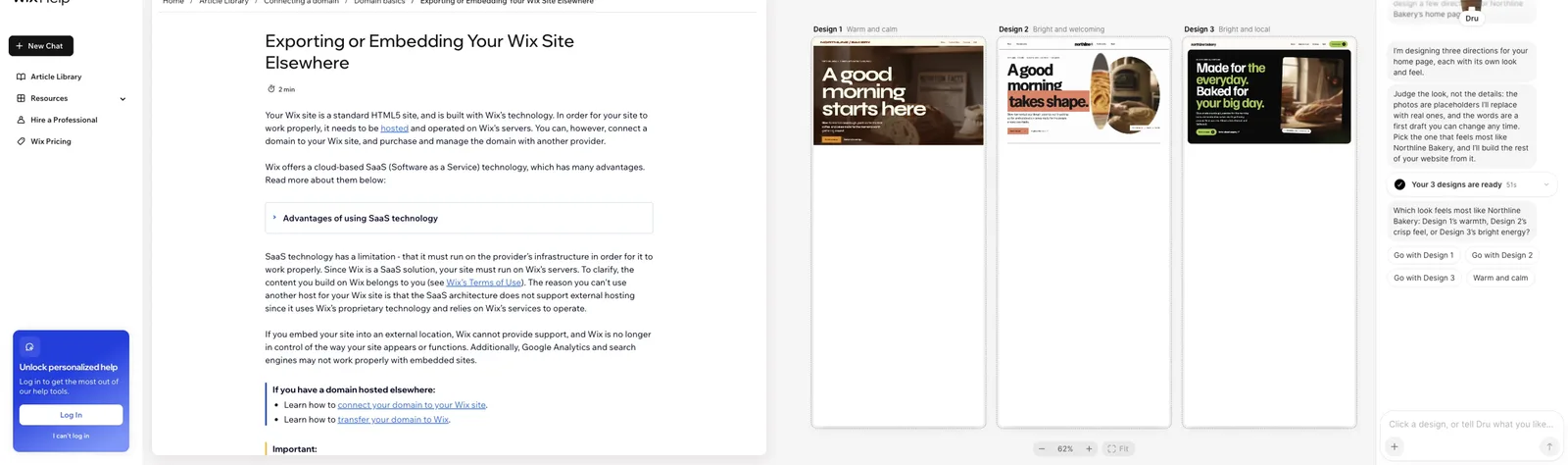
Wix states plainly that a Wix site "needs to be hosted and operated on Wix's servers." It explains that its SaaS architecture "does not support external hosting." The content belongs to you, but the built site does not leave Wix. You can export CMS collections and store products as CSV files. Blog posts are a different story. A Wix feature-request page says "it is not possible to export blog posts to other platforms." If you have years of posts, that is the strongest reason to plan carefully, and the strongest reason to pick an alternative that documents an export.
2. Speed
In the same 46-site test, the median mobile Lighthouse performance score for Wix home pages was 54, and the median page weighed 4.9 MB. That is five Wix sites with one lab run each, so treat it as a snapshot, not a ranking. Google's Core Web Vitals guidance recommends a Largest Contentful Paint within 2.5 seconds, measured on real visits. Only 3 of the 46 home pages met that figure in our lab run, so most builders have work to do here.
Run your own Wix home page through PageSpeed Insights before you decide that speed is the reason to move. If it is, our advice is to choose a platform where you control page weight: fewer scripts, lighter images and static HTML.
3. Price
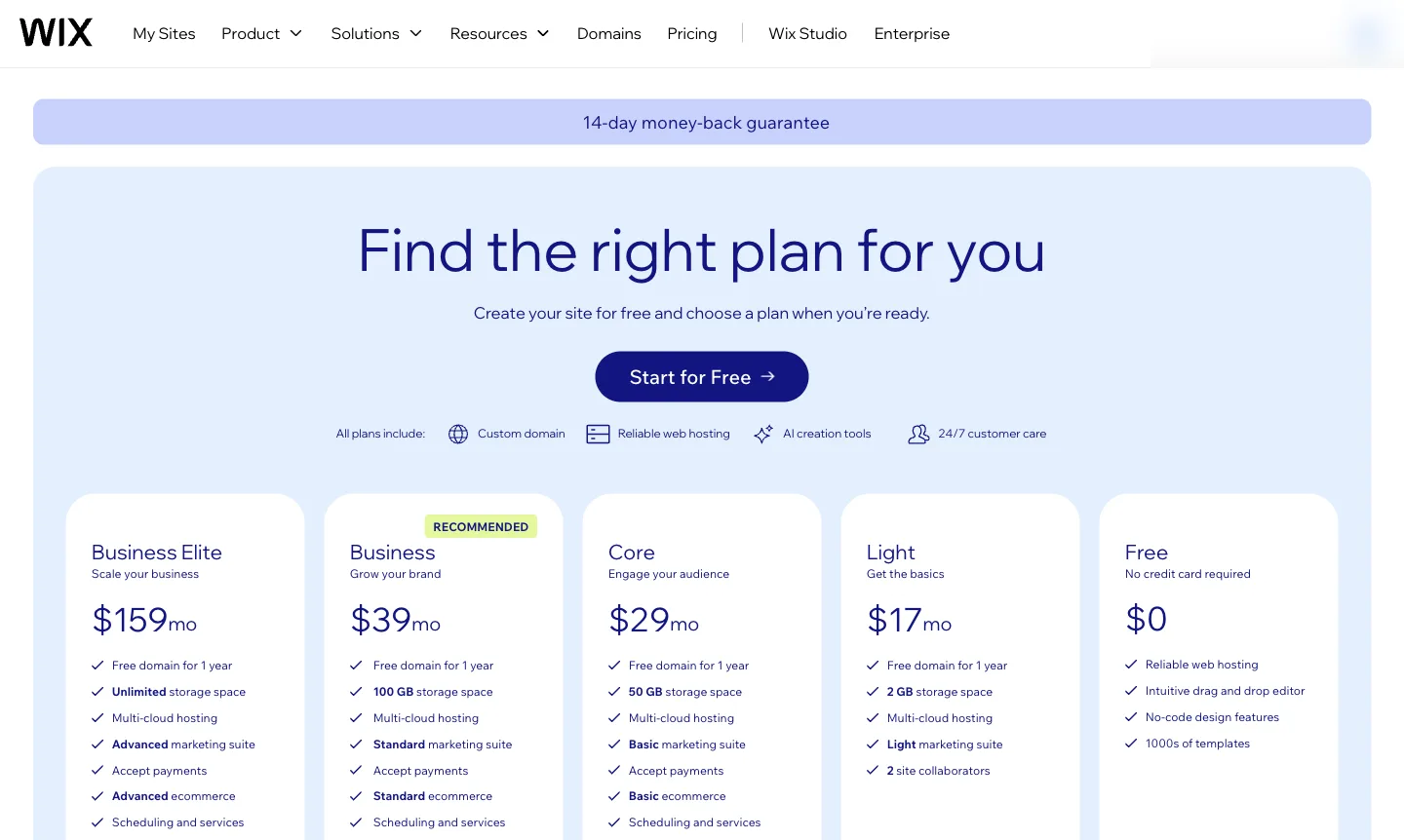
Wix showed us these monthly prices on November 19, 2026: Light $17, Core $29, Business $39 and Business Elite $159. There is also a free plan. Online payments start on Core. If you only need a small brochure site or a single page, several alternatives below cost far less. If you rely on Wix's store, bookings or marketing tools, compare the plan you would actually need on each platform, including any transaction fees.
4. SEO control
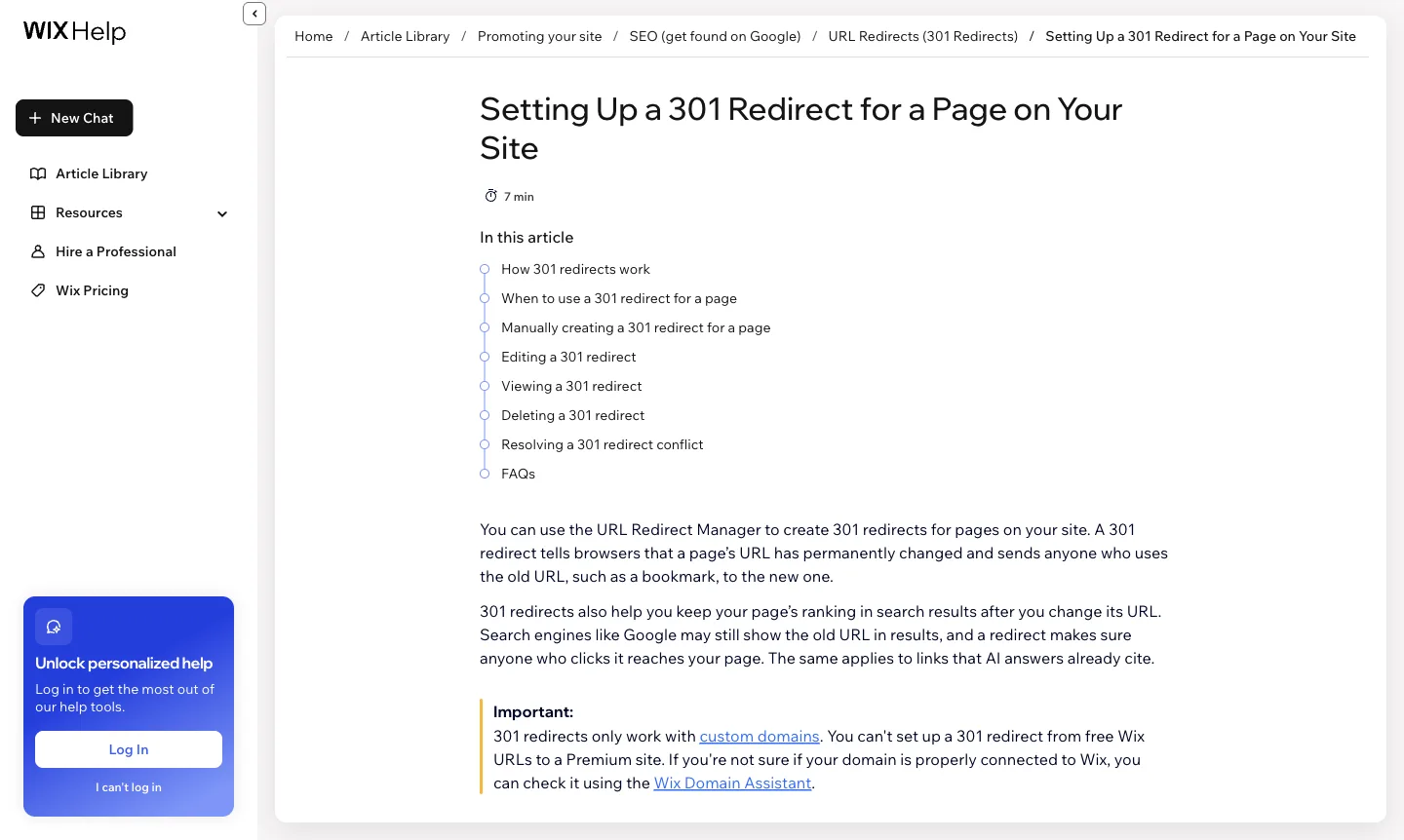
Wix covers the basics, as the 46-site test shows, and it has a 301 redirect tool. The limits show up at the edges. For example, Wix says "301 redirects only work with custom domains," so a site on a free Wix address can't use them. Some teams also want their own code or a different stack. Moving makes sense only when you hit a limit like that, not because a new builder promises better rankings. No platform can guarantee those.
What you can take with you when you leave Wix
Fill in this worksheet before you choose. For each row, write down how many items you have on Wix, then check whether the alternative you are considering can take them in.
| What you have on Wix | What Wix lets you export | What you do instead | Your count |
|---|---|---|---|
| Pages and layout | Nothing. The site runs only on Wix | Rebuild the pages on the new platform. Keep a list of every live URL first | |
| Blog posts | No export (feature request open) | Copy posts by hand or with a script, then check each one | |
| CMS collections | CSV export, including hidden and system fields | Import the CSV into the new CMS | |
| Store products | CSV export of your product list | Import into Shopify or another store | |
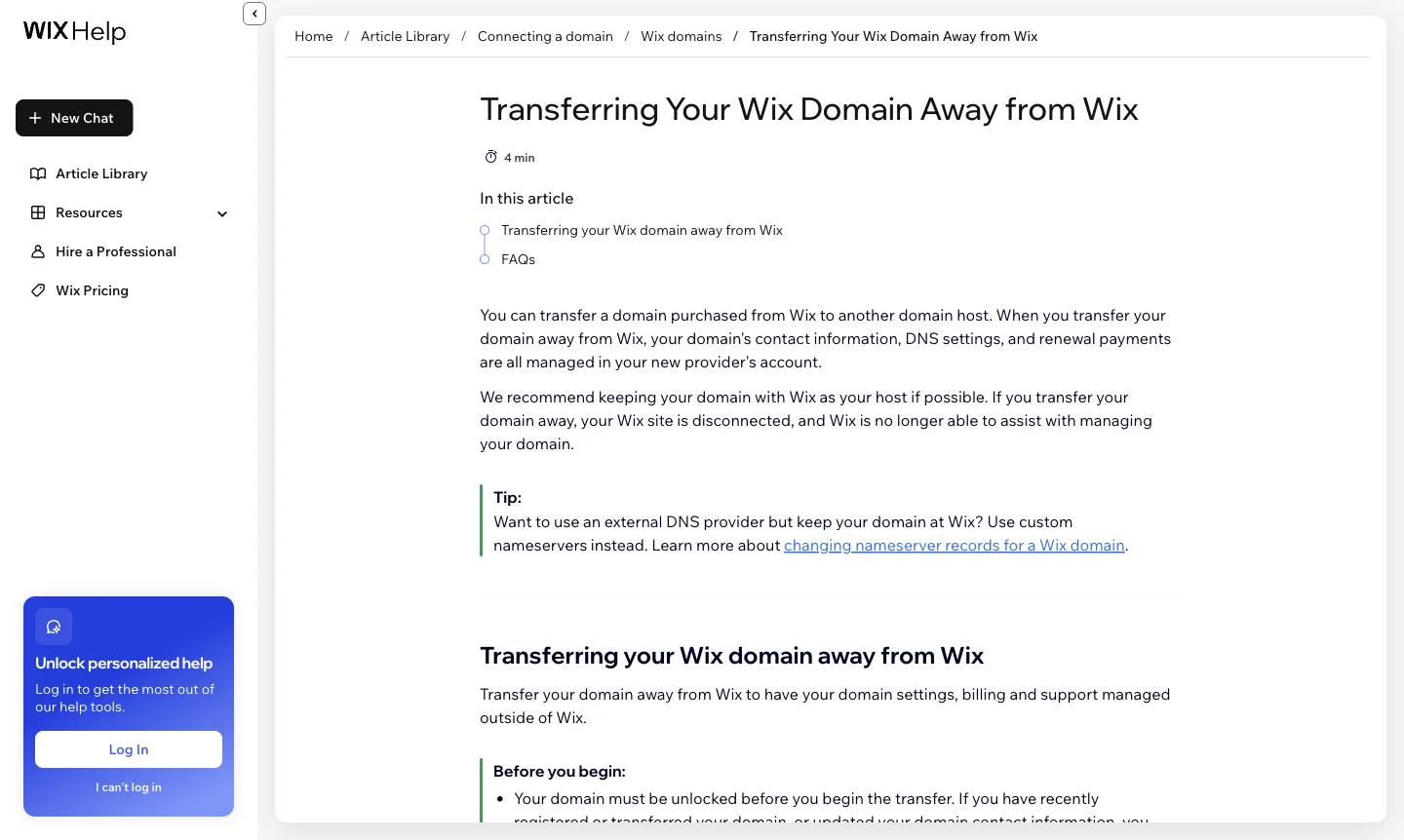
| Domain | You can transfer it away from Wix | Turn off the domain lock first. Wix notes your Wix site disconnects when you transfer | |
| Redirects | Not covered by the Wix export pages we checked | Map every old URL to its new URL and set up redirects on the new host before launch | |
| Apps, bookings, forms, members | Not checked for this article | Ask Wix support and the new platform what can move before you commit |
The alternatives, one by one
Our test brief was a home page for Northline Bakery, a fictional two-location bakery in Portland, Oregon, with a hero and an "Order ahead" button, both locations with opening hours, menu highlights, a custom cakes section and a footer. Framer and Durable built the full brief. On WordPress.com, Carrd and Google Sites we stopped earlier, and each entry says where. Entries marked "Not tested" rely on the vendor's own pages. The full method is in How we tested.
WordPress.com: best for owning your content and moving it later
What it is. Hosted WordPress, with free and paid plans. It runs the same open-source software you can host elsewhere.
Who it suits. Owners who mainly publish pages and posts, and who want to be able to leave without retyping everything.
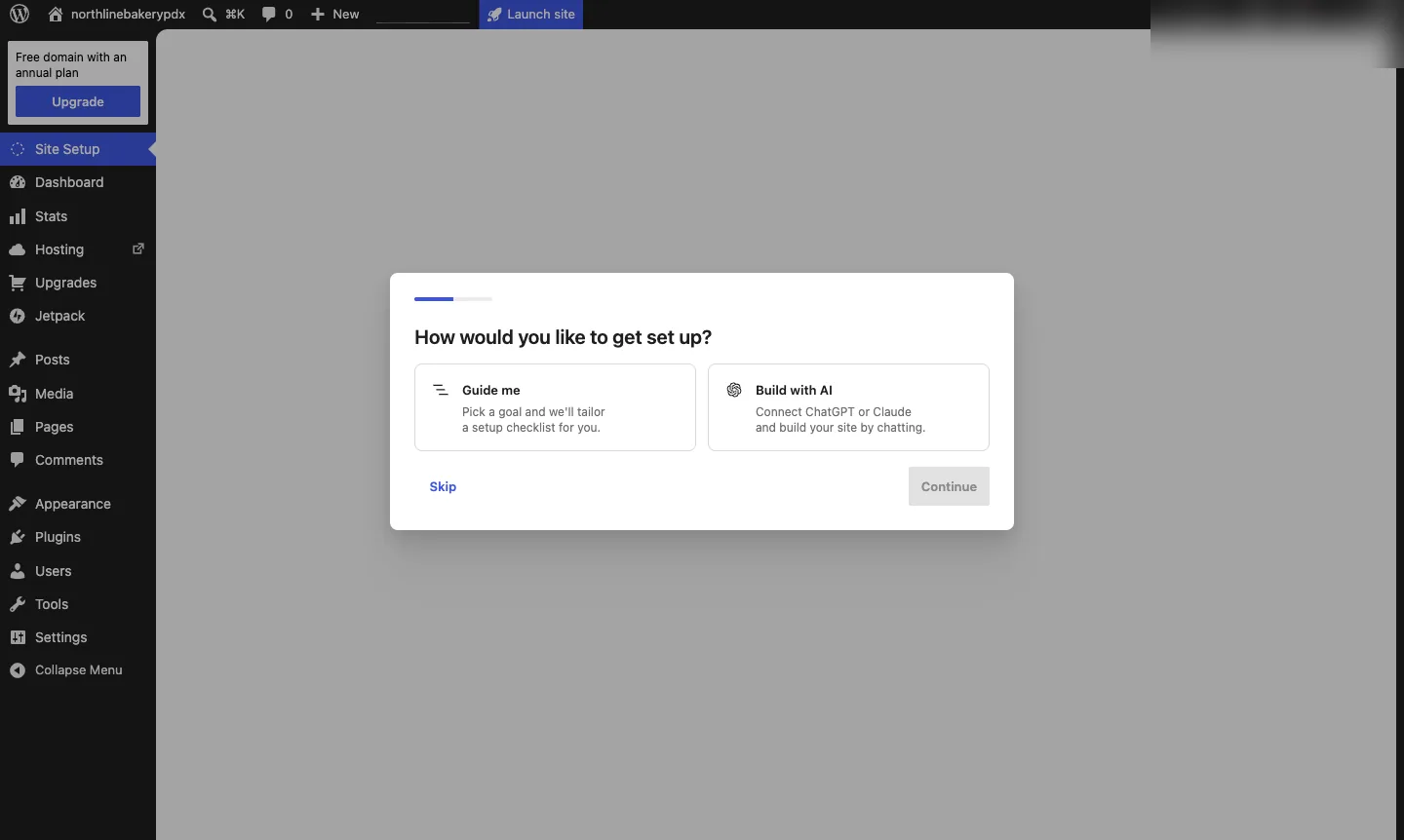
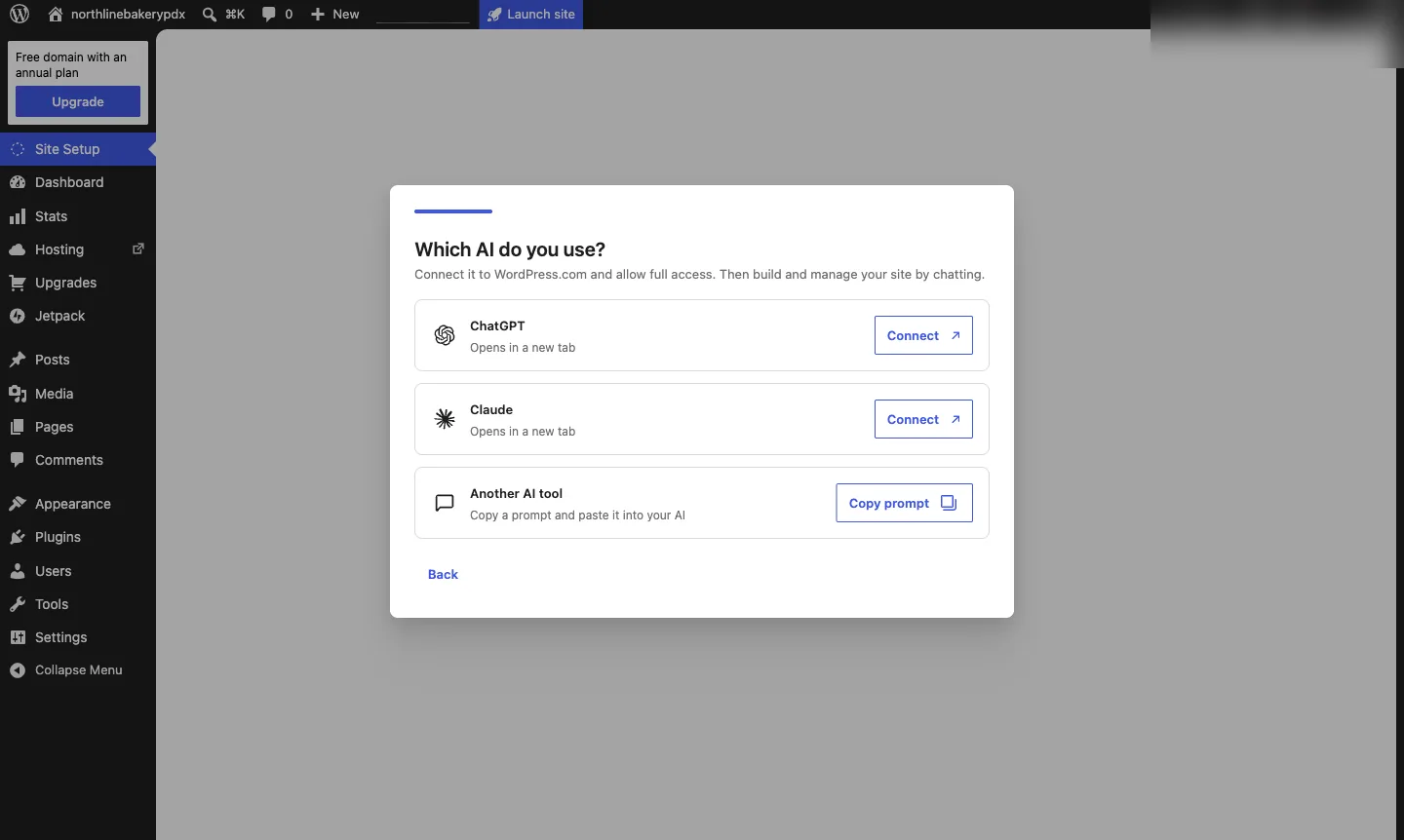
What we saw in our test. Partial hands-on. We created a free site. After sign-up, WordPress.com asked "How would you like to get set up?" with two choices: "Guide me" or "Build with AI." The AI route didn't build inside WordPress.com. It asked us to connect ChatGPT or Claude, each opening in a new tab, or to copy a prompt into another AI tool. We didn't connect an outside AI account, so we did not get a generated Northline page and can't comment on the result.
Pricing. On November 19, 2026, the WordPress.com pricing page listed Personal at $4 a month billed yearly ($9 monthly, renewing at $5), Premium at $8, and Business at $25. The plans step in our test showed the free plan with 1 GB of storage.
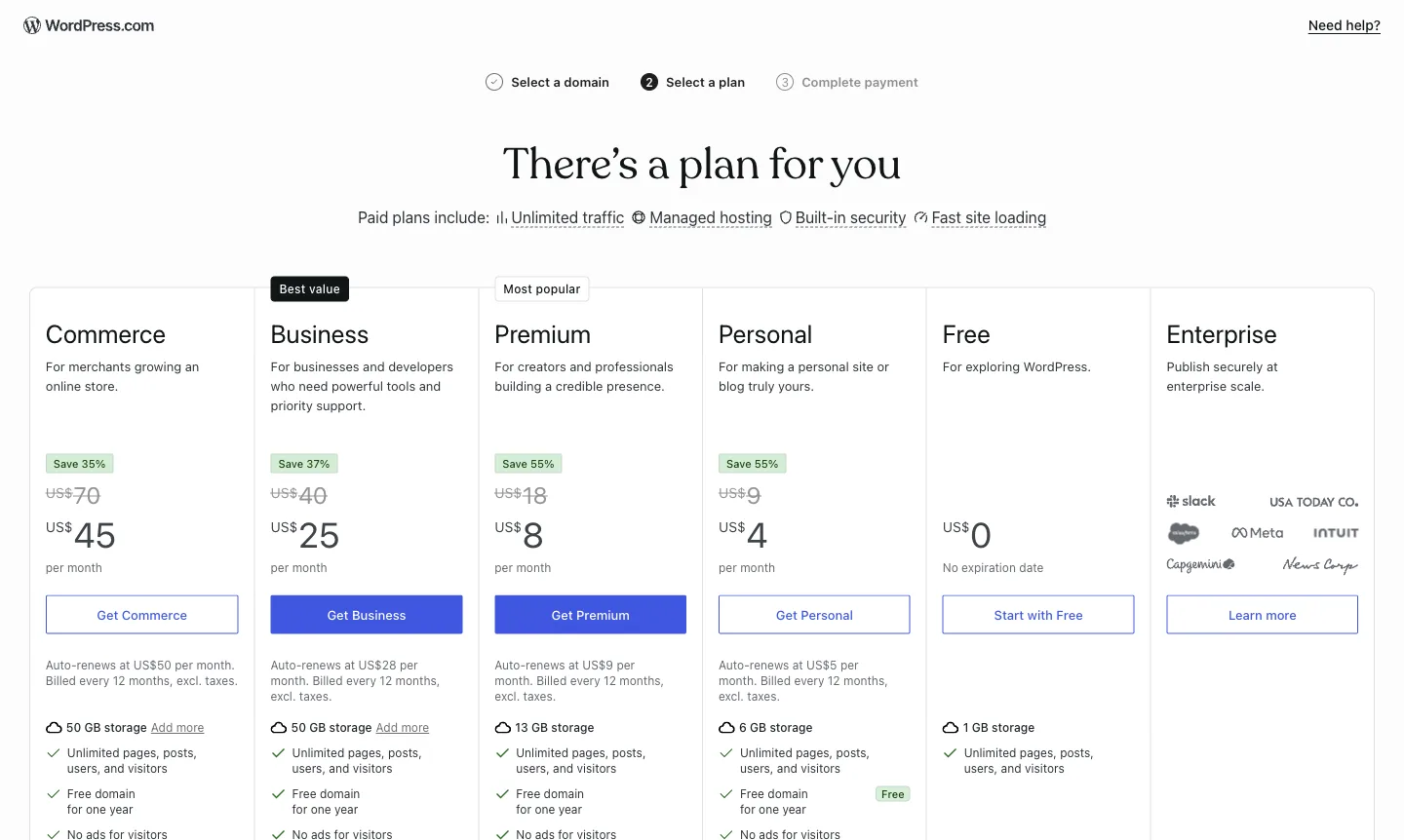
Limits. The free plan shows WordPress.com ads and has 1 GB of storage.
Verdict. WordPress.com has the clearest documented content export of the options here, which matters if portability is why you are leaving Wix. Its export guide covers posts, pages and comments for moving to another WordPress site or platform. Expect to set up the design yourself, unless you connect an outside AI tool, which we did not test.
Squarespace: best for a polished all-in-one swap
What it is. A hosted all-in-one website builder.
Who it suits. People who like the all-in-one model and want a different look and editor.
What we saw in our test. Not tested. We could not complete sign-in within our test setup, and we could not capture the pricing page as a screenshot. That is a limit of our setup, not of Squarespace. This entry relies on Squarespace's published prices.
Pricing. On November 19, 2026, the Squarespace pricing page listed Basic at $19 a month billed annually ($25 monthly) and Core at $29 ($39 monthly). Every plan starts with a 14-day free trial. Basic lists a 2% online store transaction fee.
Limits. No free plan. Squarespace is also a hosted platform, so you would swap one hosted builder for another. Our Squarespace alternatives guide covers what its export leaves out.
Verdict. Choose Squarespace if you want the same convenience with a different design. Look elsewhere if being able to leave is the point.
Webflow: best when a designer wants precise control
What it is. A visual builder aimed at designers, with a CMS and hosting.
Who it suits. Teams with a designer who wants control over layout and code.
What we saw in our test. Not tested. We could not complete sign-in within our test setup, so this entry relies on Webflow's pricing page and help center.
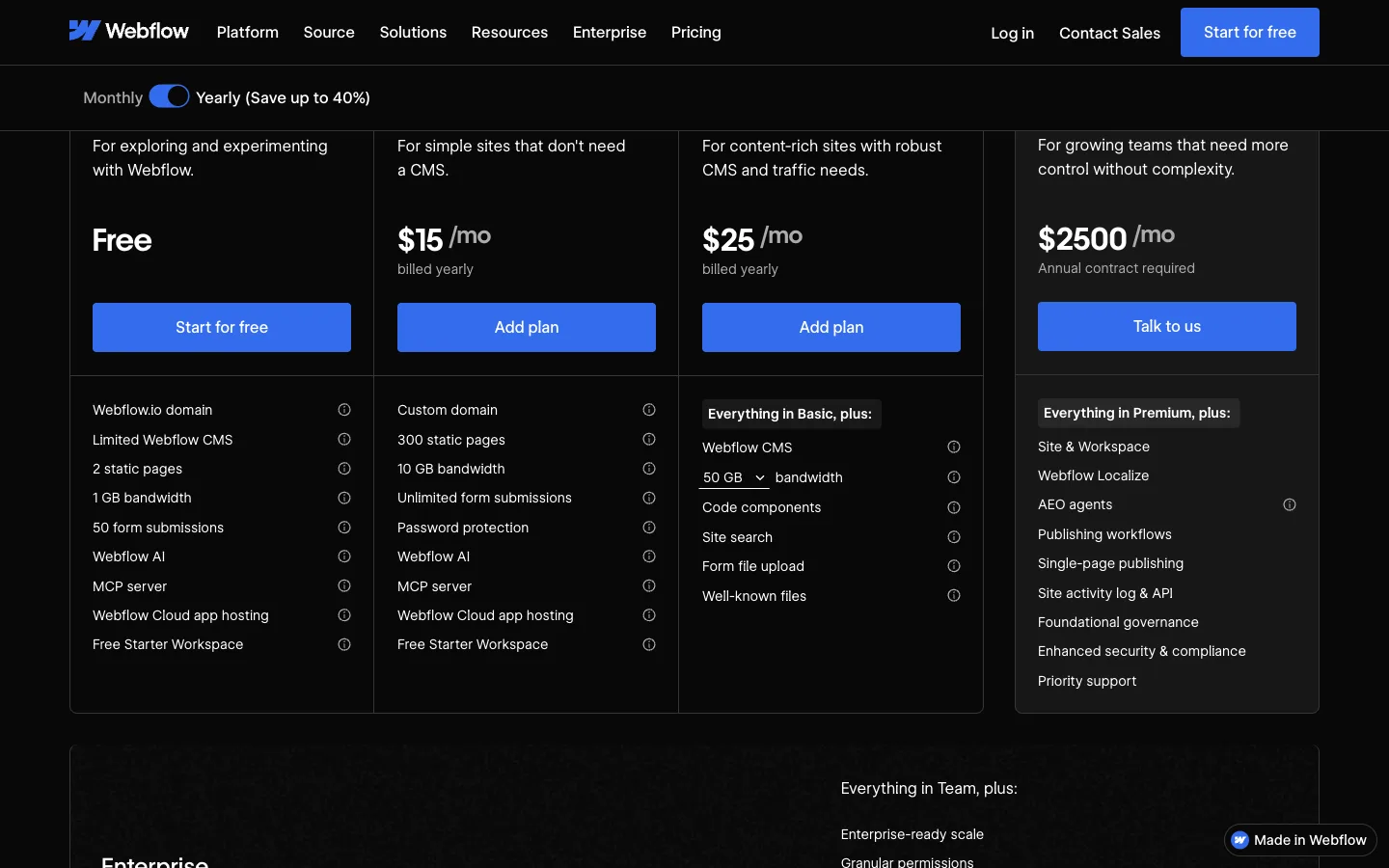
Pricing. The Webflow pricing page on November 19, 2026 listed Starter as free (a webflow.io domain, 2 static pages, limited CMS), Basic at $15 a month billed yearly and Premium at $25 billed yearly. The Premium plan is the first to list the full Webflow CMS.
Limits. Code export is "only available on Workspace plans," according to Webflow's help center. Site plans can't export. CMS content, e-commerce data, user accounts and localized content are not included in exported code. Check which Workspace plan you would need, and its price, before you count on export.
Verdict. Webflow documents a partial code export, which is more than Wix offers. It is built for designers, so budget for a designer's time. Our guide to Webflow alternatives explains why some teams later leave Webflow, so read it before you commit.
Framer: best for design-led marketing sites built with an AI agent
What it is. A design tool that publishes websites, with an AI agent that edits the canvas.
Who it suits. Startups and designers who want a striking marketing site and are happy to work in a design canvas.
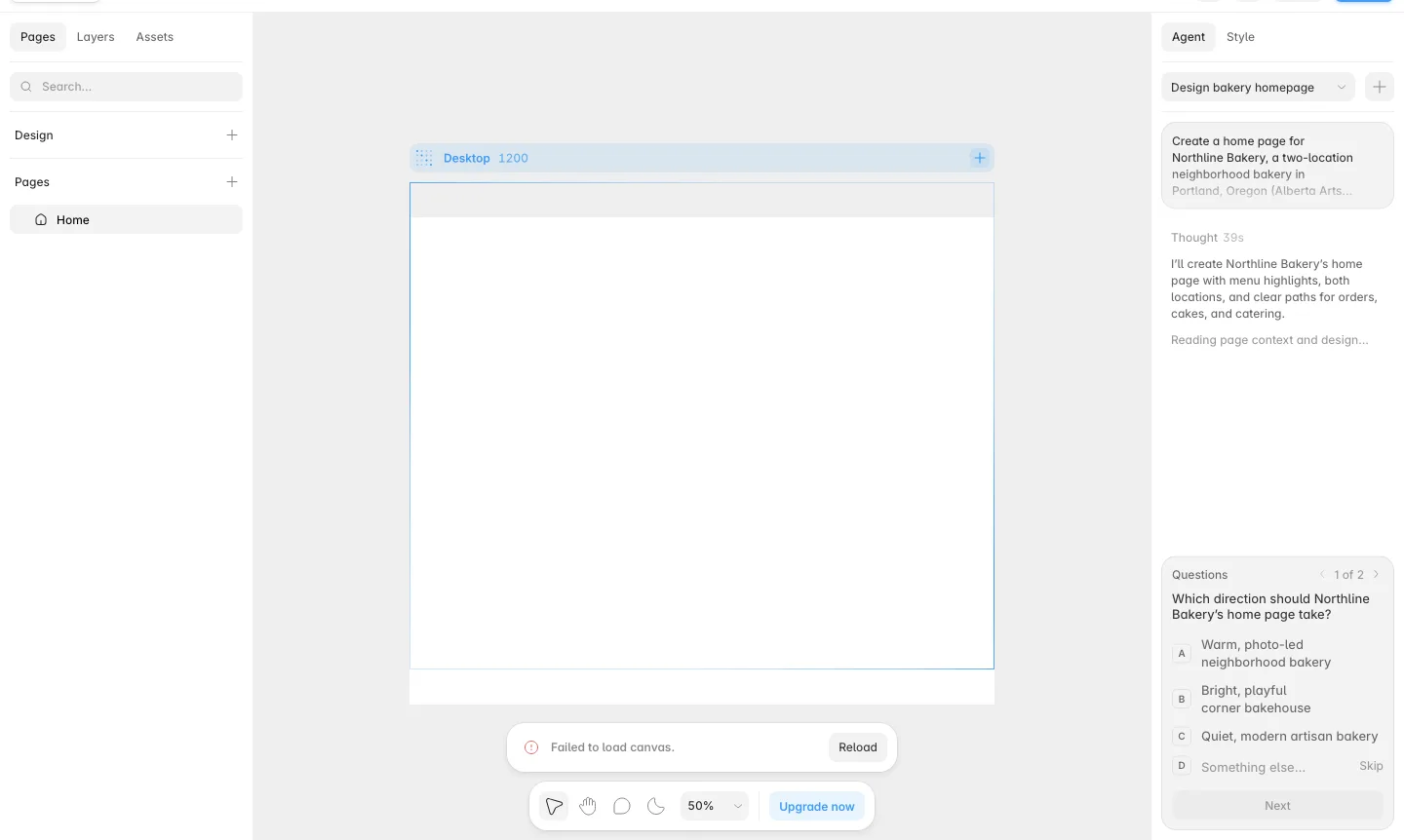
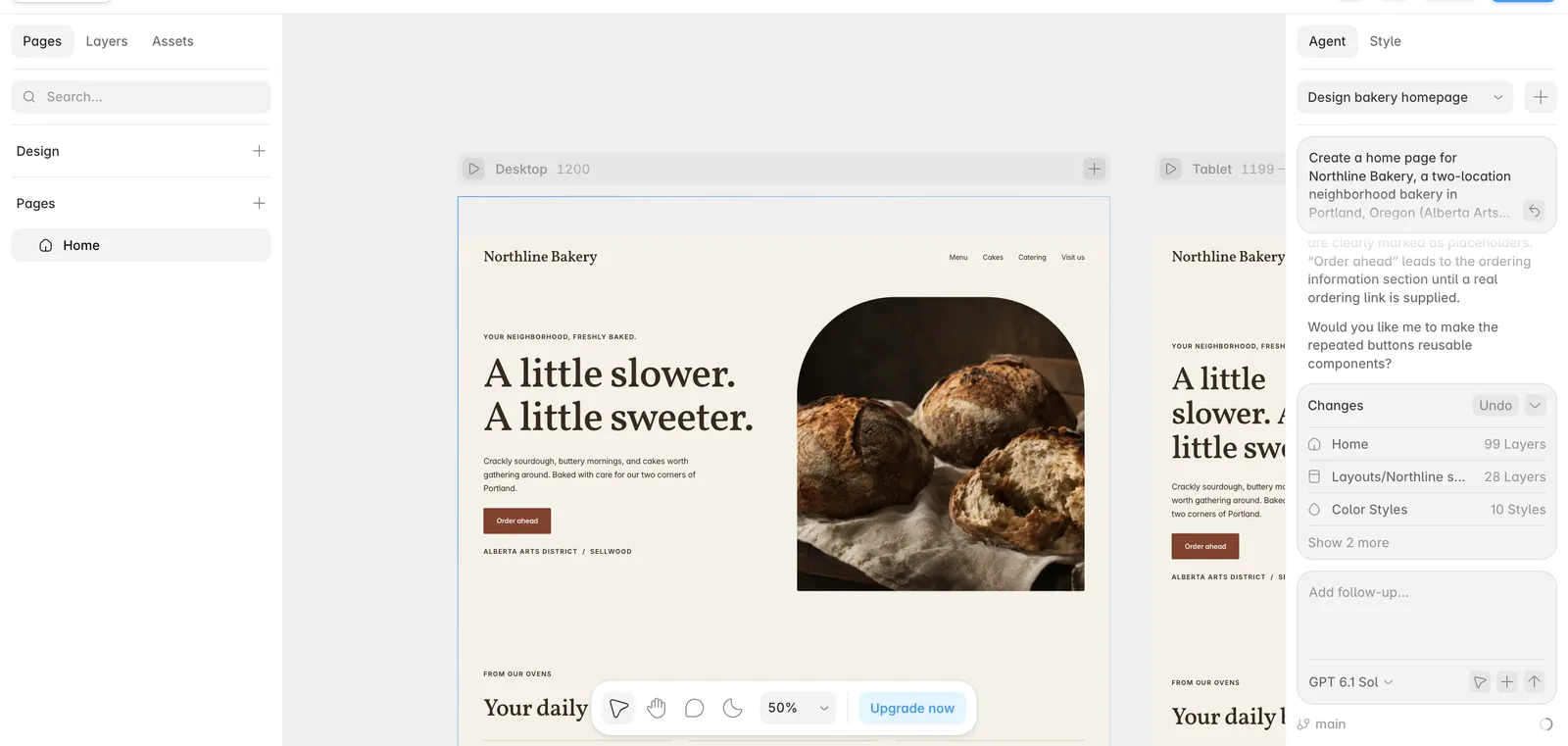
What we saw in our test. Full brief built. We pasted the Northline brief into Framer's agent on a free account. It thought for 39 seconds, then asked us to pick a direction: warm and photo-led, bright and playful, quiet and modern, or something else. One early step showed a "Failed to load canvas" message with a Reload button, and the build carried on afterwards. The agent then worked in several passes of roughly 20 to 30 seconds each. It reported adding 115 layers and editing 35, and it generated images.
The finished page had the requested hero with "Order ahead," a "From our ovens" menu section and the two neighborhoods. The agent said placeholders were clearly marked, and that "Order ahead" pointed to an ordering section until we supplied a real link. That was a sensible choice.
Pricing. The Framer pricing page on November 19, 2026 listed Free at $0 (Framer domain, 1 GB bandwidth, 500 AI credits a month), Basic at $10 a month and Pro at $30. Site redirects and staging are listed on Pro.
Limits. Framer says its Free plan "is ideal for non-commercial use," and connecting a custom domain needs a paid plan. Redirects, which you need when you move a site, are listed on Pro.
Verdict. Of the two full drafts we got, Framer's looked the more finished to us. We did not check whether Framer can export a site, so confirm that, and the Pro-plan redirect requirement, before you commit.
Shopify: best when the site is really a store
What it is. A commerce platform with a storefront builder.
Who it suits. Wix users whose main job is selling products.
What we saw in our test. Not tested. Shopify's trial is for setting up a store, which was outside our bakery home page task.
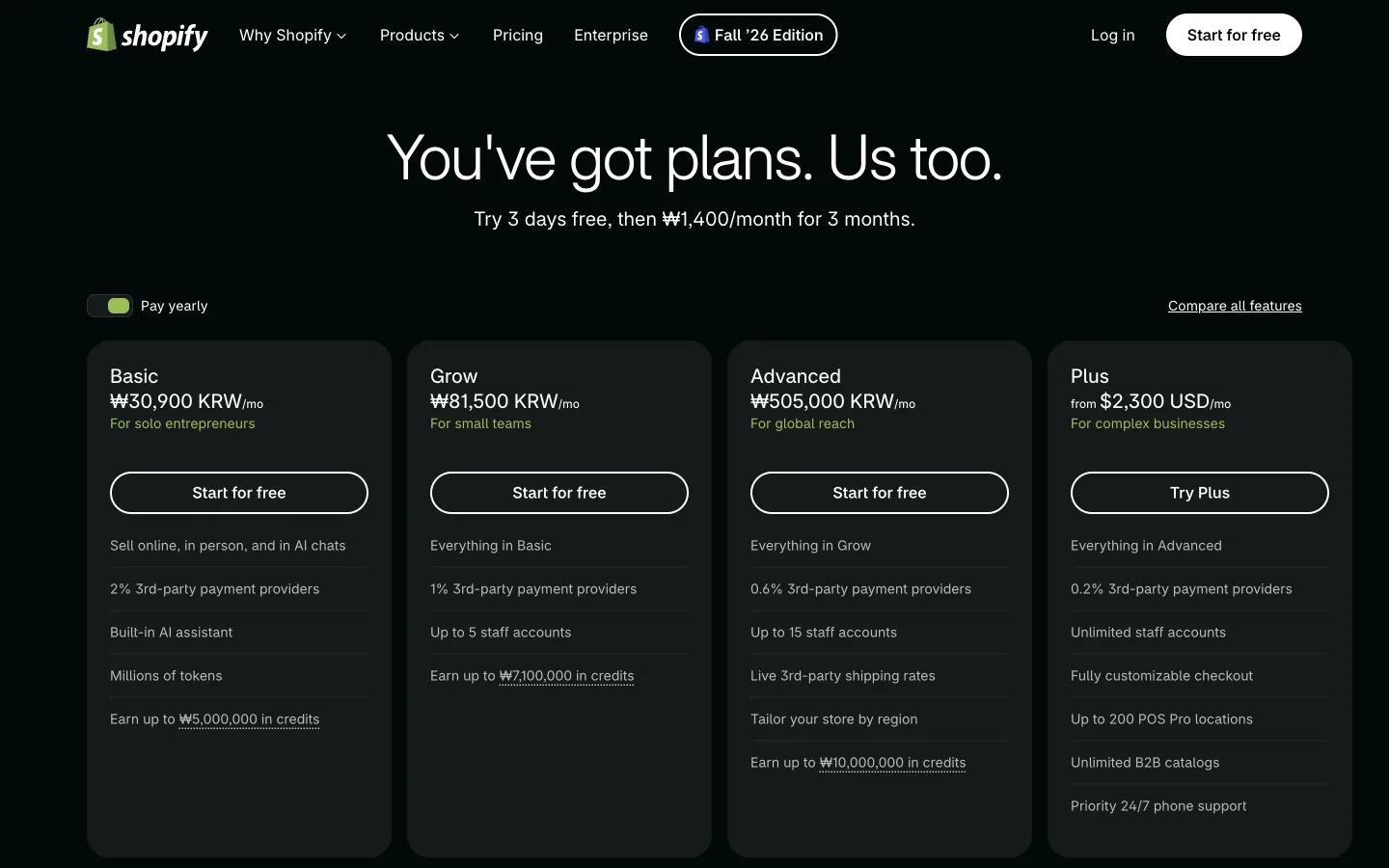
Pricing. Shopify shows local currency by location. On November 18, 2026 the US Shopify pricing page listed Basic at $29 a month billed yearly, after a 3-day free trial and $1 a month for 3 months. On November 19 it served us Korean won (Basic ₩30,900 a month), so confirm the price in your own country.
Limits. Shopify is built for stores. A simple service business site would pay for features it doesn't use. Wix lets you export your product list to CSV, which helps with this move.
Verdict. If you sell products, this is the natural move. If you don't, look elsewhere.
Hostinger Website Builder: best for the lowest advertised price
What it is. A website builder sold by the hosting company Hostinger.
Who it suits. Small sites that need to be cheap and simple.
What we saw in our test. Not tested. The trial needs a separate Hostinger account, which was outside our test setup. This entry relies on Hostinger's own page.
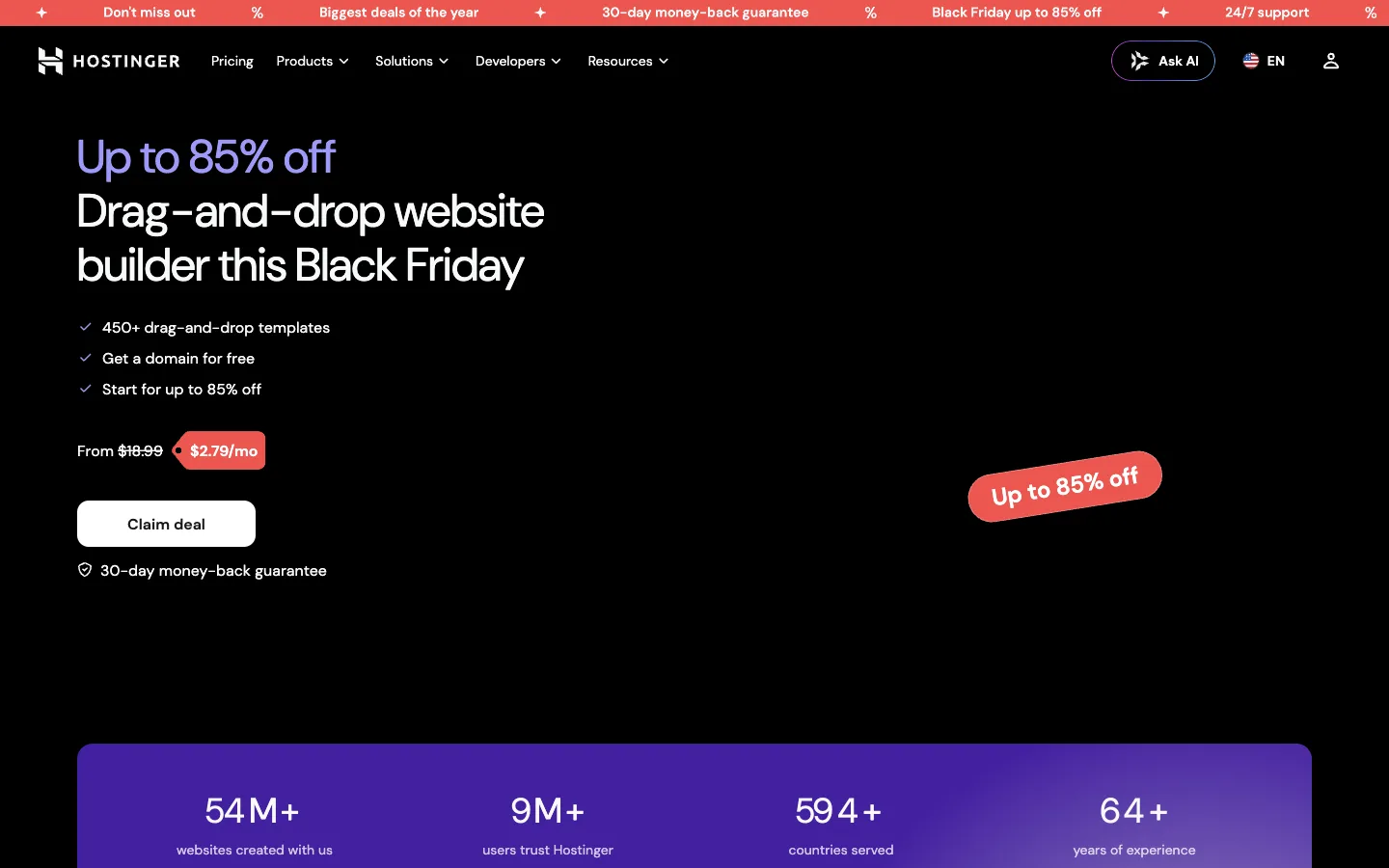
Pricing. The Hostinger website builder page on November 19, 2026 listed plans from $1.99 a month on a 48-month term ($95.52 upfront, renewing at $10.99 a month). The next plan was $2.79 a month ($133.92 upfront, renewing at $16.99). These were Black Friday promotion prices, so expect them to change. Hostinger says its builder "isn't free," but offers a 14-day free trial.
Limits. The lowest price needs four years paid upfront and renews much higher. Compare renewal prices, not just the first term. We did not check what Hostinger lets you export.
Verdict. Hostinger has the lowest advertised price here if you are happy to commit for years. Don't assume it solves the portability problem.
Durable: best for a fast AI-built small business site
What it is. An AI website builder for small businesses.
Who it suits. Owners who want a decent site in minutes and won't touch code.
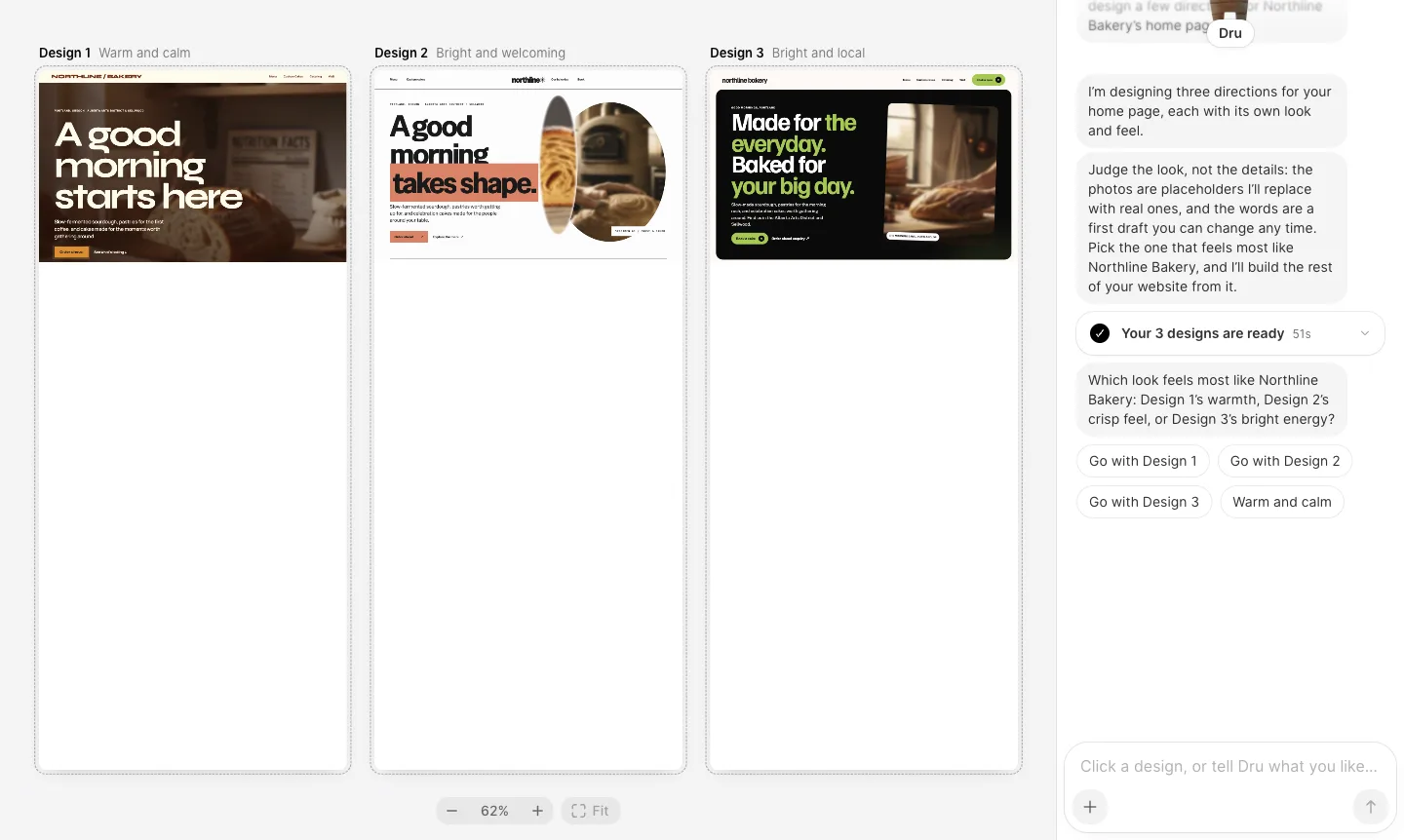
What we saw in our test. Full brief built. Durable's assistant asked "What does Northline Bakery do?" and we pasted the brief. It produced three design directions in 51 seconds, labeled "Warm and calm," "Bright and welcoming" and "Bright and local." It told us the photos were placeholders and the words were a first draft. We picked the first design. The preview had a clear hero, navigation for menu, custom cakes, catering and visit, and both neighborhoods named in the header line. It also showed a "Built with Durable" badge and a "this website isn't live yet" banner.


Pricing. The Durable pricing page on November 19, 2026 listed Free at $0 (a website preview and 300 AI credits in total), Launch at $22 a month billed yearly ($25 monthly) and Grow at $41 billed yearly ($49 monthly).
Limits. Durable says it does not "offer extensive options for HTML customization." If you leave, it says a domain transfer "takes a couple of weeks."
Verdict. Durable was the quicker of our two full builds to reach a believable first draft. It suits owners who would otherwise stay on Wix for convenience. It is not the choice for portability or fine-grained SEO control.
Carrd: best for a one-page site on a tiny budget
What it is. A builder for single-page sites: landing pages, profiles and link pages.
Who it suits. Anyone whose Wix site is really one page.
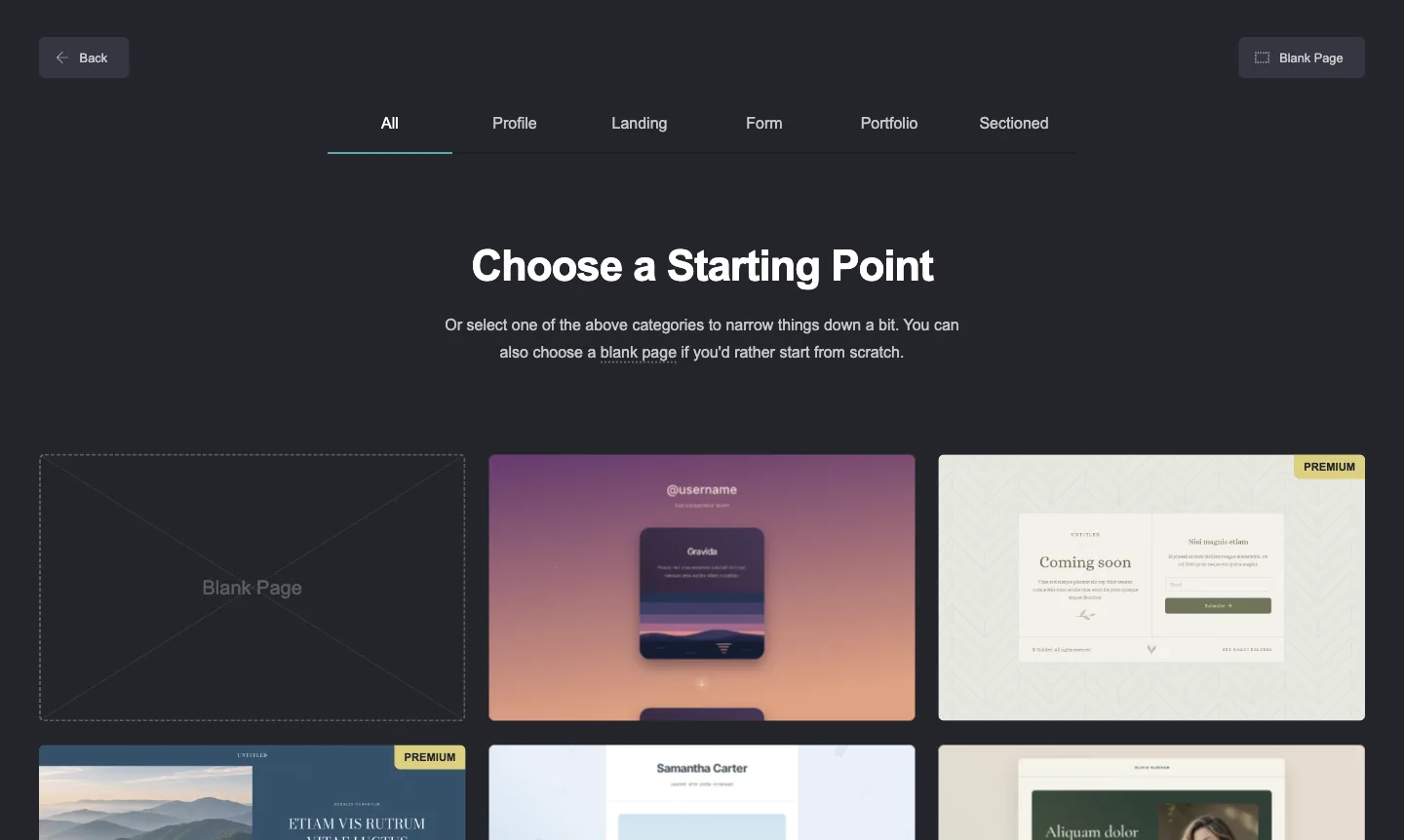
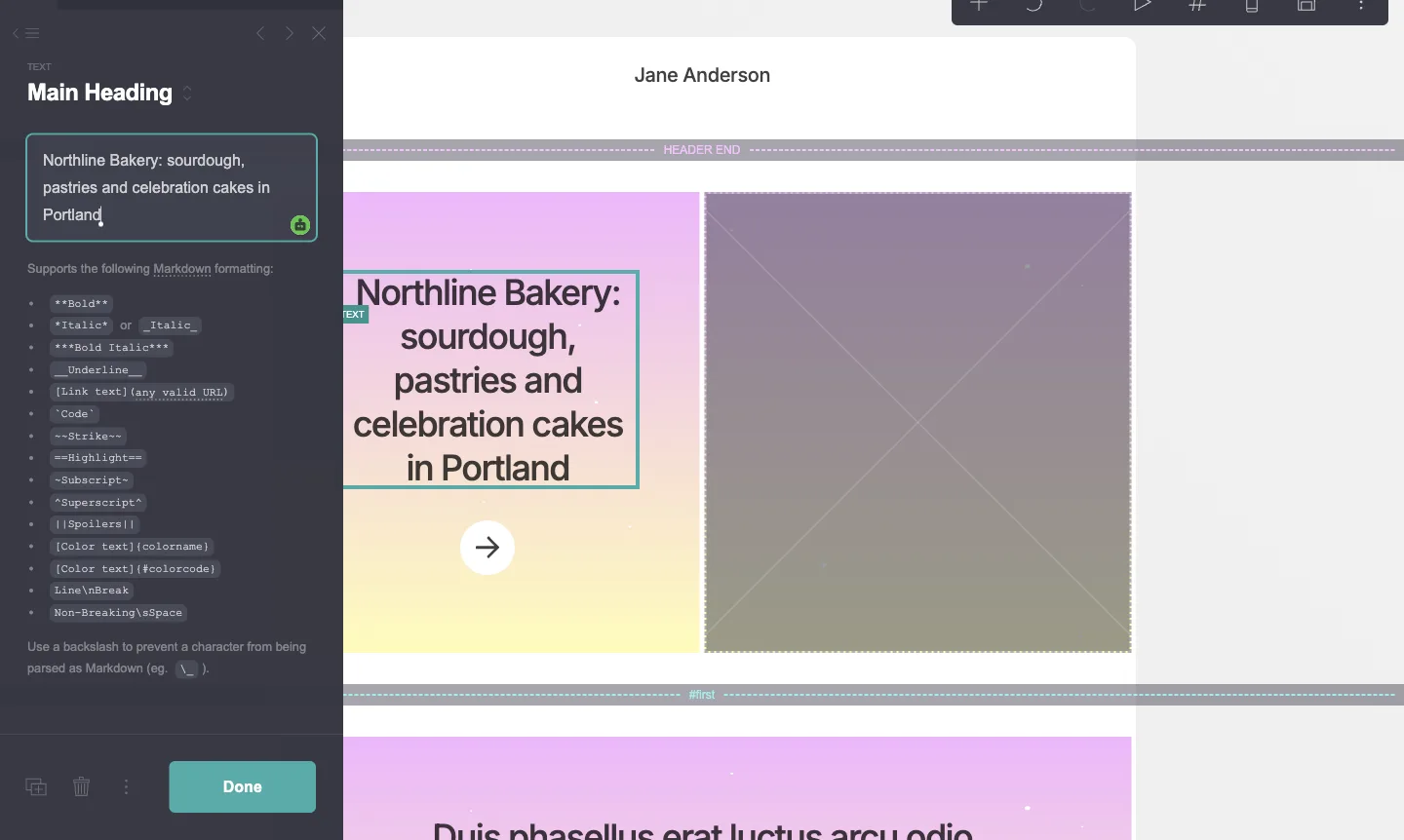
What we saw in our test. Partial hands-on. Carrd has no AI generation in the flow we used. We picked a starting point from its template gallery, which has categories for profile, landing, form, portfolio and sectioned pages. Then we typed the Northline heading. Editing is done in a side panel, and text supports Markdown-style formatting. We did not build the full brief.
Pricing. On November 19, 2026, Carrd's Pro page said Pro starts "from just $19 / year." Custom domains, forms and embeds are Pro features. Downloading sites and redirects appear only on the highest Pro tier in its plan list.
Limits. Carrd describes itself as a builder for "one-page sites," so it isn't the right fit for a blog or a multi-page site.
Verdict. If your Wix site is a single page, Carrd Pro's starting price for a year is close to one month of Wix Light.
Google Sites: best for free, simple pages
What it is. Google's free site builder, saved in Google Drive.
Who it suits. Internal pages, events, clubs and very simple business pages.
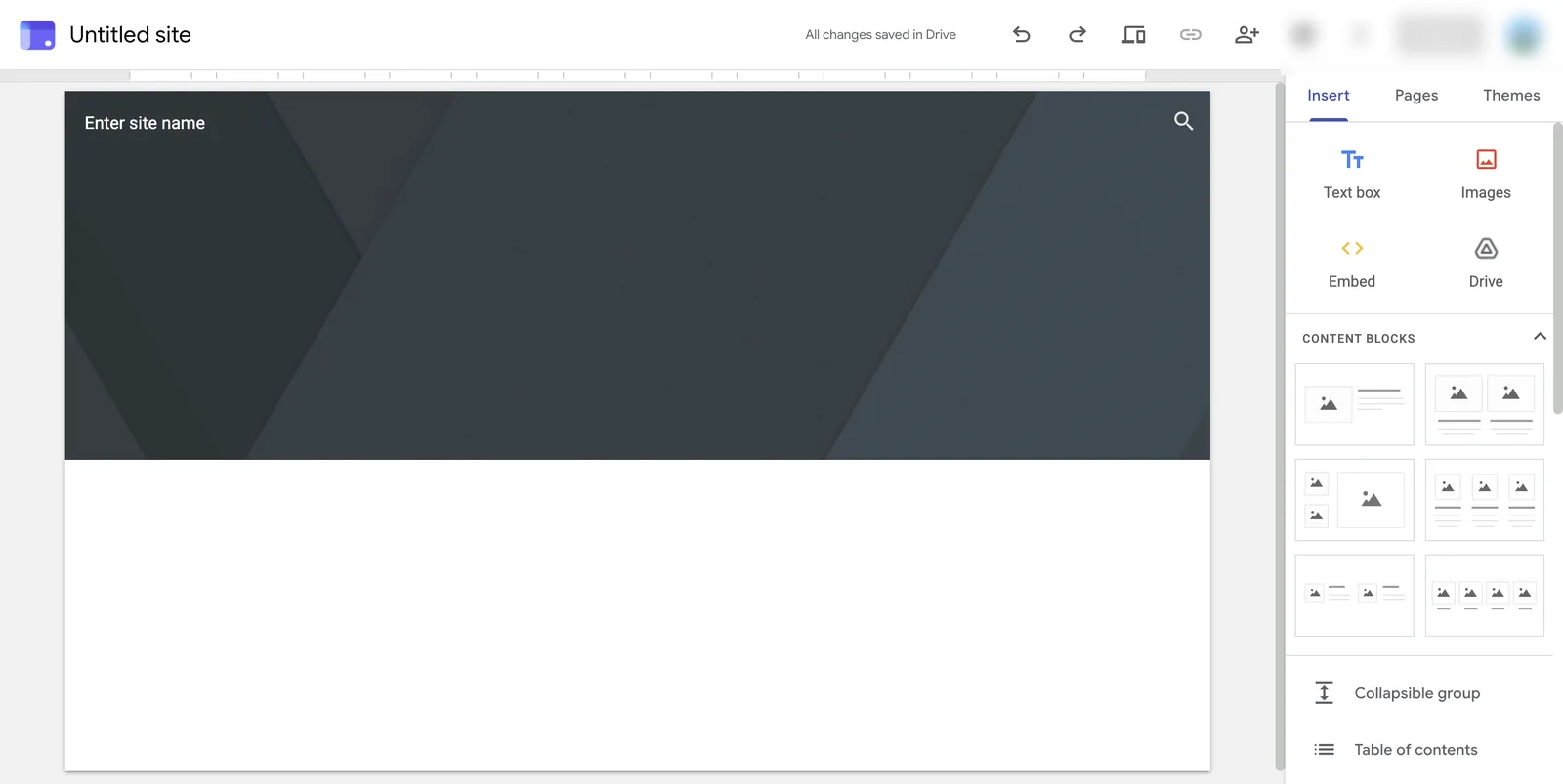
What we saw in our test. Partial hands-on. We opened a new site with a Google account at no charge. The editor offers text boxes, images, embeds, Drive files and a few content block layouts. It saves to Drive automatically. We only opened a blank site and did not build the Northline page.
Pricing. We used it at no cost with a Google account. See Google Sites for Workspace use.
Limits. We saw few design and SEO settings in the editor compared with Wix. That is an impression from a blank site, not a full review.
Verdict. Use it when free matters more than looks or search. It isn't a like-for-like Wix replacement for a marketing site.
PolyDraft (our product): best for a multilingual business site on your own Cloudflare account
We make PolyDraft, so read this entry with that in mind. We did not test it for this article, and we list where it is the wrong choice.
What it is. An AI website builder. You describe the business, or give it an existing URL, and it builds a multi-page Astro site that deploys to your own Cloudflare account. Its features page says titles, descriptions, structured data, a sitemap and robots.txt come with the build. Its AI visibility page also lists an llms.txt file, which it describes as a public proposal, not a ratified standard, with no proven effect on rankings or AI citations. Sites can run in several languages with hreflang: the pricing page lists up to 10, 30 or 100 languages per site, depending on plan. After launch, PolyDraft suggests content opportunities and drafts content for you to review before anything is published. None of this guarantees rankings, traffic or AI citations.
Who it suits. Business sites, often multilingual, where the work after launch (what to publish, what to refresh) matters more than visual editing.
What we saw. Not tested. Our test did not include PolyDraft, so we report no test result and show no test screenshots for it. Everything in this entry comes from PolyDraft's own public pages.
Pricing. The PolyDraft pricing page on November 19, 2026 listed Starter at $39 a month ($390 billed yearly), Pro at $99 and Agency at $299. Building and previewing is free, and you pay to publish. Access is currently invite-based.
Limits.
- No store. Wix and Shopify are better for selling products.
- It does not import a Wix site. It reads your live pages as source material for a new build, which is a rebuild, not a migration.
- You steer the design through the brief and revisions, not by dragging elements. Wix, Framer and Webflow give more hands-on visual control.
- Full source-code export is on the Agency plan only. On every plan, canceling a subscription doesn't take a deployed site down, because it runs in your own cloud account.
- Access is invite-based, so you can't just sign up and publish today.
Verdict. Consider PolyDraft if you want the site to run in your own Cloudflare account, need several languages, and want content drafted for your review after launch. Skip it if you sell products online, want to design by hand, or need the source code without the Agency plan. Our PolyDraft vs Wix comparison goes into more detail.
Which alternative fits your reason for leaving
| Your reason for leaving Wix | Look at first | Why |
|---|---|---|
| I want to be able to leave again | WordPress.com, Webflow (Workspace plan), PolyDraft (our product; Agency plan for source export) | Each documents a content or code export. Wix doesn't export the site. |
| My site is slow | A builder where you control page weight; test with PageSpeed Insights first | Speed depends on the page as much as the platform. |
| It costs too much | Carrd, Hostinger, Google Sites, WordPress.com Personal | Lower entry prices; check renewal terms. |
| I need more design control | Framer, Webflow | Canvas-level design tools. |
| I sell products | Shopify | Built for commerce; Wix exports products to CSV. |
| I need several languages | Framer (translation locales, listed at $20 per locale), PolyDraft (our product; up to 10, 30 or 100 languages per site by plan) | Check per-language costs on each pricing page. |
| I don't want to touch the site at all | Durable for speed, or a done-for-you service | Less control, less work. Disclosure: PolyDraft sells one such service, AI FDE, where our engineers do the site work for you. It is a paid service, and we did not compare it with other agencies here. |
To compare the full cost of each route over a few years, try our website cost calculator.
How to leave Wix without losing search traffic
Google documents how it handles site moves with URL changes and redirects. A move from Wix is a site move with URL changes, because the new platform will rarely use the same URL patterns. The steps below are our recommendations, based on that guidance:
- List every live URL on your Wix site, from its sitemap and from Search Console.
- Export what Wix lets you export. That means CMS collections and store products as CSV. Copy blog posts out by hand or with a script.
- Build and check the new site on a preview address before you touch the domain.
- Map every old URL to a new one and set up permanent (301) redirects on the new host.
- Point the domain at the new host, or transfer it away from Wix after turning off the domain lock. Wix notes the Wix site is disconnected when you transfer.
- Watch Search Console for crawl errors and 404s for several weeks.
Our website migration checklist covers each step in detail.
How we tested
- Dates. Hands-on tests ran on November 18, 2026. Prices and help pages were re-checked on November 19, 2026, except Shopify's US price, which is from November 18. Screenshots carry their own capture dates.
- Test task. One brief: a home page for Northline Bakery, a fictional two-location bakery in Portland's Alberta Arts District and Sellwood, with a hero and "Order ahead" button, both locations and hours, menu highlights, custom cakes and a footer.
- How far each test went. Framer and Durable received the full brief and generated a page. On WordPress.com we stopped before connecting an outside AI tool, so no page was generated. In Carrd we chose a starting point and typed one heading. In Google Sites we only opened a blank site.
- Accounts. Free plans only. No payment details, no paid trials, no published sites and no connected domains.
- Criteria. Time to first result, how well the draft followed the brief, what was paywalled, what you can export, redirect support, and price including renewal. For builders we did not test, the criteria are answered only as far as the vendor's own pages allow.
- What we did not test. Squarespace and Webflow (we could not complete sign-in in our test setup), Shopify (store setup was outside the task) and Hostinger (it needs a separate account). We did not measure page speed for any draft, because none were published. Speed figures come from our earlier test of 46 live sites.
- Our own product. We make PolyDraft. We did not test it here, we did not rank it first, and we listed its limits. Claims about it were checked against the public PolyDraft pages listed in Sources.
- AI assistance. This article was drafted with AI assistance and reviewed by our editorial team under our editorial policy.
Frequently asked questions
Can I export my Wix site to another host?
No. Wix says a Wix site must be hosted and operated on Wix's servers. You can export CMS collections and store products as CSV files, and you can transfer your domain. Blog posts currently can't be exported to other platforms, according to Wix's help center.
What is the best free alternative to Wix?
It depends on the site. For a multi-page site, WordPress.com's free plan, though it shows ads. For one page, Carrd's free plan. For simple internal or event pages, Google Sites. Framer's free plan is meant for non-commercial use, and Durable's free plan is a preview only.
Will I lose my Google rankings if I leave Wix?
Not necessarily, but rankings are at risk if URLs change without redirects. Map every old URL to a new one, set up 301 redirects on the new host, and watch Search Console after the move. Nobody can guarantee rankings will hold or improve.
Is Squarespace better than Wix?
It is different, not clearly better. Both are hosted all-in-one builders, so moving between them does not make your site more portable. Squarespace has no free plan. Pick between them on design and the features you need.
Which alternative to Wix is cheapest?
Google Sites is free. Carrd Pro starts at $19 a year. Hostinger advertised $1.99 a month during a Black Friday promotion on November 19, 2026, but only on a 48-month prepaid term that renews at $10.99 a month.
Sources
All checked November 19, 2026 unless noted.
- Wix: Plans; Exporting or Embedding Your Wix Site Elsewhere; Wix Blog Request: Exporting Blog Posts to Other Platforms; CMS: Exporting Content from Your Collection; Wix Stores: Exporting Your Product List; Setting Up a 301 Redirect for a Page on Your Site; Transferring Your Wix Domain Away from Wix
- WordPress.com: Pricing; Export your website's content
- Squarespace: Pricing
- Webflow: Pricing; How do I export my Webflow site code?
- Framer: Pricing
- Shopify: Pricing (US prices checked November 18, 2026)
- Hostinger: Website builder
- Durable: Pricing
- Carrd: Pro; Home page
- Google: Google Sites; Core Web Vitals; Site moves with URL changes; Redirects and Google Search; PageSpeed Insights
- PolyDraft (our own pages): Pricing; Features; AI visibility; Integrations; AI FDE; PolyDraft vs Wix; Wix SEO guide; Best website builder for SEO: 46 live sites measured