Webflow Alternatives: 7 Options for Teams Outgrowing Webflow
Seven Webflow alternatives matched to why teams leave: per-site and seat pricing, CMS limits, localization and code export. Two tested hands-on, prices dated.
Short answer. The best Webflow alternatives depend on why you are leaving. For a design canvas at a lower entry price, start with Framer. For plugins and a documented content export, choose WordPress.com. Agencies should look at Duda or Wix Studio. Teams that want the site in their own code should look at Lovable (generated code synced to GitHub) or Builder.io (visual editing on a codebase you already have). Dorik is a lower-priced builder for simple sites.
This guide is for designers and dev-adjacent teams who already know Webflow. One caveat up front: we tested Framer and WordPress.com hands-on, got part of the way with Wix, and compared the other four from their pricing pages and docs only. We also cover our own product, PolyDraft, in a separate, disclosed entry.
If you have a designer who works in Webflow every week and a content model that needs its CMS, staying is often the right call. Our Webflow SEO audit covers what to check if you stay.
In brief:
- We wrote one brief, a home page for a fictional "Northline Bakery", and used it in every tool we could sign in to. Framer and WordPress.com got a full hands-on build. Wix got a partial test: its AI onboarding, not the Wix Studio editor. Duda, Dorik, Lovable and Builder.io were not tested, because we did not get past sign-up under our own test rules. Each entry says which it is.
- Prices were re-checked on each vendor's own pricing page on 19 November 2026. The exception is Wix, where we could only read the plan page shown inside our signed-in account.
- Webflow's limits are cited from Webflow's own pricing page and help center, not from third-party summaries.
Webflow alternatives at a glance
A Webflow alternative is any platform a team can move to and still design, publish and manage a website without Webflow. The seven below fall into four groups: canvas builders, hosted CMS platforms, agency platforms and code-based tools.
Prices are the lowest paid tier in US dollars, billed yearly unless noted, checked 19 November 2026. Prices can differ by region and currency. For tools marked "Not tested", the "Best for" column is our reading of the vendor's pricing page and docs, not a test result.
| Tool | Best for | Starting paid price | Free plan | Key limit | How we evaluated it |
|---|---|---|---|---|---|
| Framer | Designers who want a canvas and fast publishing | $10/mo (Basic) | Yes | Extra locales cost $20 each per month; free sites stay on a Framer domain | Hands-on: free account |
| WordPress.com | Teams that want plugins and a documented content export | $4/mo (Personal) | Yes | Plugins need a paid plan; design work happens in blocks, not a free canvas | Hands-on: free account |
| Wix Studio | Agencies that are comfortable on a hosted platform | Studio plan prices not verified; the Wix site plans shown in our account started at $14/mo (Light) | Free account to build (observed) | Wix says a Wix site cannot be hosted elsewhere | Partly tested: Wix AI onboarding on a free account; Studio editor not opened |
| Duda | Agencies running many client sites with white label | $19/mo (Basic) | No, 14-day trial with no card | One included core project on Basic | Not tested: docs and pricing only |
| Dorik | Freelancers and small teams with simple sites and a small budget | $20.75/mo (Personal, $249 a year) | Not listed on the pricing page | 25 pages and no collaborators on Personal | Not tested: docs and pricing only |
| Lovable | Dev-adjacent teams who want generated code synced to GitHub | $25/mo (Pro, monthly billing shown) | Yes | Free sites publish invite-only; custom domains need Pro | Not tested: docs and pricing only |
| Builder.io | Teams with an existing codebase | $24 per user/mo (Pro) | Yes | Free plan has 60 credits a month, 15 a day | Not tested: docs and pricing only |
| PolyDraft (our product) | Content-led business sites that need several languages and ongoing SEO and GEO work | $39/mo, or $32.50/mo billed yearly (Starter) | Free to build and preview; pay to publish | No design canvas; full source-code export only on Agency; access is invite-based | Not tested in this round: our product, see disclosure |
Why teams leave Webflow, checked against Webflow's own pages
In our reading, most teams looking at Webflow competitors are not unhappy with Webflow's design tools. The friction shows up in the bill and in the exit. Here is what Webflow's own pages said when we checked them.
Pricing is per site, and seats are sold separately
Webflow sells two kinds of plans. Site plans pay for hosting one site. Workspace plans pay for the team and its tools. The pricing page says site plan prices are "per site" (Webflow pricing). On 19 November 2026, Basic cost $15 a month billed yearly with no CMS, and Premium cost $25 a month billed yearly with the CMS. The Team plan, which bundles Localize and AEO agents, was listed at $2,500 a month with an annual contract.
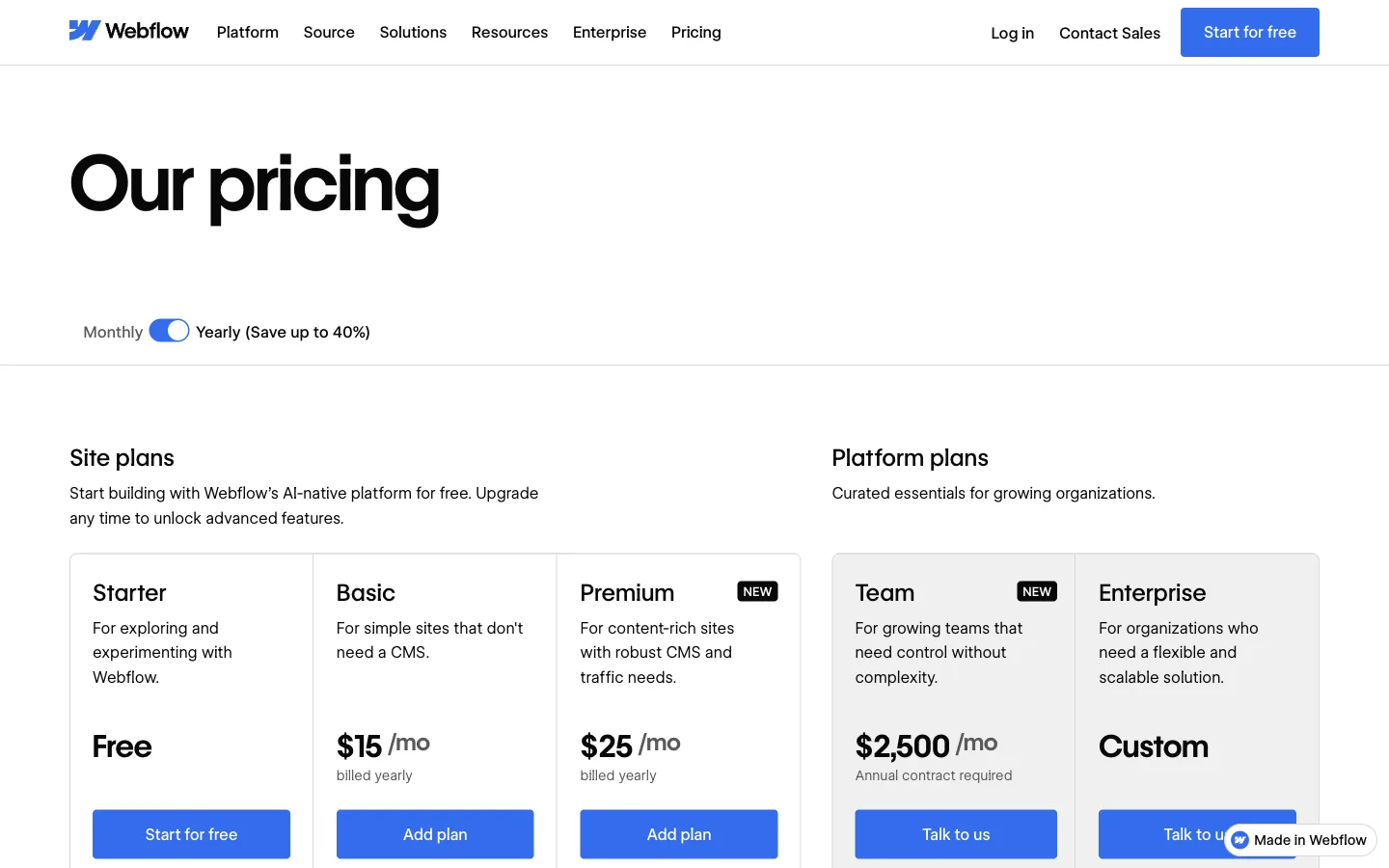
Seats sit on the Workspace side. Each workspace includes one full seat. More full seats cost $39 a month each billed yearly, and limited seats for content editing cost $15 a month each (Webflow pricing; Webflow seats overview).
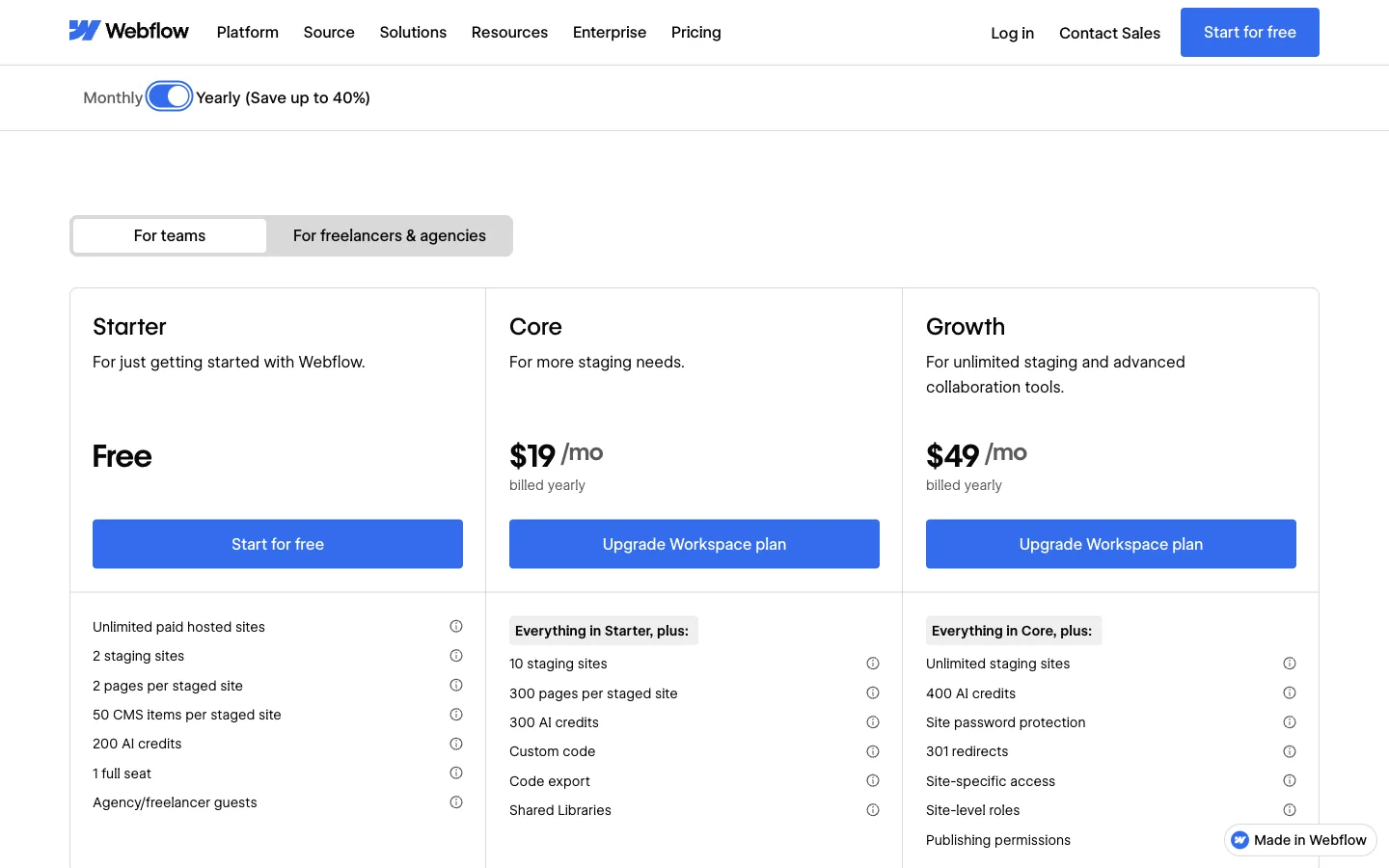
A worked example, using list prices and our own arithmetic: one Premium site ($25), a Core workspace so you can export code ($19), and two extra designers on full seats ($78) comes to $122 a month billed yearly, before any localization add-ons. Each additional site adds another site plan.
CMS limits are higher now, but they still cap structured sites
Webflow raised its limits in May 2026. Premium now includes 20,000 CMS items and 40 collections, and CMS item add-ons were removed (Webflow: updated pricing for May 2026). In our view that is enough for most marketing sites. It can be tighter for directories, large blogs, or location pages across many markets. If that is you, check how your item count grows as you add languages and regions. On the free Starter workspace, staged sites are limited to 50 CMS items (Webflow pricing).
Localization is an add-on that scales with locales
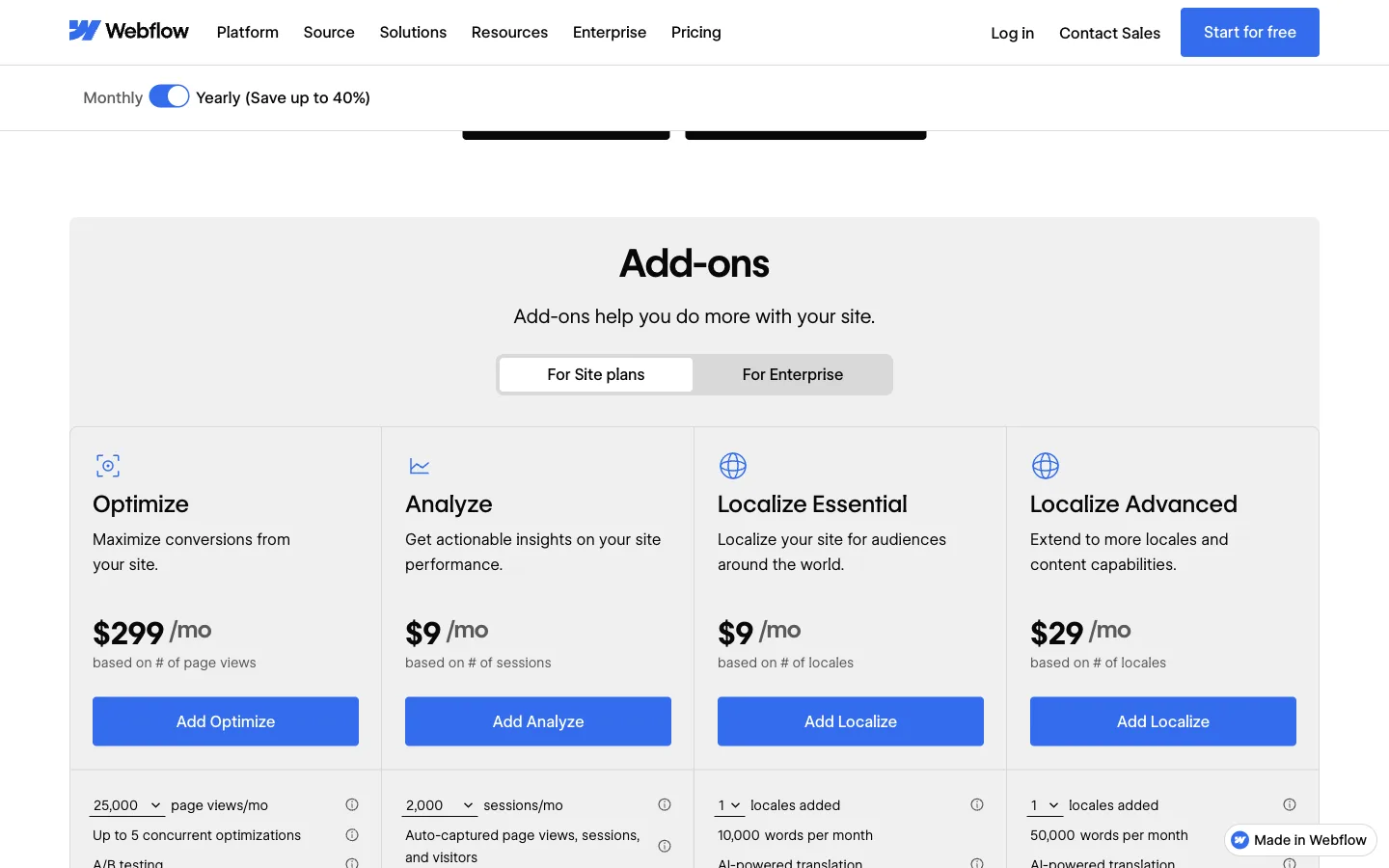
Webflow Localize is priced "based on # of locales". Essential starts at $9 a month billed yearly for one to three locales and 10,000 translated words a month. Advanced starts at $29 a month for up to 10 locales and 50,000 words, and adds localized URLs and visitor routing (Webflow pricing). The pricing page lists these as add-ons for site plans, so they come on top of the site plan price.
The learning curve is real
This one is our view, not a statement from Webflow. Webflow is a visual development tool built on classes, components and interactions. That is its strength. It is also why a marketer who only needs to change a paragraph or add a landing page can end up waiting for the one person who knows the project. If that person leaves, the site can stall. We cover this trade-off in more depth in our Webflow vs WordPress comparison of cost, upkeep and ownership.
Code export leaves the dynamic parts behind
Webflow does let you export HTML, CSS, JavaScript and assets, but only on paid Workspace plans. Site plans don't include export. The help center lists what Webflow code export does not include: CMS content and functionality, user accounts, ecommerce, password protection, form processing, site search, localized content (only the primary locale exports) and code components. Collections can be exported separately as CSV files (Webflow: How do I export my Webflow site code?).
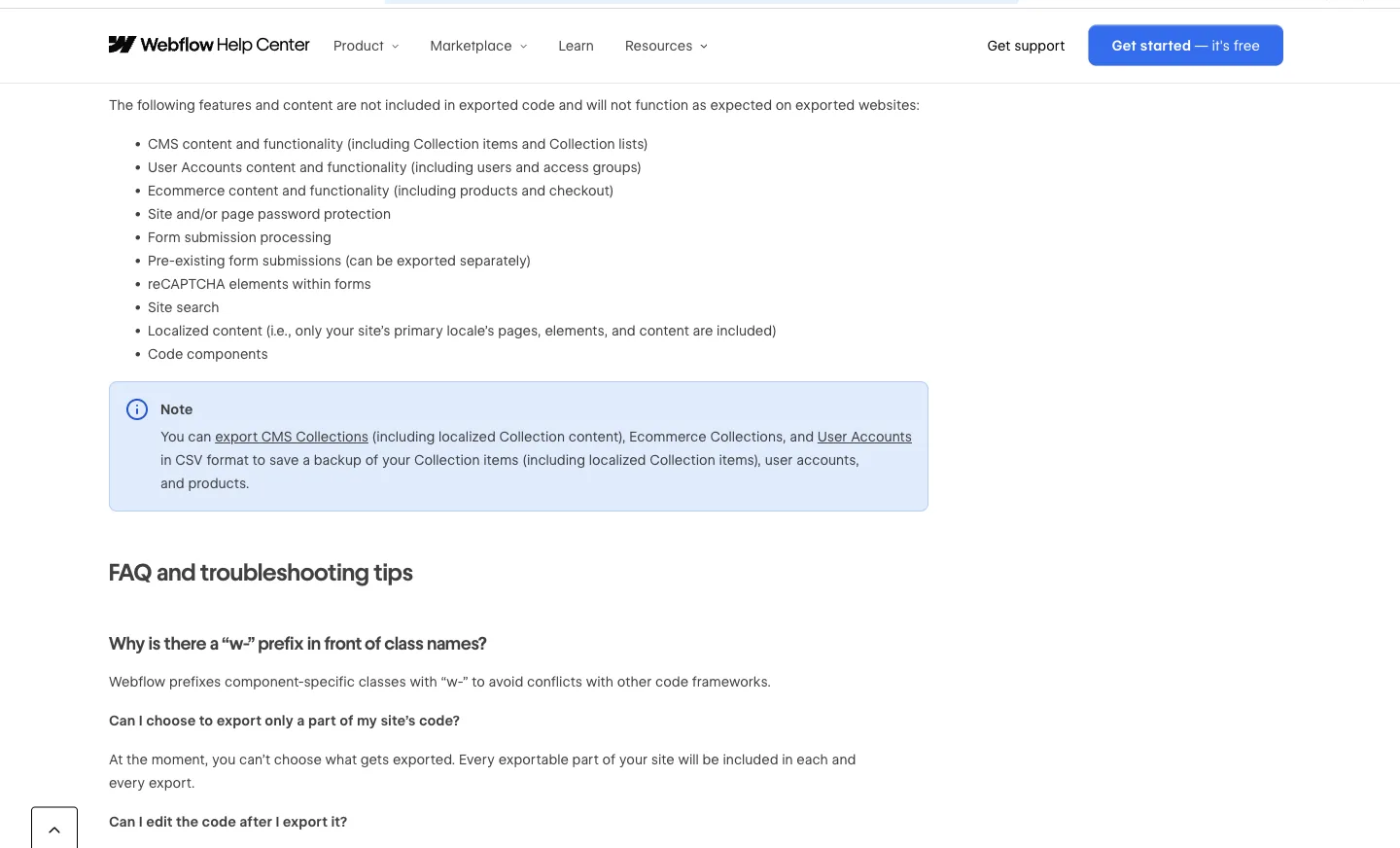
Going by that list, expect an exported Webflow site to be a static front end without its CMS content. You rebuild forms, search and translations wherever you move. We did not run an export ourselves.
A worksheet: match your reason for leaving to an alternative
Write down your top two reasons for leaving, then read across. "Check first" is the question to answer in a free account or trial before you commit. These are our recommendations from the docs and tests below, not vendor claims. The tools in each row are listed in no ranked order, and most of them are ones we did not test.
| Your main reason | Check first in any alternative | Where to start |
|---|---|---|
| Per-site and per-seat cost | Price for your real site count and editor count, billed the way you will actually pay | Framer, WordPress.com, Duda (for many client sites) |
| CMS item or collection limits | Item limit per site, cost to raise it, and whether the limit counts each language separately | WordPress.com, Framer Pro (pay as you go up to 40,000 items) |
| Localization cost | Price per extra language, and whether hreflang and localized URLs are included | Framer (priced per locale), PolyDraft (our product; languages are included in each plan) |
| Learning curve | Can a non-designer edit a section without breaking layout? | WordPress.com, PolyDraft (our product; not tested in this round) |
| Code export and ownership | What exactly exports: CMS, forms, other languages? Can you host it yourself? | WordPress.com, Lovable, Builder.io, PolyDraft Agency plan (our product) |
| Agency billing and handover | Client seats, white label, and how each extra client site is charged | Duda, Wix Studio (neither tested) |
To fill it in, price your current Webflow setup with the worked example above. Then price the same number of sites, editors and languages on your top two candidates. If the saving is small and your designer is happy, the switch may not be worth the migration risk. If you are rebuilding a B2B marketing site either way, our scored B2B website examples show what buyers check first.
The alternatives
Every entry follows the same skeleton: what it is, who it suits, what we saw, pricing, limits and a verdict. Where we could sign in, we used the same brief for a fictional two-location bakery, "Northline Bakery" in Portland. It asks for a home page with a hero, this week's bakes, two locations with hours, a catering and wholesale section, and a footer. We did not publish anything.
Where an entry says "Not tested", everything in it comes from the vendor's pricing page or docs, checked on the date shown.
1. Framer: best for designers who want a canvas and a lower entry price
What it is. A design-first website builder with a free-form canvas, a CMS, and an AI agent that edits the project from a chat panel.
Who it suits. Design teams leaving Webflow because of cost, or because they want to move faster on marketing pages, with modest CMS needs.
What we saw. We signed in with an email magic link, because Google sign-in opened outside the single browser tab our test rules allow. We pasted the Northline brief into the agent panel. It asked one question first, which opening layout to use, and we picked a split editorial cover. About four minutes after we sent the prompt, it had built all five sections, generated images, and added tablet and phone breakpoints. The agent said plainly that the hours and email were placeholders.
Two things went wrong in our session. The editor sat on "Connecting... editing disabled" for about two minutes and needed a reload, and later the tab stopped responding. This was one session on one machine, so we can't say whether the cause was Framer or our setup.
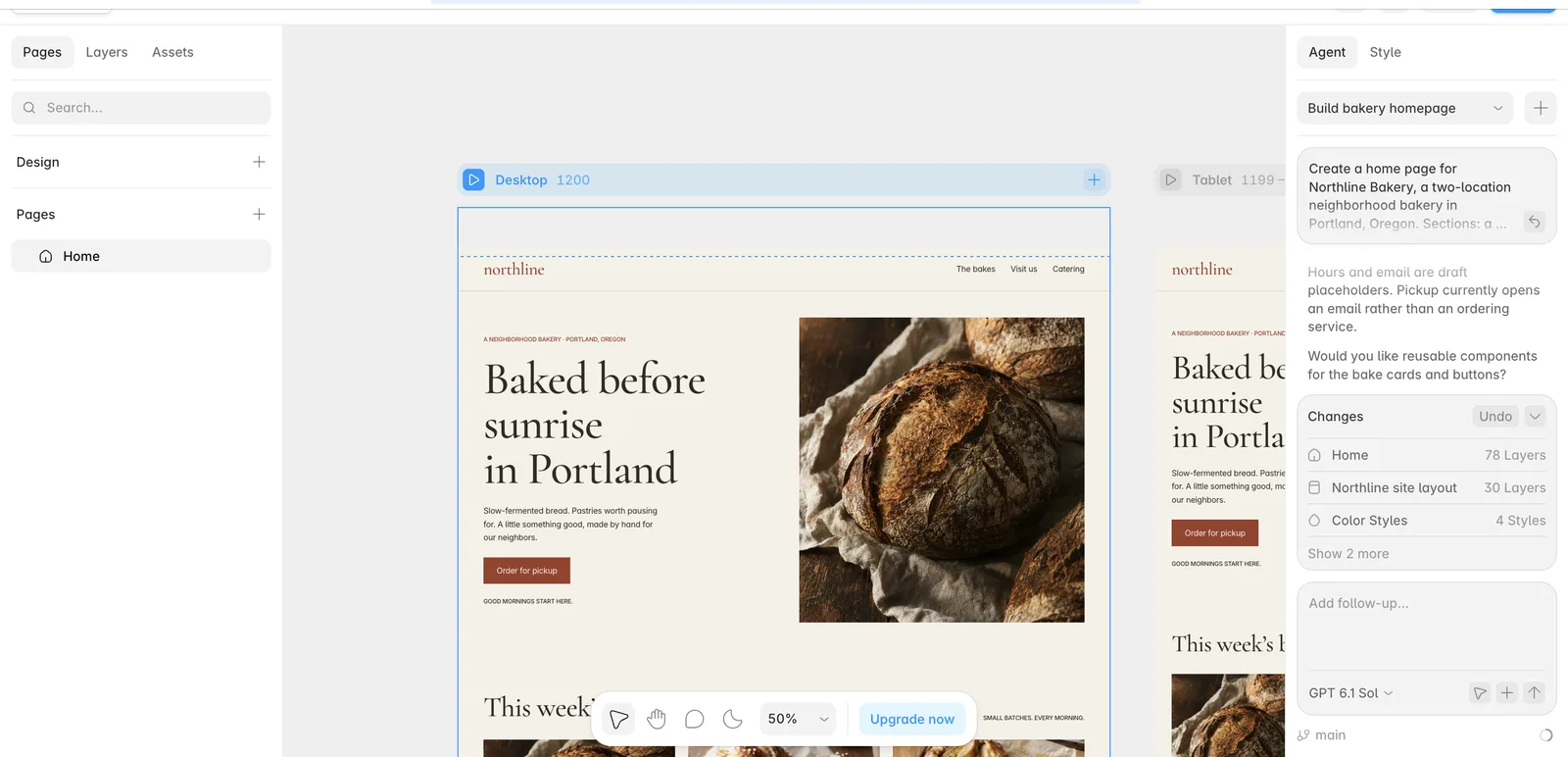
Pricing. Free plan with 500 AI credits a month, a Framer domain and 1 GB of bandwidth. Basic is $10 a month and Pro is $30 a month with yearly billing selected on the plans page. Translation locales are $20 per locale per month, and additional editors are $20 a month (Framer pricing, checked 19 Nov 2026).
Limits. Basic includes 1,000 CMS items and Pro 2,500, with Pro able to add more at $20 per 10,000 up to 40,000. Localization gets expensive across many languages. Export is unclear: Framer's own help articles disagreed when we compared them for our Framer vs Webflow guide to price, CMS and lock-in. Check Framer's current help pages before you rely on export.
Verdict. Of the tools we tested, Framer felt closest to Webflow for designers, at a lower entry price. Check the per-locale and per-editor costs against your team size before you assume it is cheaper.
2. WordPress.com: best for plugins and a documented way out
What it is. Hosted WordPress, with a block editor, themes and, on paid plans, plugins.
Who it suits. Teams leaving Webflow because of the CMS limits, the learning curve, or lock-in, who are happy with a block-based editor instead of a free canvas.
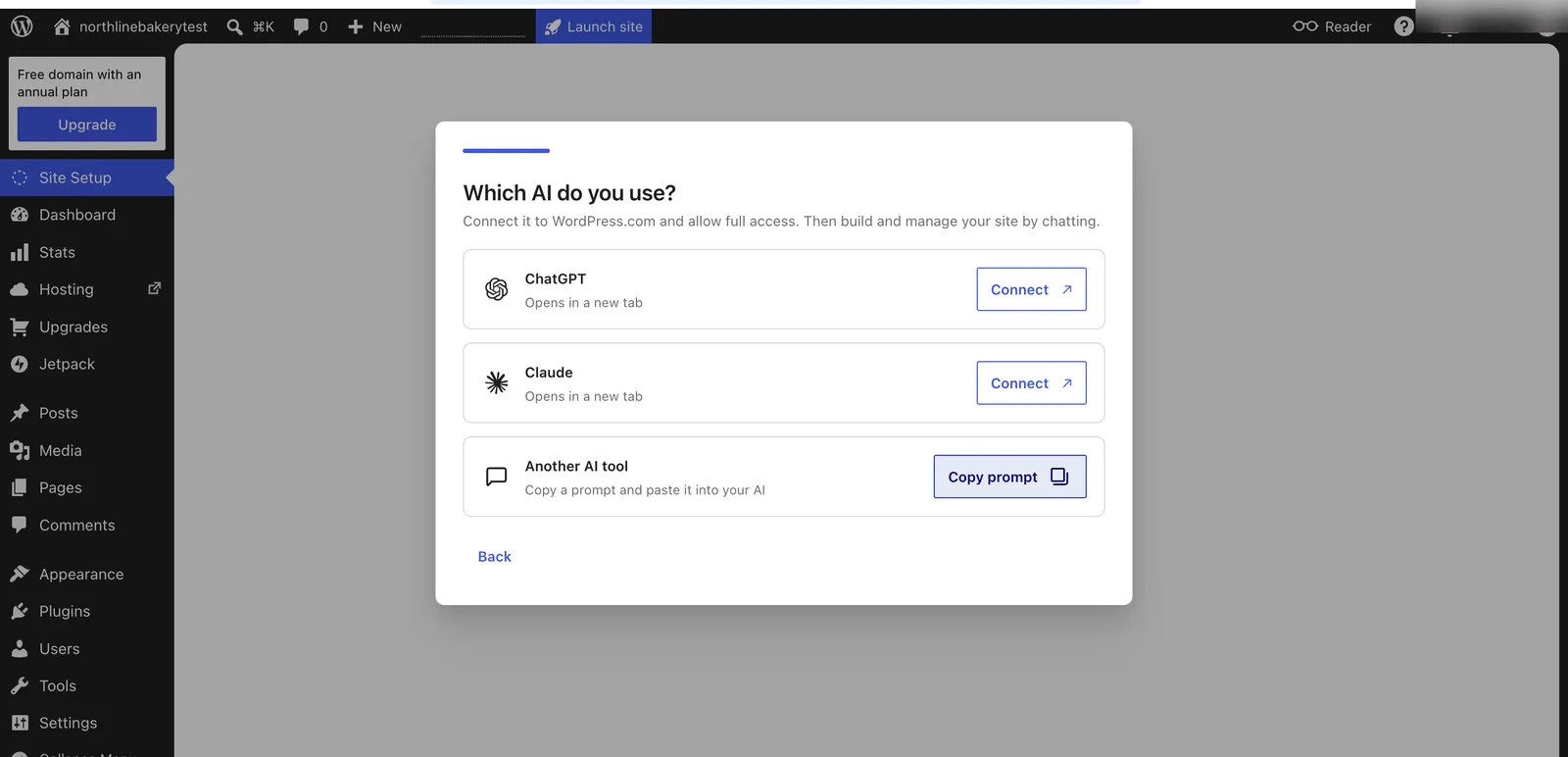
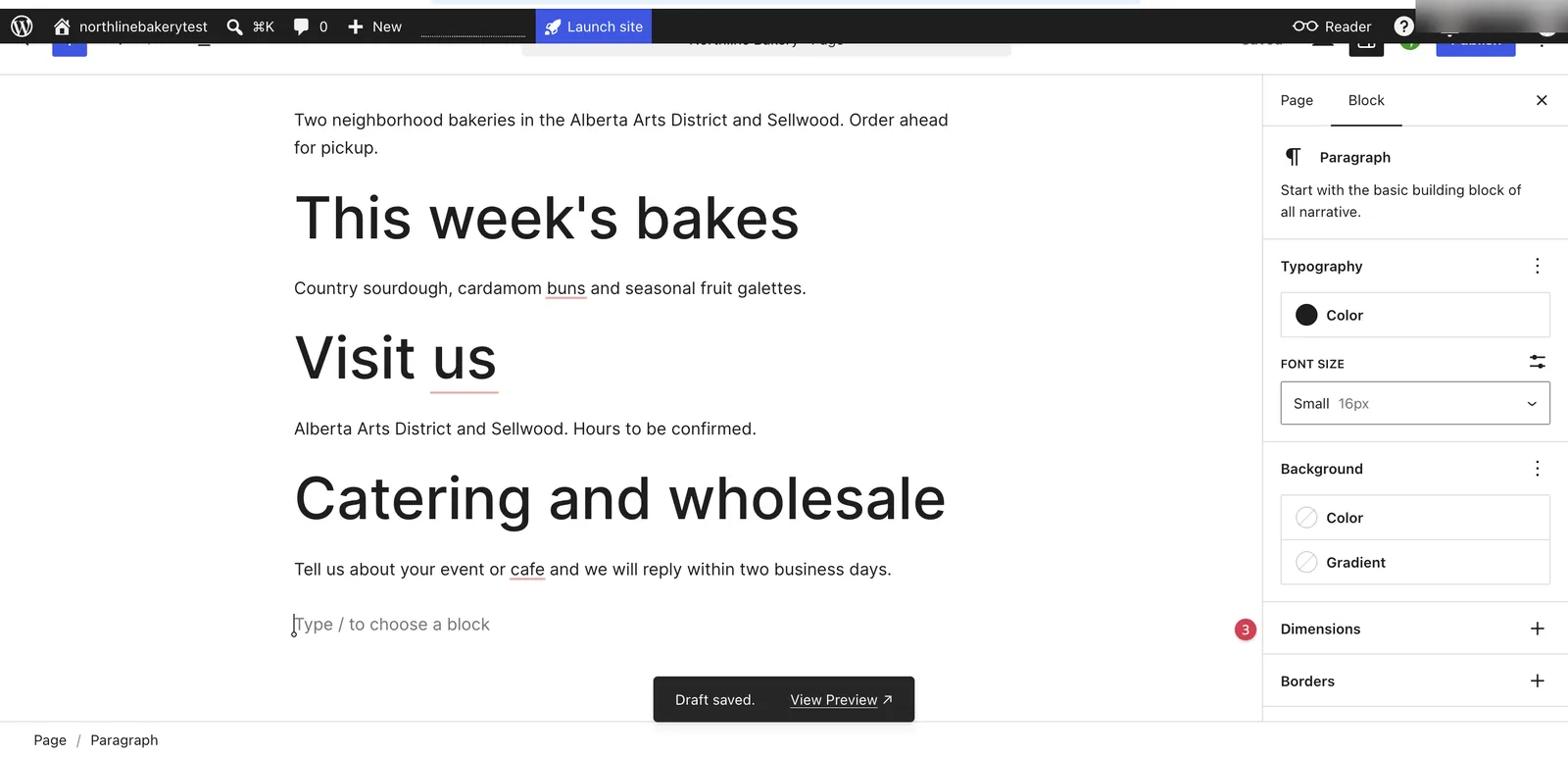
What we saw. We created a free site called "northlinebakerytest". The setup flow offered a "Build with AI" path, but that path asked us to connect ChatGPT or Claude in a new tab, or to copy a prompt into another AI tool. It did not build the page inside WordPress.com. So we built the Northline page by hand in the block editor: headline, intro, "This week's bakes", "Visit us" with both neighborhoods, and "Catering and wholesale". It saved as a draft. The site stayed unlaunched.
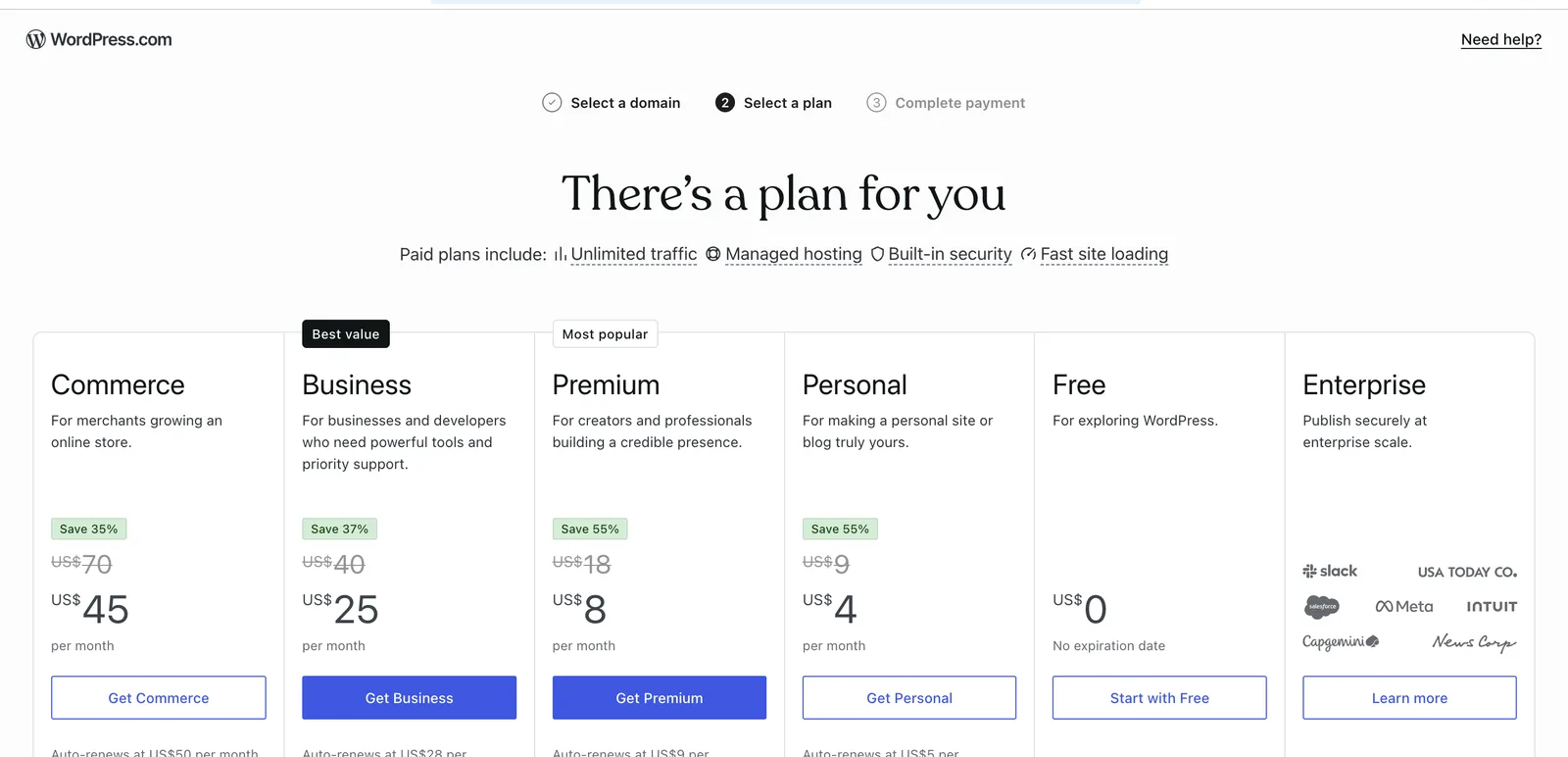
Pricing. Free plan available. Personal is $4 a month, Premium $8, and Business $25, billed yearly (WordPress.com pricing, checked 19 Nov 2026). Plugins can be installed on all paid plans, not on free sites (WordPress.com: plugins).
Limits. You trade Webflow's visual precision for blocks and themes. In our hand build, layout was a matter of stacking blocks, not placing elements freely. Plugins also bring their own updates to manage.
Verdict. WordPress.com is a strong choice if lock-in is your main worry. It documents an export of posts, pages and comments that you can move to another WordPress site or platform (WordPress.com: export your content). We did not test the export.
3. Wix Studio: an option for agencies that hand sites to clients
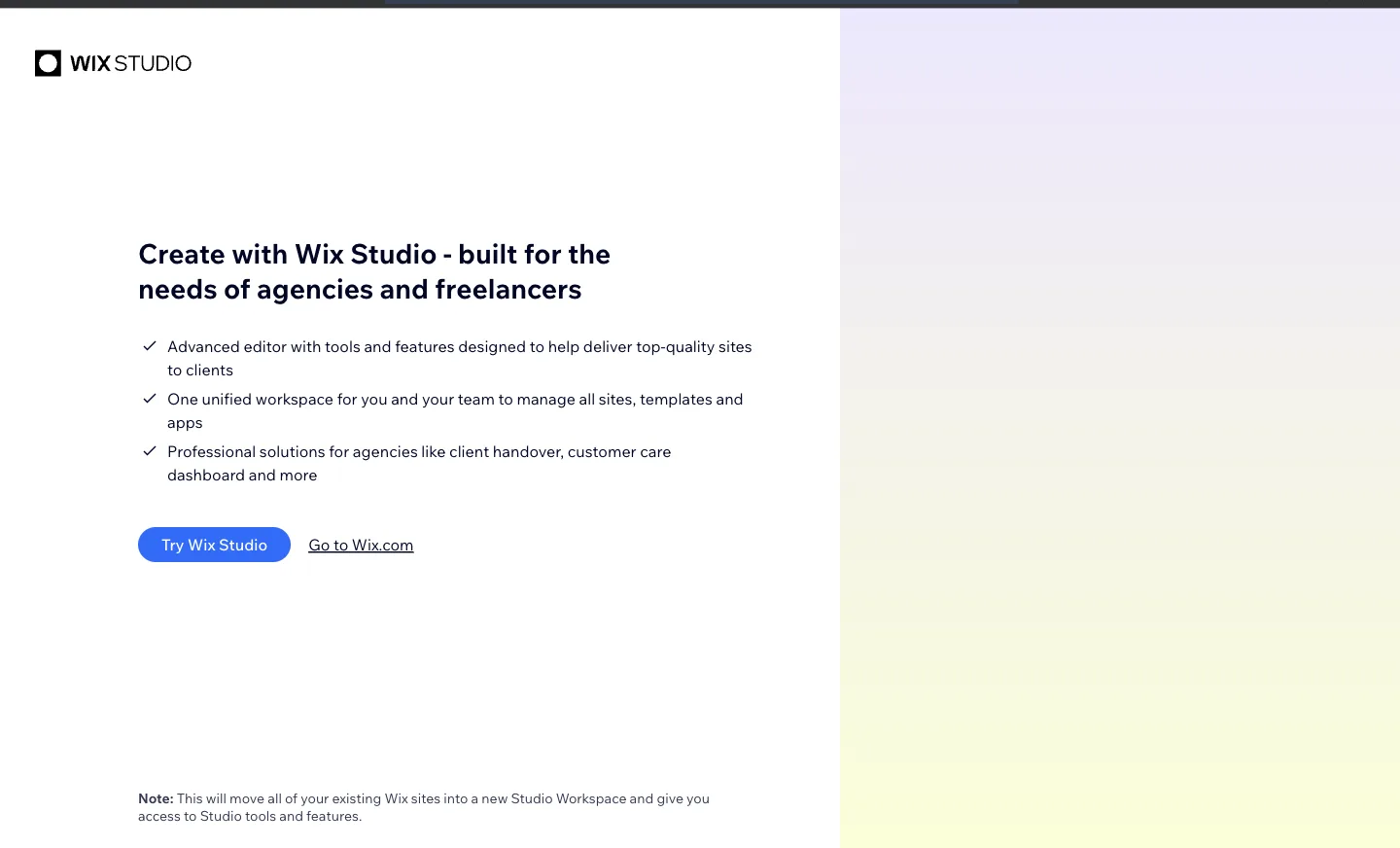
What it is. Wix's platform for professional site builders. Its start page describes it as "built for the needs of agencies and freelancers".
Who it suits. Agencies leaving Webflow because client work takes too much time there, who are comfortable staying on a hosted platform.
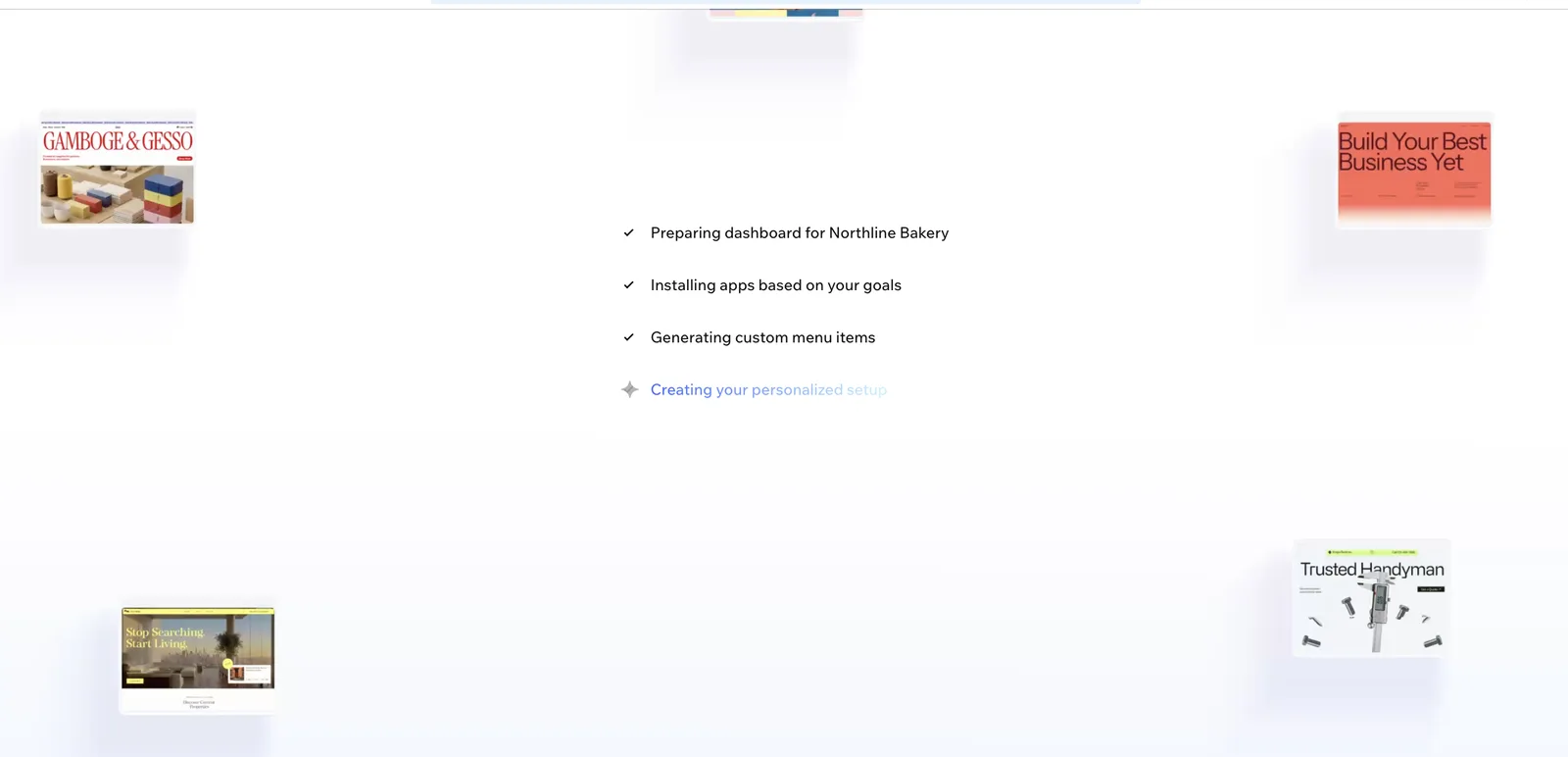
What we saw. We did not test the Wix Studio editor. Here is what happened instead. On 18 November, using a free Wix account, we gave Wix's AI onboarding the Northline brief. It recommended apps for a site profile and then stalled on "Creating your personalized setup". When we returned on 19 November, the dashboard for the test site stayed blank for more than 30 seconds. Both were single sessions, so treat them as what we saw, not as a measure of Wix's reliability.
We then tried to open Wix Studio itself. The Studio start page said that switching would move all existing Wix sites in the account into a new Studio Workspace. Because that change would affect the whole Wix account, not just our test site, we stopped there.
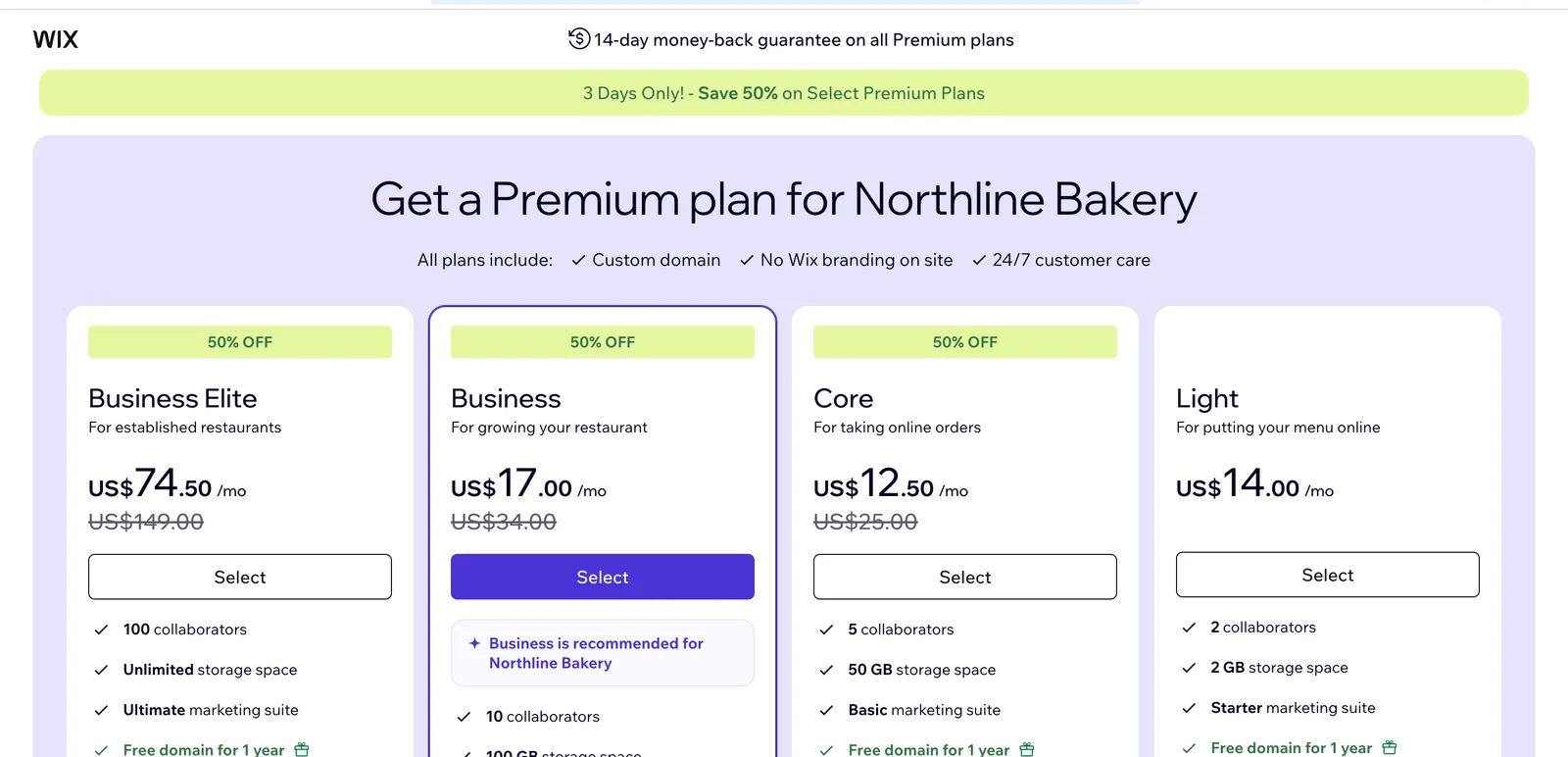
Pricing. We could not verify Wix Studio's own plan prices. The Wix Studio plans page redirected our signed-in account to the upgrade page for our test site, so we could not read Studio's public plan table. That upgrade page listed Wix site plans, not Studio plans: Light at $14 a month, Core at $25, Business at $34 and Business Elite at $149, billed yearly. It also showed a 50% discount on the top three, marked as ending 21 November 2026, and we could not tell whether the listed prices already included it. Wix had filed the bakery under restaurant plans, and prices shown inside an account can differ from the public list.
Limits. Wix states that its SaaS architecture does not support hosting a Wix site anywhere else (Wix Help: exporting or embedding your site). If you are leaving Webflow because of code export, this moves you further from it. Our guide to Wix alternatives covers what Wix lets you take with you if you leave it later.
Verdict. Wix Studio is worth a trial for agencies that value a hosted, all-in-one platform over portability. Try it in a separate Wix account if you already have Wix sites, and confirm Studio's pricing yourself, because we could not.
4. Duda: an option for agencies running many client sites
What it is. A website platform whose pricing is built around agencies: its plans are named Basic, Team, Agency and White Label, and they scale by team seats and included sites.
Who it suits. Agencies leaving Webflow because per-site and per-seat costs climb with every client.
What we saw. Not tested. Duda's sign-up page offers "Sign up with Google", labeled as opening in a new tab, which falls outside the single browser tab our test rules allow. The other path was an email and password account with an activation link, which our rules for this round did not allow us to create. That is a limit of our test, not a problem with Duda's sign-up.
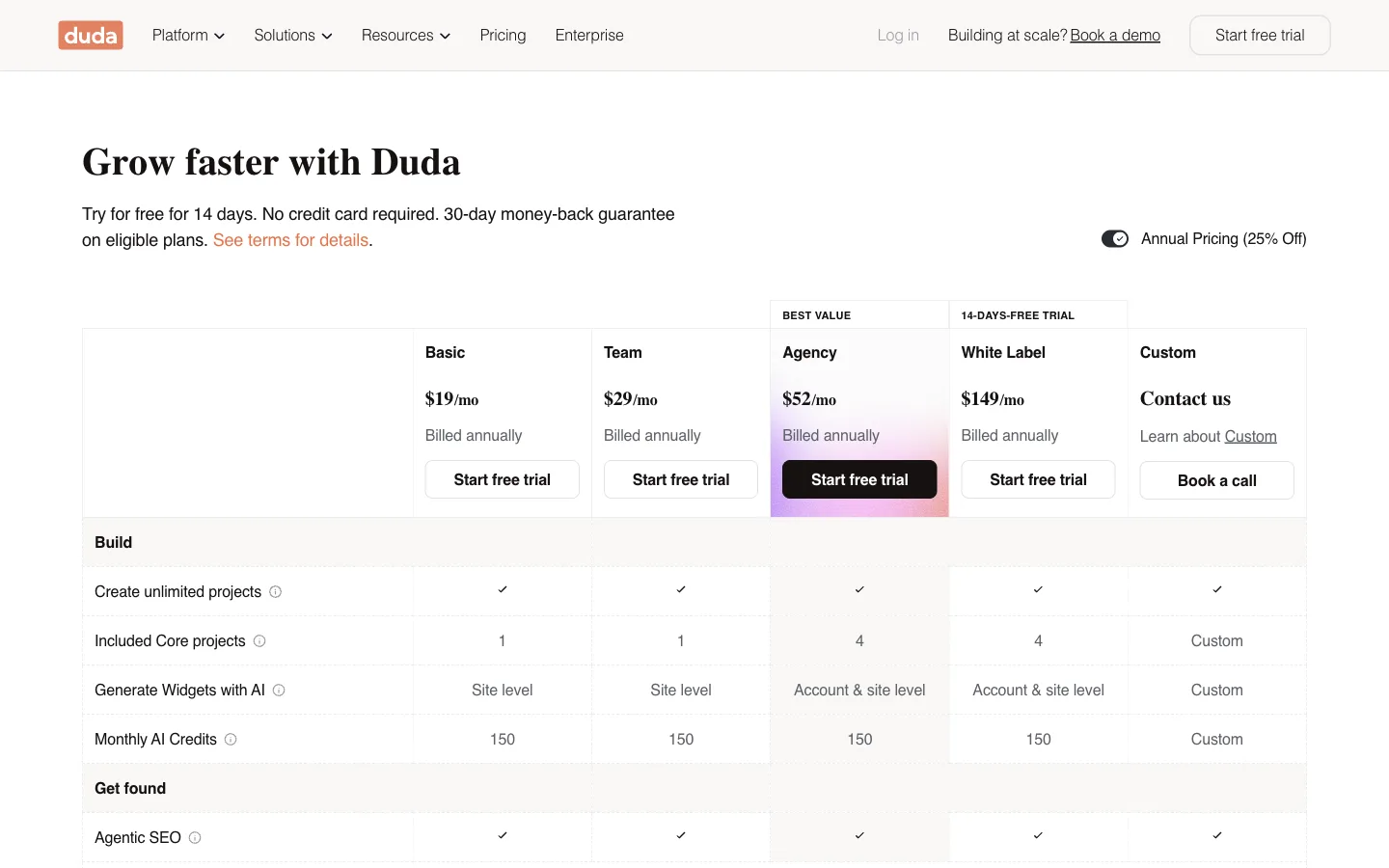
Pricing. 14-day free trial, no credit card required. Basic is $19 a month billed annually ($25 monthly), Team $29, Agency $52 and White Label $149. Team includes three team seats and Agency six (Duda pricing, checked 19 Nov 2026).
Limits. Basic and Team include one core project, and Agency four, so check the cost of each additional site for your client count. The pricing page lists a trial, not a free plan.
Verdict. On paper, Duda's pricing fits the agency use case better than Webflow's per-site model. We have not used it, so run the trial with one real client site before moving a roster.
5. Dorik: a lower-priced builder for simple sites
What it is. A website builder with yearly, two-year and one-time "lifetime" plans. Its plan list mentions blog posts, collaborators and code export.
Who it suits. Freelancers and small teams leaving Webflow mainly because of price, with simpler sites.
What we saw. Not tested. Dorik's sign-up page offers Google sign-up in a new tab, or email with a password. Our rules for this round did not allow either, so we did not create an account.
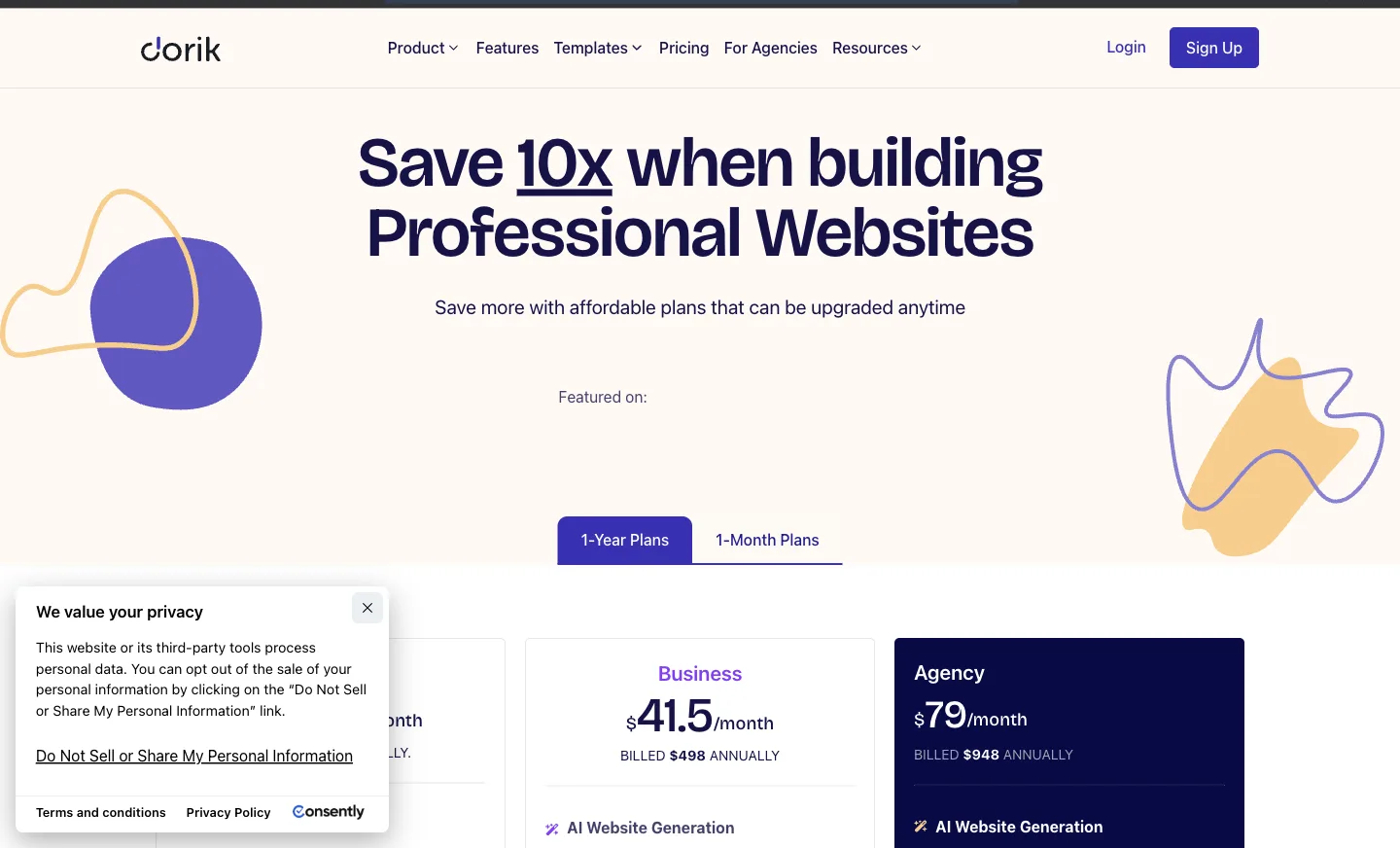
Pricing. Personal is $249 a year ($20.75 a month) or $29 monthly. Business is $498 a year or $59 monthly (Dorik pricing, checked 19 Nov 2026).
Limits. Personal allows 25 pages, one custom domain, no collaborators and 200 blog posts. Code export is in the plan feature list, but the page did not make clear to us which tiers include it. Confirm that with Dorik before you buy if export is your reason for leaving Webflow.
Verdict. Dorik is a lower-cost option for simple sites. We can't speak to its design depth, because we have not used it.
6. Lovable: an option for dev-adjacent teams who want code they can sync
What it is. An AI builder that writes a web project's code from chat, with hosting on lovable.app and GitHub sync.
Who it suits. Teams leaving Webflow because of code export, who are comfortable reviewing generated code and want to keep it in a repository.
What we saw. Not tested. "Continue with Google" opened outside our tab, and the email path did not advance in our session. We don't know whether that was Lovable or our test setup.
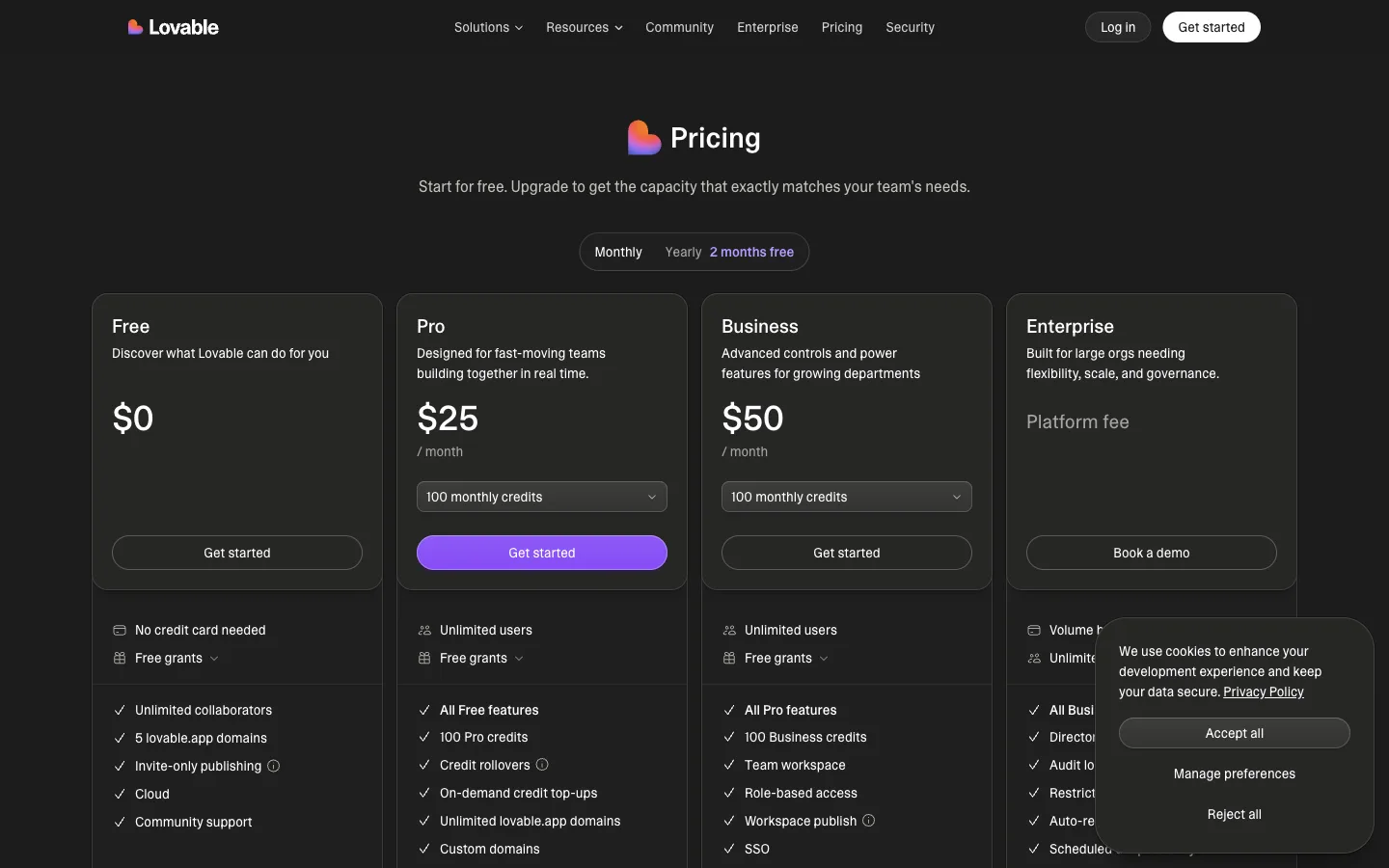
Pricing. Free plan with five lovable.app domains and invite-only publishing, meaning only people you invite can open the site. Pro is $25 a month with 100 monthly credits and custom domains (Lovable pricing, checked 19 Nov 2026).
Limits. Lovable's GitHub integration exports and two-way syncs project code (Lovable docs: GitHub). That answers the ownership question. The trade-off, in our view, is that someone on the team then owns a codebase, including the SEO details and content editing that Webflow handles in its interface.
Verdict. On its docs, Lovable is strong on ownership. It looks like a weaker fit for a marketing team that wants to edit content without prompts or code.
7. Builder.io: an option for teams with an existing codebase
What it is. A visual editing tool that connects to your Git repository. Its free plan lists GitHub, GitLab and Bitbucket connections, and its plans are priced per user.
Who it suits. Product companies leaving Webflow because the marketing site should live in the same codebase as the product.
What we saw. Not tested. "Continue with Google" opened a pop-up outside our tab, and our rules for this round did not allow a new email and password account.
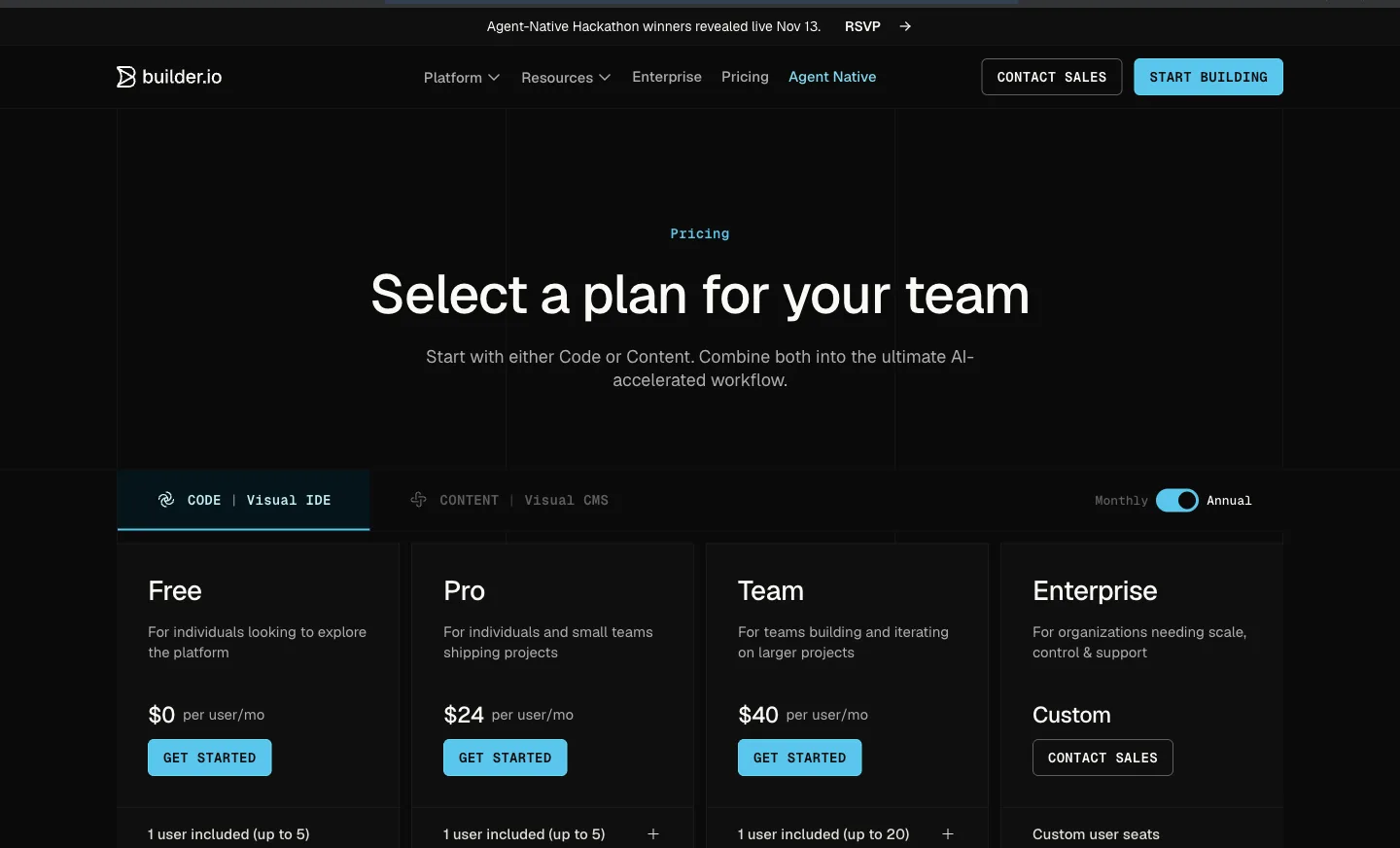
Pricing. Free plan with one user, 60 credits a month (15 a day) and GitHub, GitLab and Bitbucket connections. Pro is $24 per user a month and Team $40 per user a month (Builder.io pricing, checked 19 Nov 2026).
Limits. It starts from a Git repository, so it assumes you have developers and a codebase. We did not verify what it offers for hosting or content management, so check that if you expect it to replace Webflow's hosting and CMS.
Verdict. Builder.io looks like a fit when engineering owns the site. It is not the obvious move for a team that wants to stop depending on developers.
Our own product: PolyDraft, for when the ongoing marketing work is the problem
Disclosure. PolyDraft is our product. We include it because one common reason for leaving Webflow is that nobody has time to keep up the site's search, AI visibility and language work. We did not run it through the Northline test in this round, and it is not part of the numbered list or ranked against it. What follows comes from our own public pages, so read it as a vendor's account of its own product.
What it is. An AI website builder that builds an Astro site from a plain-language brief or an existing website's URL, deploys to your own cloud account under your own domain, and handles multilingual pages with hreflang, according to its How it works and Features pages (linked in Sources). After launch, it helps with SEO and GEO work: finding opportunities, drafting content and running on-page checks. It does not publish unattended. A person approves what goes live.
Who it suits. Content-led business sites where the reasons for leaving Webflow are localization cost, the learning curve, and the weekly SEO work that nobody on the team has time for.
Pricing. Building and previewing is free, with 500 welcome credits for new accounts. You pay to publish. Starter is $39 a month ($32.50 a month billed yearly) with up to 10 languages, Pro is $99 with up to 30, and Agency is $299 with up to 100 languages and full source-code export. Access is currently invite-based (PolyDraft pricing page, linked in Sources, checked 19 Nov 2026).
Limits. There is no design canvas: you steer the design through the brief and edits, not by moving elements (PolyDraft vs Webflow comparison). It is not a storefront platform. Full source-code export is on Agency only. It can read your own Google Search Console data once you connect your property, but it does not connect to your own Ahrefs or Semrush accounts. Like every tool on this page, it cannot guarantee rankings, traffic or AI citations. Our public pages describe rebuilding your site from its public URL, not importing a Webflow project or its CMS collections directly.
If you want the move done for you, AI FDE is our paid service where a PolyDraft engineer moves sites from Webflow with old URLs mapped and redirected. It is also our product, and we did not test a migration for this article.
Verdict. Consider PolyDraft if your team is leaving Webflow for operational reasons and not design ones. If design control is the point, Framer or staying on Webflow will suit you better.
Also considered
We left out Squarespace for two reasons. We could not sign in to it under our test rules, and our Squarespace alternatives guide already covers it as a destination and as a platform people leave. We also left out self-hosted static site generators, which need a developer to run.
Before you switch: what moves and what doesn't
A Webflow exit is a migration, whichever alternative you pick. The order below is our recommendation. The cited rules come from Webflow and Google.
- Export what Webflow lets you. Export CMS collections as CSV, and the code if you are on a paid Workspace plan. Expect forms, site search, password protection and secondary languages to need rebuilding (Webflow code export).
- List every URL. Include CMS item pages and localized paths. Each one needs a matching page or a 301 redirect on the new site. Google recommends permanent server-side redirects when a URL changes for good (Google Search Central: redirects).
- Rebuild forms and integrations. Webflow form processing does not come with an export.
- Move languages last. If you used Localize, check the hreflang annotations on the new site before you switch DNS. Google documents how to mark up localized versions (Google Search Central: localized versions).
- Keep Webflow running until the new site is verified. Cancel only after redirects and forms work.
Our website migration checklist covers the redirect map and launch checks step by step.
How we tested
- Dates. Hands-on tests ran on 18 November 2026. Sign-up attempts, pricing checks and the extra Wix checks ran on 19 November 2026.
- Test task. The same Northline Bakery home page brief in every tool we could sign in to: hero with "Baked before sunrise in Portland" and an "Order for pickup" button, this week's bakes, two locations with hours, catering and wholesale, and a footer. Where a builder had an AI path, we pasted the brief. Where it did not, we built the sections by hand.
- Accounts and rules. Free accounts only, in one browser tab, with no new password accounts. No payment details, no paid trials, nothing published, no domains connected.
- Criteria. How long the AI build took, how editable the result was, what sat behind a paywall, and how each tool answers the five Webflow exit reasons above. We timed the AI build in Framer. We did not record times for the hand-built WordPress.com page or the Wix onboarding.
- What we did not test. Duda, Dorik, Lovable and Builder.io. Under our rules we did not get past sign-up, because Google sign-in opened outside our tab and email sign-up needed a new password account. That is a limit of our method, not a fault in those products. We did not open the Wix Studio editor, because switching would have moved every site in the account. We did not test code export, migrations, ecommerce, or performance in any tool.
- Prices. Read from each vendor's public pricing page on 19 November 2026, in US dollars. Wix is the exception: we read the plan page inside our signed-in account. Prices can vary by region, currency and promotion.
- Our own product. PolyDraft is our product and is marked as such. It was not run through the Northline test in this round, its entry lists its limits, and it sits outside the numbered list. Our editorial policy explains how comparisons and corrections work. Drafts are written with AI assistance and approved by a named person before publishing.
Frequently asked questions
What is the best free alternative to Webflow?
Of the two we tested, Framer and WordPress.com both let us build a full page on a free plan. Framer's free site stays on a Framer domain with 1 GB of bandwidth. WordPress.com's free plan does not allow plugins.
Is Framer cheaper than Webflow?
At the entry level, the list price is lower: Framer Basic is $10 a month and Webflow Basic is $15 a month, both with yearly billing. The gap narrows with extra editors at $20 each and languages at $20 per locale, so price your own team and languages.
Can I export my Webflow site and host it somewhere else?
Partly. Paid Webflow Workspace plans export HTML, CSS, JavaScript and assets, but not CMS content, forms, site search, password protection or secondary languages. CMS collections export separately as CSV.
Which Webflow alternative is best for agencies?
Duda and Wix Studio are the two alternatives to Webflow in this list that are aimed at agencies. Duda's pricing page lists team seats and a White Label plan at $149 a month. Wix describes Studio as "built for the needs of agencies and freelancers". We tested neither editor, so check how each one charges for additional client sites and run a trial first.
Will I lose my Google rankings if I leave Webflow?
Not necessarily, but rankings can drop if URLs change without redirects. Google recommends permanent server-side redirects for URLs that move for good. Beyond that, our advice is to keep titles and content equivalent and to check the new site in Search Console after launch. No platform can guarantee rankings after a move.
Sources
- Webflow: Plans and pricing, checked 19 Nov 2026
- Webflow Help Center: How do I export my Webflow site code?, checked 19 Nov 2026
- Webflow Help Center: Updated pricing and simplified plans for May 2026, checked 19 Nov 2026
- Webflow Help Center: Seats, roles, and permissions overview, checked 19 Nov 2026
- Framer: Pricing, checked 19 Nov 2026
- WordPress.com: Pricing, Plugins, Export your content, checked 19 Nov 2026
- Wix Help Center: Exporting or embedding your Wix site elsewhere, checked 19 Nov 2026
- Wix: plan page shown inside our signed-in test account, and the Wix Studio start page, viewed 19 Nov 2026. Neither is a public pricing source.
- Duda: Pricing, checked 19 Nov 2026
- Dorik: Pricing, checked 19 Nov 2026
- Lovable: Pricing and GitHub integration docs, checked 19 Nov 2026
- Builder.io: Pricing, checked 19 Nov 2026
- PolyDraft (our product): Pricing, How it works, Features, PolyDraft vs Webflow, AI FDE, checked 19 Nov 2026
- Google Search Central: Redirects and Google Search and Tell Google about localized versions of your page, checked 19 Nov 2026