In this article
- 01 The three layers of site architecture
- 02 A six-step method
- 03 The architecture register: a template
- 04 When two pages compete: check, then fix
- 05 Architecture and AI answers
- 06 What small sites can ignore
- 07 A quarterly architecture audit
- 08 Where PolyDraft fits
- 09 Frequently asked questions
- 10 Continue with the next task
- 11 Sources
Website architecture, or site structure, is the set of decisions about which URLs exist, what each one is for, and how they link to each other. It matters for SEO because Google primarily finds pages through links from pages it has already crawled, and it uses links as a signal of relevance. One rule matters more than the rest: every search intent should have exactly one clear owner page, and related pages should link to it with crawlable, descriptive links. For small and mid-size sites, in our view, getting intent ownership right matters more than debates about flat versus deep structures.
This guide is a working method, not a theory overview. It uses PolyDraft's own site and keyword data as the example, and includes a register template you can copy.
Key points
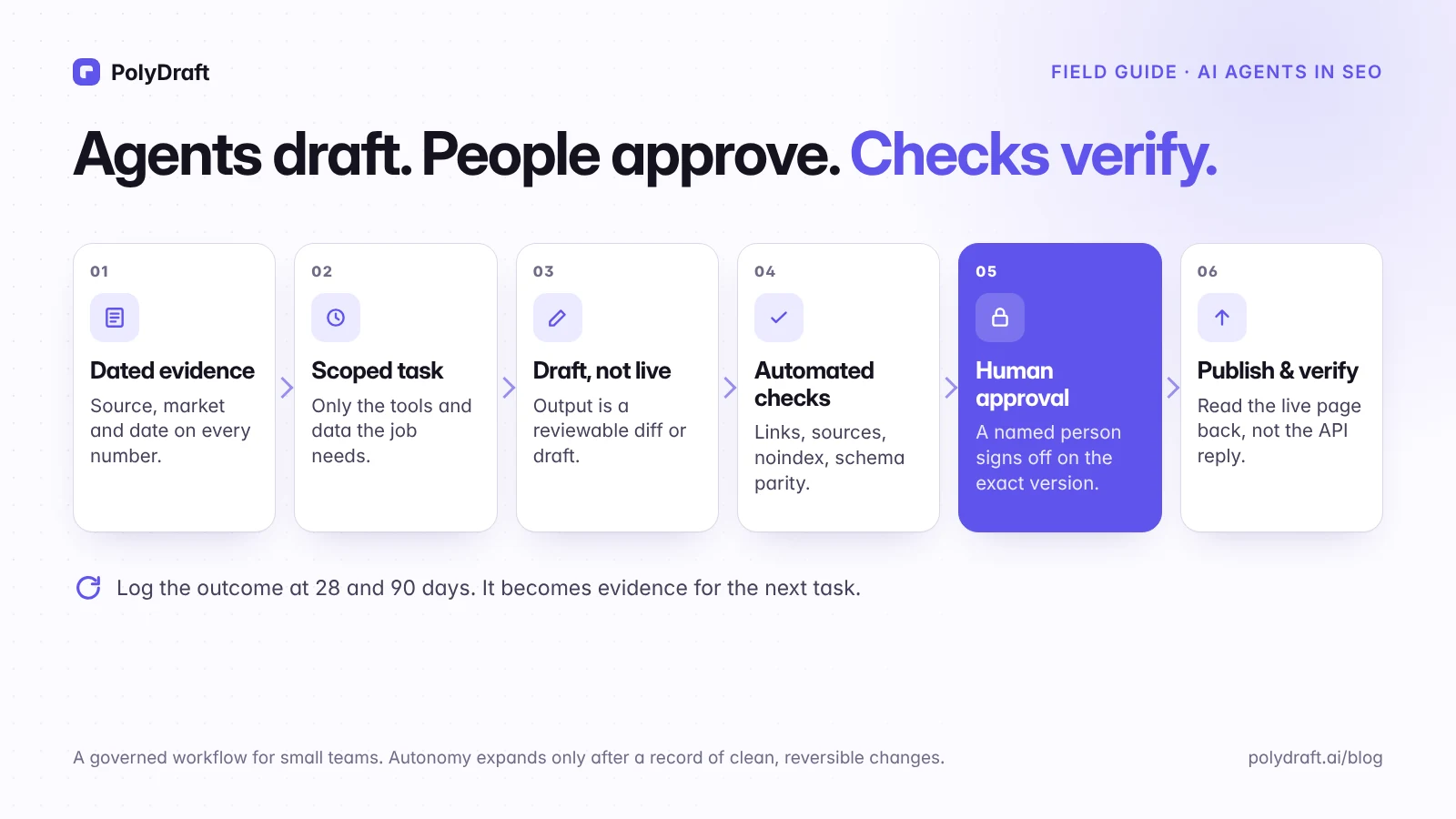
- Architecture has three layers: the URL inventory, intent ownership, and the link graph.
- Use the SERP overlap test to decide whether two queries are one intent or two. On real results, two near-identical calculator queries shared 7 of 10 URLs, while two AI-visibility queries shared none.
- Keep an "architecture register" so each intent has one owner, and separate "the page is live" from "we checked the results".
- Before fixing two pages that compete, check whether they really do. Sometimes the right move is to leave both.
- Small sites can ignore crawl budget and most silo theory.
The three layers of site architecture
- URL inventory. Which pages exist, which return a 200 status, and which are meant to be indexed.
- Intent ownership. Which search need each page answers. This layer is invisible in your CMS, and it's where most architecture problems start.
- Link graph. How pages connect: main navigation, hub pages, contextual links in body copy, breadcrumbs, and footers.
URL paths such as /blog/ or /compare/ are labels. Click paths are what people and crawlers actually follow. A page with a tidy URL that nothing links to is still an orphan.
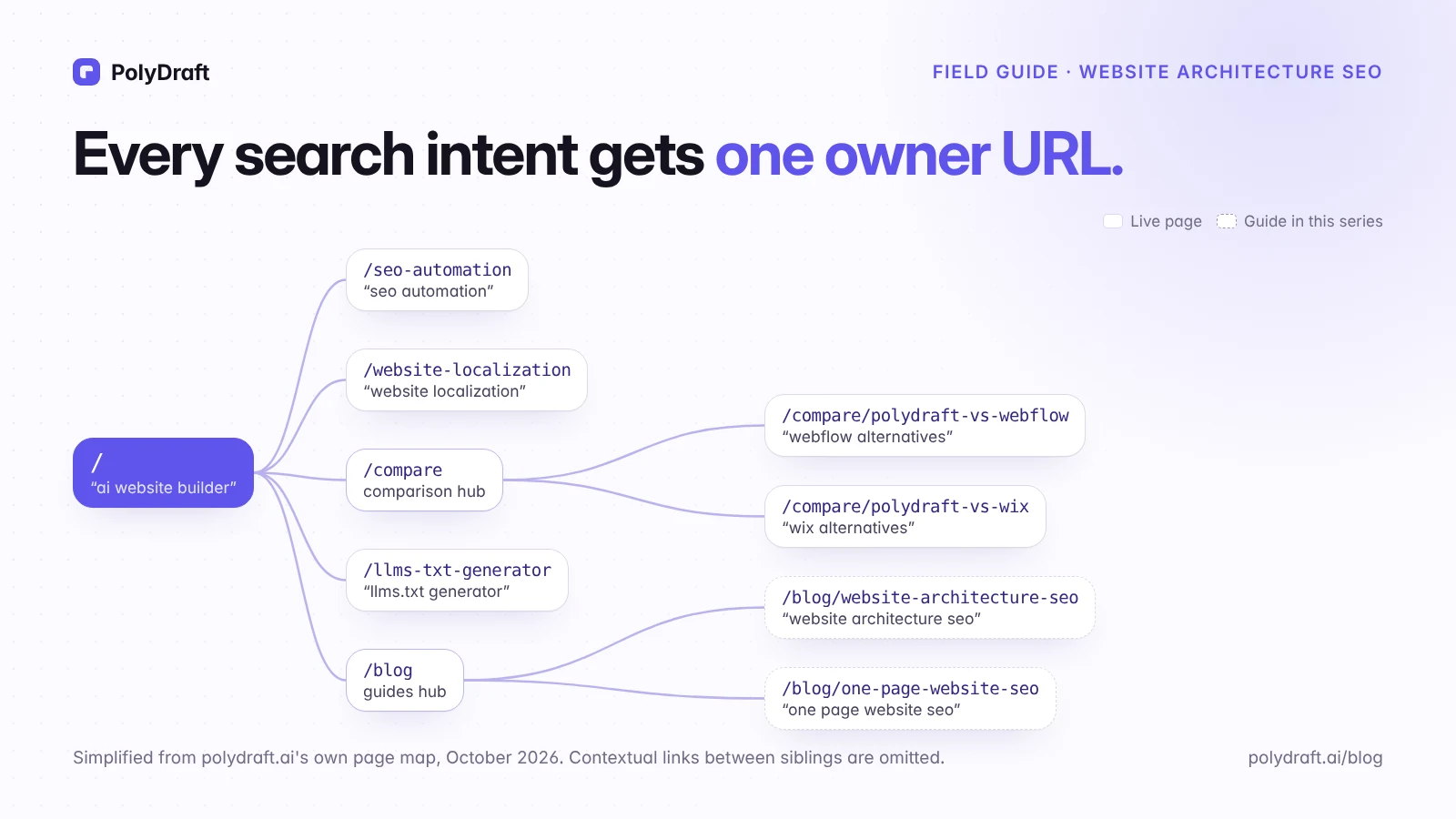
Here is polydraft.ai's own structure, simplified, as of October 2026:
- Homepage
/owns the category ("AI website builder") and links to everything below. - Capability pages such as
/seo-automation,/ai-visibility, and/website-localizationeach own one capability. - Buyer pages such as
/for-startupsand/for-small-businesseach own one audience. - Comparison hub
/comparelinks to one page per alternative, such as/compare/polydraft-vs-webflow. - Free tools such as
/website-cost-calculatorand/llms-txt-generatoreach own one task. - Blog hub
/blog, with category pages, links to guides like this one, each owning one how-to question.
A six-step method
1. List the jobs your site has to do
Start from the business, not a keyword tool. A typical software or services site needs pages that explain each offer, compare you with alternatives, answer how-to questions, provide tools, and establish trust (about, pricing, security, contact). Each job tends to map to a page type.
2. Group queries by intent with the SERP overlap test
Two queries belong to the same intent when Google answers them with largely the same pages. To test a pair, compare the top 10 organic results for each query, in the same market, as close together in time as you can, and count the URLs they share. Record the date of each result page.
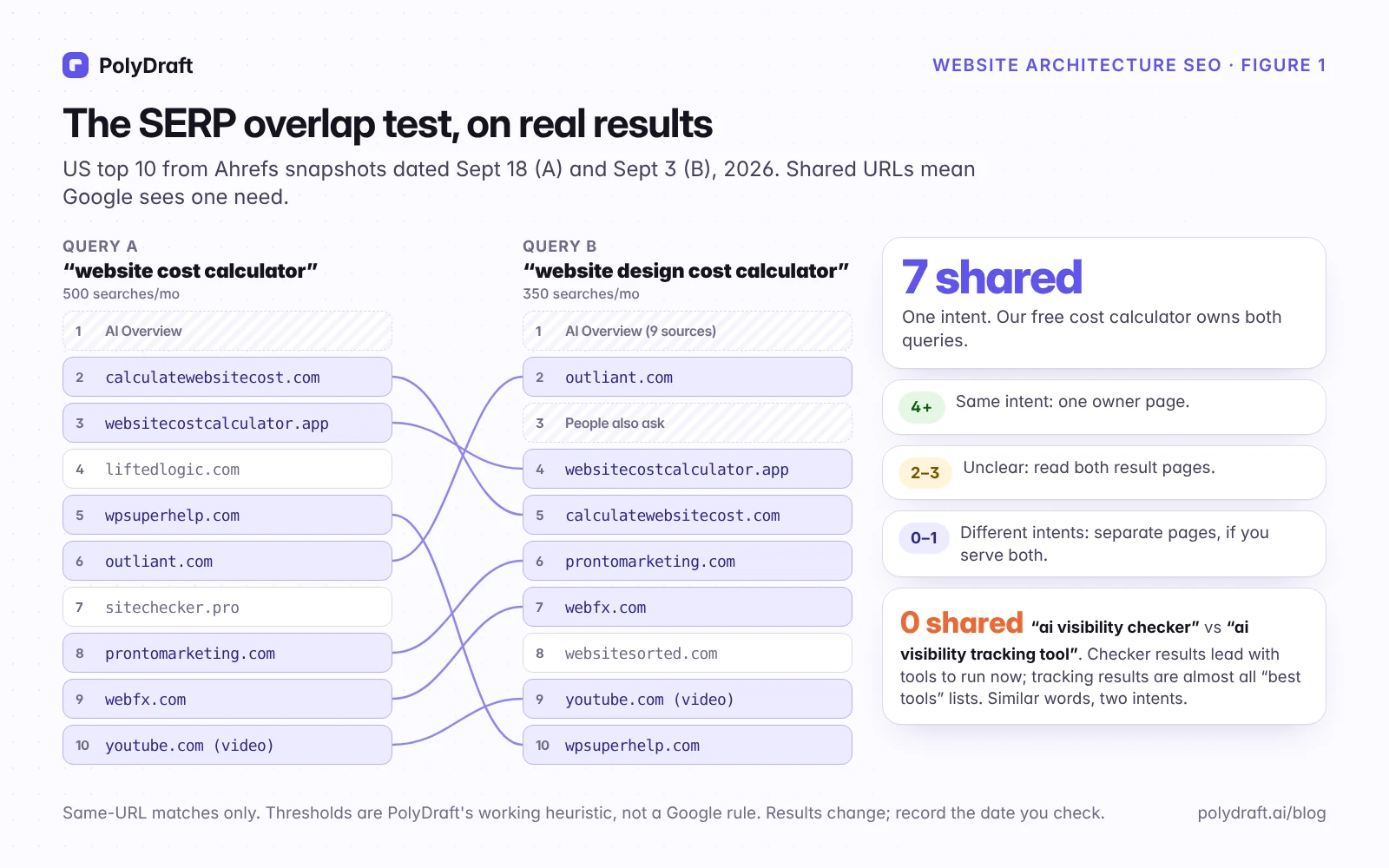
Two real pairs from Ahrefs US result snapshots that we exported on October 5, 2026. Ahrefs had last refreshed the calculator results on September 18 and September 3, and the AI-visibility results on October 5 and September 29. The calculator pair is 15 days apart, short of our own ideal, so treat its count as approximate:
- "website cost calculator" (500 searches a month) and "website design cost calculator" (350): 7 shared URLs. Same intent. Our free website cost calculator owns both queries, and we don't build a second page for the variant.
- "ai visibility checker" (1,900) and "ai visibility tracking tool" (700): 0 shared URLs. The words overlap, but the results don't. The checker query leads with tools you can run now, plus a few roundups. The tracking query returns almost nothing but "best tools" lists for ongoing monitoring. They're two intents, and a page built for one would serve the other poorly.
Our thresholds:
- 4 or more shared URLs: treat them as one intent with one owner page.
- 2–3 shared: unclear. Read both result pages and decide by what searchers seem to want.
- 0–1 shared: different intents. Use separate pages, if you serve both.
These thresholds are our working heuristic, not a Google rule, and results change over time. Record the date you checked. Count exact URLs, and treat a YouTube video or a forum thread as a real result.
At scale, this check is the expensive part. Our research library holds 14,183 US queries grouped into 62 draft clusters. As of October 13, 2026, 13,979 of those queries (98.6%) were still grouped by rules rather than reviewed one by one. Rule-based mappings stay drafts: we don't approve a cluster's owner page until someone has checked the live results for its main queries.
3. Assign one owner URL per intent, and choose its page type
| Intent type | Typical page type | Example on polydraft.ai |
|---|---|---|
| Category or product | Homepage or landing page | / for "AI website builder" |
| Capability | Landing page | /website-localization for the localization process |
| Comparison | Comparison page under a hub | /compare/polydraft-vs-webflow for "PolyDraft vs Webflow" |
| Task | Free tool | /website-cost-calculator for "website cost calculator" |
| How-to or concept | Guide under /blog/ |
This article, for "website architecture SEO" |
Ownership also means deciding what a page should not own. A search for "Lovable vs Bolt" compares two other products. That's a different intent from our own "PolyDraft vs Lovable" page, even though the words overlap. We left that query unassigned rather than stretch an existing page to cover it.
Only map intents to pages that are live and can do the job. A planned page that returns a 404 isn't an owner, so we record it as planned and link nothing to it until it ships.
4. Group owners into hubs
A hub page introduces a topic and links to the pages that cover its parts. Those pages link back to the hub and to their siblings where a reader would genuinely want the next step. On a small site, the homepage plus one to three hubs is plenty. Our /compare page is a hub for comparison pages, and /blog and its category pages are hubs for guides.
5. Design the links
- Use crawlable links. Google says it can generally crawl a link only if it's an
<a>element with anhref. - Write descriptive anchor text. Google's guidance on anchor text asks for text that is "descriptive, reasonably concise, and relevant to the page that it's on and to the page it links to." Use "compare PolyDraft and Webflow," not "click here."
- Give navigation clear roles. Header navigation carries your hubs and main offer pages. The footer carries trust, legal, and contact pages. Don't put every page in both.
- Put contextual links where the reader needs them. A link in the paragraph that raises a question is worth more to the reader than a footer link.
- Add breadcrumbs on deeper pages. They show the page's position in the site hierarchy, and Google still supports
BreadcrumbListmarkup. Since January 2025, Google shows breadcrumbs only in desktop results; mobile results show the domain. - Keep key pages close to the homepage. A few clicks is a sensible target, but the "three-click rule" is a heuristic, not a Google requirement. Don't flatten everything to meet it: when every page links to every other page, links stop signaling what matters.
- Use the XML sitemap as a backup, not a substitute. List only canonical, indexable URLs that return 200. A sitemap helps discovery, but a page that only the sitemap mentions has no links showing it matters.
6. Set URL rules once, then leave URLs alone
- Use readable words, lowercase, and hyphens:
/compare/polydraft-vs-webflow. - Group similar content in folders. Google notes that directories can help it learn how often URLs in each one change, which matters most on sites with thousands of URLs.
- Keep dates out of evergreen URLs.
- Never use fragments (
#) for distinct content. Google generally doesn't support them. - Use parameters for filtering and sorting, not for pages that should rank on their own.
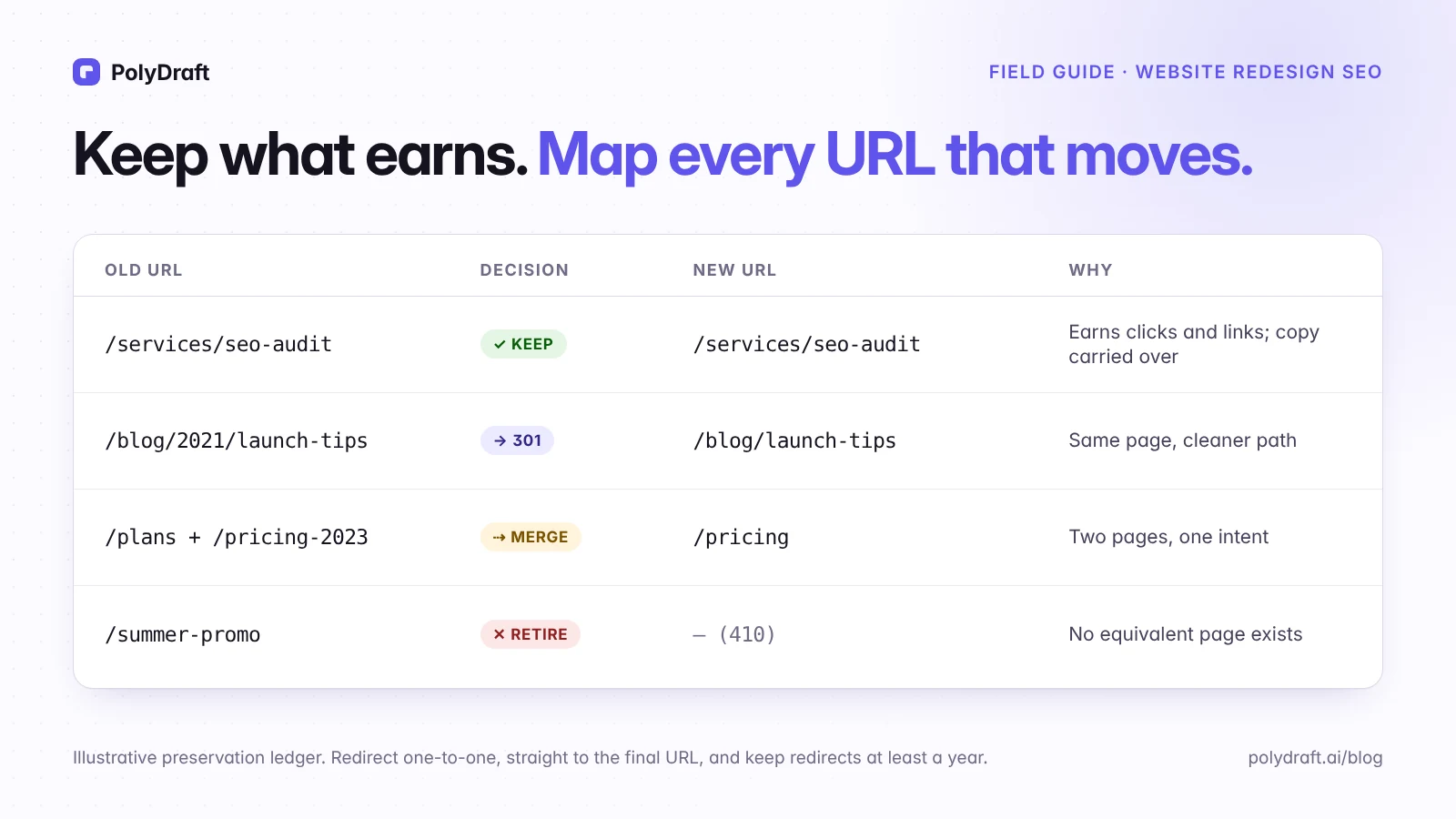
Changing URLs later means a redirect map and a migration. Our website redesign SEO checklist covers that process.
The architecture register: a template
Keep one row per intent. This is the document that prevents two pages from quietly competing. Here are four rows from our own register, simplified:
| Intent | Example queries | Owner URL | Must not compete with | Page live | Results checked | Decision |
|---|---|---|---|---|---|---|
| Estimate what a website costs | "website cost calculator", "website design cost calculator" | /website-cost-calculator | Website cost breakdown, a budgeting guide for a different question | Yes, 2026-10-13 | Ahrefs results of 2026-09-18 and 2026-09-03: 7 URLs shared | One owner for both queries |
| Run an AI visibility check now | "ai visibility checker" | Unassigned | AI visibility overview, which explains the concept | — | Ahrefs results of 2026-10-05 and 2026-09-29: 0 URLs shared with "ai visibility tracking tool" | Separate intent. No owner until we have a page that can run the check |
| Compare two other builders | "lovable vs bolt" | Unassigned | /compare/polydraft-vs-lovable | — | Not yet measured | Leave unassigned; don't stretch our own comparison page |
| Find alternatives to Lovable | "lovable alternatives", "lovable alternative" | Open: Lovable alternatives or PolyDraft vs Lovable | Whichever of the two doesn't own it | Both, 2026-10-13 | Not yet checked | Open conflict. Pick one owner, re-point internal links to it, and keep the other on its own question |
What each column means:
- Must not compete with: the nearby page that could steal the intent. New content gets checked against it.
- Page live: whether the owner URL returns 200 and is indexable, with the date checked.
- Results checked: when you last compared the live results, and what you found. A live page whose results haven't been checked is a guess, not an owner.
- Decision: what you will and won't do, so the next person doesn't redo the analysis.
When two pages compete: check, then fix
Signs of cannibalization include two of your URLs taking turns ranking for the same query, two pages with near-identical titles, and a new post that suddenly outranks the page that should own the topic. Before changing anything, check:
- In Search Console's Performance report, filter the exact query and open the Pages tab. Note which URLs get impressions and how that changes over three months.
- Compare the two pages' intents with the overlap test. If their own top queries return different results, they aren't really competing.
- Act only if both pages serve the same intent and they trade positions or split clicks without either holding a stable spot near the top. That's our heuristic, not a rule: two of your pages ranking together can be a good outcome.
| Option | When to use it | How |
|---|---|---|
| Leave both | Both rank well, or they serve different intents | Do nothing, and check again next quarter |
| Re-point internal links | Both pages are right, but your links favor the wrong one | Link the topic's anchor text to the owner from every page that mentions it |
| Differentiate | The pages could serve different intents | Re-focus one page's title, headings, and content on its own intent |
| Merge | Both pages serve the same intent | Combine the best content on the owner, then 301-redirect the other |
| Consolidate signals | Near-duplicates must both exist, such as variants | Point a canonical tag at the owner. Google treats a canonical as a strong signal, not a command |
| Keep out of search | A page must exist for users but shouldn't rank | Add noindex, and make sure robots.txt doesn't block it |
Architecture and AI answers
Google says AI Overviews and AI Mode need no special optimization beyond what makes a page eligible for regular results. Architecture still helps: when each question has one clear owner page, an answer engine has one unambiguous page to quote instead of two half-answers. Give each owner page headings that answer its sub-questions directly, and have hubs summarize and link to them. For crawler access and what assistants can read, see our guide to whether AI assistants can read your website.
What small sites can ignore
- Crawl budget. Google's crawl budget guide is written for sites with about a million or more pages that change weekly, sites with 10,000 or more pages that change daily, and sites where many URLs sit in "Discovered – currently not indexed". A site with a few hundred pages and no such backlog doesn't need to worry about it.
- Faceted navigation, unless you run a catalog with filters.
- Elaborate silo theories. Clear hubs and honest contextual links do the job.
- Folder depth as a ranking lever. What matters is whether pages are linked and useful, not how many slashes their URLs contain.
A quarterly architecture audit
| Check | How | Tool |
|---|---|---|
| Orphans | Compare the sitemap and analytics landing pages with a crawl that starts at the homepage | A crawler such as Screaming Frog or Sitebulb |
| Broken links and links to redirects | Crawl internal links; list non-200 targets | Crawler |
| Key pages buried too deep | Sort the crawl by click depth; flag owner pages deeper than your target depth (we use three clicks as a prompt to look, not a rule) | Crawler |
| Pages competing | Run the Search Console check above on your top 20 queries | Search Console |
| Sitemap hygiene | Crawl the sitemap list; flag redirected, noindex, or non-canonical URLs |
Crawler |
| Navigation language | Compare menu labels with the words in your top queries | Search Console |
| Stale register rows | Re-check any row whose "Results checked" date is more than a quarter old | The register |
Where PolyDraft fits
You can plan pages with PolyDraft's builder in conversation. Its agent is set up to give each target keyword one page and to point related pages' links at that owner, and generated sites include canonical tags and an XML sitemap in the site scaffold. Check that output like any other draft. The intent map is still a business decision: no tool knows which customers you most want to reach. Keep the register yourself, and see what PolyDraft automates for SEO for the repetitive work around it. To see how we lay out comparison pages, browse the comparison hub.
Frequently asked questions
What is a good website architecture for SEO?
One where each search intent has a single owner page, related pages are grouped under clear hubs, every important page is reachable through crawlable links, and URLs are readable and stable.
How many clicks from the homepage should important pages be?
As few as is natural, usually a handful. The "three-click rule" is a heuristic, not a Google requirement. Clear links matter more than an exact click count.
Is a flat or a deep site structure better for SEO?
Neither is better in itself. A structure that's too flat makes every page look equally important. One that's too deep buries key pages. Group pages into a few hubs that match how customers think about your offer.
Do URL folders affect rankings?
Folders mainly help organize content. Google says they can help it understand how often sections change on larger sites, but adding or removing folders isn't a ranking tactic. Links and content matter more.
Should a blog live in a subfolder or a subdomain?
Either can work for search. We keep ours in /blog/ so it shares the main site's navigation, analytics, and internal links, which keeps maintenance simple for a small team.
How do I find orphan pages?
Crawl your site starting from the homepage, then compare that list with your sitemap and your analytics landing pages. URLs that appear in the sitemap or analytics but that the crawl never reaches have no crawlable path from the homepage. Treat them as orphans and find out why.
Continue with the next task
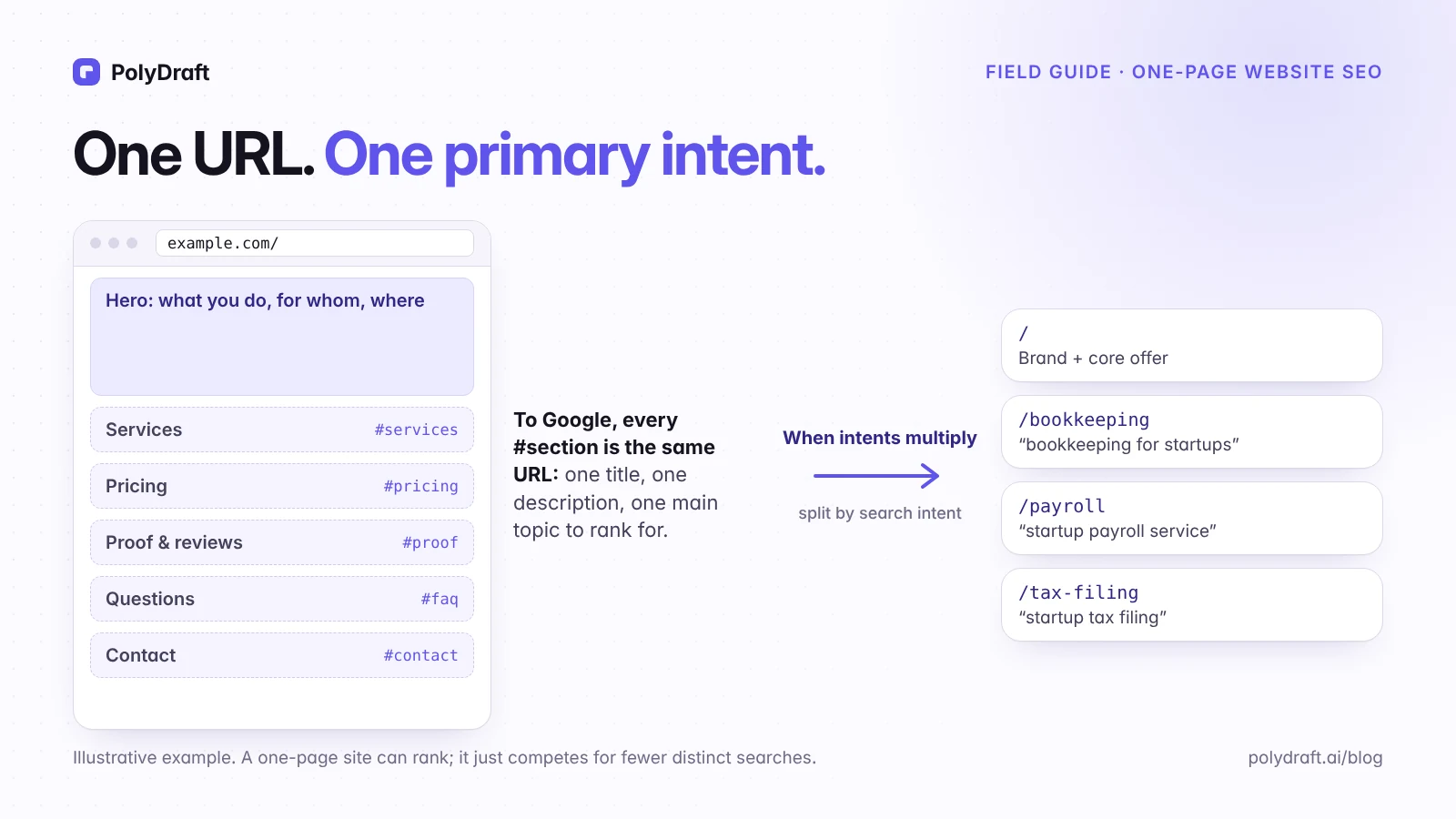
- Deciding whether one page is enough: One-page website SEO
- Building a site from scratch: SEO for a new website
- Restructuring a live site: Website redesign SEO checklist
About this article. Drafted with AI assistance from PolyDraft's internal keyword research and page-ownership records, checked against the sources below, and reviewed and approved by Vincent Chen. The overlap counts come from Ahrefs US result snapshots exported on October 5, 2026 (last refreshed by Ahrefs between September 3 and October 5), comparing exact top-10 URLs. The thresholds are our editorial heuristic. We don't report ranking results. The diagrams are original illustrations made for this article.
Sources
Accessed October 2026.
- Google Search Central: In-depth guide to how Google Search works
- Google Search Central: Link best practices for Google
- Google Search Central: SEO Starter Guide
- Google Search Central: URL structure best practices
- Google Search Central: Breadcrumb structured data
- Google Search Central Blog: Simplifying the visible URL element on mobile search results (2025)
- Google Search Central: Consolidate duplicate URLs
- Google Search Central: Large site owner's guide to managing crawl budget
- Google Search Central: Block indexing with noindex
- Google Search Central: AI features and your website
Written by
Founder of PolyDraft and CEO of BlackMonolith, Inc.