In this article
- 01 What an AI agent is, in SEO terms
- 02 What Google says about AI-assisted content
- 03 Where agents earn their keep
- 04 Three ways to run an SEO agent
- 05 Where agents go wrong
- 06 A permission matrix based on blast radius
- 07 The workflow, step by step
- 08 How we used this workflow on our own articles
- 09 A 30-day pilot for a small team
- 10 Measure the agent, not only the traffic
- 11 Where PolyDraft fits
- 12 Frequently asked questions
- 13 Continue with the next task
- 14 Sources
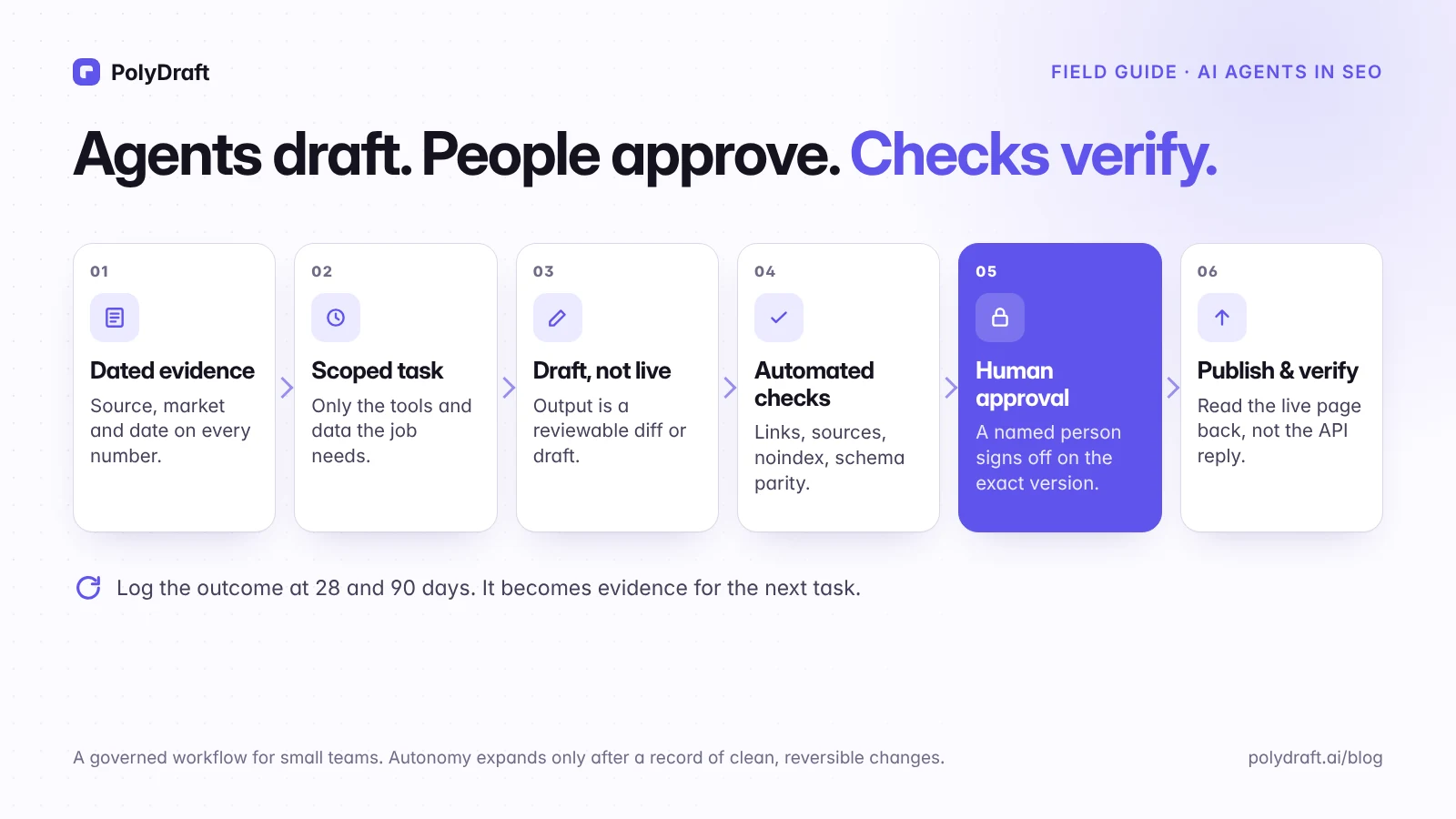
Use AI agents for the high-volume, checkable parts of SEO: crawling, collecting data, clustering keywords, writing first drafts, and quality checks. Keep people in charge of decisions with a large blast radius, such as what gets published, which URLs redirect, and what your site claims. The pattern that works is simple. The agent prepares a reviewable change, automated checks run, a named person approves that exact version, and the system confirms the live result.
This guide is for small teams that want an agent to do real work without handing it the keys to the site. It covers what to connect, three ways to run an agent, a permission matrix you can adopt, a task card you can copy, what happened when we used this workflow on our own blog, and a 30-day pilot.
Key points
- An agent plans steps and uses tools. That makes it useful, and it also means it can break things.
- Google's guidelines don't object to AI involvement as such. They object to content made mainly to manipulate rankings, including scaled pages that don't help anyone.
- Set each action's autonomy ceiling by its blast radius, and raise ceilings one level at a time.
- Approval should cover the exact version that gets published. An HTTP success response doesn't prove publication.
- Judge the agent by corrections and defects before you judge it by traffic.
What an AI agent is, in SEO terms
| What it does | Who acts | |
|---|---|---|
| Chat assistant | Answers questions and drafts text | You copy, paste, and decide |
| Script or automation | Runs fixed steps, such as a weekly export | The script, the same way every time |
| AI agent | Plans steps, calls tools (crawler, Search Console, CMS), and adapts as it goes | The agent, within the permissions you give it |
An agent is a language model in a loop: it reads a goal, picks a tool, looks at the result, and decides the next step until the task is done or it needs to ask. What it can do depends entirely on what you connect: a crawler, a Search Console account, a keyword data export, your CMS. An agent with write access to your CMS can publish. An agent that can add noindex or edit robots.txt can take a whole section out of search. Governance means deciding in advance which of those actions it may take alone.
"Agentic SEO" is also used for a different idea: making your site easy for AI agents to read and use. That's about crawler access and clear content, which our guide to whether AI assistants can read your website covers. This article is about agents doing SEO work for you.
What Google says about AI-assisted content
Google's position has been consistent since 2023. "Appropriate use of AI or automation is not against our guidelines." What it does object to: "Using automation—including AI—to generate content with the primary purpose of manipulating ranking in search results is a violation of our spam policies." In March 2024, Google added scaled content abuse to its spam policies, describing it as "when many pages are generated for the primary purpose of manipulating search rankings and not helping users." Its guidance on generative AI content adds that generating many pages without adding value for users may violate that policy. In October 2026, Google added to the same page that manually fact-checking and reviewing AI-generated content before publishing is critical, and that this also applies to titles, meta descriptions, structured data, and image alt text. Google's search quality rater guidelines also tell raters how to judge main content produced with automated or generative tools and little effort or originality. Raters don't set rankings directly, but the guidelines show what Google wants its systems to reward.
So the useful question isn't "did an agent write this?" It's whether the result is accurate, original enough to be worth reading, and published at a pace a person can stand behind. Google's people-first content guidance also asks you to be clear about who created the content and how. That's why our articles say how they were made.
Where agents earn their keep
| Task | What the agent does | What a person checks |
|---|---|---|
| Technical audit | Crawls the site, groups issues by template, proposes fixes | That the issue is real on the rendered page, and which fixes matter |
| Search Console digest | Summarizes weekly changes by page group | Whether a change has a cause or is just noise |
| Rank and competitor monitoring | Tracks positions and result changes for a fixed query set | Whether a change matters before anyone acts |
| Keyword clustering | Groups queries by shared results and proposes an owner URL per cluster | The live results for the biggest clusters before assigning pages |
| Content briefs | Collects common subtopics, questions, and sources | The first-hand angle only your team can add |
| Drafts and refreshes | Writes a first version from the brief and evidence | Facts, claims, voice, and anything you can't stand behind |
| Internal links and metadata | Suggests links, titles, and descriptions | Relevance and natural anchor text |
| Structured data | Drafts JSON-LD from the page content | That every property matches what's visible on the page |
| Outreach research | Finds relevant sites and drafts messages | Every message, before anything is sent |
| Pre-publish QA | Checks links, alt text, noindex, and that structured data matches visible content |
Every failure before anything ships |
The common thread is that agents do the gathering and drafting, and people make the judgment calls. That split keeps the decisions with the largest blast radius with people. We haven't measured how much time it saves yet; the metrics section below lists what to log so you can.
Three ways to run an SEO agent
| Setup | Best for | Where changes land | Main risk |
|---|---|---|---|
| A general-purpose agent connected to your data (through APIs or connectors to Search Console, a crawler, and keyword exports) | Research, audits, drafts, one-off analysis | Files, drafts, or pull requests you review | Too much access granted for convenience |
| A workflow tool with AI steps (the n8n, Make, or Zapier style) | Recurring jobs such as weekly digests or monitoring | Wherever each step writes: a sheet, a channel, a draft | Silent failures in a step nobody watches |
| Auto-fix features inside an SEO platform | Narrow technical fixes on sites the platform manages | Directly on the site | Changes at scale with little review |
Our rule for choosing: prefer setups where changes land as drafts or diffs you can review, and give each one the narrowest access that does the job. If a setup can only change the live site directly, keep it to the low-risk rows in the matrix below. For which products fit, see what PolyDraft automates for SEO. This guide doesn't rank tools.
Where agents go wrong
These failure modes are specific enough to design checks against:
- Invented facts and sources. A confident statistic with no source, or a citation that doesn't say what the draft claims.
- Unknowns turned into numbers. A missing search volume becomes "0," or an estimate is presented as measured data.
- Mistakes at scale. One wrong template rule, applied to 500 pages, ships 500 wrong titles.
- High-impact technical edits. A redirect sends a section to the wrong place, a canonical points at staging, or
Disallow: /stops Google crawling the site. Over the following weeks, pages lose their rankings and either drop out of results or appear without a description. - Prompt injection. An agent that reads competitor pages or search results can meet text written to redirect its behavior. In OWASP's 2025 Top 10 for LLM applications, prompt injection is listed first. Treat fetched content as data, never as instructions, and limit which tools an agent can call while it's reading untrusted pages.
- Unsafe publishing defaults. See our own example below.
- Volume over value. Agents make it cheap to publish pages nobody needed, which is the scaled-content pattern Google's policy describes.
A permission matrix based on blast radius
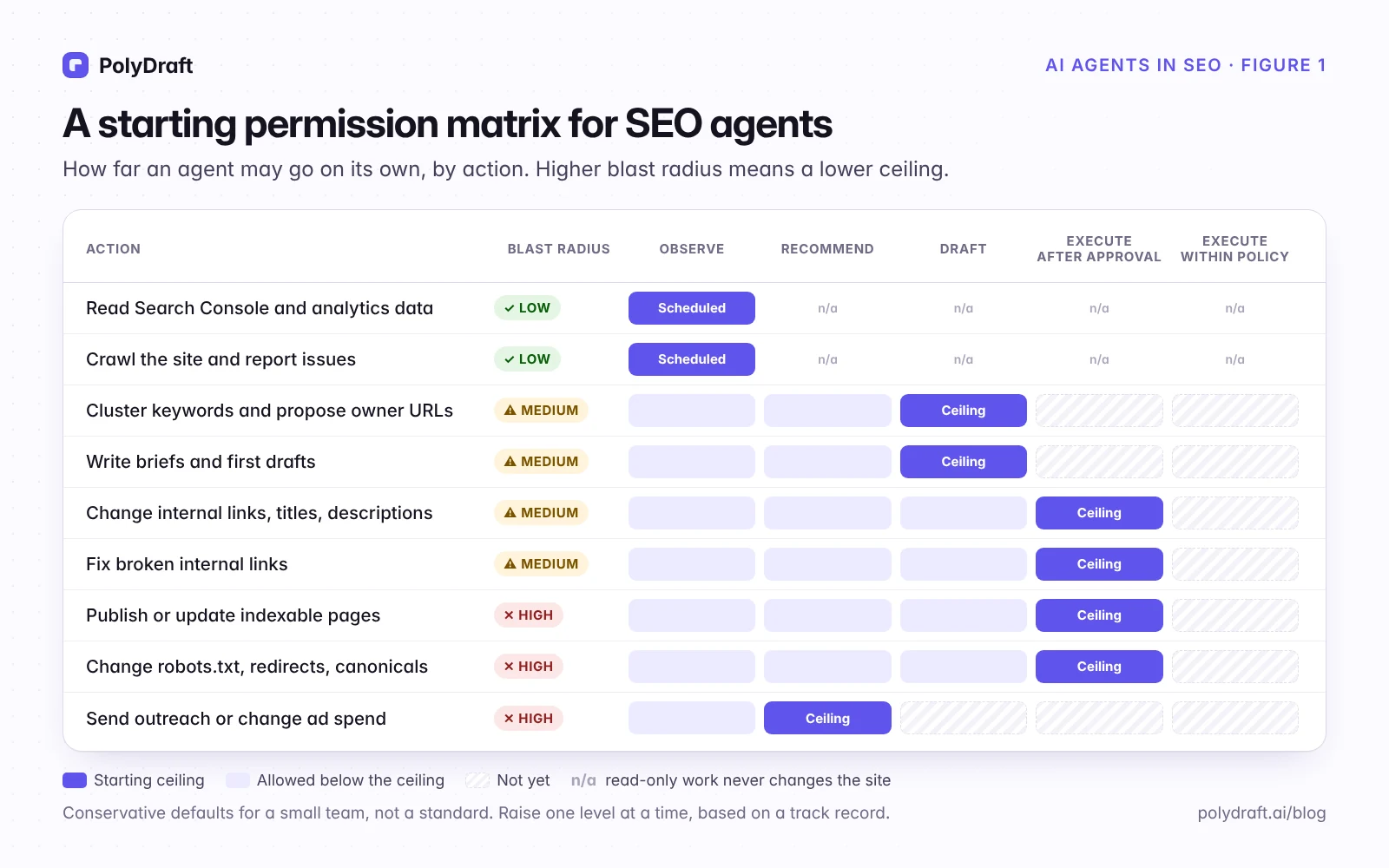
Autonomy has five levels:
- Observe: read data and report.
- Recommend: propose what should change.
- Draft: prepare the change as a draft or diff, without publishing it.
- Execute after approval: apply the change once a named person approves it.
- Execute within policy: apply low-risk, reversible changes alone, within written rules.
Each action gets a starting ceiling based on its blast radius: how many URLs it touches, how visible a mistake would be, and how easily it can be undone.
| Action | Blast radius | Starting ceiling | Who approves | How to undo |
|---|---|---|---|---|
| Read Search Console and analytics data | Low: no site changes, but data leaves your account | Observe, on a schedule, with read-only access | Nobody per run | Revoke access |
| Crawl the site and report issues | Low: server load | Observe, rate-limited, respecting robots.txt | Nobody per run | Stop the crawl |
| Cluster keywords and propose owner URLs | Medium | Draft | SEO owner | Discard the draft |
| Write briefs and first drafts | Medium | Draft | Editor | Discard the draft |
| Change internal links, titles, and descriptions | Medium | Execute after approval | Editor | Revert the change |
| Fix broken internal links | Medium | Execute after approval | Editor | Revert the change |
| Publish or update indexable pages | High | Execute after approval of the exact version | Named approver | Revert to the previous revision |
| Change robots.txt, redirects, or canonicals | High | Execute after approval | Engineer | Restore the previous file |
| Send outreach or change ad spend | High, outside your site | Recommend | Owner | Often impossible |
Read-only access should be exactly that: a read-only Search Console permission or a restricted user, not an owner account. Check your model provider's data terms before you send it Search Console or analytics data.
Raise a ceiling one level at a time, based on a track record. For example, after a month in which every broken-link fix the agent proposed was approved without edits, let it apply one narrow, written rule on its own, such as "replace a link to a URL that redirects with the final URL; never remove links", and keep reviewing a sample.
The workflow, step by step
- Dated evidence. Every number carries its source, market, and date. Unknown stays "unknown."
- A scoped task. Spell out the goal, the tools and data the agent may use, the output format, and when it should stop and ask. The task card below shows one.
- A draft, not a live change. Set the draft status explicitly on every write. Don't rely on defaults.
- Automated checks. Broken links, unsourced statistics,
noindexor canonical mistakes, structured data that doesn't match visible content, missing alt text, banned claims. - Human approval of the exact version. If anyone edits the draft after approval, approve it again.
- Publish and verify. Read the live page back: status code, rendered content, canonical, links. An API returning "201 Created" isn't proof the page is right.
- Log the outcome. Note what changed and when, and look again at 28 and 90 days. Treat what you see as evidence for the next decision, not proof of cause and effect.
A task card you can copy
Here is a real task from this series, written up as a task card: putting the five finished articles onto our site as drafts.
| Field | The task, as scoped |
|---|---|
| Goal | Create five blog drafts on polydraft.ai from the approved Markdown files. Nothing becomes public. |
| Inputs | Five Markdown posts, ten WebP images with alt text, the site's API reference (received October 13, 2026) |
| Allowed tools | The site's content API with draft-only writes; read-only checks of the live site |
| Forbidden | Publishing; changing or deleting any existing post; printing or saving the API key |
| Output | Five draft posts, a log with each post's ID and a fingerprint of its content |
| Stop and ask if | Any of the five URLs already exists, the key fails, or a stored draft differs from the approved file |
| Acceptance checks | Every draft reads back as draft, stored content matches the approved HTML, every image returns 200, and the public URL doesn't serve the draft |
How we used this workflow on our own articles
This series was produced with the workflow above, and it caught real problems before they reached readers.
Before writing to our own CMS, we audited its API. We found four behaviors an agent could trip over, and added a control for each:
| What the API does | Risk | Our control |
|---|---|---|
| A post sent without a status is published immediately | An agent's "draft" goes live | Every write sets draft explicitly, then reads the post back |
| Sending a post with an existing URL overwrites that post | Staging could replace a live article | Refuse to write over a live post, or over a post the pipeline didn't create, unless a person overrides it |
| Every content update clears the featured image's alt text | Accessibility and image search lose the description | Set the alt text in a second step after every update, then check it |
| The publish date is set when the draft is created | A post looks older than it is | Set the real date when the post goes live |
Unknown stayed unknown. When our research agent called the Ahrefs API, it got an "Insufficient plan" error. Rather than estimate, it used an export captured from the Ahrefs web app on October 5, 2026, and labeled each figure with both Ahrefs' own update date and the capture date. Missing values stayed "unknown".
Separate checks found what the first draft missed. These counts come from our logs for this series. AI agents ran the reviews, audits, and fact-check, each separate from the agent that did the work, and a person approved the result:
| Check | What it found |
|---|---|
| Automated QA on the first draft of the five articles (October 12) | 3 errors fixed before review: one unqualified "guarantee" and two meta descriptions over 160 characters |
| Adversarial review of the publishing script by three AI reviewer agents, each looking for a different kind of risk, with a separate agent verifying each reviewer's findings | 18 confirmed findings (10 distinct problems, since the reviewers overlapped), including one that could have re-published a draft a person had deleted |
| Test runs of the fixed script against a local mock of the API | 7 scenarios, including deleted drafts, edits made in the admin, and interrupted runs |
| AI-agent audit of the articles against current search results, through a search tool (October 13) | The redirect-check script in our redesign guide passed redirects that led to missing pages; we fixed and re-tested it |
| AI-agent fact-check of each article against its sources (October 13) | Search data labeled with the wrong dates, citations pointing to the wrong Google page, and two inflated counts in this table; all corrected before publishing |
We didn't log human review time for this batch, so we can't report it. That's the first thing we'll add for the next one.
A 30-day pilot for a small team
| Week | What the agent does | What you measure |
|---|---|---|
| 1 | Read-only: a site crawl and a weekly Search Console digest | Were the findings accurate? |
| 2 | Drafts titles, descriptions, and internal links for 10 pages; a person applies them | Edit time per page; suggestions rejected |
| 3 | Takes one existing page through the full workflow as a content refresh | Factual corrections; QA defects |
| 4 | Review | Decide whether to raise any ceiling, and which task to add next |
Measure the agent, not only the traffic
Search results move slowly and for many reasons. Before asking whether an agent improved rankings, ask whether it improved the work:
- human review and edit time per task
- factual corrections needed per draft
- QA defects caught before and after publishing
- rollbacks
- cost per task, including review time
Then look at search outcomes for the changed pages over fixed 28-day and 90-day windows, compared with the same weekdays before. Where you can, keep a few similar pages unchanged as a comparison.
Where PolyDraft fits
PolyDraft's product direction follows the same progressive model: recommend, then draft and preview, then execute after approval, and only later execute low-risk changes within policies you set. Today, PolyDraft's builder agent does SEO work inside your project when you ask it to. It isn't an always-on agent that publishes by itself. See what PolyDraft automates for SEO, and our guide to post-launch SEO for the recurring work an agent can help with.
Frequently asked questions
What is an AI SEO agent?
Software built on a language model that can plan multi-step SEO tasks and use tools to carry them out: crawling a site, querying Search Console, drafting content, or editing a CMS. Unlike a chat assistant, it can act, so it needs permissions.
Will AI agents replace SEO specialists?
They replace a lot of gathering, formatting, and first-draft work. Deciding what a site should say, which risks are acceptable, and what customers actually need is still a human job, and it matters more once drafting is cheap.
How do I use an AI agent for SEO strategy?
Use it to prepare the evidence, not to make the call. Give it your Search Console data, a dated keyword export, and your page list, and ask for a draft opportunity list: which queries map to which page, where pages compete, and what's missing. Then a person checks the live results for the top items and decides priorities.
Should an AI agent publish directly to my CMS?
Not at first. Let it create drafts with an explicit draft status, and have a person approve the exact version. Consider direct publishing only for narrow, reversible changes after the agent has a clean track record.
What is the safest first task for an SEO agent?
Read-only work: a site crawl with an issue summary, or a weekly Search Console digest. Neither changes the site, provided the crawl is rate-limited, identifies itself, respects robots.txt, and skips admin, cart, and action URLs.
How do I stop an agent from making things up?
Give it the evidence it may use, with sources and dates. Require a citation for every factual claim. Let it say "unknown." Run an automated check that flags statistics without a source before a person reviews the draft.
Continue with the next task
- A refresh process an agent can feed with drafts: SEO content refresh workflow
- The site structure an agent should respect: Website architecture for SEO
- Launch checks worth automating: SEO for a new website
About this article. Drafted by an AI agent following the workflow described here: dated evidence, automated checks, review by separate AI agents, then human approval. Checked against the sources below and reviewed and approved by Vincent Chen. This revision of October 13, 2026 adds changes from an AI-agent audit and fact-check. The matrix ceilings are our recommended defaults, not an industry standard. The diagrams are original illustrations made for this article.
Sources
Accessed October 2026.
- Google Search Central Blog: Google Search's guidance about AI-generated content
- Google Search Central: Guidance on using generative AI content on your website
- Google Search Central: Spam policies for Google web search
- Google Search Central: Creating helpful, reliable, people-first content
- Google: Search Quality Rater Guidelines (PDF)
- Google Search Central: General structured data guidelines
- OWASP GenAI Security Project: LLM01:2025 Prompt Injection
Written by
Founder of PolyDraft and CEO of BlackMonolith, Inc.