In this article
- 01 What zero actually looks like
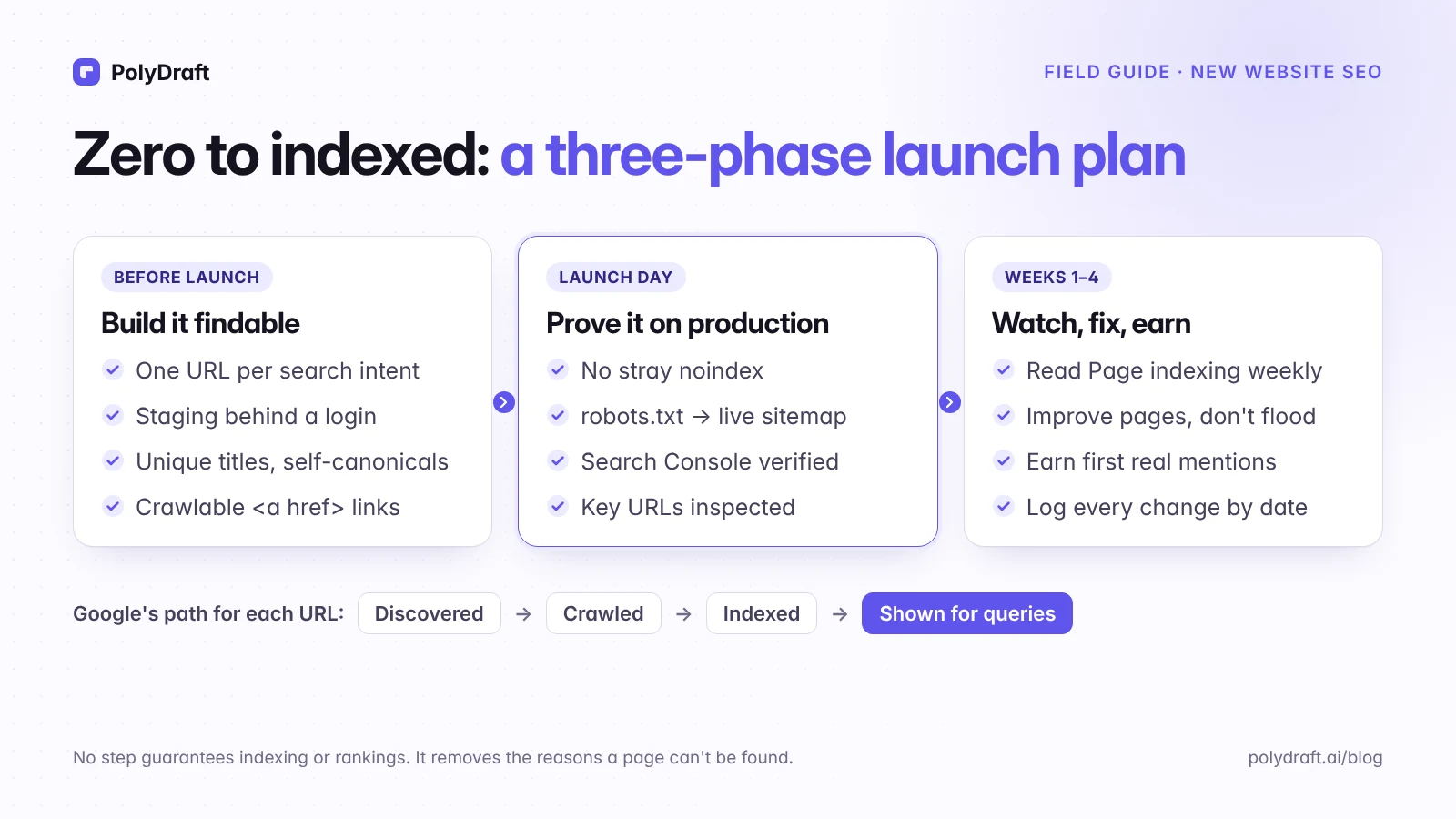
- 02 Phase 1: before launch, build it findable
- 03 Phase 2: the launch-day SEO checklist, proved on production
- 04 Phase 3: weeks one to four, watch, fix, earn
- 05 How long until a new site ranks? Three clocks
- 06 Mistakes that waste a new site's first months
- 07 Where PolyDraft fits
- 08 Frequently asked questions
- 09 Continue with the next task
- 10 Sources
SEO for a new website comes down to two jobs. First, remove every reason Google can't find, crawl, or index your pages. Second, launch a small set of pages that each deserve to rank for one specific search. A brand-new domain has no links, no history, and no data. You can't win on authority yet, but you can control whether your site is technically findable and whether each page is the best answer to a narrow question.
This plan is for founders and small teams launching a first website. If you are replacing a site that already gets search traffic, use our website redesign SEO checklist instead. A redesign has existing rankings to protect, and that is a different job.
In this guide
- What "zero" looks like, using our own site's dated numbers
- Phase 1: seven things to build before launch, including how to pick searches a new domain can win
- Phase 2: a launch-day checklist with pass conditions, and our own results from running it
- Phase 3: what to watch and fix in weeks one to four
- How long ranking takes, separated into three clocks
What zero actually looks like
We are a new site too, and our build log for this website records how it was made. Here is what Ahrefs reported for polydraft.ai on two dates, five weeks apart:
| Ahrefs metric | August 29, 2026 | October 5, 2026 |
|---|---|---|
| Domain Rating | 0.6 | 7 |
| Referring domains | 4 | 40 |
| Organic keywords | 0 | 0 |
| Estimated organic traffic | 0 | 0 |
Referring domains grew tenfold, and Ahrefs still tracked zero organic keywords. That doesn't prove links are useless, and third-party tools miss queries that Search Console would show. It does show that a tenfold jump in referring domains didn't produce any rankings Ahrefs could detect within five weeks. Pages also have to be indexed and be a precise match for a query.
It helps to separate what you control at launch from what you don't:
| You control now | You don't control yet |
|---|---|
| Which pages exist and what each one is for | How many sites link to you |
| Whether pages can be crawled and indexed | How fast Google crawls and indexes them |
| Titles, headings, copy, and internal links | Which queries you rank for first |
| Whether each page adds something new | Whether Google shows your page at all |
Google states plainly that it doesn't guarantee it will crawl, index, or serve a page, even one that follows its guidelines. Everything below removes obstacles. None of it guarantees a result.
Phase 1: before launch, build it findable
1. Decide which pages exist, one search intent per URL
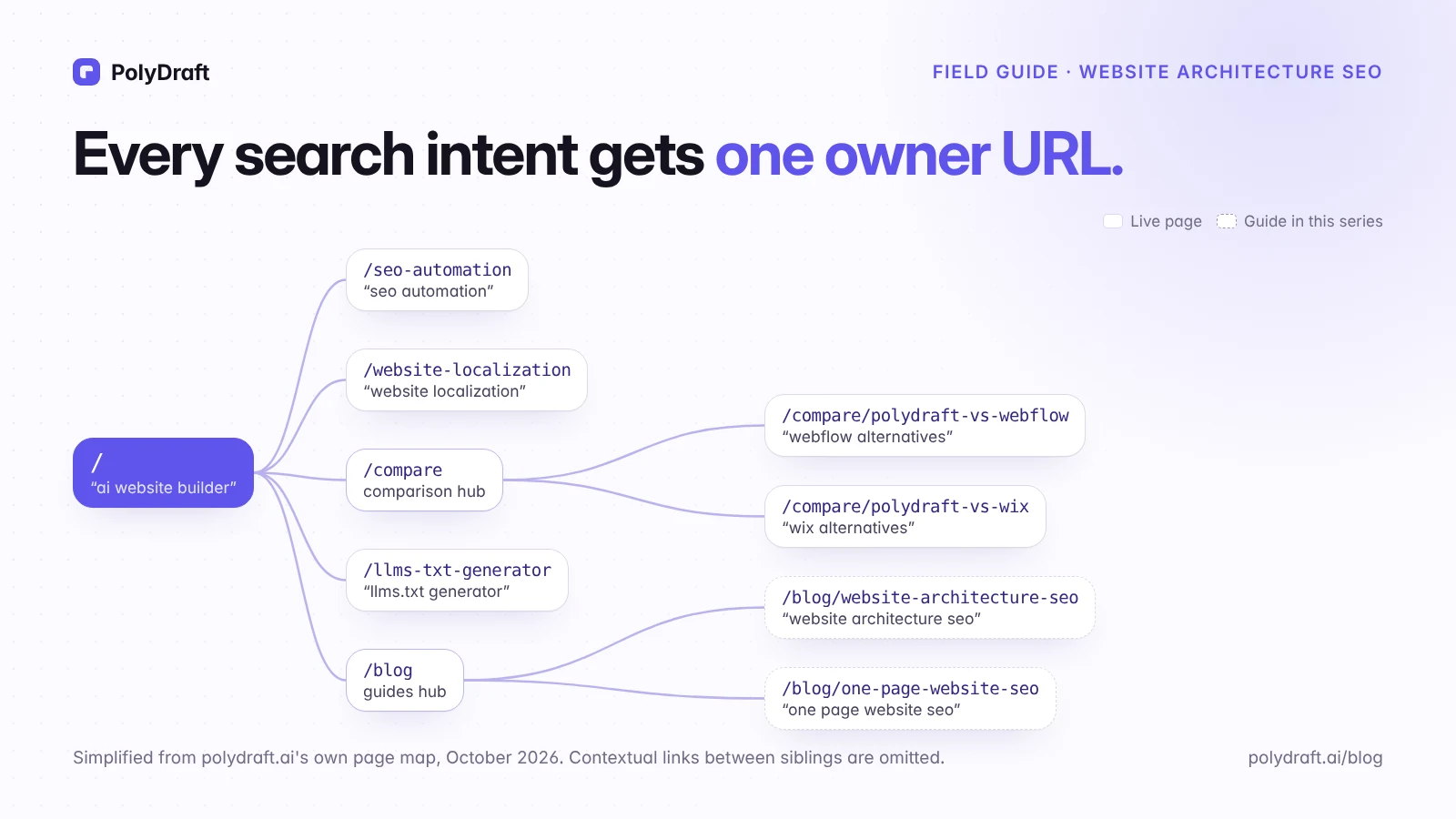
Before you write any copy, list the searches you want each page to answer. Give each distinct search need exactly one page. Two pages chasing the same intent compete with each other. One page trying to cover five unrelated needs answers none of them well. Settle your URL pattern now too, because changing URLs after launch means redirects and a period of re-crawling.
A typical launch set for a startup or service business looks like this:
| Page | Its job | Example search it could own |
|---|---|---|
| Homepage | Say what you are and who it's for | your brand name; your category plus audience |
| One page per core offer | Explain one product or service in depth | "bookkeeping for startups" |
| Prices | Answer the cost question directly | "[your category] cost" |
| About | Show who is behind the business and why to trust them | your brand name plus "founder" or "team" |
| Contact | Make the next step obvious | rarely a search target, still essential |
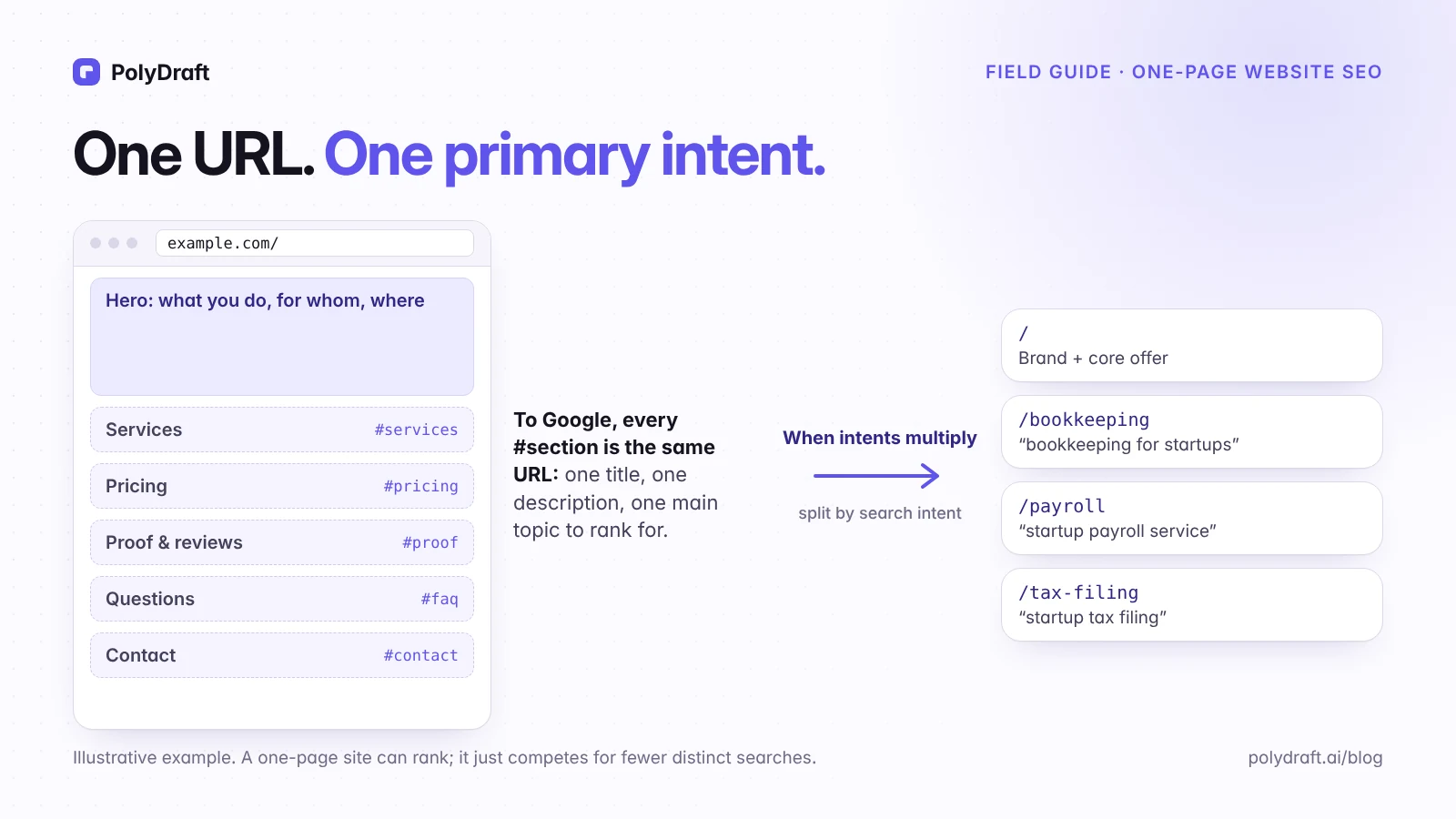
If you have only one offer, a single page can work. Our guide to one-page website SEO explains when one page is enough. For larger sites, website architecture for SEO covers how to test which queries share an intent.
2. Pick searches a new domain can actually win
Broad terms are out of reach for a while. Choose queries where today's results show you have a chance. Our working rule: a query is worth targeting early when its intent matches one of your pages and the current top five already includes a weak result, such as a small site, a forum thread, or a page that only half answers the question.
Here is how that filter worked on our own keyword research. On October 5, 2026, we took a set of 167 English US queries that Ahrefs rated at a Keyword Difficulty of 20 or less. We then kept only those with at least 100 monthly searches and a site with a Domain Rating of 20 or less somewhere in the top five. Twelve queries were left. Several had nothing to do with our product, such as "words with geo in it", so checking intent cut the list further. A tool filter finds candidates; it doesn't pick them. Without a paid tool, you can do the same by hand: search the query, and look for forums, small sites, or off-target pages near the top.
Treat difficulty scores as estimates, not promises. After launch, Search Console's Performance report shows which queries Google already associates with your pages, and that becomes the better list.
3. Give every page something the current results lack
Google's guidance on helpful, people-first content asks whether a page provides "original information, reporting, research, or analysis." It also asks who created the content, how, and why. For a new business, original value is usually close at hand:
- what you actually charge and what's included
- how your process works, step by step
- the questions customers really ask you
- a constraint or trade-off you know from experience that generic guides gloss over
Don't launch with dozens of thin pages, such as one page per city with the city name swapped. Google's spam policies describe scaled content abuse as "when many pages are generated for the primary purpose of manipulating search rankings and not helping users." The policy applies however those pages were produced. Five strong pages beat fifty interchangeable ones.
4. Keep the staging site out of Google, then remember to undo it
Put your staging site behind a password. Google notes that robots.txt is not a mechanism for keeping a web page out of Google: a blocked URL can still be indexed if other pages link to it. A noindex rule is a reasonable backup on staging, but Google can only see it if the page isn't blocked by robots.txt.
A common and costly launch mistake is a staging noindex, or a Disallow: / in robots.txt, that ships to production. Visitors see a normal site, so nothing looks broken until someone checks. Phase 2 checks for exactly that, and our robots.txt examples show production-safe patterns.
5. Get the page-level basics right
- A unique, specific title that says what the page is. Google writes the title links shown in results automatically, but your
<title>is a primary input. - A meta description that summarizes the page. It can be used as the snippet people see before they click. Google said in 2007 that descriptions don't affect ranking.
- One clear main heading that matches the page's purpose.
- A self-referencing canonical tag on the production domain, never pointing at staging.
- Crawlable links. Google says it can generally only crawl a link if it's an
<a>element with anhrefattribute. Buttons that navigate with JavaScript alone may never be followed. - Main content in the HTML. Some site builders render pages in the browser with JavaScript. Make sure your text and links are in the HTML that Google receives. Phase 2 shows how to check.
- The same content on mobile. Google uses the mobile version of a site for indexing, so text, links, and structured data hidden on phones are missing for Google too.
- Real images with descriptive alt text for anything meaningful. Google doesn't index CSS background images.
- One preferred address. Choose HTTPS and either
wwwor the bare domain. Redirect every other variant to it in one hop. - A real 404. Missing pages should return a 404 status, not a "page not found" message served with a 200 status, and not a redirect to your homepage.
- If you serve a local area, create and verify a Google Business Profile, with the same business name, address, and phone number as your site.
Skip the old rituals. Google Search doesn't use the keywords meta tag, and the same guide says "the length of the content alone doesn't matter for ranking purposes." Write as much as the topic needs and no more.
6. Ship a clean XML sitemap and structured data that matches the page
List only canonical URLs that return a 200 status and are meant to be indexed in your sitemap: no redirects, no noindex pages, no staging hosts. Add a Sitemap: line to robots.txt. Google's sitemap documentation names "your site is new and has few external links to it" as a situation where a sitemap helps. It is still a hint, not a guarantee of crawling or indexing.
Organization markup with your logo and sameAs links to your real profiles helps Google connect your brand's identity. Google's rules say: "Don't mark up content that is not visible to readers of the page." Don't add markup in the hope of a visual result. FAQ rich results are a good example: Google limited them to government and health sites in 2023, and its FAQ structured data documentation says they stopped appearing in Search on May 7, 2026.
7. Decide who can read the site, including AI search
Google's AI Overviews and AI Mode use the same index as regular results. Google says "there are no additional requirements" to appear in them: a page must be indexed and eligible to show a snippet. So avoid nosnippet on pages you want quoted.
Other assistants run their own crawlers. OpenAI, for example, says that sites that opt out of its OAI-SearchBot won't be shown in ChatGPT search answers, though they can still appear as navigational links. Decide which crawlers you allow in robots.txt, then check your CDN or firewall settings, because some block AI crawlers by default regardless of robots.txt. Our guide to whether AI assistants can read your website walks through the checks, and PolyDraft's AI visibility overview explains how we approach it.
If the domain was used before, check its past too: what it hosted (the Internet Archive's Wayback Machine), which sites link to it, and, once Search Console is verified, the Manual actions and Security issues reports.
Phase 2: the launch-day SEO checklist, proved on production
Staging checks don't count. Run these against the live domain the hour you launch, and write down the result of each one.
| Check | How to verify | Pass condition |
|---|---|---|
| Pages load | Open the homepage and three key pages; check the HTTP status | 200, correct content, no redirect loop |
| Indexing allowed | View source and response headers on each key page | No noindex in the robots meta tag or X-Robots-Tag header |
| Content in HTML | View page source, then URL Inspection's rendered HTML after Search Console is set up | Title, main text, and internal links are present |
| Canonicals | View source | Self-referencing absolute URLs on the production domain |
| robots.txt | Open /robots.txt |
No site-wide Disallow; a Sitemap: line pointing to the live sitemap; the crawlers you want are allowed |
| Sitemap | Open it and request every URL | Production URLs only, each returning 200 |
| One address | Try http://, www, and the trailing-slash variant |
One hop to the preferred HTTPS URL |
| Missing pages | Visit a made-up path in every section, such as /blog/ |
Returns a 404 status, not a redirect |
| Mobile view | Open key pages on a phone | Same main content, navigation, and links as desktop |
| Speed | Run PageSpeed Insights on each page template | No blocking issues in the lab results. A new site has no Core Web Vitals field data at first, and missing data isn't a pass |
| Search Console | Verify a domain property, submit the sitemap, run URL Inspection's live test on key pages | Sitemap accepted; live test says the page can be indexed |
| Bing Webmaster Tools | Import the site from Search Console and submit the sitemap | Sitemap processed |
| Analytics | From a phone with no ad blocker, accept the consent banner and complete your main conversion once | The visit and the conversion each appear once, in the production property |
| Internal links | Crawl the site from the homepage | No broken links; every key page reachable |
Write down the launch-day numbers, even when they are zero. That dated baseline is what you compare against in month two.
What it showed when we ran it on polydraft.ai on October 13, 2026:
| Check | Result |
|---|---|
| Pages load | Pass: homepage and five key pages returned 200 |
| Indexing allowed | Pass: robots meta index, follow, no X-Robots-Tag header |
| Content in HTML | Pass: titles, body text, and links are in the server-rendered HTML |
| Canonicals | Pass: each of those six pages points to itself on the production domain |
| robots.txt | Pass: all crawlers allowed, with named rules for seven AI crawlers, and a Sitemap: line. We didn't check CDN bot settings |
| Sitemap | Pass: all 55 URLs returned 200 (one returned a 502 on the first request and 200 on a retry) |
| One address | Partial: trailing-slash URLs redirect in one hop. We didn't test http:// and www in this run |
| Missing pages | Fail: a made-up URL at the root returned 404, but made-up URLs under /blog/ and /compare/ redirected to the section page. That is a soft-404 pattern. The fix is logged for our site template |
| Internal links | Pass with one exception: the 55 sitemap pages link to 59 internal URLs, and one pointed to a post that wasn't published yet, so it redirected to the blog index until that post went live |
| Mobile view, Speed, Bing Webmaster Tools | Not part of this run |
| Search Console, analytics | Not part of this run; they need account access |
The point of writing results down is to find failures like the redirect above. It looked fine in a browser and only showed up when we requested a URL that shouldn't exist.
Phase 3: weeks one to four, watch, fix, earn
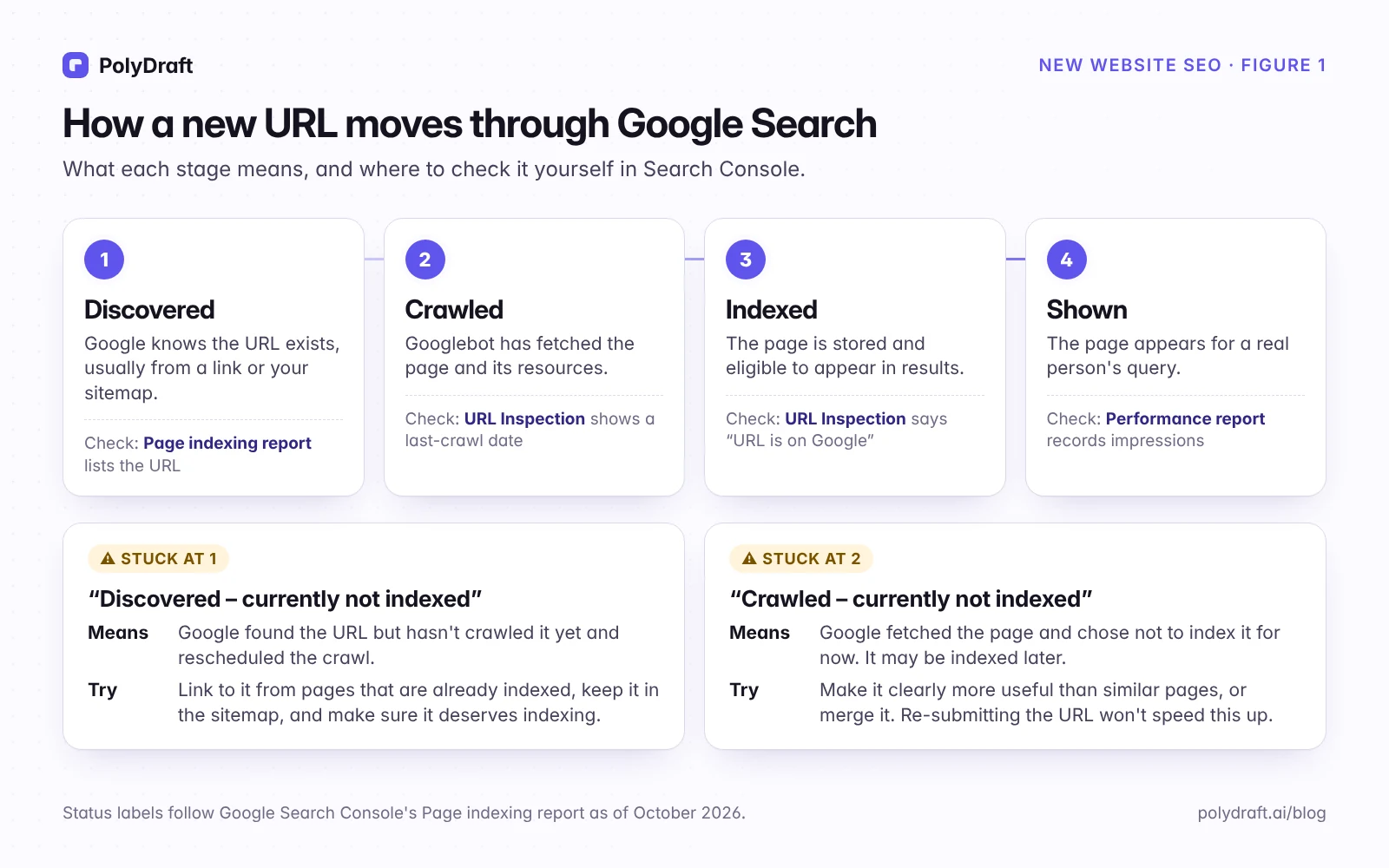
Know where each page is stuck
Every URL moves through the same stages: Google discovers it, crawls it, indexes it, and then shows it for real queries. Google's recrawl documentation says crawling "can take anywhere from a few days to a few weeks." Check weekly in Search Console's Page indexing report, and use URL Inspection for individual pages.
If a page isn't on Google, diagnose by status:
| What Search Console shows | Likely cause | What to do |
|---|---|---|
Excluded by noindex |
A tag or header left over from staging | Remove it, then request indexing once |
| Blocked by robots.txt | A Disallow rule covers the URL |
Fix the rule; remember robots.txt doesn't remove indexed URLs |
| Alternate page with proper canonical | The canonical points to another URL | Make the canonical self-referencing if this page should rank |
| Discovered – currently not indexed | Google found the URL but rescheduled the crawl | Check Settings > Crawl stats for server errors first, then link to the page from indexed pages and keep it in the sitemap |
| Crawled – currently not indexed | Google fetched it and chose not to index it for now | Make it clearly more useful than similar pages, or merge it. Resubmitting won't change the outcome |
Request indexing once for your most important pages after launch. Repeated requests don't make crawling faster. Google's Indexing API is only for job posting and livestream pages, so services that promise instant indexing through it are a risk, not a shortcut.
Improve before you add
Our rule of thumb for the first month: improve the pages you have before publishing more. A few strong pages get crawled, linked, and judged as a set more easily than many new ones. Read the queries that start appearing in the Performance report. If people find a page through questions it barely answers, answer them on that page. Add a new page only when it serves a distinct need better than anything on your site.
Earn your first real mentions
New sites rarely get links by accident. These are legitimate first sources, roughly in the order they pay off:
- Profiles you control: company pages on LinkedIn, GitHub, Crunchbase, or the networks your customers use. List them as
sameAslinks in your Organization markup. - Partner and integration directories where you genuinely belong.
- Curated category directories that real buyers use, not link farms.
- Launch platforms and communities where you already take part.
- Founder talks, podcasts, and guest expertise.
- Customers' "tools we use" pages, if they'd mention you anyway.
Don't buy links or trade them at scale. Google's spam policies treat link schemes as manipulation.
Log every change with a date
Keep a simple log: date, URL, what changed, why. Search data arrives with a delay and many things move at once. A dated log is the most reliable way to look back later and form a reasonable hypothesis about what helped. Even then, treat a before-and-after chart as a clue, not proof.
How long until a new site ranks? Three clocks
"How long" mixes three questions with different answers:
- Indexing: days to weeks. Google's recrawl documentation gives that range for crawling, and URL Inspection shows when a specific page is on Google.
- First impressions: usually weeks. The first queries are often your brand name and narrow long-tail searches. Treat this as a practitioner estimate: we'll replace it with polydraft.ai's own Search Console dates once we have them.
- Top-10 rankings for non-brand searches: months, if at all. In the original 2017 sample of Ahrefs' study on how long pages take to rank, 5.7% of new pages reached the top 10 within a year. Treat any such figure as a base rate, not a forecast for your site.
Google hasn't confirmed a "sandbox", but new sites do start without the signals older sites have built up, and rankings can move around while those signals form. The practical answer is the same: there's no fixed waiting period to sit out.
| When | What to check | Where |
|---|---|---|
| Launch day | Every row of the launch checklist passes | Browser, crawler, Search Console |
| Weeks 1–2 | Key pages crawled and indexed | URL Inspection, Page indexing report |
| Weeks 3–4 | First impressions, often for your brand name and narrow queries | Performance report |
| Months 2–3 | Which pages earn impressions and clicks, and whether visitors convert | Performance report, analytics |
| Months 4–12 | Whether positions stabilize for your target queries, and which pages need improving or merging | Performance report, compared month over month |
These are the order in which signals become checkable, not a schedule Google follows. Some sites move faster, many move slower, and nobody can promise dates.
Mistakes that waste a new site's first months
- Launching with a staging
noindexor aDisallow: /in robots.txt - A sitemap full of redirects,
noindexpages, or staging URLs - Missing pages that redirect to a section page or the homepage instead of returning 404
- Publishing dozens of near-identical pages to "cover keywords"
- Targeting broad head terms your new domain can't compete for yet
- Changing URLs a few weeks after launch, which forces redirects and makes Google re-crawl and reassess the moved pages
- Chasing word counts, keyword density, or meta keywords
Where PolyDraft fits
The PolyDraft site scaffold includes canonical tags, an XML sitemap, robots.txt, Open Graph tags, and structured data support, which cover several Phase 1 items. They are starting points, not a substitute for the launch-day checks, as our own soft-404 finding shows. Run the checklist on your rendered production pages whichever builder you use, and verify Search Console in your own Google account. If you're still choosing a tool, our guide on how to evaluate an AI website builder lists what to test before you commit. Early-stage teams can see how we approach this on PolyDraft for startups.
Frequently asked questions
How long does it take for a new website to show up on Google?
Indexing usually takes days to weeks, and Google doesn't guarantee that any page will be indexed. Ranking in the top 10 for non-brand searches takes months, and many new pages never get there. Check individual pages with URL Inspection rather than searching for them.
Is there a "Google sandbox" for new websites?
Google has never confirmed one. New sites start with few links, little history, and few signals that their pages are the best answer, and rankings can fluctuate while those build. There's no fixed penalty period to wait out.
Does a small new website need a sitemap?
It isn't required. Google lists new sites with few external links as a case where a sitemap helps, and it costs little to add. Keep it accurate.
Does a new website need anything special for AI search?
Not for Google: AI Overviews and AI Mode use the regular index, so a page has to be indexed and allowed to show a snippet. For other assistants, allow the crawlers you want in robots.txt and check that your CDN doesn't block them.
How many pages should a new website have at launch?
As many as there are distinct needs you can answer well. For most startups that means a homepage, one page per core offer, prices, about, and contact. Add pages when real demand appears.
Should I request indexing for every new page?
No. Submit your sitemap and request indexing for a handful of key pages. Repeated requests for the same URL don't speed up crawling, and Google's Indexing API only covers job posting and livestream pages.
Continue with the next task
- After launch, the work changes from setup to an ongoing loop. Our guide to post-launch SEO covers that phase.
- Planning which pages to build: Website architecture for SEO
- Launching with a single page: One-page website SEO
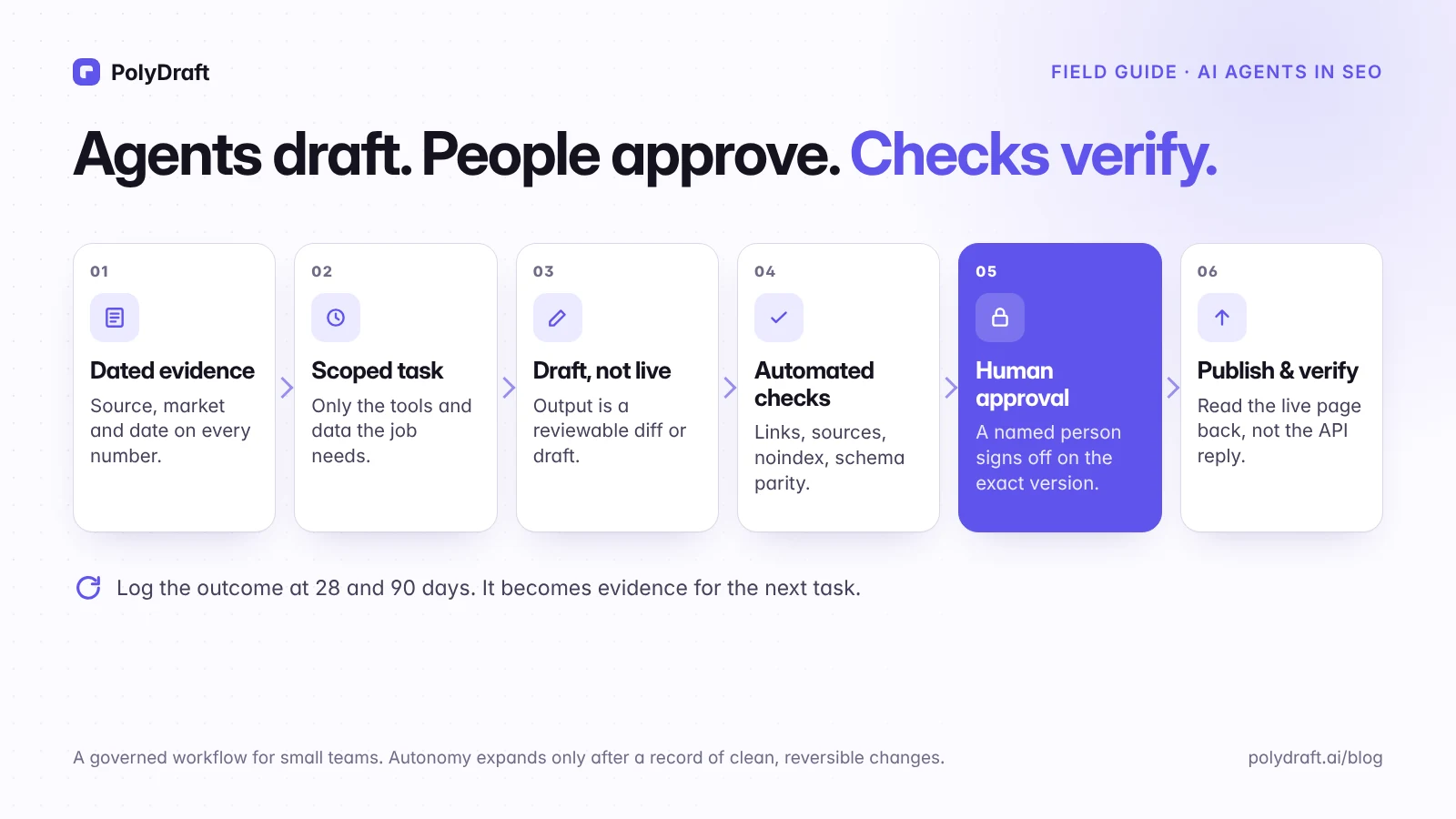
- Using AI to help with the work, safely: How to use AI agents in SEO
About this article. Drafted with AI assistance from PolyDraft's internal research notes, checked against the sources below, and reviewed and approved by Vincent Chen. The polydraft.ai figures come from Ahrefs data recorded on August 29 and October 5, 2026, our Ahrefs keyword research of October 5, 2026, and the launch checklist we ran on polydraft.ai on October 13, 2026. We don't claim any ranking or traffic results. The diagrams are original illustrations made for this article, not screenshots of customer sites.
Sources
Accessed October 2026.
- Google Search Central: How Search works
- Google Search Central: Creating helpful, reliable, people-first content
- Google Search Central: Spam policies for Google web search
- Google Search Central: SEO Starter Guide
- Google Search Central: Influencing your title links and Control your snippets in search results
- Google Search Central Blog: Improve snippets with a meta description makeover (2007)
- Google Search Central: Mobile-first indexing best practices
- Google Search Central: Google Images SEO best practices
- Google Search Central: Introduction to robots.txt and Block indexing with noindex
- Google Search Central: Make your links crawlable
- Google Search Central: Sitemaps overview
- Google Search Central: Organization structured data, General structured data guidelines, and FAQ structured data
- Google Search Central: AI features and your website
- Google Search Central: Ask Google to recrawl your URLs and Indexing API quickstart
- Search Console Help: Page indexing report, URL Inspection tool, and Crawl stats report
- Google Business Profile Help: Tips to improve your local ranking on Google
- OpenAI: Overview of OpenAI crawlers
- Ahrefs: How long does it take to rank in Google?
- PageSpeed Insights: pagespeed.web.dev
Written by
Founder of PolyDraft and CEO of BlackMonolith, Inc.