Website Redesign SEO Checklist: What to Preserve, Test, and Monitor
A website redesign SEO checklist organized by risk: preserve URLs and content, keep text in the server HTML, test staging, verify launch day, diagnose drops.
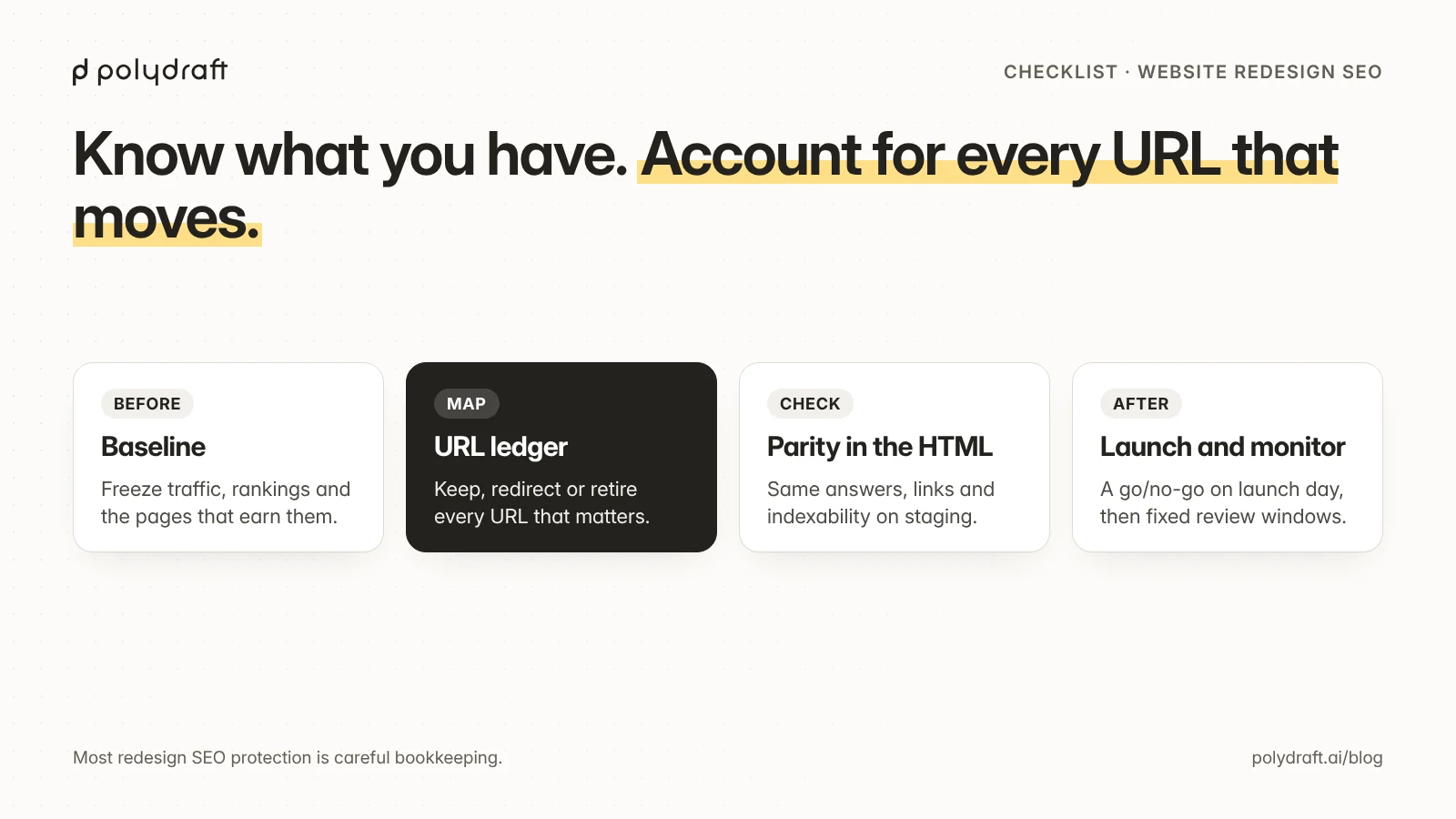
A website redesign hurts SEO when it removes or moves what search engines relied on without saying where it went. That includes URLs, the text that answered queries, internal links, indexability, and whether the words are in the HTML at all. Most of the protection is careful bookkeeping: know what you have, decide what happens to every URL that matters, and verify the result on the live site. Even when everything goes right, Google says to expect temporary fluctuation while it processes a move.
This checklist is for teams changing a site that already gets search traffic. If you are launching from nothing, use our SEO launch plan for a new website instead.
Website redesign SEO checklist at a glance
- Find your level on the redesign risk ladder
- Freeze a baseline before anything changes
- Build a URL preservation ledger
- Check content parity template by template
- Check that the content is in the HTML, not only in JavaScript
- Test staging like production
- Run a launch-day go/no-go
- Monitor in fixed windows, and diagnose drops by symptom
Step 1: Find your level on the risk ladder
"Redesign" covers everything from new colors to a new domain. The checks you need depend on how much changes.

- Visual refresh. Same URLs, same copy, new look. Risk is low only if the HTML the server sends still contains the same text and links. A "visual" refresh that moves copy into JavaScript, animations, or click-to-load components behaves like a level 2 change. Crawlers that don't run JavaScript may not see the copy at all (Step 5).
- Content or template changes. Same URLs, but copy, headings, navigation, or structured data change. This level fails quietly: nothing breaks, yet pages lose the content that earned their rankings.
- URL changes on the same domain. New paths need a redirect map from each old URL to its closest new equivalent, plus updated internal links, canonicals, and sitemaps.
- Platform or CMS migration. Adds rendering differences (especially JavaScript), new default robots and meta output, changed media URLs, and missing hreflang annotations. Moving to or from Webflow? See Webflow's default SEO settings and audit, or how Framer and Webflow differ on SEO controls. Leaving Squarespace? See what Squarespace's export leaves behind.
- Domain change. Adds redirects from every old hostname and Search Console's Change of Address tool, which is meant for domain and subdomain moves.
Change as few levels at once as you can. If you change URLs and rewrite copy in the same release and traffic drops, you can't tell which change caused it. When you can, ship URL changes with the content carried over intact, then improve content in later releases.
Step 2: Freeze a baseline before anything changes
Take a dated snapshot of the current site before work starts. Collect URLs from every source, because each one misses something:
- a full crawl of the live site
- the XML sitemaps
- Search Console's Performance report, by page and by query. The export button stops at 1,000 rows, so larger sites need the Search Console API or the bulk export to BigQuery
- analytics landing pages, with conversions
- pages with external links, from a backlink tool if you have one
- server logs, if you can get them
For each URL, record the status code, title, meta description, main heading, canonical, robots directives, structured data types, internal links in, top queries, clicks, and conversions. Also note the approximate word count. It isn't a target, but a sudden drop after launch is a useful alarm. Save the raw HTML of your most valuable pages too, so you can compare exact text later.
For each main template, record its Core Web Vitals from Search Console or PageSpeed Insights. Google's "good" thresholds are a Largest Contentful Paint of 2.5 seconds or less, an Interaction to Next Paint of 200 milliseconds or less, and a Cumulative Layout Shift of 0.1 or less. Without a baseline, you can't tell later whether the new templates made pages slower.
Write down the exact date range of your baseline. You will compare against it later, and it should cover the same weekdays and season as your post-launch windows.
Step 3: Build a URL preservation ledger
The ledger is a spreadsheet that records a decision for every URL that has value. Most of the steps below depend on it.
| Old URL | Evidence of value | Change type | Decision | New URL | Content notes | Owner | Verified on |
|---|---|---|---|---|---|---|---|
/services/seo-audit |
Clicks, links, leads | C | Keep | /services/seo-audit |
Copy and FAQ carried over to the new template | Content | |
/about |
Few clicks | U | Keep | /about |
Unchanged | Content | |
/blog/2021/launch-tips |
Clicks | M | 301 | /blog/launch-tips |
Same article, new path | Dev | |
/plans and /pricing-2023 |
Overlapping intent | X | Merge, 301 both | /pricing |
Best of both combined | Content | |
/summer-promo |
None | X | Retire (410) | — | No equivalent page | Dev |
The "Change type" column is what makes the ledger useful after launch: U means unchanged URL and content, C means the same URL with changed content or template, M means moved with a redirect, and X means merged or retired. To build the redirects.csv file the Step 6 script checks, take every row that redirects (the M rows and any X row marked Merge), keep only the Old URL and New URL columns, and write both as full URLs, such as https://example.com/pricing.
Four decisions cover almost every case:
- Keep. The URL stays. Protect the parts that answered the query: the copy, headings, tables, and FAQs. The visual design doesn't need protecting.
- Redirect (301 or 308). The page moves. Send it to its closest equivalent, one-to-one, straight to the final URL with no chains. Google treats both codes as permanent server-side redirects, so use whichever your host supports.
- Merge. Two pages serve one intent. Combine the best content on one URL and redirect the other.
- Retire. No equivalent exists. Return a 404 or 410. Don't redirect it to the homepage instead. Visitors land somewhere unhelpful. Google's site-move guidance warns against redirecting many old URLs to one irrelevant destination, and Google may treat such redirects as soft 404s.
We found this pattern on our own site. On October 13, 2026, made-up URLs under polydraft.ai/blog/ and /compare/ returned a 302 to the section index instead of a 404. A redesign that does the same with retired posts sends visitors to a page that doesn't answer their question. The fix is logged for our site template.
Rank rows by value: pages with clicks, external links, or conversions first. A small team can verify the top tier by hand and spot-check the rest with a script.
Step 4: Check content parity, template by template
Content parity is where "visual" redesigns lose rankings without anyone noticing. Review each template (homepage, service page, article, category) on staging against the baseline, and look for:
- body copy cut to make the design feel cleaner
- headings rewritten into slogans that no longer say what the section is about. Take each key page's top queries from the Step 2 baseline and confirm the new title, H1, and first paragraph still answer them. A slogan can sit in the design; the H1 should still describe the page.
- text moved into images or sliders (for content that loads only after a click, see Step 5)
- internal links dropped from navigation, footers, or related-content blocks
- structured data the old template produced that the new one doesn't. Output it in the HTML the server sends (Step 5).
- title and meta description templates changed across the whole site
- image URLs changed without redirects, which matters if image search sends you traffic
- hreflang annotations missing on multilingual sites. Our hreflang audit checklist tests every language version.
Step 5: Check that the content is in the HTML, not only in JavaScript
Step 4 checks that the words survive the redesign. This step checks that crawlers can actually receive them. A page can look finished in a browser while the words that earned its rankings aren't in the HTML the server sends. Design and frontend teams build rich animation into the homepage and other key pages. The headline waits for a script to fade it in, sections render in the browser, or copy appears only after a scroll or a click.
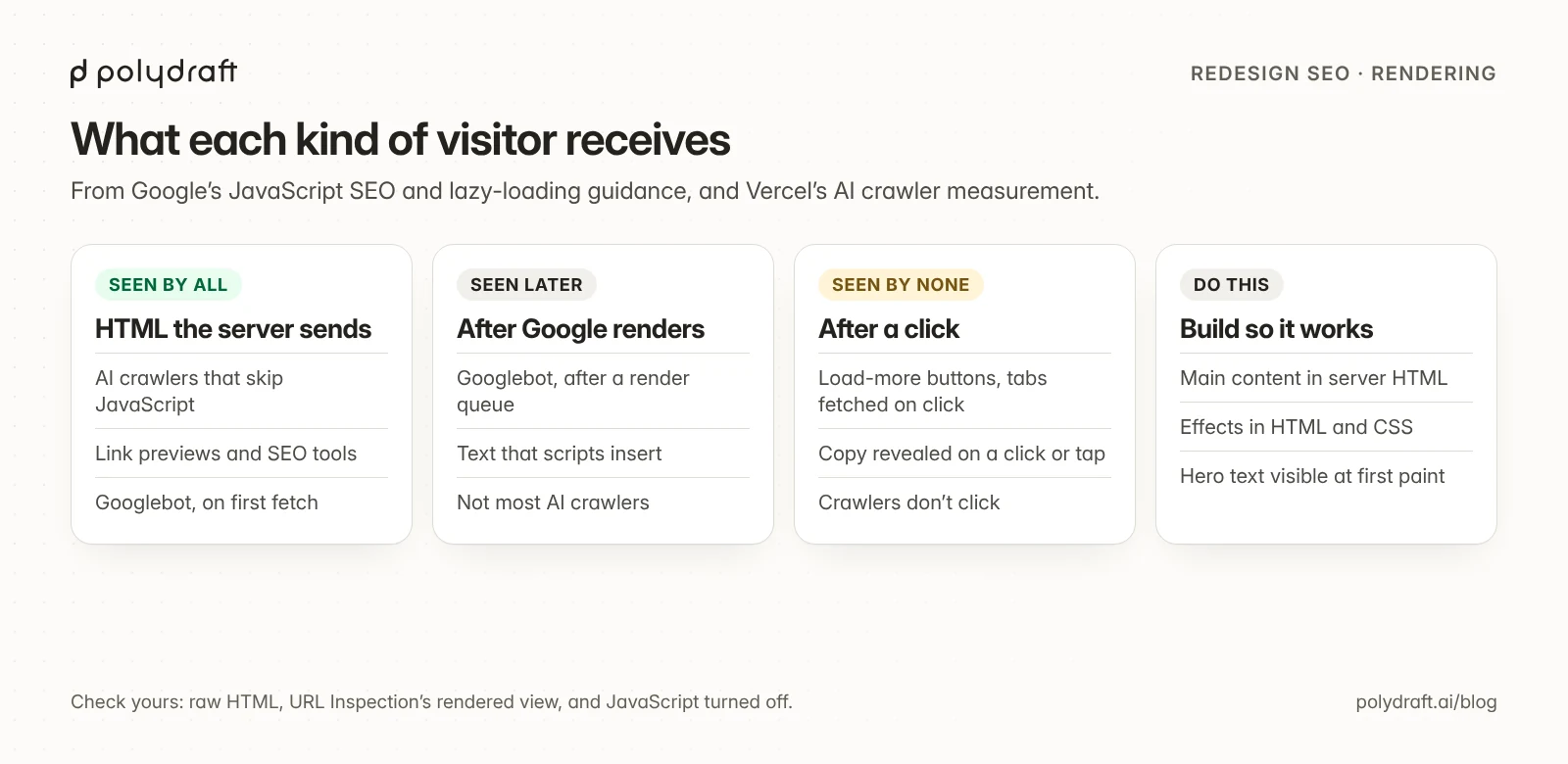
Three facts make this matter:
- Google renders JavaScript, but later. Pages wait in a render queue before Google sees what scripts add. Google's JavaScript SEO guide still calls server-side or pre-rendering "a great idea" because "not all bots can run JavaScript".
- Google doesn't scroll, click, or type. Content that loads only after a user action isn't seen. Google's lazy-loading guidance says to load content based on what's visible in the viewport instead.
- Many AI crawlers don't run JavaScript at all. In a large measurement by Vercel and MERJ, OpenAI's and Anthropic's crawlers fetched JavaScript files without executing them. If your copy exists only after scripts run, those crawlers see an empty page, which undoes any AI visibility work. This is a vendor's measurement and crawler behavior can change, but it's a poor bet to depend on.
Rules to agree with your designers and frontend developers before the build:
- Render the main content on the server, with server-side rendering or static generation: headings, body copy, links, FAQs, and structured data.
- Build visual effects with HTML and CSS where you can. Animate only
transformandopacityon content that's already painted, and keep JavaScript animation for small decorative elements such as icons or counters, never blocks of text. - Never hide the main heading, lead paragraph, or hero image until a script reveals it.
- Never inject copy with JavaScript. Animate text that's already in the HTML.
- Keep reveal-on-scroll effects below the fold and respect
prefers-reduced-motion. Hide content only under a class your script adds, for examplehtml.js .reveal { opacity: 0 }, so it stays visible if JavaScript fails. - Measure mobile Largest Contentful Paint on the real template, not on the design file. Aim for 2.5 seconds or less, the "good" threshold from Step 2.
Rule 3 has a measurable cost. On a test site built from PolyDraft's site template, hiding the hero text until a JavaScript animation library revealed it measured a mobile LCP of 3.4 seconds in PageSpeed Insights. Painting the same text at the first frame measured 0.76 seconds. That was an internal test, not a customer result.
From the author. When I took over AFFiNE's website (affine.pro) in 2024, its sitemap had never been submitted. The site looked good, but it earned fewer than 2,000 impressions a day, and most of its traffic came from GitHub. The frontend and design teams had built heavy JavaScript animation into the homepage and many important pages. Much of the core content sat in JavaScript, where Google and AI crawlers couldn't reliably read it. There was no engineering time set aside for the website, and many engineers didn't want to spend theirs on basic website work. Once AI-assisted coding matured, we audited the site page by page, using AI and various SaaS tools to analyze the code. We rebuilt more than 20 core pages, the homepage included. We added schema and rebuilt keywords around real search demand to recover pages that already had authority. The fixes have taken close to 2,000 pull requests. This year, impressions have held steady at about 80,000 a day, and daily clicks have grown from a few hundred to a few thousand and stayed fairly stable. The work is only about half done. The site has more than 10,000 URLs, about 3,000 of them indexed, and we're still redirecting or noindexing leftover pages and refreshing the articles worth keeping.
How to check, in about five minutes:
This script fetches the HTML the server sends and looks for a phrase from your H1. It strips <script> and <style> blocks first, so text that exists only inside JavaScript doesn't count. It also repeats the request with an AI crawler's user agent, in case your server answers bots differently. To test every AI crawler, including CDN blocks, use our manual AI crawler access check.
# Usage: bash check-html.sh https://example.com/page "a phrase from your H1"
# Checks the HTML the server sends, with <script> and <style> blocks removed,
# so text that only exists inside JavaScript doesn't count.
url=$1; phrase=$2
for ua in "Mozilla/5.0" "Mozilla/5.0 (compatible; GPTBot/1.2; +https://openai.com/gptbot)"; do
  html=$(curl -sL -A "$ua" "$url" | perl -0777 -pe 's/<script\b.*?<\/script>//gis; s/<style\b.*?<\/style>//gis')
  if grep -qiF -- "$phrase" <<< "$html"; then r=FOUND; else r=MISSING; fi
  name=$([[ $ua == *GPTBot* ]] && echo GPTBot || echo browser)
  echo "$r ($name user agent): \"$phrase\""
done
We tested it on November 6, 2026. It reported FOUND for a server-rendered page and for a live polydraft.ai article. It reported MISSING for a page whose heading JavaScript inserts, and for a page whose text sits only in a JSON data block. Pick a phrase without apostrophes or quotes, which HTML often encodes.
- Run the script on each key template.
- Run URL Inspection's live test in Search Console and read the rendered HTML and the screenshot. The script can't tell whether CSS hides text that's in the HTML; the screenshot can.
- Load the page with JavaScript turned off in your browser's developer tools. Everything a visitor needs to understand the page should still be there. For a worked example on a client-rendered builder, see our Lovable SEO audit.
- Run the template through PageSpeed Insights on mobile and compare its LCP with the Step 2 baseline.
Step 6: Test staging like production
- Keep staging behind authentication, with
noindexas a backup. - Crawl staging and compare it with the baseline crawl: status codes, titles, canonicals, robots directives, word count, and internal links per page.
- Test every redirect in the ledger. A short script is enough. Run it against staging before launch and production after:
# Usage: bash check-redirects.sh redirects.csv
# redirects.csv: old_url,expected_new_url (full URLs, one pair per line)
while IFS=, read -r old expected _ || [ -n "$old" ]; do
  old=${old%$'\r'}; expected=${expected%$'\r'}
  [[ $old == http* ]] || { [[ -n $old ]] && echo "SKIP $old"; continue; }
  read -r code location < <(curl -s -o /dev/null -w "%{http_code} %{redirect_url}" "$old")
  final=$(curl -s -o /dev/null -w "%{http_code}" "${location:-$old}")
  if [[ $code == 30[18] && $location == "$expected" && $final == 200 ]]; then r=PASS; else r=FAIL; fi
  echo "$r $code $old -> ${location:-none} ($final)"
done < "$1"
A row passes only when the old URL returns a 301 or 308 to exactly the expected URL, and that URL returns 200. That catches redirects to missing pages and redirect chains. We tested it on October 13, 2026 against 301, 308, 302, redirect-to-404, redirect-to-redirect, and missing-redirect cases, and against spreadsheet exports with Windows line endings. Any line that isn't a full URL, such as a header row, prints as SKIP, so a bad export can't look clean. If staging needs a password, add -u user:password to both curl commands.
- Repeat the Step 5 checks on every staging template, and again on production after launch.
- Check page speed and mobile layout on real templates, not mockups. Compare each template's lab results in PageSpeed Insights or Lighthouse with the Step 2 baseline. Staging lab scores are only a proxy, so confirm with field data in Search Console once real traffic arrives.
- Confirm analytics and consent tags fire once per page view, and that your key conversions (forms, sign-ups, purchases) fire on the new templates under the same event names.
Step 7: Run a launch-day go/no-go
Agree on the rollback trigger before launch day so nobody argues about it under pressure. For example: any noindex or robots.txt block on production, any top-tier ledger URL failing its redirect check, or a key template missing its main content. Name one owner for each check (SEO, development, content, analytics) and one person who makes the go/no-go call. Keep the previous build deployable so a rollback takes minutes, not a rebuild. Launch when the people who can fix things are available, not late on a Friday.
On launch day:
- Remove staging-only
noindexrules and robots.txt blocks from production, and check you aren't blocking AI crawlers you want (robots.txt examples). - Deploy redirects and run the redirect script against production.
- Point internal links at final URLs. Redirects are a safety net, not your navigation.
- Confirm canonicals and hreflang reference the new URLs.
- Publish the new XML sitemap and submit it in Search Console.
- Use URL Inspection's live test on your top pages.
- Confirm analytics records real visits and conversions, and add a launch-date annotation.
- Submit the new sitemap in Bing Webmaster Tools too. If your site supports IndexNow, send the changed and redirected URLs.
- Update the links you control: Google Business Profile, social profiles, directory listings, partner pages, and ads.
- For domain changes, file a Change of Address request in Search Console once the redirects are live. You need to own both the old and the new property.
Then leave the redirects alone. Google's site-move guidance says to keep them "for as long as possible, generally at least 1 year."
Step 8: Monitor in fixed windows
| Window | What to check |
|---|---|
| Days 1–3 | Run the redirect script against production and crawl the site. Read server logs for 404s and 5xx errors from Googlebot. Use URL Inspection's live test on your top 20 pages. Search Console's reports lag behind a launch, so a clean report this early proves little. |
| Weeks 1–2 | Check the Page indexing report for new 404s and redirect errors. Compare clicks and impressions by change type with the baseline, using the same weekdays. When URLs moved, add each old URL's numbers to its new URL's using the ledger, or every moved page will look like a collapse. |
| Weeks 2–8 | Watch old URLs drop out and new ones gain impressions. Google says a medium-sized site can take a few weeks for most pages to move. |
| Month 3 | Decide which pages to keep improving, merge, or retire, based on what you see. |
After a redesign, sitemap paths are easy to get wrong too. When we checked polydraft.ai on October 5, 2026, robots.txt named /sitemap.xml, while another common path, /sitemap-index.xml, didn't exist. Submit the sitemap robots.txt actually declares, and confirm it lists only live, final URLs.
If traffic drops: diagnose by symptom
Start by separating the redesign from everything else. Group pages by the ledger's change type and compare each group with its baseline:
- Only M and X pages dropped: look at redirects and merged content.
- C pages dropped and U pages held: the new template or content is the likely cause.
- U pages dropped as much as everything else: the cause is probably outside the redesign, such as an algorithm update, seasonality, or broken tracking.
Unchanged pages act as a rough control group. It isn't proof, but it stops you from rewriting content when the real problem is a redirect or a tracking tag.
| Symptom | Likely cause | How to check | Fix |
|---|---|---|---|
| Analytics shows a big drop, Search Console doesn't | Tracking broke, not rankings | Compare Search Console clicks with analytics sessions for the same days | Fix the tag or consent setup; rankings are fine |
| Sharp drop across the whole site | noindex, robots.txt block, or canonicals pointing at staging |
View source and robots.txt; URL Inspection | Remove the block, then request indexing for key pages |
| Old URLs showing 404s | Missing or wrong redirects | The redirect script, server logs, and the Page indexing report, compared with the ledger | Add one-to-one 301 or 308 redirects |
| Specific pages slipping but still indexed | Content parity loss | Compare old and new text, headings, and links | Restore the missing substance |
| Image search traffic falling | Image URLs changed | Compare old and new image URLs | Redirect images or restore their URLs |
| Drop that coincides with industry-wide changes | Algorithm update or seasonality | Google Search Status Dashboard; year-over-year data | Don't "fix" what isn't broken |
Where PolyDraft fits
If you rebuild a site with PolyDraft, its builder can read your current pages, through URLs or screenshots, as input for the new project. It gives the new project your existing content and design direction as a starting point. It is not a migration tool. It doesn't carry over your URL structure or create redirects for you, so the preservation ledger and redirect testing above are still your job, whichever builder you use. New sites built on PolyDraft's current template render their content on the server. Its frontend rules require the hero heading, lead paragraph, and main image to be visible at first paint. Run the Step 5 checks on your own pages either way. If you're adding languages as part of the redesign, read how we approach website localization before you plan URLs. If you're budgeting the rebuild, see our website redesign cost guide.
Frequently asked questions
Will a website redesign hurt my SEO?
It doesn't have to. Drops usually come from specific, avoidable causes: missing redirects, lost content, accidental noindex, or broken internal links. Some temporary fluctuation is normal while Google processes changes.
How long does it take to recover after a redesign?
It depends on how much changed. When URLs change, Google says a medium-sized site can take a few weeks for most pages to move in its index, and larger sites take longer. Pages moving isn't the same as traffic recovering, so track both, and if moved pages lag after several weeks, work through the symptom table.
Should I change URLs during a redesign?
Only when the new structure is clearly better for users and you can map every valuable old URL. If the current URLs are serviceable, keeping them is the lowest-risk choice.
How long should I keep 301 redirects after a redesign?
Google's site-move guidance says as long as possible, generally at least one year. There's little reason to remove a redirect that still receives visits or links.
Should I delete low-traffic pages during a redesign?
Check external links and conversions first. A page with few visits may still carry links or close sales. Merge it into a stronger page with a redirect, or retire it with a 404 or 410 if nothing depends on it.
Do animations hurt SEO?
Not by themselves. They hurt when they hide or replace content: a headline that waits for a script, copy that JavaScript inserts, or sections that load only after a scroll or click. Build effects with HTML and CSS on content that's already in the HTML, and keep the main heading, lead, and hero image visible at first paint.
Can Google and AI crawlers read JavaScript-rendered content?
Google can, after a delay in its render queue, but it doesn't scroll or click. Many AI crawlers don't run JavaScript at all, according to Vercel's measurement. Put the main content in the HTML the server sends, and check it by fetching the raw HTML.
Do I need Search Console’s Change of Address tool?
Only when you move to a new domain or subdomain. For path changes on the same domain, or switching from HTTP to HTTPS, redirects and updated sitemaps are enough.
Continue with the next task
- Planning a new URL structure: Website architecture for SEO
- Launch-day checks in detail: SEO for a new website
- The ongoing work after launch: Post-launch SEO
- Deciding whether to leave WordPress: WordPress alternatives for business websites
About this article. Drafted with AI assistance, checked against the sources below, and reviewed and approved by Vincent Chen. The ledger rows are an illustrative template. The redirect script was tested on October 13, 2026 against the cases listed in Step 6, and the HTML check script on November 6, 2026 against the cases listed in Step 5. The polydraft.ai observations come from our production checks on October 5 and October 13, 2026. The AFFiNE figures are the author's own rounded observations from that role, not PolyDraft customer results; we don't report client outcomes. The LCP figures come from an internal test on a site built from PolyDraft's template. The diagrams are original illustrations made for this article, not screenshots of customer sites. Updated October 26, 2026: added a link to our website migration checklist. Updated November 6, 2026: added Step 5 on JavaScript and animation and the author's AFFiNE experience, expanded Steps 1 and 4, added two FAQs and shortened one, and added new sources.
Sources
Accessed October and November 2026.
- Google Search Central: Site moves with URL changes
- Google Search Central: Redirects and Google Search
- Google Search Central: Understand JavaScript SEO basics
- Google Search Central: Fix lazy-loaded website content
- Vercel (with MERJ): The rise of the AI crawler
- Google: PageSpeed Insights
- Google Search Central: HTTP status codes, network and DNS errors (soft 404s)
- Search Console Help: Change of Address tool
- Search Console Help: Page indexing report
- Google Search Central: Search Analytics API
- web.dev: Web Vitals
- Google: Search Status Dashboard