In this article
- 01 Landing page vs website: the short answer
- 02 A decision table for what to build first
- 03 What a landing page and a multi-page site look like in practice
- 04 SEO and AI search: what a single page can win
- 05 Start with one, grow into the other
- 06 Costs and effort of each option
- 07 Where PolyDraft fits
- 08 Frequently asked questions
- 09 Continue with the next task
- 10 Sources
In the landing page vs website choice, build a landing page first when you have one offer, one audience and one action, and most visitors will come from ads, email or links you share. Build a multi-page website first when you sell several things, serve several audiences, or need people to find you through search. Most businesses end up with both. The safe path is to launch the page you need now on the URL you plan to keep, then grow it into a site.
We make PolyDraft, an AI website builder, so we have an interest in what you build. We say where it fits only after the decision sections. This guide uses Google's own documentation, our live site and our public showcase pages, checked on November 8, 2026. We didn't build test sites for this article.
Key points
- A landing page is a single page with one job, such as a sign-up or a sale. A website is a set of linked pages with navigation, built to serve several jobs.
- A single indexable page competes in search for one main need. Each extra need people search for usually needs its own URL.
- Campaign landing pages are often kept out of search with
noindex. That also keeps them out of Google's AI Overviews and AI Mode. - Growing one page into a site is low-risk if the page's URL stays the same. Redirects are only needed for URLs that change.
Landing page vs website: the short answer
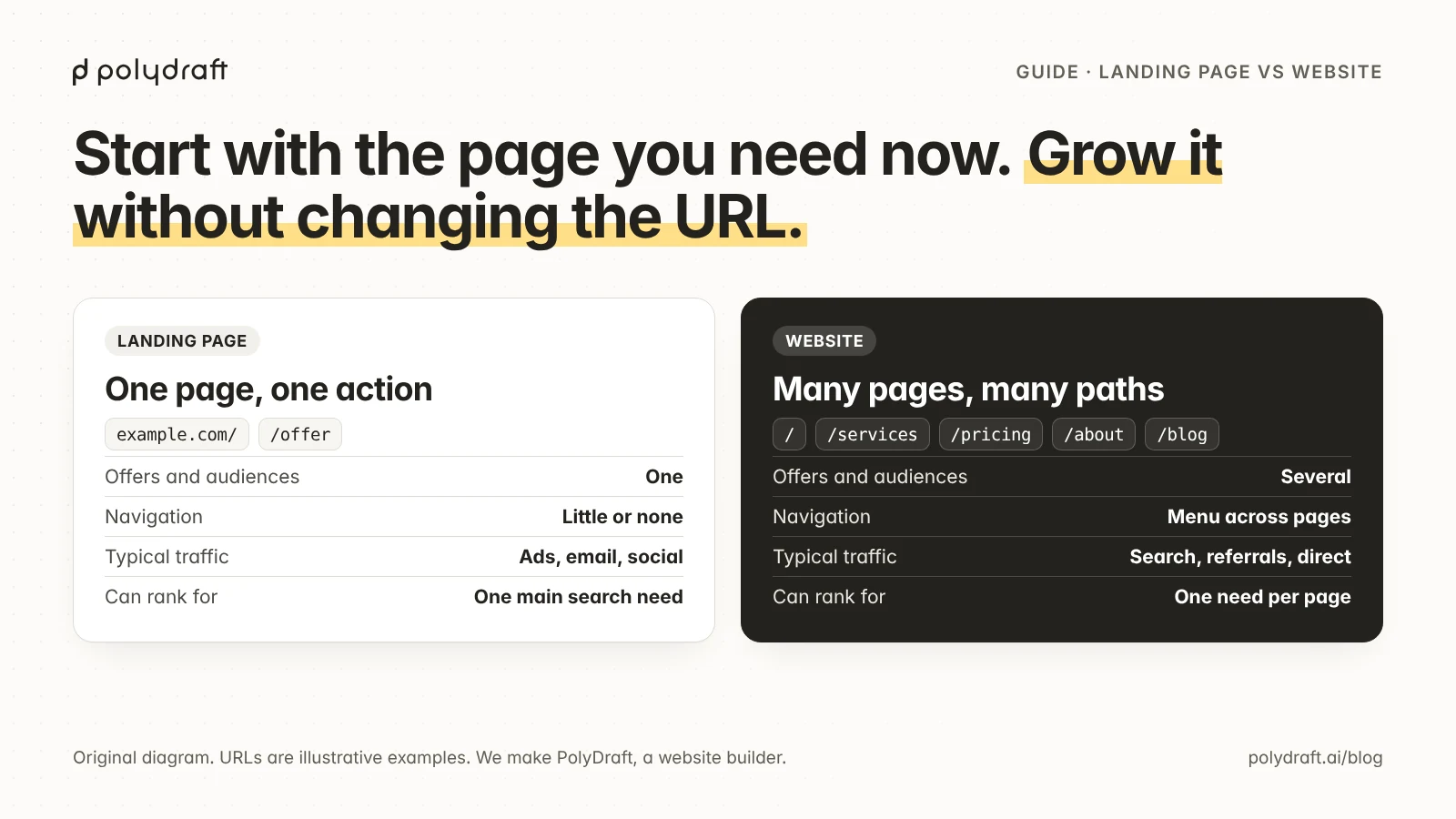
A landing page is one page built to get one action from one kind of visitor, usually with little or no navigation. A website is a group of pages under one domain, linked by a menu, that explains a business to many kinds of visitors. A homepage is the front page of a website, not a landing page, although a homepage can be designed to work like one.
The difference matters because each format suits a different traffic source and a different way of being found.
| Landing page | Website (multi-page) | |
|---|---|---|
| What it is | One page with one goal | Several linked pages under one domain |
| Main job | Get one action: sign up, book, buy, download | Explain the business and serve several goals |
| Offers and audiences | One of each | Several of either |
| Navigation | Little or none, so nothing competes with the action | A menu that links every important page |
| Typical traffic | Paid ads, email, social posts, QR codes | Search, referrals, direct visits, plus campaigns |
| Search | One URL competes for one main search need, or the page is kept out of search | One URL per search need, linked together |
| Upkeep | One page to keep current | Every page needs an owner and a review date |
| Lifespan | Often weeks or months, tied to a campaign | Years, growing as the business grows |
A decision table for what to build first
Use this table to decide what to launch. Read each row and note which column describes you. If most of your answers fall in the left column, start with a landing page. If most fall in the middle, start with a small website. The last column tells you when to switch.
| Factor | Build a landing page first if… | Build a website first if… | Switch when… |
|---|---|---|---|
| Goal | You need one result: a waitlist, a pre-order, a booked call | You need trust, information and several next steps | Visitors ask questions the page can't answer |
| Offers or audiences | One offer for one audience | Two or more services, products or audiences | You add a second offer or audience |
| Navigation | Visitors should do one thing | Visitors arrive with different questions | You add a menu to a "landing page" |
| Traffic source | Mostly paid ads, email or links you share | You expect search and word of mouth to bring people | Search Console shows impressions for searches the page doesn't answer |
| SEO needs | Searches for your brand name, or none at all | Several distinct searches you want to rank for | A topic needs more than a short section to answer |
| Content you'll publish | None planned beyond the page | Guides, case studies, updates or a blog | You have a second article worth publishing |
| Upkeep | You can review one page a month | Someone can own pages, prices and posts | The page is getting long and hard to update |
| Proof | One testimonial or result is enough | Buyers need case studies, team and process pages | Prospects ask for references or details |
Two examples show how the rows combine. They are illustrative, not customers:
- A founder testing demand for one product. One offer, paid social traffic, no content plan. Start with a landing page on the root domain, and add pages when the second offer or the first search impressions arrive.
- An accounting firm with three services in one city. Several services, buyers who search before they call, and a need for trust. Start with a small website: a homepage, one page per service, prices, about and contact.
If you are a startup choosing your first pages, our SEO plan for a new website covers which pages to launch with. Small businesses can also see how we describe this choice on PolyDraft for small business.
What a landing page and a multi-page site look like in practice
Real sites rarely fit the textbook split. A multi-page website usually has a homepage that behaves like a landing page, with one main action repeated down the page. A landing page usually grows a menu once the business adds offers. Our own site and our public showcase cases show both patterns.
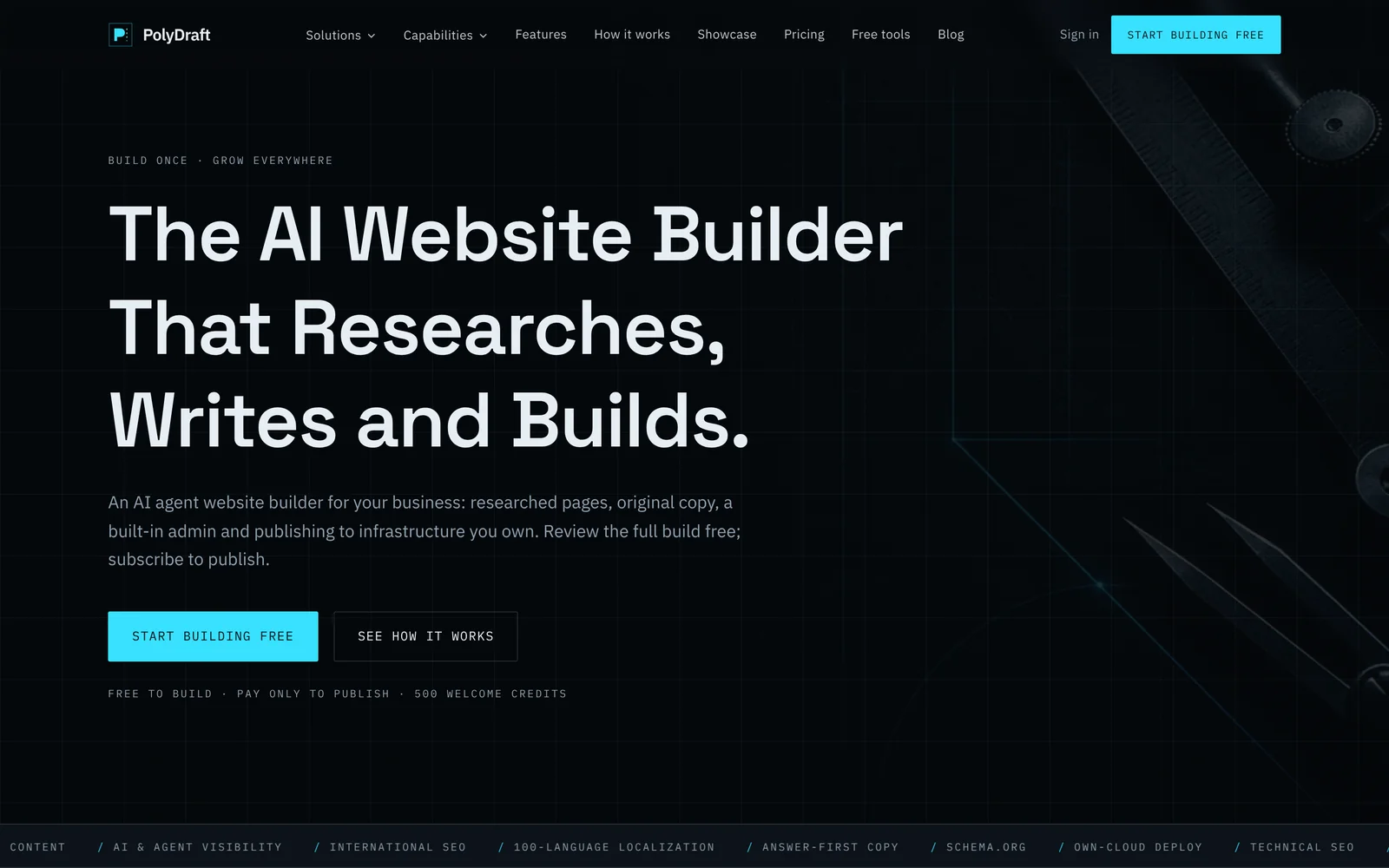
polydraft.ai is a multi-page website with a homepage that works like a landing page. On November 8, 2026, the live sitemap listed 78 URLs, including /features, /pricing, /how-it-works, 45 URLs under /blog and the showcase hub with its 3 case pages. The homepage header links to the main sections through a menu. It still drives one action: the homepage has five sign-up links, each with its own tracking label. Four are "Start building free" buttons, in the header, hero, pricing teaser and closing section, and the fifth is a "Your site could be next" tile in the showcase grid. Repeating one action and tagging each placement so clicks can be attributed to it is a landing-page technique used inside a website.
Our audience pages show the middle ground. PolyDraft for startups is one indexable page written for one audience, with the same single action, but it sits inside the site's menu. That page describes a startup site going through four stages, from pre-launch to new markets, "without a replatform". It is the same idea this guide recommends: grow the site you have.
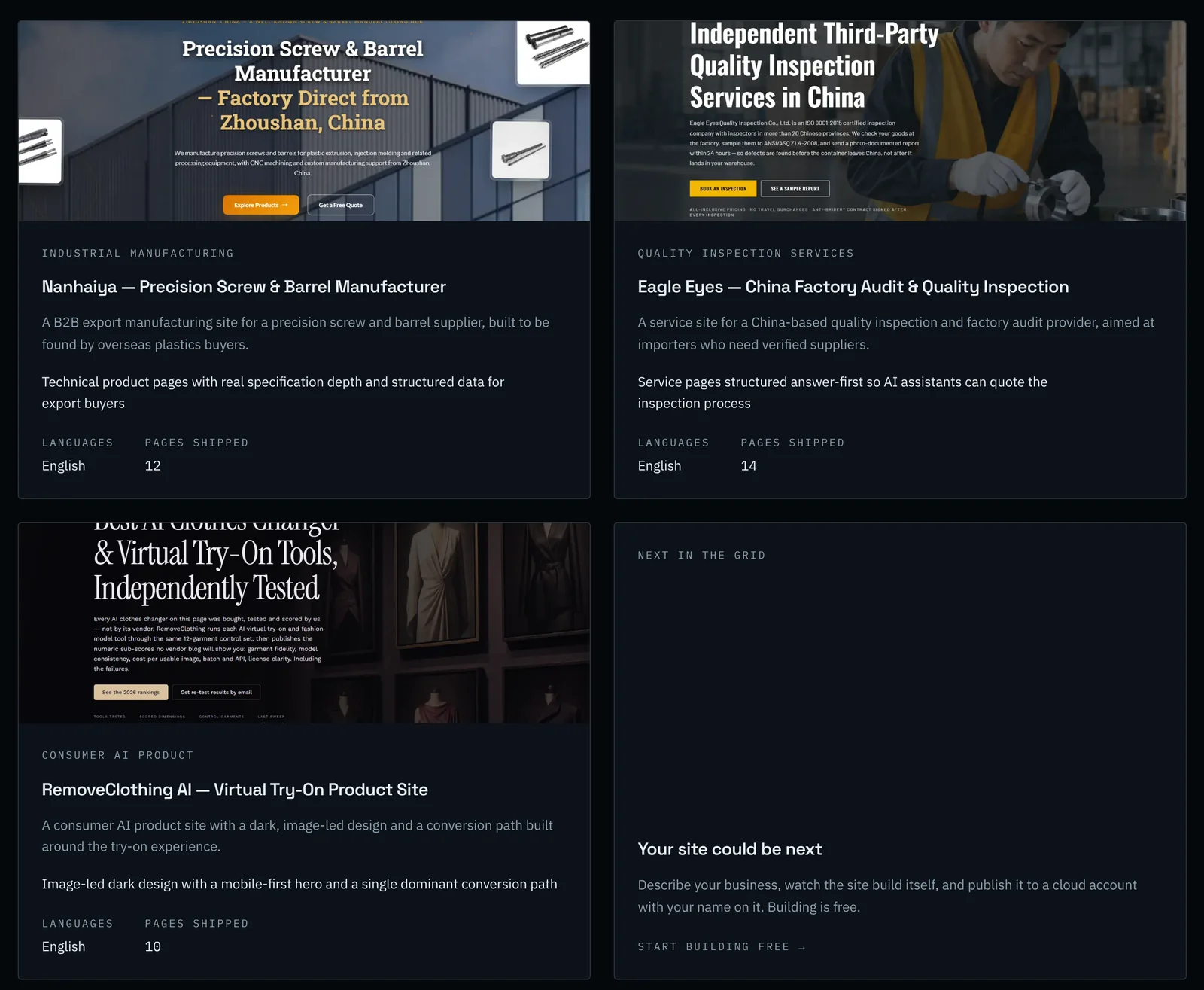
The three documented showcase builds are multi-page websites, not landing pages. According to their case pages on our PolyDraft showcase, as of November 8, 2026, which are based on our own case records and say they have not been independently audited:
| Case | Pages shipped | Pages listed on the case page | Why several pages |
|---|---|---|---|
| Nanhaiya (industrial manufacturer) | 12 | Homepage, product category index, product pages with specification tables, capability, quality control, about, contact, blog | Each product type is a separate search for overseas buyers |
| Eagle Eyes (inspection services) | 14 | Homepage, one page per inspection and audit service, process, coverage, about, contact, blog | Each inspection type owns its own page and keyword |
| RemoveClothing AI (consumer AI product) | 10 | Homepage, feature, how-it-works, pricing, FAQ-heavy support page, blog | The blog feeds the product page instead of competing with it |
The RemoveClothing AI case is the closest to a landing page. Its case page describes "a single dominant conversion path" and a mobile-first hero. It is still a 10-page site: its keyword plan kept the product term on the main page and put how-to and comparison searches on blog articles. The showcase pages don't link to the live client sites, so these facts come from the case pages, not from crawling the sites themselves. We have no build of a standalone landing page to show, and we haven't measured conversions or rankings for any of these sites.
SEO and AI search: what a single page can win
A single indexable page can rank for one main search need and its close variations. It can't compete well for several distinct needs when the search results for each are dedicated pages. Our guide to one-page website SEO covers this in depth, including a three-question test for when to split a topic out and why #section links can't be redirected. This section covers what is different about landing pages.
Paid landing pages are often kept out of search on purpose. Teams commonly build a separate page per campaign, ad group or audience, with near-identical copy. Those pages compete with each other and with your main pages if they are indexed. Two Google mechanisms handle this:
noindexkeeps a page out of Google Search results. Google's guidance on blocking indexing with noindex says the rule only works if the page is not blocked in robots.txt, because Google has to crawl the page to see it.- A canonical link tells Google which of several similar URLs is the main one. Google's page on consolidating duplicate URLs calls redirects and
rel="canonical"strong signals and sitemap inclusion a weak one. It also says not to name one URL as canonical in a sitemap and another withrel="canonical".
Use noindex for a campaign variant that shouldn't appear in search at all. Use a canonical link when a variant should point search engines to the main version, such as a copy of your offer page with tracking or layout changes. Pick one of the two for each page: a canonical is a hint about which version to show, while noindex removes the page, so combining noindex with a canonical to another URL sends mixed signals.
Don't block ad landing pages in robots.txt. Google Ads checks landing pages with its own crawler, AdsBot. Google's ad policy on inaccessible destinations says a page that AdsBot can't crawl can be disapproved. Google's special-case crawler documentation adds that AdsBot ignores rules for the * user agent, so it needs its own rule if you block it.
Landing page experience in ads is not the same as SEO. Google Ads rates landing page experience as one part of Quality Score, based on how relevant and useful the page is to people who clicked the ad and how easy it is to navigate. Google's advice on optimizing ads and landing pages is to send people to a page that matches what the ad promised. A page can score well there and still be noindex for organic search.
AI answers follow the same index. Google's page on AI features and your website says a page needs to be indexed and eligible for a snippet to appear in AI Overviews or AI Mode, with no additional requirements. It also lists noindex among the controls that limit how content appears in those features. So a noindex campaign page can't be cited there. If you want AI answers to quote your offer, put that answer on an indexable page, such as your homepage or an offer page.
| Page type | Indexable? | Canonical | In the sitemap? |
|---|---|---|---|
| Your main landing page or homepage | Yes | Points to itself | Yes |
| A permanent offer or service page | Yes | Points to itself | Yes |
| A campaign variant you want out of search | No: noindex, not blocked in robots.txt |
Self-referencing or none; don't pair noindex with a canonical to another page |
No |
| A near-copy of a main page, such as a tracking or layout variant | Crawlable, no noindex |
Points to the main page | No, list only the main page |
| A thank-you or confirmation page | No: noindex |
Not needed | No |
When a single page starts collecting searches it can't answer, the split decision belongs to your site structure. Our website architecture guide shows how to check whether two searches belong on one page or two. Choosing which searches a new, small site can realistically win is covered in our guide to finding low-competition keywords.
Start with one, grow into the other
The safest way to grow a landing page into a website is to keep the landing page's URL and add new URLs around it. If the landing page lives on your root domain, it simply becomes the homepage. Nothing needs a redirect, and the links and history it has earned stay where they are.
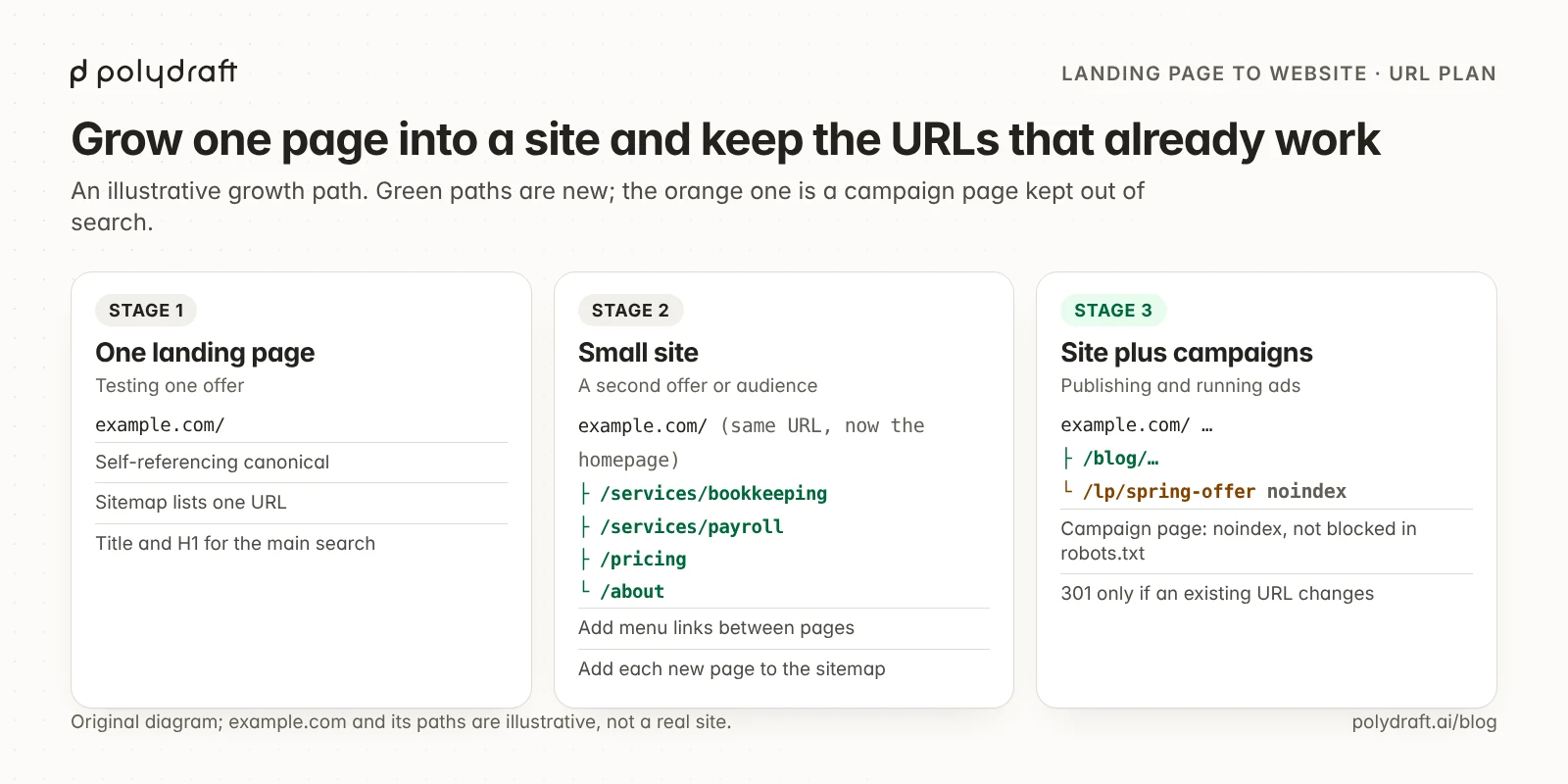
Follow these steps when you add pages:
- Choose the permanent URL before launch. Put the first landing page on the root domain or on a path you will keep, such as
/rather than/lp/launch-v1. A campaign path is fine for a temporary page you will retire. - Keep the existing URL when the page becomes a homepage. Change its content, title and heading as the business grows, but not its address.
- Add one new URL per offer or audience, linked from the menu. Move the detailed content for each one to its own page and leave a short summary on the homepage that links to it with a descriptive anchor. A visitor and a crawler should reach every important page from the homepage.
- Redirect only URLs that change. If an old URL has to move, send it to its new address with a permanent 301 or 308 redirect, directly and without chains, as Google's redirects guidance describes. Google's site move guidance recommends keeping redirects for as long as possible, generally at least a year. URLs you keep need no redirect.
- Give every indexable page a self-referencing canonical. Each new page's canonical should point to its own final URL, including your preferred
httpshost and trailing-slash style. - Update the sitemap. List every new indexable page and leave out
noindexcampaign and thank-you pages. Google's sitemap overview says a small, well-linked site of about 500 pages or fewer may not need one, but a sitemap still helps search engines find new URLs. - Check the result in Search Console. Inspect the new URLs with URL Inspection. Our one-page website SEO guide explains how to watch a moved topic's impressions shift to its new page, and how to handle old
#sectionlinks.
Keep campaign pages separate from this structure. When a promotion ends, either redirect its URL to the closest permanent page or leave it noindex and remove it from your ads.
Costs and effort of each option
A landing page costs less to build and maintain because there is one page to write, design, test and update. A website costs more up front and more to maintain, because every page needs content, an owner and periodic review. Over a few years, upkeep can matter as much as the first build.
When you compare quotes, count three things:
- Pages and copy. Each extra page adds writing, images and review time, whoever builds it.
- Hosting and tools. Landing-page tools and website builders price by plan, page views, sites or features. Compare the plan you'll need in a year, not the one you start on.
- Upkeep. Prices, team details, legal pages and posts go out of date. Someone has to own them.
Our website cost breakdown separates one-time and recurring costs, and the website cost calculator compares freelancer, agency and builder routes over several years.
PolyDraft's own pricing, as of November 8, 2026, follows the "Build free. Pay only to publish." model on our pricing page. Building and previewing are free, and a subscription is needed to publish. Plans differ in credits, projects, languages and seats. Starter costs $39 a month for 4,000 credits, 2 projects and up to 10 languages per site. Pro costs $99 a month for 10,000 credits, 10 projects and up to 30 languages. Agency costs $299 a month for 30,000 credits, 100 projects, up to 100 languages and full source-code export. Yearly billing is $390, $990 or $2,990, and access is currently invite-based.
Where PolyDraft fits
PolyDraft is an option once you've decided you need a multi-page website, or want to start small and add pages later. We make it, so weigh this section accordingly.
PolyDraft builds a server-rendered Astro website from a conversation. Its template includes canonical tags, an XML sitemap and robots.txt, plus a Blog CMS in the site's admin. The site publishes to your own Cloudflare account, and snapshots let you restore earlier versions. Multi-language sites build the primary language first, with 10, 30 or 100 languages by plan. The three showcase builds above, with 10 to 14 pages each, are examples of its output.
Know the limits before you choose it:
- No dedicated landing-page mode. Single-page starter templates are a candidate feature on our roadmap, not shipped, as of November 8, 2026, and we haven't documented or tested a one-page or campaign-page workflow.
- No redirect manager. If you change a page's URL, the old one isn't redirected automatically. Plan URLs before publishing.
- New pages may be missing from the sitemap. In the current site template, the sitemap lists published blog posts and categories automatically, but its list of other pages starts with only the homepage, and a page is added only if the build edits that list. After adding service, pricing or about pages, open
/sitemap.xmland confirm each one is listed. - No ad or conversion tools. PolyDraft doesn't include ad campaign management, A/B testing or ad conversion tracking. Dedicated landing-page tools are stronger for testing many ad variants.
If you're comparing builders for this job, our checklist for evaluating an AI website builder lists the questions to ask any vendor, including us. To try it, see the plans on our pricing page, where each plan's button starts a free build.
Frequently asked questions
What is the difference between a landing page and a website?
A landing page is a single page built to get one action, such as a sign-up or purchase, usually with little navigation. A website is a set of linked pages under one domain with a menu, built to explain a business and serve several goals. Many websites include landing pages for campaigns.
Should I build a landing page or a website first?
Build a landing page first if you have one offer, one audience and mostly paid or shared traffic. Build a small website first if you have several services or audiences, or need people to find you through search. Either way, launch on a URL you plan to keep.
Is a homepage a landing page?
Not by definition. A homepage is the front page of a website and usually links to every main section. It can work like a landing page when it pushes one main action. A campaign landing page is usually a separate page made for one ad, email or audience.
Can a landing page rank on Google?
Yes, if it is indexable. A single page can rank for one main search need and close variations, such as your brand and core offer. It struggles with several distinct searches, which usually need their own pages. Many campaign landing pages are set to noindex and never appear in search.
Should paid landing pages be noindexed?
Often, yes, when they duplicate your main pages or exist only for one campaign. Use a noindex robots tag and don't block the page in robots.txt, because Google must crawl it to see the tag, and Google Ads' AdsBot must crawl it to check the ad destination.
How do I turn a landing page into a website without losing SEO?
Keep the landing page's URL and make it the homepage. Add one new URL per offer or audience, link them from a menu, give each a self-referencing canonical and add them to the sitemap. Use permanent redirects only for URLs that actually change.
Continue with the next task
- Deciding whether one page is enough for search: One-page website SEO
- Planning your first set of pages: SEO for a new website
- Mapping searches to pages as the site grows: Website architecture for SEO
- Budgeting the build and upkeep: Website cost breakdown
About this article. Drafted by an AI agent following PolyDraft's blog workflow, checked by an automated QA script, fact-checked and edited by a separate AI agent, and approved by Vincent Chen. Google guidance was read through search excerpts restricted to Google's own domains on November 8, 2026, because those sites were not reachable from our research environment. Facts about polydraft.ai come from our live pages and sitemap, fetched on November 8, 2026, and the screenshots were captured from the live site the same day. We could not access a PolyDraft workspace for this article, so we didn't build a landing page or a website to compare. The search volume behind this topic comes from DataForSEO (US, English), retrieved on November 8, 2026. The examples of a founder, an accounting firm and example.com are illustrative, not customers. The diagrams are original illustrations.
Sources
- Google Search Central: Block search indexing with noindex, Consolidate duplicate URLs, Redirects and Google Search, Site moves with URL changes, What is a sitemap, AI features and your website
- Google crawling documentation: Google special-case crawlers
- Google Ads Help: About Quality Score for Search campaigns, Optimize your ads and landing pages
- Google Advertising Policies Help: Destination not accessible
- PolyDraft: Pricing, Showcase, PolyDraft for startups, checked November 8, 2026
Written by
Founder of PolyDraft and CEO of BlackMonolith, Inc.