Best Restaurant Websites 2027: 8 Examples Tested on a Phone
The best restaurant websites, checked on a phone: taps to the menu, booking or ordering, and hours on eight US sites, plus what each one does well.
The best restaurant websites get a hungry visitor to the menu, the booking or ordering screen, and the hours in one or two taps on a phone. Looks matter less. On November 18, 2026, we counted taps on the public pages of eight US restaurant sites, on a phone-sized screen. Franklin Barbecue and Sqirl were the quickest. Kogi BBQ put that week's truck schedule on its home page. The two most famous fine-dining sites publish no food menu, which can be the right call for a tasting menu.
We make PolyDraft, an AI website builder, so we have an interest in how restaurants build their sites. None of these restaurants uses PolyDraft, and none was contacted for this article. Every observation below comes from the public sites as they loaded on November 18, 2026. We re-checked on November 27, 2026, that all eight sites still load; the tap counts and screenshots were not re-measured.
Key points
- Four of the eight sites put a diner booking or ordering link one tap from the home screen: Eleven Madison Park, Franklin Barbecue, Russ & Daughters, and Sqirl. Three need two taps (Alinea, Tartine, The Waffle Bus). Kogi BBQ is a walk-up truck with no online ordering; its one-tap "book now!" button opens a catering request form. Reaching the menu was slower: only Franklin Barbecue and Sqirl showed menu items after one tap.
- None of the eight runs its own reservation system. Bookings go to Resy or OpenTable, and online orders go to a separate ordering site such as Toast, Owner.com's ordering, or a preorder site.
- Menus as web-page text beat PDFs on a phone. Two of the six sites with a menu still send at least some menus to a PDF.
- The site builder mattered less than the information on the page. Squarespace, WordPress, Shopify, a restaurant platform (Owner.com), and custom-coded HTML all appear in this list.
Best restaurant websites at a glance
How we measured. On November 18, 2026, we loaded each home page in Chromium through Playwright, emulating a 375 × 812 phone viewport with touch and an iPhone Safari user agent. It's an emulated phone, not a physical one. A "tap" is one tap on a link or button, starting from the home page. We counted taps on pop-ups that blocked the page, but not cookie banners that left the navigation usable. Scrolling isn't counted as a tap; we note it where it was long. We stopped at the booking or ordering provider's page and didn't complete or pay for any booking or order. The original data for each site is under the table. All eight sites still loaded when we re-checked them on November 27, 2026, but the tap counts below are from November 18.
This list judges what a phone visitor can do, not how a site looks. We didn't score visual design, photography, or page speed. If you want design inspiration, use these eight as a checklist for the basics, then look at galleries for style.
| Restaurant | Type | Site built with | Taps to menu items | Taps to book or order | Taps to hours | Checked |
|---|---|---|---|---|---|---|
| Eleven Madison Park (New York) | Fine dining, tasting menu | Squarespace | Not published online | 1 (Resy) | 3 | Nov 18, 2026 |
| Alinea (Chicago) | Fine dining, tasting menu | Squarespace | Not published online | 2 (OpenTable) | Not found | Nov 18, 2026 |
| Franklin Barbecue (Austin) | Casual, counter service | Squarespace | 1 | 1 (preorder site) | 1 | Nov 18, 2026 |
| Russ & Daughters (New York) | Casual: shop, cafe, bakery | Custom-coded home page; Squarespace for the rest | 2 | 1 (Toast) | 1 | Nov 18, 2026 |
| Sqirl (Los Angeles) | Cafe | Shopify | 1 | 1 (Resy) | 1 | Nov 18, 2026 |
| Tartine (San Francisco and more) | Bakery cafe, many locations | WordPress | 4 (PDF) | 2 (online ordering) | 3 | Nov 18, 2026 |
| Kogi BBQ (Los Angeles) | Food truck | WordPress | 2 | None for diners (walk-up truck); catering request form: 1 | 0 (that week's schedule on the home page) | Nov 18, 2026 |
| The Waffle Bus (Houston) | Food truck turned four restaurants | Owner.com | 2 | 2 (same page as the menu) | 3 | Nov 18, 2026 |
"Site built with" comes from the page source: Squarespace and Shopify asset URLs, WordPress's wp-content paths and generator tag, and a "Powered by Owner" footer link. For Eleven Madison Park, the hours count of 3 comes from the menu structure (Menu, About, About Us). Our script couldn't complete the final tap, so we confirmed the hours by opening that page directly.
What a restaurant site must do: menu, hours, reservations, ordering
A restaurant website has four jobs, and the visitor is usually on a phone with one of them in mind:
- Show the menu, with prices. "Is it my kind of food, and what will it cost?" is the most common question. Text on the page reads well on a phone and works with screen readers. A PDF makes the visitor zoom and pan.
- Say when you're open and where you are. Hours, address, and a phone number answer "can I go now?" Hours that differ from your Google listing cost you customers who turn up to a locked door.
- Take the booking. Link straight to the reservation page for this restaurant, not to a platform's home page. A party size in the link saves the guest a step; a fixed date doesn't, because it goes stale. Eleven Madison Park's Book on Resy button still carries a 2024 date.
- Take the order, if you do takeout. Franklin, Russ & Daughters, Sqirl, and The Waffle Bus all put ordering one or two taps away.
If the restaurant doesn't do one of these, the site should say so plainly. "No reservations, just walk in" on Russ & Daughters' cafe listing does that job well.
The examples
Fine dining
Eleven Madison Park
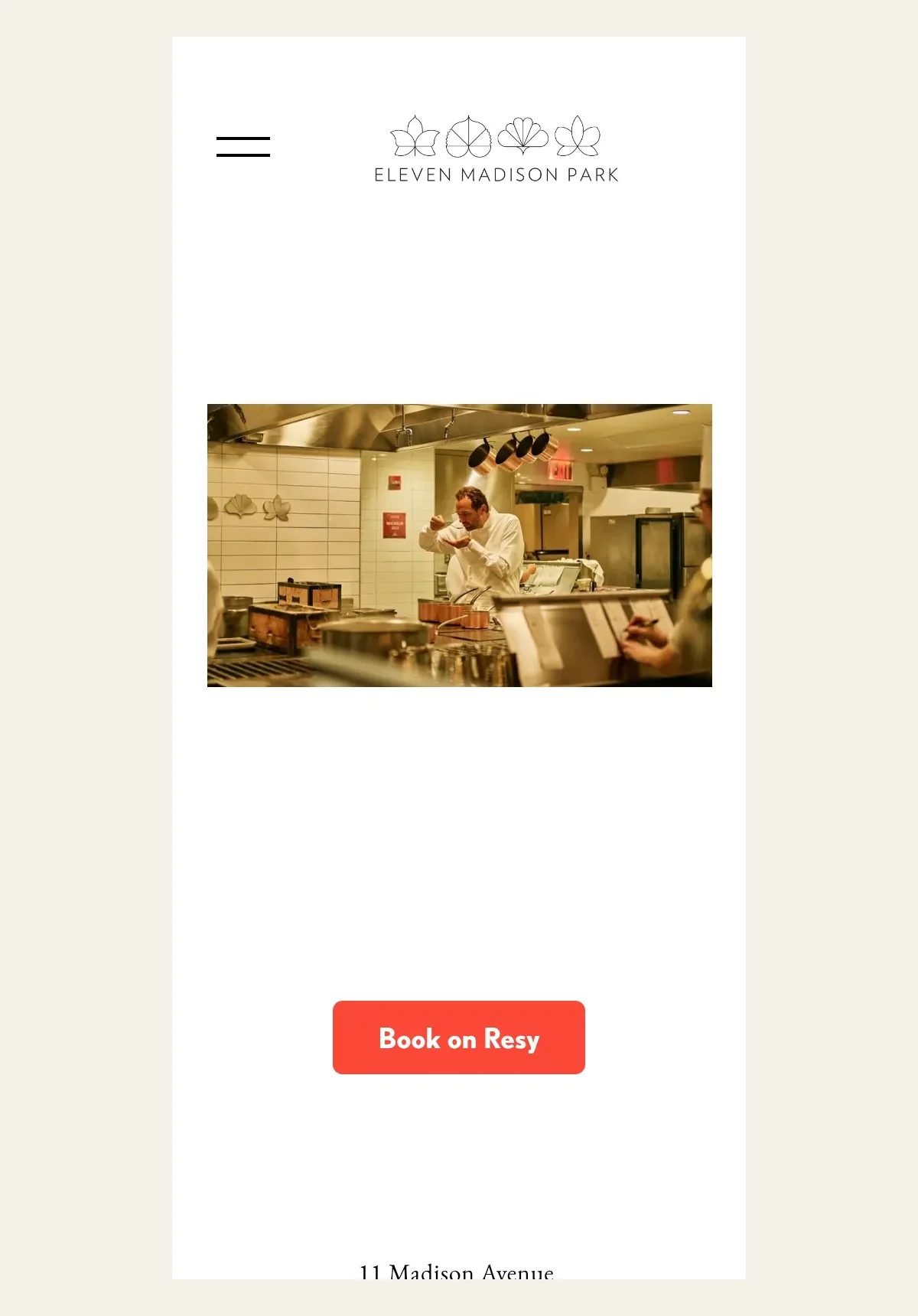
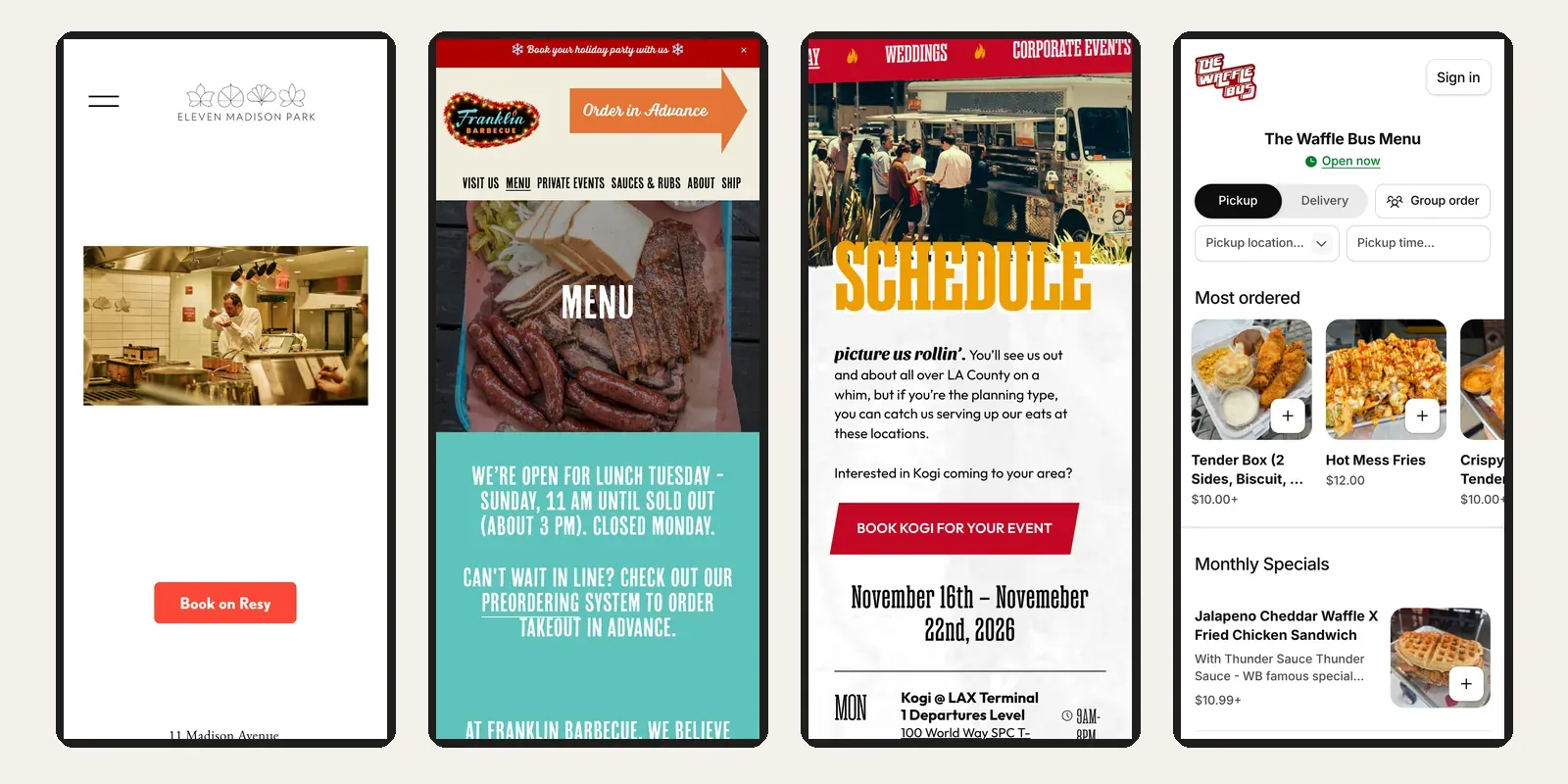
Eleven Madison Park's home page on a phone is almost empty: a logo, one photo of the kitchen, and a red Book on Resy button. One tap opens the restaurant's Resy page. The button's link sets a party of two and a date in August 2024; when we tapped it on November 18, Resy showed the current date instead. The address and phone number sit in the footer of every page. Hours are on the About Us page, three taps in. The site doesn't publish a food menu. The restaurant page says that "due to the hyper-seasonal nature of our menu… we are unable to share our food menus online." It links cocktail and wine lists instead.
- What it gets right: booking takes one tap, and the site says outright why there's no menu instead of leaving visitors to hunt for one.
- What to copy: point the booking button at your own page on the provider. If you add a party size to the link, leave the date out so it can't go out of date.
- What could be better: the hours sit three taps down. One line of hours on the home page or in the footer would answer "are they open tonight?" immediately. The Book on Resy button's link still carries a 2024 date (
date=2024-08-05). Resy switched to the current date when we tapped it, but it's a stale detail worth cleaning up.
Alinea
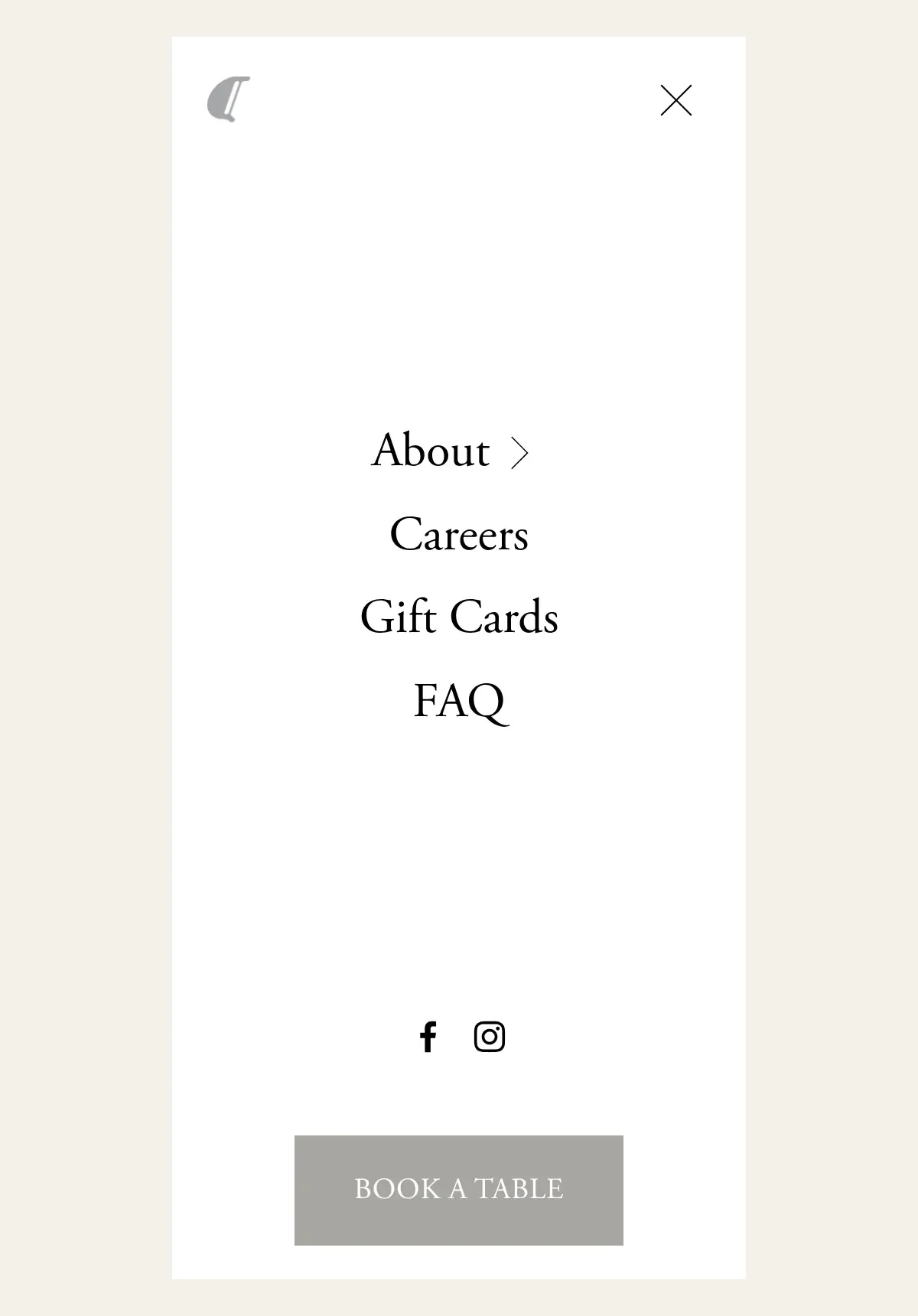
Alinea's site leads with a full-screen photo. The navigation menu opens to About, Careers, Gift Cards, FAQ, and Book a Table, which goes to OpenTable in two taps. The home page describes the three experiences (the Kitchen Table, the Gallery, and the Salon) and the restaurant's awards. Like Eleven Madison Park, it publishes no dish list. We didn't find opening hours on the home page or the FAQ page. Since our test, Alinea has added a "Celebrate New Year's Eve at Alinea! Now Booking!" bar at the top of the home page; on November 27, 2026, it linked straight to OpenTable for December 31.
- What it gets right: the FAQ page answers the questions that block a booking: dietary restrictions, cancellations, the service charge (stated as a percentage), dress code, and valet.
- What to copy: a short FAQ about how booking and payment work. At this price, unanswered questions about cost and cancellation can stop a booking.
- What could be better: keep a year-round booking button on the first screen, not only inside the menu or in a seasonal banner. Also state service times somewhere a guest can find them.
Casual
Franklin Barbecue
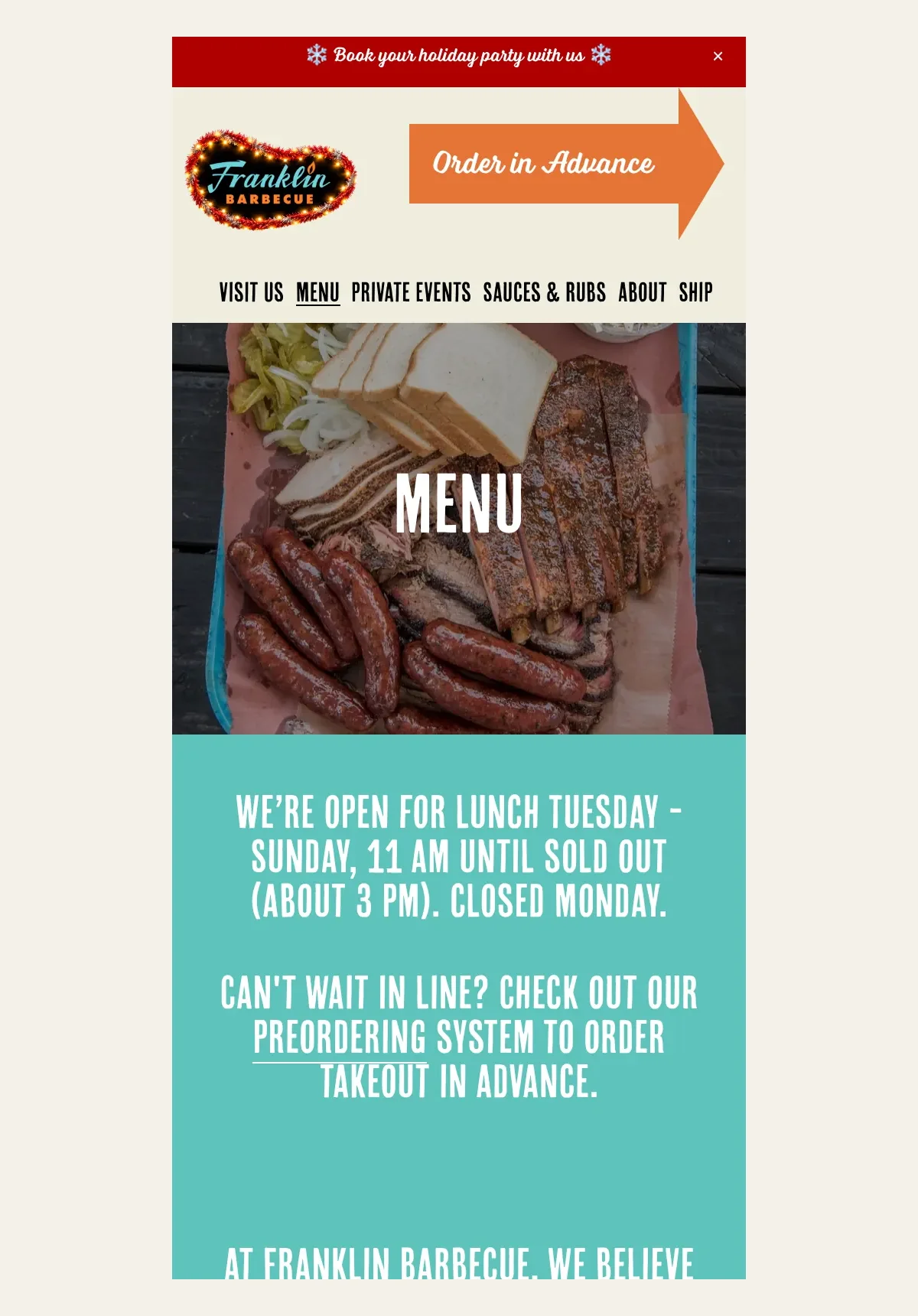
Franklin Barbecue is the clearest site in this list. The navigation is visible text, not hidden behind a menu icon: Visit Us, Menu, Private Events, Sauces & Rubs, About, Ship. A big orange Order in Advance arrow sits beside the logo. One tap on Menu shows the hours first ("open for lunch Tuesday – Sunday, 11 am until sold out (about 3 pm). closed Monday"). Then comes a text menu with prices: brisket at $42 per pound, a brisket sandwich at $21.
- What it gets right: menu, prices, and hours on one page, one tap from home, as real text.
- What to copy: if you have five or six key pages, show the links as visible text instead of hiding them behind a menu icon. And put your hours on the menu page, because that's where people decide to go.
- What could be better: a cookie banner covers the bottom of the first screen until it's dismissed. Prices come after a long block about sourcing, so on a phone the visitor scrolls past marketing text to reach them.
Russ & Daughters
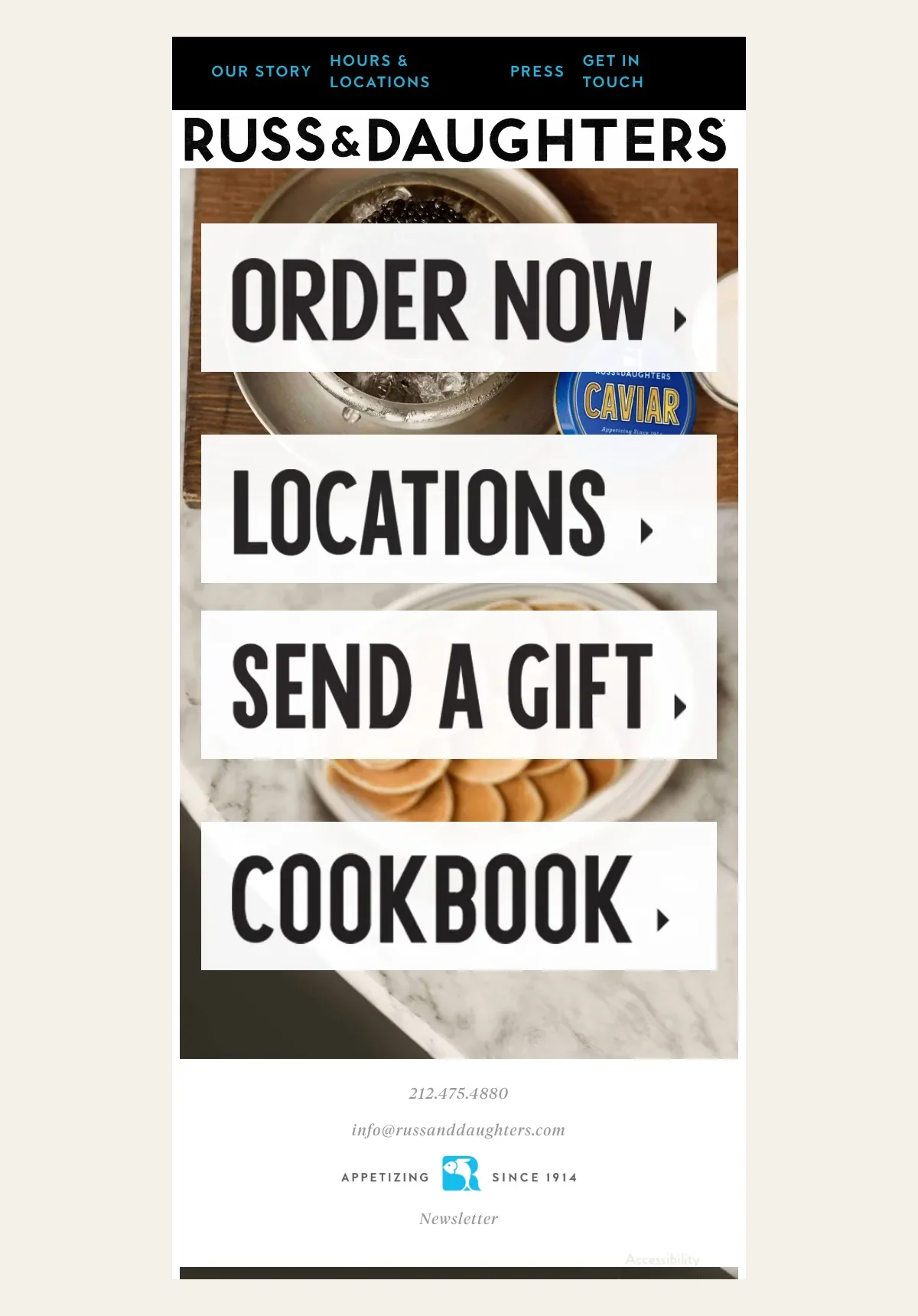
Russ & Daughters runs a shop, a cafe, a bakery, and nationwide shipping, and its home page is a single screen of big stacked buttons: Order Now, Locations, Send a Gift, Cookbook. NYC delivery and pickup through Toast is one tap away. Hours & Locations goes to a page with holiday hours at the top, then each location's hours, phone extension, and menu. On November 27, 2026, the holiday list ran from Thanksgiving to January 4 and included tickets for a December 7 Hanukkah party. The shop's in-store menu is two taps away after about 2,700 pixels of scrolling. The cafe's dine-in menu is a PDF.
- What it gets right: holiday hours at the very top of the locations page. That's when people check, and when they're most often wrong.
- What to copy: if you have several locations, give each one its own block with address, hours, phone, menu, and ordering link.
- What could be better: the home page's meta description (the search snippet) says the shop has been "in the same spot for 108 years" and dates the business to 1914. A year count like that goes out of date unless someone updates it every year. The locations page avoids the problem by saying "over a hundred years" instead. Several links use
http://rather thanhttps://. A phone browser normally upgrades them, but our test browser couldn't follow them, so we opened thehttps://versions of those pages.
Cafe
Sqirl
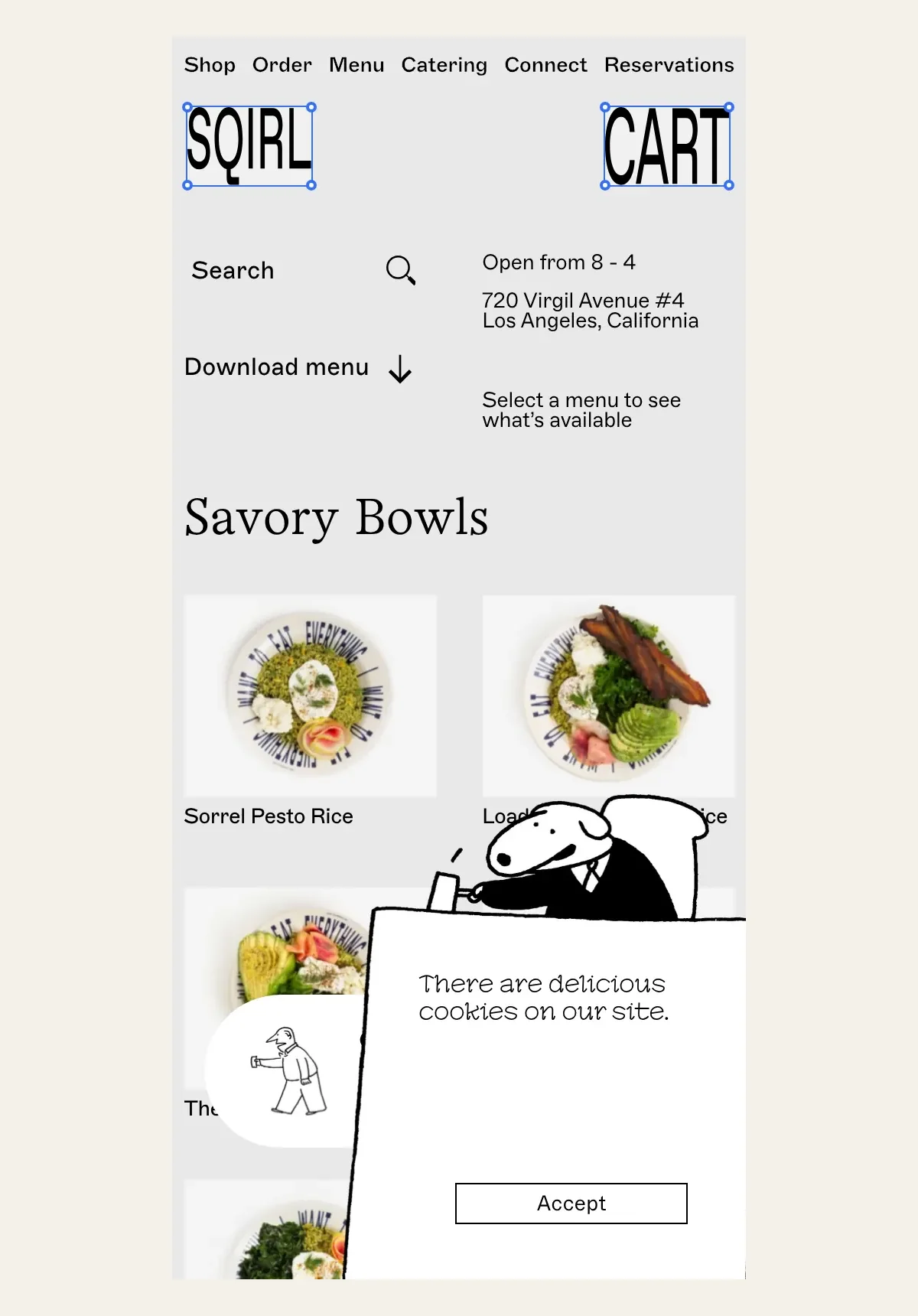
Sqirl, a Los Angeles cafe, is built on Shopify because it also sells jam and cookbooks. The top bar is visible text: Shop, Order, Menu, Catering, Connect, Reservations. One tap on Menu shows "Open from 8 - 4", the address, and a "Download menu" link. Below them, the menu itself appears as text sections (Savory Bowls, Savory Dishes, Sweet Bowls) with photos. Reservations go to Resy in one tap.
- What it gets right: hours and address sit right beside the menu, so the visitor gets both answers on one screen.
- What to copy: a top bar with your four or five tasks as words. Sqirl fits six words across a 375-pixel screen.
- What could be better: the menu page shows no prices. Pricing is one of the first things a cafe visitor checks.
Tartine
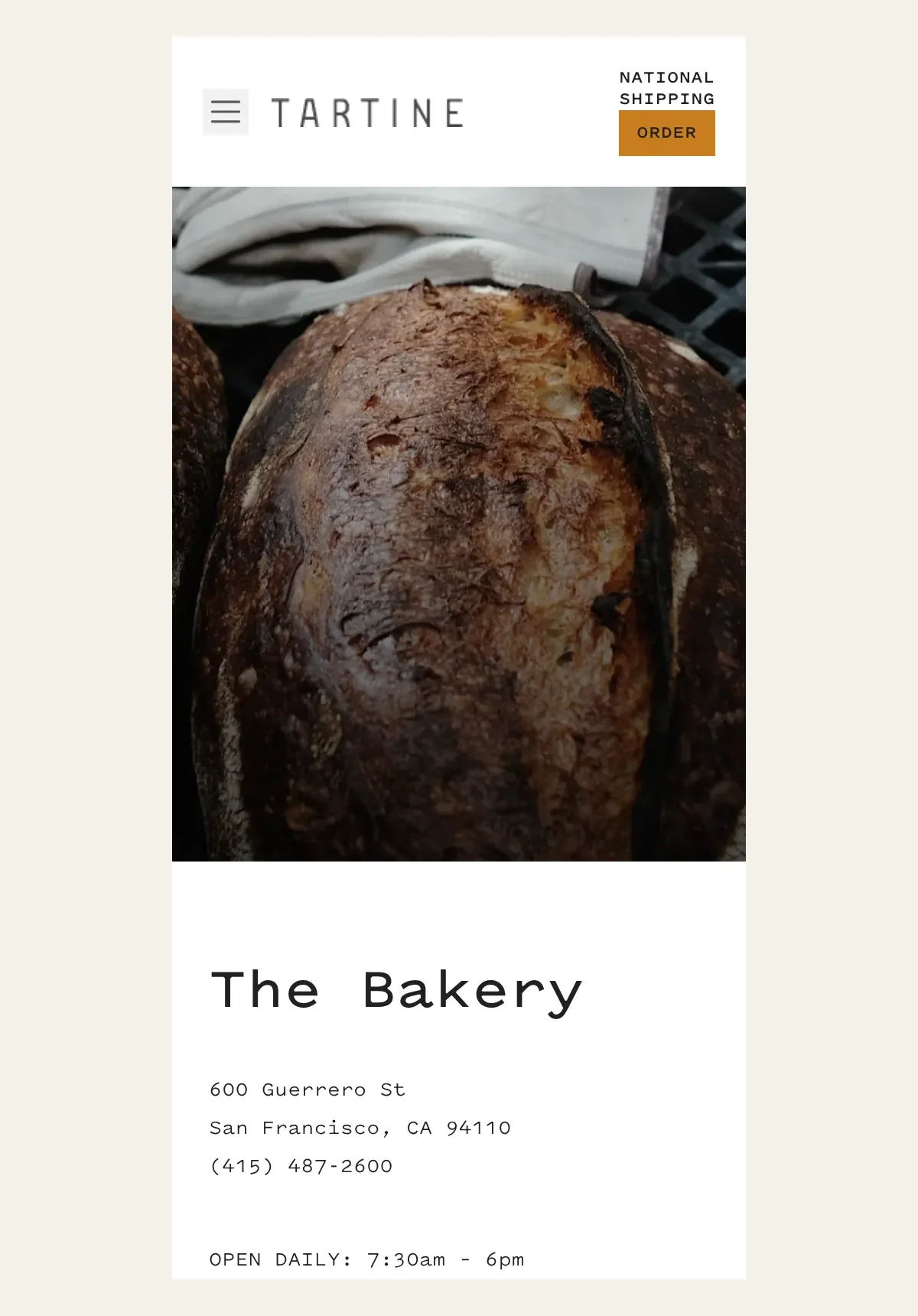
Tartine has locations in the Bay Area, Los Angeles, and Korea, so its WordPress site is organized around locations. That costs taps. To see the menu for the original bakery you tap the menu icon, then Locations, then The Bakery, then View Menu. That last link opens a PDF, which the page calls a "sample menu," and it points visitors to online ordering for daily offerings. The header's Order button is quicker: pick a location and you're on the ordering site in two taps.
- What it gets right: each location page lists the address with a map link, phone number, daily hours, and links for online ordering, cakes, catering, and gift cards.
- What to copy: the header order button that asks "which location?" first. For a multi-location business it's the fastest path in this list.
- What could be better: the menu is four taps away and is a PDF. A short text menu on each location page, even an abridged one, would save three taps.
Food truck
Kogi BBQ
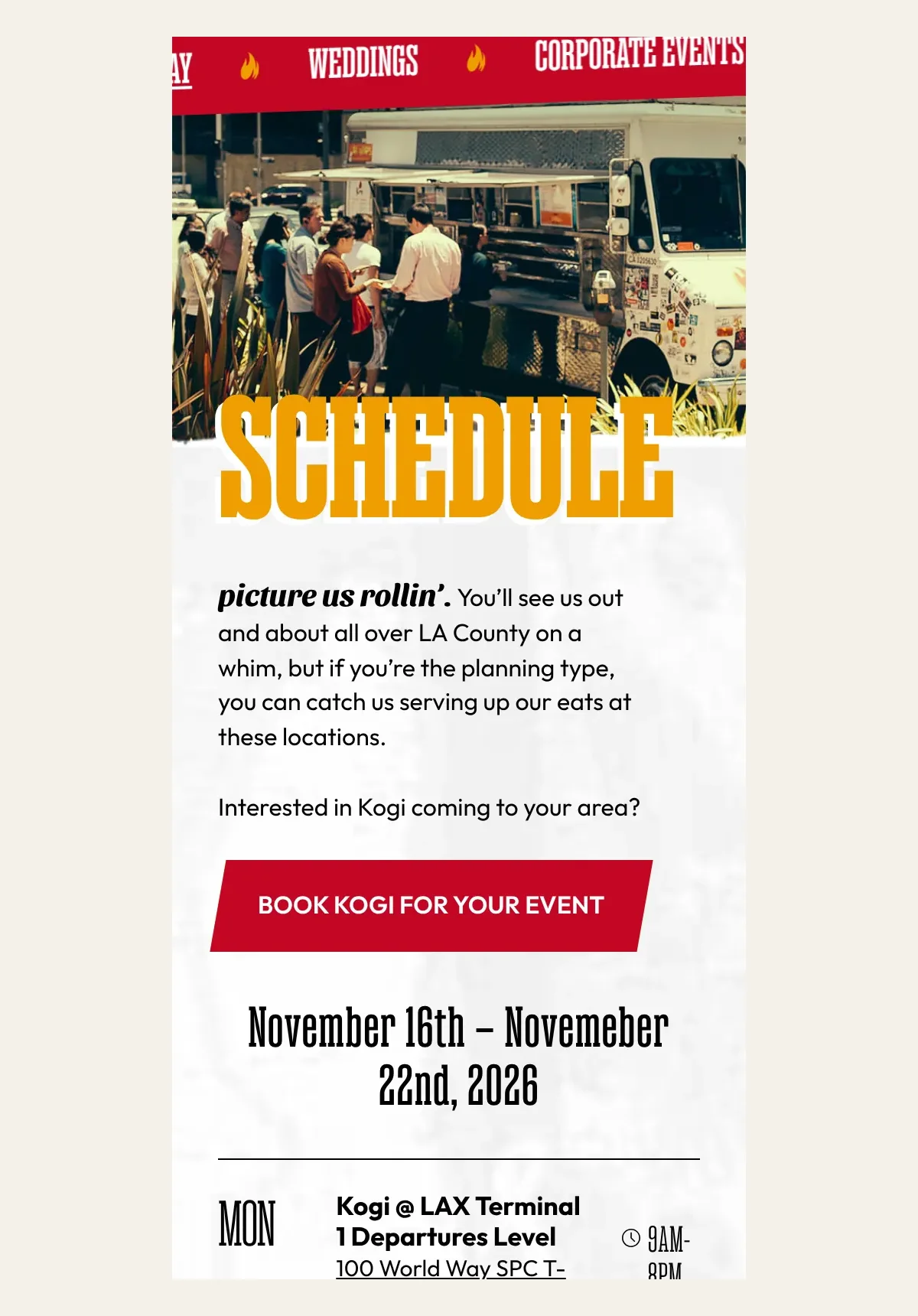
A food truck's hardest question is "where is it today?" Kogi BBQ answers it on the home page. Scroll about 1,450 pixels and there's a Schedule section for the current week. On the day we checked it covered November 16th to 22nd, 2026, with each stop's address, map link, and serving hours, from LAX Terminal 1 to a 21+ bar night. The menu is two taps away and lists prices (4 for the short rib taco, 12 for the burrito, written without a dollar sign). The header's book now! button goes to the catering request form in one tap.
- What it gets right: the schedule was current to the week we checked. On November 27 it had moved on to November 23rd–29th. A food truck schedule that's even a week stale is worse than none.
- What to copy: put every address in the schedule behind a map link. One tap opens directions.
- What could be better: the first screen is a catering pitch. Diners who want today's location scroll past it. A "Find the truck" button on the first screen would serve them in one tap. The schedule header also has a typo ("Novemeber").
The Waffle Bus
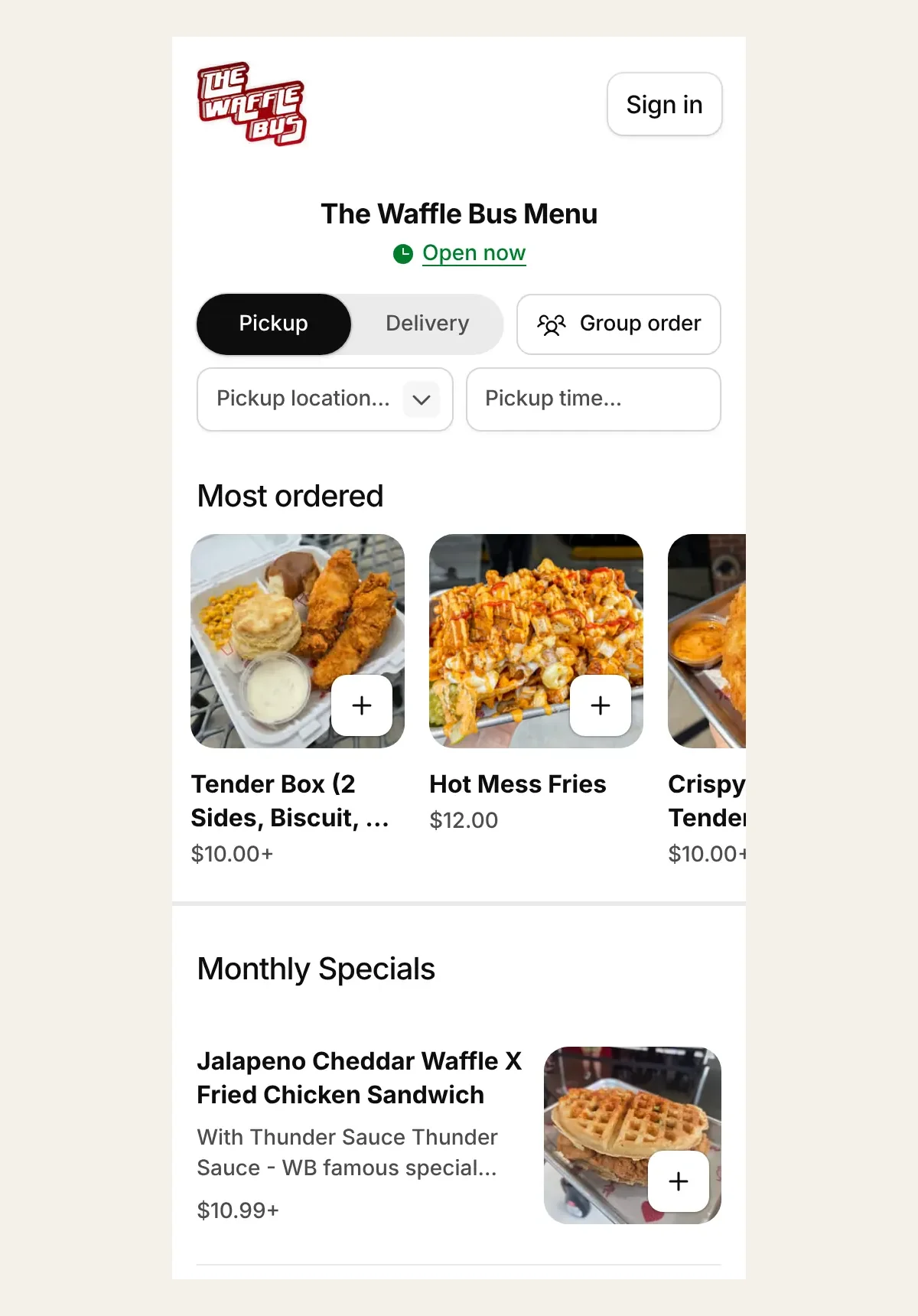
The Waffle Bus started as one Houston food truck "more than 12 years ago," according to its Our Story page, and now has restaurants in Houston and Derby, Kansas. Its site runs on Owner.com, an online-ordering platform for restaurants. The menu is the ordering page itself: pickup or delivery, a location picker, and items with prices (Hot Mess Fries at $12.00). On first load a full-screen pop-up offers 15% off an order in the mobile app. You have to close it (one tap) before you can reach the menu (a second tap).
- What it gets right: the menu and ordering are one page, with prices and an "Open now" status. The page source includes Restaurant structured data for its locations.
- What to copy: if most of your revenue is takeout, make the menu page and the order page the same page.
- What could be better: the app pop-up adds a tap and covers the menu on a first visit. Locations and hours are three taps in. A footer line with each location's hours would bring that down to zero.
What they have in common
The eight sites share five habits worth copying:
- Booking and ordering go to a specialist. Resy (Eleven Madison Park, Sqirl), OpenTable (Alinea), Toast (Russ & Daughters, Sqirl), and Owner.com's ordering (The Waffle Bus). No site runs its own reservation system. A small restaurant doesn't need one either: link to the provider you already use.
- In this set, visible text navigation beat a hidden menu. Franklin Barbecue and Sqirl show their main links as words across the top. Both reached the menu in one tap. Four sites hide their navigation behind a menu icon (Eleven Madison Park, Alinea, Tartine, and Kogi). Each either publishes no food menu or needs two to four taps to reach it.
- Hours sit next to the decision. Franklin puts hours on the menu page and Sqirl beside the menu. Kogi puts them in the schedule, and Russ & Daughters puts holiday hours first.
- Fine dining is a different job. Eleven Madison Park and Alinea sell an experience booked weeks ahead, so they skip the dish list and put booking and policy first. For a neighborhood restaurant, copying that would remove the menu people came to see.
- Pop-ups and banners cost a tap. Three of the eight showed a cookie banner or an app promotion on first load (Franklin Barbecue, Sqirl, The Waffle Bus). Two more (Tartine and Kogi) load cookie-consent tools that our test network blocked, so a real visitor may see a banner there too. Banners are sometimes legally required, but each one delays the answer.
For more examples beyond restaurants, see our business website examples.
Which builders these sites use
The eight sites in this list use five different setups:
| Builder | Sites in this list | Booking or ordering connected |
|---|---|---|
| Squarespace | Eleven Madison Park, Alinea, Franklin Barbecue, and Russ & Daughters' locations and shop pages | Links to Resy, OpenTable, Toast, and Franklin's own preorder site |
| WordPress | Tartine, Kogi BBQ | Links to an online-ordering site and a catering request form |
| Shopify | Sqirl | Store for jam and books; links to Toast and Resy |
| Owner.com | The Waffle Bus | Ordering is part of the platform |
| Custom-coded HTML | Russ & Daughters' home page | Links to Toast and Goldbelly |
For two more restaurants on Squarespace, a Brooklyn pizzeria and a Korean restaurant, see our Squarespace website examples.
The builder didn't decide which sites worked best. Franklin Barbecue and Alinea both use Squarespace and sit at opposite ends of the table. The deciding factors were information choices: is the menu text, are the hours on the page, is the booking link one tap away.
Pick by the job you need done:
- If online ordering drives most of your revenue, a restaurant ordering platform like Owner.com, or your point-of-sale system's ordering site, does the ordering for you. The Waffle Bus shows that approach.
- If you also sell products, a store builder like Shopify (as Sqirl does) handles checkout and shipping.
- If you want a general site you edit yourself, a builder like Squarespace or WordPress covers menus, hours, and booking links. Six of these sites show that, counting Russ & Daughters' Squarespace pages. If you're new to site builders, see our guide to the best website builder for beginners.
Where PolyDraft fits (our product). PolyDraft builds a site with a blog and an admin area and deploys it with one click to your own Cloudflare account under your own domain. Cancelling the subscription doesn't take a deployed site down. It can build the site in your main language and then add others, up to 10 on the Starter plan. Starter is $39/month as listed on our pricing page on November 27, 2026. Building and previewing are free, and access is currently invite-based.
It's the wrong choice for many restaurants, and here's when:
- PolyDraft has no built-in online ordering or reservations, and no ecommerce. You'd link out to Resy, OpenTable, Toast, or whichever provider you use, as most of the sites above do.
- It rebuilds an existing site rather than importing it, and it has no redirect manager. PolyDraft can rebuild a Squarespace, Wix, Webflow, Framer, or WordPress site from its public URL as a new site. But if your current site has years of links and search history, you'll plan and set up the redirects yourself.
If you want ordering, payments, and a point-of-sale menu sync in one place, a restaurant platform is the better fit.
Local search basics for restaurants
Most restaurant searches are local ("tacos near me", "brunch Silver Lake"), and the restaurant's Google Business Profile often appears before its website. The website still feeds that result. Five basics, based on what we saw on these sites:
- Keep hours identical everywhere. Your site, your Google Business Profile, and your booking provider should show the same hours, including holiday changes. Russ & Daughters puts holiday hours at the top of its locations page, and that's the model.
- Publish the menu as text. Search engines and screen readers can read text. A PDF or a photo of a chalkboard is harder for both. Franklin, Sqirl, and Kogi publish text menus. Tartine and the Russ & Daughters cafe rely on PDFs for at least some menus.
- Say what and where in the page title. "Kogi BBQ Taco Truck & Catering | Korean BBQ To-Go" tells a searcher what Kogi is. "Alinea" and "SQIRL" don't. A famous name can afford that; a new restaurant usually can't.
- Add structured data that matches the page. We checked seven home pages and Tartine's Bakery location page. Of those, only Franklin Barbecue (LocalBusiness) and The Waffle Bus (Restaurant, with addresses and an order action) include business structured data. Russ & Daughters' custom home page has none, though its Squarespace locations page carries LocalBusiness markup. The markup should describe the address, hours, and menu that visitors can actually see on the page.
- Link your Google Business Profile to the menu and booking pages. Use the direct menu page and your direct reservation link, not just your home page.
None of this guarantees a ranking. These steps make sure your site doesn't contradict or hide the facts people search for. For a fuller checklist, see our guide to SEO for business websites.
Frequently asked questions
What makes a good restaurant website?
A good restaurant website gets a visitor on a phone to the menu, the booking or ordering page, and the hours in one or two taps. Design matters less than that. Of the eight sites we checked on November 18, 2026, Franklin Barbecue and Sqirl were the quickest. Each reached the menu, the hours, and booking or ordering in one tap. Kogi BBQ put that week's truck schedule on its home page.
What should a restaurant website include?
A restaurant website should include a menu with prices, opening hours, an address with a map link, a phone number, and a direct link to book or order. Everything else is optional. If the restaurant doesn't take reservations or doesn't publish a menu, the site should say so. Russ & Daughters' cafe ("No reservations, just walk in") and Eleven Madison Park both do.
Should a restaurant menu be a PDF?
No, not as the only version. A PDF menu has to be zoomed and panned on a phone, and it's harder for search engines and screen readers to read. Tartine's bakery menu opens as a PDF four taps from the home page, while Franklin Barbecue's menu is page text one tap from home. If you want a printable version, offer it next to a text menu, the way Sqirl puts a "Download menu" link beside its text menu.
How many taps should it take to book a table or order?
One tap is achievable. Of the eight restaurant sites in this article, four put a diner booking or ordering link one tap from the home page, and three needed two. Kogi BBQ, a walk-up food truck, has no online ordering; its one-tap button is a catering request. Link straight to your page on Resy, OpenTable, or your ordering provider, with a party size if you like but no fixed date.
What website builder do the best restaurant websites use?
There's no single answer. The eight restaurant sites in this article use Squarespace, WordPress, Shopify, Owner.com, and custom-coded HTML, and the builder didn't predict which worked best. Choose a restaurant ordering platform if takeout drives revenue, a store builder if you also sell products, and a general builder if you mainly need menu, hours, and booking links.
Should a fine dining restaurant publish its menu?
Not necessarily. Eleven Madison Park and Alinea don't publish dish lists, and Eleven Madison Park explains that its "hyper-seasonal" menu changes too often. If you skip the menu, say why, describe the format and dietary options, and make booking and policies easy to find, as both sites do.
Continue with the next task
- See how other kinds of small businesses lay out their sites: business website examples
- Write the story page, like The Waffle Bus's Our Story: about us page examples
- Decide whether you need a full site or a single page for a pop-up or truck: landing page vs website
- Choose a builder you can run yourself: best website builder for beginners
About this article. Drafted by an AI agent following PolyDraft's blog workflow, checked by an automated QA script, independently reviewed, and approved by Vincent Chen. Tap paths to the menu, booking or ordering, and hours were counted on November 18, 2026, starting from each home page. We used an emulated 375 × 812 phone viewport (Chromium via Playwright, touch enabled, iPhone Safari user agent, signed out). We didn't use a physical phone, didn't complete any booking or order, and didn't measure page speed. Some analytics and cookie-consent scripts were blocked by our test network, which may hide pop-ups a real visitor would see. The builder behind each site was identified from its page source: Squarespace and Shopify asset URLs, WordPress's wp-content paths and generator tag, and Owner.com's "Powered by Owner" footer link. Screenshots were captured the same day. The phone screenshots are shown on a neutral frame, padded to page width rather than rescaled; otherwise they are only cropped or resized, and the page content is unchanged. On November 27, 2026, we re-checked that all eight sites still load (HTTP 200). Some sites block automated checks, so where a plain request was refused (Tartine), the re-check used a crawler that renders pages like a browser. Tap counts and screenshots were not re-measured, and the Kogi BBQ schedule shown is the one for November 16–22, 2026. PolyDraft is our product. None of these restaurants uses PolyDraft, and none was contacted. Restaurant sites change often, so check a site before relying on a detail here. If you run one of these restaurants and something here is out of date, tell us through our contact page and we'll update it.
Sources
Restaurant pages were opened on November 18, 2026, and the eight home pages were re-checked on November 27, 2026.
- Eleven Madison Park: home page, our restaurant
- Alinea: home page, FAQ
- Franklin Barbecue: home page, menu
- Russ & Daughters: home page
- Sqirl: home page, menu
- Tartine: home page, The Bakery location
- Kogi BBQ: home page, menu
- The Waffle Bus: home page, our story, menu
- PolyDraft: pricing (read November 27, 2026)