In this article
- 01 How SEO works
- 02 What SEO can and can’t do for a business
- 03 Where a new or small site should start
- 04 Do it yourself, hire, or use software?
- 05 A 90-day SEO plan for a small business site
- 06 How we’re running this plan on our own site
- 07 Where PolyDraft fits
- 08 Frequently asked questions
- 09 Continue with the next task
- 10 Sources
SEO for a business means making sure the people who need what you sell can find your website when they search on Google, on Bing, or in AI assistants. Search engines find your pages, store them, and show the ones that best answer each search. Your job is to make that easy and to earn the top spots. Have a technically sound site. Write one clear page for each thing customers search for. Get links and mentions from places your customers trust. Keep improving based on what Search Console shows. For a small site that doesn't have much search authority yet, start narrow: a few specific questions answered better than anyone else, linked together, measured, and improved over 90 days.
This guide is for owners and small teams who want to understand SEO well enough to run it themselves or to manage someone who does. It covers how search works today, what SEO can and can't do, whether to do it yourself, hire, or use software, and a 90-day plan.
Key points
- Search engines crawl, index, and serve pages. AI answers in Google draw on the same index, with no separate technical requirements.
- SEO compounds slowly. Expect months, not weeks, and nobody can guarantee a ranking.
- A new site can't win on authority yet. Win on specific questions, clear pages, and first-hand detail.
- Own your accounts, measure with Search Console, and change one thing at a time so you can see what worked.
- Hire for judgment and execution, use software for checks, and keep the decisions about what your site says for yourself.
How SEO works
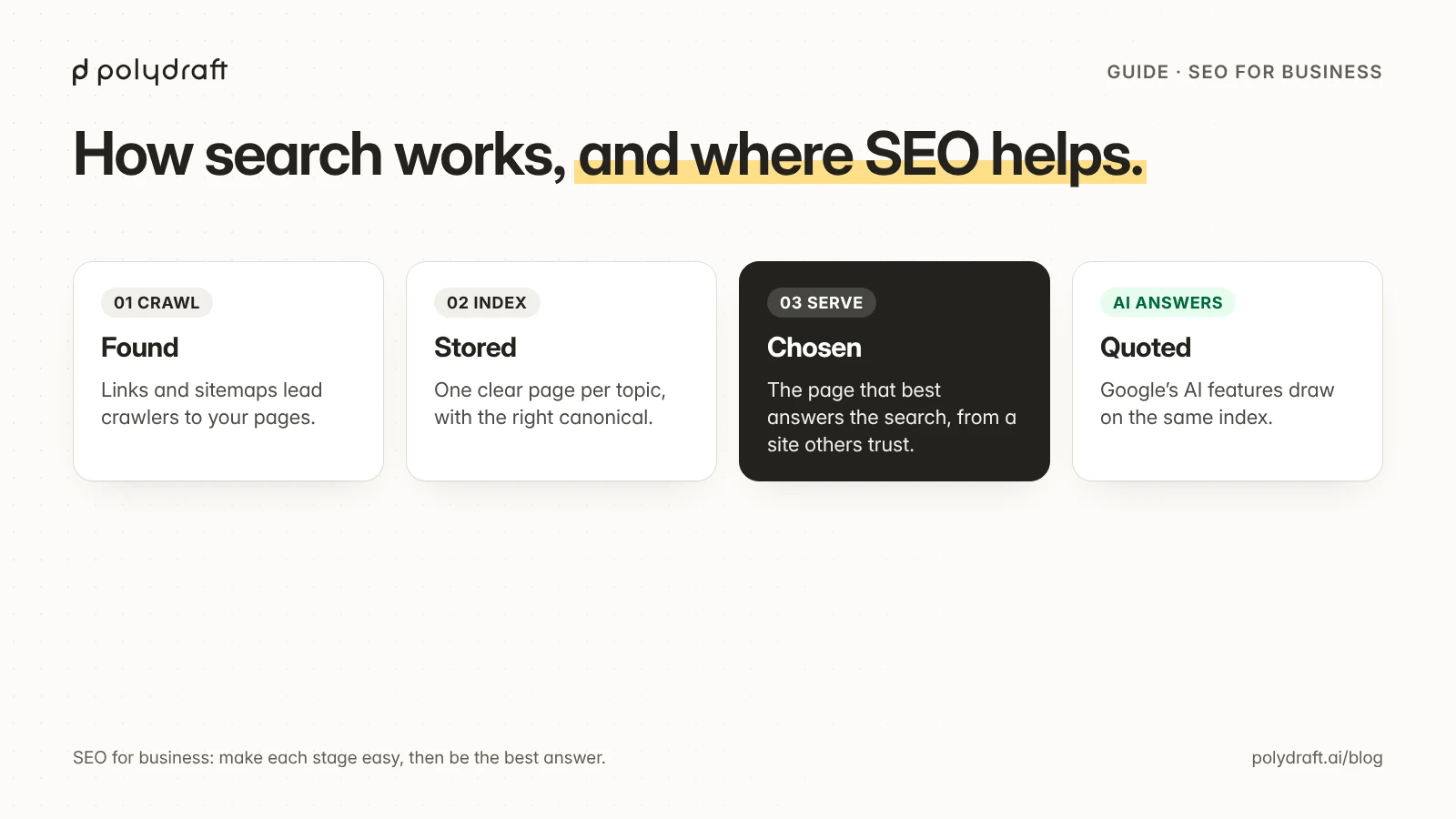
Google describes Search in three stages:
- Crawling. Automated programs called crawlers discover pages by following links and reading sitemaps, and download what they find.
- Indexing. Google analyzes each page's text, images, and structure, decides which version is the main one (the canonical), and stores it in its index.
- Serving. When someone searches, Google picks the indexed pages that best answer that search, taking into account things like language, location, and device.
Not every page makes it through all three, and Google doesn't accept payment to crawl a site more often or rank it higher in its organic results. SEO is the work that helps your pages through each stage:
| Stage | What can go wrong | What SEO work fixes it |
|---|---|---|
| Crawling | Pages not linked from anywhere, blocked in robots.txt, or very slow | Internal links, a sitemap, sensible robots rules |
| Indexing | Thin or duplicate pages, a wrong canonical, a stray noindex |
One clear page per topic, correct technical tags |
| Serving | A page that doesn't match what the searcher wants, or that few sites trust | Content that fully answers the search, plus links and mentions from relevant sites |
AI answers use the same foundation. Google's guidance for site owners says that to be shown as a supporting link in AI Overviews or AI Mode, a page needs to be indexed and eligible to appear in Search with a snippet, and that there are no additional technical requirements. Other AI assistants have their own crawlers and rules. The same basics help everywhere: pages that can be crawled, clear answers, and facts that are easy to quote. Our guide to AI visibility covers the parts specific to AI.
What SEO can and can’t do for a business
| SEO can | SEO can't |
|---|---|
| Bring visitors who are already looking for what you offer, without paying per click | Guarantee a position or a date |
| Keep working after the work stops, as long as the pages stay useful and accurate | Rescue a page that doesn't answer the search |
| Help customers answer their own questions before they contact you | Replace a product people want, or reviews and referrals |
| Make your business easier for AI assistants to describe correctly | Make an AI assistant cite you |
Unlike ads, SEO takes time to compound. Changes take time to be crawled and re-evaluated, and a new site has to earn trust. Plan in quarters, not weeks.
Where a new or small site should start
Big sites win broad searches like "SEO" on authority, meaning years of links and history. A new site usually can't. We saw this on polydraft.ai: between August 29 and October 5, 2026, our referring domains grew from 4 to 40, and Ahrefs still tracked zero organic keywords for the site. Links alone didn't produce rankings. Our launch plan for a new website has the full numbers. So a new site should compete where authority matters less and usefulness matters more:
- Specific questions. "What should an SEO contract include?" rather than "SEO services". Specific searches have clearer intent, and a thorough answer stands out.
- Questions from your own customers. Sales calls, support emails, and quote requests are the best keyword list you have. Check the wording in a keyword tool, but start from real conversations.
- One page for each intent. Each question gets one owner page, so your pages don't compete with each other. Our website architecture guide explains how.
- A small cluster, linked together. One overview page and a handful of detailed pages on the same theme, linking to each other with descriptive anchors.
- First-hand detail. Your own photos, process, prices (where you can share them), and examples. That's what a generic article can't copy.
- If you serve a local area, keep your Google Business Profile accurate. Local map results often appear above website results for local searches.
Choosing which questions to target is a skill in itself. Our guide to SEO keywords shows how we turned 370 keywords into 5 pages, with the reasoning behind each decision.
Do it yourself, hire, or use software?
Most small businesses mix all three. Split the work by who is best placed to do it:
| Work | Do it yourself | Hire a freelancer or agency | Use software |
|---|---|---|---|
| Deciding what the site should say and to whom | Yes. Nobody knows your customers better | Advice, not decisions | No |
| Technical setup and fixes | If your platform handles the basics | Yes, for migrations and complex sites | Audits and monitoring |
| Writing pages | Yes, if you can explain your work clearly | Yes, with your review and facts | Drafts, always reviewed |
| Links and mentions | Partnerships, suppliers, local groups | Outreach, if it uses legitimate methods | No automated link building |
| Measuring | Read Search Console monthly | Reporting with named sources | Reports and alerts |
If you hire, write the ownership, approval, and AI terms into the agreement. Our SEO contract guide lists the clauses. If you're looking at tools, our auto SEO software guide has a scorecard that works for tools and services alike.
A 90-day SEO plan for a small business site
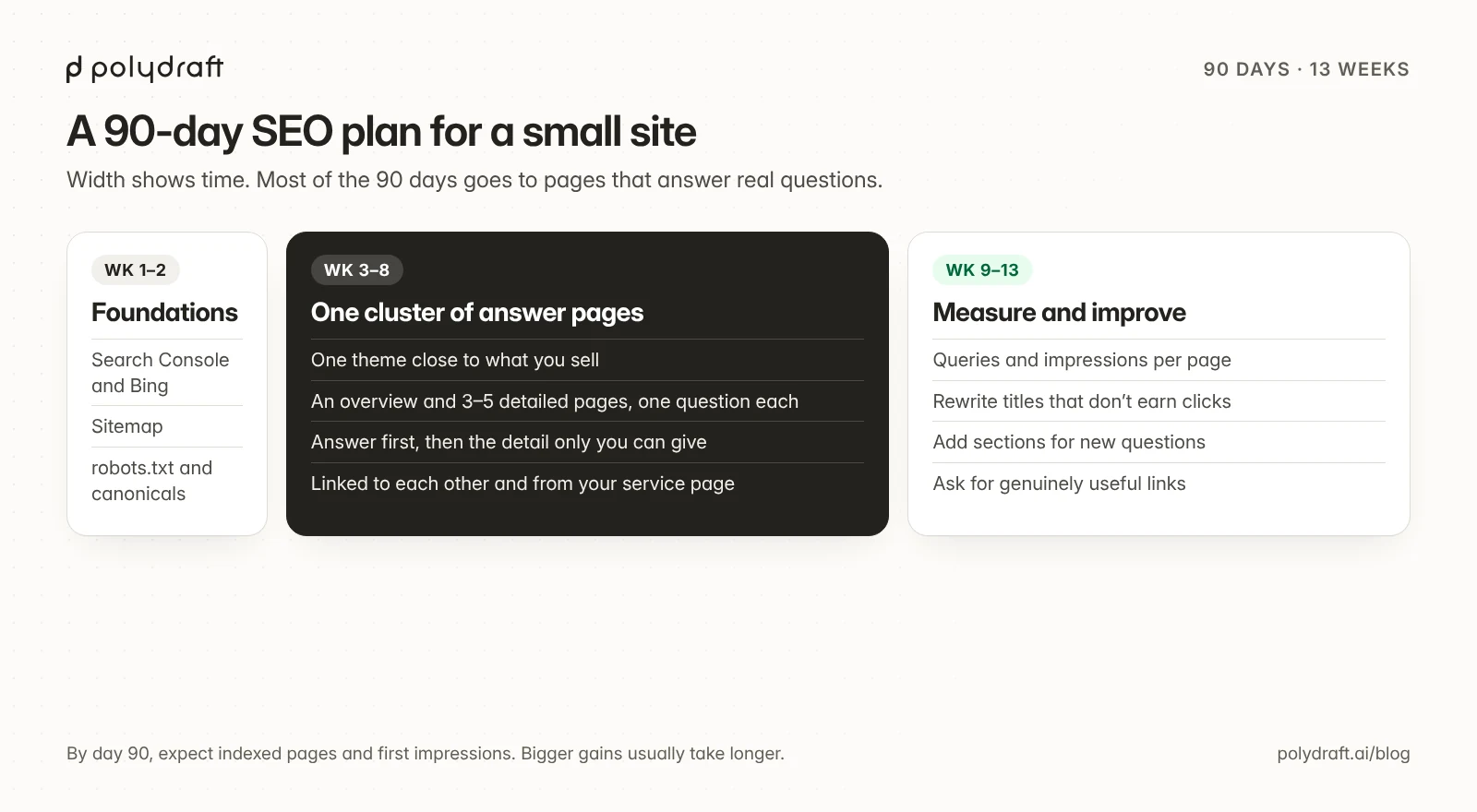
Weeks 1 to 2: foundations.
- Verify your site in Google Search Console and Bing Webmaster Tools, with your business as the owner.
- Submit your sitemap.
- Check that robots.txt doesn't block important pages, and that each page has one canonical URL.
- Fix anything Search Console reports as not indexed that should be.
The same launch plan has the full checklist.
Weeks 3 to 8: one cluster of answer pages.
- Pick one theme close to what you sell.
- Write one overview page and three to five detailed pages, each answering one specific question better than the current results.
- Answer the question in the first paragraph. Add the detail only you can give.
- Link the pages to each other and from your main service page.
- Publish them one or two at a time, and read each live page after it's published.
Weeks 9 to 13: measure and improve.
- In Search Console, look at each new page's queries and impressions.
- Rewrite titles where impressions grow but clicks don't.
- Add sections for questions that appear in the queries but aren't answered on the page.
- Ask partners, suppliers, and customers who'd genuinely find a page useful to link to it.
- Change one thing at a time and note the date, so you can tell what worked.
What to expect by day 90. On a new site, pages are typically indexed and start getting impressions, a few start getting clicks, and the queries tell you what to write next. Large traffic gains usually take longer. Our content refresh workflow covers what to do once you have that data.
How we’re running this plan on our own site
This article is part of the plan above, applied to polydraft.ai. On October 26, 2026, we started from three keyword exports and chose a small cluster. This article is the overview. The detailed pages are our guides to SEO keywords, SEO contracts, and auto SEO software. Each page answers one question and links back to this overview.
Before publishing, every page went through an automated QA check and two separate AI reviews, one for facts and one for editorial quality. The reviews found real problems in this cluster. One was a keyword statistic we had misstated, and another was a product claim that went further than our own product documentation. We fixed them, and a person approved the final version. We'll check queries and impressions in Search Console after 28, 56, and 90 days, and update this section with what we find. We don't have results to report yet, and we're not going to guess.
Where PolyDraft fits
PolyDraft builds and runs small business websites with an AI builder agent. As of October 26, 2026, new sites built on its current template generate canonical tags, a sitemap, and robots.txt, and accept page-level structured data. That's a starting point for weeks 1 to 2. You still verify Search Console and Bing, submit the sitemap, and check the live pages against the launch checklist. The site's blog CMS has draft and review states for the cluster pages. In the builder chat, the /onpageseo command runs an on-page audit and proposes edits in the builder for you to review. It doesn't run on its own, and metadata edits don't yet reach a site that's already published, so check the live page after you publish. You still decide what your site says. See PolyDraft for small business and what PolyDraft automates for SEO.
Frequently asked questions
How does SEO work?
Search engines crawl pages, store them in an index, and serve the ones that best answer each search. SEO makes your pages easy to crawl and index, and makes them the best answer for the searches your customers make.
Is SEO worth it for a small business?
Usually, if customers search for what you offer. It costs time more than money, it builds slowly, and it keeps working after the work stops. If nobody searches for your product, put your effort elsewhere first.
How long does SEO take for a new website?
Expect months. New pages need to be crawled, indexed, and trusted, and a new site has little history. In the first 90 days, aim for indexed pages, growing impressions, and the first clicks.
Can I do SEO myself?
Yes, for most small sites. You know your customers and your work, and your platform can handle much of the technical side. Hire for migrations, complex technical work, or when you don't have the time.
What’s the difference between SEO and AI search optimization?
They share the same foundation: crawlable pages, clear answers, and trustworthy facts. AI search adds attention to how easily your facts can be quoted, and to whether AI crawlers can reach your site.
Do I need a blog for SEO?
You need pages that answer your customers' questions. A blog is one place to put them. Service pages, guides, and FAQs work too, as long as each question has one clear owner page.
Continue with the next task
- Choose the questions to target: What are SEO keywords?
- Hire help without losing control: SEO contract checklist
- Set up the foundations: SEO for a new website
About this article. Drafted by an AI agent following PolyDraft's blog workflow, checked by an automated QA script, reviewed by separate AI agents, and approved by Vincent Chen. We paraphrase Google's documentation rather than quote it. Its pages are linked below. Product details are as of October 26, 2026. The 90-day plan is our own recommendation, not a guarantee of results. The diagrams are original illustrations made for this article.
Sources
- Google Search Central: In-depth guide to how Google Search works
- Google Search Central: AI features and your website
- Google Search Central: SEO starter guide
- Google Search Central: Do you need an SEO?
- Google Search Central: Creating helpful, reliable, people-first content
Written by
Founder of PolyDraft and CEO of BlackMonolith, Inc.