Squarespace Website Examples 2027: 13 Real Sites, by Type
13 live Squarespace website examples, verified from their code: stores, portfolios, local businesses and restaurants, with what each does well and what to fix.
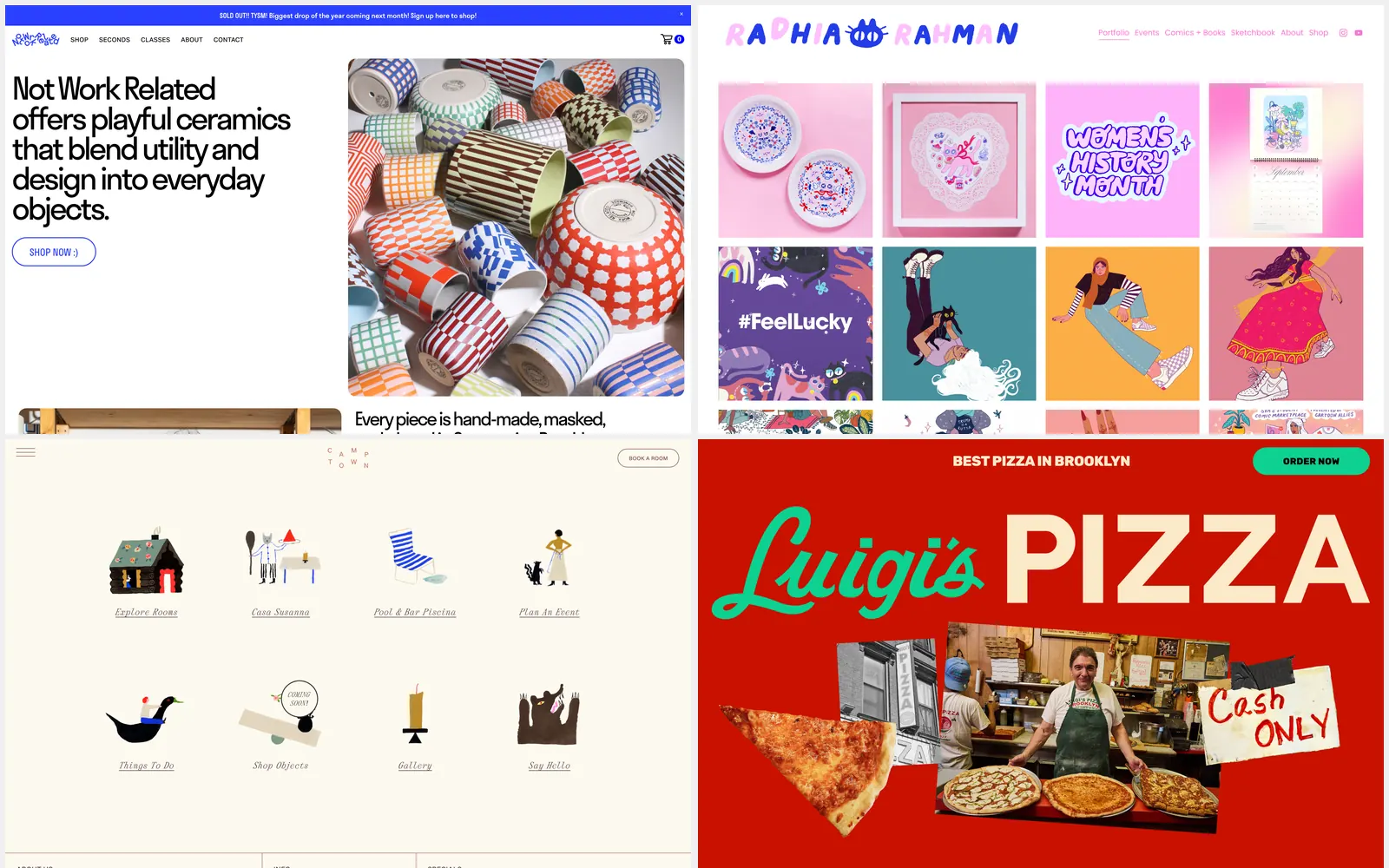
Here are 13 live Squarespace websites: three online stores, four portfolios, four local businesses and two restaurants. Each one was confirmed as Squarespace from its own code and captured on November 18, 2026. For each site we show a screenshot, what it does well, one thing worth copying and one thing to fix.
One finding changes how to read every "Squarespace template" list. All 13 sites run Squarespace version 7.1, and on 7.1 the template you start from isn't recorded anywhere. Squarespace's own help center calls the template "the design you pick as a starting point" and nothing more. So nobody, us included, can tell you which template a live 7.1 site started from. What you can see is what each site changed, and that's what we compare.
We make PolyDraft, an AI website builder, so we have an interest in this topic. None of these sites is ours or our customers', and PolyDraft is not on the list. We didn't build any Squarespace sites for this article, and we didn't measure page speed.
Key points
- Every example came from Squarespace's own "Websites made with Squarespace" showcase. We checked each one's HTML for Squarespace's markers. Of the 18 showcase sites we opened, 3 had changed. One had moved to a different host, one showed Squarespace's "Website Expired" page and one redirected to an address we couldn't check.
- All 13 sites report the same internal template ID and version 7.1. They look different because of fonts, photos, header layout and section design, not because they picked different templates.
- The most common fixable gaps are business details that the site never fills in, a booking button that disappears on mobile, and images with no alt text.
How we picked and checked these examples
We took every example from Squarespace's "Websites made with Squarespace" showcase, checked November 18, 2026. Squarespace chose those sites, so they lean toward strong visual design. They're not a random sample of Squarespace sites.
From the showcase we chose sites that fit four types: store, portfolio, local business and restaurant. We didn't include photography, blog, wedding or nonprofit sites. Then we did the following, all without signing in to any site:
- Confirmed the platform. We fetched each homepage and checked for three markers: the
server: Squarespaceresponse header, the<!-- This is Squarespace. -->comment, and Squarespace's site context object, which reports atemplateVersionand atemplateId. All 13 examples have all three. - Took screenshots. We used a headless Chromium browser with a 1440 × 900 viewport for desktop and 375 × 812 for mobile, between 17:20 and 17:29 UTC. Where a cookie banner or sign-up pop-up covered the page, we closed it and say so in the screenshot list. We didn't click through anything that asked for an age or a login.
- Read the page code. For each homepage we recorded the page title, meta description, headings, how many images have alt text, and the structured data Squarespace generates.
Three showcase sites didn't make it, and the reasons are useful if you're choosing a builder:
| Showcase site | What we found on Nov 18, 2026 |
|---|---|
| abathhouse.com | Redirects to bathhouse.com, which is served by Vercel, not Squarespace |
| fatchoynyc.com | Squarespace's "Website Expired" page (HTTP 404) |
| www.margaretrajic.com | Redirects to margaretrajic.com, which our network couldn't reach |
We also dropped two working sites: DREAMSAKE, because its age check covers the homepage, and Breathpod, because it's mainly an app company rather than a local business. Showcases go stale, so check that an example is still live and still on Squarespace before you copy it.
We re-checked all 13 examples on November 27, 2026: each homepage returned HTTP 200, and its raw HTML still contained Squarespace markers and templateVersion 7.1. The screenshots were not retaken, so the screenshots and page-code counts below are from November 18, 2026, and small details on the live sites may have changed since.
Squarespace website examples at a glance
"Header" and "Animation" are the site's own settings, read from Squarespace's page code. The "Images with alt text" column counts every image loaded on the homepage in our desktop capture that had an alt attribute. Squarespace fills alt text from an image's description, or its file name if there's none (source), so a "yes" here isn't always a useful description.
| # | Site | Type | Header layout | Animation | Images with alt text | What it does differently |
|---|---|---|---|---|---|---|
| 1 | Not Work Related | Store | Menu left | Off | 4 of 15 | Sells only in emailed drops |
| 2 | Frankly Good Coffee | Store | Menu right | Off | 12 of 24 | Subscription first, with prices on the homepage |
| 3 | Memor | Store | Logo centered | Off | 6 of 6 | Script-font menu as the whole homepage |
| 4 | Sam Frésquez | Portfolio | Menu right | Fade | Some missing | Full-screen projects, one menu link |
| 5 | Radhia Rahman | Portfolio | Menu right | Clip | 24 of 24 | Grid of 24 pieces above the fold |
| 6 | Samuel Sparrow | Portfolio and shop | Menu right | Slide | 4 of 5 | Credits the interior project and photographer |
| 7 | NOTCRISPYENOUGH | Service portfolio | Menu right | Off | 30 of 45 | Personality-led copy, scarcity bar |
| 8 | Camptown | Hotel | Not readable | Off | 7 of 13 | Illustrated icon menu |
| 9 | Stretch Squared | Wellness studio | Logo centered | Off | 10 of 12 | Puts the town and the services first |
| 10 | Xanadu | Roller rink | Menu left | Slide | 17 of 21 | One main booking action, repeated |
| 11 | Potted Plant Design | Plant design service | Logo and menu centered | Off | 2 of 4 | Splash page, service area in footer |
| 12 | Luigi's Pizza | Restaurant | Logo centered | Off | 21 of 27 | Full menu with prices as text |
| 13 | Andamiro | Restaurant | Menu right | Off | 4 of 6 | Delivery link in the main menu |
Squarespace store examples
These three shops use Squarespace Commerce: each has a cart in the header. They sell very different things, and each homepage is built around how the shop actually sells.
1. Not Work Related: handmade ceramics, sold in drops
Not Work Related is the pottery company of architect-turned-ceramicist Sarah Hussaini, who makes every piece in Greenpoint, Brooklyn. The homepage says the shop opens only a few times a year.
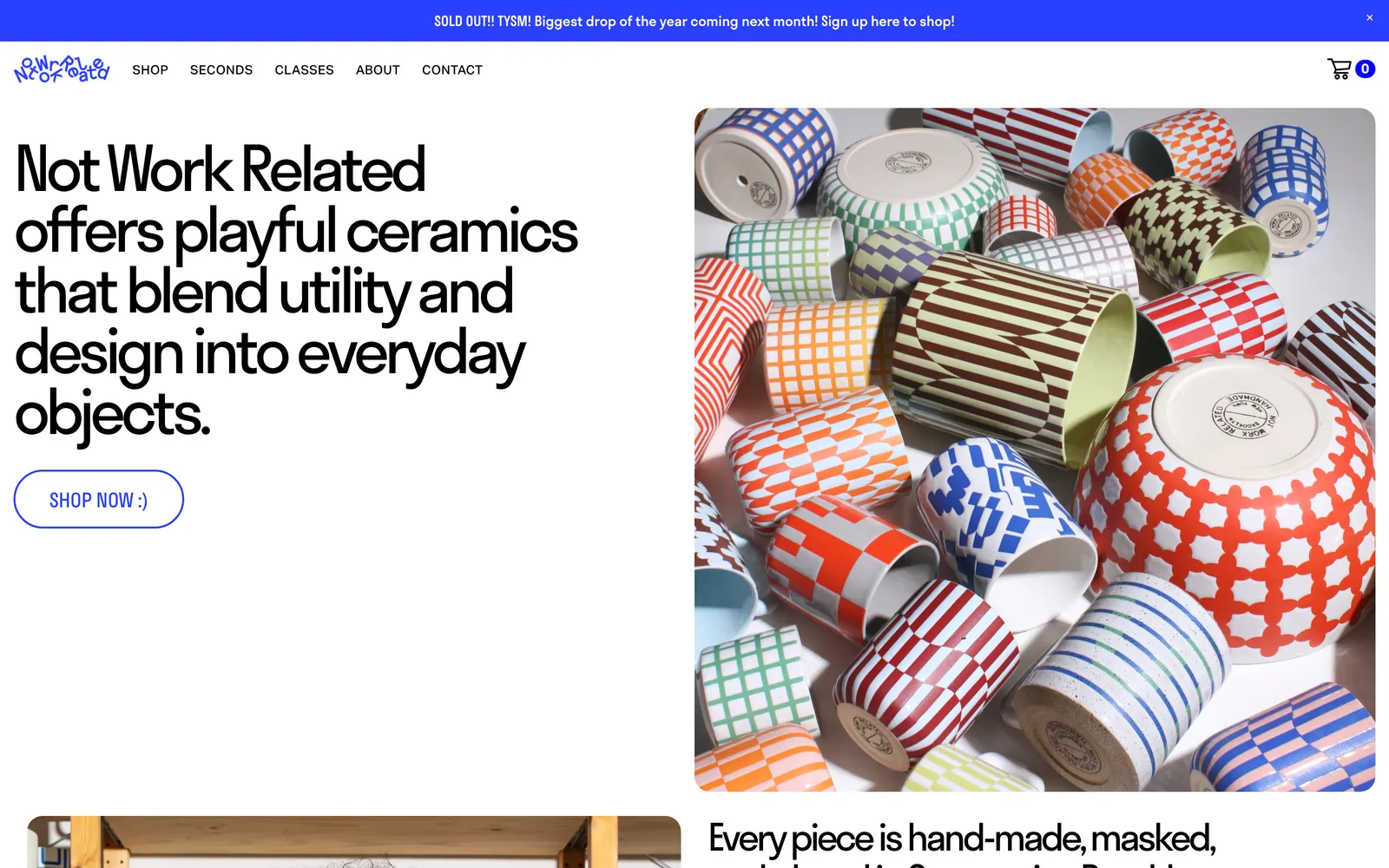
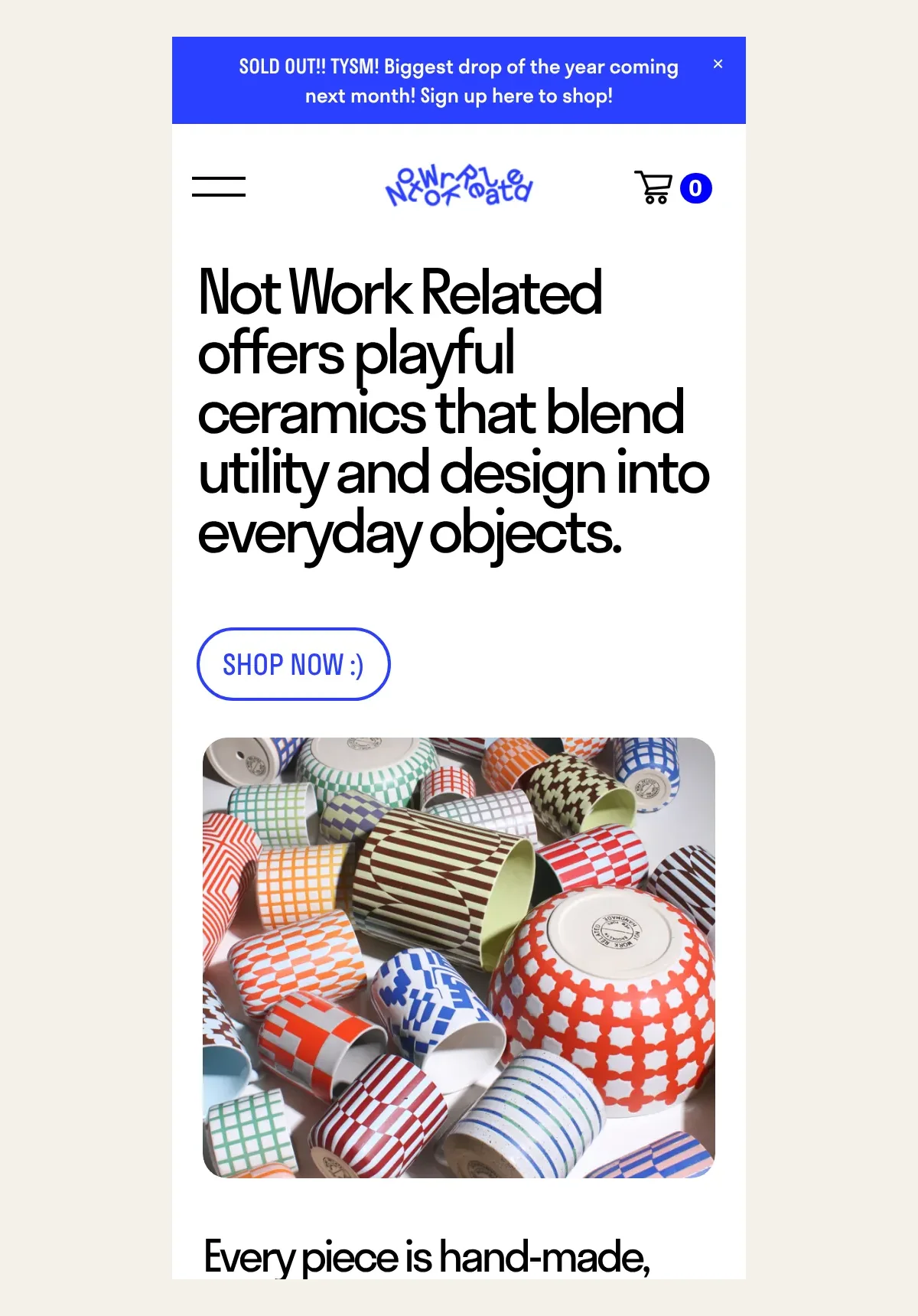
- What it does well: the homepage explains the business model. The bar at the top says the last drop sold out and the next one is coming. Further down, the newsletter section says "It's the only way to shop the site. I send emails before each update with a password to the shop... there are only 5 sales/year."
- Worth copying: turn a sold-out shop into a sign-up page. The announcement bar, the hero and the newsletter block all point to the same next step.
- Could be better: only 4 of the 15 images loaded on the homepage have alt text. Adding a short description to each image (in Squarespace, the image description becomes the alt text) helps screen-reader users and image search.
On mobile, the same page puts the announcement bar, headline and Shop Now button above the first product photo, so the next step is visible without scrolling.
2. Frankly Good Coffee: a subscription-first coffee roaster
Frankly Good Coffee sells roasted coffee online. Its business details in Squarespace list Boulder City, Nevada.
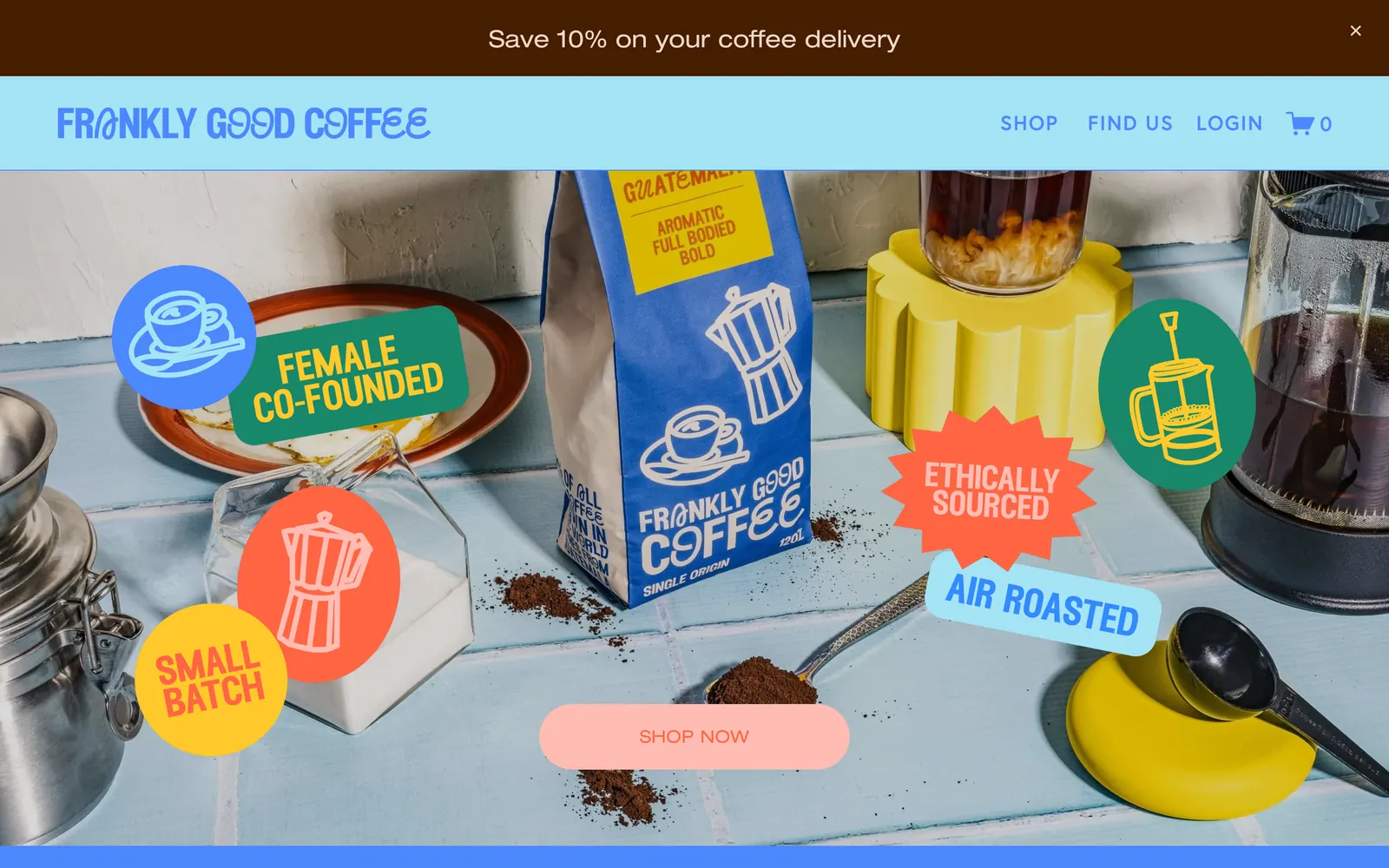
- What it does well: the recurring product comes first. Under the hero, the subscription, "from $30.60 every month", comes first, and the line "Love our Flagship blends? SAVE 10% on auto delivery! Sign up once. Cancel anytime." gives the reason to subscribe.
- Worth copying: the stickers on the hero photo ("Female Co-Founded", "Ethically Sourced", "Small Batch", "Air Roasted") put four selling points into the first image without a paragraph of text. A wholesale section and a "Find Us" page for stockists cover the other two kinds of buyer.
- Could be better: a sign-up pop-up opens on top of the hero as soon as the page loads (we closed it, and a cookie notice, before taking the screenshot). Delaying it until a visitor scrolls would let the stickers and subscription offer land first. The page title is only "Frankly Good Coffee", so it doesn't say "coffee subscription" or "coffee roaster" in the search result.
3. Memor: mosaic objects, with an almost empty homepage
Memor makes mosaic objects and describes itself as "Elevating daily objects into contemporary heirlooms est 2019."
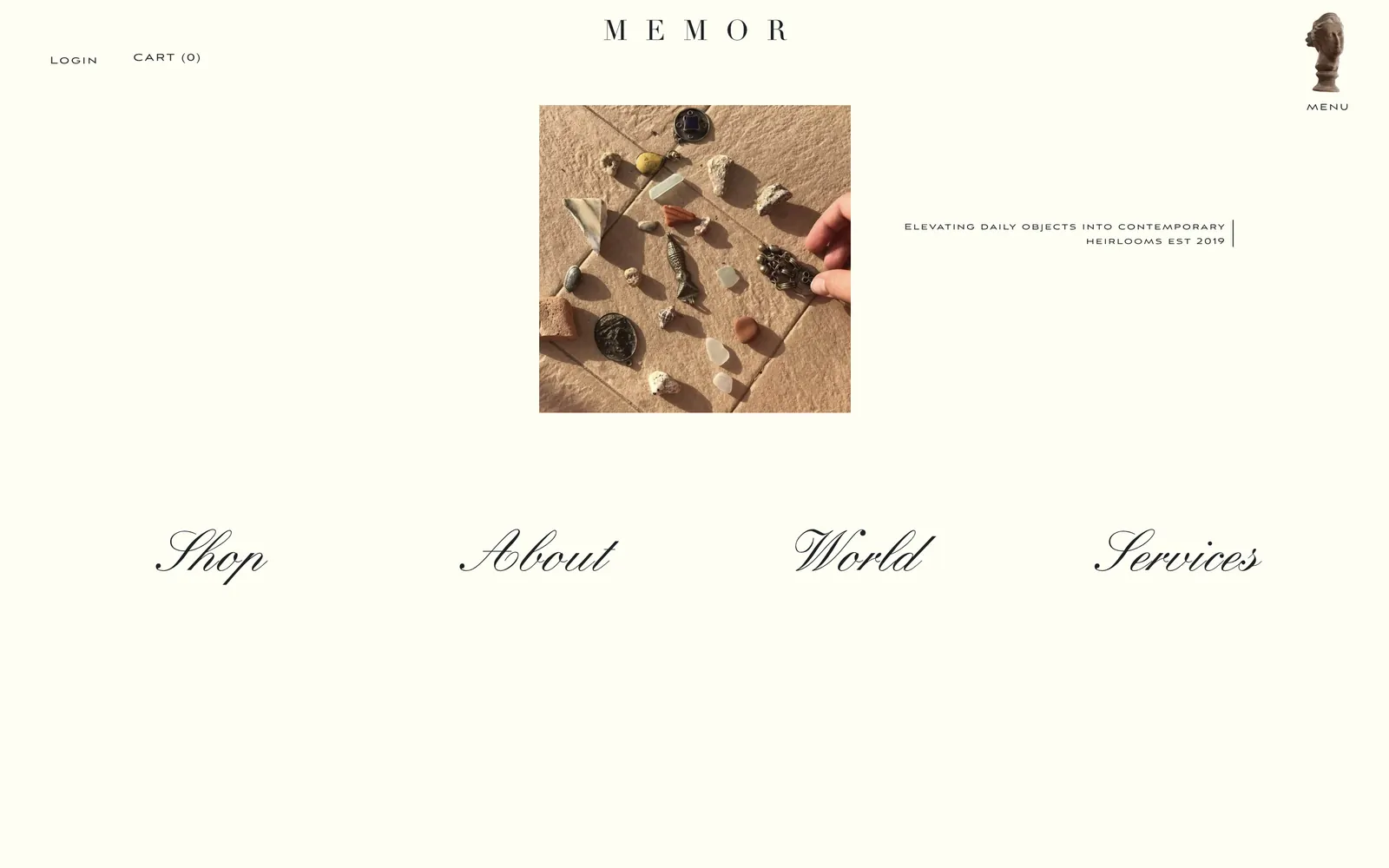
- What it does well: the homepage is the menu. Four large script-font links (Shop, About, World, Services) and one photo make the site feel like a gallery, which suits handmade, high-priced objects.
- Worth copying: all 6 images loaded on the homepage have alt text, and the meta description is a clear sentence about what Memor makes.
- Could be better: the page title is just "Memor", and the visible homepage text never says "mosaic". A first-time visitor or a search engine has to click through to learn what the shop sells.
Squarespace portfolio examples
Portfolio sites show the work and say little else. These four make that trade-off in different ways.
4. Sam Frésquez: one project per screen
Sam Frésquez is an artist whose footer reads "Phoenix → new haven → chicago."
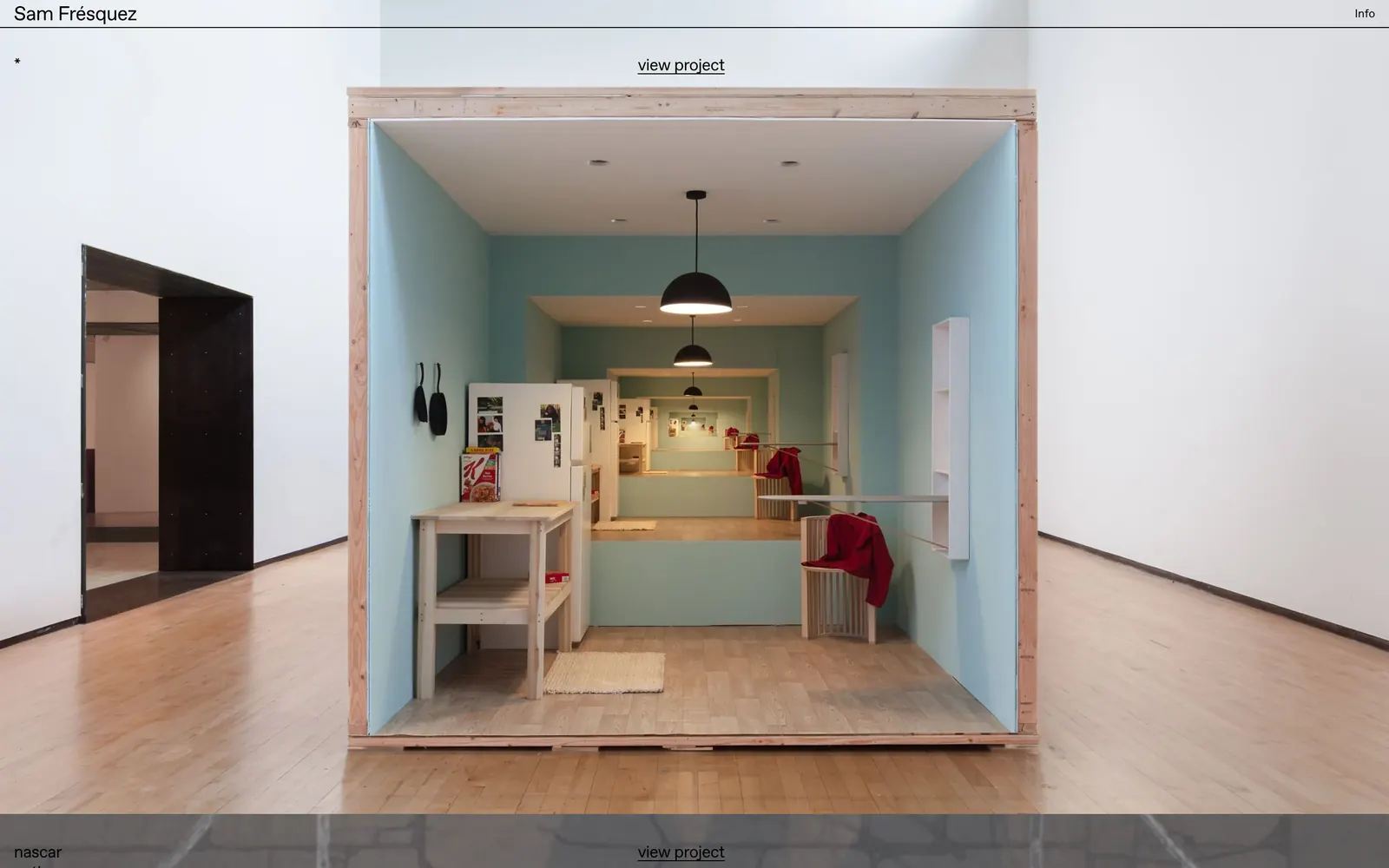
- What it does well: each project fills the screen, with one "view project" link. The menu has a single item, Info.
- Worth copying: a one-link menu works when the homepage itself is the index of work. The footer repeats the main projects as plain text links, with a "see all" link.
- Could be better: several of the homepage images had no alt text in our capture. The homepage also has 14 H1 headings, one for each project title and each "view project" label. Making one H1 (the artist's name) and turning project titles into H2s would give the page a clear outline.
5. Radhia Rahman: 24 pieces before you scroll
Radhia Rahman is an illustrator from Queens, New York, according to the site's own meta description.
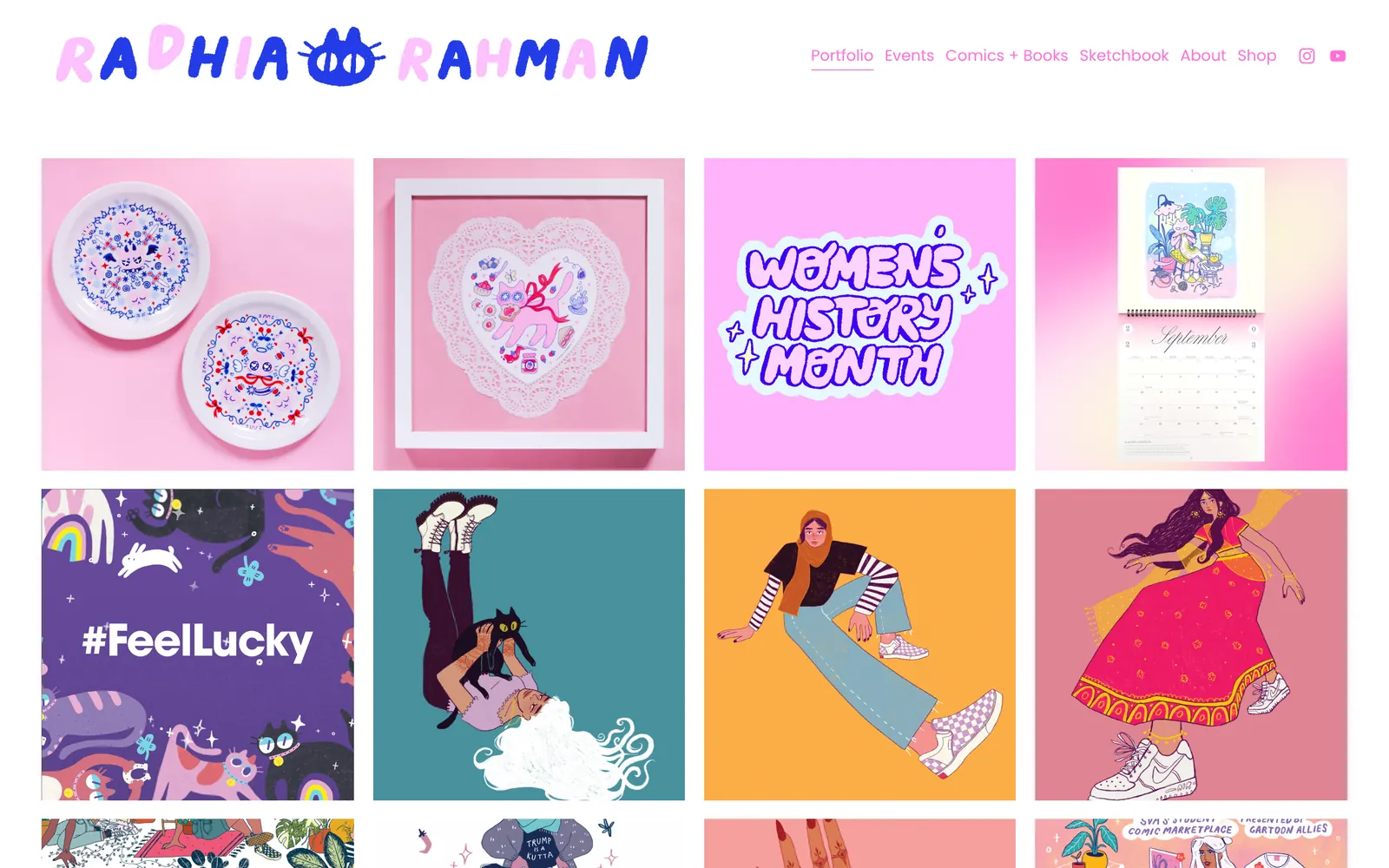
- What it does well: eight pieces are fully visible on the first desktop screen, and the grid holds 24. The hand-drawn wordmark tells you the style before you look at a single piece.
- Worth copying: all 24 grid images have alt text, a perfect score on the largest image grid here. The menu groups comics, zines and events into folders.
- Could be better: the visible homepage text never says "illustrator". Putting a short line such as "Illustrator in Queens, NY" under the wordmark would answer "what does she do?" for new visitors and for search engines.
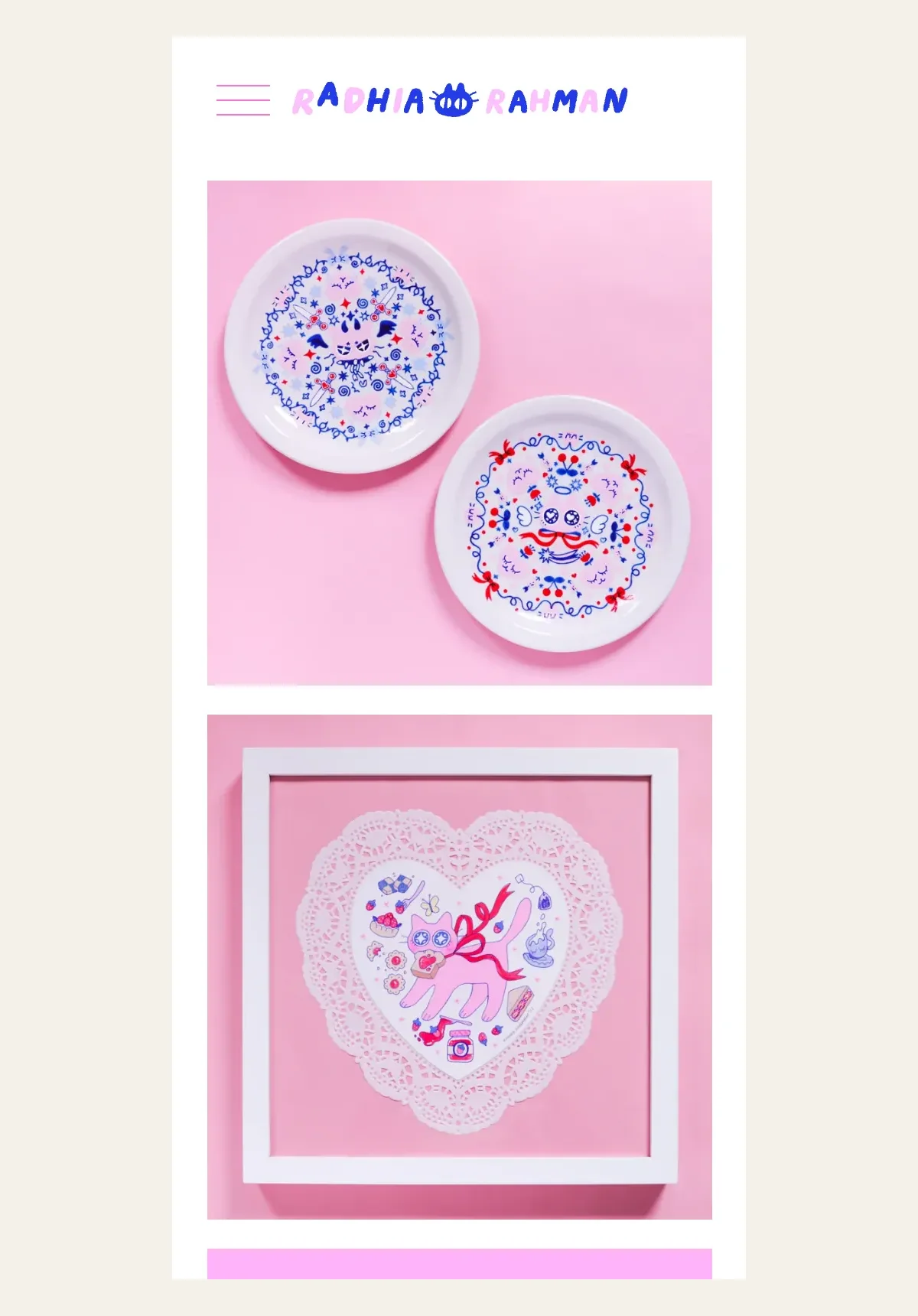
On a phone, the grid becomes one column of large images, so each piece gets the whole width.
6. Samuel Sparrow: a potter’s portfolio with a shop
Samuel Sparrow is "a Potter and Maker based in Scotland", in the words of his page title, and sells tableware and pottery tools.
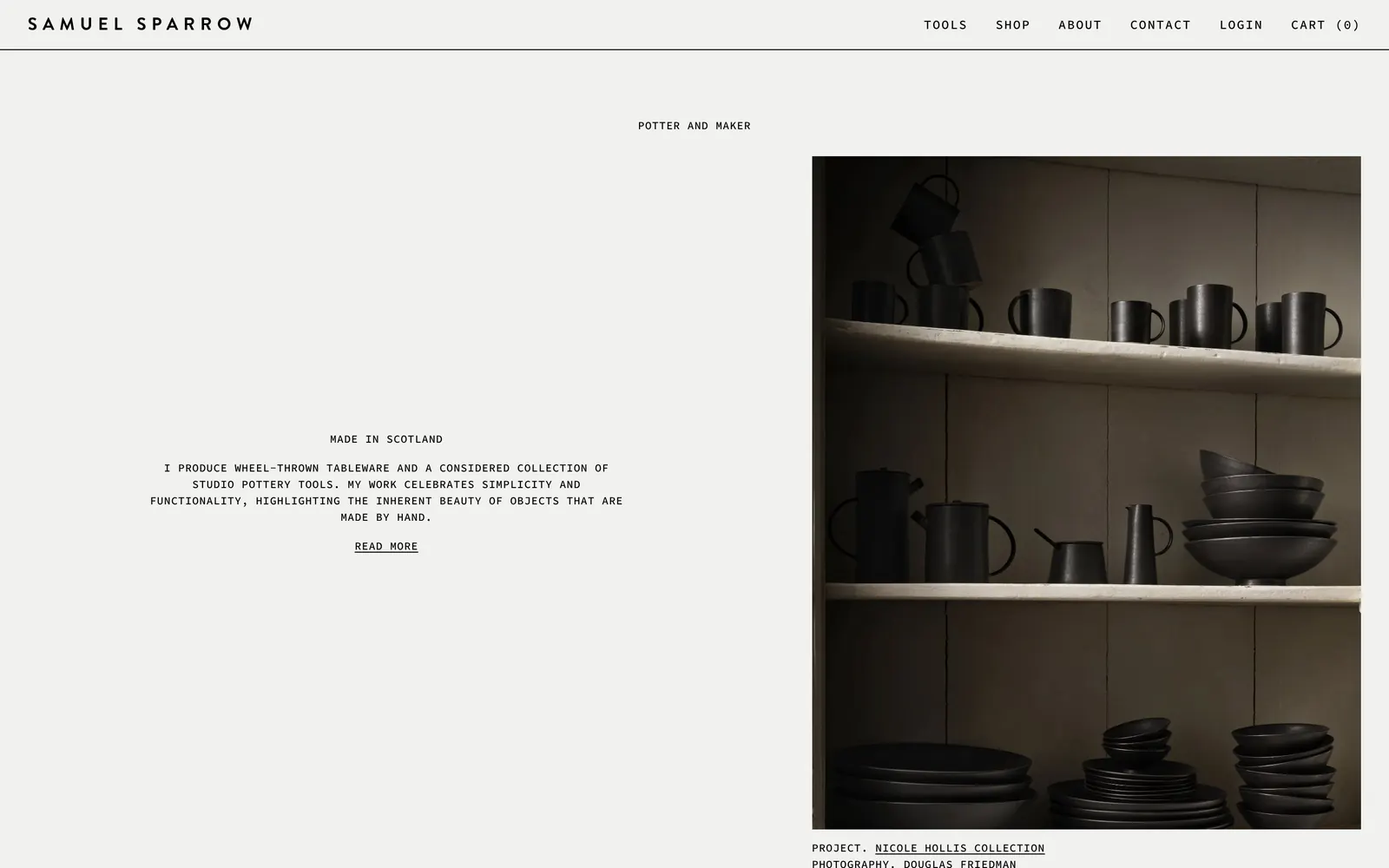
- What it does well: the hero credits the interior project and the photographer ("Project. Nicole Hollis Collection / Photography. Douglas Friedman"). That's a quiet trust signal, the way a portfolio lists clients.
- Worth copying: the page title says who he is, what he makes and where, and the footer gives a studio address with "Visit by appointment."
- Could be better: the homepage has no H1 heading, and it shows one photo and no products. One row of best-selling pieces would give shop visitors a direct path.
7. NOTCRISPYENOUGH: a brand-strategy studio with a loud voice
NOTCRISPYENOUGH sells brand strategy to small businesses. Its page title is "Brand Strategy for Small Businesses."
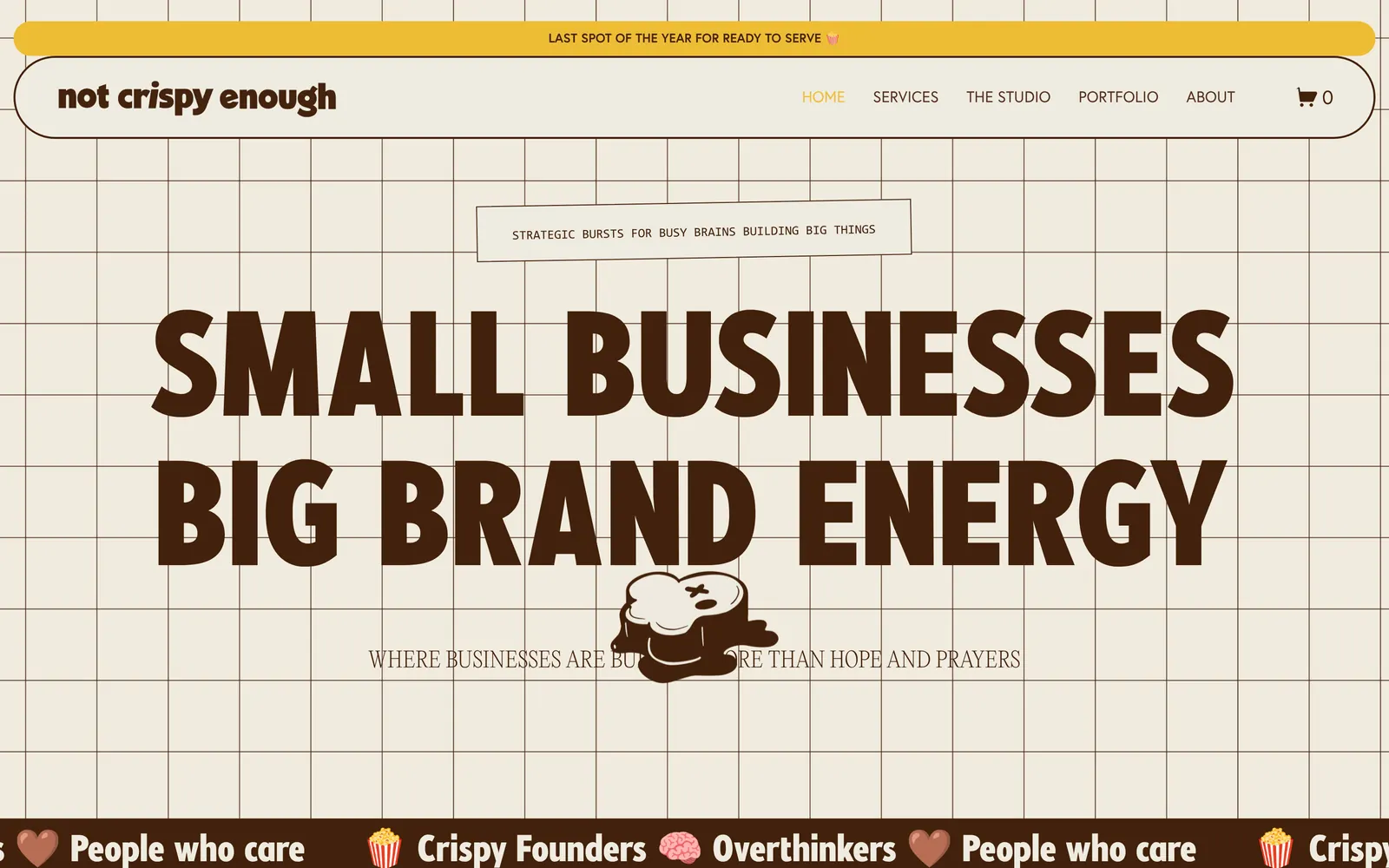
- What it does well: the copy is the brand. The headline, the scrolling ticker ("Crispy Founders · Overthinkers · People who care") and the rest of the homepage copy all sound like the same person.
- Worth copying: when we captured it on November 18, the top bar read "Last spot of the year for Ready to Serve". It named a real package and a real limit, which is honest urgency.
- Could be better: the homepage HTML we downloaded was about 2 MB, the largest of the 13 by far, across 24 sections. Repeated scrolling text and headings leave the page with 17 H1s. A shorter homepage with one H1 that links to the services page would be easier to scan, and it's worth testing on a phone.
Squarespace local business examples
Local businesses need visitors to know where they are and how to book. Squarespace stores location and hours in its Business Information settings and generates "Local business" structured data automatically. Its help center lists that schema among the ones "you can't edit or remove" (source). In our sample, sites that had filled in Business Information had their address in that markup, and sites that hadn't had empty fields. It's a quick settings fix worth checking on any Squarespace site.
8. Camptown: a Catskills hotel with an illustrated menu
Camptown is a hotel in Leeds, New York, with "26 log cabins and 24 hotel rooms", according to its footer.
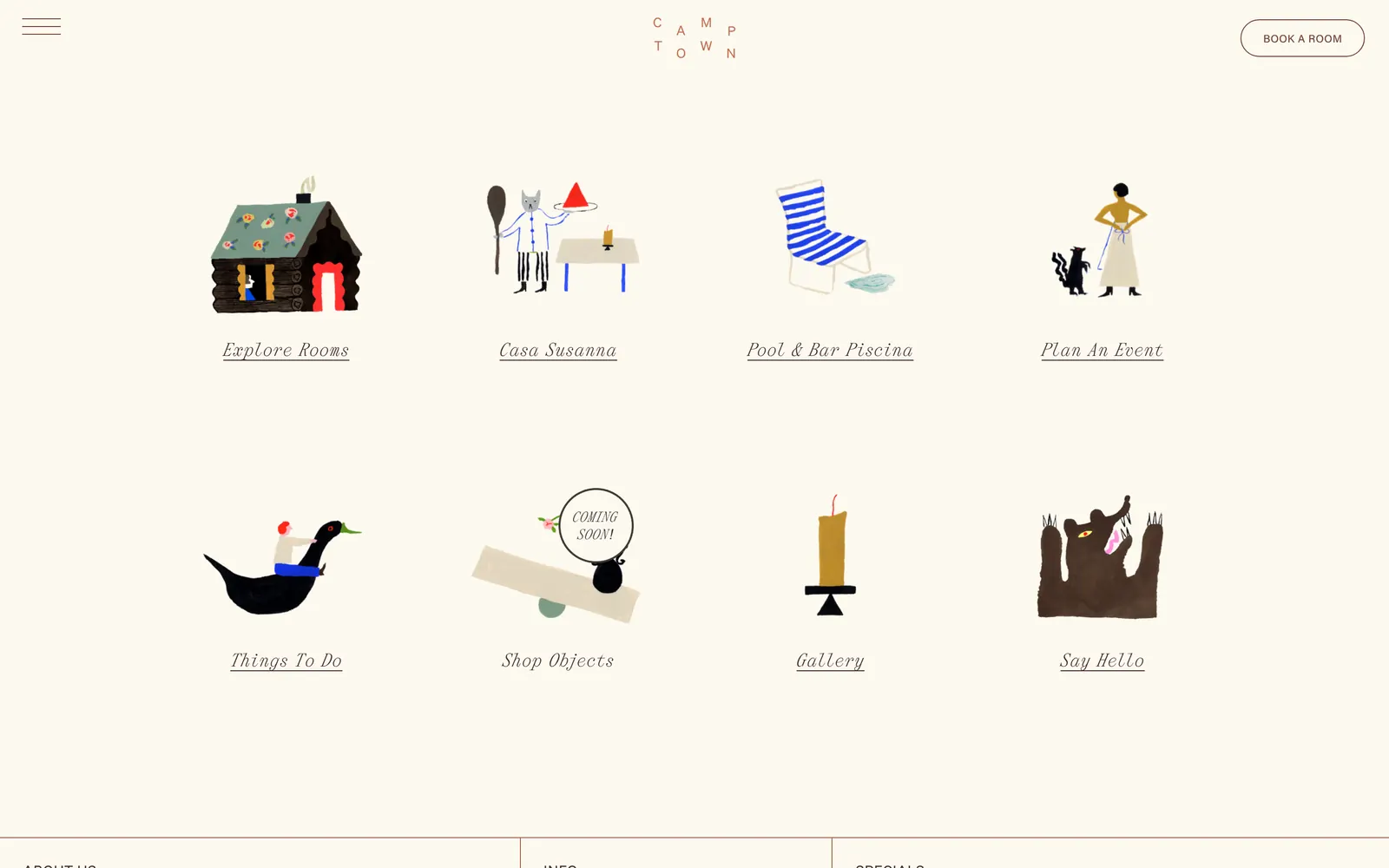
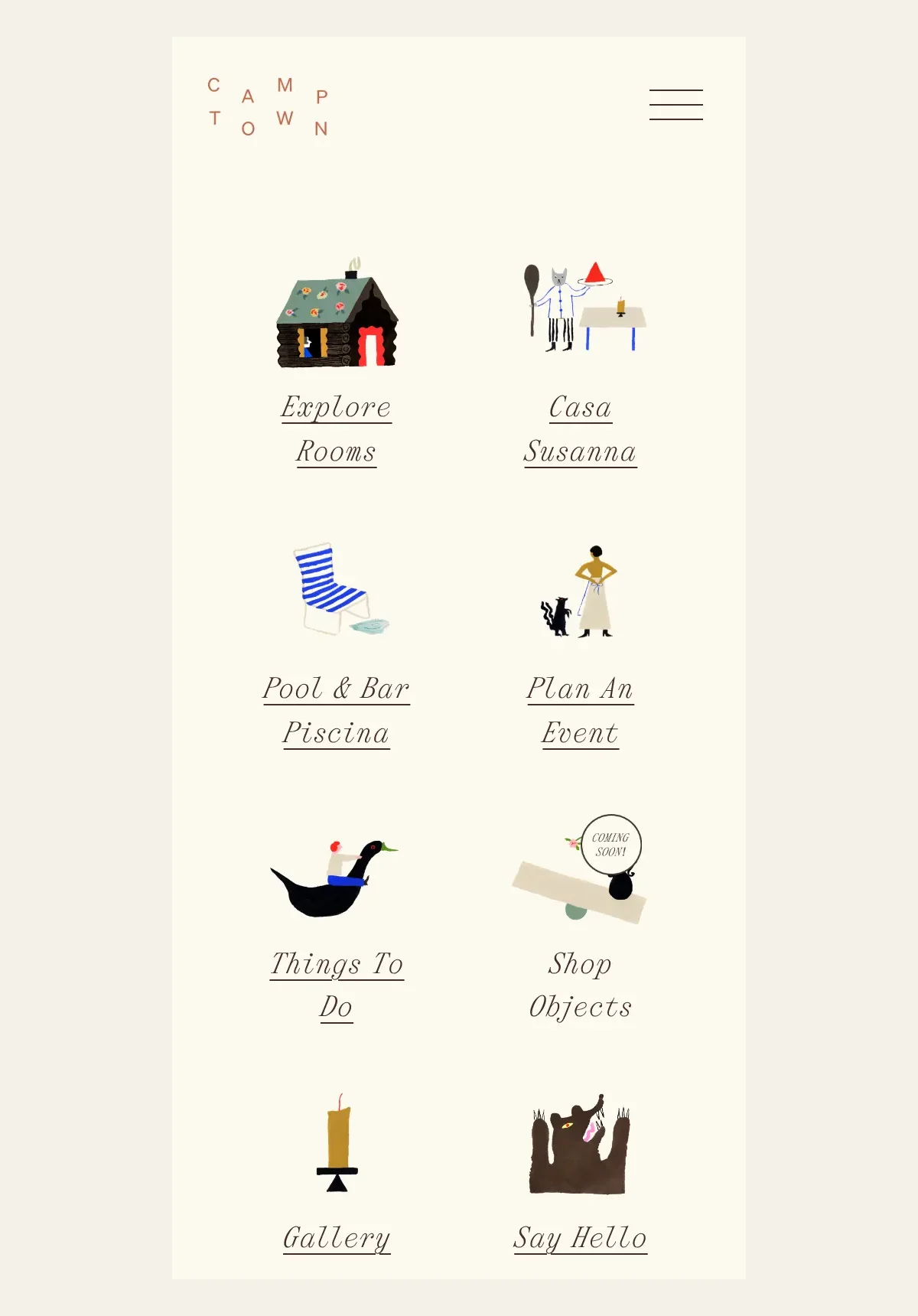
- What it does well: the homepage is a picture menu of eight illustrated icons, which says "relaxed, a bit quirky" faster than a hero photo would. The "Book a Room" button sits in the top right on desktop and opens the hotel's booking engine.
- Worth copying: the page title names the category and the nearest well-known town: "Boutique Hotel in Hudson, NY | Catskills Hotel".
- Could be better: the footer address is "800 Co Rd 23B", but the address in the site's structured data and Business Information is "810 County Road 23B". A hotel's address should match everywhere. On mobile, the Book a Room button isn't in the header; it's inside the menu.
9. Stretch Squared: a recovery studio that leads with where and what
Stretch Squared is a recovery and wellness studio in Roswell, Georgia.
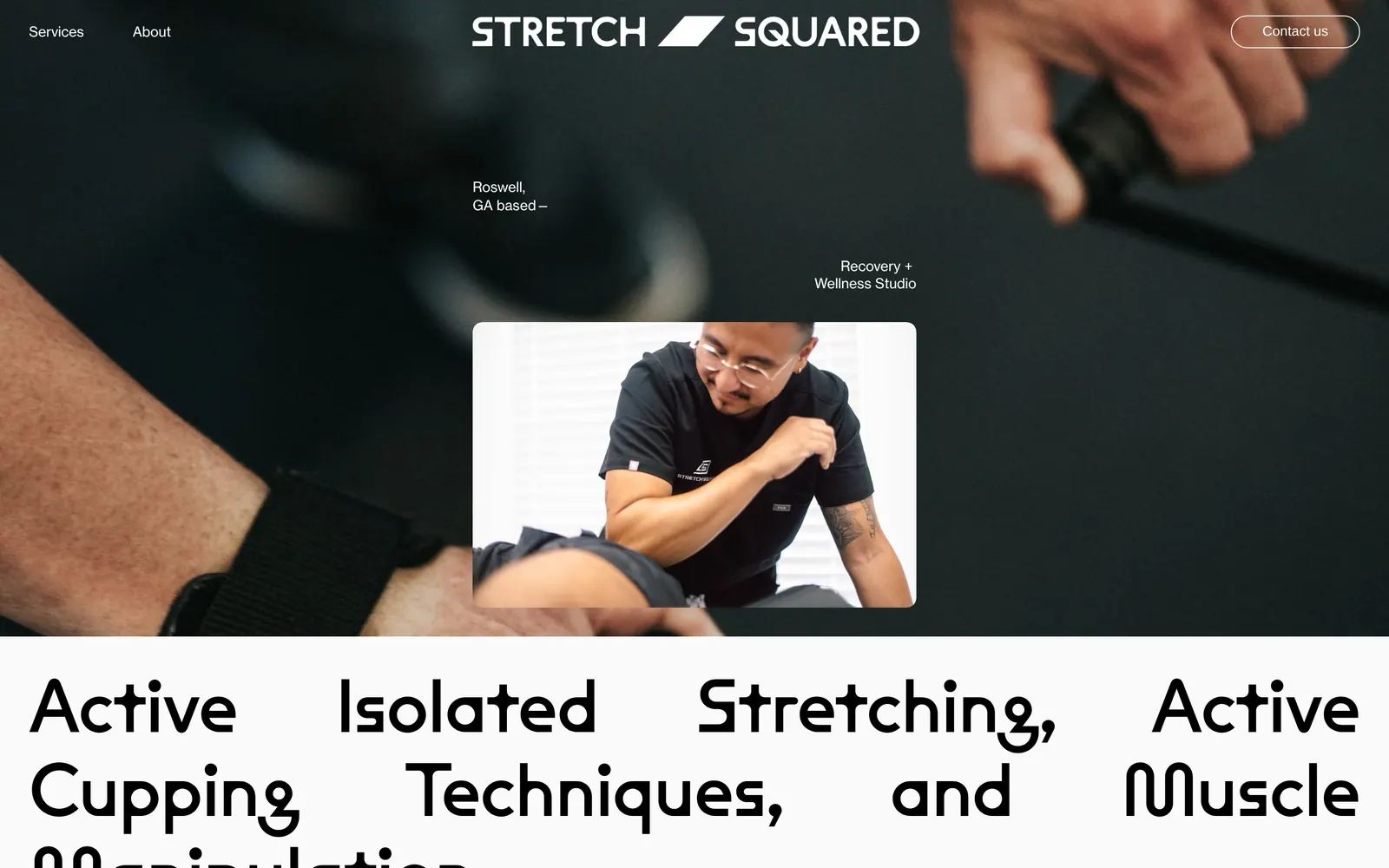
- What it does well: the first screen answers where ("Roswell, GA based") and what ("Recovery + Wellness Studio"). The H1 lists the three services by name: "Active Isolated Stretching, Active Cupping Techniques, and Muscle Manipulation."
- Worth copying: the closing call to action offers "a free first consultation", and the footer gives a full street address and phone number.
- Could be better: the page title is just "Stretch Squared", and the homepage has no Local business structured data, only a WebSite entry. Filling in Business Information with the same address and phone as the footer would add it.
10. Xanadu: a roller rink with one main action, repeated
Xanadu is a roller rink in New York. Its logo says "Roller Arts · Bushwick."
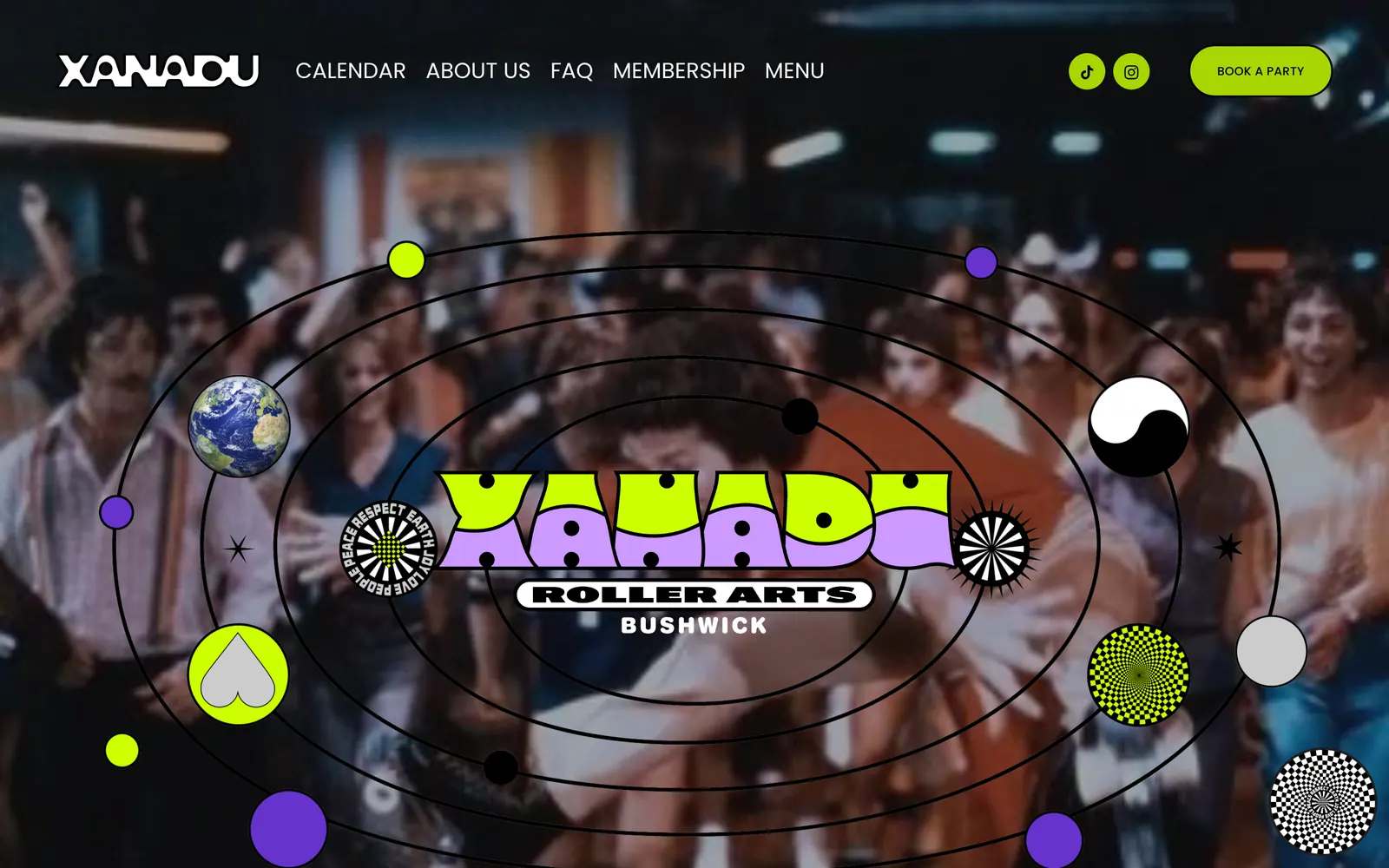
- What it does well: party booking is the main action. The "Book a Party" button is in the header, and further down the homepage links again to a form for group bookings, reservations and events.
- Worth copying: concrete details sell the experience: "7,000 square feet of Canadian Maple", skates "American-made by Riedell", and a named sound system.
- Could be better: "Bushwick" appears only inside the logo image, not in the page text. The homepage has no meta description, and its Local business markup has an empty name and address. The neighborhood and address in text would help people searching for a roller rink in Brooklyn.
11. Potted Plant Design: a splash page and a service area
Potted Plant Design designs potted plant arrangements and lists its service area in the footer: "Servicing" followed by "San Francisco, Marin & Sonoma Counties".
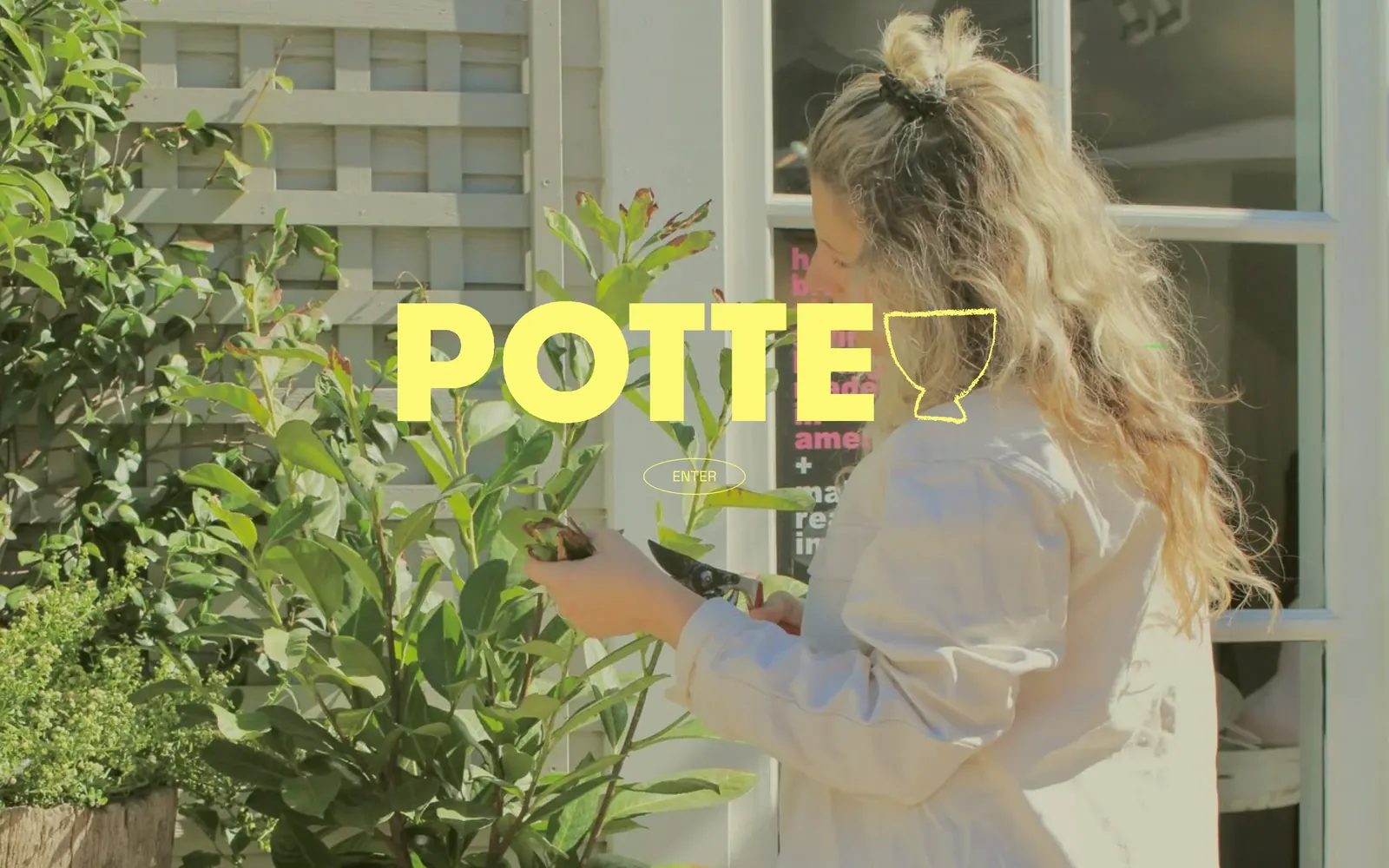
- What it does well: the opening photo shows the service being done, not just the result. The footer states the service area in plain words, which matters for a business that travels to clients.
- Worth copying: naming counties rather than "the Bay Area" tells visitors exactly whether they're covered.
- Could be better: the home address is a splash page with an animated wordmark and an "Enter" button that leads to a second homepage. That adds a click, and the first page's only headings are "Follow", "Contact" and "Servicing". Making the real homepage the front page would remove a step.
Squarespace restaurant examples
Restaurant visitors want the menu, hours, address and a way to order or book. These two Brooklyn restaurants on Fifth Avenue handle that very differently. For eight more restaurant sites, see our best restaurant websites roundup.
12. Luigi’s Pizza: the whole menu, as text, on the homepage
Luigi's Pizza is a family-run pizzeria in Park Slope, Brooklyn. Its homepage story starts in 1973.
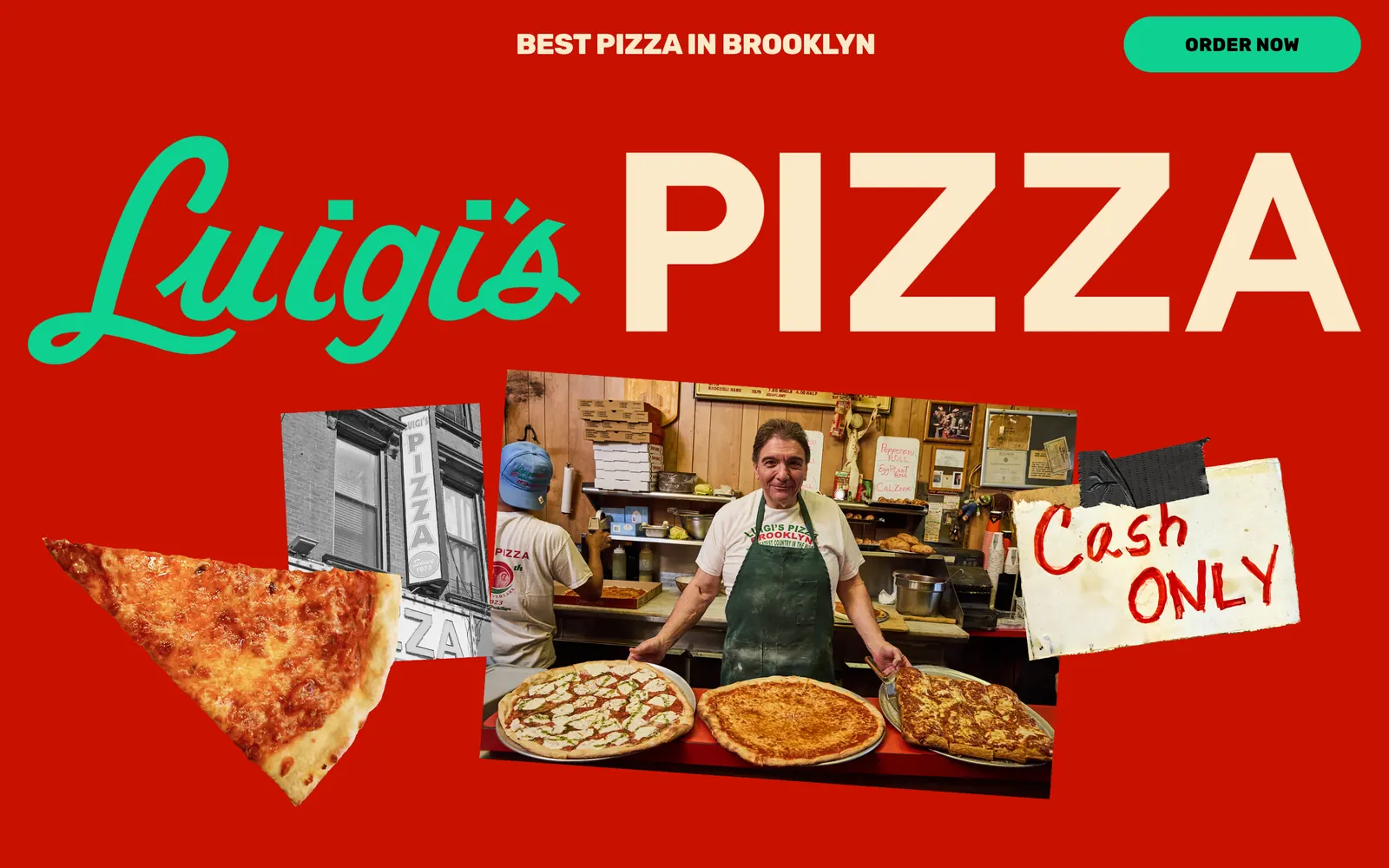
- What it does well: the full menu, with prices, is on the homepage as real text (for example "Slice $3.50" and "Large Pie $23.75"), not as a PDF or image. Hours, address and phone are in the footer, and two press quotes (Time Out New York, Serious Eats) do the persuading.
- Worth copying: "Order Now" is a phone link (
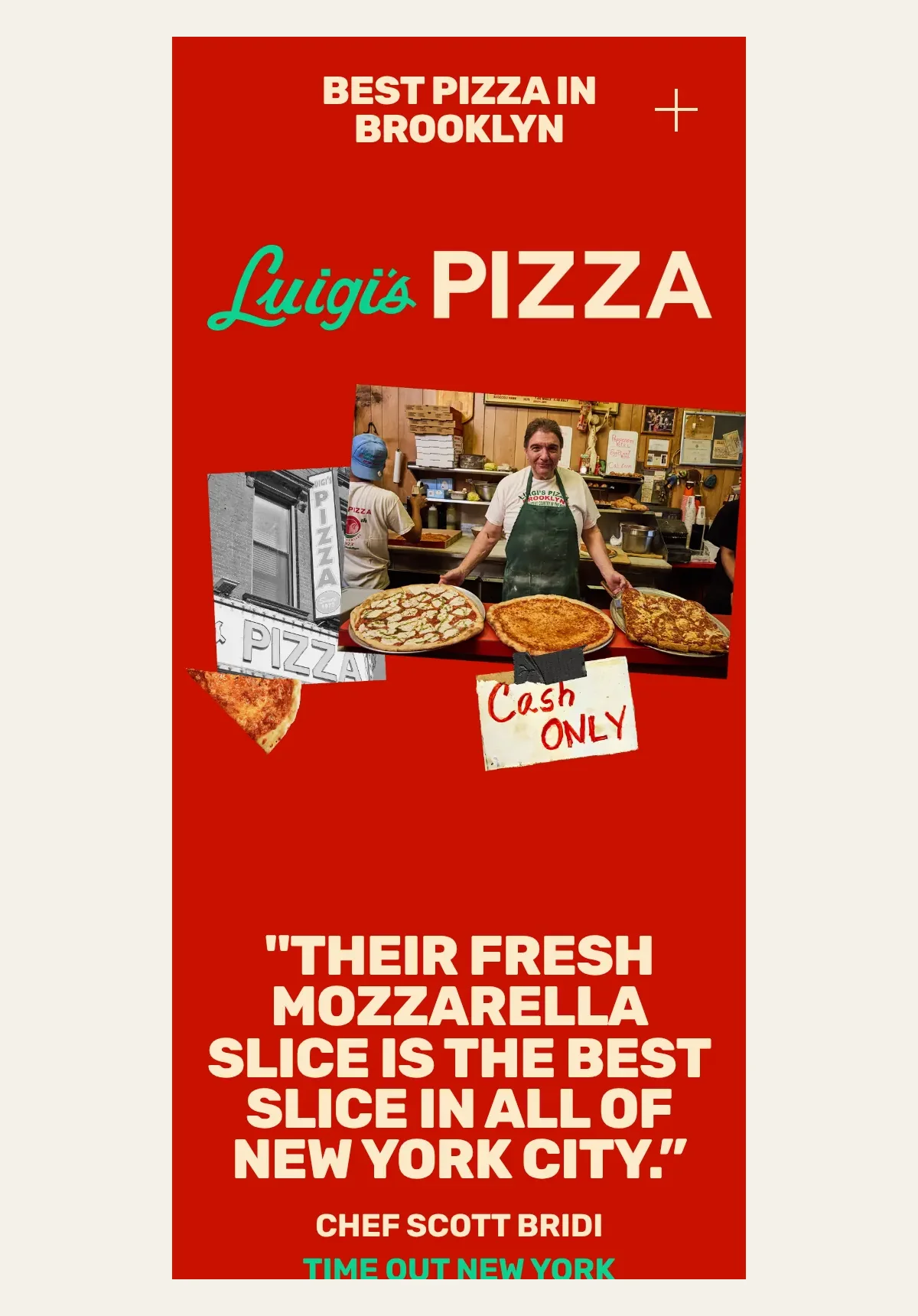
tel:), which matches how this shop takes orders. Don't add an ordering app if the phone is how you actually work. - Could be better: the page title is "BEST PIZZA IN BROOKLYN", without the restaurant's name, and there's no meta description. The Local business markup has an empty name and address. On mobile, the Order Now button moves into the menu, so the first screen has no way to order.
13. Andamiro: a Korean restaurant with delivery in the menu
Andamiro is a Korean restaurant at 276 5th Ave in Brooklyn, built around gukbap, according to its Contact and Menu pages.
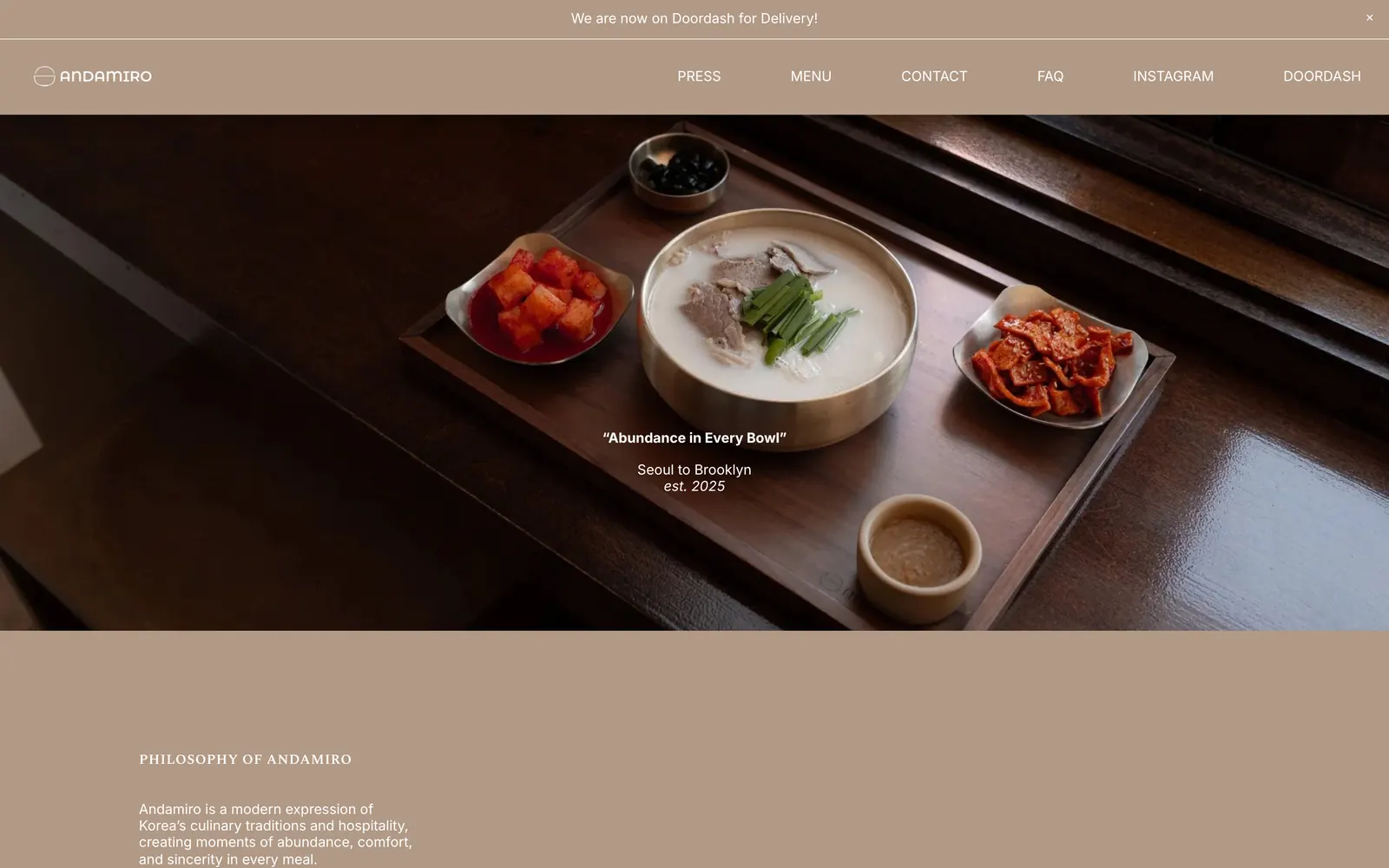
- What it does well: the delivery option is in two places on the first screen, the announcement bar and the main menu. The food photo is shot from above, so you see every dish on the tray.
- Worth copying: the Menu page is dated: "Current Menu – updated Nov 2026". That tells diners the prices and dishes are current.
- Could be better: the homepage shows no address or hours; they're only on the Contact page. The menus are PDFs, and the Local business markup has an empty name and address. Hours and address in the footer, plus filled-in Business Information, would help people searching for Korean food nearby.
What the best Squarespace examples do differently
The strongest sites in this sample share four habits. None of them depends on the template. For more small-business sites beyond Squarespace's showcase, see our business website examples.
- They pick one main action and repeat it. Xanadu repeats "Book a Party." Not Work Related pushes the newsletter, because that's the only way to buy. Frankly Good Coffee leads with the subscription.
- They say what and where in text. Stretch Squared and Camptown put the service and the place in the first screen or the page title. Radhia Rahman, Memor and Xanadu leave that to images, so a new visitor has to work it out. For help putting that into words, see our About Us page examples.
- They make the brand in fonts and copy, not layout. Camptown's icons, NOTCRISPYENOUGH's voice and Luigi's red collage carry the identity. Under them, the page structure is ordinary Squarespace sections.
- They keep the action on mobile. This is where two of the four sites we show on mobile fell short: Camptown's and Luigi's main buttons are inside the mobile menu.
Which template is behind each example?
None of these sites shows its starting template, and Squarespace doesn't record it on version 7.1.
- All 13 sites report the same internal template ID (
5c5a519771c10ba3470d8101) andtemplateVersion: 7.1in their page code. On version 7.1, every site shares the same platform template. - Squarespace confirms it. Its help center says that on 7.1, "a template is the design you pick as a starting point. Every site on version 7.1 has the same features and style options" (source). It also says "It's not possible to change templates on a version 7.1 site" (source). Even the site owner's Pages panel shows only a "Version 7.1" label instead of a template name (source).
- All 13 use Fluid Engine, which Squarespace calls "the primary editing experience for sites on Squarespace version 7.1" and uses by default in block sections. Every homepage has Fluid Engine sections (source).
So when a list says a 7.1 site "uses the X template", treat it as a guess. If you still want to start from a design, any 7.1 template gives you a first-page layout. Squarespace's help center now also suggests building your own starting point with its Blueprint AI Builder (source). Whichever you pick, it sets only your starting layout. Pick a template for the layout of its first page, then plan to change fonts, colors and sections. Here's what each example changed, as far as the page code and screenshots show:
| Site | Template / version | Heading font | Body font | Customizations visible on the homepage |
|---|---|---|---|---|
| Not Work Related | Not recorded / 7.1 | Stratos | Stratos | Announcement bar, cart, 6 sections |
| Frankly Good Coffee | Not recorded / 7.1 | ED Nimpkish | Helvetica Neue | Announcement bar, cart, code block, 11 sections, pop-up |
| Memor | Not recorded / 7.1 | Kuenstler Script | Ortica Light | Centered branding, menu as homepage links |
| Sam Frésquez | Not recorded / 7.1 | Favorit Pro | Favorit Pro | Fade animation, one-item menu, 8 project sections |
| Radhia Rahman | Not recorded / 7.1 | (image wordmark) | Poppins | Clip animation, folders in menu |
| Samuel Sparrow | Not recorded / 7.1 | Brandon Grotesque | Source Code Pro | Slide animation, cart, code block |
| NOTCRISPYENOUGH | Not recorded / 7.1 | Nineties Headliner | Europa | Announcement bar, scrolling text, 2 code blocks, 24 sections |
| Camptown | Not recorded / 7.1 | (illustrations) | Söhne | Custom icon-grid menu, code block, external booking engine |
| Stretch Squared | Not recorded / 7.1 | MaxiRound | Grotesk | Centered branding, 9 sections |
| Xanadu | Not recorded / 7.1 | Doss Acid | System sans-serif | Slide animation, animated hero, 7 sections |
| Potted Plant Design | Not recorded / 7.1 | Lust Text | — | Splash page with Enter button |
| Luigi's Pizza | Not recorded / 7.1 | Rubik | Rubik | Centered branding, phone-link ordering, 8 sections |
| Andamiro | Not recorded / 7.1 | (image logo) | Helvetica Neue | Announcement bar, delivery link in menu |
Fonts are the first font-family the browser applied to the first heading and first paragraph. A dash means that element had no text font we could read.
What Squarespace handles for you, and its limits
Squarespace takes care of hosting, SSL and a set of SEO basics, which is why these small businesses could launch without a developer. These points come from Squarespace's own pages, checked November 18, 2026:
- SEO basics are automatic. Squarespace creates and updates a sitemap, and generates structured data for blog posts, events, local businesses, organizations, products and the website (source). The markup is only as good as the details you enter, as the empty fields on six of these sites show.
- Plans start at $19 a month billed annually. The pricing page lists Basic at $19, Core at $29, Plus at $49 and Advanced at $99 a month billed annually ($25, $39, $65 and $139 billed monthly). Our Squarespace pricing guide adds fees, domains and worked first-year totals.
- Selling costs more on Basic. Basic charges a 2% online store transaction fee; Core and above charge 0%. Card rates start at 2.9% + $0.30.
- Custom code needs Core or higher. Advanced code blocks and code injection aren't included on Basic, according to the same pricing page.
- Design freedom has a ceiling. On 7.1 you customize inside one shared set of features. You can't switch to a template with different capabilities, because none exist.
Squarespace's export is a WordPress-format file that includes layout pages, one blog and text and image blocks, but not store pages, products, styles or custom CSS (source). Our Squarespace alternatives guide covers how to move.
When Squarespace is not the right fit
Squarespace suits most of the sites above: one location, a small catalog, visual design and an owner who wants to edit the site without a developer. Consider something else when:
- You need a large or complex store. A shop with many variants, wholesale price lists or deep inventory tools may outgrow Squarespace Commerce. A dedicated store platform is the usual next step.
- Search traffic is your main growth channel and you need control. If you need custom structured data, fine-grained page templates or large numbers of programmatic pages, compare builders on those points in our guide to the best website builder for SEO.
- You need several languages. On 7.1, Squarespace's multilingual option is its built-in Weglot integration. It's free for one extra language up to 2,000 words, with a paid Weglot plan beyond that. Translations are edited in Weglot rather than in Squarespace (source).
- You want the site to run in your own hosting account. Squarespace hosts your site on its own platform, and its export is a WordPress-format file of some content, not your design or code (source).
PolyDraft, our product, is one option for that last case, but only for some sites. It builds server-rendered Astro sites that deploy to your own Cloudflare account, so cancelling the subscription doesn't take the site down. Full source-code export is on the Agency plan only. Plans include up to 10, 30 or 100 languages per site. It is the wrong choice for most examples in this article. It has no ecommerce and can't move a Squarespace store, and it rebuilds a site from its public pages rather than importing it. It doesn't create redirects, and custom domains are connected through your own Cloudflare account. Access is currently invite-based, and building and previewing are free.
Frequently asked questions
What are some good Squarespace website examples?
Good examples include 13 live sites from Squarespace's own showcase, each confirmed as Squarespace from its code. For stores, see Frankly Good Coffee and Not Work Related. For portfolios, see Radhia Rahman and Sam Frésquez. For local businesses, see Stretch Squared and Xanadu, and for restaurants, Luigi's Pizza. Study each for one decision it makes well.
Can you tell which template a Squarespace site uses?
Only for version 7.0 sites. On version 7.1, every site reports the same internal template ID, and Squarespace says the template is just "the design you pick as a starting point" (source). All 13 examples in this article are on 7.1, so their starting templates can't be identified from the outside.
How can I tell if a website is built with Squarespace?
View the page source and search for "This is Squarespace." Squarespace sites include that HTML comment and a Static.SQUARESPACE_CONTEXT script, and the response header usually says server: Squarespace. Images are typically served from images.squarespace-cdn.com. We used the comment, the context script and the header for every example in this article.
Is Squarespace good for small business websites?
Yes, for a business with one location, a small catalog and an owner who wants to edit the site without a developer. Fill in Squarespace's Business Information settings, because its local business structured data is built from them. Six of the 13 sites we checked had empty name and address fields there. Also check that your main booking or ordering button is visible on a phone.
Is Squarespace good for restaurant websites?
It can be, if you put the menu in text with prices, show hours and address on every page, and give one clear way to order or book. Luigi's Pizza does the first two well, with its full menu and prices as text and hours and address in the footer. Andamiro keeps hours on the Contact page and uses PDF menus, which are harder to read on a phone.
Does Squarespace work for SEO?
Squarespace covers the basics: it creates a sitemap and generates structured data for local businesses, products and blog posts (source). The rest is up to you. Common gaps in the 13 sites we checked were vague page titles, missing meta descriptions and images without alt text.
Continue with the next task
- Work out what your Squarespace site will cost in year one: Squarespace pricing
- Compare Squarespace with Wix before you pick a builder: Wix vs Squarespace
- See what else is out there if Squarespace doesn't fit: Squarespace alternatives
- Browse more small-business sites: business website examples
About this article. Drafted by an AI agent following PolyDraft's blog workflow, checked by an automated QA script, independently reviewed and approved by Vincent Chen. Every example comes from Squarespace's "Websites made with Squarespace" showcase and was confirmed as Squarespace from its HTML markers (the server: Squarespace header, the "This is Squarespace." comment and the site context object). All screenshots and page-code checks were done on November 18, 2026, with headless Chromium, desktop at 1440 × 900 and mobile at 375 × 812, signed out. On November 27, 2026, we re-checked that all 13 homepages still return HTTP 200 and their raw HTML still contains Squarespace markers and templateVersion 7.1; the screenshots were not retaken. The four mobile screenshots are shown on a neutral frame, padded to page width but not rescaled. We didn't build any Squarespace sites, measure page speed or contact the site owners. Squarespace prices and features come from Squarespace's own pages, checked November 18, 2026, with some help-center details read on November 27, 2026; check them before you buy. PolyDraft is our product, and it is not among the examples. If you run one of these sites and something here is out of date, tell us through our contact page and we'll update it.
Sources
Squarespace pages were opened on November 18, 2026 (UTC), except the Fluid Engine, multilingual and export help articles, opened November 27, 2026. The template and search-optimization articles were opened on both dates; the Blueprint AI Builder and alt-text details come from the November 27 reading.
- Squarespace: "Websites made with Squarespace" showcase, pricing
- Squarespace help, templates: how site templates work in versions 7.0 and 7.1, switching templates in version 7.0, find your site's version and template, edit your site with Fluid Engine
- Squarespace help, languages and export: creating a multilingual site with Weglot, export your site content
- Squarespace help, SEO and business details: how Squarespace optimizes your site for search results, Business Information settings
- The 13 example sites themselves, captured November 18, 2026, and re-checked November 27, 2026