In this article
- 01 Squarespace alternatives at a glance
- 02 What Squarespace already does well
- 03 What leaving Squarespace actually involves
- 04 The alternatives
- 05 AI builders and AI search on these platforms
- 06 Which alternative fits your reason for leaving
- 07 How we compared
- 08 Frequently asked questions
- 09 Continue with the next task
- 10 Sources
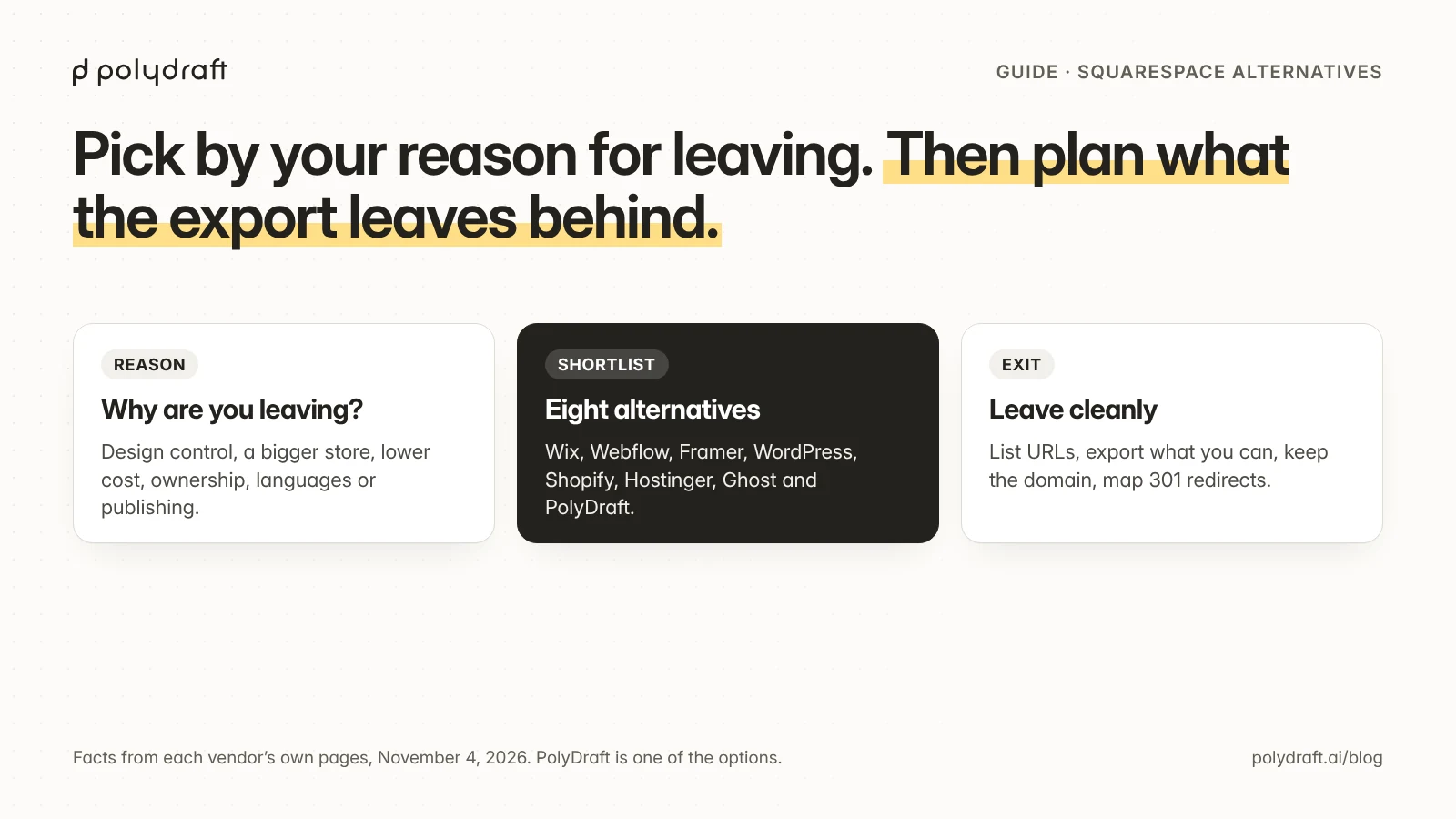
The best Squarespace alternative depends on why you're leaving. For more design control, look at Webflow or Framer. For a store, Shopify. For a cheaper all-in-one builder, Wix or Hostinger. For full ownership, self-hosted WordPress. For a newsletter or membership publication, Ghost. For a multilingual business site deployed to your own Cloudflare account, PolyDraft (our product). Plan the exit first: Squarespace's export doesn't carry your store, styles, or most page types.
Updated November 6, 2026: re-checked every price on each vendor's own plans page, including Ghost, Hostinger and WordPress.com, and added Squarespace's Plus plan, monthly prices and free trial, plus a section on AI builders.
We make PolyDraft, so we've applied the same criteria to it, including where it's the wrong choice. This guide is built from each vendor's own price lists and help centers, re-checked on November 6, 2026. We didn't test these products hands-on, and every check date is stated.
Key points
- Squarespace already handles the SEO basics: it builds your sitemap and structured data automatically and supports 301 redirects. Leaving won't fix SEO by itself.
- Squarespace exports a WordPress-format XML file, but it leaves out store pages, products, portfolio and index pages, styles, and custom CSS. Plan to rebuild those.
- Your domain can stay where it is. You can point it at a new host, or transfer it away after turning off the domain lock.
- Pick the alternative by the reason you're leaving, then compare price and what you can export.
Squarespace alternatives at a glance
As of November 6, 2026, these are the entry-level paid plans as each vendor publishes them. We opened every vendor's plans page in a browser on that date, and each section below includes a dated screenshot. Promotional prices change often, so confirm before you budget.
| Option | Best for | Entry paid plan (checked Nov 6, 2026) | Free plan | What you can take with you | Store |
|---|---|---|---|---|---|
| Squarespace (for reference) | All-in-one design-led sites | Basic $19/month billed annually ($25 monthly) | No; 14-day free trial | WordPress XML of pages and one blog; no store or styles | Yes; 2% fee on Basic |
| Wix | All-in-one small business sites | Light $17/month billed yearly; prices vary by location | Yes, with Wix ads | No site export; CMS and store data to CSV | Core plan and up |
| Webflow | Design teams who want precise control | Basic $15/month billed yearly | Yes, on a webflow.io address | Code export on paid Workspace plans, without CMS | Separate Ecommerce plans |
| Framer | Design-led marketing sites | Basic $10/month billed yearly | Yes, non-commercial | Unclear: Framer's help articles disagree | No native store found |
| WordPress (.com or self-hosted) | Full ownership and plugins | WordPress.com Personal $4/month billed annually ($9 monthly); software free (.org) | Yes on .com | Full XML export; self-hosted files are yours | Via WooCommerce |
| Shopify | Online stores | Basic $29/month billed yearly ($39 monthly) | No; 3-day trial | Products and data to CSV | Core product |
| Hostinger Website Builder | Low-cost simple sites | Premium $1.99/month, promotional, on a 48-month upfront term; renews at $10.99 | No; 14-day free trial | Pages, text and images; not styles, store or SEO settings | Paid add-on, on Unlimited and up |
| Ghost | Newsletters and paid memberships | Starter $15/month billed yearly; paid memberships from Publisher, $29 | Self-host free (MIT license) | JSON of content plus members CSV | Memberships, not products |
| PolyDraft (ours) | Multilingual business sites on your own Cloudflare account | Starter $39/month; invite-based | No; build and preview free, pay to publish | Source export on Agency plan | No |
What Squarespace already does well
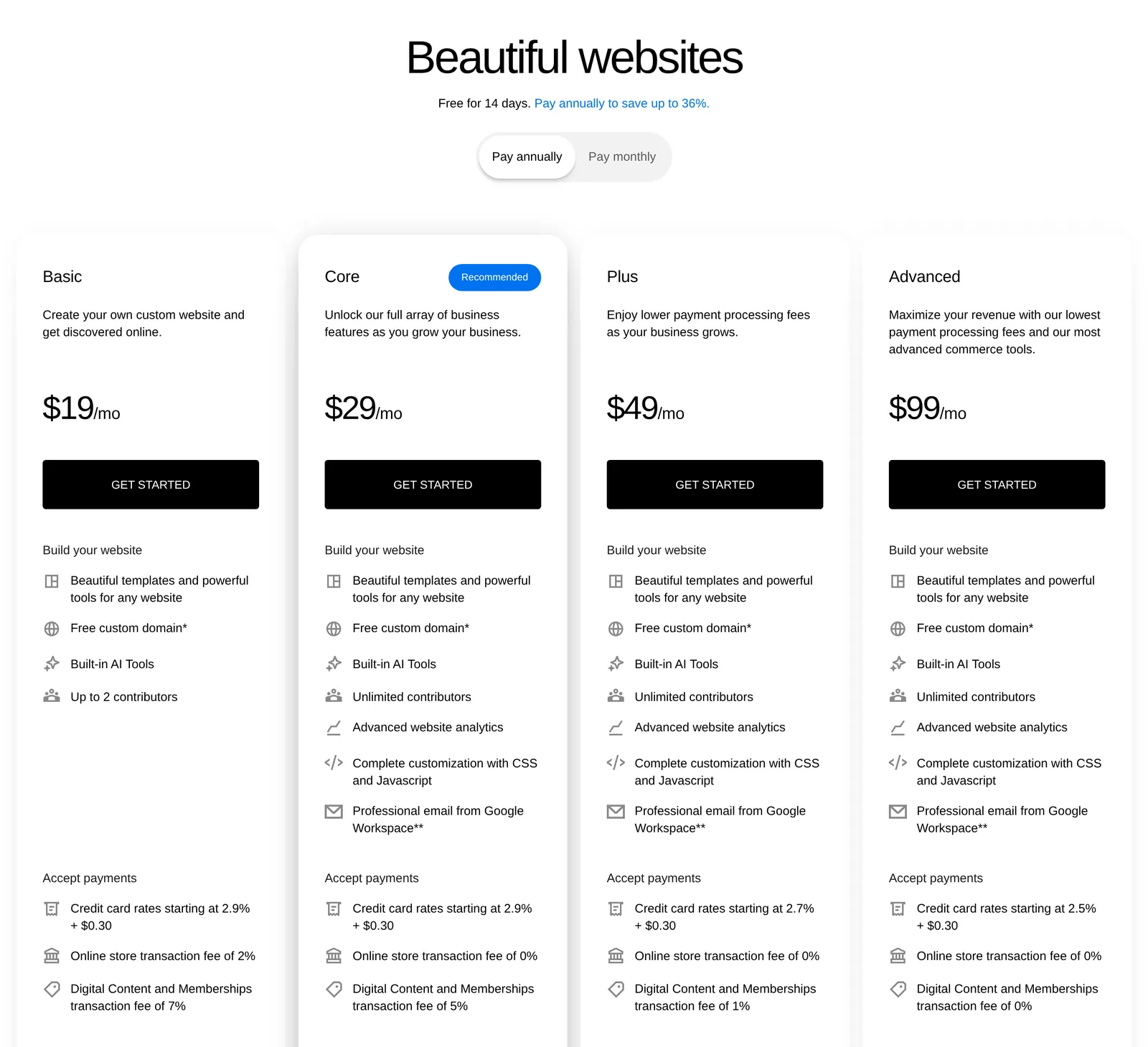
Before you leave, be clear on what you're paying for and what you'd be giving up. As of November 6, 2026, Squarespace's plans page lists four plans: Basic at $19 a month billed annually ($25 billed monthly), Core at $29 ($39 monthly), Plus at $49 ($65 monthly), and Advanced at $99 ($139 monthly). There's no free plan, but every site starts with a 14-day free trial that doesn't need a credit card. According to Squarespace's own help center:
- SEO basics are automatic. Squarespace creates and updates your sitemap, and it generates structured data for blog posts, events, products, local businesses, and the site itself. You can't edit or remove that markup.
- Redirects are built in. URL mappings support 301 and 302 redirects in a simple
/old-url -> /new-url 301format, with room for roughly 2,500 lines. - Plans include hosting, SSL, and a first-year domain. Annual plans include one custom domain free for the first year, and Squarespace-managed domains include SSL.
- AI and scheduling are part of the product. Blueprint AI generates a multi-page starting site you can edit, and Acuity Scheduling handles bookings.
The documented limits are where alternatives come in:
- Code injection is available on Core and above, not on Basic.
- Multilingual sites use a Weglot integration on version 7.1 only, and translations are edited in Weglot, not in Squarespace.
- Basic charges a 2% transaction fee on sales, and Core and above charge 0%.
- The export leaves out a lot. That's the next section.
What leaving Squarespace actually involves
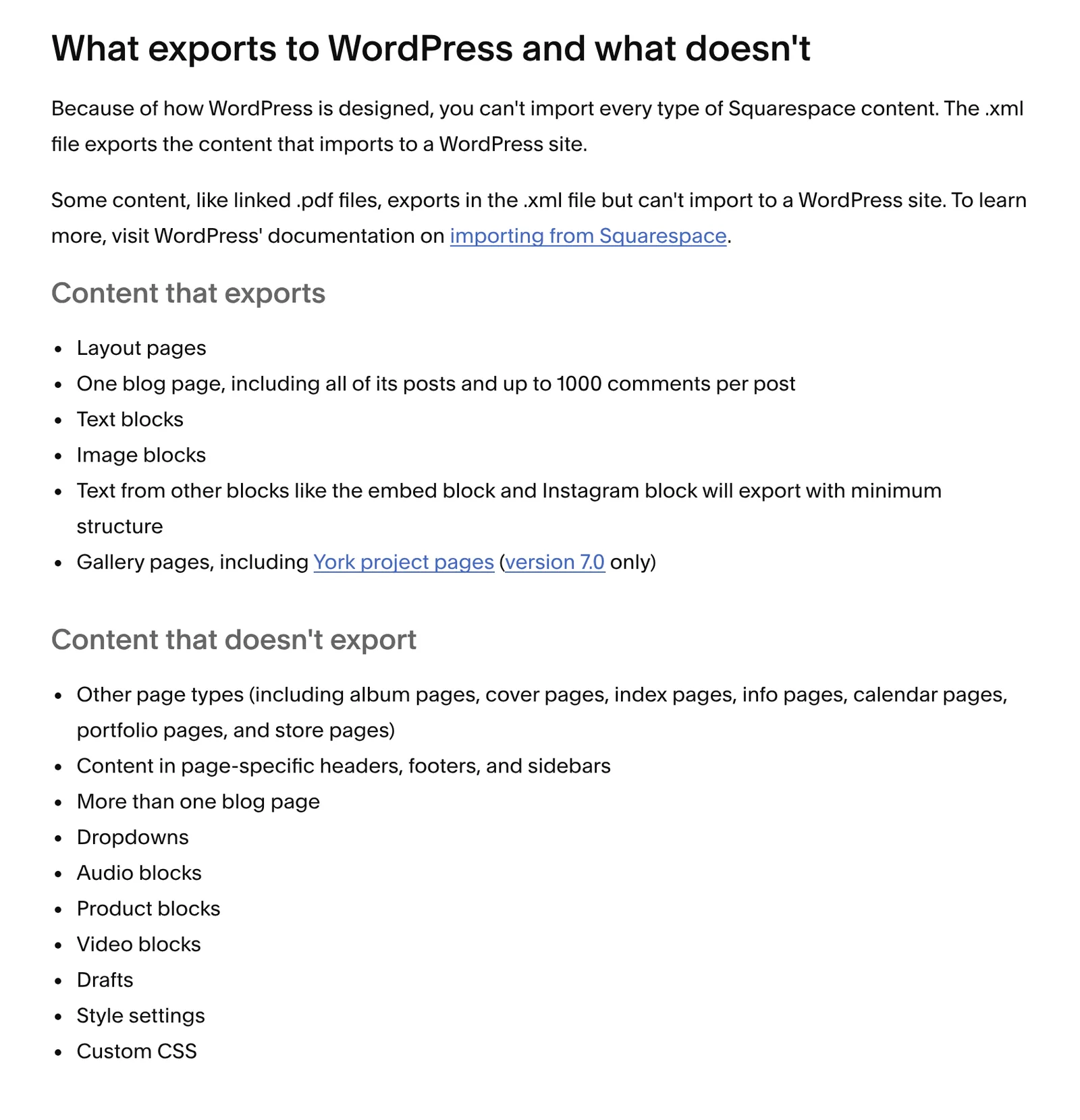
Squarespace exports your site as a WordPress-format XML file. As of November 6, 2026, its help center lists what goes in and what doesn't:
| Exported | Not exported |
|---|---|
| Layout pages | Store pages and product blocks |
| One blog page with its posts and up to 1,000 comments per post | Any blog page after the first |
| Text blocks and image blocks | Album, index, and portfolio pages |
| Gallery pages | Audio and video blocks |
| Text from other blocks, such as embed and Instagram blocks, with minimal structure | Page-specific headers, footers, and sidebars |
| Drafts, style settings, and custom CSS | |
| Cover, info, and calendar pages, and dropdown menus |
More caveats from the same article: the site has to be published and set to public, so you can't export from a trial site. Some content, such as linked PDF files, goes into the file but won't import into WordPress, and you can't import the file into another Squarespace site. Images may not carry over to a self-hosted WordPress site, so either import into WordPress.com, which copies them, or download them separately.
In practice, that means:
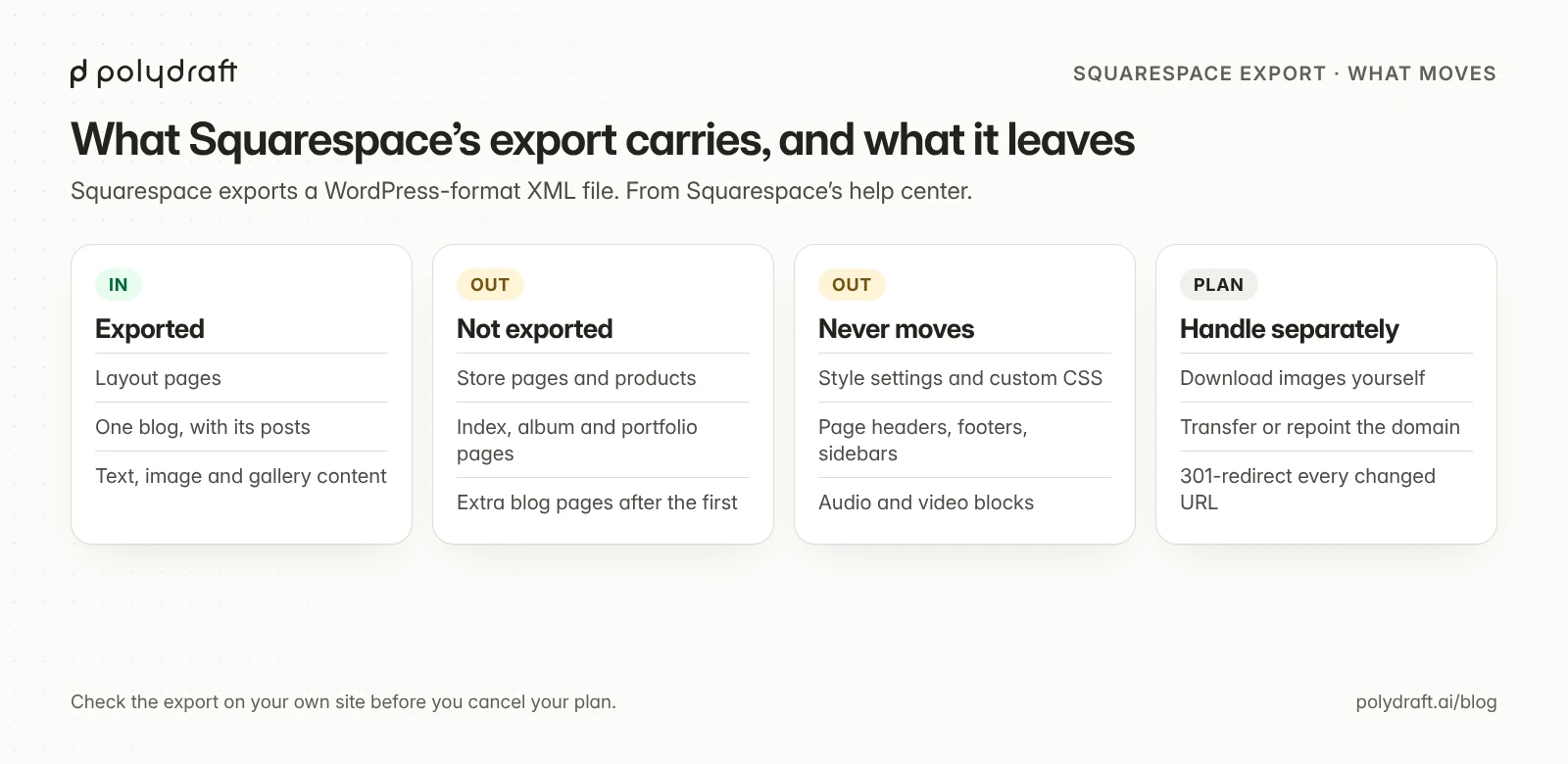
- A blog-led site moves fairly cleanly. The posts and pages come across, and you rebuild the design.
- A store doesn't move through the export at all. Plan to recreate products on the new platform. Shopify, for example, imports products from a UTF-8 CSV file.
- Design never moves. Styles and custom CSS stay behind on every route.
Keep your domain and your traffic
Your domain and your search traffic are separate problems from your content, and both are recoverable if you handle them in order:
- List every URL before you change anything. Your sitemap is at
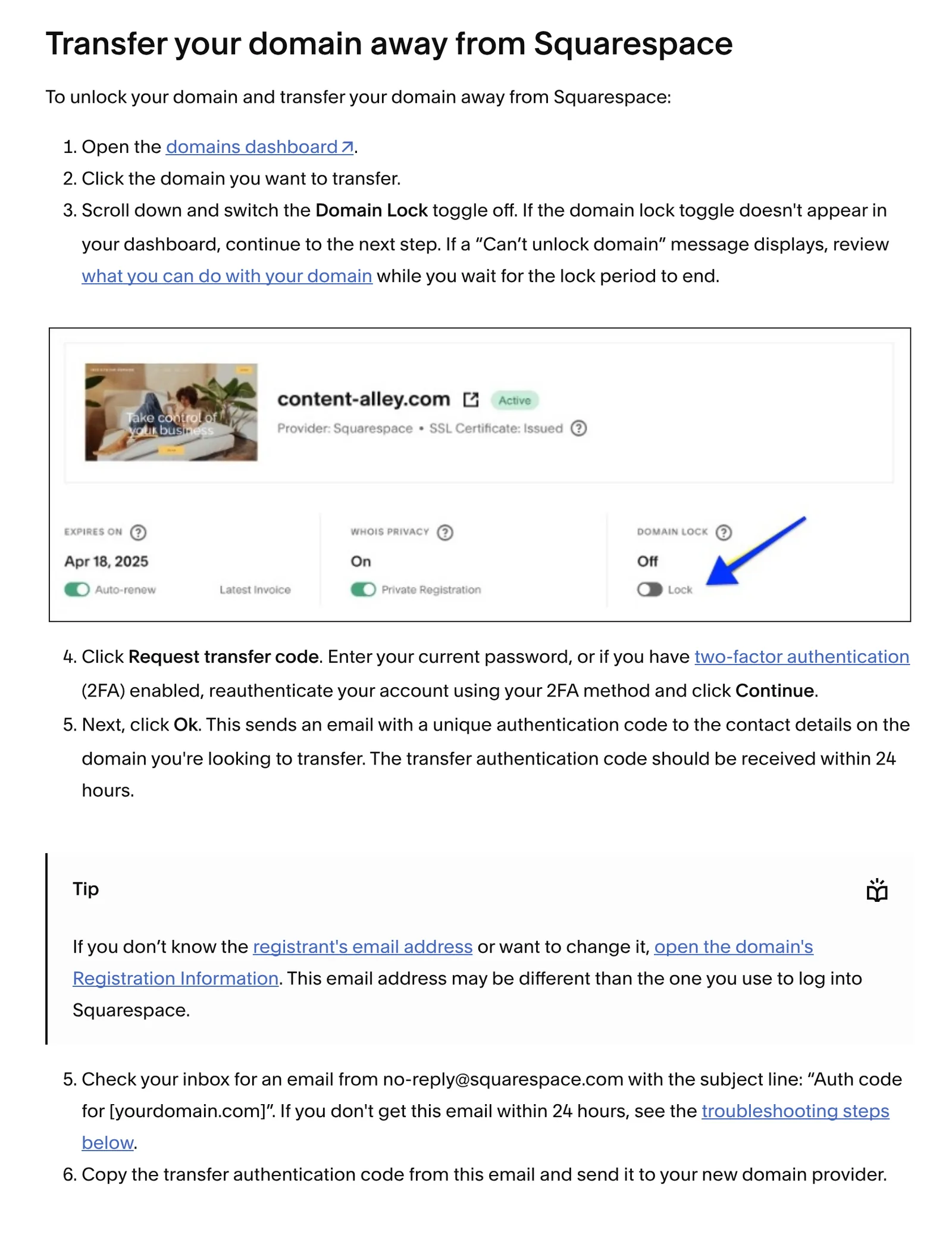
/sitemap.xmlon your Squarespace domain. Save it, and export your top pages from Search Console. - Decide where the domain lives. You can keep the domain registered with Squarespace and point it at your new host. To move it, record your DNS settings, turn off Domain Lock in the domains dashboard, click Request transfer code, and send the code to your new provider; it arrives by email, usually within 24 hours. As of November 6, 2026, Squarespace's help center says a transfer can take up to 15 days, a 60-day lock applies after a recent purchase or transfer, a free Squarespace domain loses its free offer when it moves, and moving the domain doesn't cancel your Squarespace site.
- Map old URLs to new ones. Every URL that changes needs a 301 redirect on the new platform. Write the map before launch as a simple two-column list, because each platform has its own import format. For example:
/blog/spring-menu      -> /news/spring-menu
/services/catering     -> /catering
/shop/p/gift-card      -> /gift-cards
- Launch, then verify. Spot-check redirects, resubmit your sitemap in Search Console, and keep the Squarespace site until the new one is confirmed working.
Our website migration checklist covers each step in more detail, and our redesign checklist shows how to build a redirect ledger before launch.
The alternatives
Wix: best for an easier all-in-one builder
Wix is the closest like-for-like swap: a hosted builder with templates, apps, and a store on higher plans. It has a free plan with Wix ads and a wixsite.com address. Its paid plans run from Light, at $17 a month billed yearly, to Business Elite at $159, as of November 6, 2026; Wix says prices and currency vary by location. Online payments start on the Core plan. Wix says its sites can't be exported or hosted elsewhere, so leaving later means rebuilding again. CMS collections and store products can be exported to CSV. Wix Multilingual adds hreflang tags automatically.
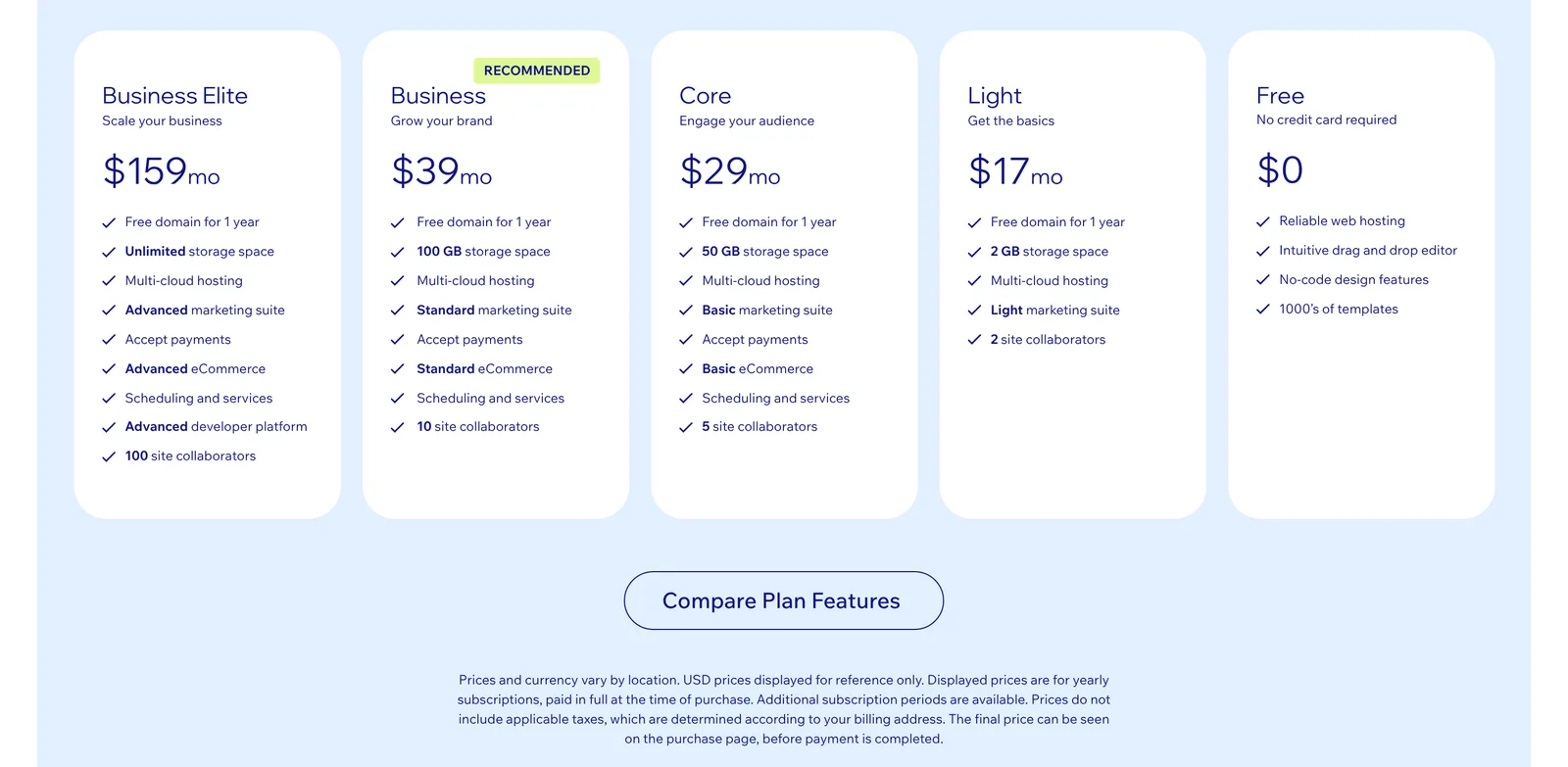
Choose Wix if you want to keep the all-in-one model and possibly pay less. Look elsewhere if being able to leave easily matters, because Wix is no more portable than Squarespace. Our Wix SEO guide covers what you can control there.
Webflow: best when a designer wants precise control
Webflow is a visual development platform with a powerful CMS. It has a free Starter plan on a webflow.io address, with tight limits. As of November 6, 2026, Basic costs $15 a month billed yearly, with no CMS, and Premium costs $25 a month billed yearly and includes the CMS, up to 20,000 items. Ecommerce is sold as separate plans. Webflow documents code export, but only on paid Workspace plans, and exported sites lose CMS content, forms, site search, and password protection. Its Localize add-on doesn't cover ecommerce features.
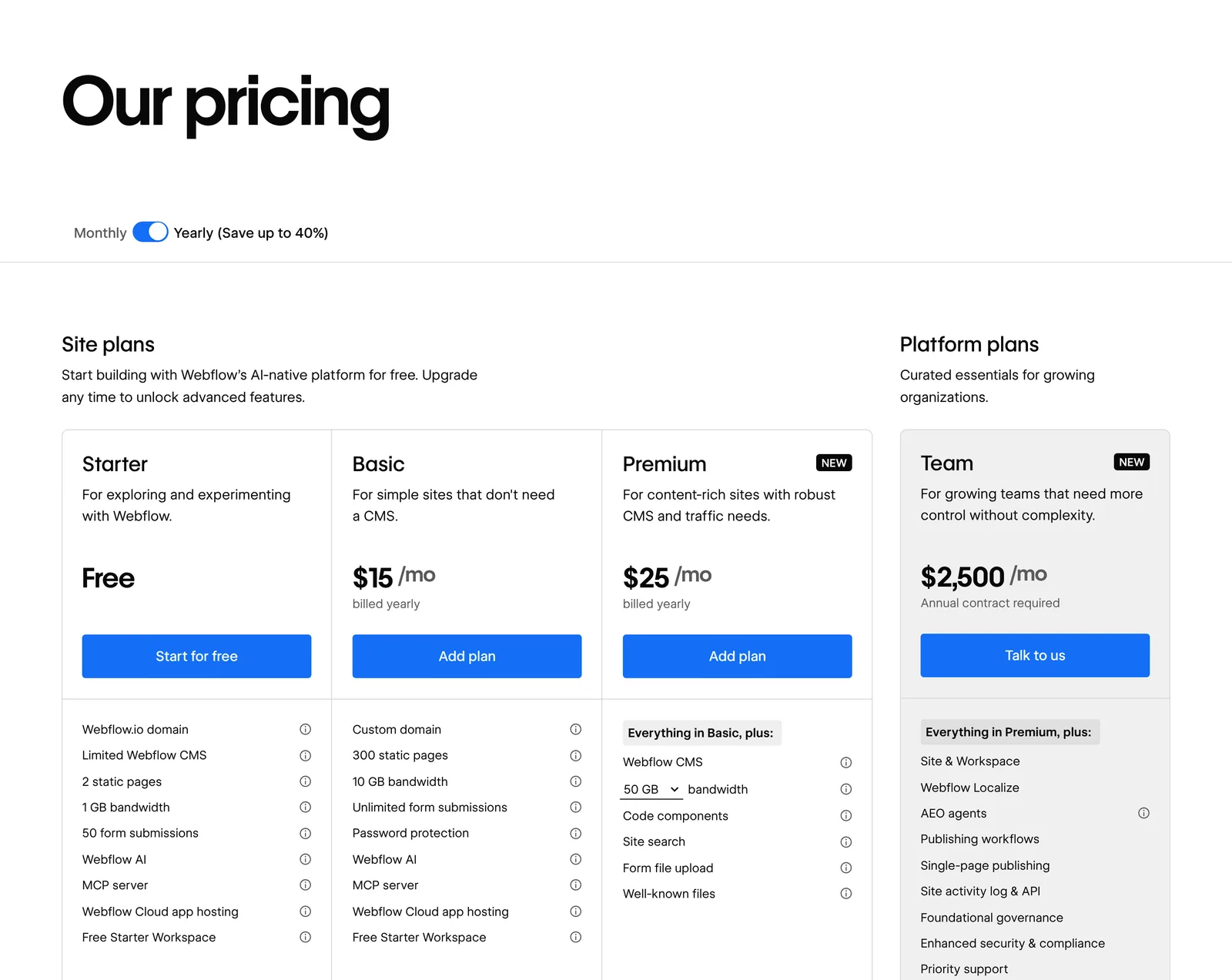
Choose Webflow if a designer will run the site and wants class-level control and structured CMS content. Look elsewhere if nobody on the team will learn a professional tool. Our guide to Webflow's SEO settings and plan requirements shows which controls need a paid plan, and our Webflow vs WordPress comparison and Framer and Webflow price and CMS comparison go deeper.
Framer: best for design-led marketing sites
Framer is a design tool that publishes websites. It has a free plan for non-commercial use on a Framer domain, and paid site plans from $10 a month billed yearly. Localization is an add-on, and Framer sets the language attribute and adds hreflang tags automatically on localized pages. On export, Framer's own help center disagrees with itself. One article says published sites can't be exported as standalone HTML for self-hosting; another says you can download the site's files and move them to any host. Test it before you rely on it. We found no native store in Framer's documentation.
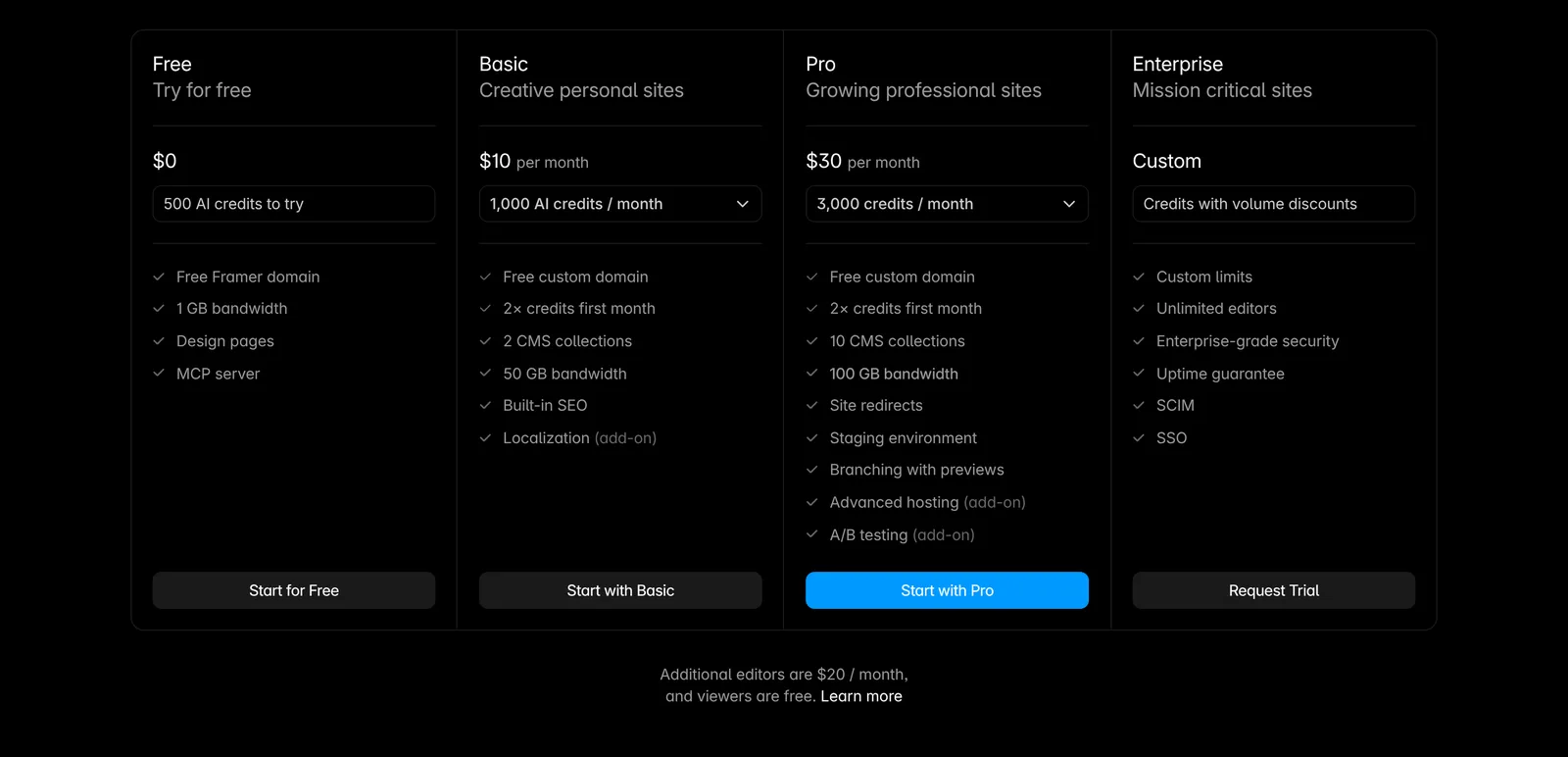
Choose Framer if visual polish and animation matter most and you're happy to stay on Framer's hosting. Look elsewhere if you need a store or a documented code export.
WordPress: best for full ownership
WordPress comes in two forms. WordPress.org is free, open-source software (GPLv2 or later) that you install on your own hosting, so the files and database are yours. WordPress.com is a hosted service with a free plan and paid tiers starting with Personal, at $4 a month billed annually or $9 billed monthly, as of November 6, 2026. Plugins can be installed on every paid plan, including Personal, but not on the free plan. Both export posts, pages, and comments as a WordPress XML file, which is also the format Squarespace exports to. For a store, WooCommerce adds commerce.
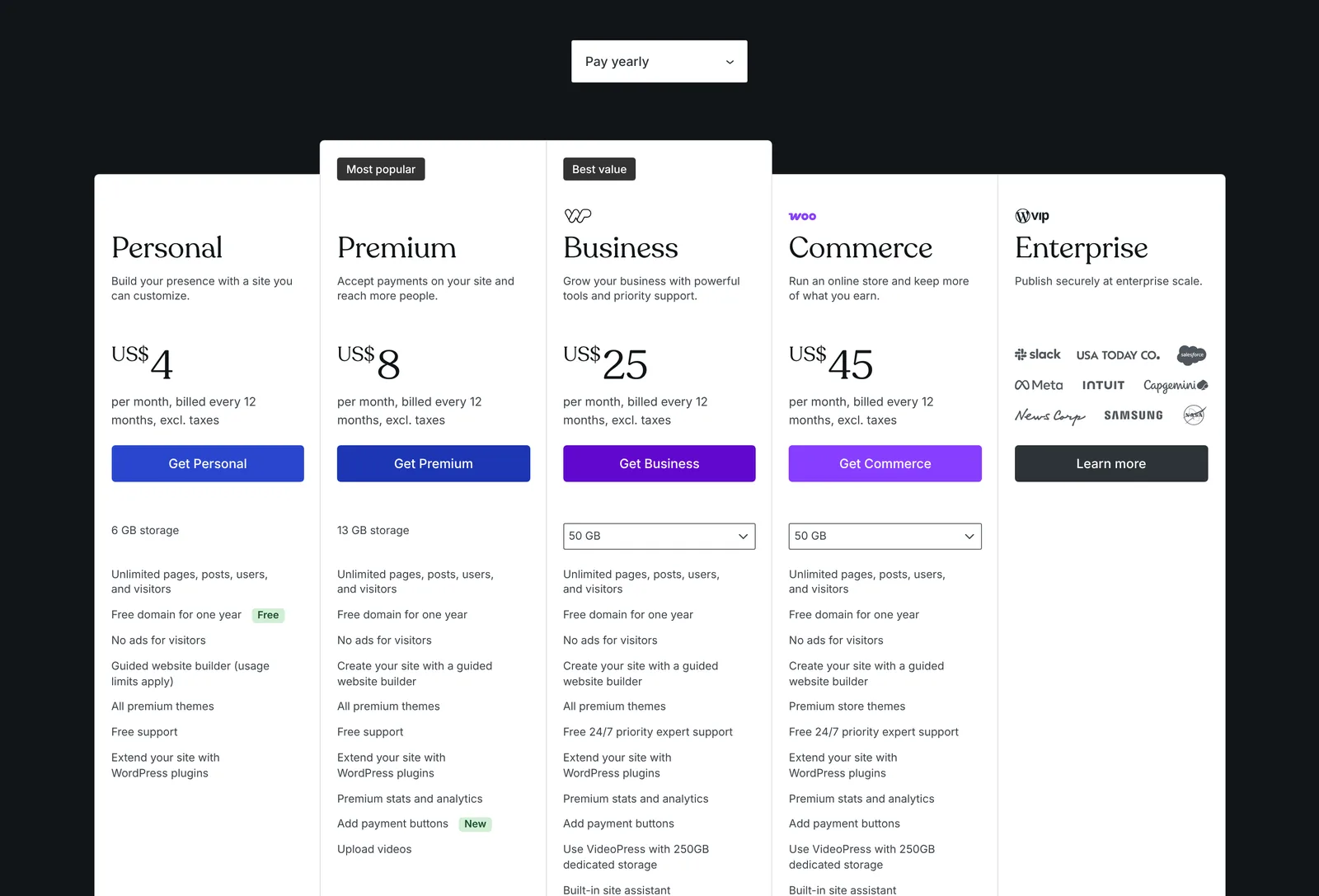
Choose WordPress if you want to own everything and need plugins. Look elsewhere if you don't want to maintain software: self-hosted WordPress needs updates for core, plugins, themes, and PHP, and auto-updates for plugins and themes are opt-in. Our WordPress alternatives guide covers that maintenance trade-off.
Shopify: best for a real online store
If your Squarespace site is mainly a store, Shopify is built for that job. As of November 6, 2026, Basic costs $29 a month billed yearly or $39 billed monthly. There's no free plan: Shopify offers a 3-day free trial, then $1 a month for three months. Products import and export as UTF-8 CSV files. Stores can sell in up to 20 languages, and Shopify adds hreflang tags and lists every published language in the sitemap.
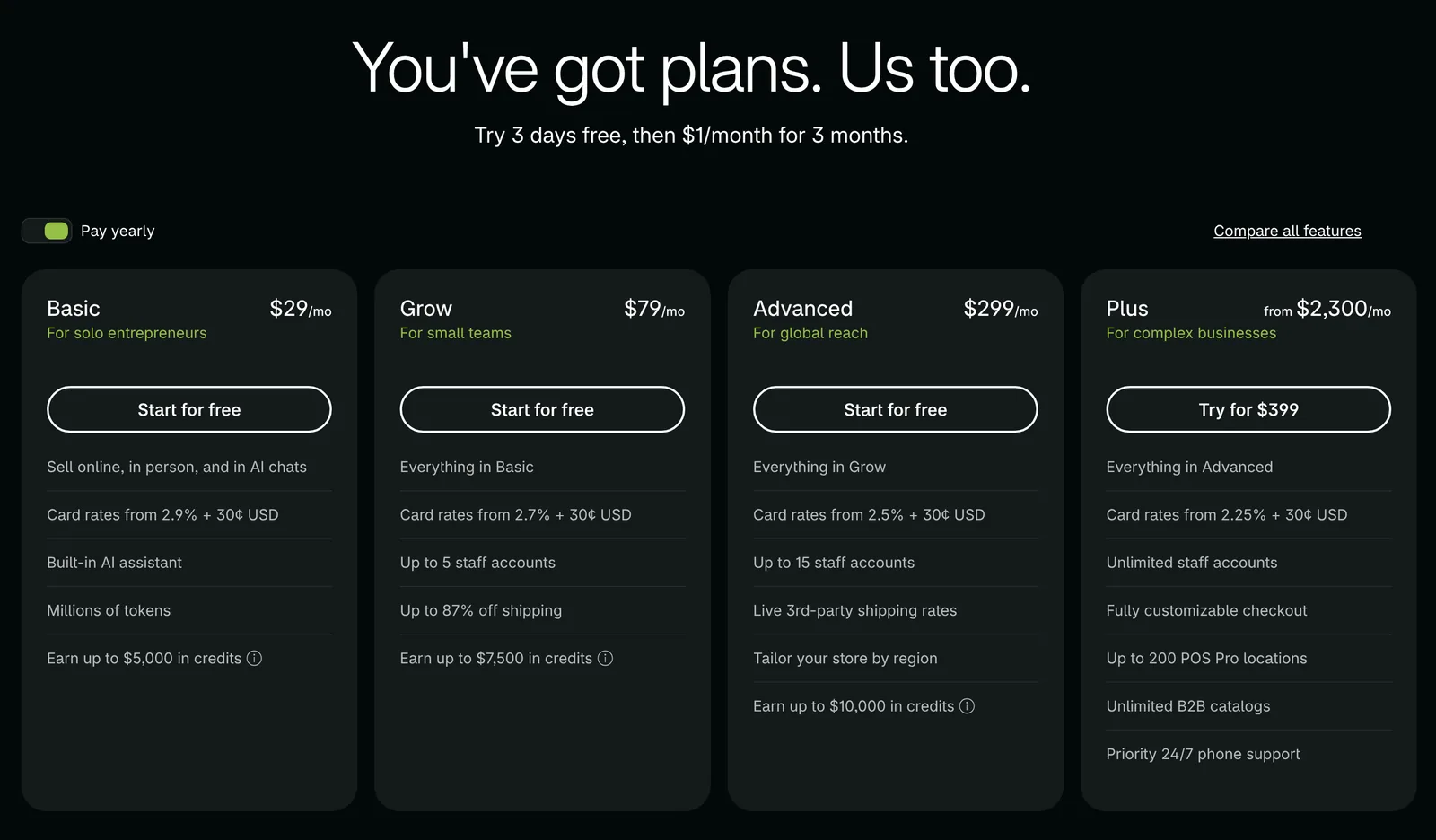
Choose Shopify if commerce is the business. Look elsewhere if you mostly need content pages and a contact form.
Hostinger Website Builder: best for a low-cost simple site
Hostinger's builder is a budget option, and its advertised monthly rates are promotional. As of November 6, 2026, during a Black Friday sale, the Premium plan costs $1.99 a month only on a 48-month term paid upfront ($95.52), and it renews at $10.99 a month. Premium doesn't list ecommerce. The Unlimited plan ($2.79 a month on the same term, renewing at $16.99) and Cloud Startup list "Ecommerce available", which Hostinger adds for $1 for three months, then $8.99 a month. There's a 14-day free trial and a 30-day money-back guarantee. Hostinger's help center says you can export pages, text, and images, including to WordPress, but not styles, layouts, the store, forms, or SEO settings.
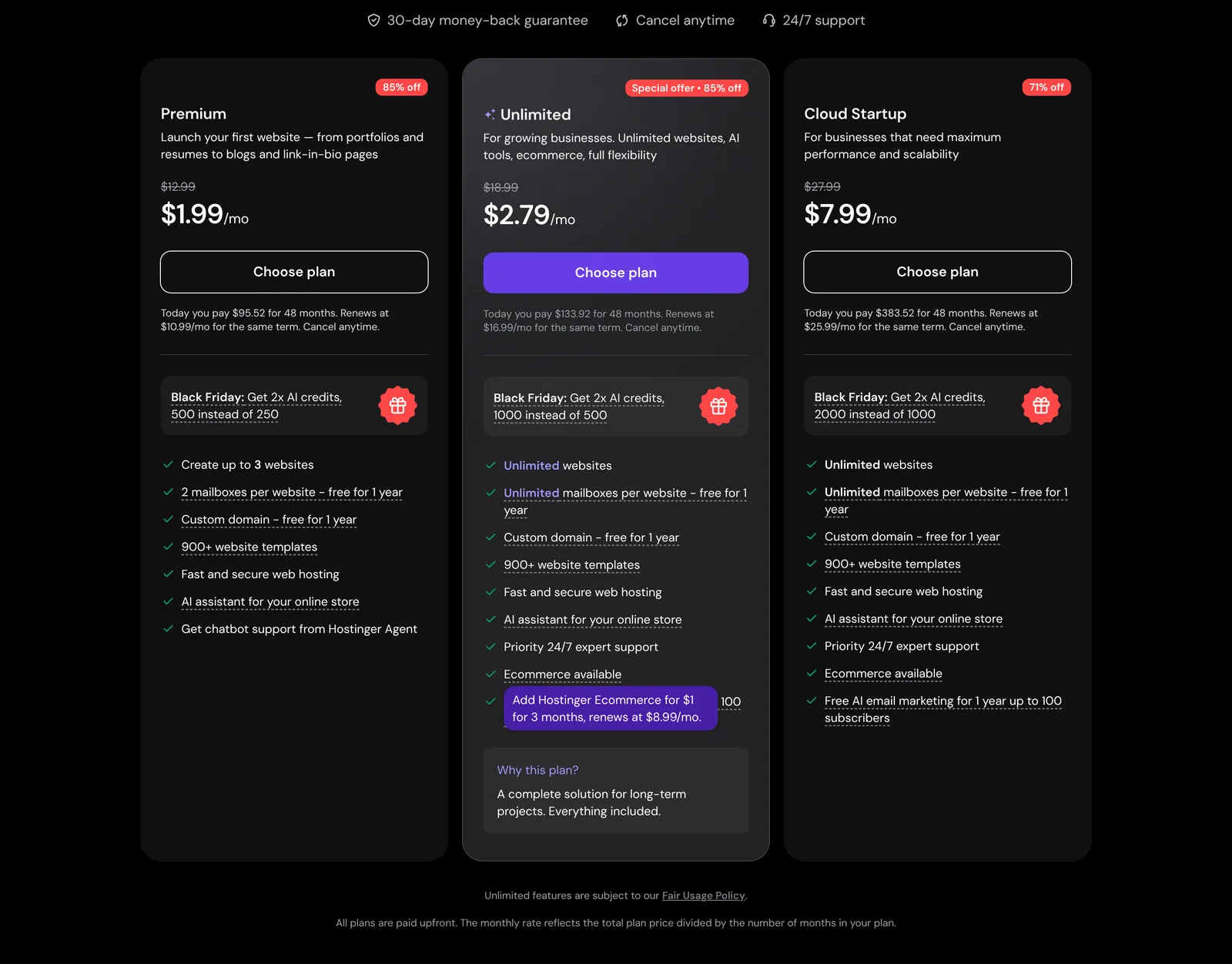
Choose Hostinger if price is the main reason you're leaving. Look elsewhere if you need advanced design, multilingual stores, or a clean exit.
Ghost: best for newsletters and paid memberships
Ghost is a publishing platform for writers and media businesses. The software is free under the MIT license and can be self-hosted. On Ghost(Pro) hosting, as of November 6, 2026, the Starter plan costs $15 a month billed yearly ($18 billed monthly) for up to 1,000 members, but it doesn't include paid subscriptions. Paid memberships start on the Publisher plan, at $29 a month billed yearly ($35 monthly). Prices rise with the size of your audience. Ghost takes 0% of paid subscriptions, so only Stripe's fees apply. Its export produces a JSON file of content and settings plus a CSV of members.
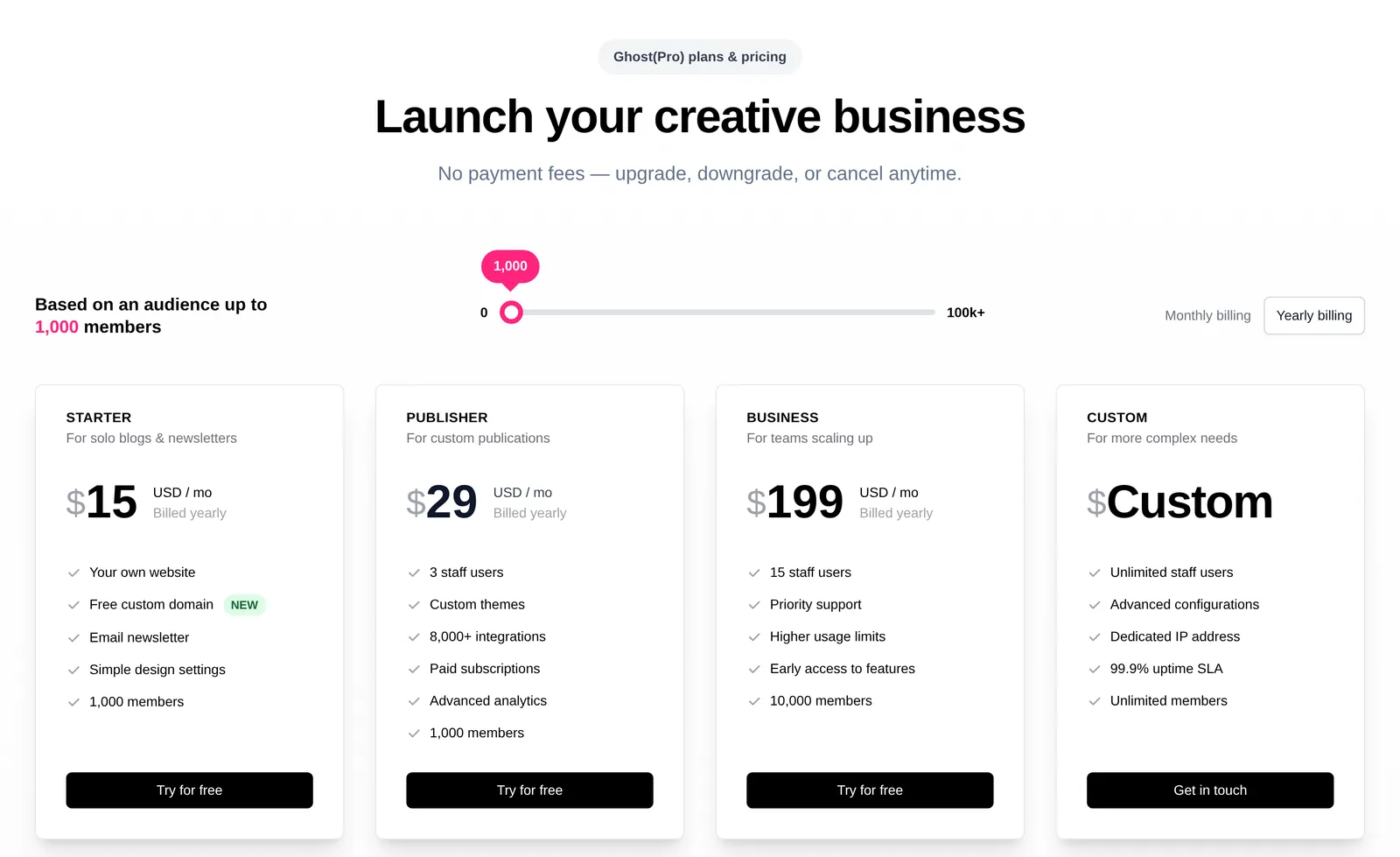
Choose Ghost if your site is a publication with subscribers. Look elsewhere if you need a product store or a brochure-style business site.
PolyDraft (our product): best for a business site where the marketing work is the point
We make PolyDraft, and it's a different kind of tool from the builders above. Squarespace and its alternatives are good SaaS products: you rent a builder and a host, and the marketing work (deciding what to publish from search and AI-search demand, writing it, and refreshing what underperforms) stays with you or an agency. PolyDraft is an AI-native website marketing system built around that work, on a site you own. As of November 6, 2026:
- Infrastructure first. You describe the business, or give it your existing URLs, and its agent researches, writes and builds a multi-page Astro site that renders HTML on the server and deploys to your own Cloudflare account. Titles, descriptions, structured data, canonicals, a sitemap, robots.txt and llms.txt come with every plan, and canceling a subscription doesn't take a deployed site down.
- Content planned from data. Sites built since November 2026 come with a content calendar in their admin: competitor keywords and question data when search data is available, otherwise questions from search results, AI-predicted sub-queries that answer engines run for your topics (GEO), topic clusters with pillar pages, and a dated publishing queue.
- Refresh from performance. When you ask, PolyDraft uses your Search Console data to flag articles with low click-through, or older articles with no impressions, as due for a refresh. This needs a deployed site with PolyDraft's Search Console access added to your property, and it doesn't run on a schedule. PolyDraft's agent doesn't publish without your approval.
- Plans, languages and ownership. Building and previewing is free, and you pay to publish: Starter is $39 a month ($390 billed yearly), Pro $99, Agency $299, and Enterprise is custom. Access is currently invite-based. Sites can have up to 10 languages on Starter, 30 on Pro and 100 on Agency; see how PolyDraft handles localization. Full code export is included on Agency, and project transfer is listed on Pro and above.
Recurring, evidence-backed recommendations of what to publish or refresh next are the direction we're building toward, not a current feature.
If you'd rather not run it yourself, PolyDraft also offers AI FDE (AI forward-deployed engineering): a PolyDraft engineer runs PolyDraft for you, building your new site from your current one, and its agent still doesn't publish without your approval. Contact us to ask about it.
Be clear on the limits before you choose it:
- PolyDraft has no store.
- It doesn't import a Squarespace export. It reads your existing pages as source material for a new build, which isn't the same as a migration.
- It doesn't manage redirects. You'd set them up in the same Cloudflare account, for example with Cloudflare's Bulk Redirects, once your domain's DNS is on Cloudflare.
- You connect the custom domain yourself, and its DNS needs to be on Cloudflare for the site and redirects to work. The registration itself can stay at Squarespace.
Choose PolyDraft if you need a business website, possibly in several languages, and want help with the search and AI-search work after launch, on hosting you own. Look elsewhere if you sell products online or want to keep editing the design visually yourself.
If you're also looking at AI tools that generate apps as well as sites, our comparison of AI app and website builders covers Lovable, Bolt, Framer, Webflow and others.
AI builders and AI search on these platforms
Most of these platforms now generate a first draft of a site with AI; they differ more in what they offer for AI search after launch. This table lists only what each vendor documents on pages we could check on November 6, 2026.
| Platform | AI site building | AI search features |
|---|---|---|
| Squarespace | Blueprint AI generates a multi-page starting site | Not verified for this update |
| Wix | Creates a site from a single prompt; AI creation tools listed on every plan; Wix Harmony is its newer AI editor | AI Visibility Overview (Premium plans, at least 50 unique visitors in 30 days); an auto-generated llms.txt file on eligible sites; a robots.txt editor for AI crawlers |
| Webflow | Webflow AI writes copy, fills CMS items and generates schema markup, with monthly credits | llms.txt and crawler controls on paid Site plans (or with a paid Workspace on a free site); the Analyze add-on reports LLM visibility and AI agent traffic; AEO agents on the Team plan and for Enterprise |
| Framer | AI agents on the canvas; 500 credits to try on Free, 1,000 a month on Basic | Upload your own llms.txt file; a free AEO scanner |
| Hostinger | An AI builder that generates the site, with an agentic mode | Not verified for this update |
Shopify, WordPress.com and Ghost also sell AI features, which we didn't verify for this update. None of these features makes an AI assistant cite you, and none of them decides what you should publish next. For what PolyDraft does here, see its section above; for what makes a page quotable in AI answers on any platform, see our guide to generative engine optimization.
Which alternative fits your reason for leaving
| If you're leaving because… | Options to look at first |
|---|---|
| You want more design control | Webflow, Framer |
| Your store has outgrown Squarespace | Shopify, WordPress with WooCommerce |
| You want to pay less | Wix, Hostinger |
| You want to own the files and hosting | Self-hosted WordPress; PolyDraft (hosting in your own Cloudflare account, source files on the Agency plan) |
| You need several languages | Shopify (stores), Wix, Webflow (Localize), Framer, WordPress (plugins), PolyDraft |
| You run a newsletter or membership | Ghost |
If none of these reasons applies, staying may be the right call. Squarespace's documented SEO features cover the basics, and our SEO for business guide covers the content work that matters on any platform.
How we compared
We chose alternatives that come up often for people leaving Squarespace and that publish prices or help documentation we could cite. We compared them on six criteria: entry price, free plan, export, store support, languages, and who each tool suits. We first read each vendor's plans page and help center through search excerpts on November 4, 2026. On November 6, 2026 we opened every vendor's plans page, plus Squarespace's help articles on exporting a site and transferring a domain, in a desktop browser (1440 × 900, US English, not signed in), and saved a screenshot of each in this article. We didn't sign in, start trials, or build test sites. Other help-center facts, such as export formats and language limits, are carried over from our November 4 reading of each vendor's help center. We left out GoDaddy and Carrd because we couldn't confirm their current terms on their own pages, and narrower tools for portfolios or digital products because they serve a different need. Where a fact wasn't confirmed, the table says so.
This guide doesn't measure performance, rankings, or design quality. Prices change often, especially promotional ones, so treat every figure as a dated checkpoint. To estimate the full cost of a rebuild, including your own time, try our website cost calculator.
What changed since November 4:
- Every price is now checked on the vendor's own plans page rather than in search excerpts.
- Ghost: Starter is $15 a month billed yearly ($18 monthly), and paid memberships start on Publisher ($29 a month billed yearly).
- Hostinger: the $1.99 rate needs a 48-month term and renews at $10.99; ecommerce is a paid add-on on Unlimited and up; there's a 14-day free trial.
- WordPress.com: the entry price is now filled in (Personal, $4 a month billed annually, $9 monthly).
- Squarespace: the Plus plan, monthly prices and the 14-day free trial added; the export table now follows the help article's wording and lists cover, info and calendar pages and dropdowns as not exported; the domain steps note what a transfer doesn't do.
- Screenshots of every vendor's plans page and of Squarespace's export and domain-transfer help articles, a new section on AI builders and AI search, and a rewritten PolyDraft section.
Frequently asked questions
What is the best alternative to Squarespace?
It depends on why you're leaving. For design control, Webflow or Framer. For a store, Shopify. For a lower price, Wix or Hostinger. For full ownership, self-hosted WordPress. For a publication, Ghost. For a multilingual business site deployed to your own Cloudflare account, PolyDraft, which is our product.
Is there a free alternative to Squarespace?
Wix, Webflow, Framer (non-commercial use), and WordPress.com have free plans with limits such as ads or a vendor subdomain. WordPress.org and Ghost are free software, but you pay for hosting. PolyDraft lets you build and preview for free and charges to publish.
Can I export my Squarespace site?
Partly. Squarespace exports a WordPress-format XML file with layout pages, one blog, text, image, and gallery content. Store pages, products, portfolio and index pages, styles, and custom CSS aren't included.
Can I keep my domain if I leave Squarespace?
Yes. You can keep the domain registered with Squarespace and point it at your new host, or transfer it away. Turn off Domain Lock, request the transfer code, and allow up to 15 days. A 60-day lock applies after a recent purchase or transfer.
Which Squarespace alternative is cheapest?
On advertised prices, Hostinger's builder is the cheapest, but its lowest rate requires a 48-month upfront term and renews higher. Wix, Webflow, Framer, and WordPress.com have free plans with limits. Compare the plan you'd actually need, including store fees.
Will I lose my Google rankings if I switch?
Not if you plan for it. List every URL first, keep the same URLs where you can, and 301-redirect the ones that change. Then resubmit your sitemap and check the important pages in Search Console after launch.
Continue with the next task
- Plan the move step by step: Website migration checklist
- Budget the rebuild: Website redesign cost
- Compare two of the strongest options: Webflow vs WordPress
About this article. Drafted by an AI agent following PolyDraft's blog workflow, checked by an automated QA script, fact-checked and edited by separate AI agents, and approved by Vincent Chen. PolyDraft is one of the options compared, and we've applied the same criteria to it. Vendor facts come from each vendor's own plans pages and help centers: every vendor's plans page and Squarespace's export and domain-transfer help articles were opened in a browser on November 6, 2026, and other help-center facts were read on November 4. PolyDraft facts come from our plans page and product documentation on November 6, 2026. We didn't sign in, run hands-on tests, or build test sites. Screenshots of these public pages were captured on November 6, 2026, with cookie and chat pop-ups hidden, and are unedited apart from cropping and resizing; the diagram is an original illustration made for this article.
Sources
- Squarespace Help Center: Choose the right plan, Transaction fees, Export your site content (opened November 6, 2026), What Squarespace does for SEO, URL mappings, Using code injection, Multilingual sites with Weglot, Free domain, Transferring a domain away (opened November 6, 2026)
- Squarespace: Pricing (opened November 6, 2026), Blueprint AI
- Wix: Plans (opened November 6, 2026), About the AI Visibility Overview, Understanding your site's llms.txt file, What is Wix Harmony?, Building a website for free, Exporting or embedding your Wix site elsewhere, Multilingual SEO settings
- Webflow: Pricing (opened November 6, 2026), Webflow AI, AEO, Updated pricing for May 2026, Exporting site code, Localization overview
- Framer: Pricing (opened November 6, 2026), AI, Can I export my website to HTML?, Porting your data from Framer
- WordPress: License, Plugin and theme auto-updates, WordPress.com pricing (opened November 6, 2026), WordPress.com plugins, WordPress.com export
- Shopify: Pricing (opened November 6, 2026), Exporting products, Languages
- Hostinger: Website Builder (opened November 6, 2026), Ecommerce website builder, Moving your content
- Ghost: Pricing (opened November 6, 2026), Hosting Ghost, License, Transaction fees, Exports
- Cloudflare Docs: Bulk Redirects concepts, Workers custom domains
- PolyDraft: Pricing, Features
Written by
Founder of PolyDraft and CEO of BlackMonolith, Inc.