Wix vs Squarespace 2027: Price, SEO, Exports and 20 Sites
Wix vs Squarespace on November 2026 prices, refunds, storage, SEO controls, store fees and exports, plus per-site data from 20 showcase homepages.
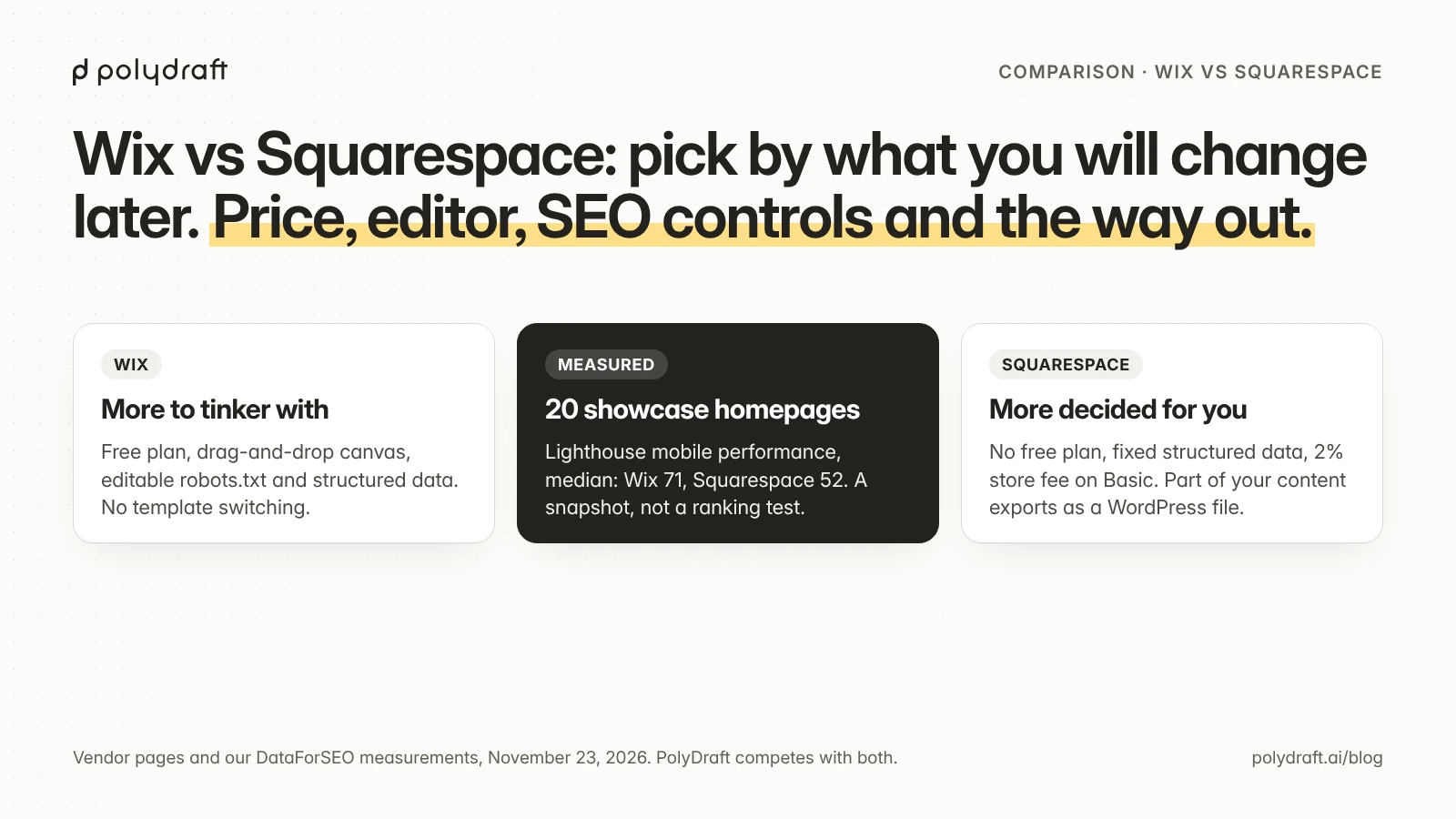
Wix vs Squarespace comes down to how much you want to adjust yourself. Pick Wix if you want a free plan to start, a canvas where you place things freely, and SEO settings you can edit in a dashboard, such as robots.txt and your own structured data. Pick Squarespace if you want a tidy design system with fewer choices to get wrong, and you will pay from day one. For a small shop, Squarespace's Core plan and Wix's Core plan cost the same per year.
We make PolyDraft, an AI website builder, and PolyDraft competes with both Wix and Squarespace; it has its own short, labeled section near the end. Every price and policy below comes from Wix's and Squarespace's own pages, read on November 23, 2026 in the US. We did not open an account or build a site on either platform for this article, so nothing here is a hands-on test. Instead we measured something you can check: the homepages of 10 Wix and 10 Squarespace sites that each vendor picked for its own showcase, run through DataForSEO's crawler and Lighthouse. The per-site results are in a table below.
Updated November 23, 2026: corrected our statement that Squarespace has no way to add your own structured data; its Core plan and up include code injection, which can add custom JSON-LD.
Key points
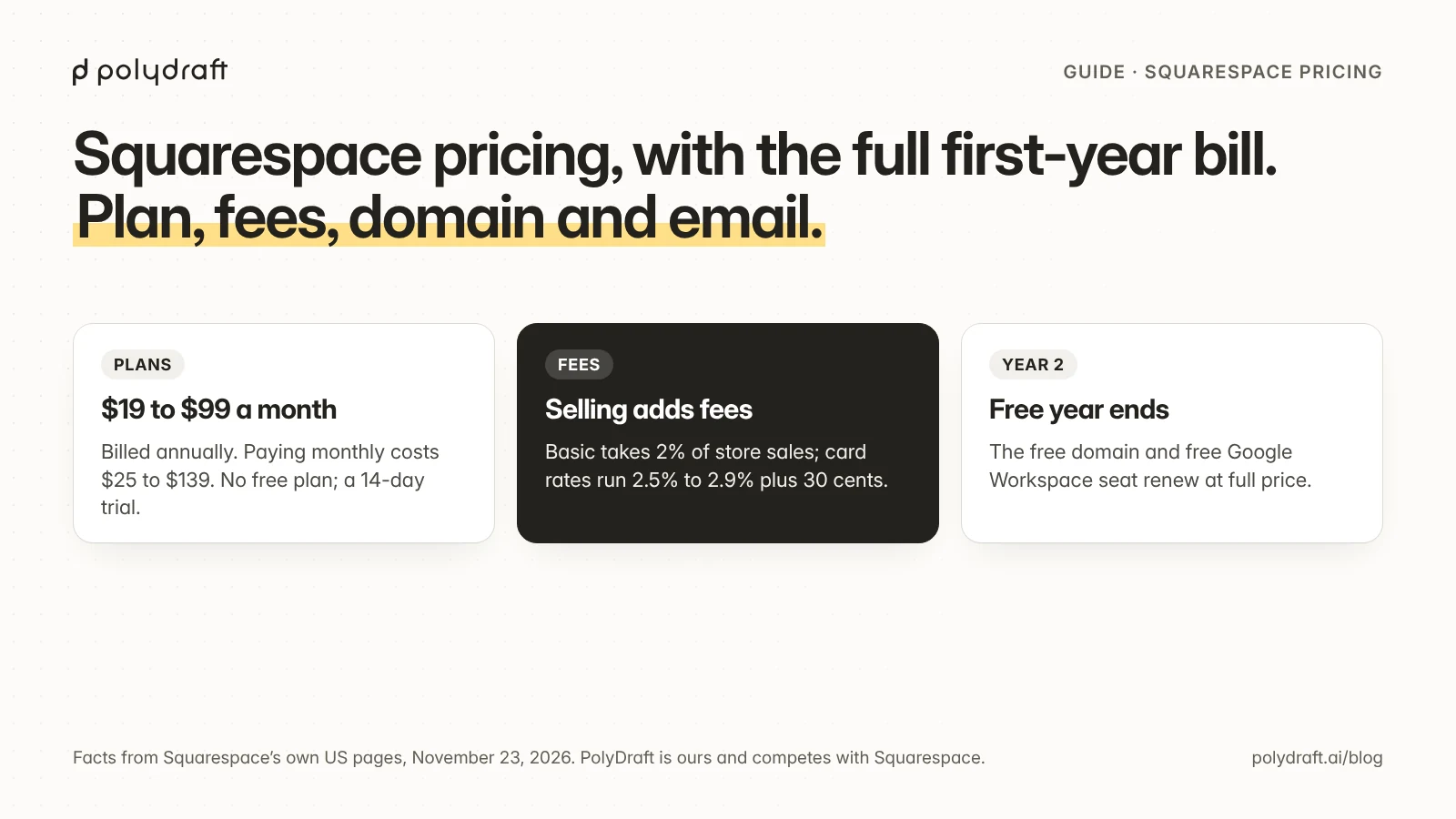
- Price: Wix starts free; its paid plans run from $17 to $159 a month, billed yearly (Wix plans). Squarespace has no free plan; plans run from $19 to $99 a month billed yearly, or $25 to $139 billed monthly.
- Store fees: Squarespace's Basic plan adds a 2% fee on store sales; Core and up charge none. Card processing starts at 2.9% + $0.30 on both.
- Design: neither lets you swap the template of a finished site. Wix says you start a new site; on Squarespace 7.1 every site shares the same style options, so you restyle instead.
- SEO controls: Wix documents an editable canonical tag, a robots.txt editor and a structured data panel for custom JSON-LD. Squarespace generates structured data you "can't edit or remove"; on Core and up you can add your own through code injection, without a dedicated panel.
- Our measurement: on vendor-picked homepages, the median Lighthouse mobile performance score was 71 for Wix and 52 for Squarespace. Ten sites each is a small sample, and none of this proves anything about rankings.
- Trying before you commit: Wix gives a full refund if you cancel a first paid plan within 14 days (Wix plans). Squarespace offers a 14-day free trial with no card.
- Photos: Wix storage runs from 2 GB on Light to unlimited on Business Elite. Squarespace says there are no caps on storage, but limits video by plan.
- Leaving: a Wix site cannot be hosted anywhere else. Squarespace exports part of your content as a WordPress file.
Wix vs Squarespace at a glance
| Wix | Squarespace | |
|---|---|---|
| Free plan | Yes, on a wixsite.com address | No; 14-day free trial, no card needed |
| Refund on a new paid plan | Full refund within 14 days of the first upgrade | Website refund terms were collapsed on the refund page we captured; the free trial comes first |
| Paid plans, billed yearly (US) | Light $17, Core $29, Business $39, Business Elite $159 a month | Basic $19, Core $29, Plus $49, Advanced $99 a month |
| Paid plans, billed monthly | Not shown on the plans page | Basic $25, Core $39, Plus $65, Advanced $139 a month |
| Free domain | 1 year with most yearly plans, new domains only | 1 year with annual plans only |
| Storage | Light 2 GB, Core 50 GB, Business 100 GB, Business Elite unlimited | "No caps" on storage or bandwidth; video from 30 minutes on Basic to unlimited on Advanced |
| Online store fee on top of processing | None listed on the pages we read | 2% on Basic; 0% on Core and up (fees) |
| Switch the template of a live site | No; start a new site and copy elements | 7.1: no template to switch; restyle in Site styles |
| Editable robots.txt | Yes, Robots.txt Editor | No free-form editor on the pages we read; a Crawlers setting adds AI-crawler or search-engine blocks |
| Structured data | Presets, AI markup for blog posts, custom JSON-LD in a panel | Automatic schemas you can't edit or remove; Core and up can add custom JSON-LD through code injection |
| Take your site elsewhere | No; must run on Wix's servers | Partial .xml export in WordPress format |
| Built-in AI | AI site builder and Aria agent | Blueprint AI builder, AI assistant, AI credits per plan |
| Median Lighthouse mobile performance, 10 showcase homepages | 71 | 52 |
Prices are US list prices before tax, read on November 23, 2026 on wix.com/plans and squarespace.com/pricing.
Wix vs Squarespace pricing in November 2026
Wix is cheaper to start and slightly cheaper at the entry paid tier. At the plan most small shops need, both cost $29 a month billed yearly. Squarespace's monthly prices are 32% to 40% higher than its annual ones on its pricing page, so the billing choice matters more there than the vendor choice.
Wix. The plans page lists Free at $0, then Light at $17, Core at $29, Business at $39 and Business Elite at $159 a month. The fine print says the "displayed prices are for yearly subscriptions, paid in full at the time of purchase" and that "additional subscription periods are available" (Wix plans). The page does not show a monthly price. Wix's help center confirms monthly plans exist and adds that they "do not include Wix vouchers", which means no free domain (Wix monthly plans). Light does not list "Accept payments"; Core is the first plan that does.
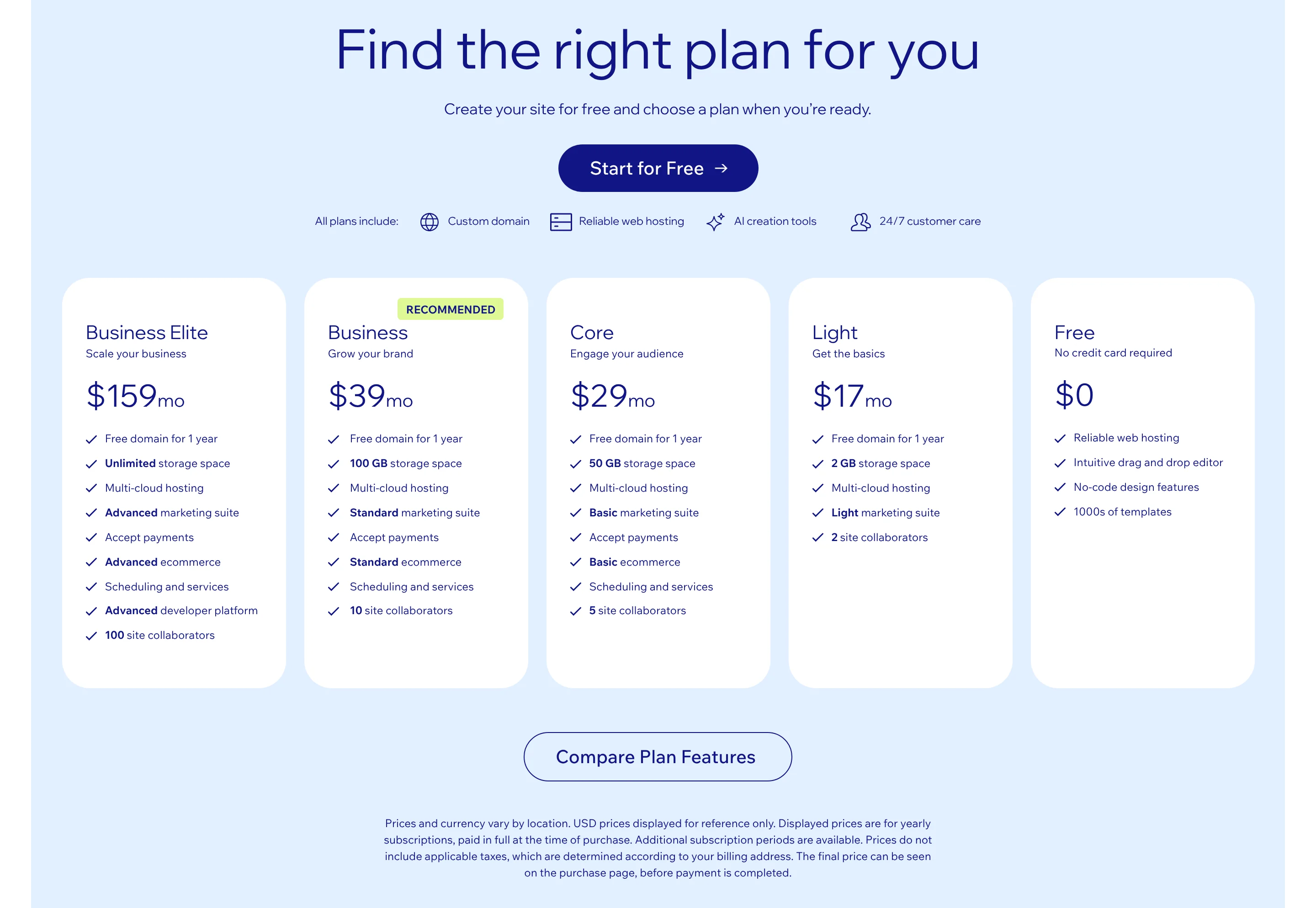
Wix's plans page, captured November 23, 2026 (US). A cookie banner covering the cards was hidden before the capture. The prices are yearly subscriptions shown as a monthly figure.
Squarespace. The pricing page has a toggle. Paid annually, Basic is $19, Core $29, Plus $49 and Advanced $99 a month. Paid monthly, the same plans cost $25, $39, $65 and $139 (Squarespace pricing). Its FAQ says there is no free plan but "every site starts with a free trial", and the trial lasts 14 days. The free custom domain comes only with an annual plan; on the monthly view, that line is struck through.
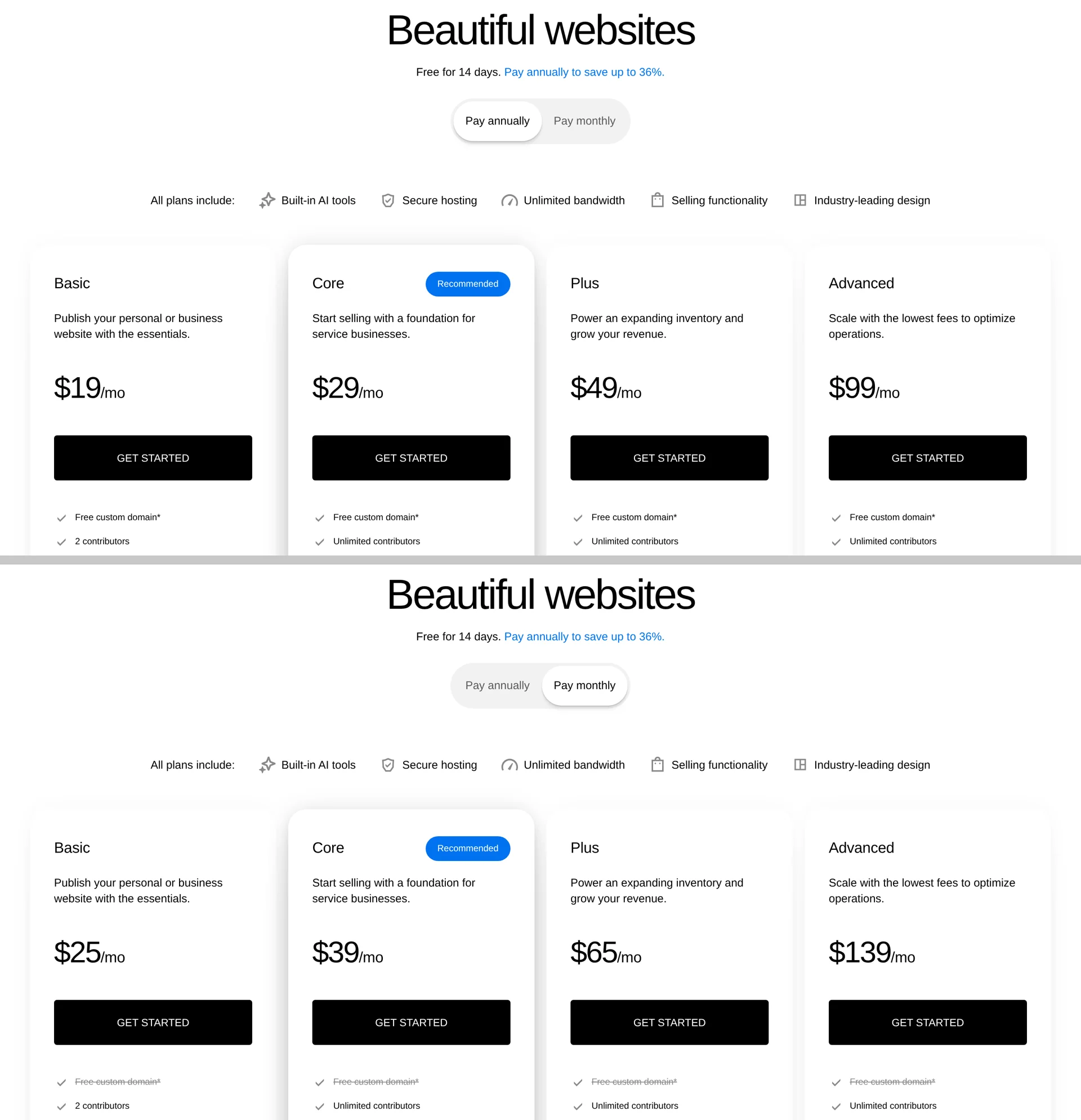
Two captures of Squarespace's pricing page, November 23, 2026 (US): Pay annually above, Pay monthly below. "Pay annually to save up to 36%" is Squarespace's claim on its pricing page; on these four plans our arithmetic gives 24% to 29%.
What a year costs on each, at list price and before domains, email and taxes:
| Plan you would need | Wix, billed yearly | Squarespace, billed yearly | Squarespace, billed monthly |
|---|---|---|---|
| Brochure site or portfolio (entry paid plan) | Light: $17 × 12 = $204 | Basic: $19 × 12 = $228 | Basic: $25 × 12 = $300 |
| Small shop or bookings | Core: $29 × 12 = $348 | Core: $29 × 12 = $348 | Core: $39 × 12 = $468 |
| Larger store | Business: $39 × 12 = $468 | Plus: $49 × 12 = $588 | Plus: $65 × 12 = $780 |
The plans are not identical feature for feature, so match on what you need before you match on price. Wix's Light plan includes 2 GB of storage and 2 collaborators. Squarespace's Basic includes 2 contributors and charges the 2% store fee covered below. For the full first-year bill on Squarespace, including domains and Google Workspace email, see our Squarespace pricing breakdown. To price a whole project, try the website cost calculator.
Renewals: both renew on their own
Both vendors renew automatically, and the timing differs. Wix charges yearly plans "up to 3 weeks prior to the plan's expiration date" and emails you starting 30 days before. Monthly plans renew without an email (Wix renewals). Wix's FAQ adds that the free domain voucher "is not included when renewing a plan". So from year two the domain is a separate bill.
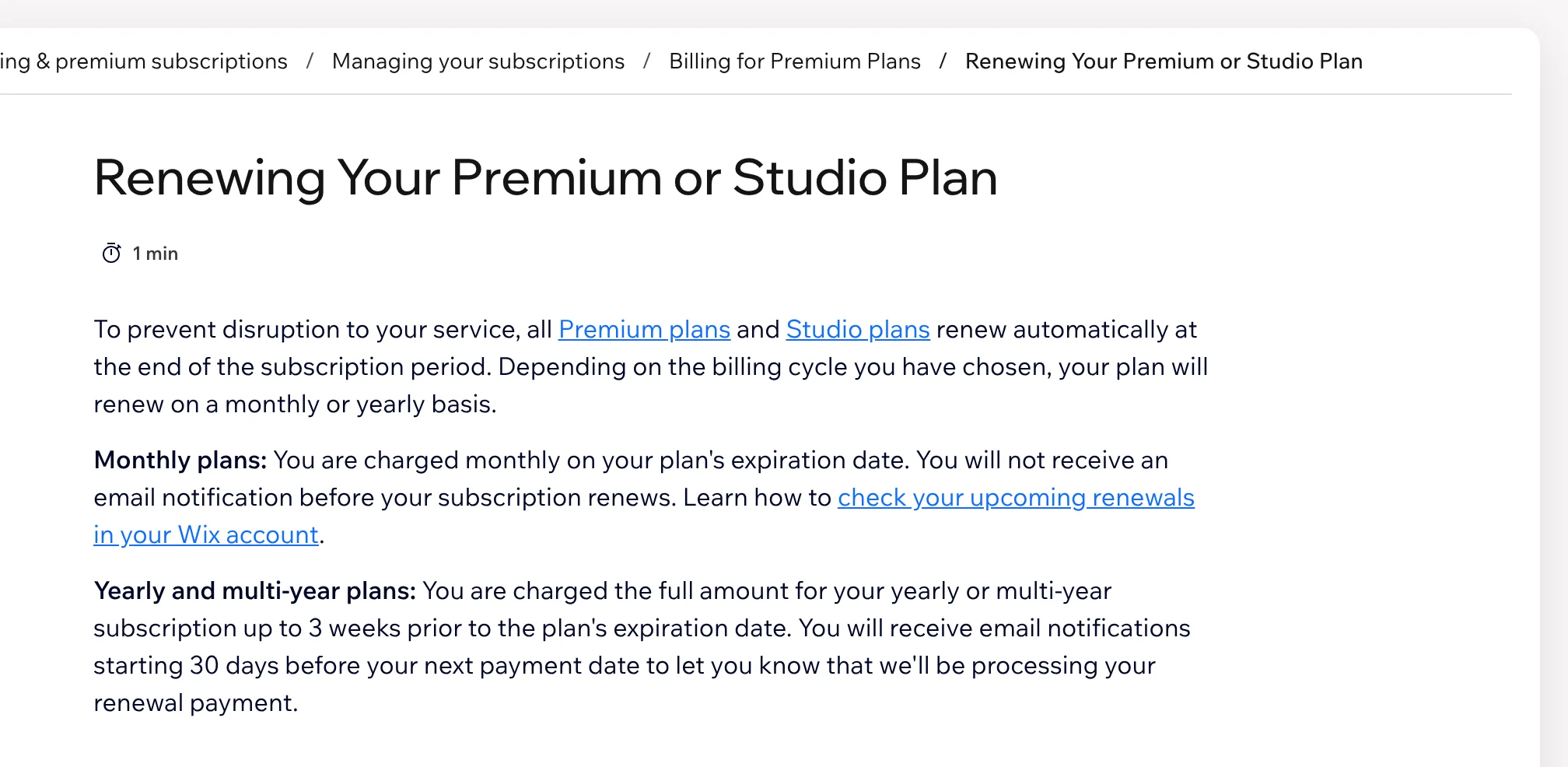
Wix Help Center, captured November 23, 2026.
Squarespace emails a reminder "15 days before your annual subscription renews"; monthly subscriptions renew "without an email reminder". On price rises it says you "pay the updated price on your next scheduled renewal date" (Squarespace renewals). Neither page promises that your renewal price will match your first-year price. Put the renewal date in your calendar either way.
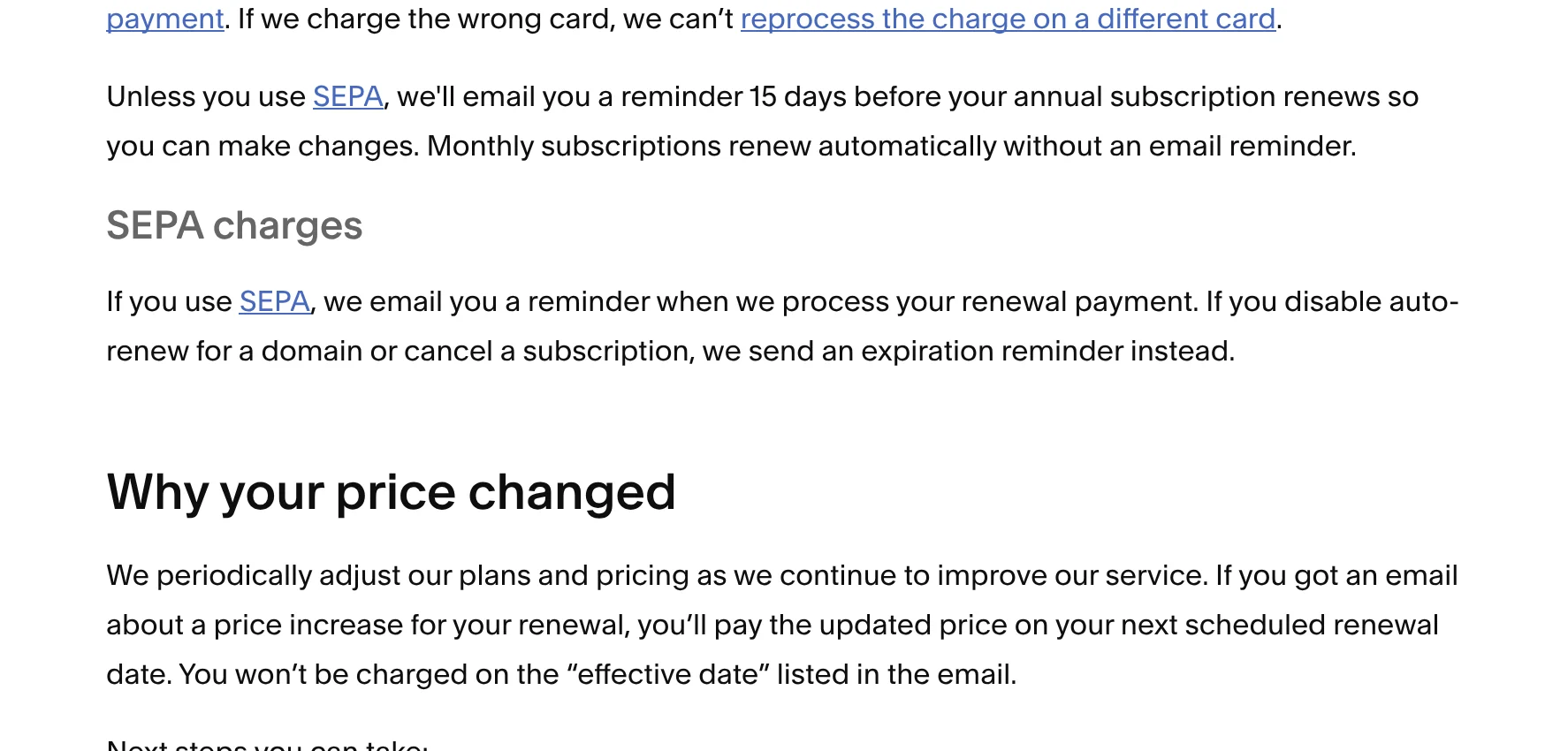
Squarespace Help Center, captured November 23, 2026.
Design, templates and editor: neither lets you swap a finished site’s look
Both vendors lead with templates, and neither lets you apply a new template to a site you already built. The difference is what you do instead.
Wix advertises "2,000+ templates" (Wix plans). Its help center is plain about switching: "it's not possible to switch to a different template for a site you already created". You create a new site, copy elements and pages over, and move your plan and domain. The site theme, design and layout, contacts and site members are on the list of things that do not transfer (Wix: switching your site template).
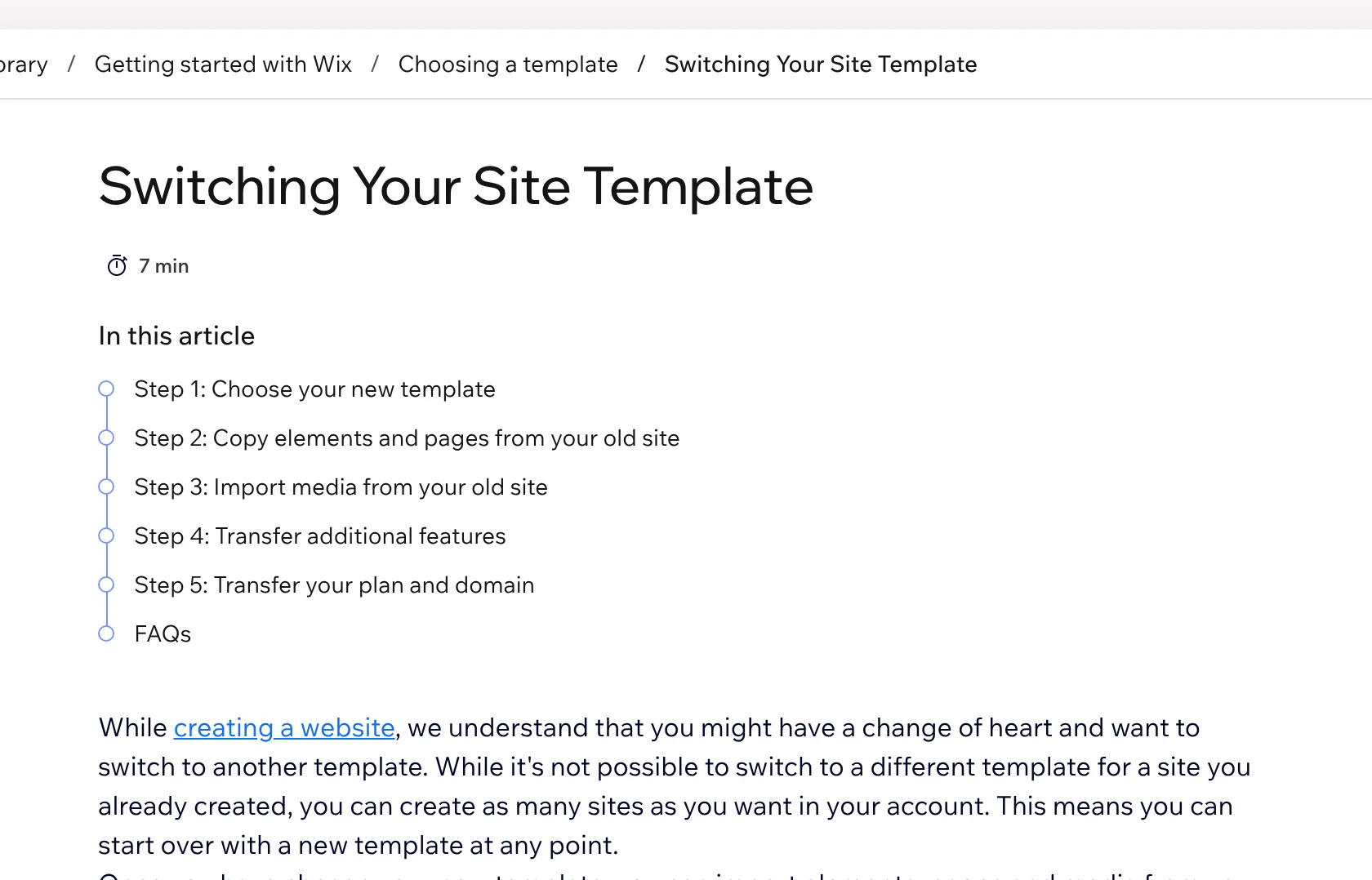
Wix Help Center, captured November 23, 2026.
Squarespace changed the question with version 7.1. "Every site on version 7.1 has the same features and style options, so you don't need to switch templates to get new features or styles" (Squarespace: how templates work). You restyle the same site in the Site styles panel. On older 7.0 sites, each template has fixed style settings and features.
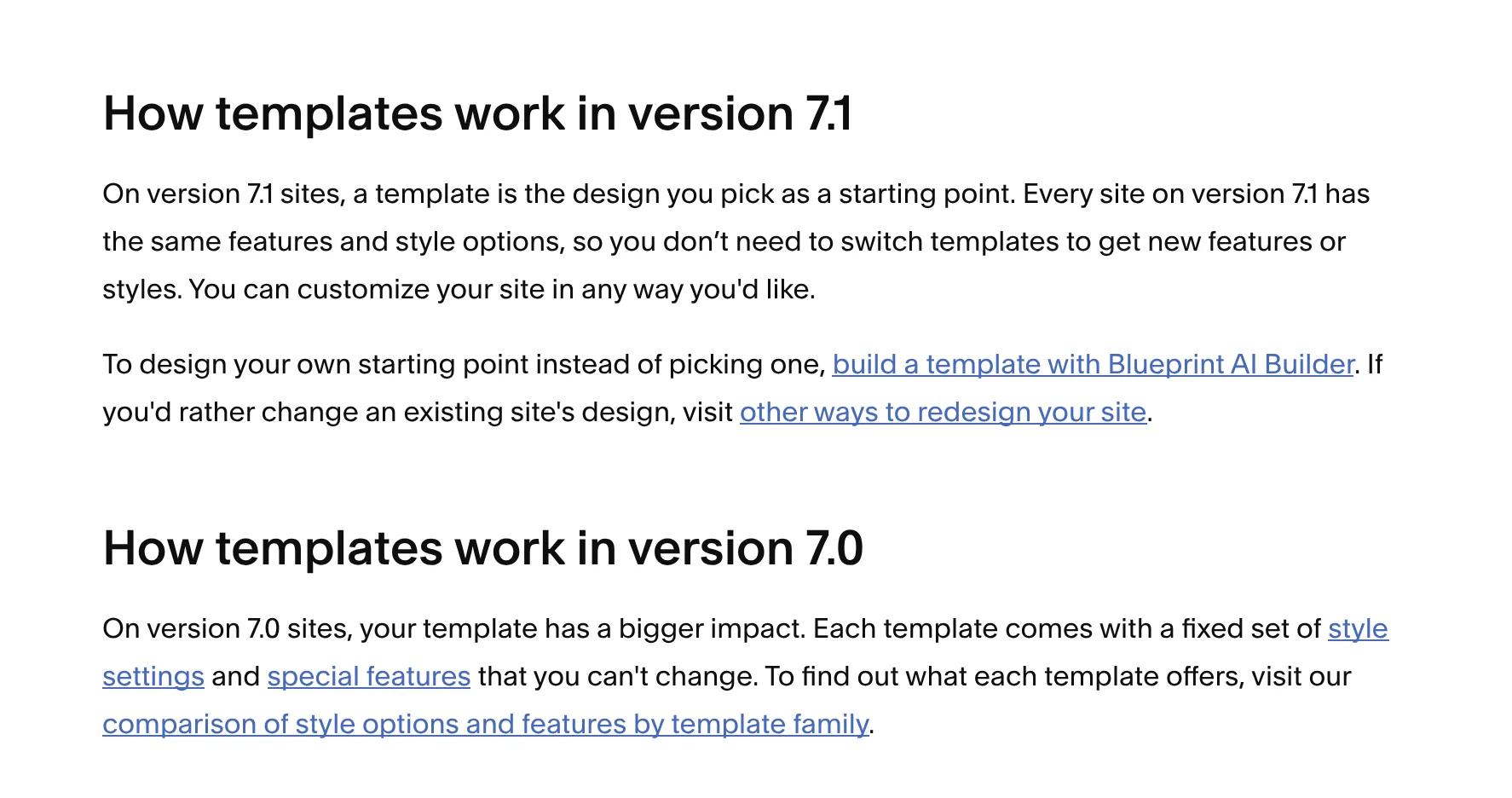
Squarespace Help Center, captured November 23, 2026.
On paper, Squarespace's approach is kinder to a redesign two years from now: same site, new styles, no copy-and-paste rebuild. Wix gives you more freedom on the first build and a harder reset later. If you expect to hire help for that later rebuild, our guide to website redesign cost has a budget model and an RFP template.
The editor: freeform canvas or a structured layout
Both vendors now describe a drag-and-drop editor with AI help, so the gap is smaller than older comparisons suggest. Wix's examples page says you can "freely arrange text, visuals, buttons and entire sections as you build", plus scroll effects and animations (Wix website examples). Squarespace's AI builder page says you can "drag, drop, resize, and rearrange content across desktop and mobile without code" (Squarespace AI website builder).
Squarespace frames its editor around sections and site-wide styles, as its template article shows. That keeps fonts and colors consistent, which suits owners who would rather not make design decisions. Wix's freer canvas suits owners who want to place an element exactly where they see it. It also leaves more of the layout decisions to you. If this is your first site, our guide to the best website builder for beginners compares Wix, Squarespace and other builders on how quickly you can publish and what you pay in year two.
Wix Studio vs Squarespace
Wix Studio is Wix's separate platform "for designers and developers", aimed at agencies and freelancers (Wix plans). If you build sites for clients, compare Wix Studio rather than the standard Wix editor. Squarespace has no separate product for that. It runs a free partner program instead, Squarespace Circle, which offers discounts on new annual subscriptions, extended free trials for client sites and priority support by tier. For a business owner building one site, the standard Wix editor is the fair comparison.
Wix vs Squarespace for SEO: what each lets you change
Both cover the basics, and our measurement found titles and self-referencing canonical tags on all 20 homepages. The difference is control. Wix documents more settings you can change in its dashboard; Squarespace decides more for you, and more of what goes beyond its defaults needs custom code.
Wix creates "a default canonical URL for all of your pages", which you can change per page in the Advanced SEO tab (Wix SEO panel). It has a Robots.txt Editor in the SEO dashboard, with a warning that edits "may cause issues" (Wix robots.txt). For structured data, Wix adds preset markup to store, bookings, blog and event pages. It can generate markup for blog posts with AI, and it accepts your own JSON-LD, "less than 7,000 characters" and up to five markups per page (Wix structured data).
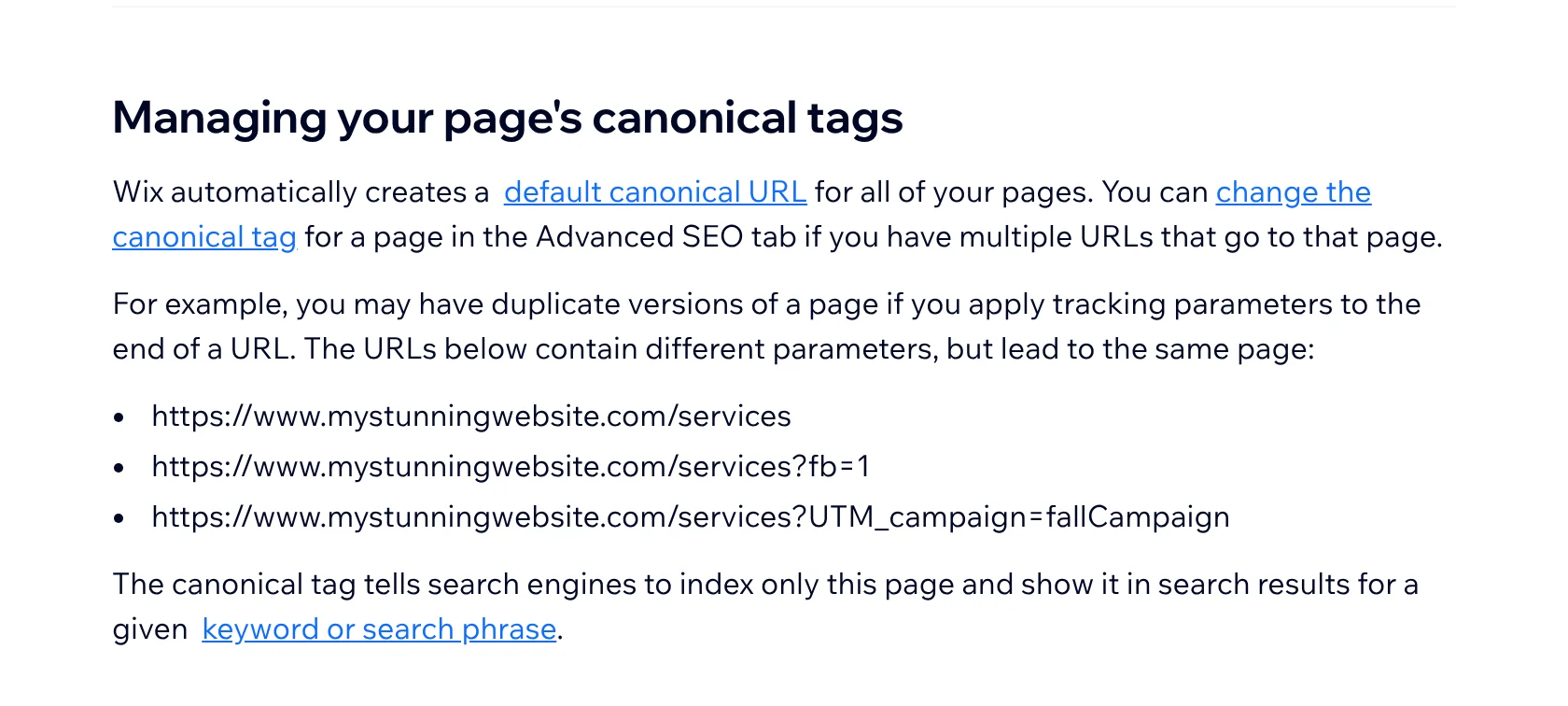
Wix Help Center, captured November 23, 2026.
Squarespace creates and updates a sitemap automatically, redirects extra domains to your primary one, and generates structured data. Its help page names six schemas, blog post, event, local business, organization, product and website, "which you can't edit or remove" (Squarespace SEO). You write SEO descriptions yourself, up to 400 characters (Squarespace SEO descriptions). Squarespace's SEO overview page adds that its Customer Support "can't assist with SEO strategy". None of the Squarespace help pages we read describe a robots.txt editor.
You can still add your own structured data on Squarespace, with a catch. Code injection, which adds "HTML and scripts" to the site header, footer or a single page's header, is "available in the Core, Plus, Advanced, and some legacy billing plans" (Squarespace code injection). The pricing page lists it as not included on Basic (Squarespace pricing). A JSON-LD script placed there sits alongside the automatic schemas, which stay in place. Squarespace's support team "can't help you add custom code" or troubleshoot it. On Wix, the same job is done in a structured data panel rather than in code injection.
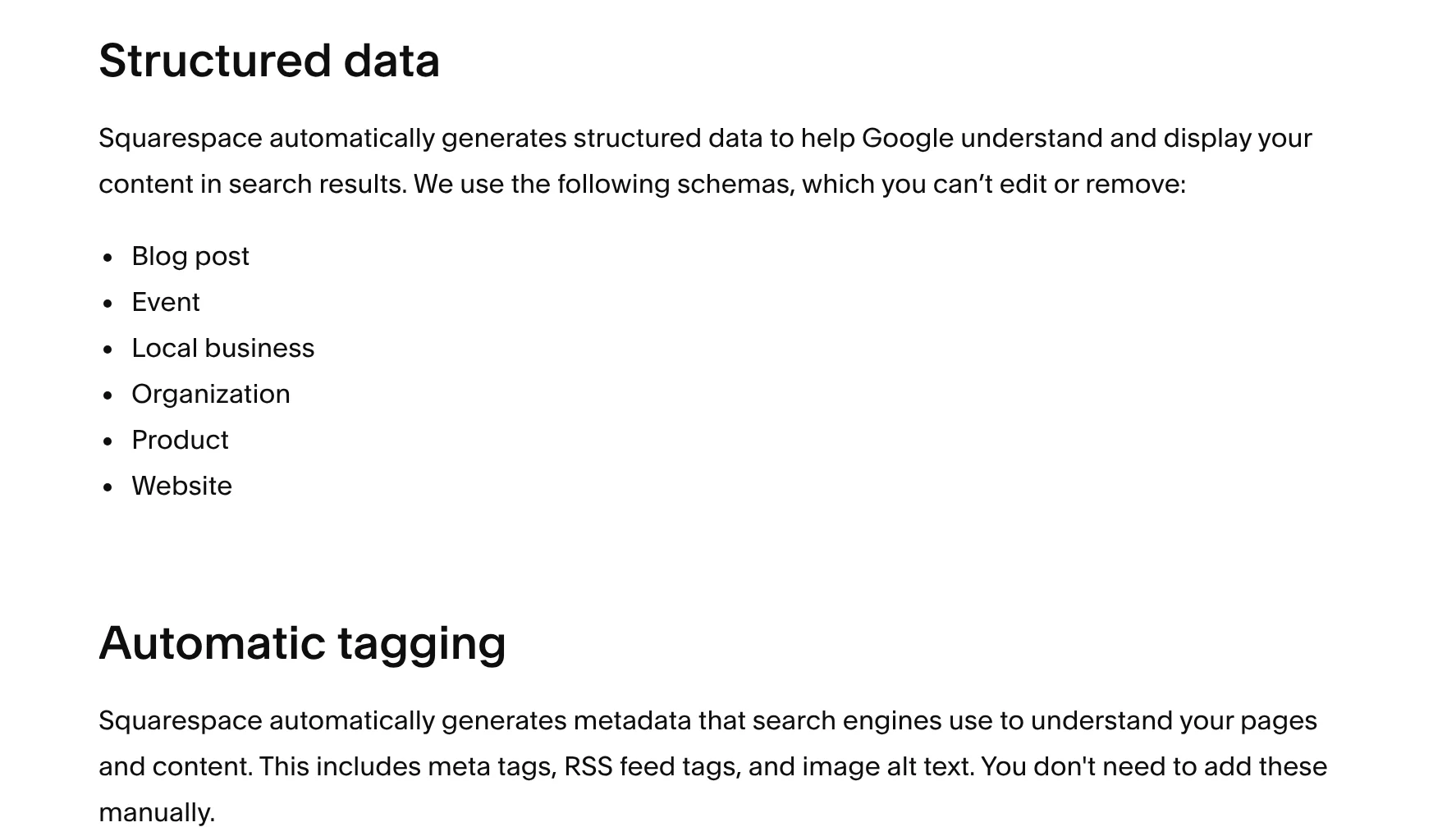
Squarespace Help Center, captured November 23, 2026.
Both let you ask AI crawlers to stay away. Wix's guide has you add Disallow lines for bots such as GPTBot and CCBot in the Robots.txt Editor (Wix: blocking AI crawlers). Squarespace has a checkbox, "Block known artificial intelligence crawlers", under Settings › Crawlers; it is unchecked by default and, in Squarespace's words, "doesn't guarantee" that the bots comply (Squarespace: request that AI models exclude your site).
If you want to tune what search engines see in a dashboard, Wix gives you more to work with. If you would rather never touch those settings, Squarespace's defaults cover the common cases. For a Wix-specific checklist, see our Wix SEO guide. For a wider view across ten builders, see best website builder for SEO.
What we measured on 20 live showcase homepages
We did not build test sites, so we measured the sites each vendor shows off. On those homepages the Wix sites were faster in Lighthouse's mobile lab test and carried fewer script files. The Squarespace sites more often had LocalBusiness or Organization structured data. Both platforms sent their text in the HTML without JavaScript.
How we picked the sites. For Wix we took the default grid on Wix's website examples page, in page order, and followed each tile to the live site. For Squarespace we took the site links on its customer examples page in the order they appear in the page's HTML. That page reshuffles its visible grid on each load, so we saved the list we used. We kept a site if its homepage returned HTTP 200 and showed its platform: Wix's generator tag, or Squarespace references in the HTML. Two of the first ten Wix tiles failed: one returned 404, and DataForSEO reported the other's domain as not found. We moved down the grid. Tile 11 passed; tile 12 redirected to a page without a Wix generator tag, so we took the first tile on the second page. The first ten Squarespace links all passed.

Wix's website examples page, the source of the Wix sample, captured November 23, 2026. A cookie banner was hidden before the capture.

Squarespace's customer examples page, the source of the Squarespace sample, captured November 23, 2026. The thumbnails come from an image host our browser could not reach, so only the names show. The visible grid reshuffles on each load, so its order here differs from the HTML order we sampled.
What we ran. After screening the candidates at about 09:34 UTC on November 23, 2026, we made four DataForSEO requests for each homepage between 09:36 and 09:51 UTC. Two were on-page crawls, one with JavaScript off and one with it on. The other two were Lighthouse 13.4.0 runs on mobile settings for performance and SEO. A small script inside the crawl listed the JSON-LD types and counted script tags. Each site's Lighthouse figure is the average of its two runs; the two runs differed by a median of 3 points, and by up to 21. The 106 calls in this study, including the screening of candidates, cost US$0.24 in total.
| Homepage measure, median of 10 | Wix | Squarespace |
|---|---|---|
| HTML size, uncompressed | 728 KB | 640 KB |
| Visible words without JavaScript | 266 | 298 |
| Visible words with JavaScript | 266 | 305 |
| Script files counted by the crawler | 10 | 28.5 |
| All script tags in the HTML | 60 | 50.5 |
| Title tag / meta description | 10 / 8 of 10 | 10 / 6 of 10 |
| Self-referencing canonical | 10 of 10 | 10 of 10 |
| Exactly one H1 | 4 of 10 | 3 of 10 |
| JSON-LD types found | WebSite on 10; LocalBusiness on 4 | WebSite on 10; LocalBusiness on 8; Organization on 4 |
| Lighthouse performance, mobile (range) | 71 (46.5 to 98) | 52 (4 to 66.5) |
| Lighthouse SEO, mobile | 96 | 96 |
| Largest Contentful Paint (LCP), lab | 6.7 s | 12.2 s |
| Total Blocking Time (TBT), lab | 198 ms | 538 ms |
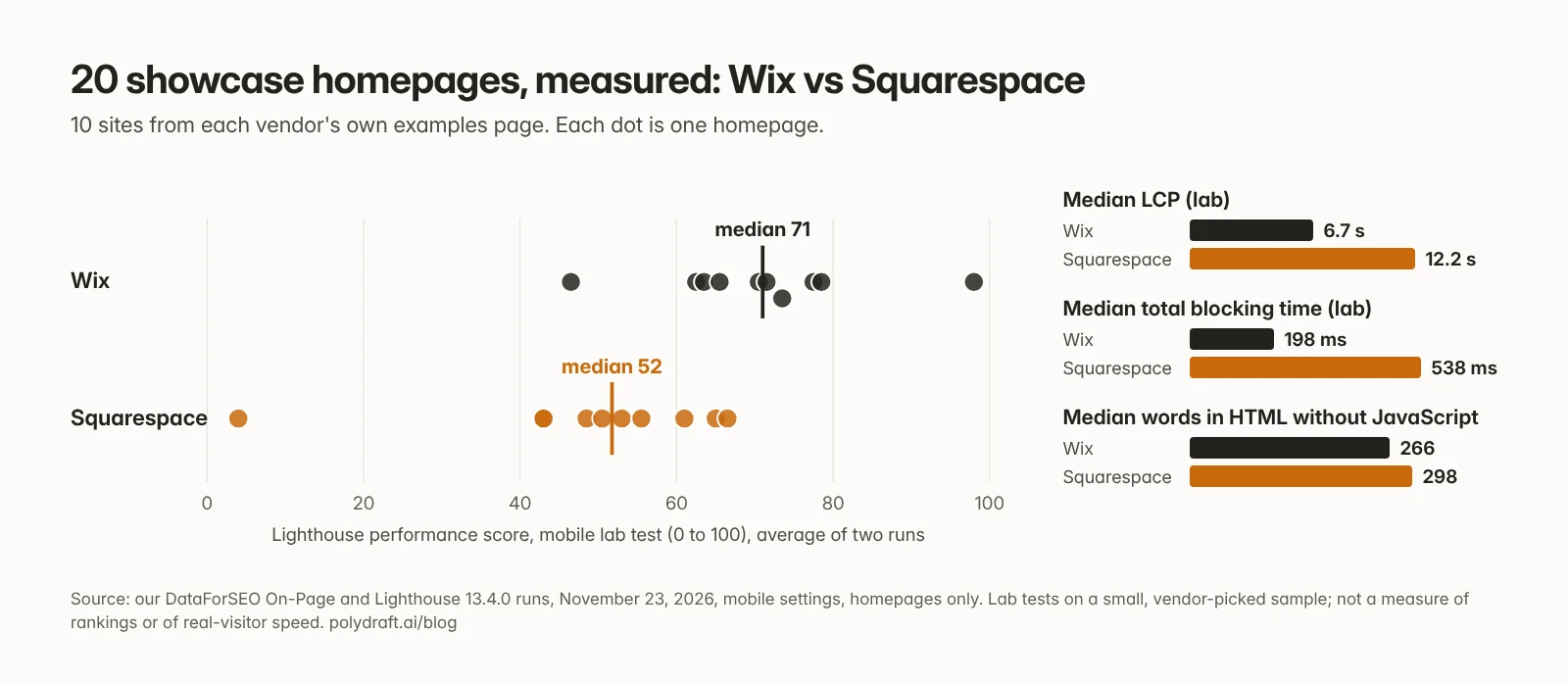
Our own chart from the DataForSEO results above, November 23, 2026. Each dot is one homepage, averaged over two Lighthouse runs.
Per-site results
Each row is one homepage, in the order we sampled it. Lighthouse, LCP and TBT are the average of two mobile runs on November 23, 2026. JSON-LD types leave out nested helper types such as PostalAddress.
| Homepage | Platform | Lighthouse performance, mobile | LCP, lab | TBT, lab | Words without JavaScript | H1 tags | JSON-LD types |
|---|---|---|---|---|---|---|---|
| puffinpackaging.co.uk | Wix | 63.5 | 4 s | 888.5 ms | 308 | 1 | WebSite |
| tiannawolfson.com | Wix | 78.5 | 5.95 s | 49.5 ms | 83 | 1 | WebSite |
| photodesign.co.uk | Wix | 98 | 2.05 s | 30 ms | 377 | 5 | LocalBusiness, WebSite |
| awakenstudio.nyc | Wix | 62.5 | 9.55 s | 89 ms | 980 | 2 | WebSite |
| generationshe.co | Wix | 73.5 | 7.15 s | 59.5 ms | 369 | 21 | WebSite |
| yukaidu.com | Wix | 71.5 | 9 s | 194 ms | 85 | 0 | CollegeOrUniversity, WebSite |
| hedof.com | Wix | 77.5 | 5.05 s | 260.5 ms | 136 | 1 | LocalBusiness, WebSite |
| festelastore.com | Wix | 70.5 | 13.15 s | 201 ms | 75 | 0 | WebSite |
| blackagsummit.com | Wix | 65.5 | 6.85 s | 350 ms | 458 | 0 | LocalBusiness, WebSite |
| themightyspice.co | Wix | 46.5 | 6.45 s | 3,435.5 ms | 224 | 1 | LocalBusiness, WebSite |
| caylonhackwith.com | Squarespace | 55.5 | 10.35 s | 591.5 ms | 7 | 1 | LocalBusiness, Organization, WebSite |
| myrtlegreen.org | Squarespace | 48.5 | 13.85 s | 532 ms | 510 | 1 | LocalBusiness, WebSite |
| guchagucha.com | Squarespace | 4 | 27.65 s | 2,968 ms | 1,100 | 10 | LocalBusiness, Organization, WebSite |
| thegarretgroup.com | Squarespace | 61 | 13.65 s | 238 ms | 283 | 10 | WebSite |
| sisubar.com | Squarespace | 66.5 | 3.65 s | 544.5 ms | 128 | 1 | LocalBusiness, WebSite |
| wearesunnie.com | Squarespace | 53 | 8.55 s | 522.5 ms | 367 | 0 | LocalBusiness, WebSite |
| pottedplantdesign.com | Squarespace | 65 | 9.1 s | 204.5 ms | 22 | 3 | LocalBusiness, Organization, WebSite |
| onemag.us | Squarespace | 43 | 10.65 s | 532 ms | 312 | 0 | LocalBusiness, Organization, WebSite |
| shopmemor.com | Squarespace | 50.5 | 16.35 s | 601 ms | 20 | 0 | LocalBusiness, WebSite |
| littleripper.la | Squarespace | 43 | 20.6 s | 787.5 ms | 327 | 6 | WebSite |
What the numbers say, and what they don't:
- Text arrives in the HTML on both. Word counts barely changed when JavaScript ran: they were identical on all 10 Wix sites and within 64 words on the Squarespace sites. A crawler that does not run JavaScript still sees the copy.
- Wix pages were lighter on script files, heavier on inline code. The crawler counted about 10 script files per Wix homepage against 28.5 on Squarespace. Counting every script tag, inline ones included, Wix had more.
- Neither platform was fast in the lab. One of 20 homepages reached Google's 2.5-second LCP target on Lighthouse's simulated mid-range phone. Image-heavy showcase sites are a hard case, and lab scores move between runs.
- Headings are the owner's job. Six Wix and seven Squarespace homepages had no H1 or several. Both editors let you set headings; showcase sites skip them anyway.
- Our earlier test agrees on direction. On November 14, 2026 we measured five other sites per builder, picked from DataForSEO's technology index. Wix's median mobile performance was 54 and Squarespace's 33 (best website builder for SEO).
Keep the limits in view. This is 10 sites per platform, homepages only, on one day. The vendors chose these sites for their looks, not their speed. Lighthouse is a lab test, not data from real visitors, and none of these figures shows how a site ranks. Treat the gap as a reason to keep your own homepage light, whichever platform you choose.
Selling online: plan fees and card rates
For a small shop, card processing costs the same on both at the entry level; the difference is Squarespace's extra fee on Basic. Squarespace charges a commerce transaction fee of 2% on Basic and 0% on Core, Plus and Advanced (Squarespace transaction fees). Squarespace Payments charges standard US cards 2.9% + $0.30 on Basic and Core, 2.7% on Plus and 2.5% on Advanced, each plus $0.30. Digital products carry their own fee, from 7% on Basic down to 0% on Advanced.
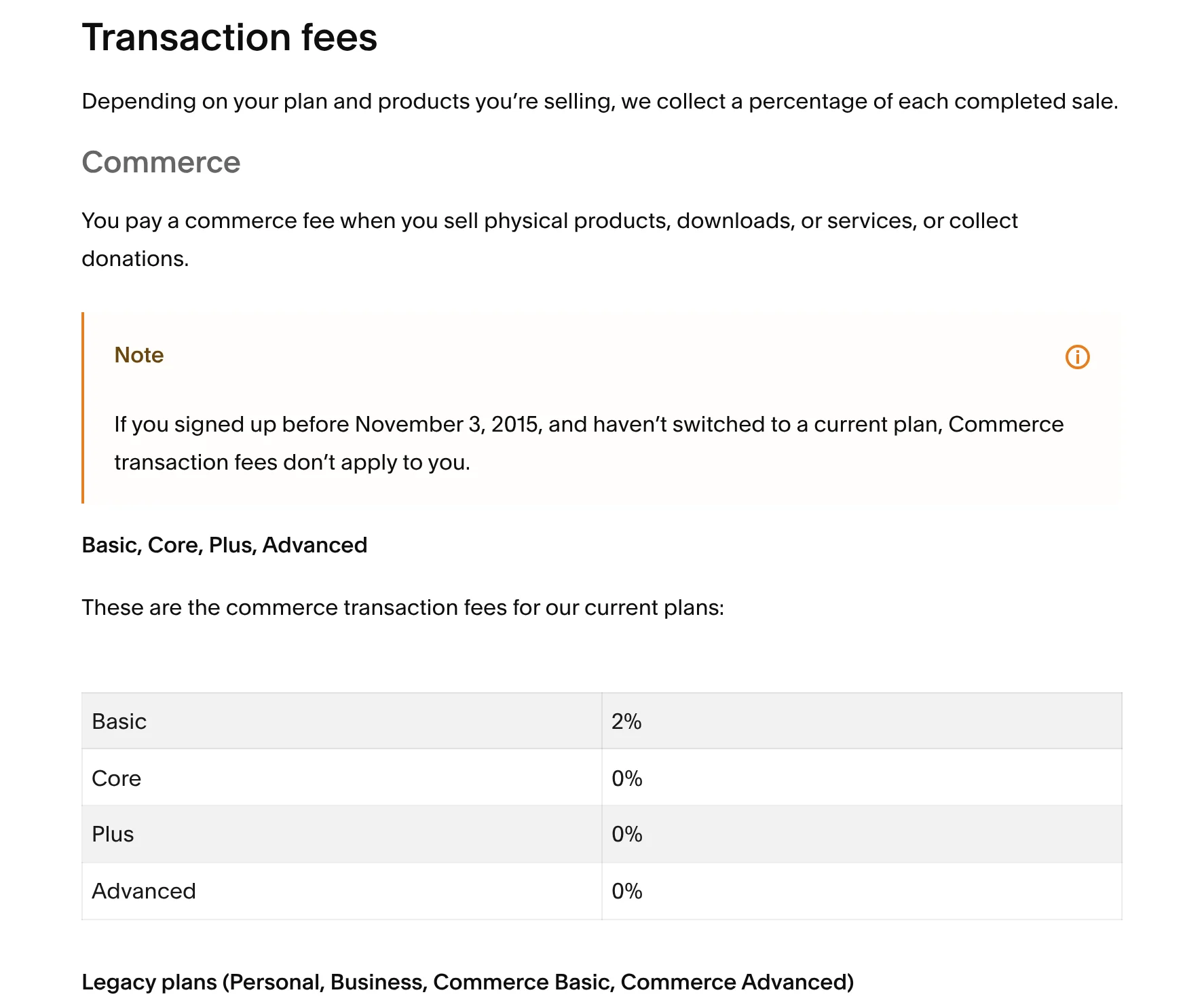
Squarespace Help Center, captured November 23, 2026.
Wix Payments' default US processing fee is "2.9% + 0.30 USD" (Wix Payments fees). The Wix plan cards list "Accept payments" from Core up, with "Basic", "Standard" or "Advanced" ecommerce by tier. We found no separate Wix commerce fee on the pages we read.
When does Squarespace Core pay for itself over Basic? Core costs $120 more a year when both are billed yearly ($348 against $228). Basic's 2% commerce fee reaches $120 at $6,000 of store sales a year. Below that, Basic is cheaper; above it, Core is. Core also adds unlimited contributors and a free year of Google Workspace email.
AI features and support: what each vendor says
Both now build a first draft from a description, then let you edit by hand or by asking an assistant, and both list round-the-clock help. These are vendor descriptions; we did not use either tool or contact either support team.
Wix's AI page promises to "go from a prompt to a business-ready website" and introduces Aria, "your built-in AI agent", for editing and business questions. It also mentions an "AI marketing agent" (Wix AI website builder).

Wix's AI website builder page, captured November 23, 2026. A cookie banner was hidden before the capture. Vendor claims.
Squarespace calls its builder Blueprint AI and describes a "multi-page starting point with relevant content, imagery, and styling". It also lists AI image generation, AI-built custom sections and an AI assistant (Squarespace AI website builder). Its Design Intelligence page adds a tool to "see whether your business appears in AI answers" (Design Intelligence). The pricing cards meter this with AI credits: 10 one-time on Basic, then 20, 40 and 120 a month. Before you rely on either AI builder, run the checks in our guide on how to evaluate an AI website builder.

Squarespace's AI website builder page, captured November 23, 2026. Two parts of the page are shown; an empty block between them was cut. "One of TIME's Best Inventions of 2025" is Squarespace's claim.
Support
Both list round-the-clock help, in different forms. Wix's plans page lists "24/7 customer care". Its contact article offers a chat "to get help right away, 24/7", where you can ask for a Customer Care Expert to step in, plus English callbacks 24/7 and English chat hours of Monday to Friday, 2 a.m. to 6 p.m. Eastern (Wix Customer Care). Squarespace's pricing page lists "24/7 Support" from its Customer Care team, and its help center offers email, chat and social media. Neither vendor's support will set your SEO strategy: Squarespace says so, and Wix says Customer Care cannot help with structured data or robots.txt changes.
Leaving later: what you can take with you
Plan the exit before you pick, because both platforms make leaving a rebuild. Wix is the stricter of the two.
Wix's help center says a Wix site "needs to be hosted and operated on Wix's servers". The reason given is that its SaaS architecture "does not support external hosting". You keep your content, which "belongs to you", and you can connect or transfer your domain (Wix: exporting your site). There is no export of the site itself.
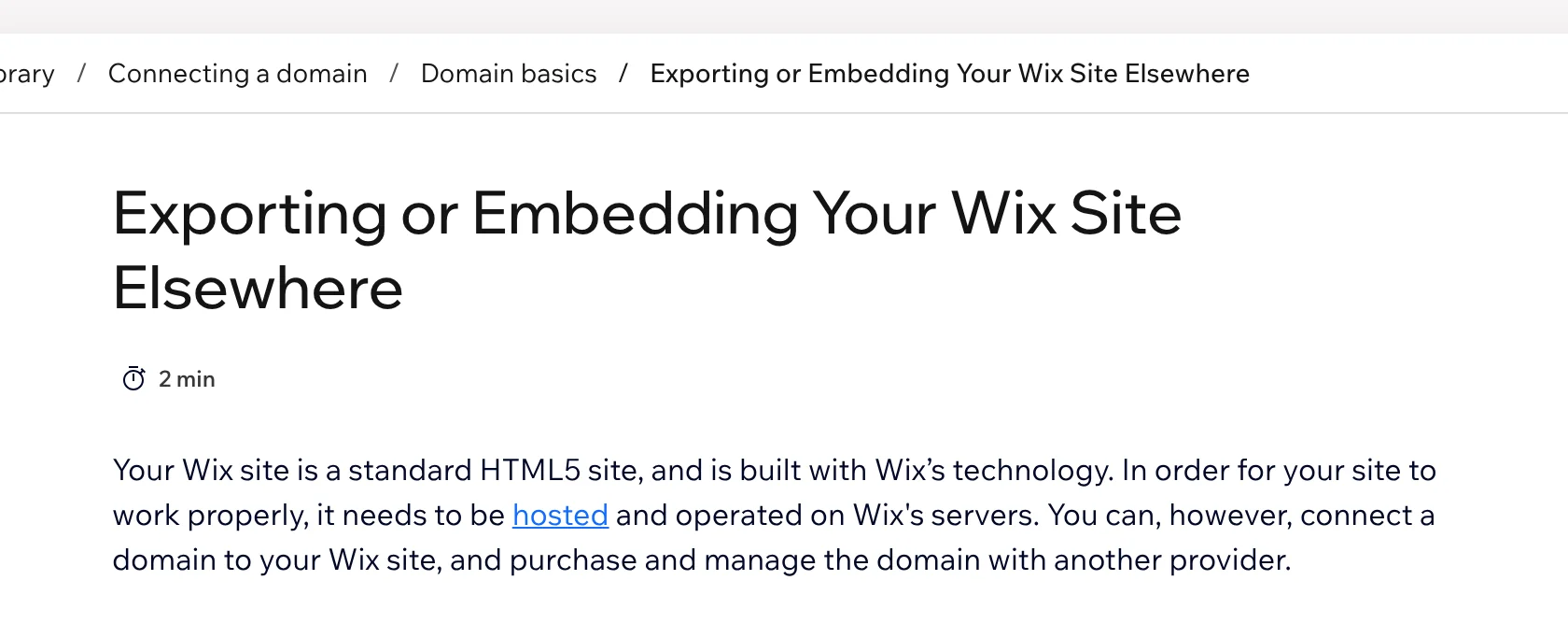
Wix Help Center, captured November 23, 2026.
Squarespace exports an .xml file "in WordPress format", even if you are not moving to WordPress. It includes layout pages, one blog with its posts, text and image blocks. It leaves out store pages, portfolio pages, more than one blog, product, video and audio blocks, drafts, style settings and custom CSS (Squarespace: export your site content). Products and contacts export separately as .csv files. Images and uploaded videos cannot be exported in bulk; you download images one at a time from the Asset library (Squarespace import and export).
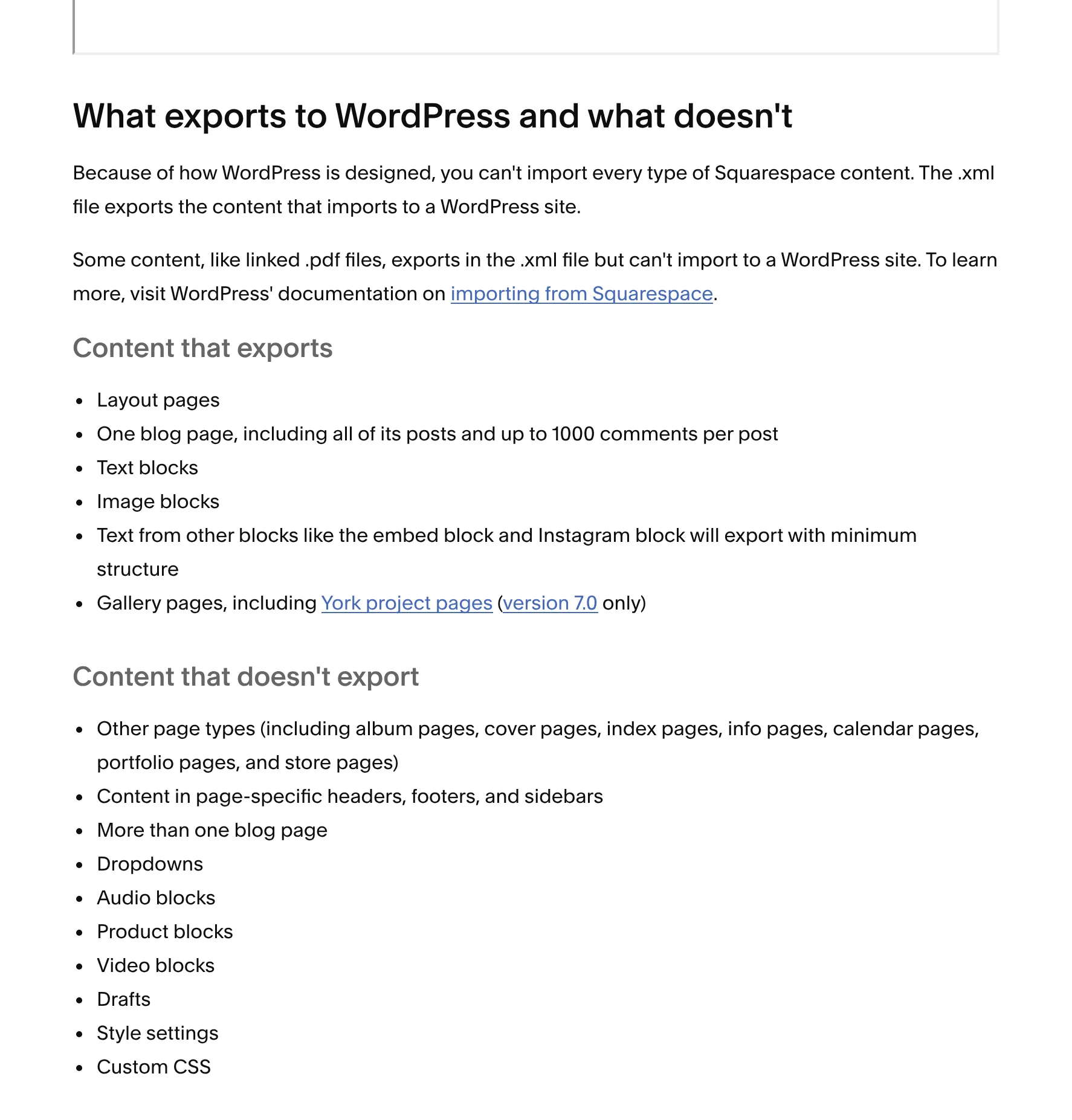
Squarespace Help Center, captured November 23, 2026.
If you might move within two years, Squarespace leaves you with more in hand. Either way, keep a list of your URLs and copies of your images from day one. Our guides to Wix alternatives and Squarespace alternatives cover the move itself, and the website migration checklist covers redirects. To keep your search traffic through the move, work through our redesign SEO checklist.
Wix vs Squarespace for photographers and portfolios
For a large photo library, Squarespace is the simpler buy on storage: its pricing page says "there are no caps on your bandwidth or storage usage" on every plan (Squarespace pricing). Wix sets storage by plan and lifts the cap only on Business Elite, at $159 a month billed yearly. Weigh that against exports, where neither is kind to portfolios.
| For a portfolio | Wix | Squarespace |
|---|---|---|
| Storage | Light 2 GB, Core 50 GB, Business 100 GB, Business Elite unlimited | No caps on storage or bandwidth on any plan |
| Video | Not broken out on the plan cards | 30 minutes on Basic, 5 hours on Core, 50 hours on Plus, unlimited on Advanced |
| Entry paid plan | Light, $204 a year billed yearly | Basic, $228 a year billed yearly |
| Exporting portfolio pages | No site export at all | Portfolio pages are left out of the .xml export |
| Getting your images out | Not covered on the pages we read | No bulk export; one image at a time from the Asset library |
| Asking AI crawlers to stay away | Add Disallow lines in the Robots.txt Editor | One checkbox in Settings › Crawlers |
Storage figures come from wix.com/plans and squarespace.com/pricing as of November 23, 2026. Thousands of full-size images can fill Wix Light's 2 GB; Wix's next step, Core at $348 a year, includes 50 GB. On Squarespace the storage question goes away, and the limit to watch is video if you show film work. Whichever you pick, keep your original files somewhere else: Squarespace has no bulk image export, and Wix has no site export.
Is Wix or Squarespace better? A decision table
Neither is better overall. Each is better for a particular owner, and the table below sorts by the situation you are in.
| Your situation | Pick | Why, from the evidence above |
|---|---|---|
| You want to start free and upgrade later | Wix | Wix has a free plan; Squarespace offers a 14-day trial |
| Portfolio or brochure site, lowest yearly cost | Wix Light | $204 a year against $228 for Squarespace Basic, both billed yearly |
| Photographer with a large image library | Squarespace | No storage caps on any plan; Wix Light holds 2 GB and Core 50 GB |
| You want design decisions made for you | Squarespace | Site-wide styles; 7.1 lets you restyle the same site later |
| You want to place every element yourself | Wix | Freeform canvas; harder reset later, since templates can't be swapped |
| Small shop under $6,000 a year in sales | Squarespace Basic or Wix Core | Basic's 2% fee costs less than the step up to Core at that volume; Wix Core, not Light, because Light does not list "Accept payments" |
| Small shop above $6,000 a year | Squarespace Core or Wix Core | Both $348 a year billed yearly; Squarespace Core has no store fee, and Wix lists none on the pages we read |
| You want to edit robots.txt or manage schema in a dashboard | Wix | Robots.txt Editor and a structured data panel; Squarespace's own schemas can't be edited, and custom JSON-LD needs code injection on Core and up |
| You will want to leave within two years | Squarespace | Partial WordPress-format export; Wix sites can't leave Wix's servers |
| You build sites for clients | Compare Wix Studio | A separate Wix platform for designers and agencies |
| You pay monthly and may cancel soon | Check Wix checkout | Squarespace monthly costs 32% to 40% more (pricing); Wix shows monthly prices only at checkout, and a first upgrade can be refunded in full within 14 days |
Wix vs Squarespace vs WordPress
WordPress is the third option people weigh, and it trades convenience for ownership. Self-hosted WordPress runs on hosting you choose and moves between hosts. In return, you handle updates, plugins and backups, or pay someone to. Pick it if ownership matters more than convenience. Pick Wix or Squarespace if you want one bill and no maintenance. The exit picture also differs: WordPress content moves with you, Squarespace exports part of a site in WordPress format, and Wix exports none. If you are already on WordPress and want a hosted builder instead, our list of WordPress alternatives compares the options. Our Webflow vs WordPress comparison covers the hosted-against-self-hosted trade-off in detail. The website maintenance cost guide prices the upkeep on each kind of platform.
Where PolyDraft fits
We make PolyDraft, an AI website builder that competes with Wix and Squarespace, so weigh this section accordingly. It fits a business that wants its marketing site built from a brief and wants ongoing search work done on it. Our pricing page lists weekly keyword opportunities from Search Console, new articles and refreshes on every plan, from $39 a month. Content is published after the user authorizes it. The same page lists "Your own cloud account, no hosting fees" and says "Your site keeps running if you cancel". Full source-code export is part of the Agency plan.
PolyDraft is the wrong choice in several cases. It does not sell online stores, so pick Wix or Squarespace for a shop. It has no freeform canvas for placing each element by hand. It also has no free plan to publish on; it is free to build and preview. We make no promise about rankings or traffic on any of the three.
Frequently asked questions
Who is cheaper, Squarespace or Wix?
Wix, at the low end. Wix has a free plan, and its entry paid plan is $17 a month billed yearly against $19 for Squarespace Basic. At the plan most small shops need, both are $29 a month billed yearly. Squarespace's monthly billing costs 32% to 40% more than annual (Squarespace pricing); Wix shows monthly prices only at checkout. Prices as of November 23, 2026.
What is the downside of Wix?
You cannot take the site with you: Wix says a Wix site must run on Wix's servers. You also cannot switch a finished site to a new template; you rebuild on a new site. The freeform canvas also leaves more design decisions to you. On the vendor's own showcase, 6 of 10 homepages had no H1 or more than one.
Is Squarespace still good in 2027?
Yes, for owners who want polished defaults. On November 23, 2026 it offered four plans from $19 a month billed yearly, Blueprint AI, automatic structured data and no storage caps. The trade-offs are no free plan, a 2% store fee on Basic, automatic schemas you cannot edit, and a partial export.
What is the downside to Squarespace?
There is no free plan, only a 14-day trial. Basic adds a 2% fee on store sales and leaves out code injection, so your own JSON-LD needs Core or higher. The export skips store and portfolio pages, and images come out one at a time. Monthly billing costs 32% to 40% more.
Is Wix more expensive than Squarespace?
No, not at list price. Billed yearly, Wix Light is $17 a month against $19 for Squarespace Basic, both Core plans are $29, and Wix Business is $39 against $49 for Squarespace Plus. Wix also has a free plan. Prices as of November 23, 2026 (Wix plans, Squarespace pricing).
Is Wix or Squarespace better for SEO?
Both cover the basics: all 20 of our showcase homepages had a title tag and a self-referencing canonical. Wix documents more dashboard controls, including a robots.txt editor and a panel for custom JSON-LD. Squarespace generates structured data you cannot change, and on Core and up you can add your own JSON-LD through code injection. Neither platform choice decides rankings; content and links matter more.
Can I move a site from Wix to Squarespace?
Not automatically. Wix offers no site export, so you rebuild the pages on Squarespace, copy your text and images across, and point your domain at the new site. Keep a list of old URLs, and add redirects so links and search results still land on the right pages.
Is Wix Studio better than Squarespace?
For agencies and freelancers building client sites, Wix Studio is the closer match, since Wix positions it for designers and developers. For one business owner building one site, compare the standard Wix editor with Squarespace instead.
Continue with the next task
- Work out your full first-year bill on Squarespace: Squarespace pricing
- Already on Wix and thinking of leaving: Wix alternatives
- Already on Squarespace and thinking of leaving: Squarespace alternatives
- See how ten builders measure on SEO basics and speed: best website builder for SEO
About this article. Drafted by an AI agent following PolyDraft's blog workflow, checked by an automated QA script and approved by Vincent Chen. Every vendor fact was read on the vendor's own page on November 23, 2026 and is logged with its capture file. Nothing here comes from a search excerpt. We did not open an account on Wix or Squarespace, so this is not a hands-on test, and checkout prices, including Wix's monthly prices, are not included. The homepage measurement, the cost tables and the decision table are our own work, with the method and limits stated above; every DataForSEO request and response is saved with its task ID, cost and SHA-256 hash. Vendor claims, such as Squarespace's TIME award, are labeled as theirs. Screenshots are captures of the vendor pages, cropped and resized but otherwise unchanged. PolyDraft is our product and competes with both.
Sources
Pages were opened on November 23, 2026 (UTC), US.
- Wix: plans, website examples, AI website builder
- Wix Help Center: monthly plans, renewals, switching your site template, SEO panel and canonical tags, robots.txt, structured data, Wix Payments fees, exporting your site, Customer Care, blocking AI crawlers
- Squarespace: pricing, customer examples, AI website builder, Design Intelligence, Circle
- Squarespace Help Center: renewals, how templates work, what Squarespace does for SEO, SEO descriptions, transaction fees, export your site content, import and export, code injection, request that AI models exclude your site
- DataForSEO: On-Page API, instant pages and Lighthouse (our measurement, November 23, 2026)
- PolyDraft: pricing