Webflow Pricing 2027: Plans, Seats and Year-Two Costs
Webflow pricing from its own pages: Basic $15 and Premium $25 a month billed yearly, plus seats, ecommerce, add-ons and worked year-two costs.
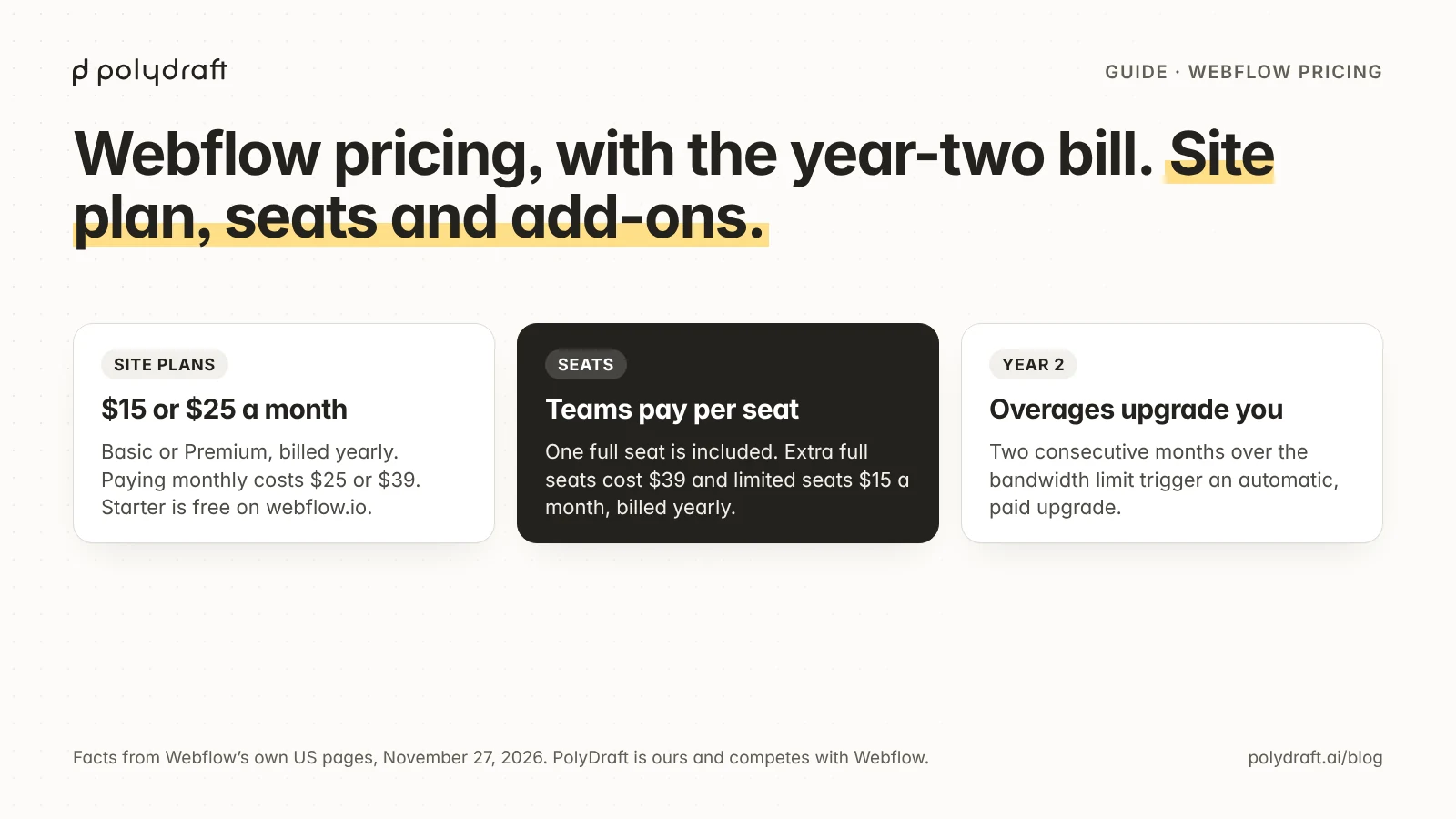
Webflow pricing starts with a free Starter plan that publishes only to a webflow.io address. To use your own domain, a site needs a paid Site plan: Basic costs $15 a month billed yearly ($180 a year) or $25 billed monthly. Premium, the plan with the CMS, costs $25 or $39. The Team plan costs $2,500 a month on an annual contract. Extra seats, add-ons and ecommerce plans are billed on top.
All figures are US list prices read on Webflow's own pages on November 27, 2026, before tax. We make PolyDraft, an AI website builder that competes with Webflow, so we mention it once, in a labeled section near the end. We did not buy a Webflow plan or open an account. What we added is the arithmetic: yearly totals, savings, break-even points and worked year-one and year-two budgets.
Key points
- Webflow bills two things separately. A Site plan pays for one published site. A Workspace plan and seats pay for the people who build it. A solo owner can stay on the free Workspace.
- Yearly billing saves 40% on Basic and 36% on Premium, by our arithmetic from the pricing page. Savings on seats, ecommerce and add-ons are smaller.
- Year two can cost more than year one. A site that stays over its bandwidth limit for two consecutive months is upgraded automatically, and the upgrade is not refundable.
- Webflow's help pages disagree on refunds. Its refund policy allows a full refund within 14 days of a new plan purchase; several billing articles say purchases are nonrefundable.
Webflow pricing in 2027: you pay per site, then per seat
Webflow pricing has two layers, and most people only need the first. Every site starts on the free Starter Site plan. You buy a paid Site plan for each site you want on a custom domain. Separately, every account gets a free Workspace, where sites are built and teammates are invited.
| Site plan (pricing page) | Billed yearly, per month | Billed yearly, per year | Billed monthly | 12 months, monthly | Yearly saves |
|---|---|---|---|---|---|
| Starter | Free | Free | Free | Free | – |
| Basic | $15 | $180 | $25 | $300 | $120 (40.0%) |
| Premium | $25 | $300 | $39 | $468 | $168 (35.9%) |
| Team (Platform plan) | $2,500 | $30,000 | Not offered | Not offered | – |
| Enterprise | Custom | Custom | Custom | Custom | – |
Source: Webflow pricing, captured November 27, 2026. The per-year, 12-month and saving columns are our arithmetic. The page says: "All prices in USD, per site, plus applicable taxes added at checkout."
Our screenshot service could not switch the page's Monthly/Yearly toggle, so monthly prices come from the page's HTML, which stores both values. Webflow's May 2026 article confirms the Basic and Premium monthly prices.
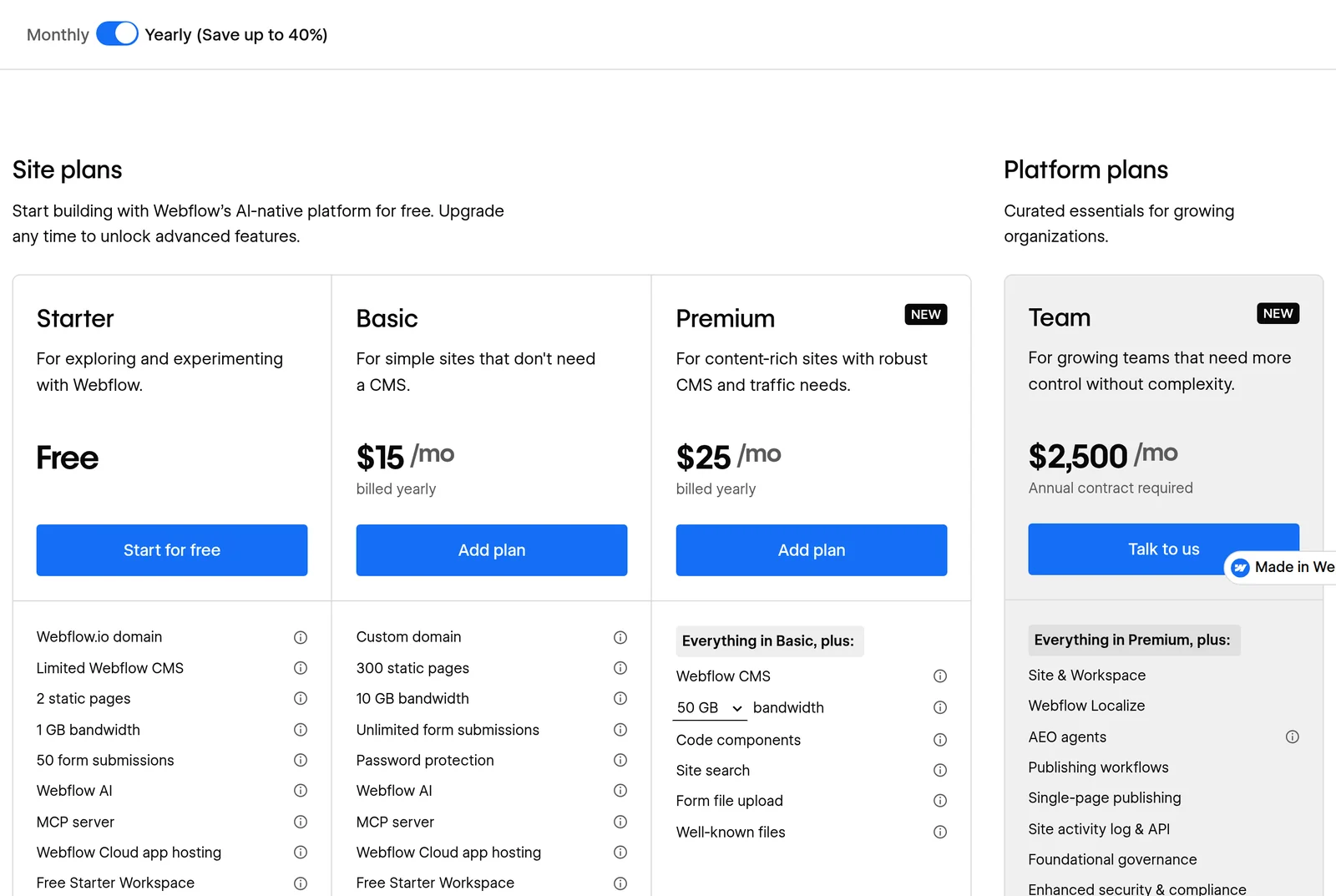
Webflow's pricing page with the toggle on "Yearly (Save up to 40%)", captured November 27, 2026. The site header is cropped out.
What each plan includes, from the plan cards and comparison table on the pricing page:
- Starter (free): a webflow.io domain, 2 static pages, 50 CMS items, 1 GB of bandwidth a month and 50 form submissions.
- Basic: "For simple sites that don't need a CMS." A custom domain, 300 static pages, 10 GB of bandwidth and unlimited form submissions. The CMS column shows no CMS items for Basic.
- Premium: for content-rich sites. It adds the CMS with 20,000 items and 40 Collections, and 50 GB of bandwidth, expandable to 2.5 TB with add-ons. It also adds code components, site search, form file upload and faster search indexing.
- Team: everything in Premium plus Webflow Localize with 2 locales, AEO agents, publishing workflows and priority support. The comparison table lists 5 full seats, 5 limited seats, 100,000 AI credits a year and up to 30 TB of bandwidth a year. Webflow pitches it "for fast-growing teams that have outgrown self-serve but aren't ready for Enterprise." Team is billed annually only, and Enterprise has no public price (May 2026 update).
A Site plan covers one site. Webflow's help says "each site you want to host with Webflow on a custom domain needs its own Site plan" (Choose a Site plan). Ten client sites mean ten Site plans.
What changed in 2026: CMS and Business became Premium
Older articles still quote CMS and Business plans, and those plans are gone for new buyers. From May 13, 2026, Webflow began "Combining CMS and Business Site plans into a unified plan called the Premium Site plan" (Updated pricing and simplified plans for May 2026). The blog announcement says the same.
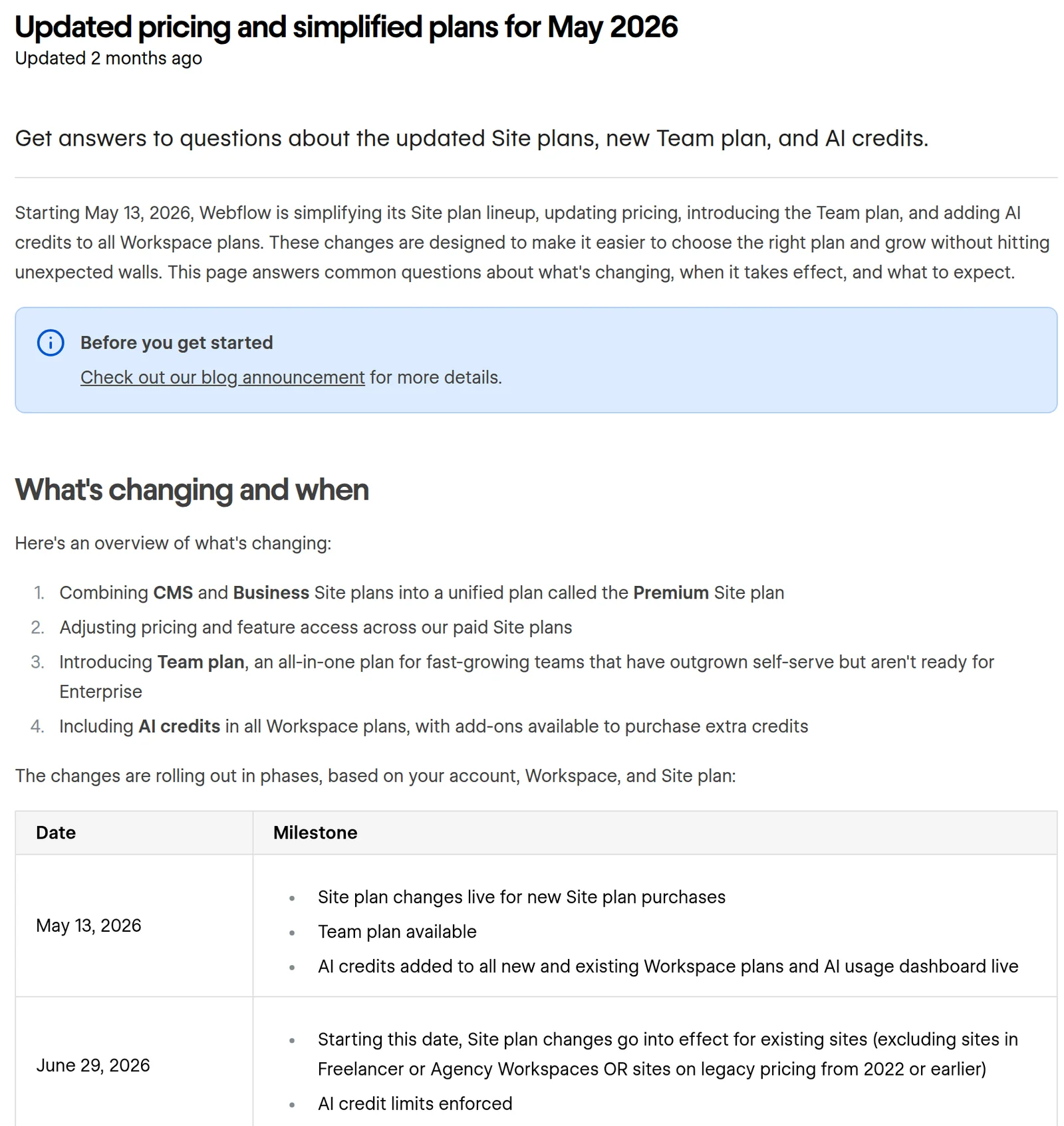
Webflow's help article on the 2026 plan changes, captured November 27, 2026.
The rollout ran in three steps, per the same article:
| Date | What took effect |
|---|---|
| May 13, 2026 | New prices for new Site plan purchases; Team plan available; AI credits added to every Workspace |
| June 29, 2026 | New prices for most existing sites at their next renewal or billable change; AI credit limits enforced |
| November 16, 2026 | New prices for sites in Freelancer or Agency Workspaces and sites on legacy pricing from 2022 or earlier |
Source: May 2026 update. A "billable change" means changing your base Site plan or switching between monthly and yearly billing.
What the change means for existing plans:
- Basic: the price rose to $15 a month yearly or $25 monthly, and the static page limit rose from 150 to 300.
- CMS: moved to Premium at $25 or $39. CMS items rose from 2,000 to 20,000 and Collections from 20 to 40.
- Business: moved to Premium, a lower plan price. Bandwidth fell from 100 GB to 50 GB, and sites that used more get bandwidth add-ons. In Webflow's own example, a yearly Business site using 150 GB goes from $59 to $65 a month.
- CMS items add-ons: removed, because Premium includes 20,000 items.
- Ecommerce: "Nothing is changing for the Ecommerce Site plans at this time."
Both dates for existing sites have now passed, but each site switches only at its first renewal or billable change after its date. A yearly plan that renewed just before then, or was locked in by switching to yearly, moves in 2027. Webflow's May 2026 article links to a pricing change calculator for existing sites. Two discounts also ended: Webflow for Students closed on February 28, 2026 (students discount), and the startups program was marked "discontinuing June 30, 2026" (discounts overview). Nonprofits can still get 50% off a new annual Premium plan for 12 months (nonprofit discount).
Is Webflow free? Yes to build, no to publish on your own domain
Webflow is free to build with, and you can publish a small site to a webflow.io address at no cost. The pricing page says: "Try Webflow for as long as you like with our free Starter plan" (Webflow pricing). There is no time limit, so it is not a trial. Hosting on your own domain needs a paid Site plan.
The free Starter Site plan is limited. Per the pricing page and the help article Choose a Site plan:
- It publishes only to a webflow.io subdomain; a custom domain needs a paid Site plan.
- It allows 2 static pages, 50 CMS items, 50 form submissions and 1 GB of bandwidth a month. The help article describes the limit as "up to 1,000 monthly visits".
- The "Made in Webflow" badge stays unless the Workspace is on a Growth or Agency plan, which can remove it from staged sites.
- Sitemap controls, crawler access, robots.txt and schema markup are marked "Must have a paid Workspace plan to access on a Starter site," and 301 redirects aren't available on Starter.
The free Starter Workspace adds 2 staging sites, 1 full seat and 200 AI credits a month. Each customer is limited to one free Workspace.
Monthly vs yearly billing: yearly saves up to 40% on Site plans
Yearly billing is cheaper on every Site plan, Workspace plan, seat, ecommerce plan and add-on we priced, but the discount varies a lot. It is largest on the Site plans and smallest on the top ecommerce plan. Webflow's help says yearly pricing lets you "pay upfront for a full year at a discounted rate" (Downgrade or cancel your Site plan). So Basic on yearly billing is one $180 charge.
| Product (pricing page) | 12 months, billed yearly | 12 months, billed monthly | Yearly saves |
|---|---|---|---|
| Basic Site plan | $180 | $300 | 40.0% |
| Premium Site plan | $300 | $468 | 35.9% |
| Ecommerce Standard | $348 | $504 | 31.0% |
| Ecommerce Plus | $888 | $1,008 | 11.9% |
| Ecommerce Advanced | $2,544 | $2,820 | 9.8% |
| Core Workspace | $228 | $336 | 32.1% |
| Full seat (each) | $468 | $540 | 13.3% |
| Limited seat (each) | $180 | $228 | 21.1% |
Source: Webflow pricing, yearly prices from the visible page and monthly prices from its HTML, November 27, 2026. Totals and percentages are our arithmetic.
You can switch cycles without canceling, and the prorated amount is shown at checkout. Switching a Site plan from yearly to monthly turns the unused time into Workspace credit, not cash (Switch your billing frequency).
Add-ons follow the Site plan's billing cycle and seats follow the Workspace plan's (Manage add-ons). Pay monthly only if you might drop the site within a year.
Webflow workspace and seat pricing: free for one person
A solo site owner pays nothing for the Workspace. The free Starter Workspace includes one full seat, and "Any Workspace tier can support an unlimited number of paid Site plans" (pricing FAQ). You pay for a Workspace plan when you need more staging sites, code export, client tools or more AI credits. Seats are a separate charge. To buy seats, "you don't need to upgrade your Workspace plan from the Starter plan" (Workspace and Site plans overview).
| Workspace plan (pricing page) | Billed yearly, per month | Billed monthly | Staging sites | AI credits a month | Notable extras |
|---|---|---|---|---|---|
| Starter | Free | Free | 2 | 200 | 1 full seat |
| Core | $19 | $28 | 10 | 300 | Custom code, code export, Shared Libraries |
| Growth | $49 | $60 | Unlimited | 400 | Site-level roles, publishing permissions, 301 redirects |
| Freelancer | $16 | $24 | 10 | 300 | 1 free client seat per site, client payments |
| Agency | $35 | $42 | Unlimited | 400 | 3 free client seats per site |
Source: Webflow pricing, "For teams" and "For freelancers & agencies" tabs, read from the page's HTML on November 27, 2026; AI credit counts also from Webflow AI credits.
Seats, from the "Add seats" block on the pricing page:
- Full seat: "Design full sites or manage admin settings." $39 a seat a month billed yearly, or $45 monthly.
- Limited seat: "Edit content or build pages with components." $15 a seat a month billed yearly, or $19 monthly.
- Free seat: "Invite reviewers and commenters." $0. The Choose a Workspace plan article allows up to 100 free Reviewer seats.
So a team of three designers on Core costs $228 + 2 × $468 = $1,164 a year on yearly billing, by our arithmetic. Code export, which lets you host the HTML and CSS elsewhere, needs a paid Workspace plan. CMS content can't be exported as code, per the pricing table. If that matters, our Webflow vs WordPress comparison covers the trade-off.
Webflow ecommerce pricing: $29 to $212 a month, plus a fee on Standard
A Webflow store needs an Ecommerce Site plan, which replaces Basic or Premium for that site. Webflow says you "will need an Ecommerce plan to enable checkout" (Choose a Site plan).
| Ecommerce plan (pricing page) | Billed yearly, per month | Billed monthly | Ecommerce items | Webflow transaction fee | Staff accounts |
|---|---|---|---|---|---|
| Standard | $29 | $42 | 500 | 2% | 3 |
| Plus | $74 | $84 | 5,000 | 0% | 10 |
| Advanced | $212 | $235 | 15,000 | 0% | 15 |
Source: Webflow pricing, Ecommerce plans section and comparison table, November 27, 2026. The transaction fee is charged "In addition to Stripe or Paypal processing fees"; Webflow's pricing page does not list those processors' rates.
Plus costs $540 a year more than Standard on yearly billing and removes the 2% fee. So Plus is cheaper once your store sells more than $27,000 a year. On monthly billing the gap is $504, so the break-even is $25,200. Both figures are our arithmetic from the pricing page.
Webflow add-ons: localization, analytics, bandwidth and AI credits
Each add-on is priced per site or per Workspace, on top of the plan. Webflow's add-on help says site add-ons "are not available for sites on a Starter or Ecommerce Site plan," and bandwidth add-ons work only on Premium (Manage add-ons).
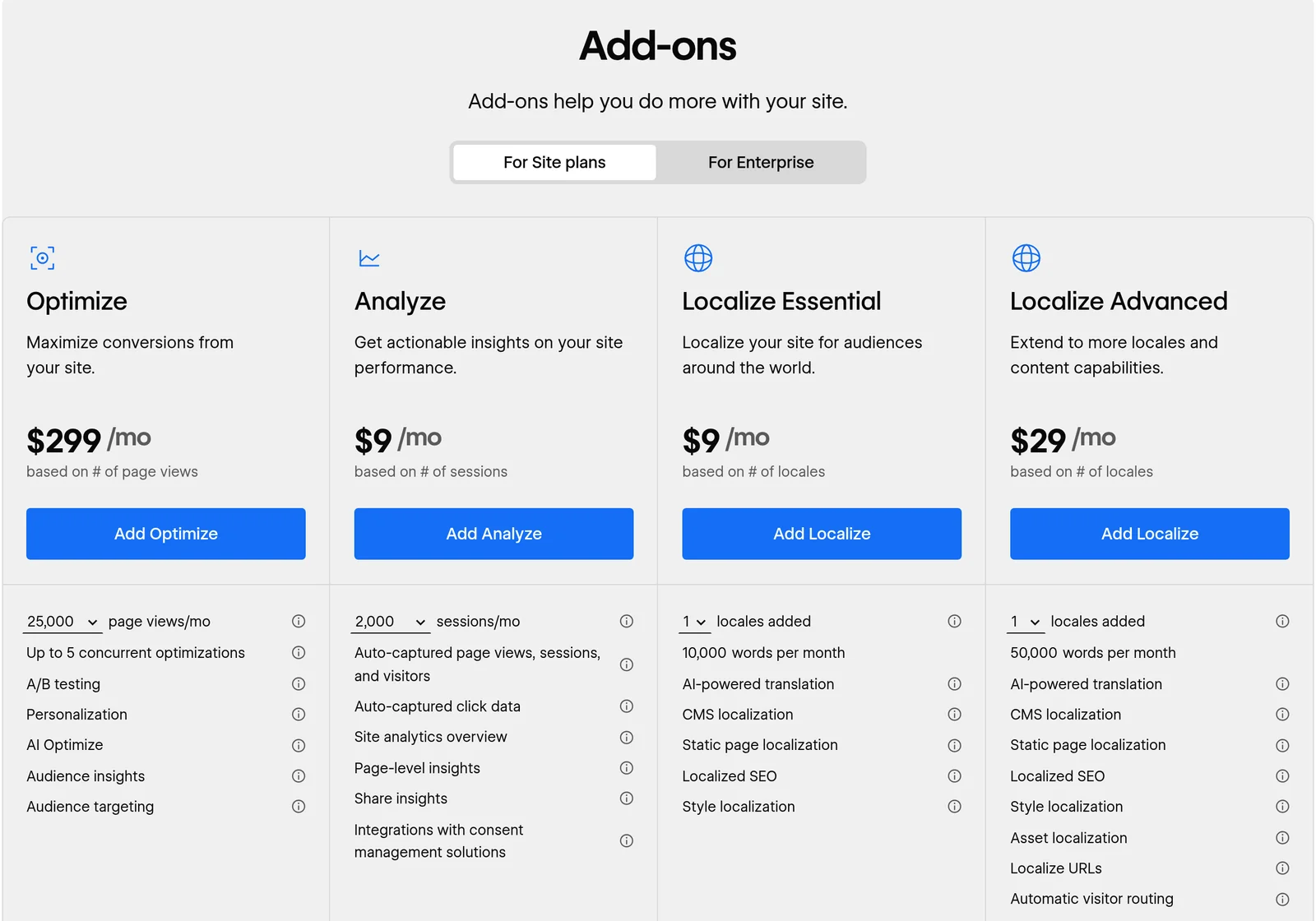
The add-ons section of Webflow's pricing page with Yearly selected, captured November 27, 2026.
| Add-on (pricing page) | Billed yearly, per month | Billed monthly | What the starting price covers |
|---|---|---|---|
| Localize Essential | $9 per locale | $12 per locale | Up to 3 added locales, 10,000 translated words per locale a month |
| Localize Advanced | $29 per locale | $35 per locale | Up to 10 added locales, 50,000 words per locale, localized URLs and visitor routing |
| Analyze | From $9 | From $12 | 2,000 sessions a month; tiers up to 500,000 sessions at $229 or $299 |
| Optimize | From $299 | From $379 | 25,000 page views a month and up to 5 concurrent tests |
| Bandwidth (Premium only) | From +$20 for +50 GB | From +$30 | Tiers up to 2.5 TB total at +$974 or +$1,460 |
| AI credits (Workspace) | $20 for 2,000 credits a month | $25 | Up to 15 packs per Workspace |
| Webflow Cloud overages | $2 per million requests | $2 per million requests | Also $2 per 5 CPU hours, per the pricing FAQ |
Sources: Webflow pricing (add-on cards, dropdown tiers and FAQ; monthly bandwidth prices are also listed in the pricing FAQ) and Webflow AI credits, November 27, 2026.
Three details matter for budgets:
- Localization is per locale. Two extra languages on Localize Essential cost $18 a month billed yearly. Planning a multilingual site? Our multilingual SEO checklist covers hreflang and URL choices.
- AI credits expire. Self-serve credits reset monthly, and unused credits don't roll over. Webflow "doesn't publish a rate card" for how many credits a task uses (Webflow AI credits). Running out doesn't trigger a charge or upgrade. Features that use credits stop until your next monthly allotment or a credit pack, and any overshoot is deducted from the next credits.
- Domains are not sold by Webflow. Its "Buy new domain" flow sends you to IONOS to complete the purchase (Buy a custom domain through Webflow). Webflow's pages list no domain price, so our examples leave it out.
What a Webflow site costs in year one and year two
A brochure site costs $180 a year; a content site with an editor costs $480, then $960 if traffic outgrows the plan. All examples use yearly billing and US list prices before tax; volumes are our assumptions.
| Line (pricing page) | Brochure site | Content site with an editor | Bilingual business site | Small store |
|---|---|---|---|---|
| Site plan, billed yearly | Basic $180 | Premium $300 | Premium $300 | Ecommerce Standard $348 |
| Extra seats | – | 1 limited seat $180 | 1 limited seat $180 | – |
| Localize Essential | – | – | 1 locale $108 | – |
| Analyze, 2,000 sessions | – | – | $108 | – |
| Webflow transaction fee, 2% | – | – | – | $400 |
| Year 1 before tax | $180 | $480 | $696 | $748 |
| Year-two change | None | Bandwidth add-on +$480 | Second locale +$108 | Sales grow; fee +$200 |
| Year 2 before tax | $180 | $960 | $804 | $948 |
The assumptions behind each column:
- Brochure site: one owner, under 300 pages, no CMS, under 10 GB of bandwidth a month. The free Workspace is enough.
- Content site with an editor: a blog on Premium with one writer on a limited seat. Traffic reaches 150 GB a month in the last two consecutive months of year one. Webflow then upgrades the site at the start of its next billing month to the +100 GB bandwidth tier, $40 a month billed yearly, so year two costs $480 more. If the overage starts later, the charge is prorated and lower (bandwidth charges).
- Bilingual business site: Premium with Spanish added through Localize Essential and basic analytics. Year two adds French, which takes Localize Essential to $18 a month.
- Small store: $20,000 of sales in year one and $30,000 in year two, so the Standard plan's 2% fee is $400, then $600. At $30,000, Plus ($888 a year, no fee) would cost less than Standard ($948), per the break-even above. Stripe or PayPal processing fees come on top and are not on Webflow's pages.
On monthly billing, the same year-one bills come to $300, $696, $984 and $904. A freelancer with three client sites on Premium and a Freelancer Workspace pays $192 for the Workspace plus $900 for the sites. With client payments, clients can put their own card on those Site plans.
What changes in year two, per Webflow's pages:
- Overages become charges, in any year. A site that exceeds its bandwidth limit for "a second consecutive month" is "automatically upgraded" at the start of the next billing month (bandwidth charges). The same rule covers Analyze sessions, Optimize page views and Webflow Cloud requests (surge protection).
- Renewals are charged automatically. "Paid Webflow plans are auto-renewed at the end of each billing cycle" (Webflow billing). Annual plans get a reminder "at least 7 days before renewal."
What the examples leave out: sales tax, domains, payment processing, paid templates and apps, and design help. To compare Webflow with builders and agencies across a full budget, see our website cost breakdown or run your own numbers in the website cost calculator.
Refunds, cancellation and tax: Webflow’s pages disagree on refunds
Plan on no refund after the first 14 days, and check the refund question with Webflow support before you rely on it. Webflow's dedicated refund policy, "last updated: September 2026", says: "New Site and Workspace plan purchases are fully refundable if you cancel and request a refund within 14 days of your initial purchase date. This applies to both monthly and annual plans" (Webflow Refund Policy).
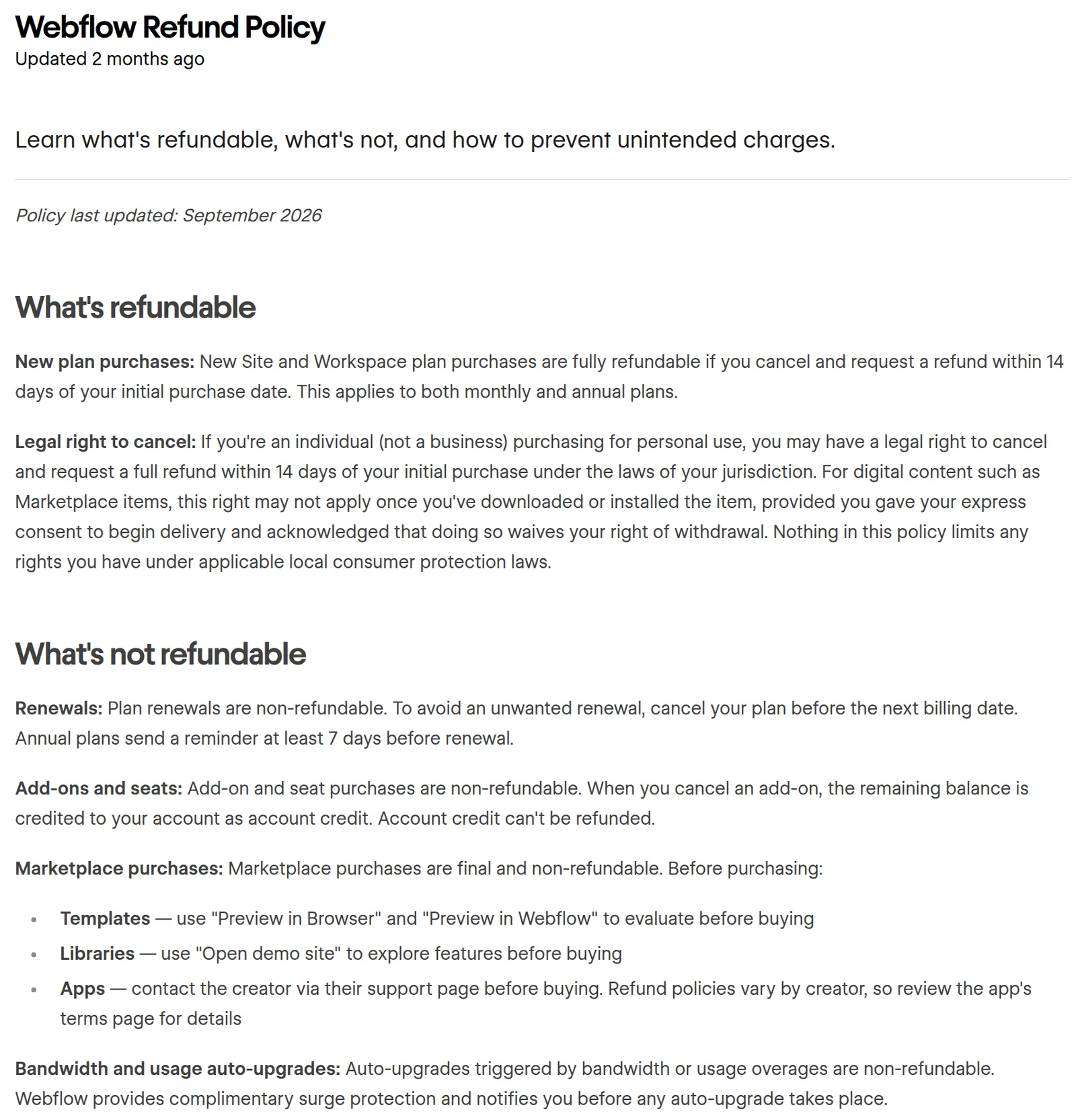
Webflow's refund policy in its help center, captured November 27, 2026.
Several billing articles say the opposite. The proration article states: "Webflow purchases are nonrefundable, see our Refund policy for more details" (Proration and refunds). The same sentence appears in the help on canceling a Site plan, canceling a Workspace plan, Webflow billing and Workspace billing. On canceling, the pricing FAQ says: "Yes, but you'll still pay the remainder of the term for the plan you signed up for" (pricing FAQ). The policy is the more specific page, and the other articles link to it. If you need a refund, ask within 14 days of the first purchase. Individuals buying for personal use may also have a legal 14-day right to cancel under local law, per the same policy.
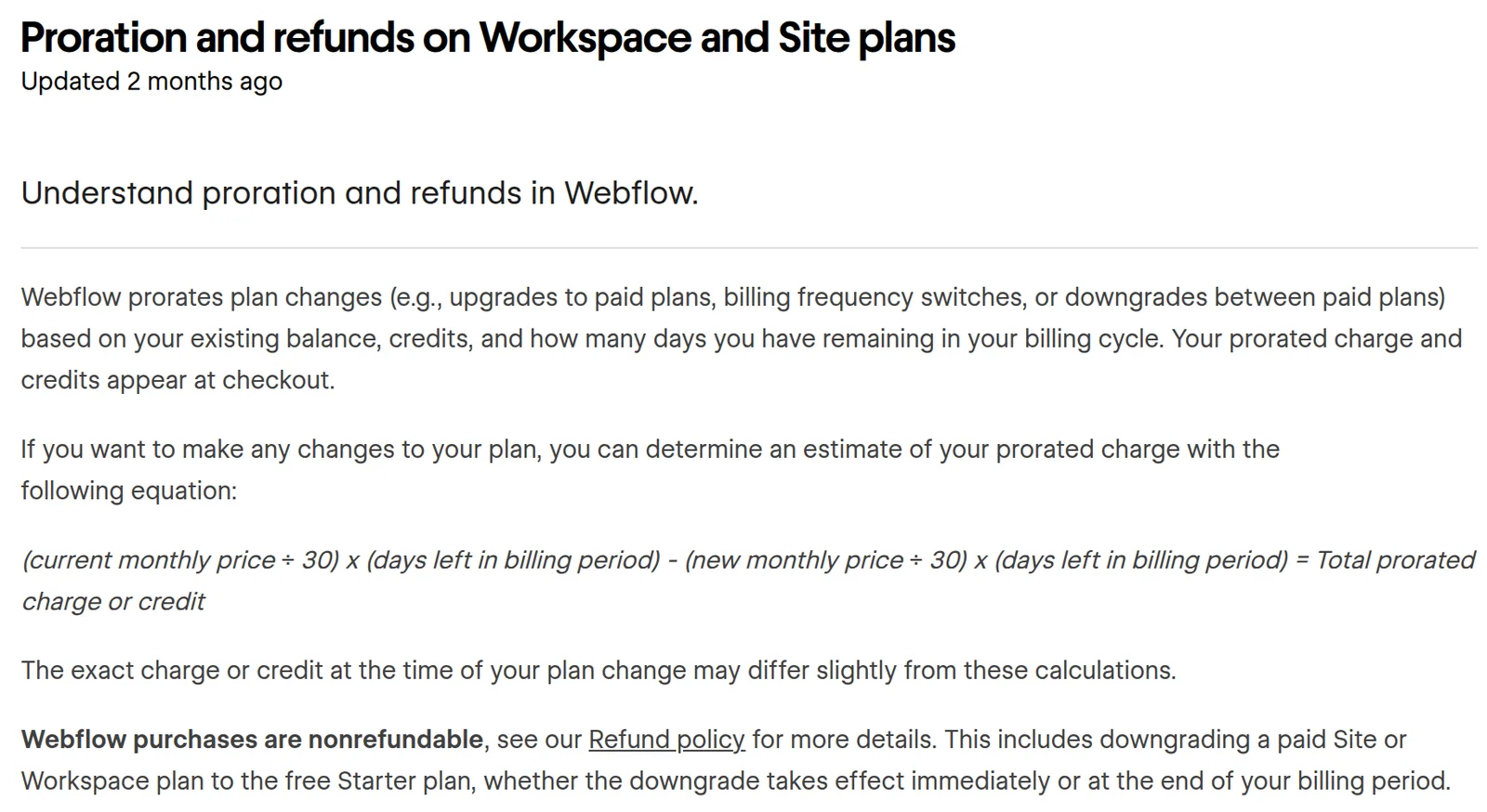
Webflow's proration help article, captured November 27, 2026. Both this page and the refund policy showed "Updated 2 months ago".
What the refund policy lists as non-refundable:
- renewals ("cancel your plan before the next billing date");
- add-ons and seats, where a canceled add-on's balance becomes account credit that "can't be refunded";
- Marketplace templates, libraries and apps;
- automatic upgrades from bandwidth or usage overages;
- AI credits.
Canceling works per plan. Site plans and Workspace plans "are billed separately and cancelled in different places. Cancelling one doesn't cancel the other" (Webflow Refund Policy). You cancel a Site plan by downgrading it to Starter, and paid features last until the period ends. Remove add-ons first. Canceling immediately "issues no credit for unused time" and takes the site offline right away. If you are leaving Webflow, our website migration checklist covers redirects and the URL list.
Tax, where Webflow collects it, comes on top of the list prices. Webflow uses Anrok to collect tax based on billing address. Its tax help names six US states where it assesses sales tax "for a portion of new user subscriptions": New Mexico, New York, Rhode Island, South Carolina, South Dakota and West Virginia (Sales tax on Webflow subscriptions). Invoices are only in US dollars.
Is Webflow worth the price?
Webflow is worth paying for if you want precise visual control over a marketing site and you will use the CMS. Premium at $300 a year is the plan most content sites need. It is weaker value for a site that will stay small, because Basic has no CMS, and for teams, because every extra designer adds $468 a year. Stores also pay the 2% Standard fee until sales justify Plus.
A short checklist before you buy:
- Decide whether you need the CMS. No blog, portfolio collection or dynamic pages: Basic at $180 a year. Otherwise Premium at $300.
- Count the people. One person: the free Workspace. Each extra designer: $468 a year. Each content editor: $180 a year.
- Pay yearly if the site will last a year. It saves 36% to 40% on Site plans.
- Budget year two now. Add bandwidth tiers if traffic may pass 50 GB a month, and locales if you plan more languages.
For a side-by-side with Framer's plans, see our Framer vs Webflow comparison. If Webflow's bill is too high for what you need, our list of Webflow alternatives groups options by the reason people leave. Wondering whether the platform is still a safe bet? Read is Webflow dead. If you are also pricing Wix, our Wix pricing guide breaks down its plans the same way.
Where PolyDraft fits
PolyDraft (our product). We make PolyDraft, and it competes with Webflow for business websites. Its pricing page lists Starter at $39 a month, or $390 billed yearly, in US dollars before tax. That is more than Webflow Basic or Premium. Building and previewing a site are free, and you pay to publish. Plans include up to 10, 30 or 100 languages per site. Sites deploy to a Cloudflare account you own and keep running if you cancel. PolyDraft can rebuild an existing site from its public URL; that is a rebuild, not an import, and it does not create redirects. Source-code export is on the Agency plan only, and access is currently invite-based.
PolyDraft is the wrong choice if you want Webflow's visual canvas and pixel-level design control, or if you need an online store. Its own pricing page says Webflow is stronger for visual design. For a feature-by-feature view, see PolyDraft vs Webflow.
Frequently asked questions
How much does Webflow cost per month?
As of November 27, 2026, Webflow's Basic Site plan costs $15 a month billed yearly or $25 billed monthly. Premium costs $25 or $39. Ecommerce plans run $29 to $212 a month billed yearly. Team costs $2,500 a month on an annual contract. Starter is free. Prices are US list prices before tax.
Is Webflow free?
Yes, to build and to publish a small site on a webflow.io address. The free Starter plan allows 2 static pages, 50 CMS items and 1 GB of bandwidth a month, with the Webflow badge. A custom domain needs a paid Site plan, starting at $15 a month billed yearly.
What is the difference between a Webflow Site plan and a Workspace plan?
A Site plan pays for one published site: its domain, pages, CMS and bandwidth. A Workspace plan covers the space where you build, with staging sites, code export and collaboration tools. One person can use the free Workspace and buy only Site plans. Extra seats cost $39 (full) or $15 (limited) a month billed yearly.
What happened to the Webflow CMS and Business plans?
Webflow merged them into the Premium Site plan starting May 13, 2026. Premium costs $25 a month billed yearly or $39 monthly. Existing CMS and Business sites move to Premium at their first renewal, or billable change, on or after June 29, 2026 (November 16 for Freelancer and Agency Workspaces and legacy pricing). A yearly plan that renewed just before its date switches at its 2027 renewal.
Does Webflow give refunds?
Webflow's refund policy, updated September 2026, allows a full refund of a new Site or Workspace plan within 14 days of the first purchase. Renewals, add-ons, seats, AI credits and overage upgrades are not refundable. Other Webflow billing articles still say purchases are nonrefundable, so confirm with support.
How much does a Webflow ecommerce site cost?
On November 27, 2026, Webflow's Ecommerce Standard plan cost $29 a month billed yearly, Plus $74 and Advanced $212. Standard adds a 2% Webflow fee on sales; Plus and Advanced add none. Stripe or PayPal processing fees are extra. Plus costs less than Standard above about $27,000 a year in sales.
Continue with the next task
- Compare Webflow's plans with Framer's: Framer vs Webflow
- See what a website costs across builders, freelancers and agencies: website cost breakdown
- Estimate your own build over three years with the website cost calculator
- Weigh other platforms if the bill is too high: Webflow alternatives
About this article. Drafted by an AI agent following PolyDraft's blog workflow, checked by an automated QA script and an independent review, and approved by Vincent Chen. Every Webflow price, limit, fee and policy was read on Webflow's own pages (webflow.com and help.webflow.com) on November 27, 2026. We read them through DataForSEO's page capture and parsing services, not logged in. Each fact is logged with its quoted wording and capture file; none comes from a search excerpt. We did not open a Webflow account, buy a plan or build a site, so checkout totals, proration and tax were not observed. Monthly prices come from the pricing page's HTML, as explained above. Webflow lists no domain price, so domains are excluded. The worked examples, savings and break-even points are our own arithmetic, with assumptions labeled. PolyDraft is our product, and its facts come from its live pricing, features and integrations pages, read the same day. Screenshots are captures of the named pages, cropped and resized but otherwise unchanged. If something here is out of date, tell us through our contact page (https://polydraft.ai/contact) and we'll update it.
Sources
Pages were captured on November 27, 2026 (UTC).
- Webflow: pricing, blog announcement of the 2026 plans
- Webflow help, plans: updated pricing and simplified plans for May 2026, Workspace and Site plans overview, choose a Site plan, choose a Workspace plan, manage add-ons, Webflow AI credits
- Webflow help, usage: surge protection for overages, bandwidth limit charges, buy a custom domain
- Webflow help, billing: Webflow billing, Workspace billing and invoices, switch billing frequency, proration and refunds, sales tax
- Webflow help, refunds and cancellation: Webflow Refund Policy, downgrade or cancel a Site plan, downgrade or cancel a Workspace plan
- Webflow help, discounts: discounts overview, nonprofit discount, students discount
- PolyDraft: pricing