In this article
- 01 Webflow vs WordPress at a glance
- 02 What each one is
- 03 What each one really costs
- 04 Webflow vs WordPress for SEO
- 05 AI tools and AI search
- 06 Upkeep and security: who does the work
- 07 Design and ease of use
- 08 Content, editing, and limits
- 09 Ownership and leaving
- 10 Which should you choose?
- 11 When neither fits: the work that starts after launch
- 12 How we compared
- 13 Frequently asked questions
- 14 Continue with the next task
- 15 Sources
Choose WordPress if you need plugins, a WooCommerce store, self-hosting, or full control of the code and data, and you have someone to keep it updated. Choose Webflow if a designer will run the site and you'd rather the platform handle hosting, security, and updates, as long as your content fits its CMS limits. Both can rank well. The real differences are cost structure, upkeep, and how easily you can leave.
Updated November 6, 2026: re-checked every Webflow price on its plans page, marked each as billed yearly or monthly, and added the Team plan, Workspace prices, Starter-site SEO limits and AI tools.
This comparison uses Webflow's plans page and product pages, which we opened directly on November 6, 2026, plus Webflow's help center and WordPress's own documentation. We make PolyDraft, a different kind of product, and we say where it fits near the end. We didn't build test sites on either platform for this article.
Key points
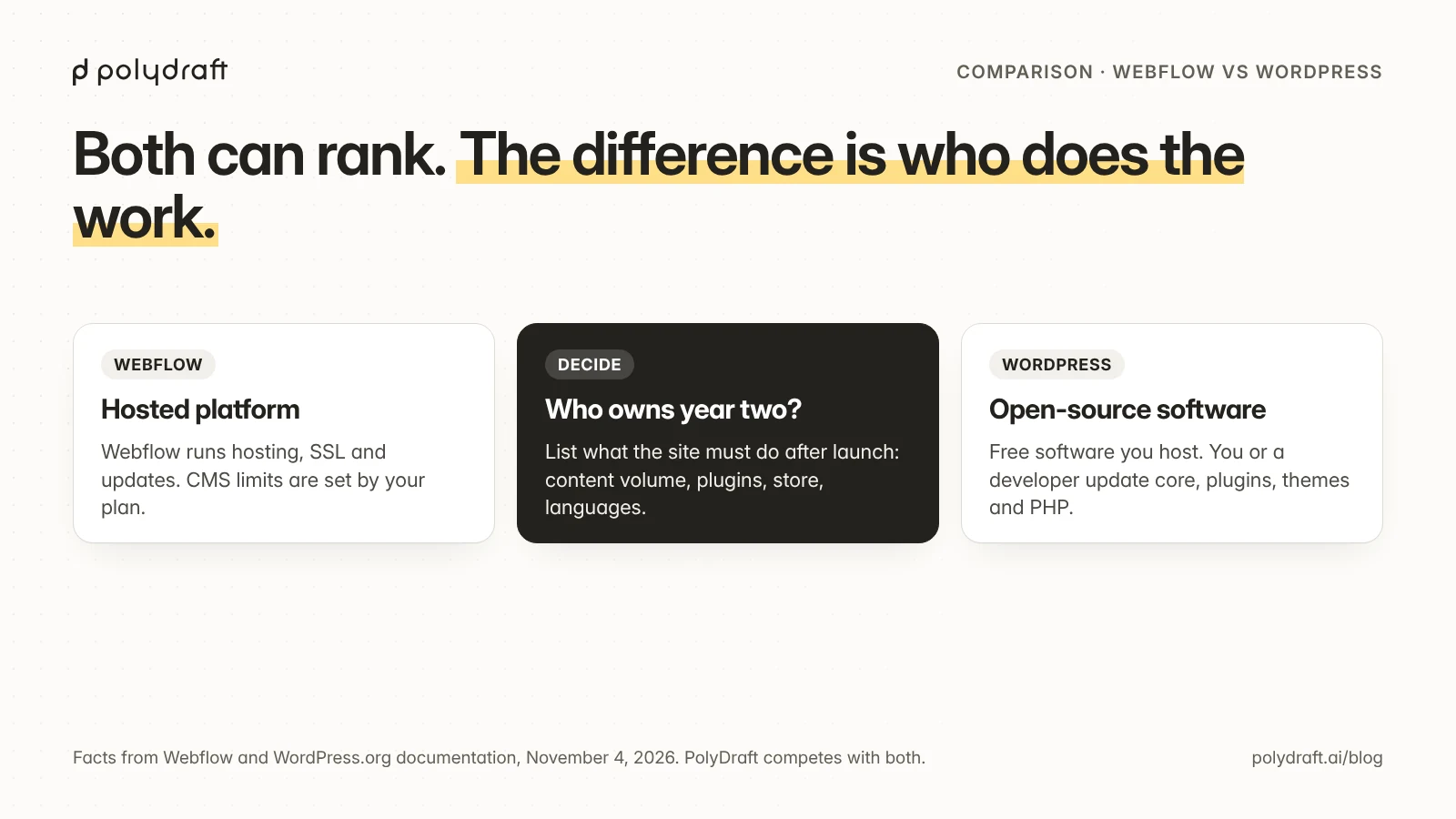
- WordPress software is free and open source. You pay for hosting, and you or a developer maintain core, plugins, themes, and PHP.
- Webflow is a hosted platform. Its Premium plan, with the CMS, costs $25 a month billed yearly ($39 billed monthly). Localize, ecommerce, and some Workspace features cost extra, and a Team plan for larger organizations costs $2,500 a month on an annual contract.
- Both cover the SEO basics. Webflow builds most controls in. WordPress core handles titles, sitemaps, and robots.txt, and most sites add an SEO plugin for the rest.
- Both now offer AI tools. Webflow sells AI features inside its plans; WordPress added an AI layer to core in version 7.0, with the features coming from plugins, and WordPress.com includes an AI assistant on paid plans.
- Leaving is easier from WordPress. Its XML export and your own files move to most hosts. Webflow's code export needs a paid Workspace plan and doesn't include CMS content.
Webflow vs WordPress at a glance
"WordPress" here means self-hosted WordPress from WordPress.org unless we say WordPress.com, the hosted service.
| Webflow | WordPress (self-hosted) | |
|---|---|---|
| What it is | Hosted visual development platform with a CMS | Free, open-source CMS (GPLv2 or later) you install on hosting |
| Cost to start | Free Starter plan on webflow.io; Basic $15/month and Premium $25/month billed yearly | Software is free; hosting, theme, and plugins are extra |
| Who maintains it | Webflow runs hosting, SSL, and the platform | You or your developer update core, plugins, themes, and PHP |
| Content limits | Premium: 20,000 CMS items and 40 collections; Basic has no CMS | Set by your hosting, not a plan |
| Extensions | Apps and custom code | Plugin directory with over 77,000 free plugins (as listed on November 4, 2026) |
| Store | Separate Ecommerce plans | WooCommerce plugin |
| Languages | Localize add-on, from $9 per locale a month billed yearly | Plugins, or a multisite setup |
| SEO basics | Built in: meta, sitemap, robots.txt, canonical; 301 redirects and a schema field on paid plans | Core: title tag, canonical on posts and pages, sitemap, robots.txt; the rest usually from an SEO plugin |
| AI tools | Webflow AI on AI credits that come with every Workspace; AEO agents listed on the Team plan | AI Client in core since 7.0, with your own AI provider; features come from plugins |
| Leaving | Code export on paid Workspace plans, without CMS; CMS to CSV | XML export plus your own files and database |
| Best for | Design-led marketing sites run by a designer | Content-heavy sites, plugin-dependent sites, and stores |
What each one is
WordPress is software. WordPress.org said in December 2025 that it powers over 43% of the web. You install it on a host, choose a theme, and extend it with plugins. Since version 5.0 it has used the block editor, and since 5.9 themes can use full-site editing. Because it's open source under the GPL, the code and your data are yours, and you can move hosts whenever you like. WordPress.com is a separate hosted service that runs WordPress for you. It has a free plan, and plugins are available on every paid plan.
Webflow is a platform. You design visually with real HTML and CSS concepts, such as classes, components, and interactions, and Webflow hosts the result. Webflow's help center says its sites are delivered through Cloudflare, and SSL certificates are included and renew automatically. The CMS stores structured content, such as blog posts, team members, and case studies, in collections that templates display.
What each one really costs
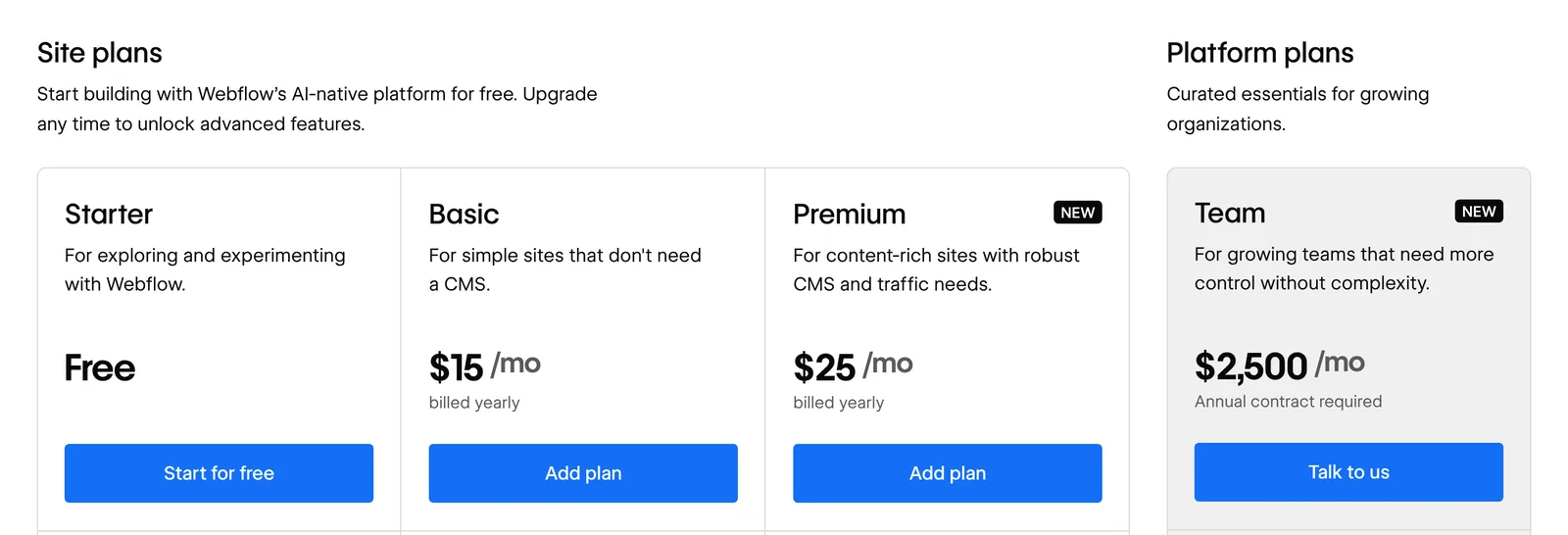
Webflow publishes its prices, and as of November 6, 2026 they range from a free Starter plan to $2,500 a month for Team. New prices applied to new purchases from May 13, 2026, when the CMS and Business plans merged into one Premium plan, and existing sites move over on a staggered schedule. WordPress's software is free, but your total depends on the hosting and help you choose, so we list the cost components rather than invent a figure.
| Cost item | Webflow (published prices, Nov 6, 2026) | WordPress (self-hosted) |
|---|---|---|
| Platform or software | Basic $15/month or Premium $25/month, billed yearly ($25 or $39 billed monthly) | $0 |
| Team plan | $2,500/month on an annual contract: everything in Premium, plus Localize with 2 locales, AEO agents, publishing workflows and 100,000 AI credits a year | No equivalent; you buy hosting, support and plugins separately |
| Hosting | Included in the site plan | Your host's price; varies widely |
| Design | Your designer's time in Webflow | Theme, free or paid, plus customization |
| Features | Apps and custom code | Plugins, free or paid licenses |
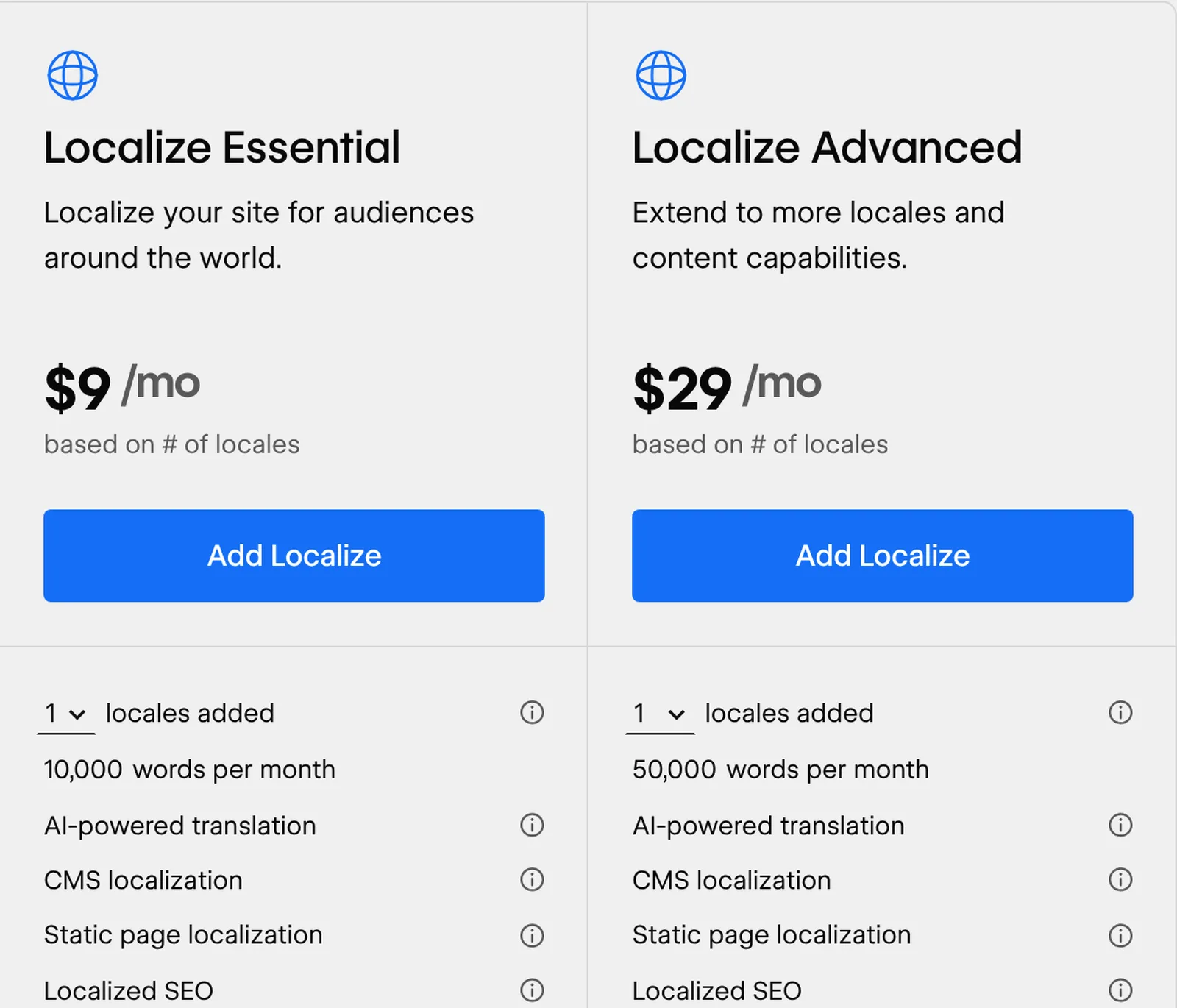
| Languages | Localize Essential $9 per locale a month billed yearly ($12 billed monthly), up to 3 locales; Advanced $29 ($35 monthly), up to 10 | A translation plugin license, if you use one |
| Store | Ecommerce plans from $29/month billed yearly ($42 billed monthly), with a 2% fee on Standard | WooCommerce plus payment and extension costs |
| Workspace (staging, code export, collaboration) | Free Starter Workspace; Core $19/month and Growth $49/month billed yearly ($28 or $60 billed monthly) | Not applicable; staging depends on your host |
| Upkeep | Mostly the platform's job | Updates, backups, and security, by you or a paid maintainer |
Two things decide which is cheaper in practice:
- Who you'll pay for upkeep. If you pay a developer to maintain WordPress, that cost can exceed the hosting. Get quotes for both.
- How many add-ons you need. Two extra languages on Webflow's Essential tier add at least $18 a month billed yearly, or $24 billed monthly, before any other add-on.
Our website redesign cost guide covers the build side of the budget, and you can estimate your first-year cost with our calculator.
Webflow vs WordPress for SEO
Webflow SEO vs WordPress SEO comes down to built-in controls versus plugins. Neither platform ranks a site by itself; both give you the controls that matter, and the difference is where those controls come from.
| SEO control | Webflow | WordPress |
|---|---|---|
| Title and meta description | Per page; CMS templates pull from fields | Core outputs the title tag in themes that support it; editing meta descriptions usually needs an SEO plugin |
| XML sitemap | Generated and updated on every publish; custom sitemap possible; sitemap controls need a paid Workspace on a free Starter site | Core sitemap at /wp-sitemap.xml since 5.5; plugins can replace it |
| robots.txt | Editable in site settings; a paid Workspace is needed on a free Starter site | Generated virtually; changed by a plugin or code |
| Canonical tags | Global canonical setting plus per-page override | Core outputs a canonical on posts and pages; archives and overrides usually need an SEO plugin |
| 301 redirects | Built in on paid plans; CSV import; Webflow recommends about 1,000 at most | Usually a plugin or your host |
| Structured data | Schema field on paid plans, plus custom code; CMS fields can fill it, and Webflow AI can generate it | Usually an SEO plugin, or custom code |
Language tags (hreflang) |
Generated by Localize | Generated by a translation plugin |
| Images | Responsive variants for inline images, lazy loading, WebP and AVIF conversion | Depends on your theme, hosting, and plugins |
| AI crawlers | Robots.txt and llms.txt controls and crawler access settings (a paid Workspace is needed on a free Starter site); Content-Signal header | Plugins or custom code |
On WordPress, an SEO plugin does most of the work. On WordPress.org, Yoast SEO listed more than 10 million active installations and Rank Math more than 4 million when we checked on November 4, 2026. On Webflow, the controls are built in, and a few have limits worth knowing:
- Webflow doesn't generate responsive variants for background images or images in rich text.
- Importing redirects from CSV replaces all existing redirects.
- You can turn off search indexing of the webflow.io staging address, which needs a site plan or paid Workspace. Check the setting rather than assume the default.
- Only Premium and the plans above it can keep individual CMS items out of search.
Our Webflow guide shows where each Webflow SEO setting lives and which plan it needs. On either platform, what usually decides rankings is the content, the site structure, and how fast the pages load. Our website architecture guide covers the structure side.
AI tools and AI search
Webflow builds AI into its plans, while WordPress provides an AI layer that plugins and hosts build on. As of November 6, 2026:
- Webflow includes AI credits with every Workspace: 200 a month on the free Starter Workspace, 300 on Core and 400 on Growth. They power Webflow AI, which generates copy, CMS items and schema markup, and its "Improve SEO & AEO" audits; on a free Starter site, that audit tool needs a paid Workspace. The Analyze add-on, from $9 a month billed yearly, reports AEO insights such as LLM visibility and AI agent traffic. Webflow's plans page lists AEO agents on the Team plan, while its AEO page says Webflow AEO is for Enterprise customers, so ask Webflow which applies.
- WordPress added an AI Client to core in version 7.0 (May 2026): a common way for plugins to call the AI provider you connect. It doesn't ship a provider or turn on AI by itself. User-facing features, such as suggested titles, excerpts, meta descriptions and alt text, come from WordPress's separate AI plugin and other plugins, so what you get depends on what you install and maintain.
- WordPress.com includes an opt-in AI assistant on its paid plans, and lets you connect ChatGPT or Claude to manage content. By default the agent describes what it will do and asks for confirmation before it creates, updates or deletes anything, though WordPress.com's AI page says you can let it go ahead on its own.
For AI search, Webflow lists robots.txt and llms.txt controls among its SEO and AEO features. On WordPress, an llms.txt file or AI-crawler rules come from a plugin or your own code. Our guide explains what llms.txt does and doesn't do. On either platform, being cited in AI answers still depends on crawlable HTML, clear answers and accurate structured data. AI tools in both suggest fixes and speed up the work; deciding what to publish and when is still yours.
Upkeep and security: who does the work
This is the biggest practical difference.
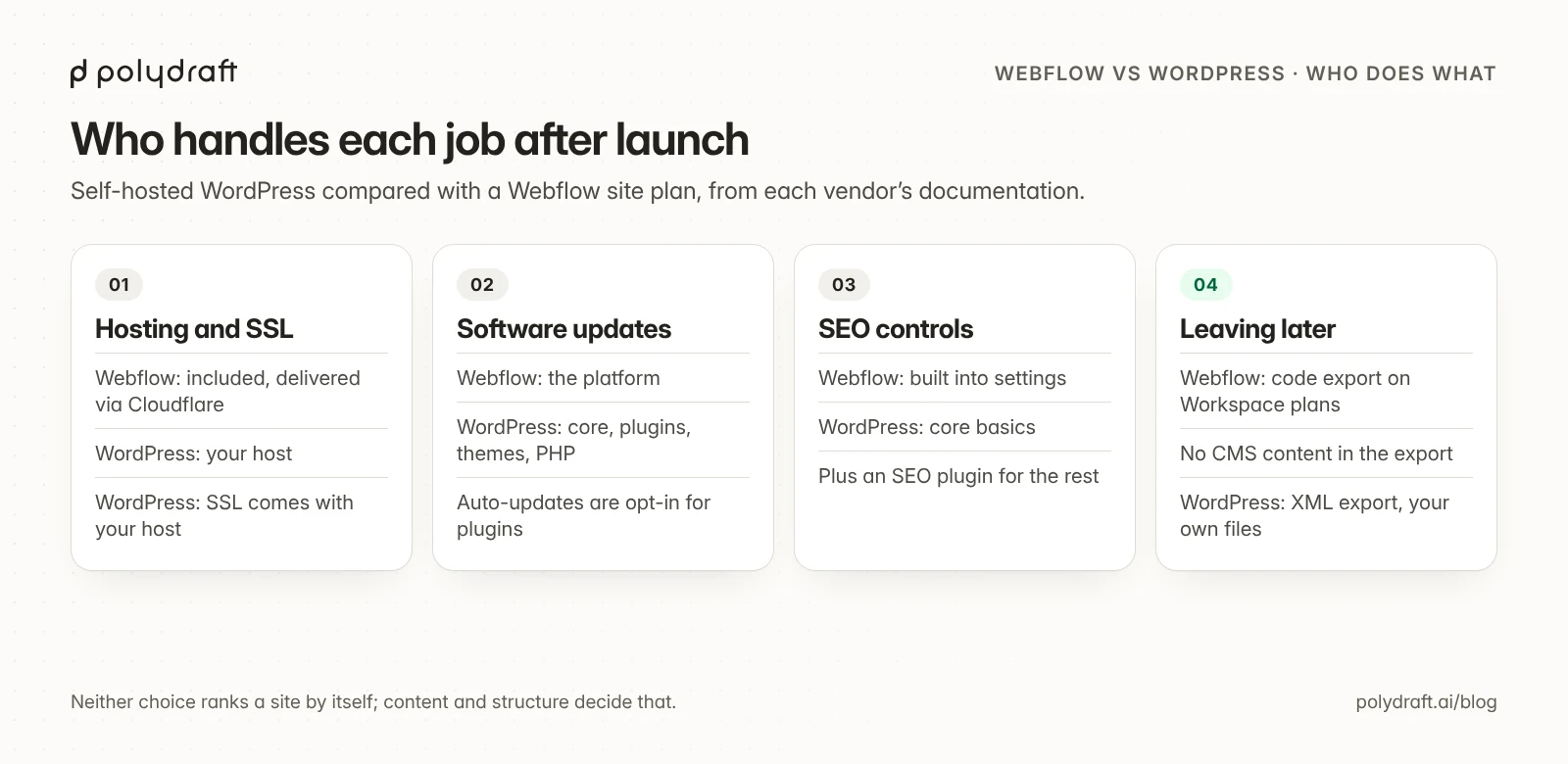
- WordPress: core, every plugin, the theme, and PHP each have their own release cycle. WordPress added opt-in auto-updates for plugins and themes in 5.5, and an auto-update control for major core releases in 5.6. WordPress.org recommends PHP 8.3 or later. Someone still has to watch for problems, test updates, and keep backups. Our guide to updating PHP in WordPress covers one of the most common jobs.
- Webflow: the platform handles hosting, SSL, and the software. Your work is mostly content, design changes, and checking that what you publish is correct.
If nobody on your team will own updates, that alone points to Webflow or another hosted option. Our WordPress alternatives guide compares the options by who maintains what, and our guide to hosted builders compared by what you can take with you covers the all-in-one options.
Design and ease of use
- Webflow: the Designer works with real web concepts, such as classes, components, flexbox, and grid. That takes longer to learn than a page builder, and in return a designer gets precise control over every breakpoint without writing code.
- WordPress: the look comes from your theme. The block editor and, since WordPress 5.9, full-site editing let you change layouts visually, and page-builder plugins add more control. How easy it feels depends heavily on the theme and plugins you choose.
If the person running the site is a designer, Webflow usually suits them better. If it's a writer or marketer who mostly publishes posts, WordPress's editor is often the more familiar tool.
Content, editing, and limits
- Webflow CMS: Premium includes 20,000 CMS items and 40 collections, and Basic has no CMS at all. Collections support structured fields and references, which suits directories, case-study libraries, and resource hubs.
- WordPress: posts, pages, and custom post types have no plan-based caps; your hosting sets the practical limits. The block editor is familiar to many writers, and plugins add almost any content type.
If you publish a lot, such as hundreds of posts a year or a large catalog, check Webflow's item limits against your plans before you commit.
Ownership and leaving
WordPress gives you the most freedom. You own the files and database, and its export produces a WordPress XML file of posts, pages, and comments. Many platforms import WordPress XML, so it's a widely supported format.
Webflow is more limited. According to its help center and plans page:
- Code export (HTML, CSS, JavaScript, and assets) needs a paid Workspace plan, from Core at $19 a month billed yearly. Site plans alone don't include it.
- CMS content can't be exported as code. Collection lists come out empty.
- Forms, site search, password protection, ecommerce, and non-primary locales stop working in an export.
- CMS, ecommerce, and user collections can be exported separately as CSV files.
Moving between the two in either direction means rebuilding the design and mapping every URL. Our website migration checklist covers the redirect map and the checks after launch.
Which should you choose?
Choose WordPress if:
- you need specific plugins or a WooCommerce store
- you publish a lot of content and don't want plan-based limits
- you want to own the code and data and be able to switch hosts
- you have a developer or a maintenance plan
Choose Webflow if:
- a designer will build and maintain the site
- you want hosting, SSL, and updates handled for you
- your content fits within the CMS limits of your plan
- you're comfortable that leaving later means a rebuild
If you're still unsure, list the five things your site must do in its second year, not its first week, and check each against the tables above.
When neither fits: the work that starts after launch
Webflow and WordPress are both good ways to build and run a website. Either way, the marketing work mostly stays with you or your agency: deciding what to publish from search and AI-search demand, writing it, linking it, checking what performs, and refreshing what doesn't. Some teams also want neither a design tool to learn nor plugins to maintain.
We make PolyDraft, and it's built around that work. It's an AI-native website marketing system: it starts with the site's infrastructure, plans content from SEO and GEO data, and helps you keep that content current, on a site you own. As of November 6, 2026:
- Infrastructure first. Its agent researches, writes, and builds a multi-page Astro site, which renders on the server and deploys to your own Cloudflare account. Titles, descriptions, structured data, canonicals, a sitemap, robots.txt and llms.txt come with every plan, and each site has a private admin panel with a blog editor.
- Content planned from data. Sites built since November 2026 come with a content calendar in their admin: competitor keywords and question data when search data is available, otherwise questions from search results, AI-predicted sub-queries that answer engines run for your topics (GEO), topic clusters with pillar pages, and a dated publishing queue.
- Refresh from performance. When you ask, PolyDraft uses your Search Console data to flag articles with low click-through, or older articles with no impressions, as due for a refresh. This needs a deployed site with PolyDraft's Search Console access added to your property, and it doesn't run on a schedule. PolyDraft's agent doesn't publish without your approval.
- Plans and ownership. Plans start at $39 a month (access currently invite-based), with up to 10 languages on Starter, and full code export is included on the Agency plan ($299 a month).
Recurring, evidence-backed recommendations of what to publish or refresh next are the direction we're building toward, not a current feature.
PolyDraft is the wrong choice if you need a store, a plugin ecosystem, or a CMS as powerful as Webflow's for complex, related content. It doesn't import from WordPress or Webflow; it reads your existing pages as source material for a new build. It doesn't manage redirects. Our WordPress to Astro page lists what carries over and what's rebuilt.
How we compared
We compared the two on cost, SEO controls, AI tools, upkeep, content limits, and ownership. On November 6, 2026 we opened Webflow's plans page and its SEO, AEO and AI product pages in a desktop browser (1440 × 900, US English, not signed in) and saved the screenshots in this article. Webflow's help center, WordPress.org and WordPress.com blocked our tools that day, so help-center details and WordPress facts come from their documentation read through search excerpts, on November 4 or, for the new AI section, November 6. We didn't build test sites or measure speed, and we don't show rankings. WordPress hosting and plugin costs vary too widely to quote, so we list them as components.
What changed since November 4:
- Every Webflow price now says whether it's billed yearly or monthly, including Localize ($9 or $12 per locale for Essential, $29 or $35 for Advanced), ecommerce and Workspace plans.
- New: the Team plan ($2,500 a month on an annual contract), a section on AI tools and AI search, Webflow's Starter-site limits on SEO controls, and screenshots of Webflow's plans page.
- A rewritten PolyDraft section, and this method note.
Frequently asked questions
Is Webflow better than WordPress for SEO?
Neither is better by default. Webflow builds most SEO controls in, including canonicals, redirects, and a schema field (the last two on paid plans). WordPress covers the basics in core and adds the rest through an SEO plugin. Rankings depend far more on content, structure, and speed than on the platform.
Which is better for AI search, Webflow or WordPress?
Neither is decisive. Webflow has built-in llms.txt and AI crawler controls (paid on Starter sites), AI audits, and AEO reporting through its Analyze add-on. WordPress gets the same from plugins, and core 7.0 lets plugins use the AI provider you connect. Being cited still depends on crawlable pages, clear answers and accurate structured data.
Is Webflow cheaper than WordPress?
Not always. WordPress software is free, but hosting, plugins, and maintenance add up, especially if you pay a developer. Webflow's Premium plan costs $25 a month billed yearly, or $39 billed monthly, with extra cost for languages, ecommerce, and some features. Compare the full first-year cost for your own site.
Can I export a Webflow site to WordPress?
Not directly. Webflow's code export needs a paid Workspace plan and doesn't include CMS content. You can export CMS collections as CSV files, bring that content into WordPress, and rebuild the design.
Is Webflow more secure than WordPress?
They put the work in different places. Webflow runs the platform, hosting, and SSL for you. Much of a WordPress site's security depends on keeping core, plugins, themes, and PHP updated.
Can I move from WordPress to Webflow without losing SEO?
Yes, with a plan. Keep URLs the same where you can, add 301 redirects for every URL that changes, carry over titles and descriptions, and check indexing in Search Console after launch. Webflow recommends keeping redirects to about 1,000 and using wildcards where possible.
Is WordPress really free?
The software is free and open source. A working site still needs hosting and a domain, and usually a theme, some plugins, and time for maintenance.
Continue with the next task
- Check a Webflow site's settings: Webflow SEO guide
- Compare the two leading design tools: Framer vs Webflow
- Plan a platform move: Website migration checklist
About this article. Drafted by an AI agent following PolyDraft's blog workflow, checked by an automated QA script, fact-checked by a separate AI agent, and approved by Vincent Chen. PolyDraft competes with both platforms, and we've kept to what each vendor documents. Webflow prices and plan features come from Webflow's plans page and product pages, read directly on November 6, 2026; help-center details and WordPress facts come from their documentation, read through search excerpts. PolyDraft facts come from our plans page and product documentation on November 6, 2026. Screenshots of Webflow's public plans page were captured on November 6, 2026, unedited apart from cropping and resizing; we didn't sign in or build test sites, and we couldn't open WordPress.org to capture it. The diagrams are original illustrations made for this article.
Sources
- Webflow (checked November 6, 2026): Pricing, Webflow AI, SEO, AEO, Simplified plans and updated pricing
- Webflow Help Center: Updated pricing for May 2026, Hosting overview, Exporting site code, Setting up redirects, Importing redirects, Optimizing site speed, Disabling search engine indexing, Payment providers and fees
- WordPress.org: License, Requirements, Plugins, State of the Word 2025, Plugin and theme auto-updates, WordPress 7.0 "Armstrong"
- WordPress developer resources: rel_canonical(), XML sitemaps in 5.5, robots_txt hook, Title tag support, Introducing the AI Client in WordPress 7.0, What's new in AI 0.7.0
- WordPress.com: Plugins, Export, WordPress AI, Introducing the WordPress AI Assistant, AI agents can manage content on WordPress.com
- WordPress.org plugin pages: Yoast SEO, Rank Math SEO
- PolyDraft (checked November 6, 2026): Pricing, Features
Written by
Founder of PolyDraft and CEO of BlackMonolith, Inc.